
JMeter Cloud Load Testing
Upload the .jmx your team already maintains. TestMu AI provisions the load generators, drives the run, and tears the infrastructure down when it finishes.

Trusted by 3M+ users globally at




"We have tripled our tests and are now executing tests in less than 2 hours with 78% Faster Test Execution"


"We figured out a more efficient way to monitor system health and resolve failures earlier in lower environments."





"TestMu AI has significantly boosted our testing speed, is easy to implement, and provides exceptional support."


"With 70% faster test execution, TestMu AI helped us achieve faster time-to-market and enhanced CX."



Run the Load Plan Your Team Already Maintains
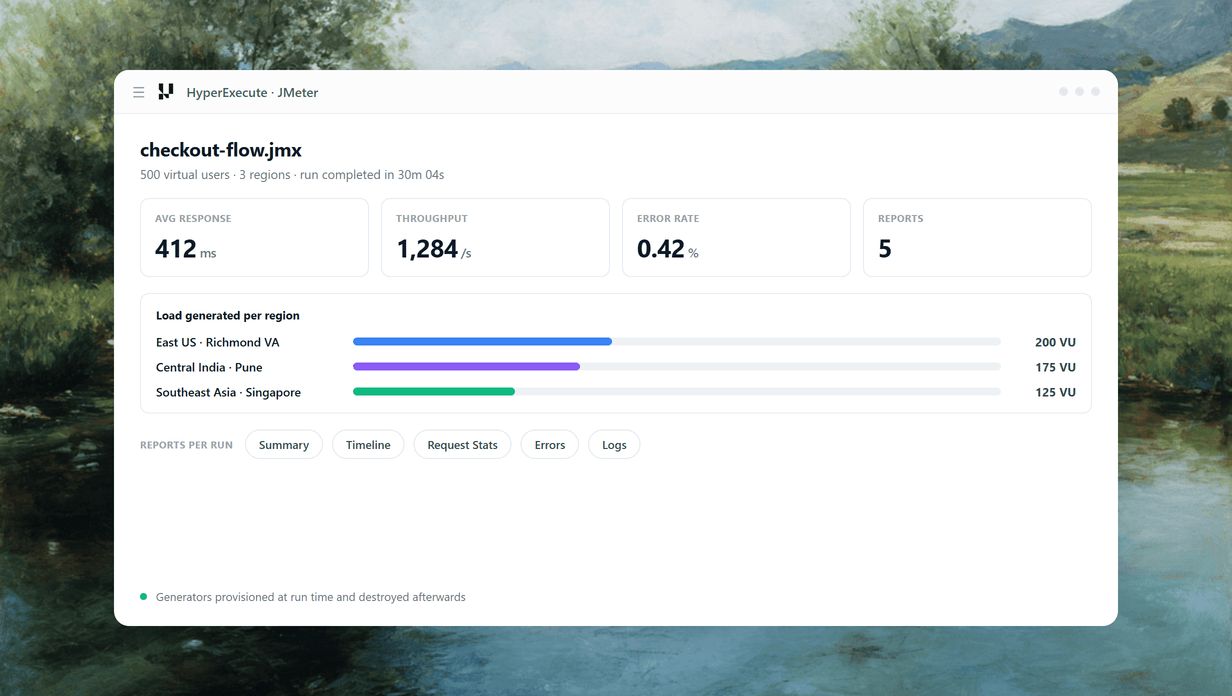
JMeter is a first-class project type on HyperExecute. Existing .jmx plans run without a rewrite.
 NO REWRITE
Upload the Plan You Maintain
Create a JMeter project, upload the .jmx and its CSV data files, and save. Whole folders are supported.
Start free
- Existing .jmx test plans run without a rewrite.
- Standard and custom JMeter thread groups both work.
- Java 11 by default, or Java 25, chosen at run time.

 EIGHT FIELDS
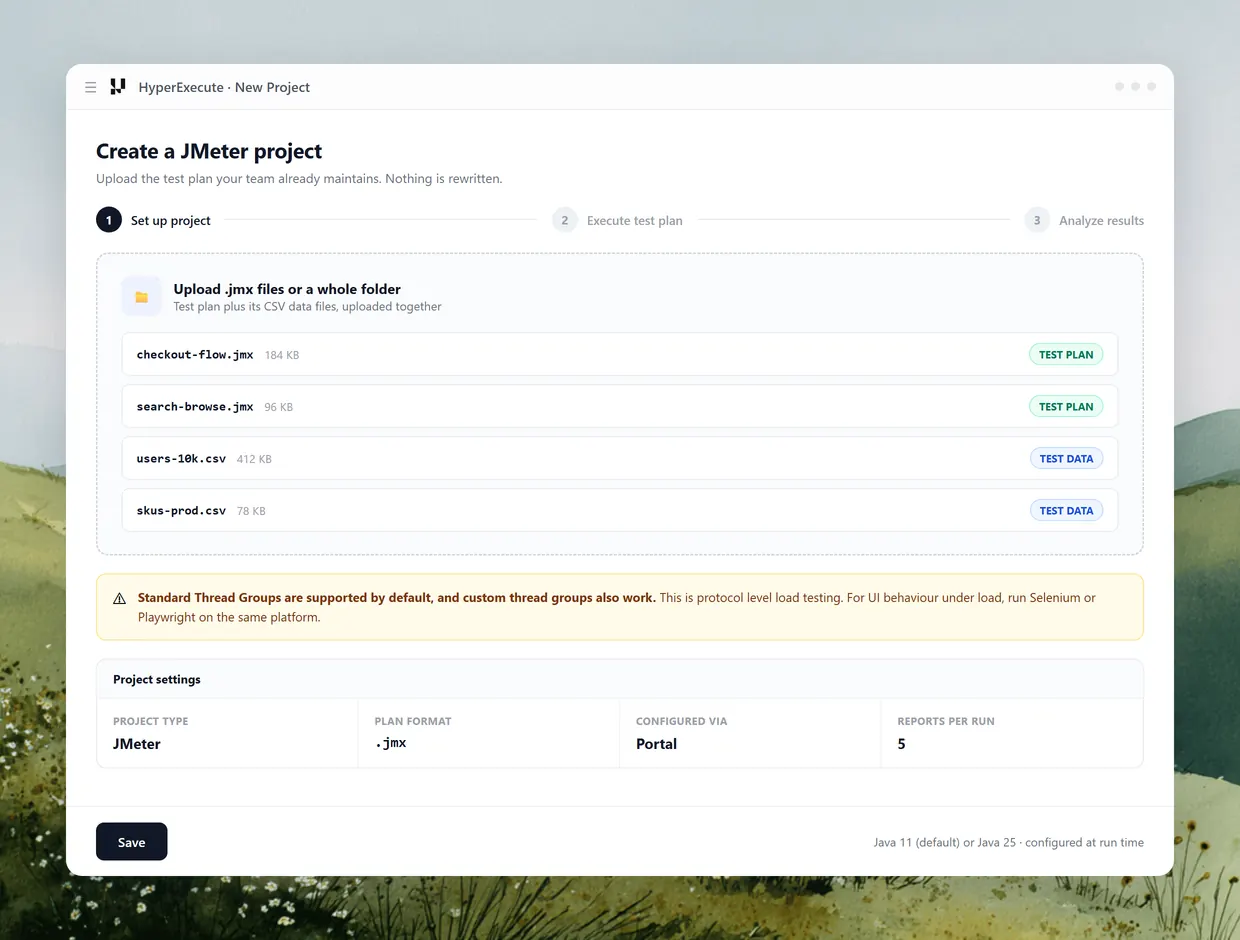
Configure Load in Eight Fields
Set total users, duration, ramp-up, machine count, regional split, Split CSV, job labels and Java version.
See the field reference- Split load across six regions as a percentage of users.
- Split CSV gives each generator its own slice of test data.
- Job labels trace a run back to a build or scenario.
 FIVE REPORTS
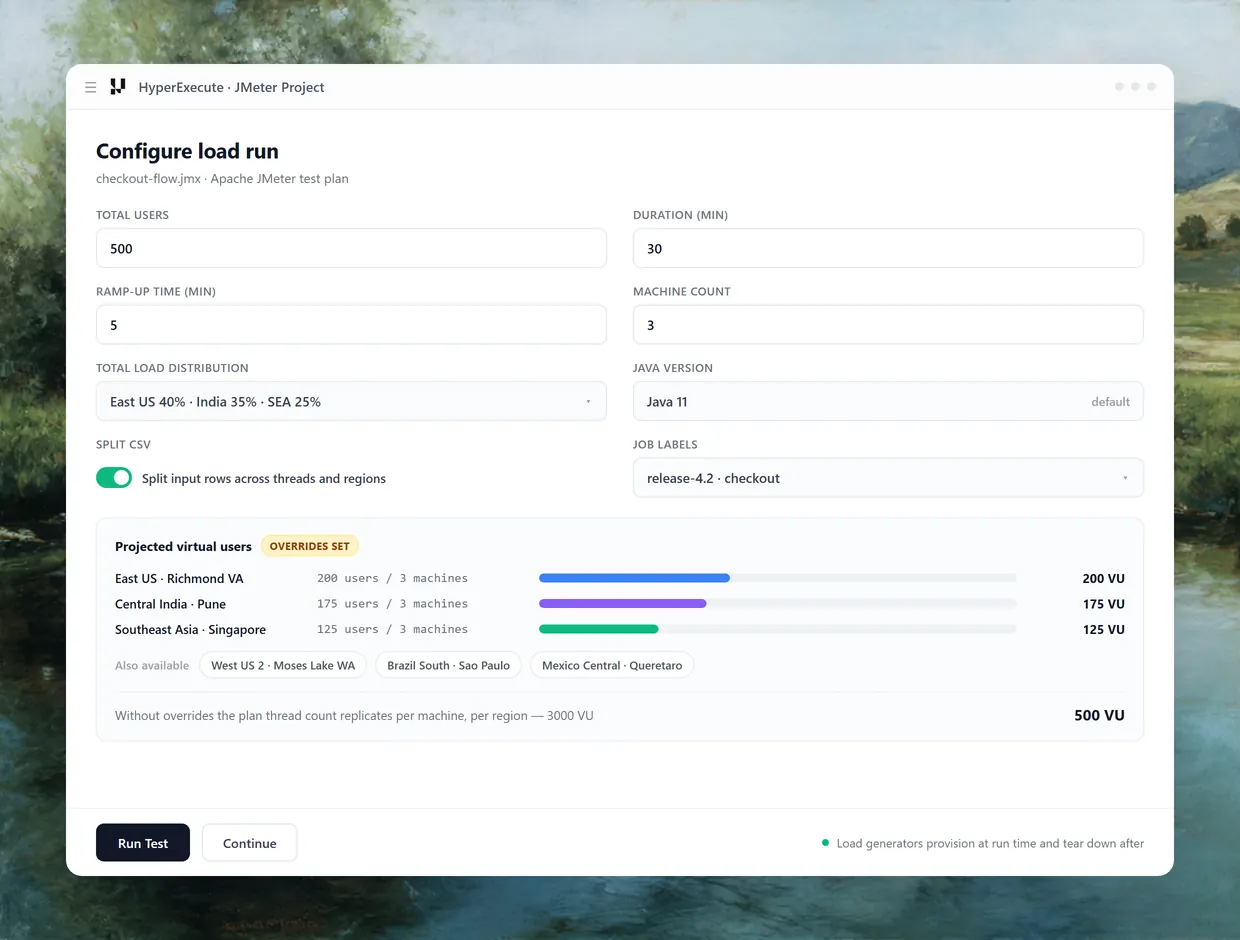
Five Reports for Every Run
Summary, Timeline, Request Stats, Errors and Logs land against the job as soon as the run completes.
Start free- Response time, throughput and bandwidth per run.
- Errors grouped by code, count and sample distribution.
- Toggle reported metrics between milliseconds and seconds.
Before your first billed run
Do the Virtual User Math First
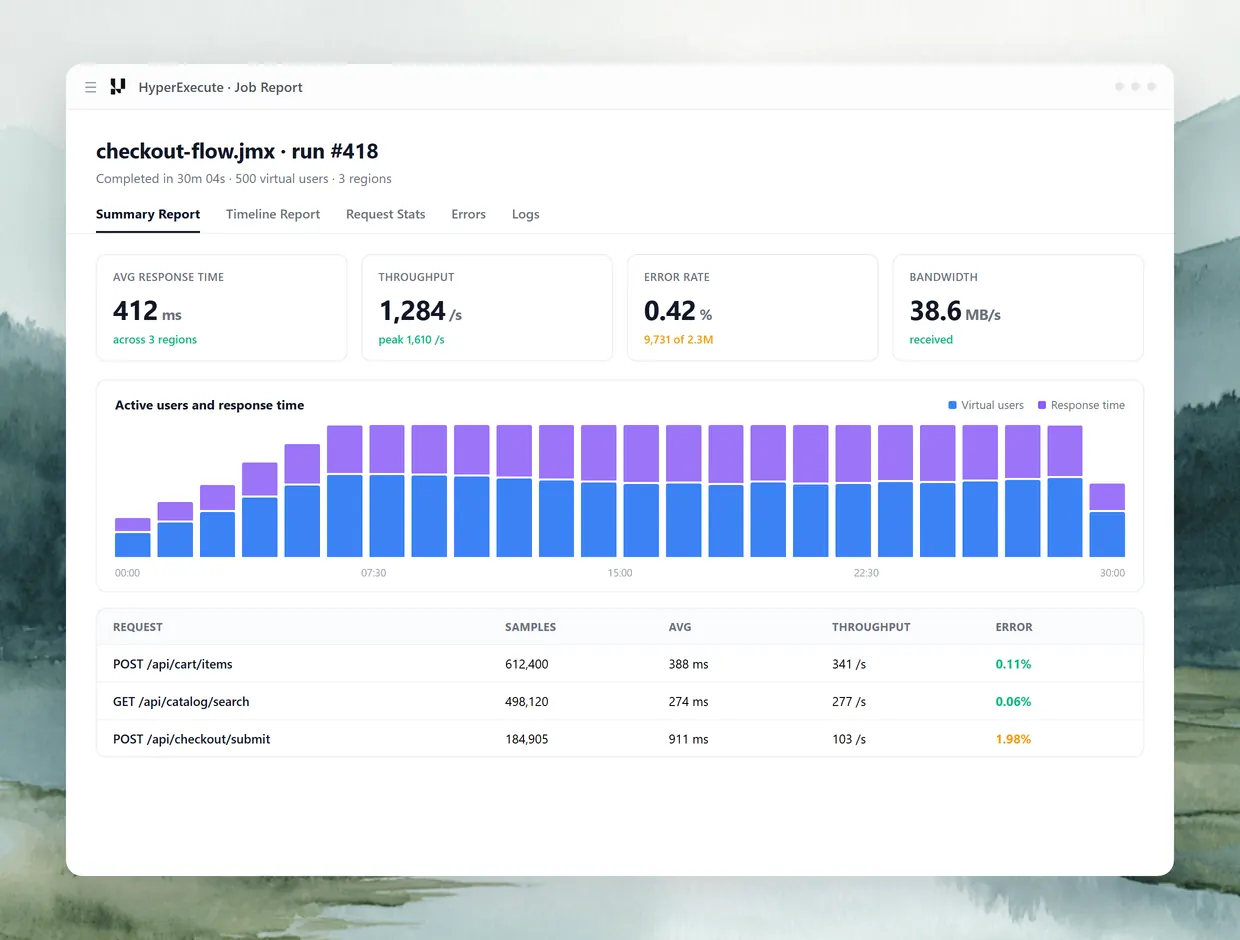
By default HyperExecute replicates the thread count in your .jmx onto every machine in every region rather than dividing it. We put this first because it is the single most expensive surprise in distributed load testing, and it is the detail we found missing from every vendor page we reviewed while building this one. A plan written for 250 users, run on 3 machines in each of 2 regions, fires 1,500 virtual users and bills six times the virtual user hours you expected.
Users in plan
250
Machines per region
3
Regions selected
2
Actually generated
1,500 VU
Set the Total Load Distribution overrides and the platform divides users proportionally instead. 500 users across 2 regions at 50 percent each becomes 250 per region, packed evenly across machines as 84, 83 and 83, without exceeding the maximum users per machine threshold.
What Erodes Achievable Load
Your ceiling is whatever your plan entitles: 100 concurrent virtual users on Free, up to 2,000 on Basic, up to 8,000 on Pro. Inside that, browser-driving samplers pull the achievable figure down, along with missing HTTP timeouts, large payloads, and long chained workflows. Size a run against that list, not against a headline number.
Where the Scope Ends
This is protocol level load testing. It answers what your servers do under concurrent request volume, not what a browser renders. For UI behaviour, run Selenium or Playwright on the same platform.
JMeter or Gatling on the Same Runner
Start free with Google
Both plan formats are supported natively. They are configured through different surfaces, so pick by how your team works.
JMeter
Gatling
Plan format
.jmx
Java DSL .java simulation
Portal path
Yes, and it is the only path
Yes
hyperexecute.yaml and CLI
No
Yes
Load shaping
Portal form, eight fields
Portal form or system properties
Reports
Five named reports in the dashboard
Gatling HTML, collected as a job artifact
Run config versioned in your repo
No
Yes, beside the simulation
Existing plans run unchanged
Yes
Yes
JMeter
Plan format
.jmx
Portal path
Yes, and it is the only path
hyperexecute.yaml and CLI
No
Load shaping
Portal form, eight fields
Reports
Five named reports in the dashboard
Run config versioned in your repo
No
Existing plans run unchanged
Yes
Gatling
Plan format
Java DSL .java simulation
Portal path
Yes
hyperexecute.yaml and CLI
Yes
Load shaping
Portal form or system properties
Reports
Gatling HTML, collected as a job artifact
Run config versioned in your repo
Yes, beside the simulation
Existing plans run unchanged
Yes
One Platform for Load and Functional Runs
The grid that runs your load plan already runs your Selenium, Playwright, Cypress and Appium suites.
HyperExecute
The orchestration cloud that runs your load plans and your functional suites on the same grid.
More about HyperExecute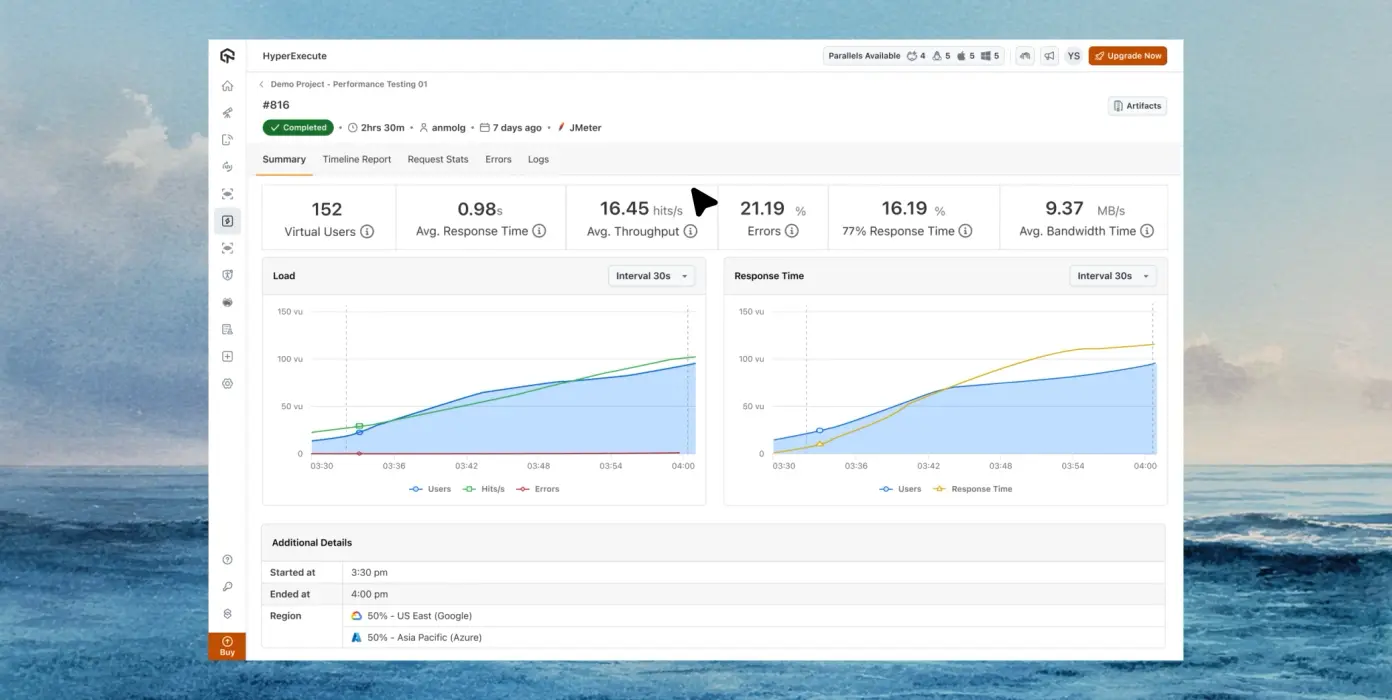
Performance Workload
JMeter and Gatling plans run as a first-class job type, not a workaround.
Managed Generators
Load machines are provisioned per run and destroyed when the run ends.
Job Artifacts
Reports and logs are collected against the job for every execution.
Performance Testing Plans and Limits
Start free with GoogleConcurrency, virtual user hours, load generators and test duration are all plan entitlements. Verified on the pricing page on 8 September 2026.
Free
Basic
Pro
Enterprise
Price, annual
$0
$79 / month
$349 / month
Custom
Price, monthly
$0
$99 / month
$449 / month
Custom
Concurrent virtual users
100
Up to 2,000
Up to 8,000
Customizable
Virtual user hours / month
100, introductory
2,000, introductory
8,000
Customizable
Load generators
1
Up to 2
Up to 20
Customizable
Max test duration
40 minutes
2 hours
6 hours
Customizable
Load regions
Single region
Single region
Single region
Multi region
Free
Price, annual
$0
Price, monthly
$0
Concurrent virtual users
100
Virtual user hours / month
100, introductory
Load generators
1
Max test duration
40 minutes
Load regions
Single region
Basic
Price, annual
$79 / month
Price, monthly
$99 / month
Concurrent virtual users
Up to 2,000
Virtual user hours / month
2,000, introductory
Load generators
Up to 2
Max test duration
2 hours
Load regions
Single region
Pro
Price, annual
$349 / month
Price, monthly
$449 / month
Concurrent virtual users
Up to 8,000
Virtual user hours / month
8,000
Load generators
Up to 20
Max test duration
6 hours
Load regions
Single region
Enterprise
Price, annual
Custom
Price, monthly
Custom
Concurrent virtual users
Customizable
Virtual user hours / month
Customizable
Load generators
Customizable
Max test duration
Customizable
Load regions
Multi region
Some Love from our Customers
As Best Egg expanded its product offerings and entered new markets, we knew our old testing infrastructure couldn’t keep up.
With support from Tenny Agustin, our Engineering Operations Lead, we modernized our approach with
TestMu AI

Best Egg
best-egg

Excited to Share My Learning Journey with Kane AI & Lambda Tool!
I'm pleased to announce that I've recently gained hands-on experience exploring Kane AI through the Lambda Tool and it’s been a fantastic journey of upskilling!
KaneAI

Suryateja Goud
suryateja-goud

See how is #Futureready to enable blazing-fast test orchestration seamlessly integrated with organizations' existing CI/CD platforms, using #Microsoft Azure.
TestMu AI

Microsoft India
MicrosoftIndia
More Reasons to Love TestMu AI (formerly LambdaTest)
See how TestMu AI improves your testing with seamless integration, quicker results, and unmatched accuracy.
Users
3M+
Tests
1.5B+
Enterprises
18K+
Countries
132
TestMu AI positioned as a Leader in the 2026 Gartner® Magic Quadrant™
Read ReportTestMu AI recognized in The Forrester Wave™: Autonomous Testing Platforms, Q4 2025
Read ReportWall of Fame
TestMu AI is the #1 choice for SMBs and enterprises across the globe.

Enterprise-Grade Security
We safeguard your data and AI systems with global security, privacy, responsible AI, and ESG standards.

Integrations
Works where you work, 120+ integrations with the tools your team relies on.




As Seen On
Frequently asked questions
TestMu AI for Enterprise
Get access to solutions built on enterprise-grade
security, privacy, & compliance
- Advanced access controls
- Advanced data retention rules
- Advanced Local Testing
- Premium Support options
- Early access to beta features
- Private Slack Channel
- Unlimited Manual Accessibility DevTools Tests