

Power Your Software Testing with AI Agents and Cloud
The Native AI-Agentic Cloud Platform to Supercharge Quality Engineering. Test Intelligently and Ship Faster.


- TestMu AI (Formerly LambdaTest)
- /
- Learning Hub
- /
- Angular E2E Testing Tutorial: Cypress & Playwright Guide
Angular E2E Testing Tutorial: Cypress & Playwright Guide
Angular E2E testing runs your app in a real browser to test full user journeys. Compare Cypress and Playwright, set them up with the Angular CLI, and more.
Last Updated on:
On This Page
- What's End-to-End Testing?
- What Are the Best Practices for Creating End-to-End Tests?
- How Do You Get Started With Angular E2E Testing?
- What Replaced Protractor for Angular E2E Testing?
- Cypress vs. Playwright: Which is Best for Angular?
- How Do You Set Up and Run Modern E2E Tests With the Angular CLI?
- How to write an End-to-End Test in JavaScript with Karma?
- How Are AI Agents Changing Angular E2E Testing?
- Which Angular E2E Testing Approach Should You Choose?
- Who Wrote This Angular E2E Testing Tutorial?
OVERVIEW
Heads up before you read on. Karma, Jasmine, and TestBed are unit and integration testing tools, and Protractor, Angular's original end-to-end runner, was officially deprecated in 2023. They do not drive a real browser through your whole application, so they are not true E2E tools. For modern Angular E2E testing, jump to the modern Angular E2E landscape, Cypress vs. Playwright, and setting up E2E tests with the Angular CLI.
In software engineering, testing is one of the crucial aspects of checking the requirements of the software to check the performance and responses of every aspect of the software to make sure it conforms with the defined requirements.
The importance of testing can't be overemphasized, it is very crucial to test every aspect of software before deploying your production environments where users will interact with it.
If the software is deployed without proper testing, it might result in bugs and loss of funds, as in the case of the Bloomberg terminal in London, which crashed due to a software glitch that affected more than 300,000 traders in financial markets. It forced the government to postpone a three billion pound debt sale in April 2015, according to The Guardian.
In most cases, errors and bugs have been affected differently. This makes software testing an important stage in the Software Development Life Cycle (SDLC) phases.
In this Angular E2E testing tutorial, we will explore the end-to-end testing type and show developers how to perform it to ensure the correctness of their codebase.
So, let's get started.
What's End-to-End Testing?
End-to-end testing (or E2E) is a methodology that assesses the working order of a complex product in a start-to-finish process.
It is a very complex testing method because it assesses the working order of a complex product in a start-to-finish process. For instance, you can use end-to-end testing to work through a complete website or checkout feature exactly how you intend your users to use the product to discover any bugs before pushing it to production for real users.
In most organizations, end-to-end testing is used to access a complete feature after developing in isolation with different developers in the team. A central repository system is used to build and combine the codebase. Next, end-to-end testing runs through the complete feature and ensures it works as intended before approving and pushing it to the stage.
In the next section of this Angular E2E testing tutorial, we will explore the best practice in creating end-to-end test cases and how you can set up end-to-end tests with JavaScript.

Note: Run your Angular E2E tests across 3,000+ browser and OS combinations in the cloud. Start free with TestMu AI
What Are the Best Practices for Creating End-to-End Tests?
End-to-end test best practices are testing real user journeys, prioritizing critical flows, keeping tests independent, using stable selectors, managing test data, and running suites in CI.
In end-to-end testing, you mimic that user's actions, activities, and the experience of a real user using the application. Below is a list of a few best practices to get the best out of end-to-end testing.
- Test Repeated User scenarios
End-to-end testing is very complex and requires time to test out all the possible edge cases completely. Avoid testing every possible edge case and focus only on the most common and important scenarios.
- Prioritize the Right Aspects
It's important to prioritize what you're testing because it can easily become cumbersome and complex. Therefore, it's important to prioritize business-impacted features before going over other less important edge cases.
- Make Testing Realistic
Sometimes, you want to make end-to-end testing a little realistic. In most cases, real users stop by to look at images or pause and watch a few videos before moving on with their actions. End-to-end testing should mirror real-life interactions as much as possible.
- Error Monitoring
End-to-end testing is a very complex process because it encompasses the walkthrough of the whole application or sometimes only the features that were newly added. However, the complexity can be reduced by ensuring many errors are resolved during coding before end-to-end testing.
- Optimize Testing Environment
You can facilitate the testing process by creating an optimum test environment. Creating an optimum test environment allows for minimal setup when it's time to test and clear out data for your next test.

How Do You Get Started With Angular E2E Testing?
Get started with Angular E2E testing by choosing Cypress or Playwright, adding it through the Angular CLI schematic, and writing a first test for your most important user journey.
Enterprise companies should integrate end-to-end testing into their development pipeline as a necessary component to ensure safe and defect-free applications in production.
It should be part of your day-to-day activities as you code. In JavaScript, you can write end-to-end test suites the same way you write your real code using different testing libraries.
With these testing libraries, testing the functionalities and features of your project becomes very easy because the libraries include different assertion methods to carry out your checks.
Here are some of the most popular JavaScript end-to-end testing frameworks you can use to write your end-to-end tests.
Popular JavaScript End-to-End Testing Frameworks
Various frameworks are helpful for end-to-end testing in JavaScript. They are as follows:
- Cypress
- Karma
- TestCafe
- WebDriverJS
- NightwatchJS
Cypress
Cypress is an end-to-end JavaScript-based testing framework that changes how developers approach software testing. It is built on Mocha, making asynchronous testing simple and convenient. In Cypress, unit tests can be configured to execute without running the web server.
This feature makes Cypress the ideal automation testing framework for testing a JavaScript/TypeScript library that is meant to be used in the browser, and setting up automated testing in your enterprise project is a breeze.
Some of the growth statistics of the Cypress library as of the time of writing, according to GitHub, include more than 43.7k GitHub Stars and about 860k GitHub Usage, making Cypress among the most popular testing framework.
Karma
Karma is an end-to-end testing framework that spawns a web server that executes source code against test code for each of the browsers connected. The results are displayed to the developers to see if the test case failed or passed.
The Angular team created the Karma test library to fit their ever-changing testing requirements to make life easier.
Some of the growth statistics of the Karma library as of the time of writing, according to GitHub, include more than 11.9k GitHub Stars and about 3.1m GitHub Usage, making Karma among the most popular testing framework.
TestCafe
TestCafe is an end-to-end testing framework that requires no web driver. Additionally, it is an open-source testing framework that is easy to configure for different browsers. It also allows developers to focus only on testing and has good dashboard reports.
Some of the growth statistics of the TestCafe library as of the time of writing, according to GitHub, include more than 9.7k GitHub Stars and about 12.7k GitHub Usage, making TestCafe among the most popular testing framework.
Selenium WebDriverJS
The WebDriverJS is a Selenium-based framework that uses the Selenium WebDriver to interact with browsers. The library uses a promise manager to ease the pain of working with a purely asynchronous API, and it saves developers from writing a long chain of promises.
Some of the growth statistics of the Selenium WebDriverJS library as of the time of writing, according to GitHub, include more than 26. 9k GitHub Stars and about 209k GitHub Usage, making Selenium WebDriver among the most popular testing framework.
NightwatchJS
The NightwatchJS is a simple but powerful end-to-end testing framework focusing on a mobile-first-driven approach. It has no framework restrictions, and you run your test on real browsers. You can easily integrate Nightwatch with Mocha, Cucumber, Ava, Jest, etc., to carry out your test.
Some of the growth statistics of the Selenium WebDriverJS library as of the time of writing, according to GitHub, include more than 11.4k GitHub Stars and about 142.8k GitHub Usage, making Nightwatch among the most popular testing framework.
In the next section of this Angular E2E testing tutorial, we will look at how to perform Angular E2E testing with JavaScript and Karma in an Angular project and how to run your test manually. Additionally, we will look at how to automate your testing suite with the TestMu AI cloud grid.
Note: For modern Angular projects, run your Cypress and Playwright end-to-end tests on real browsers instead of relying on Karma and TestBed, which only cover unit and integration testing.
What Replaced Protractor for Angular E2E Testing?
Cypress and Playwright replaced Protractor for Angular E2E testing after the Angular team deprecated Protractor, and the Angular CLI now adds them through official schematics.
For years, Protractor was the default end-to-end testing tool that shipped with the Angular CLI. That changed when the Angular team officially deprecated Protractor in 2023 and stopped scaffolding it into new projects. Protractor is no longer the recommended path for Angular E2E testing, and its removal pushed the community toward modern browser automation tools.
It also helps to be precise about what counts as end-to-end testing. Karma is a test runner and Jasmine is an assertion library, and together with TestBed they power Angular unit and integration tests. TestBed compiles a component in a simulated environment and checks its logic in isolation, but it never launches your full application in a real browser. True Angular E2E testing does the opposite: it starts the entire running application and automates a real browser the way an actual user would click, type, and navigate.
With Protractor gone, the Angular CLI now lets you add a modern E2E framework of your choice. The three tools teams reach for most are Cypress, Playwright, and WebdriverIO, all of which run tests against a live browser rather than a compiled component. The next sections compare the two leading options and show how to wire them up.
Cypress vs. Playwright: Which is Best for Angular?
Cypress and Playwright are the two dominant modern frameworks for Angular E2E testing. Both drive a real browser, both support TypeScript out of the box, and both integrate cleanly with the Angular CLI. The right pick usually comes down to how your team debugs tests and how much cross-browser coverage you need, and that trade-off is what leads many Angular teams to weigh Playwright as a Cypress alternative.
Cypress
Cypress is known for a developer-friendly experience. Its interactive Test Runner shows each command as it executes, offers time-travel debugging so you can step back through a run, and applies automatic waiting so you rarely write manual sleeps. Cypress runs inside the browser alongside your application, which makes it approachable for teams new to end-to-end testing and gives fast, readable feedback during development.
Playwright
Playwright, maintained by Microsoft, focuses on speed and breadth. It drives Chromium, Firefox, and WebKit (the engine behind Safari) natively, so a single suite can cover the browsers your users actually run. It executes tests out of process, runs them in parallel by default, and is the E2E framework scaffolded automatically when you create an Angular application inside an Nx workspace. For teams that need broad cross-browser coverage and fast parallel runs, Playwright is often the stronger fit.
| Aspect | Cypress | Playwright |
|---|---|---|
| Debugging | Interactive runner with time-travel and automatic waiting | Trace viewer, video, and step-by-step traces |
| Cross-browser support | Chromium-based browsers and Firefox | Chromium, Firefox, and WebKit (Safari) natively |
| Execution model | Runs inside the browser with the app | Runs out of process, parallel by default |
| Default in Nx workspaces | Supported | Default E2E option |
| Best for | Fast local feedback and a rich plugin ecosystem | Speed and wide cross-browser coverage |
WebdriverIO is a third option worth knowing. It sits on top of the WebDriver protocol, supports both modern and Selenium-style workflows, and suits teams that already standardize on WebDriver across web and mobile. Whichever framework you choose, structuring tests with the Page Object Model keeps selectors and page actions reusable as the application grows.
How Do You Set Up and Run Modern E2E Tests With the Angular CLI?
Set up modern E2E tests by running the Angular CLI schematic for Cypress or Playwright, which adds the config and an e2e target, then run the suite with ng e2e.
Because Protractor no longer ships by default, the Angular CLI expects you to add an E2E framework through an official schematic. The steps below set up Cypress and outline the equivalent path for Playwright, then show a real end-to-end test that visits a live URL and asserts on browser behavior rather than compiling a component with TestBed.
Step 1: Add Cypress with the official schematic
Run the Cypress schematic in your Angular project root. It installs Cypress, wires up the e2e folder and configuration, and registers the ng e2e builder so the CLI can launch your tests.
bash
ng add @cypress/schematic
ng e2e
Step 2: Or set up Playwright
If you prefer Playwright, initialize it from the project root. This creates a tests folder, a Playwright configuration, and example specs you can adapt for your Angular routes.
bash
npm init playwright@latest
npx playwright test
Step 3: Write an end-to-end test against a live URL
A genuine E2E test serves the app, opens it in a browser, and drives a real user journey. The Cypress spec below visits the running application, checks the heading, submits a form, and asserts that the URL changed, none of which involves TestBed.
describe('Angular contact form', () => {
  it('submits the form and navigates to the dashboard', () => {
    cy.visit('http://localhost:4200/contact');
    cy.get('h1').should('contain.text', 'Contact');
    cy.get('input[formControlName=name]').type('Ada Lovelace');
    cy.get('input[formControlName=email]').type('ada@example.com');
    cy.get('input[formControlName=text]').type('Hello team');
    cy.get('button[type=submit]').click();
    cy.url().should('include', '/dashboard');
  });
});
Run the spec locally while ng serve is running, then wire the same command into your CI/CD pipeline so every pull request triggers the suite. Keeping tests in the e2e folder and organizing selectors with the Page Object Model makes them easy to maintain as your Angular app grows.
To run these Cypress and Playwright suites across many browsers without maintaining your own grid, you can point them at TestMu AI Automation Cloud. It executes your existing Cypress, Playwright, and Selenium scripts across 3,000+ browser and OS combinations in parallel, and captures video, network logs, and console logs on every run so failures are easier to reproduce. This keeps your test code unchanged while expanding coverage and speeding up CI/CD.
How to write an End-to-End Test in JavaScript with Karma?
Writing an end-to-end test is simpler than you think using some of the popular testing frameworks listed above. In this section of this Angular E2E testing tutorial, we will use the Karma framework to write some basic end-to-end test cases.
We will write some end-to-end test cases to check for 'TestMu AI' on Google and print the metadata on the terminal (once the search is completed).
Creating an Angular project with Karma
First, clone the Angular testing repository from GitHub, and add the following libraries to our package.json file.
bash
yarn install
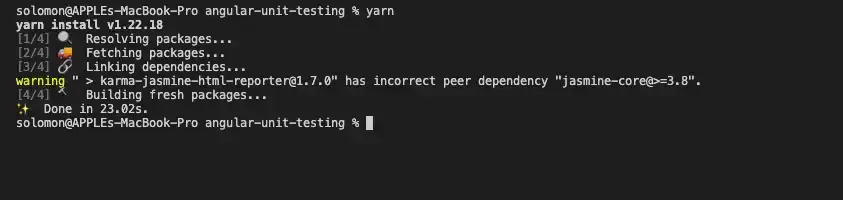
If you're new to Angular, you should see that the package.json file contains all the dependencies to execute Angular, including the dependencies to run your software testing out-of-the-box.
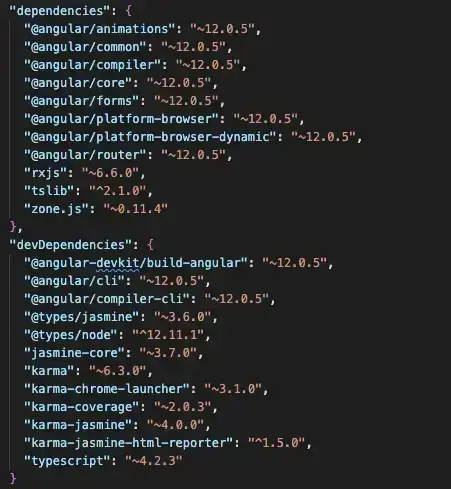
In the image above, you can see all the dependencies installed for testing purposes under the DevDependencies. As shown in the image, we will use Karma and Jasmine to implement the Angular E2E testing.
Karma Config
Let's examine the Karma configuration file created by angular-cli:
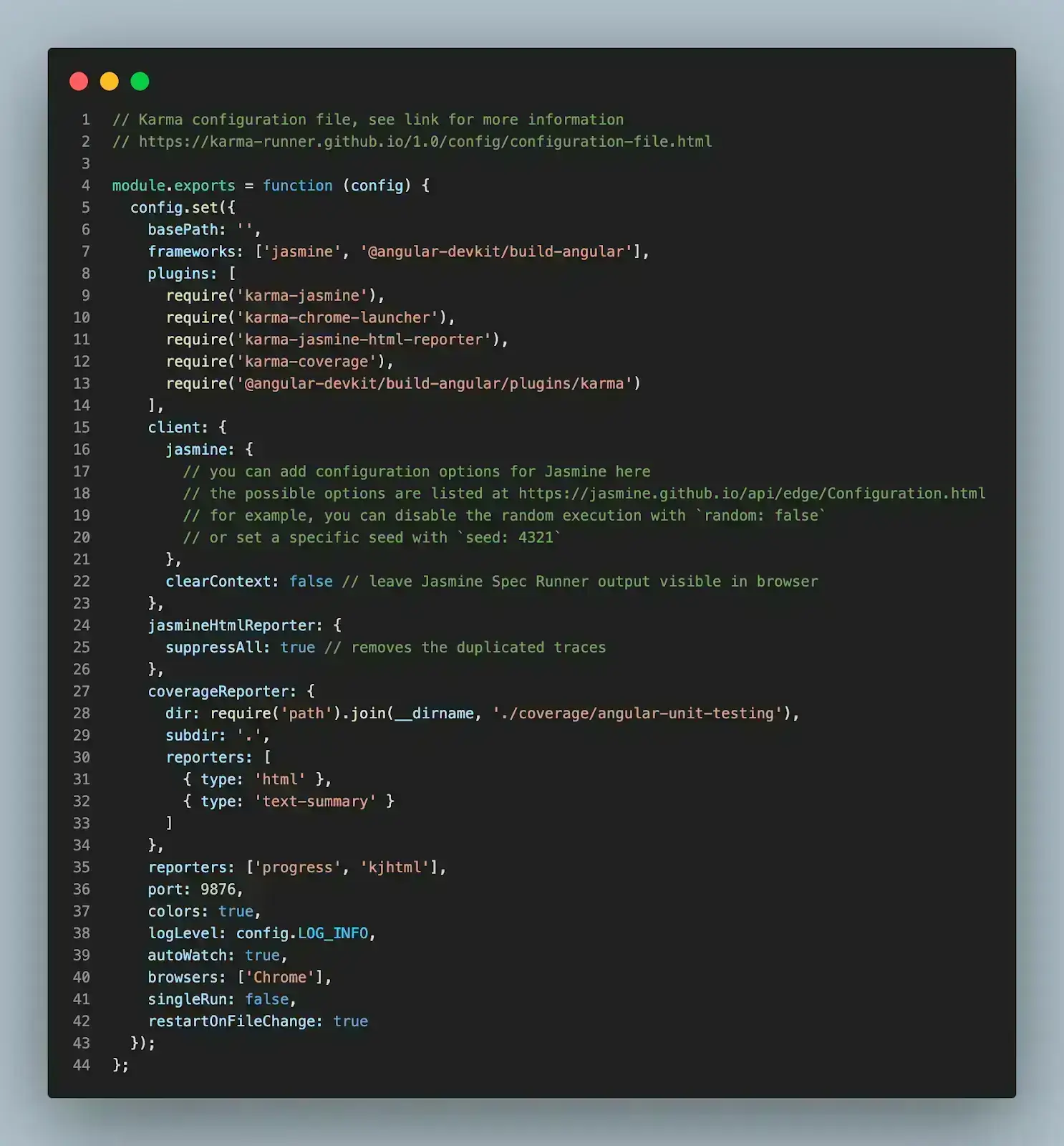
The configuration is clear and easy to understand. First, it specifies the framework that will be used for test execution, and in this case, Jasmine is already specified for us. You can also set more advanced configurations for Jasmine or install a different framework from here.
Next, we have our reporters automatically configured to use `progress` and `kjhtml` to process our reports. You can add more reports to the array if you have another specific need.
Most importantly, angular-CLI configured our test to automatically use `Chrome` as the default browser for our Angular E2E testing and set the `autoWatch` true to watch and update automatically each time we change and save anything in our files.
Test Entry File
When it comes to testing with Angular, one of the most important files is the "test.ts" because it is the entry point of the tests for the application. Let's look at this file and open your "src/test.ts" file.
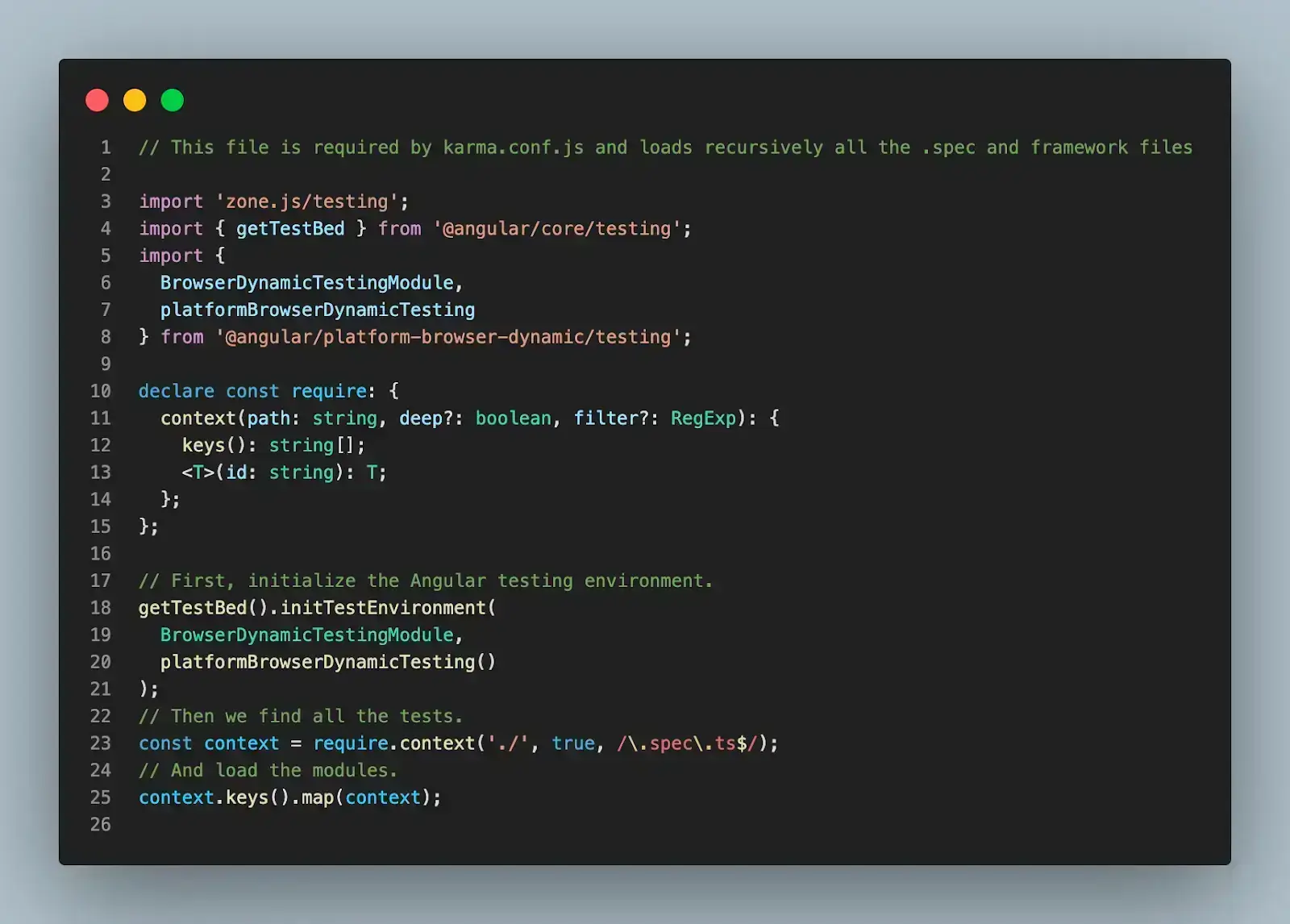
You won't be changing anything in this file in this demo, but what's happening here is Angular setting up your test environment by importing and using all the imports at the beginning of the file. Next, Angular uses a powerful unit testing tool called TestBed, provided by Angular.
Lastly, Angular loads all the test files of the application matching their names against a regular expression, so you don't have to worry about importing any test file individually.
Once you are happy with the default configurations, let's create simple Angular E2E testing using Karma. In this demo, we are going to test and validate Angular forms.
Testing a Form
First, we will create the HTML part to represent a simple HTML form. Create the "contact.component.html" file and add the following code.
<div>{{ text }}</div>
<form
 (ngSubmit)="onSubmit()"
 novalidate
 [formGroup]="contactForm"
 id="contact-form"
>
 <div>
   <label for=""
     >Name:
     <input formControlName="name" />
   </label>
   <label for=""
     >Email:
     <input formControlName="email" />
   </label>
   <label for=""
     >Text:
     <input formControlName="text" />
   </label>
 </div>


 <button type="submit" [disabled]="!contactForm.valid">
   Save
 </button>
</form>
The code snippet above represents a simple HTML form with "name", "email", and "text" fields. Lastly, we have a Submit button to submit the details of the form.
Next, let's create a "contact.component.ts" file to add actions to the form and create a Contact component. Add the following code to your new file.
import { Component } from '@angular/core';
import { FormControl, FormGroup, Validators } from '@angular/forms';
@Component({
 templateUrl: './contact.component.html',
 styleUrls: ['./contact.component.css'],
})
export class ContactComponent {
 text = 'contact page';
 contactForm!: FormGroup;
 contact = {
   name: '',
   email: '',
   text: '',
 };
 submitted = false;
 constructor() {
   this.createForm();
 }
 createForm(): void {
   this.contactForm = new FormGroup({
     name: new FormControl(this.contact.name, [
       Validators.required,
       Validators.minLength(4),
     ]),
     email: new FormControl(this.contact.email, [
       Validators.required,
       Validators.email,
     ]),
     text: new FormControl(this.contact.text, [Validators.required]),
   });
 }
 onSubmit(): void {
   this.submitted = true;
 }
}
The code snippet is straightforward. In the snippet, we validate the form input and change the "submitted" variable to true if everything is valid.
Lastly, we will create the "contact.component.spec.ts" file for writing all the Angular E2E testing suites and test cases. Open the file and add the following code snippet.
import { DebugElement } from '@angular/core';
import { ComponentFixture, TestBed } from '@angular/core/testing';
import { FormsModule, ReactiveFormsModule } from '@angular/forms';
import { BrowserModule, By } from '@angular/platform-browser';
import { ContactComponent } from './contact.component';
describe('ContactComponent', () => {
 let comp: ContactComponent;
 let fixture: ComponentFixture<ContactComponent>;
 let de: DebugElement;
 let el: HTMLElement;
 beforeEach(async () => {
   TestBed.configureTestingModule({
     declarations: [ContactComponent],
     imports: [BrowserModule, FormsModule, ReactiveFormsModule],
   })
     .compileComponents()
     .then(() => {
       fixture = TestBed.createComponent(ContactComponent);
       comp = fixture.componentInstance;
       de = fixture.debugElement;
       el = fixture.nativeElement;
     });
 });
 it('should have as text "contact page"', async () => {
   expect(comp.text).toEqual('contact page');
 });
 it('should set submitted to true', async () => {
   comp.onSubmit();
   expect(comp.submitted).toBeTruthy();
 });
 it('should call submitted method', async () => {
   fixture.detectChanges();
   spyOn(comp, 'onSubmit');
   el = fixture.debugElement.query(By.css('button')).nativeElement;
   el.click();
   expect(comp.onSubmit).toHaveBeenCalledTimes(0);
 });
 it('form should be invalid', async () => {
   comp.contactForm.get('name')?.setValue('');
   comp.contactForm.get('email')?.setValue('');
   comp.contactForm.get('text')?.setValue('');
   expect(comp.contactForm.valid).toBeFalsy();
 });
 it('form should be valid', async () => {
   comp.contactForm.get('name')?.setValue('kapper');
   comp.contactForm.get('email')?.setValue('kap@kap.com');
   comp.contactForm.get('text')?.setValue('text');
   expect(comp.contactForm.valid).toBeTruthy();
 });
});

Code Walkthrough
Walk through the code below to understand the nitty-gritty of it.
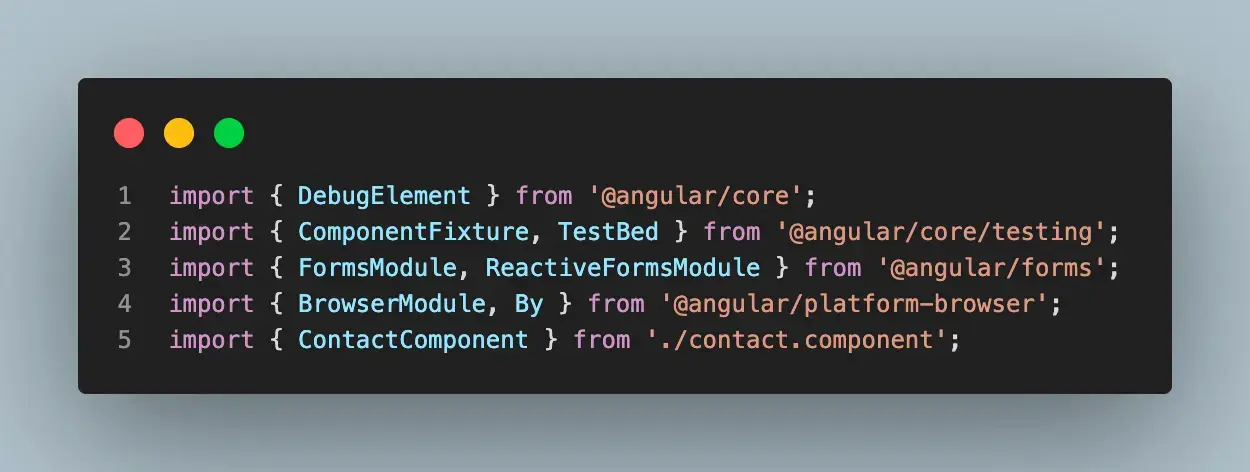
Step 1: Add the required packages and Set Up Express Server.
First, we imported all the required packages and created the describe block, which helped us organize our test suites.
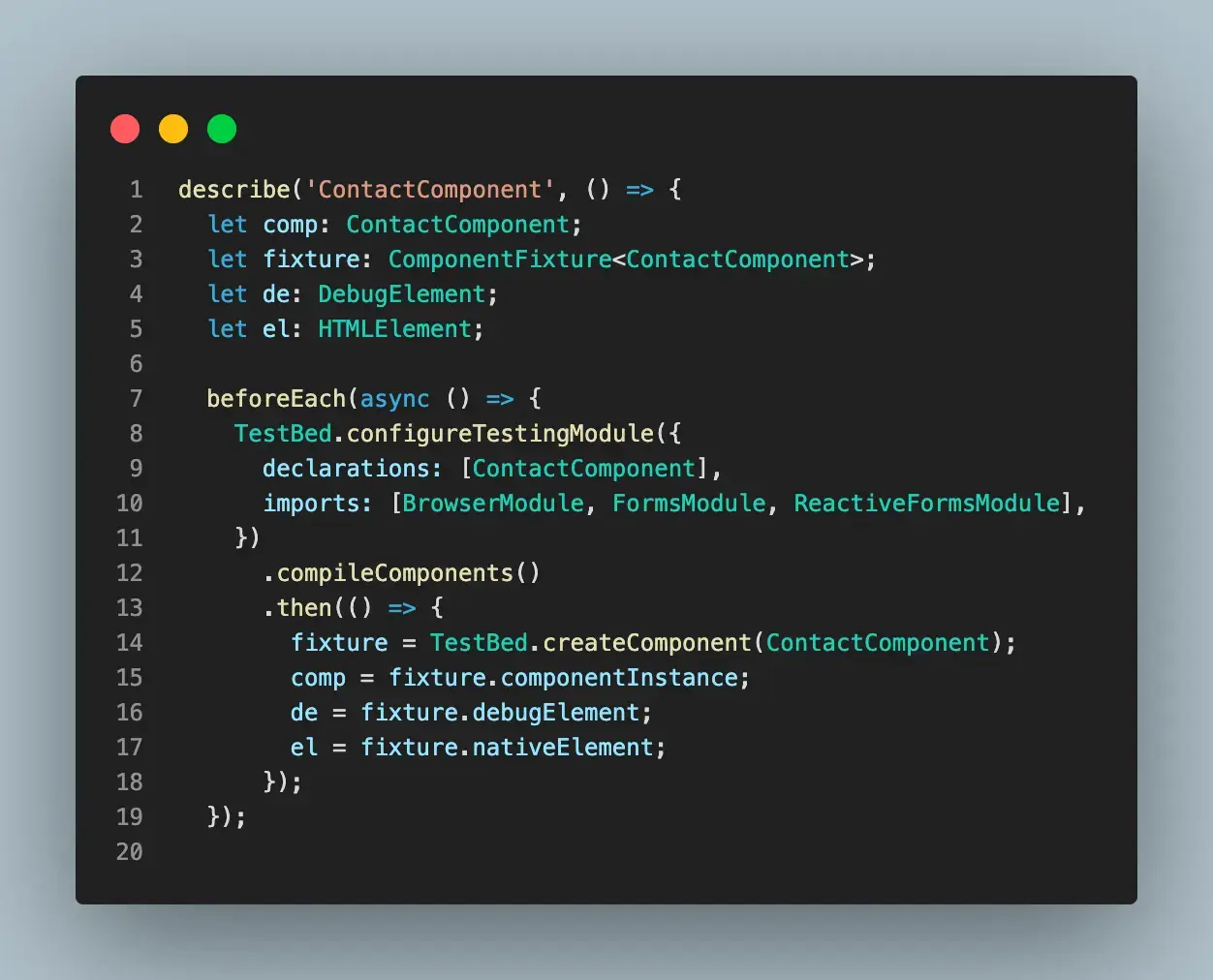
Step 2: Creating the beforeEach.
Inside the beforeEach block, we initialized all the variables that will be used through the test and configured our TestBed to work accordingly.
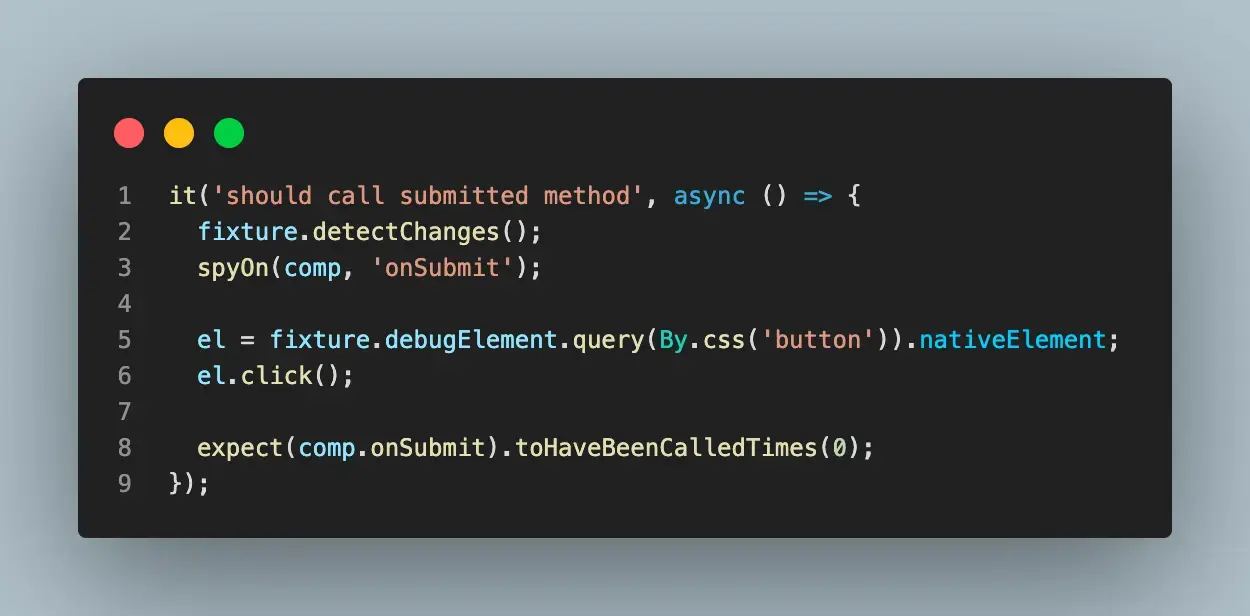
Step 3: Write each test case.
Lastly, we start writing each test case and defining what we expect to test. Below is an example of using end-to-end testing to submit a button in our contact form.
Running the Test
To run your test, type the following command into your root terminal.
bash
npm start
npm run test
After successfully performing running the test, you should be greeted with green passes for your test, like the screenshot below:
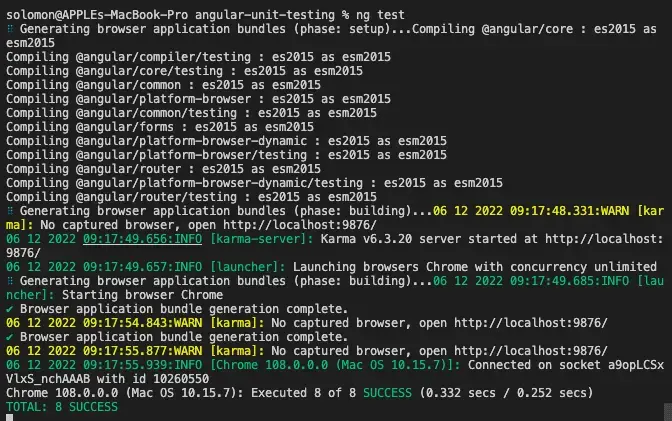
So far, we have manually run the test with the command above to make sure that our test is passing before we move ahead to deploy.
We can also automate this process with a cloud-based grid like TestMu AI, making it possible to implement a test strategy during deployment.
TestMu AI is a cloud-based digital experience testing platform that allows automated testing of websites and web applications on an online browser farm of 3,000+ browser and OS combinations. Using TestMu AI, you can perform Angular E2E testing on real browsers and operating system combinations. In addition, you can accelerate your release cycles with the help of parallelization.

Subscribe to our TestMu AI YouTube Channel to get the latest updates on tutorials around Selenium testing, Cypress testing, and more.
How Are AI Agents Changing Angular E2E Testing?
AI agents now plan, write, and repair Angular E2E tests, and they can drive the Angular CLI directly, but a developer still reviews every generated test and fix.
The Angular CLI ships a Model Context Protocol (MCP) server, started with npx @angular/cli mcp, that lets AI assistants list projects, start the dev server, and run build or test targets. An assistant can therefore bring the app up and run your E2E target without leaving the editor.
On the test side, Playwright's test agents split the work into a planner that explores the app and writes a Markdown test plan, a generator that turns it into test files, and a healer that repairs failing tests. See how the two frameworks compare in Cypress vs Playwright.
Review agent output like any pull request: confirm each test asserts a real user outcome, and check that a healed selector did not hide a genuine Angular regression.
Which Angular E2E Testing Approach Should You Choose?
Choose Playwright for Angular E2E testing when you need multiple browsers and parallel runs, and Cypress when interactive debugging and a fast local loop matter most.
Software testing is a very important aspect of software development. It ensures that the software under test meets the intended requirement and is free of errors and bugs.
End-to-end testing makes it simpler to catch problems before releasing the software to end users. It improves the experience of the users, especially for applications requiring a lot of user interaction. These user expectations become the basis for the test cases.
In this Angular E2E testing tutorial, we discussed end-to-end software testing and how developers should perform it to ensure the correctness of their codebase. We explored the different JavaScript end-to-end testing libraries and showed their popularity using GitHub usage and stars.
We implemented a simple web form validation in Angular and tested the functionality using Karma.
Solomon Eseme is a Software Engineer and Content Creator who is geared toward building high-performing and innovative products following best practices and industry standards. He also loves writing about it at Masteringbackend.com. You can also follow him on Twitter.
Author

Solomon Eseme
Blogs: 4


Solomon Eseme is a Software Engineer with over 5 years of experience in backend development. He is the Founder and CTO of Mastering Backend, a platform dedicated to helping backend engineers enhance their skills. Solomon has contributed to impactful projects, including those that helped secure $20M in funding. He is passionate about building scalable, secure systems and promoting clean code principles. With over 11,000 followers on LinkedIn, Solomon’s network includes QA engineers, software testers, developers, DevOps professionals, tech enthusiasts, AI innovators, and tech leaders. He is also skilled in AWS, GraphQL, and blockchain technologies.
Reviewer

Srinivasan Sekar
Reviewer
Srinivasan Sekar is Director of Engineering at TestMu AI (formerly LambdaTest), where he leads engineering and open-source initiatives behind the Selenium and Appium automation grid and owns TestMu AI's MCP Server. A committer to Appium and a contributor to Selenium, WebdriverIO, Taiko, and AppiumTestDistribution, he brings over 15 years of experience in quality engineering and open-source technologies. He is the author of the Apress book 'The MCP Standard: A Developer's Guide to Building Universal AI Tools with the Model Context Protocol,' a Certified Kubernetes and Cloud Native Associate, and an international conference speaker. Before TestMu AI he spent over eight years at Thoughtworks as a Principal Consultant and Quality Architect. Srinivasan holds a B.Tech in Information Technology from Anna University.


Angular E2E Testing FAQs
Did you find this page helpful?
More Related Learning Hubs
TestMu AI forEnterprise
Get access to solutions built on Enterprise
grade security, privacy, & compliance
- Advanced access controls
- Advanced data retention rules
- Advanced Local Testing
- Premium Support options
- Early access to beta features
- Private Slack Channel
- Unlimited Manual Accessibility DevTools Tests