

Power Your Software Testing with AI Agents and Cloud
The Native AI-Agentic Cloud Platform to Supercharge Quality Engineering. Test Intelligently and Ship Faster.


- TestMu AI (Formerly LambdaTest)
- /
- Blog
- /
- Integration Testing vs Functional Testing: Key Differences
Integration Testing vs Functional Testing: Key Differences
Explore the two testing methodologies, Integration Testing and Functional Testing and their key differences.
Last Updated on:
Integration testing verifies that combined modules exchange data correctly, while functional testing verifies that each feature meets its documented requirement.
Integration testing uses grey box techniques and real dependencies, which Testcontainers supplies as throwaway databases and message brokers in Docker containers, while functional testing stays black box.
This guide covers what integration testing is, what functional testing is, the key differences between them, and how AI coding agents change both layers.
Key Takeaways
- Integration testing verifies that combined software modules exchange data correctly, while functional testing verifies that individual features meet documented user requirements.
- Integration testing uses a grey-box technique that combines white-box and black-box knowledge, while functional testing is black-box only and judges the application from the outside.
- Unit testing runs before integration testing, functional testing, and system testing, because integration testing assumes every module already passes in isolation.
- Integration tests are fast enough to run on every pull request, while functional suites drive the whole application and usually run on merge to the main branch or on a nightly build.
- Testcontainers starts throwaway databases and message brokers in Docker containers for the length of a test run, which gives integration tests real dependencies instead of mocks.
- Playwright 1.56 ships planner, generator, and healer agents that drive the product through a browser, so agent-written tests land in the functional layer rather than the integration layer.
What is Integration Testing?
Integration testing is software testing where software modules are gradually integrated and then tested as a unified group. This testing ensures that all modules interact correctly and without flaws and errors. The modules must be tested independently before being tested together; hence, unit testing must be performed before integration testing.
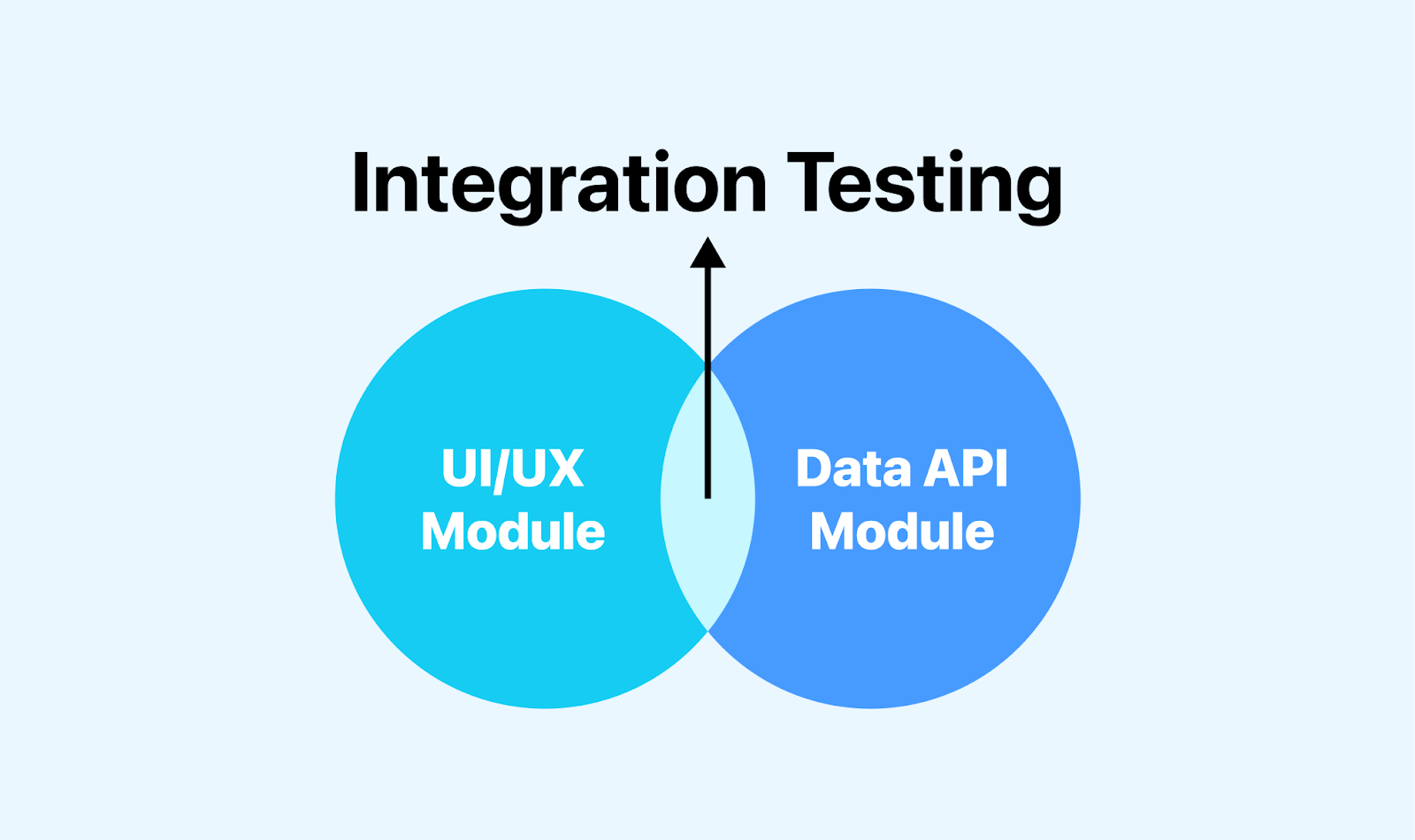
Integration testing uses grey box testing techniques, combining white box testing and black box testing. There are various ways to perform integration testing, such as top-down, bottom-up, sandwich, big-bang, and incremental approaches.
The main objectives of integration testing are:
- Interaction Check: It verifies that different modules of the software work as expected when combined.
- Issue Discovery: It looks for hidden problems arising when these modules interact.
Learn more about integration testing in detail.
Workflow
The integration testing workflow is visually represented in the image below.
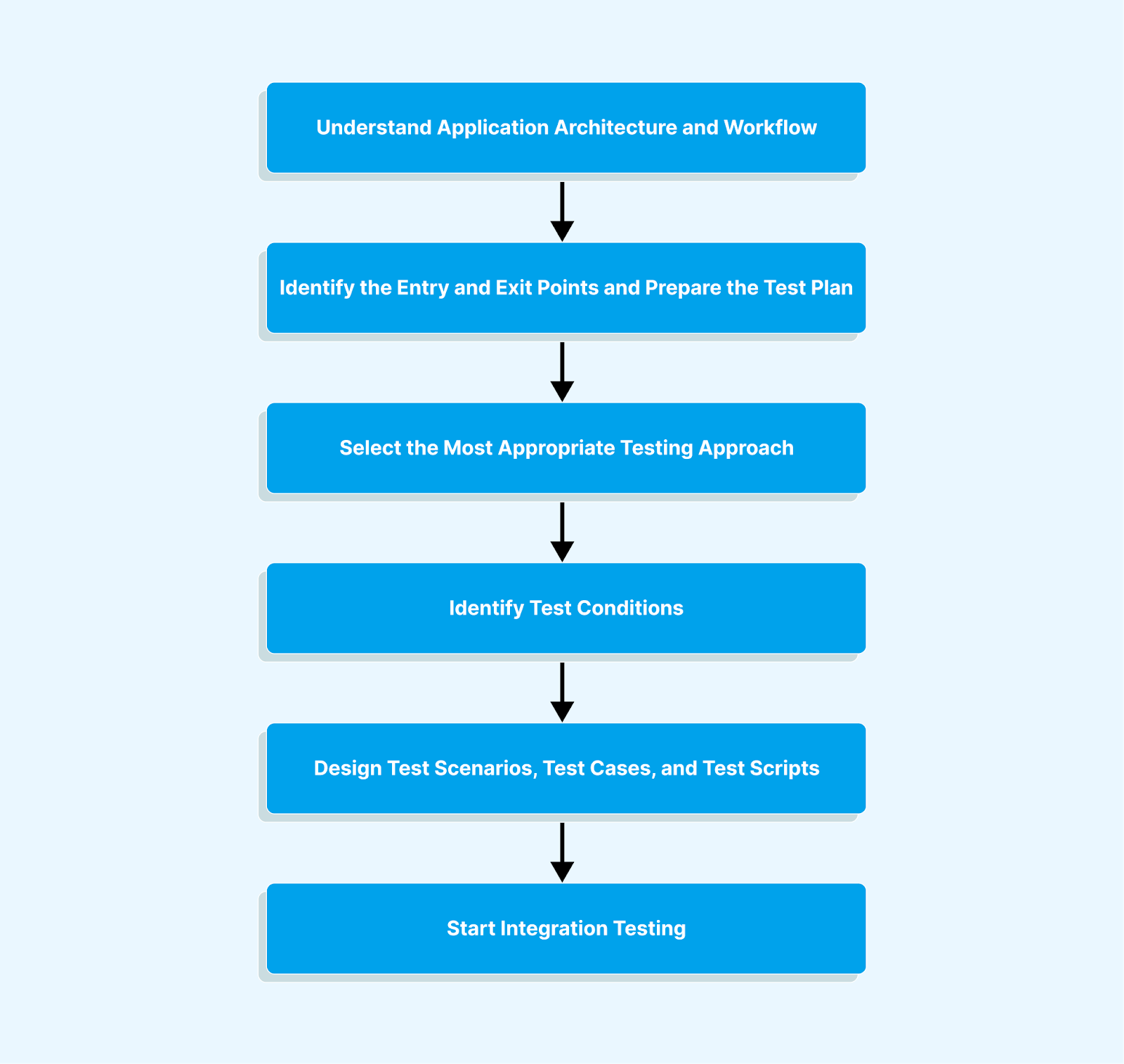
From the above image, we may conclude the workflow as follows:
- Understand and verify the requirements and specifications.
- Prepare a test plan by identifying entry and exit points.
- Create a traceability matrix through analysis and planning.
- Select the best testing approach based on application needs.
- Design various test cases and scripts for integration testing.
- Compare actual results with expected output for validation.
Advantages of Integration Testing
The following are the advantages of integration testing:
- Integration testing allows you to test important scenarios that can only be verified when all system modules are combined.
- Integration testing provides a structured approach to assembling a software system and running tests, efficiently uncovering errors related to component interactions.
- You don't have to wait for all individual modules to complete unit testing before integration testing can begin.
- It is important to confirm whether software modules work cohesively and in unity, which is crucial for seamless system functionality.
Disadvantages of Integration Testing
The following are the disadvantages of integration testing:
- Integrating different modules can be complex and time-consuming, especially for large and complicated systems.
- It can delay development, especially when integration problems require extensive troubleshooting.
- Identifying the root cause of integration problems can be more challenging than unit testing, where problems are usually limited to a specific component.
- It may require substantial hardware, software, and test environments, making it resource-intensive.
Use Cases of Integration Testing
The following are the uses of integration testing:
- It ensures that APIs work seamlessly together, enabling data exchange and communication between software services.
- It helps to check the interaction between the software and the database.
- It helps to test the integration of third-party APIs and services, such as payment gateways or social media logins. Also, it ensures that they work smoothly with the main application.
- It helps test the software performance on different platforms like mobile devices, web browsers, or operating systems.
When to Perform Integration Testing
Integration testing is performed after unit testing and before functional testing. Unit testing involves isolating individual modules to ensure their correctness and acceptance. The integration test is done once the module unit tests are completed. Integration testing examines how modules interact when combined to form a unified group. After successful integration testing, functional testing is the next phase. It assesses the entire software system to ensure it meets user requirements and functions correctly in real-world scenarios.
Let's take a real-world scenario as an example.
Suppose you're building an e-commerce platform with various interconnected modules - a product catalog, a shopping cart, and a payment gateway. Each module is developed independently, ensuring they work flawlessly in isolation.
To guarantee a smooth shopping experience, you want to ensure these modules work correctly. The workflow should be: a customer browsing the product catalog, adding items to the shopping cart, and successfully making a payment.
This involves checking whether the product details are correctly transferred from the catalog to the cart. The payment gateway securely processes the transaction if the cart accurately matches the costs. Integration testing ensures that these modules interact correctly without any error.

Note: To ensure your application never BREAKS, test it with an infrastructure that won't break either. Try TestMu AI Today!
Key Takeaway: Integration testing combines already unit-tested modules and tests them as a group with grey-box techniques such as top-down, bottom-up, sandwich, big-bang, and incremental, to catch faults in the way those modules exchange data.
What is Functional Testing?
Functional testing is a black-box testing technique in which the software is tested to verify that it works as expected in real-world situations. It evaluates a software system by examining whether it meets all specific requirements and expectations, such as user interface, database, APIs, client/server communication, security, and other crucial components. It includes various tests such as smoke testing, acceptance testing, sanity testing, regression testing, etc.
The main objectives of functional testing are:
- Verify Correctness: Ensure software functions according to documented requirements and performs tasks accurately and effectively.
- Detect Defects: Identify deviations from expected behavior or software functionality errors.
Learn more about functional testing in detail.
Workflow
The functional testing workflow is visually represented in the image below.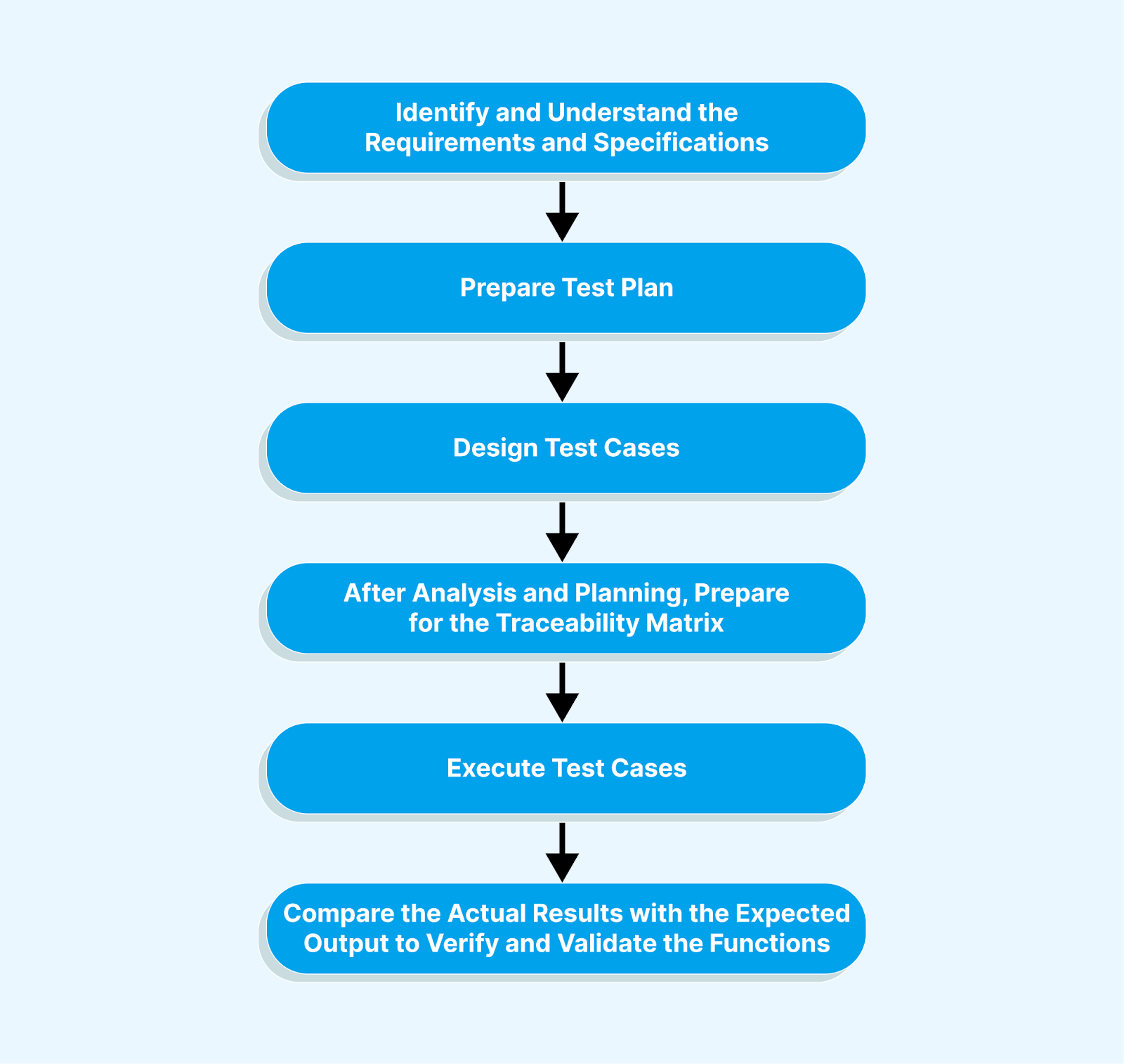
From the above image, we may conclude the workflow as follows:
- Identify and understand the requirements and specifications.
- Prepare and design test cases.
- Create a traceability matrix through analysis and planning.
- Execute the test cases.
- Validate the results by comparing actual results with expected output.
Advantages of Functional Testing
The following are the advantages of functional testing:
- Functional testing ensures software meets user expectations by testing individual functions against specified requirements.
- It reduces and resolves software defects and prevents problems before they become critical.
- It verifies that each software function performs as intended, resulting in a more reliable and bug-free product.
- It saves costs by detecting functional issues early and preventing defects from propagating through later stages of development.
Disadvantages of Functional Testing
The following are the disadvantages of functional testing:
- This may only cover some lines of code or all possible scenarios, leaving some parts of the software untested.
- It mainly focuses on what the software is supposed to do and generally neglects non-functional aspects such as performance, security, and scalability.
- With functional testing, it can be difficult to discover all problems.
- It can be resource-intensive, requiring time, effort, and a range of test scenarios.
Use Cases of Functional Testing
The following are the uses of functional testing:
- It helps identify and fix software deficiencies, bugs, and errors to improve reliability and quality.
- It helps verify software performance under various configurations, loads, and environments to ensure reliable functionality.
- It helps in testing the software to prevent new problems when implemented changes or updates are introduced.
When to Perform Functional Testing
Functional testing after integration testing may coincide with system testing, depending on the software development methodology. Functional testing occurs after unit testing, which evaluates individual modules in isolation, and integration testing, which verifies the interactions between those modules.
Let's take a real-world example of functional testing by considering a mobile banking application.
- User Authentication: In this, you want to check whether you securely log in to their mobile banking accounts. Here, the testers validate that the login credentials are correctly verified and ensure users can access their accounts securely.
- Balance Inquiry: In this, you want to check account balances and transaction history. Here, the testers perform balance inquiries, verifying that account balances and transaction histories are accurately displayed and any transactions are updated immediately.
What makes TestMu AI the right testing partner for you?TestMu AI is an AI-powered test orchestration and execution platform that lets you run manual and automated tests at scale with over 3000 real devices, browsers, and OS combinations thus complementing functional testing needs with its cloud-based infrastructure.
For a smooth and efficient functional testing experience you can leverage TestMu AI's capabilities for efficient cross-browser testing, comprehensive test coverage and real-time collaboration.
Key Takeaway: Functional testing is a black-box technique that checks whether software features meet documented requirements in real-world use, and it covers smoke testing, sanity testing, regression testing, and acceptance testing.
Key Differences : Integration Testing vs Functional Testing
The key differences between integration testing and functional testing are important for effective software quality assurance. Knowing these differences helps testing and development teams choose the right testing approach and effectively allocate resources across development phases.
| Parameters | Integration Testing | Functional Testing |
|---|---|---|
| Testing Techniques | Grey-Box Testing | Black-Box Testing |
| Testing Complexity | It is less complex as the software modules are integrated logically and tested as a group. | It is more complex than integration testing as it tests the whole functionality of the application. |
| Focus | Interaction between integrated modules. | Issues that stop applications from performing their functionality. |
| Scope | It examines how integrated modules work as a whole. | It tests specific functions, features, or use cases. |
| Aim or Goal | Find integration issues and ensure system modules work together. | Verify that individual software features are reliable and meet user needs. |
| Testing Items | Components or modules integrated into a system. | Individual functions, features, or interfaces. |
| Level of Testing | Typically conducted after unit testing. | Often performed after unit and integration testing. |
The two suites also sit at different points in a CI pipeline. Integration tests exercise a few modules against a real database or a stubbed service, so they finish fast enough to run on every pull request. Functional suites drive the whole application through a browser or an API client, so most teams run them on merge to the main branch or on a nightly build. Splitting the two this way keeps pull request feedback short without giving up coverage of complete user journeys.
Microservice teams narrow the integration layer further with consumer driven contract testing. A tool such as Pact records the requests a consumer sends and the responses a provider promises, then verifies each side in its own pipeline without deploying every service together. Broad integration tests still cover database access, message queues, and third party gateways. Functional testing is not affected by this split, because it checks behavior at the product level rather than at a single service boundary.
Sources disagree on whether integration testing belongs inside functional testing. Some group it there because both check observable behavior rather than internal code structure. The more useful split is the one that helps when a test fails. Integration testing is grey-box and points at the seam between two modules, while functional testing is black-box and points at the feature that stopped working. Teams that keep the two suites separate get that signal without running the whole application on every commit.
Note: Turn Testing Complexity into Simplicity: Automate your tests across 3000+ browsers, real devices, and OS combinations. Try TestMu AI Today!
Key Takeaway: Integration testing is grey-box and targets the interaction between integrated modules, while functional testing is black-box and targets whether each feature meets user requirements. Integration tests are short enough for every pull request, and functional suites usually run on merge or nightly.
How Do AI Coding Agents Change Integration and Functional Testing?
AI coding agents mostly produce functional tests, not integration tests, because they observe the application from the outside. Playwright shipped three test agents in version 1.56, and the project documents them as a planner, a generator and a healer. The planner explores the app and writes a Markdown test plan, the generator turns that plan into Playwright test files, and the healer runs the suite and repairs failing tests. You create the agent definitions with the npx playwright init-agents command. Everything these agents produce drives the product through a browser, which places it in the functional layer.
The integration layer still has to be specified by a human. An agent with only browser access cannot assert that a message reached a queue, that a database write used the right transaction boundary, or that a provider returned the agreed response shape. That work needs real dependencies rather than mocks. Testcontainers handles this by starting throwaway instances of databases, message brokers and other services in Docker containers for the length of a test run, then removing them afterwards.
The healing step introduces a risk worth naming. When a functional test fails, the cause can be a changed locator or a genuine defect below the interface. An agent that keeps patching the test until it passes can hide the second case. Two habits reduce that exposure. Review every automated repair before it merges, and treat repeated repairs on the same test as a signal to look at the integration tests underneath it. The layers are useful here for the same reason they always were. Integration tests tell you which seam broke, and functional tests tell you what the user lost.
Key Takeaway: AI coding agents such as the Playwright planner, generator, and healer produce functional tests because they see the application only through a browser, so integration tests against databases, message queues, and provider contracts still have to be specified by a human.
Conclusion
We have explored two testing approaches, namely integration testing and functional Testing. Integration testing mainly focuses on the harmony of software modules, and functional testing ensures user-oriented functionality. These are two indispensable pillars of quality assurance. We have examined their workflows, advantages, and disadvantages and shed light on the nuances that determine their application. At the end of this article, it is clear that a deep understanding of integration testing and functional testing enables you to create solutions that stand up testing with time.
Author

Upendra Prasad Mahto
Blogs: 9


Upendra Prasad Mahto is a community contributor with 2+ years of experience across software engineering, test automation content, and technical writing. He specializes in creating content around test automation tools such as Selenium and Appium, along with topics in software quality and emerging AI technologies. Formerly a Technical Content Writer at TestMu AI, Upendra focuses on translating practical testing workflows and automation concepts for developers and QA professionals. He holds a B.Tech in Electronics and Communication Engineering and certifications in Generative AI and Product Analytics.


Integration Testing vs Functional Testing FAQs
Did you find this page helpful?
More Related Blogs
TestMu AI forEnterprise
Get access to solutions built on Enterprise
grade security, privacy, & compliance
- Advanced access controls
- Advanced data retention rules
- Advanced Local Testing
- Premium Support options
- Early access to beta features
- Private Slack Channel
- Unlimited Manual Accessibility DevTools Tests