
Power Your Software Testing with AI Agents and Cloud
The Native AI-Agentic Cloud Platform to Supercharge Quality Engineering. Test Intelligently and Ship Faster.


- TestMu AI (Formerly LambdaTest)
- /
- Learning Hub
- /
- What Are Assertions in Software Testing?
What Are Assertions in Software Testing?
An assertion is the check that decides whether a test passes or fails. Learn how assertions work, assertion vs verification, hard vs soft, and the syntax.
Published on:
A test that contains no assertion cannot fail. It will open the page, click the button, fill the form, and report success whether the application behaved correctly or returned nonsense. The assertion is the one line that turns observed behavior into a verdict.
The word carries several unrelated meanings, which is why searching for it returns dictionaries, philosophy, and auditing alongside testing guides. In auditing it names a claim management makes about the financial statements, which is a different job from anything on this page. Two of the meanings are software ones, and those are the pair that actually get confused.
A test assertion decides whether a test passes. A programming assertion, such as Python's assert statement or Java's assert keyword, is a self-check the author leaves inside the code itself. The clearest proof that they are different things is that a programming assertion can be switched off. The Python language reference states that the code generator emits no code for an assert statement when optimization is requested with the -O flag, and Oracle's Java documentation states that assertions are disabled at runtime by default and are switched on with the -ea flag. A test assertion is never optional in that way.
This page covers the testing meaning first, separates it from the language feature, and then maps the syntax across the frameworks you are likely to use.
TL;DR
An assertion is the check inside a test that compares an actual value against an expected one and decides whether the test passes or fails. If the values match, execution continues. If they do not, the assertion raises an error and the test is marked failed. Without one, a test reports success no matter what happened.
- Test assertion: The check a test framework evaluates to produce a pass or fail verdict, written with an expect or assert API and reported by the runner.
- Programming assertion: A self-check left inside application code to catch impossible states. Python removes these under the -O flag, so they are not a security control.
- Hard assertion: Throws on the first mismatch and aborts the test immediately, so no later step in that test runs.
- Soft assertion: Records the mismatch, lets the test finish, and reports every collected failure together at the end, but only if the final collection call is actually made.
- Auto-retrying assertion: Re-checks the condition until it holds or the timeout expires, which is how Playwright avoids failing on content that has not rendered yet.
- Empty green: A suite that passes while asserting nothing. Running the same assertions across browsers on TestMu AI surfaces the environment-specific mismatches a single local run never sees.
What Is an Assertion?
An assertion is a statement in a test that declares what must be true at a given point. It compares an actual value produced by the software against an expected value supplied by the test author. When the comparison holds, execution continues silently. When it fails, the assertion raises an error, and the test runner records the test as failed.
Everything else in a test is setup. Navigation, clicks, form input, and API calls put the system into a state worth examining. Only the assertion examines it. This is why a test is sometimes described as arrange, act, assert: the first two phases create a situation, and the third one judges it.
The judgment is binary by design. An assertion does not report that a value looks close or seems reasonable. It either holds or it does not, which is what lets a unit testing suite of thousands of tests collapse into a single pass or fail signal a pipeline can act on.
Test Assertion vs Programming Assertion
Both are called assertions and both check that something is true, but they live in different places and answer to different owners. Confusing them leads to a specific and dangerous mistake: using a language-level assert to enforce a rule that must hold in production.
| Aspect | Test assertion | Programming assertion |
|---|---|---|
| Where it lives | In test code, run by a test framework | In application code, run whenever that code runs |
| What it checks | Observable behavior the user or caller depends on | An internal invariant the author believes can never be false |
| Who sees a failure | The test runner, the report, and the pipeline | Whoever is running the program, usually a developer |
| Can it be disabled | No, it is the point of the test | Yes. Python emits no code for it under -O, and Java disables assertions at runtime unless -ea is passed |
| Safe for input validation | Not applicable | No, never use it for untrusted input or security checks |
The last two rows are the ones that cause incidents. Because the Python interpreter can strip assert statements out of an optimized build, and because Java skips them unless the JVM is started with -ea, a permission check written as an assert can simply not run in production. Oracle's documentation is explicit about this, instructing readers not to use assertions for argument checking in public methods, on the grounds that those checks must be obeyed whether assertions are enabled or disabled. Validate untrusted input with an explicit conditional that raises a real exception, and reserve assert for conditions that would mean a bug in your own code.
Test frameworks blur this line deliberately and usefully. The pytest documentation says it allows the standard Python assert for verifying expectations and values, and that it rewrites assert statements before they are run so the failure message carries the intermediate values. You write a plain assert and still get a detailed diff, because the framework rewrote it on the way in.
How an Assertion Decides Pass or Fail
When an assertion fails, the framework raises a deliberate error so the runner can attribute that failure to one specific expectation. The useful part is the diagnostic that comes with it.
To show exactly what that looks like, I ran a Selenium test on the TestMu AI cloud against the Simple Form Demo on the Selenium Playground. The test types a message, submits it, and asserts on the text the page renders back. Below is the state the assertion evaluated.
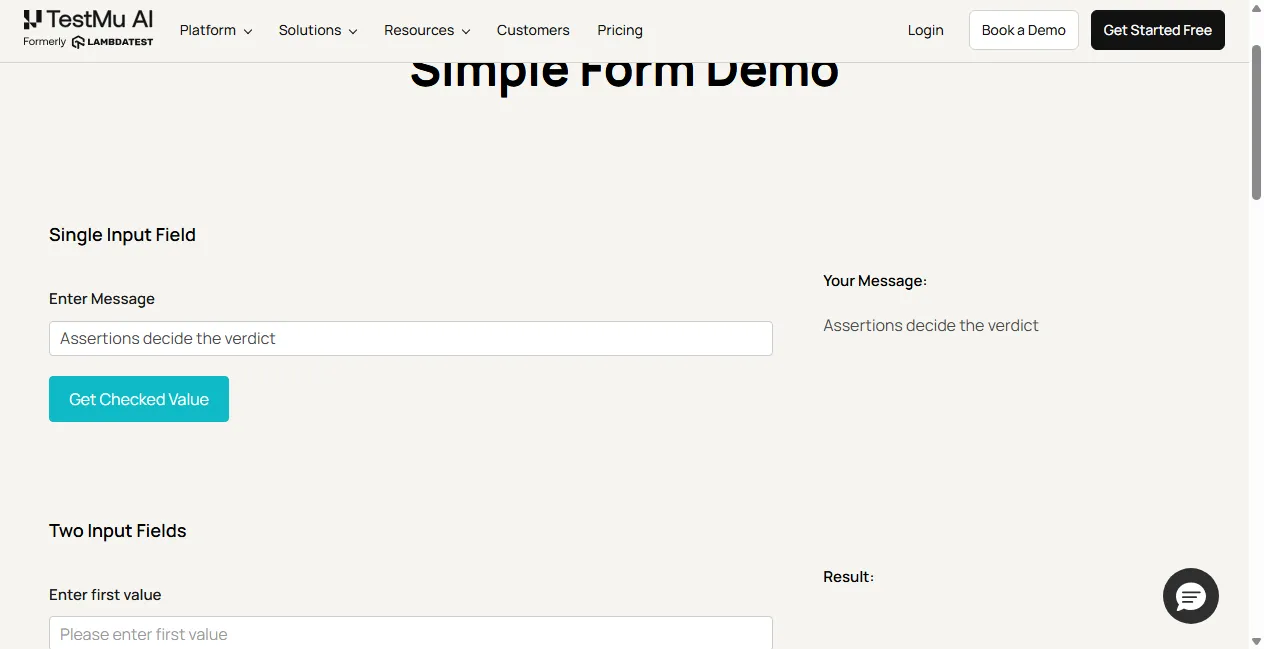
The run made two checks against that same text. The first expected exactly what the page rendered. The second expected the same string with one extra exclamation mark. This is what that run printed, on Chrome 155 and Windows 11, under build 108749049, session adafbd5d4db1e34eab1b20b596d56a78. The PASS and FAIL prefixes are labels from the script; every field beneath FAIL is the AssertionError exactly as Node reported it:
actual rendered text: "Assertions decide the verdict"

PASS  assert.strictEqual(shown, MESSAGE)  -> assertion held, test continues

FAIL  assert.strictEqual(shown, "Assertions decide the verdict!")
      name:     AssertionError
      message:  Expected values to be strictly equal:
      expected: "Assertions decide the verdict!"
      actual:   "Assertions decide the verdict"
      operator: strictEqual
One character separates the two outcomes. The assertion reports four things that make the failure actionable: the error type, the expected value, the actual value, and the operator used to compare them. A failure message missing the actual value forces whoever triages it to reproduce the run before they can even start.
Note the strictness. The two strings are visually near-identical, and the assertion still fails, because strictEqual compares exactly. Choosing the right comparison matters as much as choosing the right value: an exact match on text that legitimately varies produces a test that fails for no good reason.
This is also where an assertion failure parts company with a test error, which CI reports treat as separate columns for good reason. An assertion failure means the comparison ran and disagreed, so the software did something and it was the wrong thing. A test error means the comparison never happened at all, because a locator threw, the browser died, or the environment was unreachable. TestMu AI's Kane CLI encodes the split in its exit codes, reserving 1 for an assertion that was not met, 2 for an environment or infrastructure condition, and 3 for a timeout. A build red with errors is usually an infrastructure problem; a build red with assertion failures is usually a product problem, and reading them as one number sends you to debug the wrong thing.

Note: Assertions that pass locally and fail on a colleague's browser are usually environment differences, not bad assertions. Run the same suite across 3,000+ browser and OS combinations on TestMu AI to see which ones are real. Try it free
Assertion vs Verification
Some testing guides present these as synonyms, which costs real debugging time, because the frameworks themselves draw the line clearly. TestNG's SoftAssert javadoc puts it plainly: when an assertion fails the class does not throw, it records the failure, and calling assertAll is what then throws if at least one assertion failed. The distinction is about what happens to the rest of the test after a check fails.
| Behavior | Assert | Verify |
|---|---|---|
| On failure | Throws immediately and aborts the test | Logs the mismatch and carries on |
| Later steps | Skipped entirely | Still execute |
| Failures per run | One, the first | All of them |
| Best used when | Continuing is pointless, such as a failed login | Several independent checks on one screen |
Picking the wrong one wastes runs. Assert on a login that failed and the remaining twenty steps are meaningless anyway, so stopping is correct. Assert on the first of eight field labels and you learn about one wrong label per run, fixing them one at a time across eight runs. For a worked Selenium treatment of both, see assert and verify in Selenium WebDriver.
Hard vs Soft Assertions
Hard and soft are the framework-level names for the same trade-off. A hard assertion is the default almost everywhere: it throws, and the test ends. A soft assertion defers the failure so the test can finish and report everything it found.
JUnit implements this through grouped assertions. Its assertions guide states that in a grouped assertion all assertions are executed and all failures will be reported together, while within an ordinary code block, if an assertion fails the subsequent code in the same block will be skipped.
Playwright exposes the same idea as expect.soft. A failed soft assertion does not stop the test; it marks the test as failed and lets execution continue, so several checks can be collected in one run. TestNG offers it through a dedicated SoftAssert class whose results are only reported when you call assertAll, which the TestNG assertions guide linked in the framework table below covers in depth.
The trap with soft assertions is forgetting the final collection step. If the framework needs an explicit call to report what it gathered and that call is missing, every soft failure is silently discarded and the test passes.

Common Assertion Types
Nearly every assertion you write falls into one of the categories below, whatever your framework happens to call it.
| Type | What it checks | Typical use |
|---|---|---|
| Equality | Actual equals expected, by value or by reference | A total, a title, an API status code |
| Truthiness | A condition evaluates to true or false | A flag, a boolean helper, a predicate |
| Null or nil | A value is or is not absent | An optional field, a cleared session |
| Containment | A collection or string holds an element or substring | Search results, a message containing a name |
| Exception | A specific error is thrown by a block | Invalid input must be rejected |
| State | An element is visible, enabled, disabled, or checked | A submit button gated behind a valid form |
| Comparative | A value is greater than, less than, or within a range | A result count above zero, a duration under a limit |
Exception assertions deserve a note, because they invert the usual shape. Instead of asserting on a returned value, they assert that calling something fails in a particular way. JUnit expresses this as assertThrows with the expected exception class and the code that should raise it, which keeps the failure attributable rather than letting a stray try and catch swallow it.
Assertions by Framework
The concept transfers across every framework below. The syntax does not, and the retry behavior differs in ways that decide whether your tests are stable.
| Framework | Assertion style | Soft or grouped support |
|---|---|---|
| Playwright | expect with auto-retrying web-first matchers | Yes, expect.soft |
| Cypress | should and expect, Chai based, retried by the command chain | No dedicated soft API |
| TestNG | Assert class, static methods | Yes, SoftAssert with assertAll |
| JUnit | Assertions class, assertEquals and assertThrows | Yes, assertAll grouped assertions |
| pytest | Plain assert, rewritten for introspection | Via plugins, not built in |
| NUnit and C# | Assert.That with constraint expressions | Yes, Assert.Multiple, renamed Assert.EnterMultipleScope in 4.2 and later |
| WebdriverIO | expect with browser and element matchers | Inherits Jest style expect |
The retry column is the one that bites. The Playwright assertions documentation explains that auto-retrying assertions re-fetch the element and check it over and over until the condition is met or the timeout is reached, with a default assertion timeout of 5 seconds, while non-retrying assertions check any condition once and do not auto-retry. On asynchronously loaded content, a non-retrying assertion is a flaky test waiting to happen.

Mistakes to Avoid
The failure mode that matters most is not a wrong assertion. It is a missing one, because a missing assertion looks exactly like a passing test.
- Asserting nothing - a test that navigates and clicks without checking a result is green by default. Empty green and earned green look identical on a dashboard.
- Asserting on the locator instead of the outcome - confirming an element exists is not the same as confirming it shows the right value.
- Over-strict comparisons - an exact match on text containing a timestamp, a session id, or a currency symbol fails for reasons unrelated to the behavior under test.
- Dropping soft failures - collecting soft assertions and never calling the method that reports them discards every failure silently.
- One test asserting everything - when a single test checks a dozen unrelated things, the first failure masks the rest and the name no longer tells you what broke.
- Using a language assert as a guard - any check that must hold in production belongs in an explicit conditional, because an optimized build can remove the assert.
The first and last of those are the expensive ones. A suite where half the tests assert nothing produces green runs that prove nothing, and the problem is invisible from a pass rate alone.
TestMu AI's Kane CLI takes a different route to the same checks. You describe the expectation in plain language, such as asserting that a page contains specific text or that a submit button is disabled, and it supports exact match, contains, state, conditional, negative, positional, and comparative assertion types. Its live-page assertion engine decides checks on the live page rather than planning them blind, and every check self-verifies before it is recorded. Coverage is read from the evidence each run seals, so a step that proved nothing shows as uncovered rather than counting as passed.
Next Steps With Assertions
Open your most recently failing test and read only its assertions. Check that each one names the outcome a user would care about, that the comparison tolerates values which legitimately vary, and that any soft assertions end with the call that reports them. That pass usually explains more failures than re-reading the setup code.
Then pick the framework guide above that matches your stack for the exact syntax. If you want the same assertions checked against browsers you do not have locally, run them on TestMu AI's automation cloud across 3,000+ browser and OS combinations, or start from the Kane CLI getting started guide to write them in plain language instead.
Author

Himanshu Sheth
Blogs: 142


Himanshu Sheth is the Director of Marketing (Technical Content) at TestMu AI, with over 8 years of hands-on experience in Selenium, Cypress, and other test automation frameworks. He has authored more than 130 technical blogs for TestMu AI, covering software testing, automation strategy, and CI/CD. At TestMu AI, he leads the technical content efforts across blogs, YouTube, and social media, while closely collaborating with contributors to enhance content quality and product feedback loops. He has done his graduation with a B.E. in Computer Engineering from Mumbai University. Before TestMu AI, Himanshu led engineering teams in embedded software domains at companies like Samsung Research, Motorola, and NXP Semiconductors. He is a core member of DZone and has been a speaker at several unconferences focused on technical writing and software quality.
Reviewer

Harish Rajora
Reviewer
Harish Rajora is a software developer at TestMu AI with over 6 years of hands-on experience in Python and cross-platform application development across Windows, macOS, and Linux. He has authored 800+ technical articles and worked on large-scale projects, including GenAI applications and core engineering features used by millions. Harish has led DevOps initiatives building CI/CD pipelines with Jenkins, AWS, GitLab, and GitHub, and holds an M.Tech in Software Engineering from IIIT Allahabad.


Assertions FAQs
Did you find this page helpful?
More Related Learning Hubs

TestMu AI forEnterprise
Get access to solutions built on Enterprise
grade security, privacy, & compliance
- Advanced access controls
- Advanced data retention rules
- Advanced Local Testing
- Premium Support options
- Early access to beta features
- Private Slack Channel
- Unlimited Manual Accessibility DevTools Tests