

Power Your Software Testing with AI Agents and Cloud
The Native AI-Agentic Cloud Platform to Supercharge Quality Engineering. Test Intelligently and Ship Faster.


- TestMu AI (Formerly LambdaTest)
- /
- Learning Hub
- /
- Cucumber Testing
Detailed Guide to Cucumber Testing
Optimize software development with Cucumber testing. Gain clarity in cucumber language, streamline collaboration, and automate testing for precision.
Last Updated on:
Cucumber is a valuable and popular open-source testing framework that facilitates BDD. It serves three primary purposes: automating tests, documenting the software, and facilitating development simultaneously.
TL;DR
Cucumber testing is a behavior-driven development (BDD) approach that uses plain-language Gherkin syntax to define and automate software behavior. By translating human-readable scenarios into automated tests, Cucumber aligns business requirements with technical execution across development, testing, and business teams.
How Cucumber Testing Works
- Install Cucumber - Add the framework and your language library (Java, Ruby, or JavaScript) alongside your existing test tools.
- Write feature files in Gherkin - Capture each scenario in a ".feature" file using Given, When, and Then steps the whole team can read.
- Implement step definitions - Map each Gherkin step to code that performs the action and asserts the expected outcome.
- Run the scenarios - Cucumber matches each step to its definition, executes the code, and records pass, fail, or pending.
- Review the reports - Read the generated reports to spot failures, stack traces, and gaps in test coverage.
- Wire it into CI - Trigger the suite on every push so regressions surface early, and refine scenarios as the app evolves.
What Is Cucumber Testing?
Cucumber is a BDD tool that defines an application's behavior with clear examples before coding. It helps developers understand the desired behavior and eases collaboration with stakeholders.
Cucumber also aids automation testing, offering clear scripts for automation and system acceptance testing.
A Cucumber test needs two files: a feature file that describes behavior in plain-language Gherkin, and step definitions that map each step to code.
Cucumber reads the feature file, matches each step to its definition, runs the code, and reports the result. Because the scenarios are plain language, anyone on the team can read them.
What Are the Advantages of Cucumber Testing?
Cucumber testing is widely embraced in software development for behavior-driven development. It brings benefits to developers and stakeholders involved in software projects. Here are some important advantages of using Cucumber testing.
- Readable, plain-language tests - Gherkin scenarios stay clear enough for non-technical stakeholders to follow and collaborate on with developers and QA.
- Shared understanding - A business-readable DSL lets developers, testers, and stakeholders agree on how the software should behave.
- Reusable step definitions - Sharing step definitions cuts duplication and maintenance effort, even on complex projects.
- Living documentation - Scenarios double as current documentation of what each feature does, as long as they are maintained.
- Language flexibility - Cucumber runs with Java, Ruby, Python, JavaScript, and more, so teams use tools they already know.
- Functional testing - It ties front end, back end, and database into one end-to-end scenario to surface integration issues.
- Agile fit - It adapts to changing requirements and helps align the product with user needs before release.
- Automation and CI/CD - Scenarios automate easily and slot into CI/CD pipelines so changes are tested before deployment.
- Clear reporting - Reports show passed, failed, and pending scenarios, giving teams quick insight into quality.
How Does Cucumber Testing Work?
A Cucumber project is organized into three layers, and a test run flows straight through them.
- Feature files (Gherkin) - Plain-language ".feature" files that describe behavior in Given, When, and Then steps, readable by non-technical stakeholders.
- Step definitions (glue code) - Methods annotated with @Given, @When, and @Then that map each Gherkin step to code, often driving a browser through Selenium WebDriver.
- Test runner (JUnit or TestNG) - The entry point that tells Cucumber where the feature files and glue code live, then launches the run and collects results.
The execution flow runs in order: the test runner starts Cucumber, which reads the feature file, matches each Gherkin step to a step definition, executes the glue code, and reports results as an HTML report.
Feature files never touch code and step definitions never contain business language, which keeps Cucumber readable and maintainable.
Locally, that run loop is limited to one machine and a few browsers. Most teams run their Cucumber suites on a cloud grid instead, so scenarios run across many real browsers and devices in parallel.
TestMu AI is an AI-native test automation platform that runs your Cucumber and Selenium suites in the cloud instead of on local machines. For a BDD suite, that means:
- 10,000+ environments - Run the same Cucumber suite across real browsers, OS versions, and mobile devices to catch cross-browser failures.
- Parallel execution - Fan scenarios across the cloud grid so a suite that crawls locally finishes in a fraction of the time.
- Framework support - Works with Selenium, Cypress, Playwright, Appium, and more, so your current step definitions run as-is.
- CI/CD and reporting - Trigger runs from Jenkins, GitHub Actions, or any pipeline, with HTML reports, logs, video, and screenshots.
- AI-native stability - Auto-healing locators and smart waits keep flaky UI tests stable as the app changes.

Note: Elevate your Cucumber testing with TestMu AI. Run your BDD suites across 10,000+ browser and OS combinations on the cloud grid. Try TestMu AI Now!
Which Language Is Used in Cucumber?
Cucumber was initially built in Ruby with RSpec. It now supports JavaScript, Java, .NET, Python, and more; Java teams can start with Cucumber with Java.
Gherkin
In Cucumber testing, you create feature files with executable test scripts. These executable test scripts are in a language known as Gherkin.
Gherkin is a domain-specific language to compose executable specifications in a readable format. It employs keywords like And, When, Given, Then, and But to articulate the various steps of a test scenario.
Gherkin serves as a plain English text language for interpreting and executing various test scripts.
Why Gherkin
Test scripts can cover development or business behavior. To address these diverse requirements, testers, product owners, developers, and project managers need to collaborate when writing them.
Since the stakeholders come from different backgrounds, using a common language becomes challenging and poses a risk to the effectiveness of test scripts. Gherkin was developed to mitigate this risk.
Gherkin offers a shared set of keywords in English that is easily understandable by members from various backgrounds, thus ensuring consistent outcomes from test scripts.
How Gherkin Works
Gherkin functions by creating Step Definitions that connect steps and the corresponding code. It also accommodates keywords in different languages, such as French, and step definitions are in various programming languages like JavaScript.
Here's a clear breakdown of the basic structure:
- Cucumber tests are organized into Features that represent specific functions under test.
- Each Feature is further subdivided into Scenarios, which describe a sequence of events and correspond one-on-one with executable test cases for the system. They often contain multiple Scenarios.
- Defining Scenarios involves a sequence of Steps describing the sequence of events, including actions taken, conditions that need to be met before, and expected outcomes. This uses keywords like When, Then, Given, And, and But to structure and clarify the scenario.
Gherkin Keywords
Gherkin scenarios outline how software applications should behave in different situations. To define various parts of a scenario using specific keywords. Here are some primary Gherkin keywords.
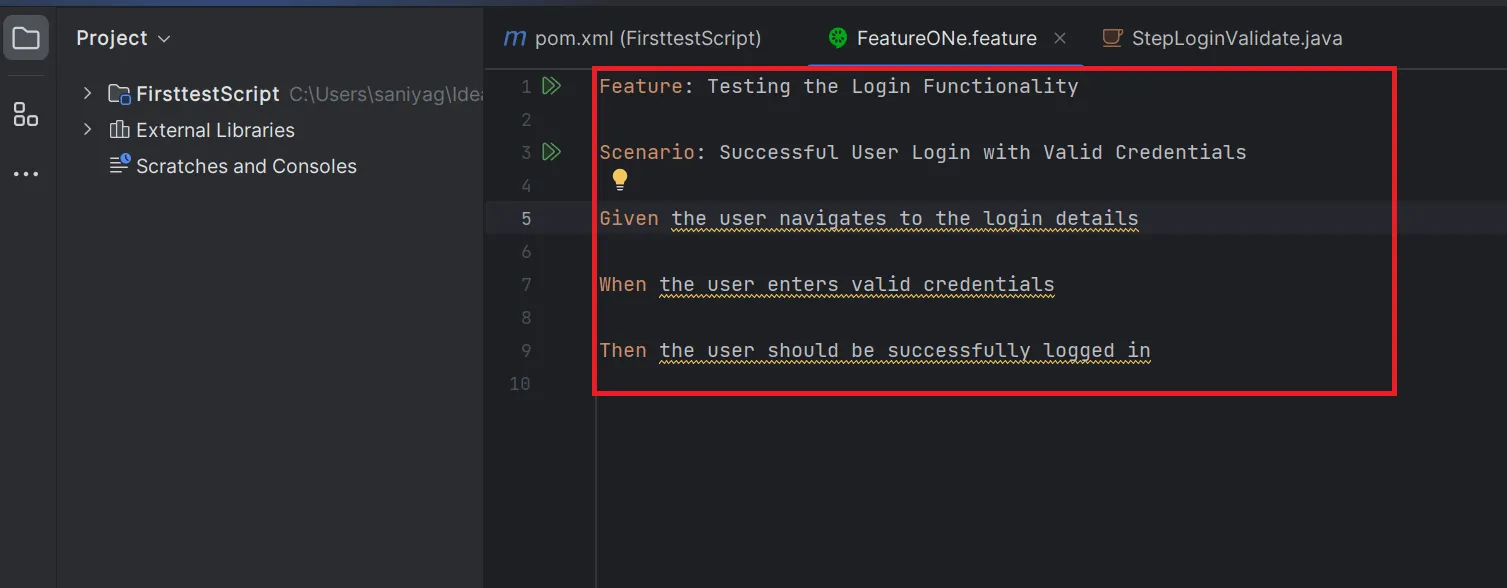
Feature: This keyword defines a wide description of the feature or functionality being tested. A Gherkin file typically starts with a Feature definition.
- Feature: Testing the Login Functionality
Scenario: A scenario represents a specific test case that portrays a particular function or behavior of the software application. Each Scenario is distinct and has to possess a unique name.
- Scenario: Successful User Login with Valid Credentials
Scenario Outline: This keyword creates a scenario template that can be executed with various data sets called scenario examples.
- Scenario Outline: User Login with Different Roles
Examples: Specify different input data sets for a Scenario Outline followed by a table with headers acting as placeholders in the Scenario Outline.
- Examples:
| Role | Username | Password |
| Admin | adminuser | password1 |
| Customer | custuser | password2 |
Given: Describe the initial preconditions or context for the scenario. It sets up a test by defining a system's initial state.
- Given the user navigates to the login details
When: Represents an action or event in the scenario. It describes a specific user interaction or a system behavior under examination.
- When the user enters valid credentials
Then: Specify an anticipated outcome or result of the scenario. It outlines an expected behavior or state of the system following the action mentioned in the "When" step.
- Then the user should be successfully logged in
And: Include additional steps within a scenario, thus ensuring conciseness and readability by preventing repetitive keywords
- And the user should be able to see the dashboard
But: Employed for supplementary steps, especially when the additional step signifies unexpected or adverse outcomes.
- But the user shouldn't have access to the admin panel
These Gherkin keywords establish the foundation for BDD scenarios, thus facilitating the creation of structured and easily comprehensible specifications for all development team members.
What Are Step Definitions in Cucumber?
Step definitions are the code that implements each step in a scenario. They are written in the language used for the Gherkin steps. The most common languages for Cucumber step definitions are:
- Ruby: Ruby is the original language in Cucumber's development and remains a popular choice.
- Java: Java, another widely-used language for writing step definitions with Cucumber, is also a popular choice.
- JavaScript: JavaScript is usually for testing web applications, thanks to the popularity of Node.js in web development.
Note: Run your Cucumber step definitions against 10,000+ real browser and OS combinations on the TestMu AI cloud grid. Try TestMu AI Now!
How do Step Definitions Work
Step definitions link human-readable Gherkin scenarios and automation codes that perform the corresponding actions. Here's how they work:
- Write Gherkin Scenarios: Write Gherkin scenarios in a Given-When-Then format, describing the system's behavior in a human-readable language.
- Map Gherkin Steps to Step Definitions: Each Gherkin step, like Given, When, Then, is mapped to a corresponding step definition. The choice of programming languages, such as Java, JavaScript, Ruby, or Python, depends on the specific testing framework.
- Step Matching: Cucumber matches each Gherkin step to a step definition using Cucumber Expressions by default, with regular expressions as an option. For example, "Given I have 5 apples" matches the pattern "I have {int} apples" and passes 5 to the code.
- Automation Code Execution: Once a step definition matches, the associated automation code executes. This code performs interactions, actions, or assertions on the system under test to ensure that it behaves as per expectations.
- Parameterization: Step definitions usually have parameters extracted from Gherkin steps with regular expressions. Such parameters serve as input for the automation code, thus making scenarios flexible and reusable.
- Reporting and Feedback: During a test scenario execution, the testing framework offers feedback, indicating whether every step passed or failed. Such feedback identifies the possible success or failure of that scenario and points to steps needing further investigation if they fail.
Each Gherkin step (Given, When, Then, And, But) has a matching step definition in your language, so Cucumber can execute and verify the scenario automatically. The keywords themselves are covered in the Gherkin section above.
How Do You Write a Cucumber Test With Maven and JUnit?
This example wires up a login test end to end in Java with Maven and JUnit. Start by adding the Cucumber dependencies to your pom.xml:
<dependencies>
  <dependency>
    <groupId>io.cucumber</groupId>
    <artifactId>cucumber-java</artifactId>
    <version>7.22.1</version>
    <scope>test</scope>
  </dependency>
  <dependency>
    <groupId>io.cucumber</groupId>
    <artifactId>cucumber-junit</artifactId>
    <version>7.22.1</version>
    <scope>test</scope>
  </dependency>
  <dependency>
    <groupId>junit</groupId>
    <artifactId>junit</artifactId>
    <version>4.13.2</version>
    <scope>test</scope>
  </dependency>
</dependencies>
Keep all io.cucumber artifacts on the same version. This example uses the JUnit 4 runner (cucumber-junit); on newer projects you can run Cucumber on the JUnit 5 Platform with cucumber-junit-platform-engine instead.
Next, write the scenario in a login.feature file:
Feature: User Login

  Scenario: Successful login with valid credentials
    Given the user is on the login page
    When the user enters a valid username and password
    And clicks the login button
    Then the user is redirected to the dashboard
Then implement the glue code in a LoginSteps.java step definition file:
import io.cucumber.java.en.Given;
import io.cucumber.java.en.When;
import io.cucumber.java.en.Then;
import static org.junit.Assert.assertTrue;

public class LoginSteps {

    @Given("the user is on the login page")
    public void user_on_login_page() {
        // navigate the WebDriver to the login page
    }

    @When("the user enters a valid username and password")
    public void user_enters_credentials() {
        // find the username and password fields and type valid values
    }

    @When("clicks the login button")
    public void clicks_login() {
        // click the submit button
    }

    @Then("the user is redirected to the dashboard")
    public void user_on_dashboard() {
        assertTrue(true); // assert the dashboard URL or element is present
    }
}
Finally, create a TestRunner class that ties the feature files to the glue code and runs them:
import io.cucumber.junit.Cucumber;
import io.cucumber.junit.CucumberOptions;
import org.junit.runner.RunWith;

@RunWith(Cucumber.class)
@CucumberOptions(
    features = "src/test/resources/features",
    glue = "stepdefinitions",
    plugin = {"pretty", "html:target/cucumber-report.html"}
)
public class TestRunner {
}
Run it with mvn test. Cucumber reads the feature file, matches each step to its definition, and produces an HTML report. To run it on every push, wire it into Cucumber with Jenkins.
Feature files read like plain English, but the step definitions behind them are still hand-written and hand-maintained. That upkeep is where a BDD suite slows down as it grows.
KaneAI, the GenAI-native testing agent from TestMu AI, closes that gap:
- Plain-English authoring - Describe a scenario the way you write Gherkin, and KaneAI turns it into a runnable test, no glue code required.
- Self-healing tests - When the UI shifts, KaneAI updates the affected steps automatically, so refactors stop breaking your suite.
- Two-way editing - Tweak the test in plain English or in code, and both stay in sync as your scenarios evolve.
- Multi-framework export - Export generated tests to Selenium, Playwright, Cypress, or Appium and drop them straight into your pipeline.
- Cloud-scale runs - Execute across 10,000+ real browser, OS, and device combinations on the TestMu AI grid, with logs and video.

How Does Cucumber Compare to Selenium and TestNG?
These two comparisons come up constantly, and in both cases the tools solve different problems rather than competing.
Cucumber vs Selenium
Cucumber and Selenium are not alternatives; they work together. Selenium automates the browser, while Cucumber describes the behavior in plain language and organizes the tests around it.
| Aspect | Cucumber | Selenium |
|---|---|---|
| What it is | A BDD framework for readable scenarios | A browser automation library |
| Language layer | Gherkin plus glue code | Direct WebDriver API calls in code |
| Main role | Structure, readability, collaboration | Driving the actual browser |
| Used together? | Yes. Cucumber step definitions call Selenium to act on the UI. | |
TestNG vs Cucumber
TestNG is a test runner and assertion framework; Cucumber is a BDD layer. Cucumber often uses JUnit or TestNG underneath to actually execute its scenarios.
| Aspect | TestNG | Cucumber |
|---|---|---|
| Purpose | A test runner and assertion framework | A BDD layer for behavior-first tests |
| Test style | Annotation-driven Java test methods | Gherkin scenarios mapped to step definitions |
| Best audience | Developers and SDETs | Mixed technical and business stakeholders |
When Should You Use Cucumber Testing?
Use Cucumber testing when your team practices BDD, needs acceptance tests, or wants non-technical stakeholders to help write and read Gherkin scenarios for end-to-end and regression testing.
Here are a few situations where Cucumber testing can be particularly beneficial.
- BDD projects - A shared Gherkin language lets teams agree on behavior; if weighing approaches, compare TDD vs BDD.
- Acceptance testing - Verify the application meets its requirements from the user's perspective.
- Non-technical stakeholders - Business analysts and product owners can write and review scenarios in plain Gherkin.
- End-to-end testing - Exercise the whole workflow, including external systems and databases.
- Regression testing - Defined scenarios act as a safety net that catches breakage from new changes.
- Integration testing - Confirm that a system's components and modules interact as expected.
- Documentation - Scenarios serve as executable, readable documentation of how the system behaves.
- Continuous integration - Run the suite on each commit to keep the app stable as it evolves.
BDD projects that use Cucumber still need efficient cross-browser testing, since browser differences directly affect a web application's quality and user experience. Cloud testing platforms like TestMu AI address that need.

What Are the Limitations and Challenges of Cucumber Testing?
Cucumber is one of the most widely used BDD and acceptance testing tools, but it has limitations worth knowing, each with a practical fix. If these become blockers, consider a Cucumber alternative.
- Slow execution - Suites slow down as they grow since each scenario boots the app and drives the UI. Keep Cucumber for end-to-end and lean on unit and integration tests for fast feedback.
- UI-fragile tests - Scenarios tied to UI elements break on minor UI changes. Write behavior-level steps and use stable locators or page objects.
- Maintenance overhead - Many feature files and step definitions drift over time. Review and refactor regularly, reuse step definitions, and organize with tags.
- Data management - Complex test data is hard to reuse and reset. Use fixtures or factories and database rollbacks, or a data-driven testing approach.
- Ambiguous language - Plain Gherkin can be read differently by different people. Agree scenarios with the team and keep a consistent Given-When-Then style.
- Limited coverage and precision - End-to-end scenarios miss edge cases and low-level detail that unit or integration tests catch, and natural language lacks code-level precision.
- Skill and setup cost - It still takes technical skill to wire step definitions and integrate with build and CI tools. Train the team on Gherkin and testing fundamentals.
What Are the Best Practices for Writing Cucumber Scenarios?
Good scenarios are more than a word jumble. Here are the key Cucumber best practices for scenario writing:
- Write scenarios early - Draft them before the code so they define behavior and surface issues before implementation starts.
- Collaborate across roles - Write scenarios with developers, QA, and business together so they reflect a shared understanding, not one viewpoint.
- One rule per scenario - Keep a single When-Then pair; multiple Whens and Thens signal the scenario is doing too much.
- Limit scenarios per feature file - Around a dozen stays readable; split large functionality into subfeatures with their own files.
- Remove throwaway scenarios - Delete early scenarios that only checked basic functionality once other tests cover the same ground.
- Balance abstraction and detail - Avoid scenarios so high-level they hide the concept, and drop incidental detail that buries the point.
- Keep scenarios behavior-driven - Describe what the user does, not UI steps like button names or field captions.
- Use few steps - Limit steps and aim for two to three "Ands" per Given, When, or Then to stay readable.
- Avoid first-person "I" - Use a named third-person role so it stays clear which user the scenario refers to.
- Name scenarios well - Use descriptive titles and descriptions that state the business rule, not labels like "Scenario1".
- Reuse step definitions - Share step definitions across similar steps to cut duplication and ease maintenance.
- Keep clauses and tenses consistent - Separate Given, When, and Then; use present-perfect for Given and present tense for When and Then.
- Agree a style guide - Capitalize Gherkin keywords, keep step text lowercase, and use lowercase hyphenated tags so scenarios stay consistent.
How Is AI Changing Cucumber Testing?
AI is changing Cucumber testing by drafting Gherkin scenarios from user stories, generating step definitions for new steps, and flagging duplicate or inconsistent steps across feature files.
Generated Gherkin often reads well but drifts into implementation detail, with clicks and CSS selectors inside Given-When-Then steps. That undermines Cucumber's main value: scenarios business stakeholders can read and agree on.
Keep product owners reviewing AI-drafted scenarios, and reuse existing steps before accepting new ones. Our guide to ai in test automation covers where AI fits in a BDD workflow.
Is Cucumber Testing Right for Your Team?
Cucumber testing is an efficient approach that promotes collaboration and a shared understanding of application behavior. Plain-language Gherkin specifications bridge communication gaps, streamline testing, and improve software quality.
Teams that adopt Cucumber resolve issues early in the development cycle and ship high-quality software on time. To go deeper or prepare for interviews, review these Cucumber interview questions.
Author

Veethee Dixit
Blogs: 9


Veethee Dixit is a seasoned content strategist and freelance technical writer specializing in SaaS platforms and AI-driven testing technologies. She has over 8 years of hands-on experience writing SEO focused technical content, simplifying complex topics in software testing, and collaborating with product marketing teams to develop high converting blogs, documentation, whitepapers, and tutorials. She holds a Bachelor of Engineering in Computer Science and has authored 50+ learning hub articles in the software testing domain. Her work has been featured in leading software testing newsletters and cited by top technology publications. Veethee has played a key role in translating complex testing workflows into actionable guides, helping audiences implement automation strategies with clarity and confidence.
Reviewer

Himanshu Sheth
Reviewer
Himanshu Sheth is the Director of Marketing (Technical Content) at TestMu AI, with over 8 years of hands-on experience in Selenium, Cypress, and other test automation frameworks. He has authored more than 130 technical blogs for TestMu AI, covering software testing, automation strategy, and CI/CD. At TestMu AI, he leads the technical content efforts across blogs, YouTube, and social media, while closely collaborating with contributors to enhance content quality and product feedback loops. He has done his graduation with a B.E. in Computer Engineering from Mumbai University. Before TestMu AI, Himanshu led engineering teams in embedded software domains at companies like Samsung Research, Motorola, and NXP Semiconductors. He is a core member of DZone and has been a speaker at several unconferences focused on technical writing and software quality.
On This Page
- What Is Cucumber Testing?
- What Are the Advantages of Cucumber Testing?
- How Does Cucumber Testing Work?
- Which Language Is Used in Cucumber?
- What Are Step Definitions in Cucumber?
- How Do You Write a Cucumber Test With Maven and JUnit?
- How Do You Organize Cucumber Tests With Tags and Hooks?
- How Does Cucumber Compare to Selenium and TestNG?
- When Should You Use Cucumber Testing?
- What Are the Limitations and Challenges of Cucumber Testing?
- What Are the Best Practices for Writing Cucumber Scenarios?
- How Is AI Changing Cucumber Testing?
- Is Cucumber Testing Right for Your Team?
Cucumber Testing FAQs
Did you find this page helpful?
More Related Learning Hubs
TestMu AI forEnterprise
Get access to solutions built on Enterprise
grade security, privacy, & compliance
- Advanced access controls
- Advanced data retention rules
- Advanced Local Testing
- Premium Support options
- Early access to beta features
- Private Slack Channel
- Unlimited Manual Accessibility DevTools Tests