
Power Your Software Testing with AI Agents and Cloud
The Native AI-Agentic Cloud Platform to Supercharge Quality Engineering. Test Intelligently and Ship Faster.


- TestMu AI (Formerly LambdaTest)
- /
- Blog
- /
- TDD vs BDD: Differences, Examples, and Where ATDD Fits
TDD vs BDD: Differences, Examples, and Where ATDD Fits
TDD vs BDD: TDD tests code units first, BDD tests user behavior in plain-English scenarios. Compare both with ATDD, with a working Cypress BDD example.
Last Updated on:
Test-Driven Development (TDD), Behavior-Driven Development (BDD), and Acceptance Test-Driven Development (ATDD) all write tests before code, but each checks a different thing: TDD checks the code, BDD checks the behavior, and ATDD checks the business requirement.
These three approaches sit inside the wider Agile development methodology, and a team can combine them rather than pick only one.
See BDD interview questions to prepare for a related interview.
TL;DR
- TDD, BDD, and ATDD all write a test before the code, but each checks a different thing: TDD checks the code, BDD checks the behavior, and ATDD checks the business requirement.
- Test-Driven Development follows a red-green-refactor cycle: write a failing test, write the minimum code to pass it, then refactor.
- Behavior-Driven Development writes test scenarios in Given-When-Then form using Gherkin syntax, most commonly with the Cucumber framework.
- Acceptance Test-Driven Development follows a Discuss, Distill, Develop, Demo cycle that involves business stakeholders in defining acceptance criteria.
- TDD, BDD, and ATDD are not mutually exclusive; a team can combine all three inside the same Agile project.
- AI coding agents can now draft the failing test, the Gherkin scenario, or the acceptance criterion first, but a developer still has to confirm it reflects what the business wants.
TDD vs BDD vs ATDD: Key Differences
TDD, BDD, and ATDD all write a test before the code. They differ in what the test describes, who writes it, and which language it uses:
| Criteria | TDD | BDD | ATDD |
|---|---|---|---|
| What the test checks | A unit of code works as the developer intends | The system behaves as users expect | A feature meets the business acceptance criteria |
| Language | Code in the project's test framework | Plain-English Given-When-Then scenarios in Gherkin | Plain-language acceptance criteria and tests |
| Who writes it | Developers | Product owners, testers, and developers together | Business stakeholders, testers, and developers together |
| Cycle | Red, green, refactor | Discover, formulate scenarios, automate | Discuss, distill, develop, demo |
| Test level | Unit | Feature or end-to-end | Acceptance |
| Typical tools | JUnit, TestNG, NUnit, pytest, node:test | Cucumber, SpecFlow, Behave, Cypress with a Cucumber preprocessor | FitNesse, Robot Framework, Concordion, Cucumber |
| Main benefit | Well-designed, regression-safe code | Shared understanding of behavior between business and engineering | Features built to agreed acceptance criteria |
The Same Feature in TDD and BDD
The difference is clearest on one feature. For a store's shopping cart, a TDD developer starts with a failing unit test for the cart total, written before the cartTotal function exists:
const test = require('node:test');
const assert = require('node:assert');
const { cartTotal } = require('./cart');

test('adds item prices times quantity', () => {
  assert.strictEqual(cartTotal([{ price: 101, qty: 1 }, { price: 20, qty: 2 }]), 141);
});

test('returns 0 for an empty cart', () => {
  assert.strictEqual(cartTotal([]), 0);
});
Run against an empty stub with Node.js 20, both tests fail, which is the red step. After writing the minimum implementation, both pass, which is the green step:
# Red: stub returns undefined
not ok 1 - adds item prices times quantity
not ok 2 - returns 0 for an empty cart
# pass 0
# fail 2

# Green: after implementing cartTotal
ok 1 - adds item prices times quantity
ok 2 - returns 0 for an empty cart
# pass 2
# fail 0
A BDD team describes the same store from the shopper's side instead, in a Gherkin scenario such as "Given I open the home page, When I search for iPhone, Then I should see search results." That scenario, run end to end in a browser, is the Cypress example in the BDD section below. The TDD test proves the calculation is right; the BDD scenario proves a shopper can complete the task.
What is Test-Driven Development?
Test-Driven Development is a programming practice implemented from a developer's perspective. In this process, a QA engineer begins designing and writing test cases for every small functionality of an application.
This technique tries to answer a simple question: Is the code valid? The primary purpose of this practice is to modify or write new code only when the tests fail. Consequently, it results in less duplication of test scripts. This technique is mainly popular in Agile development ecosystems. In an ATDD approach, test scripts are written before functional pieces of code.
Pros and Cons of Test-Driven Development
TDD is a test-first practice, where automated test scripts are typically written before implementing the product's actual features. However, TDD has its following pros and cons.
Pros of Test-Driven Development:
- Reduced development cost - The development process in TDD is split into smaller chunks to facilitate the detection of issues at the early stages of design and development.
- Focus on design and architecture - Writing tests before the implementation makes the development process more seamless and efficient.
- Improved code coverage: A well-designed system can achieve 100 percent code coverage through TDD.
- Code visibility - Tests are written to verify minor functionalities, making refactoring and maintaining the code easy.
- Detailed documentation - Since tests are written to verify micro-level functionalities, writing documentation becomes easy.
Cons of Test-Driven Development:
- Bugs leading to faulty code - Tests could contain bugs, resulting in faulty implementation. This can be averted by using the right BDD framework, performing detailed code review, and more.
- Costly architectural issues - If the generated test code is not in line with the desired architecture, it could result in huge losses.
- Slowness in development - Creating test cases before code development slows product development. In addition, framing test cases may take a huge time as the actual implementation is not available at that time.
- Requires prior experience - Prior experience with TDD is a must since many teams commit the mistake of not running tests at the red phase.
Adopting TDD, BDD, or ATDD can greatly enhance the quality of your software by encouraging early testing and collaboration. However, creating and maintaining test cases can often be time-consuming and complex. This is where AI test assistants such as KaneAI can help.
KaneAI by TestMu AI is a GenAI native end-to-end AI software testing assistant designed with industry-first features for test authoring, management, and debugging, tailored specifically for high-speed quality engineering teams. Built from the ground up, KaneAI empowers users to create and refine complex test cases using natural language, dramatically reducing the time and expertise needed to begin test automation.

How to Implement Test-Driven Development?
Test-Driven Development prefers testing instead of the implementation phase. As all the tests pass, it signals the end of the first iteration. However, if more features have to be implemented, all the phases must be repeated with new feature tests.
The diagram below summarizes the flow of TDD:
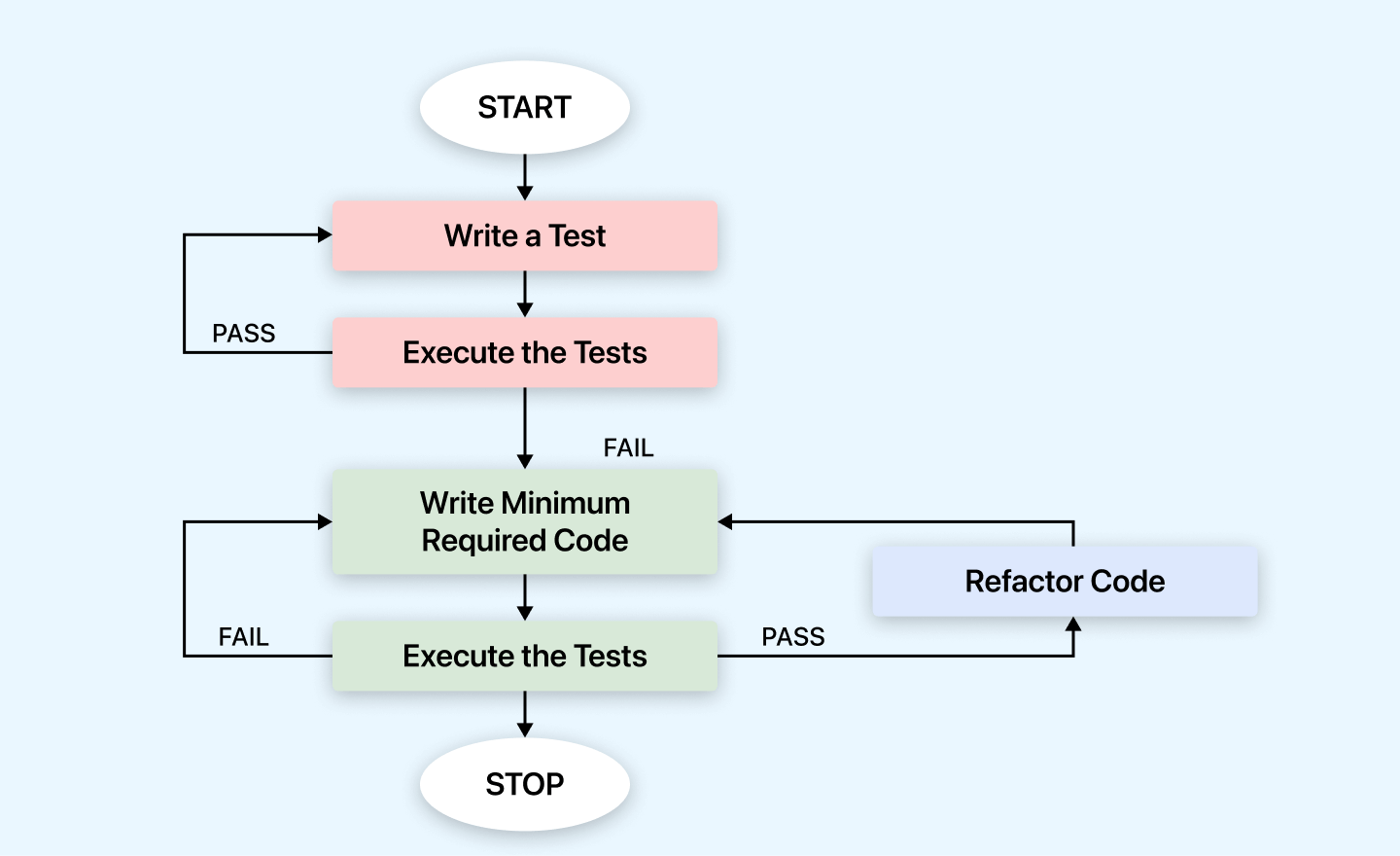
- Write a test - First, you create a test focusing on a small part of the feature you want to add to your project. The trick here is that you write the test in a way that is expected to fail because you haven't built that feature yet. So, when it fails, it's called a failing test or the red phase.
- Execute the tests - Next, you actually run the test you just wrote. Since you haven't built the feature yet, the test will fail, just as you predicted. This confirms that your test is working as expected. The exact commands for each step are in test-driven development command line.
- Write minimum required code - You start writing the minimum code needed to make that failing test pass. The goal isn't to create a perfect or fully-featured solution but just enough to satisfy the test and turn its status from red to green.
- Run the tests again - After writing the code, you run the test again. If it passes this time, you've successfully built the basic functionality required by the test. Your test is now green, indicating success.
- Refactor code - With the test passing, you can step back and tidy up your code. This means making it more efficient, readable, and organized without changing its behavior. After refactoring, you run your tests again to ensure everything works as expected. This step ensures that your improvements don't introduce any new issues.
- Repeat - This cycle doesn't end here. You continue by writing more tests, writing the minimum code to pass them, and then refactoring. Each iteration adds a bit more functionality to your project until you've either implemented the entire feature or achieved the desired level of coverage.
In this blog on TDD vs BDD vs ATDD, we have covered what TDD is, including its advantages and disadvantages. In the next section, we will look into BDD.
What is Behavior-Driven Development?
Behavior-Driven Development is derived from the Test-Driven Development methodology. In BDD, tests are based on systems behavior. The BDD approach describes different ways to develop a feature based on its behavior. In most cases, the Given-When-Then approach is used for writing test cases.
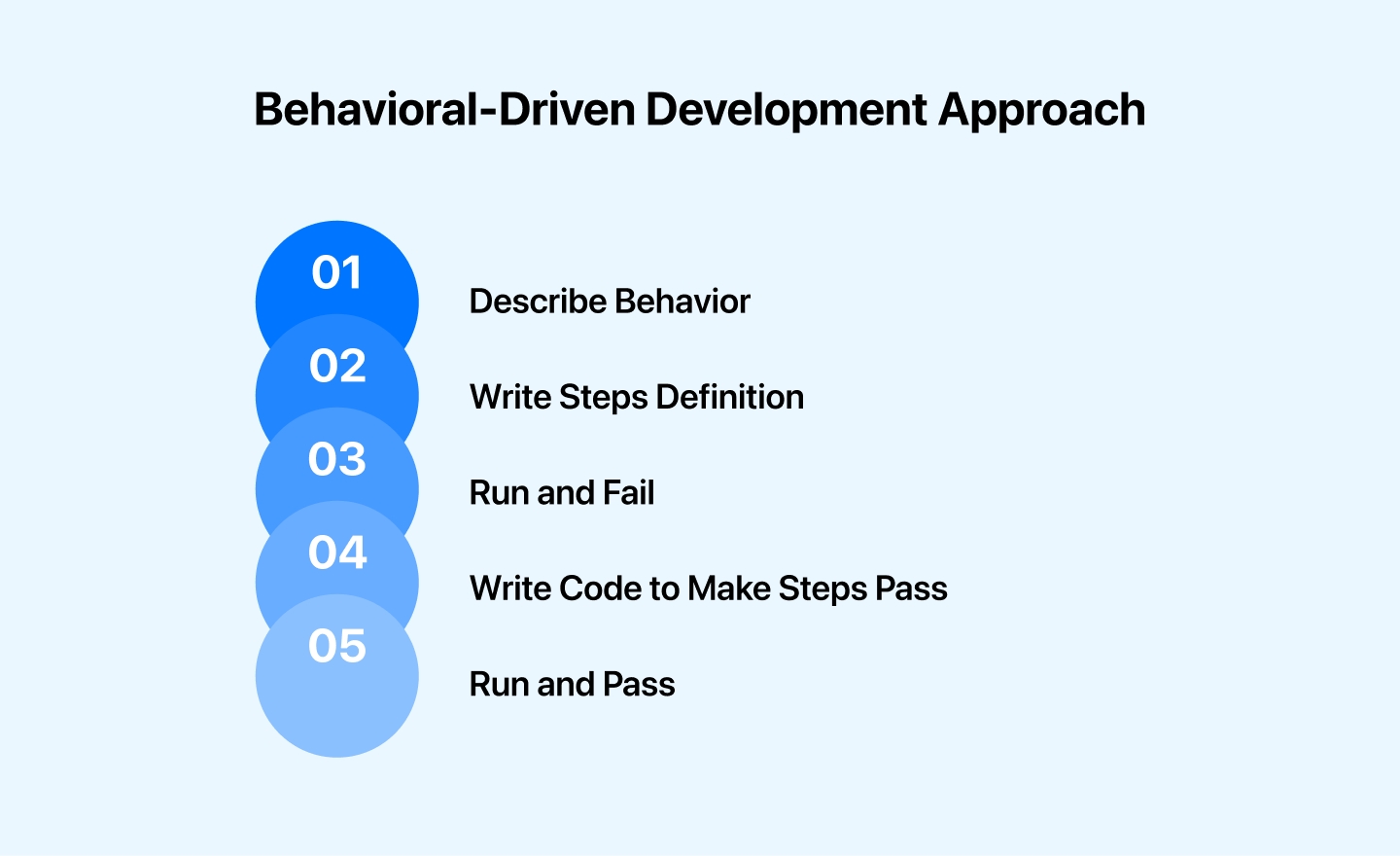
Let's take an example for better understanding:
Scenario: User successfully signs in
- Given the user is on the login page.
- When the user enters a valid username, "johnduo123" and password.
- And the user submits the login form.
- The user should be redirected to the home page.
- The user should see the welcome message "Welcome, johnduo123".
Debugging the errors in the latter stages of the development life cycle often proves very expensive. In most cases, ambiguity in understanding the requirements is the root cause. Therefore, one must ensure that all the development efforts remain aligned toward fulfilling pre-determined requirements. BDD allows developers to do the above by:
- Allowing the requirements to be defined in a standard approach using simple English.
- Providing several ways to illustrate real-world scenarios for understanding requirements.
- Providing a platform enables the tech and non-tech teams to collaborate and understand the requirements.
Pros and Cons of Behavior-Driven Development
BDD is an approach that involves managers, testers, developers, etc., in the whole process. As a result, BDD offers a huge number of benefits. Let's look at some of the major ones in this section.
Pros of Behavior-Driven Development:
- Improved communication - Creating scenarios requires close coordination between customers, managers, developers, testers, etc. This unifies the team in understanding the product behavior.
- Reduced cost of quality control - Automated acceptance tests are used to depict the scenarios, which in turn helps in reducing the costs involved in inspecting the software quality.
- Accurate task estimation - Since the expected behavior is predicted before, there are few chances to change the software application's architecture.
- Better user experience - The scenarios and tests written before development consider the user's perspective. The focus is on the desired behavior rather than on implementing features.
- Excellent documentation - When a certain test fails, the specification is updated, resulting in detailed documentation.
Cons of Behavior-Driven Development:
- BDD tools struggle with parallelization - Cucumber and SpecFlow do parallelization or support parallel testing in a sub-optimal manner. They parallelize at the feature file level. It implies that if you want to run 50 tests in parallel, you need to have 50 feature files. That's a lot of feature files. Teams blocked by this ceiling often evaluate a Cucumber alternative that parallelizes at the scenario level.
- Writing incorrect Gherkin syntax - The issue is that most of us do not follow the correct Gherkin syntax as prescribed by the BDD creators. Remember that Given-When-Then steps must appear in order and cannot be repeated.
You can also Subscribe to the TestMu AI YouTube Channel and stay updated with the latest tutorials around Selenium, automated testing, and more.
How to Implement Behavior-Driven Development?
As we know, BDD is an extension of TDD. BDD plays a crucial role in cutting back the bugs and errors you would encounter at later stages of product development. Effective test automation strategy, including scenarios, can be developed by involving different teams (e.g., engineering, product management, marketing, etc.).
The BDD approach allows technical and non-technical teams to collaborate on knowledge and ideas. It's time for some action.
Cucumber is a framework that supports BDD; anyone can write specifications in plain English using Gherkin. It is as simple as adding a test from the business value point of view, as I like to call business-centric test automation.
If you are new to Cucumber, you can also check out the step-by-step tutorial on Selenium Cucumber with examples.
The original cypress-cucumber-preprocessor package has not been released since version 4.3.1 in December 2021. Its maintained successor is @badeball/cypress-cucumber-preprocessor, and the steps below follow its quick-start guide.
- Install Cypress, the preprocessor, and the esbuild bundler.
npm install --save-dev cypress @badeball/cypress-cucumber-preprocessor @bahmutov/cypress-esbuild-preprocessor esbuild
const { defineConfig } = require("cypress");
const createBundler = require("@bahmutov/cypress-esbuild-preprocessor");
const { addCucumberPreprocessorPlugin } = require("@badeball/cypress-cucumber-preprocessor");
const { createEsbuildPlugin } = require("@badeball/cypress-cucumber-preprocessor/esbuild");

module.exports = defineConfig({
  e2e: {
    specPattern: "**/*.feature",
    async setupNodeEvents(on, config) {
      await addCucumberPreprocessorPlugin(on, config);
      on("file:preprocessor", createBundler({ plugins: [createEsbuildPlugin(config)] }));
      return config;
    },
  },
});
Feature: Home page

  Scenario: Shopper searches the store
    Given I open the home page
    When I search for "iPhone"
    Then I should see search results for "iPhone"
import { Given, When, Then } from "@badeball/cypress-cucumber-preprocessor";

Given("I open the home page", () => {
  cy.visit("https://ecommerce-playground.lambdatest.io/");
});

When("I search for {string}", (term) => {
  cy.get('#search input[name="search"]').first().type(`${term}{enter}`);
});

Then("I should see search results for {string}", (term) => {
  cy.contains("h1", `Search - ${term}`).should("be.visible");
  cy.get(".product-thumb").should("have.length.greaterThan", 0);
});
npx cypress run
I ran this project with Cypress 16.1.1 and version 28.0.0 of the preprocessor. The scenario passed:
  Running:  home.feature                                   (1 of 1)

  Home page
    √ Shopper searches the store (10509ms)

  1 passing (17s)
One troubleshooting note from that run: inside a VS Code terminal, Cypress failed to start with "bad option: --smoke-test" because VS Code sets the ELECTRON_RUN_AS_NODE environment variable. Unsetting it in that shell fixed the error.
Gherkin Keywords
Keywords are used to give structure and meaning to the executable specifications. Every specification or a feature file starts with one of the keywords:
- Feature
- Scenario
- Scenario Outline
- Background
Feature: It is the primary key in the Gherkin; it is used to describe the specification name.
Feature: Hello
In order to start a conversation with someone
chat bot needs to start with greetings
so the user gets the interactive feel.
Scenario: It is the collection of actions or steps that need to be performed to fulfill a test objective.
Feature: Greetings
In order to start the conversation with someone
chat bot needs to start with greetings
so the user gets the interactive feel.

Scenario: example
Given greeting has been set to "hello"
When name is "Frank"
Then greetings equals "Hello Frank"
Scenario Outline: It is used when the same scenario needs to be executed with multiple data sets. Scenario Outline is always defined with the Examples keyword. That's where data sets can be defined to execute the same scenario multiple times. Scenario Outline is used for data-driven tests.
Feature: Greetings
In order to start the conversation with someone
chat bot needs to start with greetings
so the user gets the interactive feel.

Scenario Outline: example
Given greeting has been set to"<greeting>"
When name is "<name>"
Then greetings equals "<conversation>"
Examples:
| greeting | name | conversation |
| Hello      | Frank   | Hello Frank   |
| Hi         | Maria   | Hi Maria      |
| Hey        | Johnny  | Hey Johnny    |
Implementation Example:
let myName, greeting, finalword
Given("greeting has been set to {string}", setGreeting => {
greeting = setGreeting + ' '
})

When("name is {string}", setName => {
myName = setName
finalString = greeting.concat(myName)
})

Then("greetings equals {string}", expectedValue => {    expect(finalword).to.equal(expectedValue)
})
Background: It is used to define a step or series of steps common to all the tests included in the feature file. The steps defined as part of the background get executed before each scenario. Adding the Background section is helpful to avoid duplication of feature steps.
Feature: Background Example
Background:
Given greeting has been set
Scenario: example1
When name is "Frank"
Then greetings equals "Hello Frank"
Scenario: example2
When name is "Maria"
Then greetings equals "Hello Maria"
In this blog on TDD vs BDD vs ATDD, we have covered TDD and BDD so far, including their advantages and disadvantages. In the next section, we will look into ATDD.
What is Acceptance Test-Driven Development?
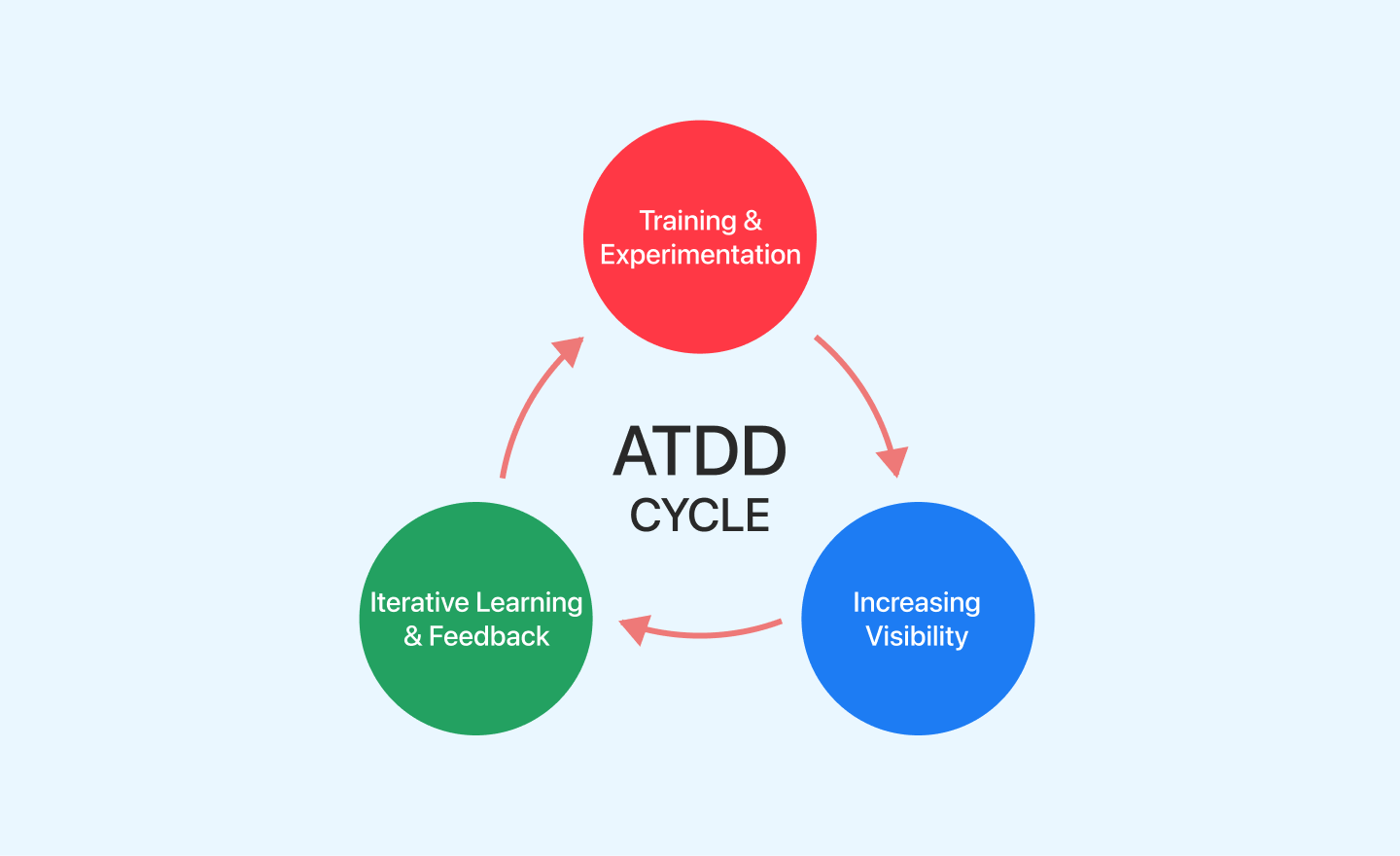
In the Acceptance Test-Driven Development technique, a single acceptance test is written from the user's perspective, mainly focusing on satisfying the system's functional behavior. ATDD extends TDD by focusing on meeting the business requirements before writing code.
ATDD is a collaborative approach involving developers, testers, and business stakeholders. The following are some of the critical practices in ATDD:
- Exploring and examining real-world scenarios.
- Selecting the acceptance criteria for those test scenarios.
- Automating the acceptance of test cases.
- Focusing on the development of those use cases.
Pros and Cons of Acceptance Test-Driven Development
In ATDD, collaboration takes place with stakeholders to determine acceptance criteria for new features, like special promotions, loyalty programs, or integration with third-party payment gateways. However, ATDD has a bunch of pros and cons.
Pros of Acceptance Test-Driven Development:
- Faster Collaboration - Foster clear communication between users and developers, ensuring everyone is on the same page.
- Crystal-Clear Requirements - Gain a deeper understanding of user needs early on, leading to the development of the right features and functionalities.
- Evolving Requirements and Testing - Continuously refine your development requirements and test cases based on user feedback, prioritizing what truly matters to your customers.
Cons of Test-Driven Development:
- Learning curve - Teams unfamiliar with the technique may find the collaborative aspect of ATDD, which involves non-technical stakeholders, to have a steeper learning curve.
- Time required - The extensive scope of end-to-end testing in ATDD can be time-consuming, slowing development.
- Availability of stakeholders - Delays in the stakeholders' availability may impact the development process, as ATDD depends on ongoing engagement with them.
How to Implement Acceptance Test-Driven Development?
In simple terms, there isn't a fixed way to go about using the ATDD cycle, but generally, it involves four main steps that are common across different ATDD approaches:
- Discuss - This step is about what the customer wants. It means understanding what the end product should look like from the customer's perspective. Testers and developers sit with the customers, owners, or others involved in the project to review the details and requirements of the proposed features.
- Distill - Here, the focus is on converting the tests into a format the test tool can easily work with. It's like translating the simple English tests into a language the system can understand. This makes it easier to integrate the tests into the development process.
- Develop - This stage is where the actual building of the features happens. ATDD follows a test-first development approach here. This means writing and ensuring the test code before actually implementing the features. Developers only build the features after going through the discussion and distillation stages and ensuring the tests run smoothly. This process continues until the tests pass successfully.
- Demo - Once all the required features are implemented, developers showcase a demonstration to the business stakeholders. It's a way of showing them what has been built and how it works.
For instance, consider that we're developing a new flight booking feature. First, we define the acceptance criteria with the stakeholders:
The user should be able to select flight dates. The system should display available flights for the selected dates.
Based on these criteria, we write the acceptance tests (before the development starts):
describe('Flight Booking', () => {
  it('shows available flights for selected dates', () => {
    cy.visit('/book-flight');
    cy.get('input[name="departure"]').type('2024-06-01');
    cy.get('input[name="returning"]').type('2024-06-10');
    cy.get('button[type="submit"]').click();
    cy.get('.available-flights').should('not.be.empty');
  });
});
The development team ensures these tests pass and align closely with the business requirements.
Can TDD, BDD, and ATDD Work Together?
The best part is that these processes are not mutually exclusive. While it's not unusual for Agile development teams to use one without the other, making these two work together can ensure a higher degree of efficiency in testing use cases, thereby bringing confidence in the performance.
TDD, when used alongside BDD, gives importance to web testing from the developer's perspective, emphasizing the application's behavior. Developers can create separate testing units to implement the specifics to get robust components. This is beneficial since the same component can be used in different places across the software development process.
The combination of ATDD and BDD frameworks can add more value to the software development process. This is where cloud-based testing platforms like TestMu AI can be beneficial since they can be integrated with major TDD and BDD frameworks.
TestMu AI is an AI-powered test orchestration and execution platform using which developers and testers can use the capabilities of TDD, BDD, and ATDD frameworks and perform automation testing at scale on a remote test lab of 3000+ real browsers, devices, and operating systems.
TestMu AI Integrations with tools like Slack, Microsoft Teams, etc., make discussions between the teams efficient and easy. TDD, BDD, or ATDD, the choice is governed by the individual needs of an application or the enterprise.

Note: Run your Cypress, Selenium, and Playwright suites across 3,000+ browser and OS combinations. Try TestMu AI Today!
TDD vs BDD vs ATDD - Which One to Choose?
BDD, TDD, and ATDD have differences and similarities. Although, at the same time, it's not unusual for Agile teams to use one without the other, making the two work together can guarantee a higher degree of efficiency in testing application use cases, thus obtaining greater confidence in their performance.
For instance, an Agile team, alongside TDD, can use the BDD approach to implement a higher level of testing that takes care of technical nuances from the Agile team's point of view, assesses the application's behavior, and finally applies ATDD to align the final product with the overarching business goals.
To implement the specifics, we can create separate testing units to maintain the robustness of different components. It can be beneficial because the same component can be used in other places across an application.
The testing process is based on specifying test scenarios in simple language. Then, automation engineers add TDD parts to test certain specific components. Whether to choose BDD/ATDD over TDD or use a combination of the three methods is a choice ruled by the needs of an application or organization.
Experimenting with BDD and ATDD if you're already doing TDD testing can add value to the Agile process. Using the three together is more accessible, and you don't need to change or rework the existing approach. All it takes is updating the testing framework to adjust the other.
How Are AI Coding Agents Changing TDD, BDD, and ATDD?
AI coding agents now write the failing test, the Gherkin scenario, or the acceptance criterion first, automating the same red-green-refactor and Given-When-Then loops this guide describes. This changes who writes the artifact, not the underlying discipline. TDD still needs a failing test before code, BDD still needs a shared example of behavior, and ATDD still needs an agreed acceptance criterion.
- Agentic TDD loops - Coding agents such as GitHub Copilot and Claude Code can write a failing unit test from a task description, run it, then generate the minimum code needed to turn it green, automating the write-test, run-test, refactor cycle described earlier in this guide.
- AI-generated Gherkin scenarios - Tools that plug into Cucumber can turn a plain-English user story into a Given-When-Then scenario automatically, cutting the manual scenario-writing step that traditionally slowed BDD adoption.
- AI-drafted acceptance criteria - AI test-authoring assistants can convert a product ticket into a first draft of acceptance criteria for an ATDD cycle, which developers and stakeholders then review and refine rather than write from scratch.
None of these agents remove the discussion step. A human still has to confirm the generated test, scenario, or criterion actually reflects what the business wants.
Conclusion
Use TDD for the code your developers own, BDD for user-facing behavior that business and engineering must agree on, and ATDD when acceptance criteria drive what gets built; many teams run all three in the same project. To run BDD scenarios like the one above across real browsers in parallel, TestMu AI Automation Cloud runs existing Cypress, Selenium, and Playwright suites on 3,000+ browser and OS combinations, and the Cypress getting started guide covers the first run.
Author

Enrique
Blogs: 11


Enrique DeCoss, Senior Quality Assurance Manager at FICO is an industry leader in quality strategy with 16+ of experience implementing automation tools. Enrique has a strong background in Testing Tools, API testing strategies, performance testing, Linux OS and testing techniques. Enrique loves to share his in-depth knowledge in competencies including, Selenium, JavaScript, Python, ML testing tools, cloud computing, agile methodologies, and people Management.
Reviewer

Srinivasan Sekar
Reviewer
Srinivasan Sekar is Director of Engineering at TestMu AI, where he leads engineering and open-source initiatives behind the Selenium and Appium automation grid and owns TestMu AI's MCP Server. A committer to Appium and a contributor to Selenium, WebdriverIO, Taiko, and AppiumTestDistribution, he brings over 15 years of experience in quality engineering and open-source technologies. He is the author of the Apress book 'The MCP Standard: A Developer's Guide to Building Universal AI Tools with the Model Context Protocol,' a Certified Kubernetes and Cloud Native Associate, and an international conference speaker. Before TestMu AI he spent over eight years at Thoughtworks as a Principal Consultant and Quality Architect. Srinivasan holds a B.Tech in Information Technology from Anna University.


TDD vs BDD vs ATDD FAQs
Did you find this page helpful?
More Related Blogs

TestMu AI forEnterprise
Get access to solutions built on Enterprise
grade security, privacy, & compliance
- Advanced access controls
- Advanced data retention rules
- Advanced Local Testing
- Premium Support options
- Early access to beta features
- Private Slack Channel
- Unlimited Manual Accessibility DevTools Tests