
HyperExecute: AI Test Orchestration Platform
HyperExecute is an AI-native test orchestration platform that runs your existing Selenium, Playwright or Cypress suite up to 70% faster. Add one YAML file and run it from your CI.


Trusted by 3M+ users globally at


"We have tripled our tests and are now executing tests in less than 2 hours."



"The execution time we got using HyperExecute, that's the major differentiator."


AI Test Orchestration: How It Works
A test orchestration platform decides how automated tests are split, ordered, retried and run across machines in a CI pipeline. HyperExecute is TestMu AI's AI-native orchestration and execution cloud: it runs existing Selenium, Playwright, Cypress and Appium suites on just-in-time VMs from one YAML file. TestMu AI says it is "up to 70% faster than a traditional grid".
 WHY HYPEREXECUTE
HyperExecute vs Selenium Grid: No Hub-to-Node Hops
A Selenium Grid routes every command through a hub to a remote node. HyperExecute runs your test script and browser on one machine, so nothing waits on the network. That is how it runs suites up to 70% faster than a traditional grid.
Run Your First Job Free
- No hub or node hops between a test and its result.
- Fewer infrastructure flakes, so fewer reruns.
- Your existing tests run as-is with one YAML file.

| Aspect | Traditional grid | HyperExecute |
|---|---|---|
| Where the browser runs | On a remote node, behind a hub | On the same VM as the test runner |
| Network hops per command | Runner to hub to node, every command | None within a task |
| Dependencies and logs | On separate components | On the task VM, kept per test |
| Unit of scaling | One remote browser session | One full task VM |
| After the run | Nodes stay up and need patching | Every VM is wiped and torn down |
Lereta cut network traffic this way and ran its tests 70% faster, nearly flake-free. Read the case study
 PARALLEL AT SCALE
Parallel Testing Without CI Shards to Maintain
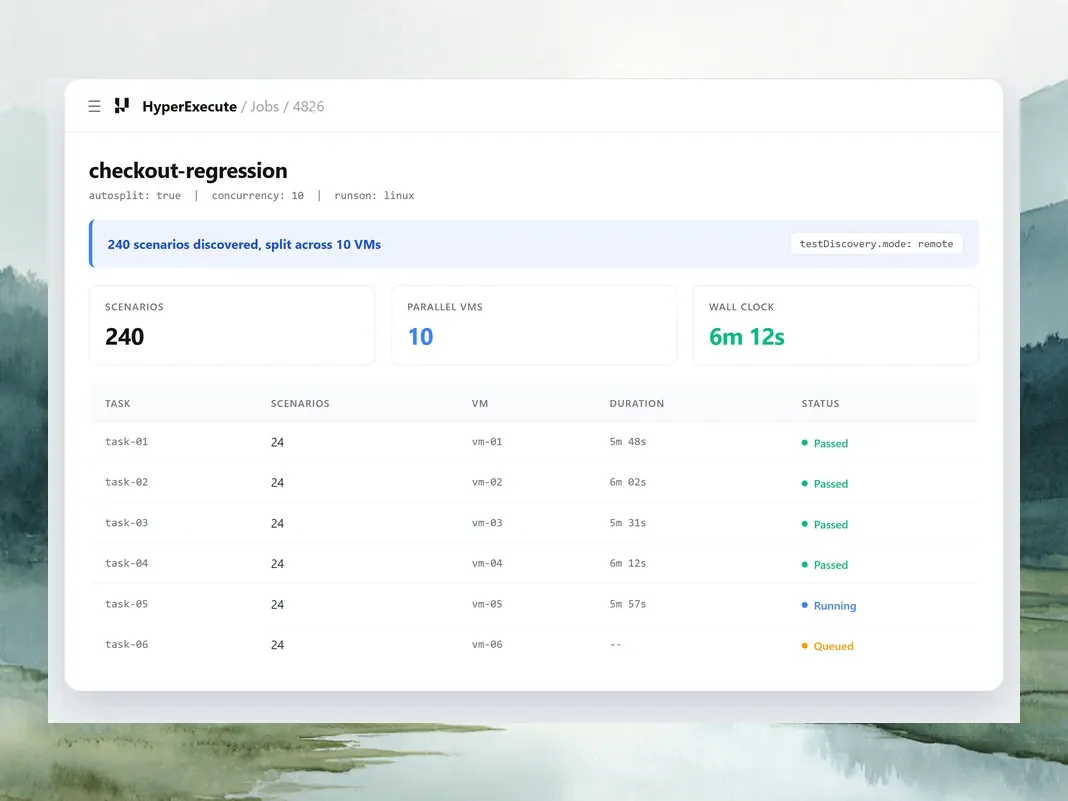
Sharding on your own CI runners means maintaining the runners and the split. HyperExecute splits the suite across fresh VMs from one YAML value.
- Set concurrency in YAML, with no runners to patch.
- Dynamic allocation hands tests to VMs as they free up.
- 10 VMs or 10,000, it's the same job to the platform.
release-regression
autosplit: true · concurrency: 24
24 parallel VMs
Each VM runs
Test runner, browser, dependencies
How the suite splits
By test discovery, no shard scripts
 AI ROOT CAUSE ANALYSIS
AI Root Cause Analysis on Failed Tests
The analysis reads the test's logs and the job's git diff, then names the root cause in 20 to 30 seconds with numbered steps to fix it.
Run Your First Job Free- Separates the root cause from its cascading effects.
- Sorts failures: product, script, environment or no action
- Runs automatically on failures that match your policy.

 FLAKY TEST DETECTION
Flaky Test Detection and Auto-Mute
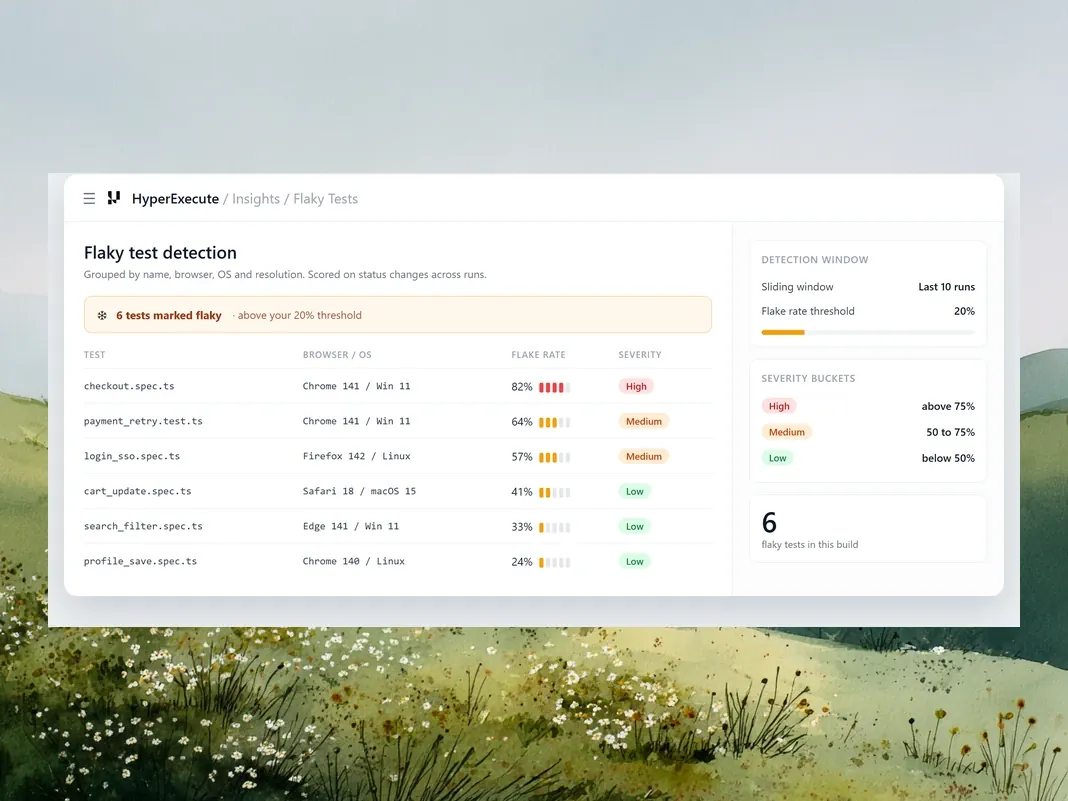
Your tests are grouped by name, browser, OS and resolution, then scored on how often the result flips between runs. Tests that fail five times in a row are muted automatically.
Run Your First Job Free- Sliding window defaults to the last 10 runs.
- Flake rate threshold defaults to 20% and is tunable.
- Severity: high above 75%, medium 50-75%, low below 50%
 AUTO-HEALING
Auto-Healing Broken Locators
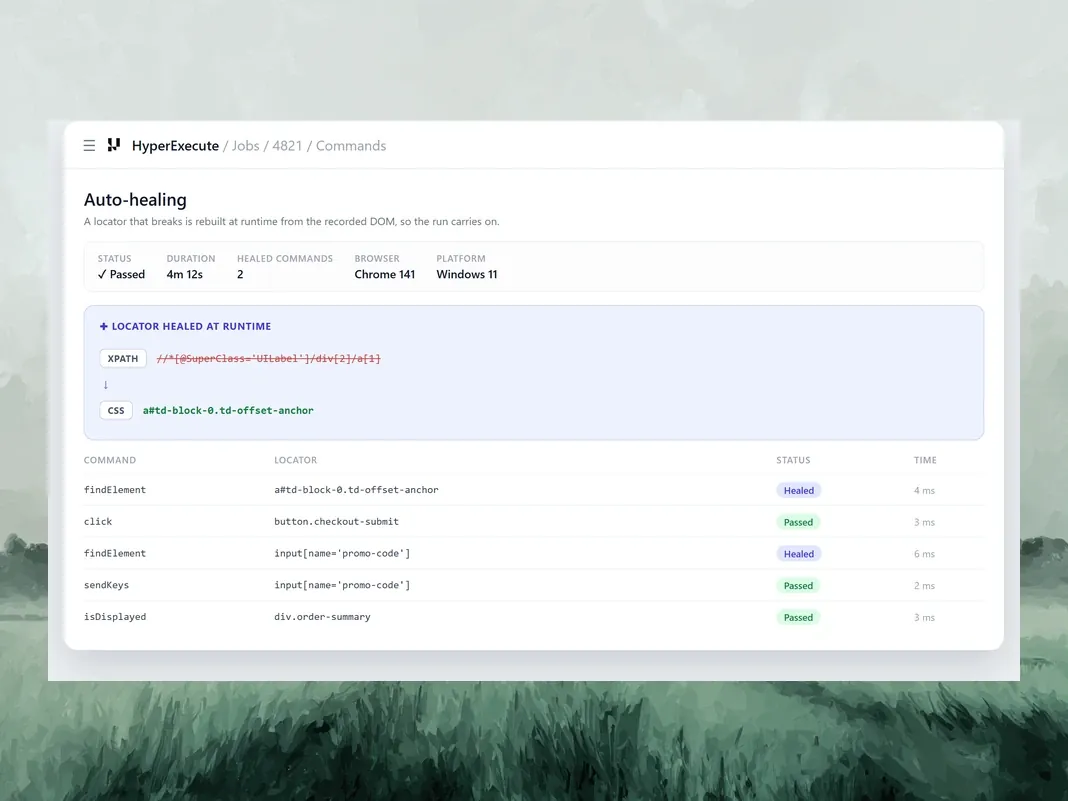
Set the autoHeal capability and a locator that breaks is rebuilt at runtime from the recorded DOM, so the run carries on.
Run Your First Job Free- Records, detects, heals, then continues the run.
- Every heal is inspectable, so nothing changes silently.
- It absorbs locator drift, not a genuinely missing element.
 AGENT SKILLS
Run HyperExecute Jobs From Your AI Agent
Add the open-source hyperexecute-skill to Claude Code, Cursor, Copilot or Gemini CLI, describe the job, and your agent writes the YAML and runs it.
Get the HyperExecute Skill- Analyzes your project, then writes and validates the YAML.
- Asks before it spends cloud concurrency on a job.
- Pulls logs and artifacts back to debug failures.
$ npx skills add \
    https://github.com/LambdaTest/agent-skills.git \
    --skill hyperexecute-skill
$ export LT_USERNAME="<your_username>"
$ export LT_ACCESS_KEY="<your_access_key>"

> run my Playwright suite on HyperExecute
✓ hyperexecute.yaml written and validated
? Submit the job to HyperExecute cloud? (y/N) y
✓ Job submitted, logs and artifacts downloaded
Measured Results
Where “Up to 70% Faster” Comes From
Lereta ran its tests 70% faster after moving to HyperExecute, because the test runner and the browser shared one machine and stopped sending every command over the network. Boomi and Dashlane published gains of 78% and about 50% on their own suites. Each figure is that team's own measurement against the setup it replaced, not a controlled benchmark, so your result depends on your suite.
| Customer | Before HyperExecute | With HyperExecute | Faster by |
|---|---|---|---|
| Lereta | Before HyperExecuteTests that should have taken under 10 minutes ran for hours, and many were flaky. | With HyperExecuteRunner and browser on one machine, cutting network traffic. Nearly zero flaky tests. | Faster by70% |
| Boomi | Before HyperExecute9.5 hours to run the full test base on internal infrastructure. | With HyperExecuteUnder 4 hours on the first runs, then about 2 hours once Boomi also modularized its tests. | Faster by78% |
| Dashlane | Before HyperExecuteAbout 80 seconds for about 70 test cases on in-house infrastructure. | With HyperExecuteAbout 40 seconds for the same tests, with flaky tests cut by 99.9%. | Faster byAbout 50% |
Sources: each customer's published case study, linked above. Lereta's is also on CaseStudies.com.
Measure it on your own suite
Step 01
Pick one suite and pin it to one commit, so both runs test the same code.
Step 02
Run it on your current grid and on HyperExecute at the same concurrency.
Step 03
Time each run from the first test starting to the last result, and repeat it at least five times.
Step 04
Compare the median wall-clock time, and the share of tests whose result changed between runs.
Red Build Triage
Know whether a red build is your runner, your test or your code
HyperExecute complements your CI. Your pipeline still triggers the run. When it goes red, HyperExecute shows where the failure came from, so you fix the cause instead of rerunning the build.
Environment
Your runner
Every task gets a fresh VM that is torn down after the run, and root cause analysis labels environment failures, so infrastructure noise isn't mistaken for a bug.
Script
Your test
Flaky test detection scores how often a test's result flips between runs, and the analysis labels script failures, so an unstable test gets fixed, not rerun until it passes.
Product
Your code
When the cause is in your code, the analysis reads the test's logs and the job's git diff, names the root cause and lists the steps to fix it.
8 Orchestration Controls for Every Job
Run browser and OS combinations, push release-critical jobs to the front, stop a broken build early, rerun only what failed and keep every log from the run.
Auto-Split spreads your discovered tests across parallel machines. Matrix runs every browser and OS pair you list. Hybrid does both.
Label a job high, medium or low with the jobLabel key, and your release-critical suites go to the front of the queue.
Set a threshold and the job stops once that many tests fail in a row, so a broken build stops burning your parallels.
A 900-scenario job ends with 20 failures. Click Re-Run on the job page and only those 20 run again, on the same commit or the latest one.
Every test keeps its own video, screenshots, and command, network and console logs, collected into one archive you can download.
Group your jobs under a named Project, then schedule Workflows to run once, later, or weekly, and chain one run into the next.
Tests that fail five times in a row are muted automatically, and stay muted until you unmute them.
Archive stale jobs to declutter your workspace and find active runs faster.
Run Your JMeter and Gatling Plans on HyperExecute
Simulate real-world traffic against your apps and APIs. HyperExecute provisions the load generators for each run and removes them when it ends.
 PERFORMANCE TESTING
Test for Every Kind of Traffic
Run load, stress and soak tests to see how your app behaves on an ordinary day and on its busiest one.
Run Your First Performance Test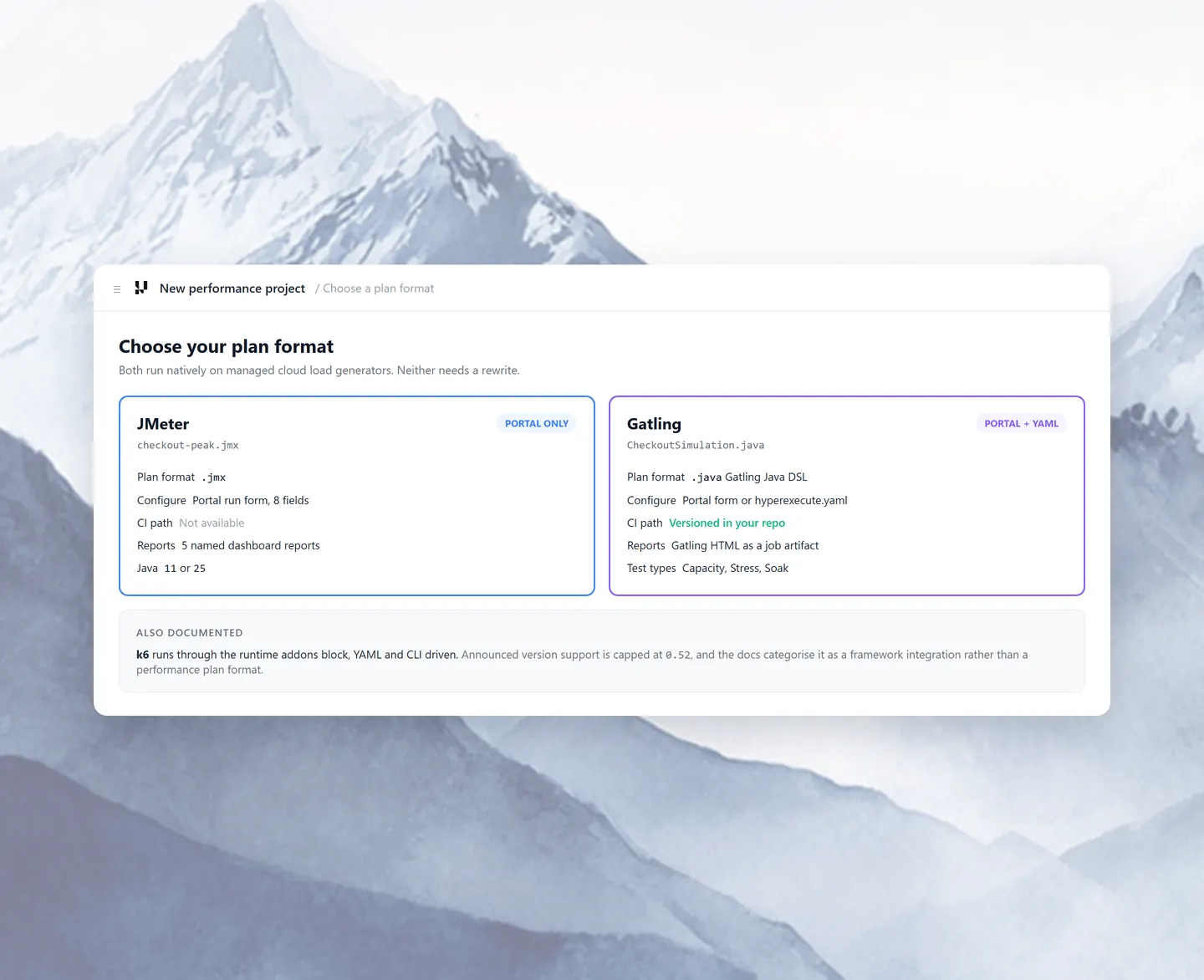
Success Stories of TestMu AI
Every number here comes from a published customer story, in the team's own words.

78%
Faster Test Execution


How Boomi Tripled Automated Test Coverage and Unblocked Its CI/CD Pipeline
Hrishi Potdar
Quality Engineering Architect




HyperExecute Reviews and Quotes
New testing platform alert! I recently tried out @testmuai's HyperExecute, an end-to-end smart test orchestration platform. I was amazed at its speed and 'intelligence'.

Sanjay Kumar
@SanjayKumaarr

Now, we worry less about the orchestration, infrastructure and focus more on our tests.
Hrishi Potdar
Quality Engineering Architect, Boomi
LambdaTest is doing for test automation what Kubernetes did for container orchestration - creating that next level of efficiency around test automation so that people can actually focus on testing versus test orchestration.

Satya Nadella
Chairman & CEO, Microsoft - Future Ready Technology Summit 2023
Works With the Framework You Already Use

 JavaScript


 JavaScriptJavaScript
 Appium
 Espresso
 Maestro
 Detox
 XCUITest
CI/CD Integration
Run HyperExecute From Any CI/CD Pipeline
One binary and one config file, wired in with the same three steps on every platform. See the CI/CD guide, CLI reference and YAML parameters.
Download the CLI
Pull the binary into your job on Linux, macOS or Windows.
Set Two Secrets
Expose LT_USERNAME and LT_ACCESS_KEY from your CI secret store.
Point It At Your YAML
Run ./hyperexecute --config hyperexecute.yaml.
Deploy HyperExecute in Your Own Cloud or On-Premise
The shared cloud is the default. Teams with data residency rules can run HyperExecute in their own cloud account or behind their firewall.

AWS Cloud
Private cloud setup is documented for six AWS regions, including Frankfurt, Mumbai and Sydney.

Microsoft Azure
An Azure Native Integration: tests run in your own Azure tenant and spend goes through Azure billing.

Private Cloud and Access Controls for Enterprises
HyperExecute for Private Cloud
Run inside your own cloud with whitelabeled dashboards, advanced data retention rules and fallback to the shared cloud for redundancy.
Enterprise Access & Governance
SSO, SCIM provisioning, role-based access and audit logs, plus concurrency groups that give each team its own parallel budget from your identity provider.


Open Source
We strongly believe in the open-source community and owe much of our success to it. To give back, we're offering 10 free parallel sessions of HyperExecute.
More Reasons to Love TestMu AI
TestMu AI is a leading agentic AI quality engineering platform, trusted globally, that assures your AI deployments work as intended, safely and securely, across enterprise and real-world conditions.
Users
3M+
Tests
1.5B+
Enterprises
18K+
Countries
132
TestMu AI positioned as a Leader in the 2026 Gartner® Magic Quadrant™
Read ReportTestMu AI recognized in The Forrester Wave™: Autonomous Testing Platforms, Q4 2025
Read ReportWall of Fame
TestMu AI is the #1 choice for SMBs and enterprises across the globe.
Enterprise-Grade Security
We safeguard your data and AI systems with global security, privacy, responsible AI, and ESG standards.

Integrations
Works where you work, 120+ integrations with the tools your team relies on.



As Seen On
Related Products and Docs
Products and Docs to Use With HyperExecute
KaneAI writes tests, Kane CLI runs plain-English browser flows from your terminal, Automation Cloud and Real Device Cloud add browser and device coverage, and Test Intelligence tracks failure trends across runs. The TestMu AI agents page shows how they fit together.
Orchestration & Speed
Execution Infrastructure
Agents & Tooling
Enterprise & Insights
Frequently asked questions
TestMu AI for Enterprise
Get access to solutions built on enterprise-grade
security, privacy, & compliance
- Advanced access controls
- Advanced data retention rules
- Advanced Local Testing
- Premium Support options
- Early access to beta features
- Private Slack Channel
- Unlimited Manual Accessibility DevTools Tests