HyperExecute Integration With CI/CD Tools
HyperExecute offers integrations with numerous CI/CD tools to assist you to:
- Expend less manual effort
- Deliver faster
- Reduce risk
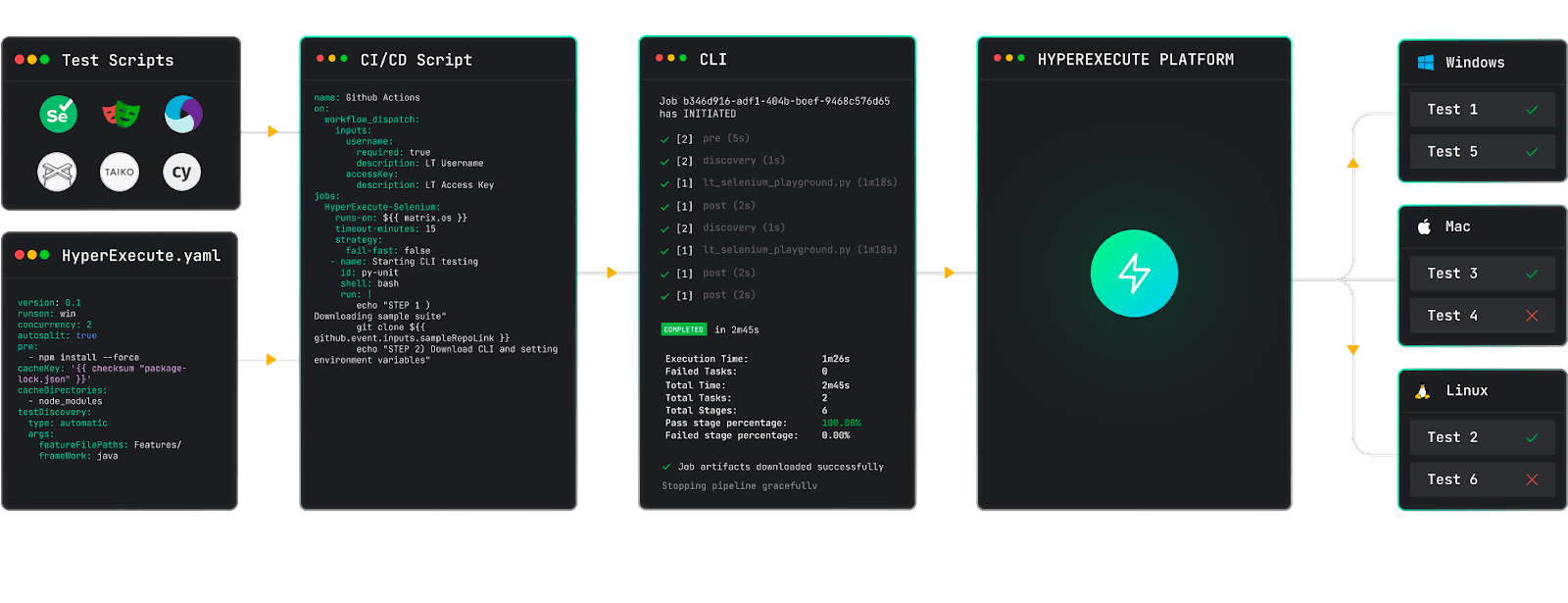
To integrate any CI pipeline with HyperExecute, follow these steps:
- Download the HyperExecute CLI Binary:
To integrate HyperExecute with your preferred CI pipeline, you need to make use of the HyperExecute CLI. HyperExecute CLI is a command line client used to interact and run tests on HyperExecute and provide a host of other useful features that accelerate test execution.
For triggering tests using HyperExecute CLI, you have to download the HyperExecute CLI binary corresponding to the platform (or OS) from where the tests are triggered: Below are the HyperExecute CLI download links for different operating systems:
- If the Pipeline VM Image agent has the OS flavor of Linux or Mac, then the HyperExecute CLI binary would need additional permission. Run the command below to get the required permission:
chmod u+x hyperexecute
- Execute the HyperExecute CLI Binary
To execute the HyperExecute CLI binary, run the following command:
- For Windows
hyperexecute.exe –user LT_USERNAME –key LT_ACCESS_KEY –config path of the Hyperexecute YAML file
- For Mac/Linux
./hyperexecute –user LT_USERNAME –key LT_ACCESS_KEY –config path of the Hyperexecute YAML file
Below are detailed instructions for CI/CD tool integrations to help you get the most out of HyperExecute.
Want to know more about HyperExecute? Here’s a link to our Documentation.
If your favourite CI/CD tool is not in the list mentioned above, then just give us a shout and we will have it ready shortly for you.
Using the CI/CD Pipeline Agent Skill with TestMu AI
The cicd-pipeline-skill is a part of TestMu AI Skills that guide AI coding assistants in generating production-ready test automation.
The cicd-pipeline-skill package includes:
Verifiedcicd-pipeline-skill/
├── SKILL.md
└── reference/
├── playbook.md
└── advanced-patterns.md
It provides structured guidance for:
- Project structure and setup
- Dependency configuration
- Local execution
- TestMu AI cloud execution
- Debugging patterns
- CI/CD integration
Installing CI/CD Pipeline Agent Skill
Install a CI/CD Pipeline Agent Skill using the command below:
Verified# Clone the repo and copy the skill you need
git clone https://github.com/LambdaTest/agent-skills.git
cp -r agent-skills/cicd-pipeline-skill .claude/skills/
# Or for Cursor / Copilot
cp -r agent-skills/cicd-pipeline-skill .cursor/skills/
Note: If you prefer installing all available framework skills instead of only cicd-pipeline-skill, clone the repository directly into your tool's skills directory (for example, .claude/skills/, .cursor/skills/, .gemini/skills/, or .agent/skills/).


 Chat with Us