

Power Your Software Testing with AI Agents and Cloud
The Native AI-Agentic Cloud Platform to Supercharge Quality Engineering. Test Intelligently and Ship Faster.


- TestMu AI (Formerly LambdaTest)
- /
- Blog
- /
- Flaky Test Detection Tools: How AI Prevents Flaky Tests
Flaky Test Detection Tools: How AI Prevents Flaky Tests
Compare the top flaky test detection tools and see how AI-based detection, stability scoring, and self-healing locators prevent flaky tests in CI/CD.
Last Updated on:
On This Page
- Why Are Flaky Tests So Costly in Enterprise Test Execution?
- How Do AI-Based Flaky Test Detection Tools Work?
- Which Tools and Practices Cause Flaky UI Tests?
- How Do AI Tools Reduce Flaky Tests in Regression Testing?
- Which Flaky Test Detection Tools Use AI and Auto-Healing?
- How Do You Fix Flaky Tests?
- Conclusion
Flaky test detection tools identify tests that pass on one run and fail on the next without any code change, using retry outcomes, run history, or AI stability scoring, and flag or quarantine them before they block a release. In the Future of Quality Assurance Survey of more than 1,600 QA professionals, respondents reported spending about 8% of their time on flaky tests, close to the 10.4% they spend on test environments. This article covers why flaky tests are so costly at enterprise scale, how AI-based detection works, which tools and practices cause flaky UI tests, how AI reduces flaky regression tests, and which AI tools for preventing flaky tests lead the field.
In the dynamic world of software testing, one persistent challenge continues to haunt testers and developers alike: flaky tests. The tests are flaky, which means one cannot say that the test is a good test to use or provides confidence. It may have broken down a test the team cannot rely on, or it may point to something the test team did not know about. Either way, it is a challenge.
What are “Flaky” tests?
A flaky test is one that produces a different result, passing on one run and failing on the next, without any change to the code or to the test itself. Run your suite once and everything is green; run it again and a handful of tests fail for no obvious reason. This non-deterministic behavior is the flakiness we are addressing here.
Flaky tests are especially costly in enterprise test execution, where suites run continuously across many teams and CI/CD pipelines. They erode trust in the test suite, mask real regressions, and force engineers to re-run jobs instead of shipping.
Flakiness usually stems from a combination of factors: unstable test environments, unreliable network conditions, race conditions in asynchronous code, and non-deterministic dependencies. Because these issues surface intermittently, they are difficult to reproduce and fix.
So, what are the common reasons we experience flaky tests?
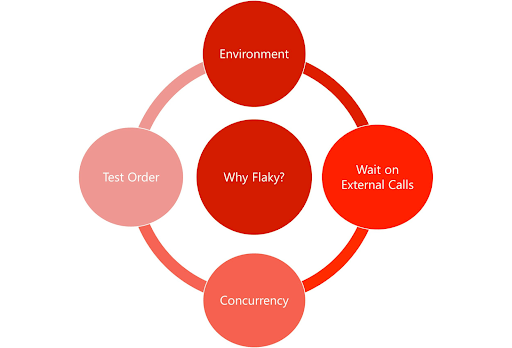
When we are planning to bring in test automation, the team can face a lot of challenges from what tool to use, a framework that works best with the tool, what type of tests to write, and whether it will be TDD/BDD or ATDD. There are so many things to think about which makes our tests better at the end of the day, but can also encounter flakiness amidst all the new changes. Therefore some of the following things can lead to flaky tests;
- Not having a framework or utilizing the framework correctly. Therefore it is vital to think ahead of time what sort of framework the team can use or knows how to use. Also, check if there is support for the framework.
- Use of environments can also lead to flaky tests, how, you may think? Well, when testers have their independent environments, the flaky test might not be a big issue, but having shared environments means other testers are merging their tests too. The shared environment can start becoming unstable due to various reasons, that’s where flakiness could happen.
- Data is an issue many times for the automated tests as it becomes difficult to understand whether to call the data file or hard code some data with the risk that it might change in the future therefore hard coded data is not the way forward and will lead to many challenges. A good solution could be having a data management tool and using that for more accuracy.
- Also, we tend to make interdependent tests many times, without thinking if one test fails the other automatically. Therefore avoid dependent tests and keep them isolated and that’s why you must pick and choose wisely what scenario is worth automating.
- Just as it’s important to plan what to automate, it is equally important to write good automated tests and not poorly scripted tests such as for API tests not using the Xpath but using other attributes that can change all the time, and then the consequence will be flaky tests, you guessed it!
- If you are running tests in parallel, you will know that it is quite powerful yet expensive, therefore if you make use of good synchronization it will always help the result.
As we have learned about what re flaky tests in details but you might be wandering what are the reasons that an flaky test might occur well, there are several reasons for flaky tests to occur, especially in complex enterprise workflows, making them challenging to identify. Engineers, developers, and testers often find flaky tests unpredictable and frustrating, attributing these issues to unstable test environments, data management challenges, and poorly scripted tests.
To understand the perspectives of developers and testers, watch the entire video tutorial. It explores the issues from different angles and provides insights on identifying the root causes of flaky tests. The video also offers ideas on how to rectify these issues.

Why Are Flaky Tests So Costly in Enterprise Test Execution?
Flaky tests cost enterprises time and trust. QA teams spend about 8% of their time on them, re-runs burn CI minutes across every team, and intermittent failures hide real regressions until release day.
Flaky tests, appear and disappear seemingly at random, leaving testers scratching their heads and developers scrambling to fix them. At the enterprise level, where testing is conducted at scale across multiple teams and environments, the impact of flaky tests is magnified. Not only do they consume valuable testing resources, but they also introduce uncertainty and instability into the project lifecycle.
In a recent TestMu AI survey, flaky tests emerged as a significant concern among over 1,600 QA professionals globally. They revealed spending approximately 8% of their time on such tests, almost equivalent to the time spent (10.4%) on setting up and maintaining test environments.
The consequences of flaky tests extend far beyond wasted time and effort. They undermine the stability of the entire project, leading to delayed releases, increased risk of defects slipping into production, and ultimately, a poor user experience. Sometimes when developers and testers fail to resolve the issue behind flaky tests, it may lead to bad team morale.
Well, one solution to deal with this is to use an AI-based flaky test detection tool inside your testing platform. These tools leverage machine learning algorithms to analyze test results, identify patterns of flakiness, and predict which tests are most likely to fail. Automating the detection and resolution of flaky tests, enables the teams to focus their efforts on fixing the most critical issues, rather than wasting time chasing false positives.
How Do AI-Based Flaky Test Detection Tools Work?
AI-based detection tools score each test on its pass/fail history, retry frequency, and run-to-run timing, classify failure logs by cause, and flag or quarantine tests whose results vary without a code change.

According to the Future of Quality Assurance Survey, 60.60% of organizations believe that AI will improve the productivity of teams, and humans will continue to play a major role in testing. This suggests a widespread view that AI will be an enhancer rather than a full replacement in the testing process.
Similarly, AI can help support Flaky tests too, you may ask how?
The answer is that AI offers a powerful solution for addressing the challenge of flaky tests, helping teams improve the reliability, efficiency, and effectiveness of their testing practices.
If your test management tool includes an AI-based flaky test detection tool, it can help with flaky tests by:
- Detecting the flaky tests
- Prediction of them
- Root cause analysis
- Automate the detection, analysis, and resolution of the flaky tests
AI provides notable advantages in preventing flakiness. Quick data analysis helps identify patterns and anomalies, speeding up the process and saving time. This automation allows teams to focus on critical features instead of diving deep into resolving a single flaky test, leading to enhanced accuracy with advanced machine learning algorithms.
Early detection and prevention are crucial, and AI, with its precise ML algorithms, reduces false positives. Root cause analysis, often overwhelming for a tester, becomes manageable as AI sifts through historical data, dependencies, conditions, and code changes, pinpointing flakiness locations. Embracing AI isn’t just adopting a cutting-edge tool; it signifies continuous improvement for enhanced test accuracy and effectiveness.
With the rise of AI in testing, its crucial to stay competitive by upskilling or polishing your skillsets. The KaneAI Certification proves your hands-on AI testing skills and positions you as a future-ready, high-value QA professional.
Which Tools and Practices Cause Flaky UI Tests?
Legacy record-and-playback tools cause most flaky UI tests. They emit absolute XPath locators, have no auto-waiting, and replay fixed sleeps, so any DOM change or slow render fails the test for no real reason.
Many flaky UI tests trace back to the tooling and habits a team adopts early on. The most common culprit is legacy record-and-playback tools that capture a click path and replay it verbatim. Because these tools lack built-in wait mechanisms, they fire actions before the page is ready and break the moment a locator or layout shifts. Before investing in AI-based stabilization, it is worth removing the anti-patterns that create flakiness in the first place.
Practices and tools to avoid:
- Brittle record-and-playback tools that generate absolute XPath locators and have no auto-waiting, so every UI change or timing variation produces a failure.
- Testing everything exclusively through the UI. Push validation down to the API and unit layers wherever possible, and reserve UI tests for genuine end-to-end journeys.
- Hardcoded test data such as fixed credentials, IDs, or timestamps that collide when suites run in parallel or when the underlying data changes.
- Sharing database or environment state across parallel tests, which lets one test’s writes leak into another and cause intermittent, hard-to-trace failures.
- Fixed sleeps (hard waits) instead of explicit conditions: too long and the suite crawls, too short and it flakes.
The table below contrasts the legacy UI-testing approach that breeds flakiness with the modern frameworks teams move to:
| Capability | Legacy Record-and-Playback Tools | Modern Frameworks (Playwright, Cypress) |
|---|---|---|
| Waiting strategy | Hardcoded sleeps or none | Built-in auto-waiting for elements and network |
| Locators | Absolute XPath, brittle | Resilient role, text, and test-id selectors |
| Test maintenance | Re-record on every UI change | Update in code, with reusable helpers |
| Parallel execution | Limited, prone to state collisions | Isolated browser contexts per test |
| Debuggability | Opaque replay logs | Traces, videos, and time-travel snapshots |
How Do AI Tools Reduce Flaky Tests in Regression Testing?
AI tools reduce flaky regression tests in five steps: score each test's stability, classify the failure cause from logs, self-heal broken locators, regenerate steps from intent, then re-run to validate or quarantine.
Each stage runs inside the CI/CD pipeline:
- AI-driven stability scoring: Each test is assigned a stability (or flake) score based on its historical pass/fail pattern, retry frequency, and execution timing, so the suite can rank which tests are least trustworthy.
- Automated root-cause classification of logs: The AI parses failure logs, stack traces, and screenshots to classify each failure by cause: timing or race condition, locator drift, environment, or a genuine regression, instead of leaving triage entirely to a human.
- Autonomous self-healing of locators: When a selector breaks because the DOM changed, self-healing test automation re-matches the element using its surrounding attributes and updates the locator, keeping the test running.
- Semantic step regeneration: For steps that can no longer be recovered with a locator swap, the AI regenerates the step from its intent (for example, “log in” or “add to cart”) rather than its literal recorded actions.
- Automated validation and quarantine: The healed test is re-run to confirm the fix; tests still deemed unreliable are automatically quarantined so they no longer block the pipeline, while the team is notified to review them.
Because these steps execute automatically inside CI/CD, a flaky regression is scored, diagnosed, healed, validated, and either merged or quarantined without stalling the release.
Which Flaky Test Detection Tools Use AI and Auto-Healing?
Trunk Flaky Tests, CircleCI AI Assistant, Bitbucket AI-assisted fixes, Playwright, Cypress, and TestMu AI Test Intelligence lead the field. All detect flakiness from run history; they differ on quarantine and healing.
Here is how each one approaches detection, healing, and quarantine:
- CircleCI AI Assistant: Surfaces flaky tests from pipeline history and, through its Model Context Protocol (MCP) server, lets you query CI status and failures in natural language and act on them without leaving your editor.
- Trunk Flaky Tests: Detects flaky tests across CI providers and automatically quarantines them so they stop breaking the build, while tracking each test’s flake rate over time.
- Bitbucket AI-assisted fixes: Analyzes failing pipeline steps and proposes fixes, reducing the manual triage that flaky failures usually demand.
- Playwright and Cypress: Modern engines that eliminate roughly 90% of timing-related flakiness through built-in auto-waiting, retries, and web-first assertions, so tests wait for the application rather than a fixed timer.
- TestMu AI Test Intelligence and KaneAI: Apply machine learning to historical execution data to flag flaky tests, run root-cause analysis, and self-heal locators across a cloud grid.
When comparing these tools, check how each one detects flakiness (retry-based, run-history, or AI stability scoring), whether it can quarantine automatically, and whether it heals the test or only reports it.
The most advanced AI agents go a step further than detection. By analyzing historical test execution metrics such as run-to-run timings, retry patterns, and failure logs, they identify the likely fix for a broken UI test and automatically open a draft Pull Request with the updated locator or step. Engineers review and merge the draft instead of debugging from scratch, turning flaky-test maintenance into a quick approval step.
How Do You Fix Flaky Tests?
Fix a flaky test by measuring its flake rate, reproducing it in isolation, then replacing hard sleeps with explicit waits, brittle XPath with role or test-id locators, and shared data with isolated fixtures.
The full sequence, manual or AI-assisted:
- Identify and quantify: Track which tests fail intermittently and how often, using flake scores or retry data, so you fix the worst offenders first.
- Reproduce and classify the root cause: Re-run the test in isolation to determine whether the cause is timing, a brittle locator, shared state, or a real defect.
- Replace hard waits with explicit conditions: Swap fixed sleeps for auto-waiting on elements, network responses, or application state.
- Stabilize locators and data: Use resilient selectors (roles, test IDs) and isolated, test-specific data instead of shared or hardcoded values.
- Isolate the test: Remove cross-test dependencies and shared database state so tests can run independently and in parallel.
- Quarantine and validate: Move stubborn tests into a quarantine test set outside the blocking suite, fix them, and re-run several times to confirm they are stable before returning them.
Key Takeaways
- 8% of QA time: Flaky tests consume nearly as much tester time as maintaining environments, so detection pays back fastest in large suites.
- Retry history vs. stability score: Retry-based detection catches a test only after it flakes; stability scoring ranks every test by risk before it blocks a build.
- Locators before AI: Replacing absolute XPath and fixed sleeps removes most UI flakiness, and no detection tool compensates for skipping that step.
- Quarantine is a holding state: A quarantined test stops blocking the pipeline but still needs a root-cause fix and several clean re-runs before it returns.
- Heal or report: Tools split into those that only flag flaky tests and those that propose or apply a fix, and only the second group removes triage work.
- Draft PRs shift the work: When an agent opens the fix as a pull request, maintenance becomes a review task instead of a debugging task.
Conclusion
Flaky tests pose a significant challenge for enterprise test execution, consuming valuable time and resources and undermining project stability. However, with the advent of AI-based detection and self-healing, organizations have an opportunity to change how they test. By adopting AI tools for preventing flaky tests, teams can shorten their testing processes, improve project stability, and deliver high-quality software faster and more efficiently than ever before.
TestMu AI’s AI-Native Test Intelligence helps teams to take data-driven actions in identifying, resolving, and preventing flaky tests. By leveraging machine learning and intelligent analysis, TestMu AI aims to enhance the reliability and effectiveness of automated testing, resulting in more robust software delivery.

Author

Laveena Ramchandani
Blogs: 4


Laveena Ramchandani is a passionate Test Manager who has been testing for nearly 10 years and is always seeking to learn and share. She is a community leader for data science testing and testing in general. Her entry on the digital platform has enhanced many individuals to learn a new area within testing. Laveena was a finalist for The Digital Star 2022 at the everywoman in Technology awards. She has also been on various podcasts, international speaker and blogs trains new testers.
Reviewer

Sandeep Yadav
Reviewer
Sandeep Yadav is a Senior Software Engineer at TestMu AI (formerly LambdaTest), where he builds the platform's test intelligence and AI-native engineering systems. He has architected autonomous GitHub Apps, vector-search code intelligence, and self-diagnosing QA workflows, and designed distributed platforms that process 2M+ daily test executions and 1B+ events, turning high-volume test, log, and code data into intelligent, self-optimizing systems. He works on embedding reasoning models into production infrastructure to power autonomous review, root-cause analysis, and analytics workflows. He brings over four years of engineering experience with deep expertise in the Elastic Stack, Apache Kafka, and Redis. Earlier he engineered a GDPR-compliant, end-to-end-encrypted secure web-chat application at Mithi. A Facebook Hackercup 2021 Round 2 qualifier and merit-scholarship recipient, Sandeep holds a B.Tech in Electrical Engineering from Delhi Technological University.


Flaky Test Detection Tools FAQs
Did you find this page helpful?
More Related Blogs
TestMu AI forEnterprise
Get access to solutions built on Enterprise
grade security, privacy, & compliance
- Advanced access controls
- Advanced data retention rules
- Advanced Local Testing
- Premium Support options
- Early access to beta features
- Private Slack Channel
- Unlimited Manual Accessibility DevTools Tests