

Power Your Software Testing with AI Agents and Cloud
The Native AI-Agentic Cloud Platform to Supercharge Quality Engineering. Test Intelligently and Ship Faster.


- TestMu AI (Formerly LambdaTest)
- /
- Learning Hub
- /
- What Is Robotic Process Automation (RPA)
What Is Robotic Process Automation (RPA)?
Learn how Robotic Process Automation (RPA) optimizes software testing, generates test data, and differs from test automation tools like Selenium.
Last Updated on:
RPA stands for Robotic Process Automation, a technology that uses software bots to automate repetitive, rule-based tasks across digital systems.
Bots work at the UI layer, clicking, typing, and moving data the same way a person would, so organizations save time, cut errors, and free people for higher-value work.
Overview
Robotic Process Automation (RPA) is a technology that uses software bots to automate repetitive, rule-based tasks by emulating human interactions at the user interface layer. To prevent failures, teams use TestMu AI to validate these automated workflows across browsers before deploying them to production.
Why Use Robotic Process Automation?
- Efficiency and speed: Robotic Process Automation accelerates task execution by automating repetitive work and operating around the clock to increase overall throughput.
- Cost savings: Robotic Process Automation reduces labor costs and costly errors by replacing manual, human-intensive processes with software automation to lower operational expenses.
- Improved customer service: Robotic Process Automation delivers faster, consistent responses and reliable support by automating customer interactions like query handling and ticket routing.
- Better compliance: Robotic Process Automation ensures audit-ready, regulation-compliant processes with minimal human oversight by maintaining detailed audit trails and reducing the risk of non-compliance.
- Enhanced data accuracy: Robotic Process Automation minimizes manual errors and improves real-time data insights for smarter, data-driven business decisions and improved reporting accuracy.
- Scalability and flexibility: Robotic Process Automation scales effortlessly to handle workload spikes and increased task volumes without requiring additional staffing.
How Does Robotic Process Automation Work?
- Identify and evaluate: Organizations use process mining to target high-volume, rule-based, and stable tasks that are most suitable for automation.
- Plan and define objectives: Teams set measurable goals, align stakeholders, and define key performance indicators to track the business value of automation.
- Choose the right tools: Organizations select Robotic Process Automation platforms that are scalable, secure, and AI-ready to meet their business needs.
- Build and test: Developers build software bots with clear logic and validate their performance through rigorous testing before deployment.
- Deploy and manage: Teams launch software bots in production environments with real-time monitoring and control to ensure smooth execution.
- Monitor, maintain, and scale: Organizations continuously optimize software bots and expand automation across teams to maximize long-term operational efficiency.
- TestMu AI: Teams use the TestMu AI automation cloud to validate Robotic Process Automation flows across browsers and operating systems before bots reach production.
What Is Robotic Process Automation?
Robotic Process Automation refers to the use of software robots (bots) that can execute structured, rule-based tasks by interacting with digital systems the same way a human would, at the UI layer.
- Clicking through web and desktop applications.
- Copying data between systems.
- Extracting data from documents or emails.
- Logging into portals.
- Triggering scheduled workflows.
Unlike traditional API-based automation, RPA uses intelligent automation techniques where bots work in environments without requiring system-level access or code changes, which makes them well-suited for legacy systems and siloed tools.
For a measured comparison of the two approaches, see RPA vs API integration.
RPA vs. Traditional Test Automation: What Is the Difference?
These two look alike from a distance. Both drive a user interface, both run unattended, and both break when a button moves. The difference is what they are for.
Traditional test automation validates code behavior. A Selenium or Playwright suite exists to answer one question: does the application do what it is supposed to do? It asserts, it fails a build, and it lives beside the code it tests, usually with access to APIs, test hooks, and the DOM.
RPA optimizes operational workflows. A bot exists to complete work, not to verify it. It simulates human interactions at the Graphical User Interface (GUI) layer across whatever applications the process touches, and it succeeds when the work is done, not when an assertion passes.
| Dimension | RPA | Traditional test automation (Selenium/Playwright) |
|---|---|---|
| Purpose | Complete business work | Verify the application behaves correctly |
| Scope | Web, desktop, mainframe, email, spreadsheets | Browsers (Selenium/Playwright) only |
| Access required | None; works on the GUI as a user would | Code access, DOM, often APIs and test hooks |
| Built by | Business analysts, ops teams (low-code) | Engineers writing code |
| Success means | The task finished | Assertions passed |
| Runs | Continuously, in production | In CI, against builds |
| Fails when | The interface changes | The interface changes, or a real defect exists |
Is Selenium an RPA Tool?
No, and the reasons are worth being precise about, because the question comes up constantly.
- Selenium requires underlying code access. It binds to the DOM and needs locators, a driver, and a codebase to live in. RPA platforms sit on top of the GUI and need none of that, which is exactly why they work against legacy systems nobody can modify.
- Selenium is built for browser testing. It cannot open a desktop accounting client, read an Outlook attachment, or move rows into a spreadsheet. Real business workflows cross all of those in a single process, and that cross-application reach is the whole point of RPA.
- Selenium verifies, RPA performs. A Selenium script that finishes without asserting anything has failed at its job. An RPA bot that finishes the work has succeeded at its job. The intent is opposite even when the clicks look identical.
People can and do build RPA-like scripts in Selenium. It works until the process needs a second application, and then it stops working.
How Do You Apply RPA in Software Testing?
RPA earns its place in QA by handling the work around the tests, not the assertions inside them. Four applications are worth the effort.
1. Test Data Generation
Realistic test data is usually trapped in systems that have no API: a mainframe, an ERP, a decade-old internal tool. Teams end up hand-keying records before every regression cycle, which is slow and quietly inconsistent.
An RPA bot extracts records from those systems, masks whatever is sensitive, and loads them into the test environment on a schedule. The suite starts every run against fresh, representative data instead of a stale fixture someone created last quarter.
2. End-to-End Environment Testing
Most real business processes do not stay inside a browser. An order might begin on a web storefront, post to Dynamics 365, trigger a desktop legacy program, and end in a finance spreadsheet. No browser-based framework can follow that path.
An RPA bot can, because it drives each application the way a person does. It becomes the only practical way to exercise the full chain and confirm that data survives every handoff intact.
3. System Integration Checking
Integrations fail quietly. A field truncates, a date format flips, a currency rounds, and nothing errors: the wrong value simply lands downstream and sits there.
Bots catch this by reading the same record in both systems and comparing what they find. Because they read the GUI, they see exactly what a user sees, including the display-layer bugs an API-level check would sail straight past.
4. Massive Regression Testing
For a stable application, the regression suite is mostly repetition: the same long flows, the same expected results, run again and again. That is precisely the profile RPA is built for, and bots can grind through volumes no manual team would attempt.
The word doing the work in that sentence is stable. Point RPA at an interface that changes every sprint and you will spend more time repairing bots than you ever spent testing. Use it where the UI has settled, and keep code-based automation where it moves.
One caveat applies across all four. Bots read the GUI, so a rendering difference between browsers or OS versions is indistinguishable from a real failure to them. Validating those flows against the exact browser and OS versions your bots target, before a bot goes live, separates the two.
Why Robotic Process Automation?
The global Robotic Process Automation market is projected to reach $30.85 billion by 2030, expanding at a 39.9% CAGR from 2023, according to Grand View Research. That growth tracks how much repetitive, rule-based work businesses are handing to software bots.
Here are some of the benefits that RPA provides:
- Increased Efficiency and Speed: RPA enables businesses to automate repetitive tasks, significantly speeding up processes. Bots work 24/7, ensuring faster completion of tasks and increasing overall throughput.
- Cost Savings: By automating manual tasks, RPA reduces labor costs and eliminates errors that would require costly corrections. It also cuts down on operational expenses, providing an efficient alternative to human-intensive processes.
- Improved Customer Service: RPA enhances customer experience by automating customer interactions, such as query handling and ticket routing. Bots can provide instant responses, ensuring faster and more reliable customer service.
- Better Compliance and Regulation Adherence: RPA ensures processes are executed in full compliance with legal and regulatory standards. It maintains audit trails and helps businesses stay compliant with minimal risk of oversight or non-compliance.
- Enhanced Data Accuracy and Reporting: By digitizing processes, RPA improves the accuracy of data management and reporting. It also provides valuable insights through real-time analytics, helping businesses make data-driven decisions.
- Scalability and Flexibility: RPA allows organizations to scale operations quickly without the need to hire additional staff. It can handle increased volumes of tasks, especially during peak periods, ensuring continuous efficiency.
- Easy Development and Implementation: With the use of low-code tools, RPA can be easily customized and implemented even by non-technical users, reducing the time and effort needed for development.

Note: Generate, author and evolve tests with KaneAI. Book a Demo!
What Are the Types of Robotic Process Automation?
Robotic Process Automation comes in three primary types, each suited to a different mix of human involvement and business need.
- Attended RPA: It works on a user's machine and requires human initiation to perform tasks. These bots assist employees by automating repetitive tasks during their workflow.
For example, a customer service representative can trigger an attended bot to retrieve customer information, allowing for quicker and more accurate responses. This type of automation is ideal for front-office operations where human interaction is essential. - Unattended RPA: Its bots operate independently without human intervention. They execute tasks based on predefined rules and schedules, handling back-office processes such as data entry, invoice processing, and report generation. These bots run in the background on servers or virtual machines, ensuring continuous operation and scalability.
- Hybrid RPA: It integrates both attended and unattended bots to automate end-to-end processes that require human judgment and decision-making.
For instance, in loan processing, an attended bot can assist with data entry and document retrieval, while an unattended bot performs background checks and generates reports. This approach keeps humans and bots working together, optimizing both front and back-office operations.
What Tasks RPA Can Automate?
RPA can enhance operations by automating repetitive tasks such as data management, email processing, and system monitoring.
- User Account Management: Managing user access and permissions is essential but can be cumbersome, especially in large businesses with frequent employee changes. RPA automates the creation, modification, and deletion of user accounts across various systems. This ensures that employees always have the appropriate level of access while reducing manual workload and improving security.
- Data Entry and Migration: Handling large volumes of data manually is time-consuming and prone to errors. By automating data entry and migration, RPA moves data reliably across systems, minimizing manual intervention. This is particularly useful when transferring data between systems during updates, making the transition smoother and more efficient.
- Email Processing: Email management can quickly become overwhelming, especially in large organizations. RPA steps in by automating the categorization, sorting, and even responding to routine emails. It can handle common queries and route important emails to the right department, saving time and improving overall productivity.
- System Monitoring and Reporting: Many IT issues arise without warning, but RPA can monitor systems continuously for performance or security issues. Instead of waiting for human detection, automated monitoring picks up problems early, generating real-time alerts and reports. This means faster problem resolution and more proactive management of IT systems.
- Report Generation: Generating IT reports is a repetitive task that can eat into valuable time. RPA automates the creation of regular reports, such as system performance or security logs, and ensures they are delivered to the appropriate stakeholders. This saves time and ensures that key decision-makers always have the latest data at their fingertips.
- IT Service Desk Operations: Routine IT support tasks like password resets, basic troubleshooting, and service ticket categorization are time-consuming. RPA can take over these repetitive tasks, allowing IT teams to focus on more complex issues. It can even automatically assign tickets to the right team members, ensuring faster resolution times.
- Compliance Monitoring and Reporting: Compliance is a constant challenge in IT, especially with changing regulations. RPA ensures that systems and processes comply with internal policies and external standards. It can automatically monitor compliance, flag any issues, and generate the necessary documentation for audit trails, reducing manual oversight and the risk of non-compliance.
How Does Robotic Process Automation Work?
To leverage the full potential of Robotic Process Automation, it's crucial to take a structured approach.
- Identify and Evaluate: Identify tasks that are repetitive, rule-based, high in volume, and stable over time, and use process mining tools to gain data-driven insights into current workflows to prioritize the most impactful tasks for automation.
- Plan and Define Objectives: Set clear, measurable goals like ROI and time savings, align all stakeholders, and define KPIs to track and ensure the automation delivers value and meets business objectives.
- Choose the Right Tools and Vendors: Evaluate RPA platforms based on their scalability, security, ease of use, and future potential for AI integration to ensure they support long-term automation needs.
- Build and Test: Develop the automation bots by defining their logic and sequence, followed by thorough testing to ensure they perform as expected without errors before going live.
- Deploy and Manage: Deploy the bots into the production environment and provide continuous monitoring to ensure their smooth operation, making adjustments as needed.
- Monitor, Maintain, and Scale: Regularly track bot performance, update them as systems evolve, and plan for scaling the RPA program across the organization while maintaining efficiency.
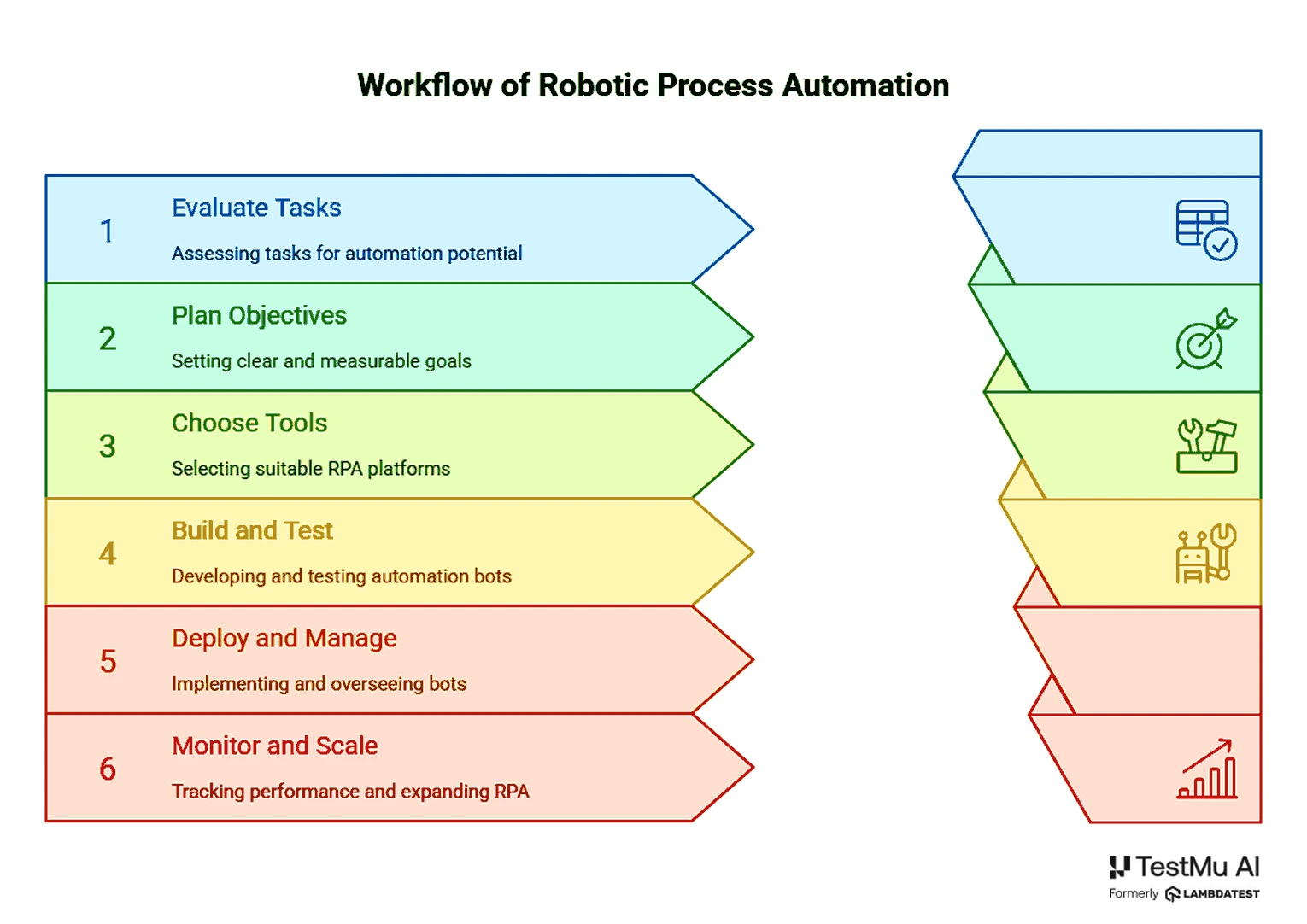
The "Build and Test" step is where most RPA projects underinvest. Because bots operate at the UI layer, the same DOM change that breaks a Selenium script also breaks a bot, so the flows a bot drives need the same cross-browser validation as any web app.
Running that check on TestMu AI's cloud, across the exact browser and OS versions your bots target, surfaces the layout and element shifts that would otherwise stall a bot in production. See the getting started with Selenium 4 guide to run your first cross-browser validation.
What Are the 4 Phases of the Automation Process Flow?
Zoom out from a single bot to the program around it and business process automation follows four phases. Skipping any of them is the most reliable way to end up with a bot graveyard.
Phase 1: Analysis
Identify and map the processes worth automating. Process mining reads system logs to show how work actually flows rather than how a process document claims it does, and the two are rarely the same.
You are looking for volume, rule-based logic, and stability. A process that is about to be redesigned is not a candidate no matter how painful it currently is.
Phase 2: Implementation
Build the bots and test them properly. This phase is where the automation gets its logic, its exception paths, and its answer to the question of what happens when a screen does not load.
Testing here means more than a happy-path run. Exercise the bot against the interface variations it will actually meet in production, because a bot that has only ever seen one rendering of a page is a bot that has not been tested.
Phase 3: Integration
Connect the bots to existing systems without changing the underlying code. This is RPA's signature move and the reason it gets adopted where API projects stall: no system owner has to approve a change, because nothing inside the system changes.
Orchestration belongs to this phase too. Once more than a handful of bots exist, something has to schedule them, queue their work, allocate machines, and decide what runs when a job fails at 3am.
Phase 4: Maintenance and Support
Monitor the bots, update them as systems change, and handle the exceptions they cannot. This is the phase everyone underfunds and the phase that determines whether the program survives its second year.
The reason is structural: bots depend on interfaces they do not control. Every vendor update, every redesign, every browser release is a change your bots did not ask for and must absorb. Treat maintenance as ongoing engineering, not as a support ticket queue.
What Are the Real-World Use Cases of RPA?
Across industries, Robotic Process Automation replaces the repetitive, high-volume work that slows teams down. Five examples show where it pays off.
- Healthcare: In healthcare settings, RPA can automate the patient onboarding process, including data entry, insurance verification, and appointment scheduling. This reduces administrative burdens, minimizes errors, and allows healthcare professionals to focus more on patient care.
- Finance and Accounting: Financial institutions can leverage RPA to automate the processing of invoices, from data extraction to approval workflows. This not only speeds up the process but also ensures compliance with financial regulations and reduces the risk of human error.
- Retail and eCommerce: Retailers can implement RPA to automate order processing, inventory updates, and customer notifications. This leads to faster order fulfillment, improved customer satisfaction, and better resource management.
- Human Resources: HR departments can use RPA to automate tasks such as document verification, account creation, and training schedule coordination for new hires. This streamlines the onboarding process, reduces administrative workload, and enhances the employee experience.
- Customer Service: Customer service teams can deploy RPA to automatically categorize, prioritize, and respond to customer emails. This ensures timely responses, improves customer satisfaction, and allows support agents to focus on more complex inquiries.
How to Leverage AI for Robot Process Automation?
RPA excels at automating repetitive, rule-based processes, whereas AI introduces capabilities such as learning, reasoning, and understanding unstructured data.
A range of AI automation tools, spanning natural language processing, machine learning, and intelligent document processing can be integrated with RPA to build smarter automation systems.
There is a testing catch here. Once RPA moves into AI-driven decision-making, its bots stop being deterministic: the same input can produce a different action from one run to the next, so the fixed pass or fail assertions that suit rule-based bots no longer hold.
Validating them calls for AI agent testing, which scores agent behavior on metrics like hallucination, bias, and task completeness both before and after deployment.
The industry calls this combination intelligent process automation, and the RPA vs IPA comparison explains when each approach fits.
- Natural Language Processing (NLP): NLP allows RPA bots to understand and communicate in human language, whether it’s text or speech. This makes it possible to automate customer service tasks like AI chatbots and process documents. AI-powered RPA bots can read and respond to text just like a human, making it easier to handle things like customer inquiries or feedback.
- Machine Learning: Machine learning helps RPA bots learn from past data, which means they can adapt to new situations without needing to be reprogrammed. With AI, RPA can predict problems before they happen, spot unusual patterns, and even suggest improvements to processes. This makes automation more efficient and flexible in a wide range of industries.
- Intelligent Decision-Making: AI adds the ability for RPA bots to make decisions. Instead of following rigid rules, AI-driven bots can make choices based on the data they get. For example, AI can decide which action to take depending on customer behavior or market trends, making automation more flexible and responsive to changes.
- Cognitive Automation: AI helps RPA bots tackle tasks that need thinking, learning, and decision-making. For example, AI can analyze unstructured data like emails, images, and documents, allowing RPA bots to handle customer service requests or automatically extract information from invoices. This makes RPA smarter and more capable of handling complex tasks.
- Automation of Complex Processes: Traditional RPA is great for repetitive tasks, but AI automation takes it a step further by handling more complex processes. AI allows RPA bots to analyze large amounts of data, make predictions, and even deal with exceptions or surprises, making it useful for more complex jobs in areas like finance, healthcare, and manufacturing.
- Improved Exception Handling: AI helps RPA bots deal with unexpected situations. When things go off track, AI can spot the problem, analyze it, and find a way to fix it. This makes RPA much more reliable, as it can continue running even when things don’t go as planned.
- Enhanced Data Analytics: AI boosts RPA by making it easier to analyze data. It helps bots gather insights, predict trends, and provide useful information that can help improve processes. This way, businesses can use the data from their automation to make better decisions and optimize their operations continuously.
What Are the Challenges of Robotic Process Automation?
While RPA offers powerful efficiency gains, it also comes with notable challenges:
- Resistance to Change: Introducing RPA can face resistance from employees who are used to traditional ways of working. There can be a reluctance to adopt new technology, especially when it seems complex or unfamiliar. To overcome this, organizations need to offer proper training, clear communication, and gradual implementation to help employees feel more comfortable with the transition.
- Loss of Human Touch: Automation can sometimes make processes feel less personal. For example, in customer service, tasks like answering basic queries can be automated. But there is a risk of losing the human connection that’s often necessary in sensitive or complex situations. Balancing automation with human intervention is crucial to maintaining quality service.
- Over-Reliance on Automation: Over-dependence on RPA can lead to problems when bots encounter unexpected situations. Bots are effective in executing repetitive tasks, but can struggle with exceptions. It’s important to have oversight and be prepared for situations where human intervention is needed to ensure the process runs smoothly.
- Emotional Impact of Repetitive Tasks: While RPA can reduce the burden of repetitive tasks, the initial shift can cause stress for employees, especially those whose roles are directly impacted by automation. Employees may feel uncertain about how their jobs will change, which can affect morale. Addressing these concerns early and showing how RPA will improve job satisfaction is important for smooth adoption.
- Ethical Concerns: RPA, especially when integrated with AI, can raise ethical questions, particularly around data privacy and decision-making. Organizations must ensure that RPA systems follow proper security protocols and comply with regulations. Transparency in how RPA decisions are made and clear accountability for automated actions are critical.
Beyond these organizational concerns, deployments also hit operational obstacles like brittle bots, weak governance, and missing test coverage. This guide to common RPA challenges covers 9 of them with a fix for each.
What Are the Best Practices for Using RPA?
Here are some best practices for implementing RPA effectively, ensuring that organizations can maximize the benefits while minimizing challenges:
- Start with the Right Processes: Identify processes that are repetitive, rule-based, high-volume, and stable over time. These tasks are the best candidates for automation, as they will provide the most significant impact. Use process discovery and task mining tools to get a clear, data-driven view of your current workflows and pinpoint areas that can benefit the most from automation. For a deeper look at how these two techniques differ and complement each other, see process mining and task mining.
- Set Clear Objectives and Metrics: Before implementing RPA, define clear business goals and success metrics. Whether it's improving efficiency, reducing costs, or enhancing accuracy, having measurable objectives will help track progress and evaluate the return on investment (ROI). Align stakeholders on these goals to ensure the automation project meets expectations.
- Involve Key Stakeholders Early: RPA implementations often succeed when all key stakeholders, including business leaders, IT teams, and end-users, are involved from the beginning. Their insights will help identify the right processes to automate and ensure smooth execution. Regular communication keeps everyone aligned and ensures that RPA initiatives meet organizational goals.
- Choose the Right RPA Tool: There are many RPA tools available, each with its strengths. Evaluate tools based on their scalability, security, ease of use, integration capabilities, and support for future technologies like AI and machine learning. Make sure the selected tool fits your organization’s needs and aligns with long-term strategic goals.
- Start Small and Scale Gradually: Begin with a small, manageable automation project to prove the concept. This allows you to learn and refine the process before scaling to more complex or enterprise-wide automation. Starting small reduces the risk and provides tangible results that can build confidence in RPA adoption across the organization.
- Test Rigorously Before Deployment: Thorough testing is crucial to ensure that bots operate as expected under real-world conditions. Test bots in various scenarios to identify and fix bugs or issues before deploying them to production. Use detailed test cases to simulate edge cases and ensure the bots can handle exceptions effectively.
- Provide Continuous Monitoring and Support: Once RPA bots are deployed, continuous monitoring is necessary to ensure their performance remains optimal. Monitor bots for any performance issues, bottlenecks, or failures. Be proactive in identifying problems and updating bots as business processes or underlying systems change.
- Focus on Employee Upskilling: RPA implementation may raise concerns among employees about job displacement. Address these concerns by focusing on upskilling employees to work alongside RPA. Provide training to help them understand the technology and how they can use it to enhance their roles. Employees who see RPA as a tool to increase their productivity will be more likely to embrace it.
- Scale with Governance and Security: As RPA expands, ensure that proper governance and security practices are in place. Implement role-based access control and ensure that bots follow security protocols, especially when handling sensitive data. Governance ensures that automation is aligned with organizational standards and compliance requirements.
- Document and Standardize Processes: Document the processes you automate, including the logic and rules that the bots follow. This helps create a standard for future automation projects and makes it easier to troubleshoot or make improvements later. Standardization also helps with scaling and ensures that automation is consistent across the organization.
What Is the Future of Robotic Process Automation?
Five shifts are reshaping RPA and what teams can expect from it next.
- RPA Goes No-Code: Automation is no longer just for developers. No-code tools let business users build bots using drag-and-drop interfaces. This speeds up adoption and puts automation in the hands of everyday teams.
- Bots Get Smarter With AI: RPA is evolving from rule-following bots to AI-powered digital workers. With machine learning, bots can understand documents, adapt to changes, and make decisions based on context.
- Cloud-Native RPA Takes Over: Cloud-based RPA makes deployment faster and scaling easier. It removes infrastructure painpoints and supports distributed teams, becoming the default for modern automation.
- Process Intelligence Fuels Strategy: Techniques like process mining help pinpoint where automation delivers the most value. This shift brings smarter, data-driven decisions instead of guesswork in automation planning.
- RPA Becomes Part of a Bigger Stack: RPA won’t stay standalone, it's merging into broader automation platforms. Expect tighter integration with AI, APIs, and workflows for connected end-to-end automation.
- Agentic Automation Replaces Scripted Steps: Agentic automation gives bots a goal instead of a script, letting them decide the steps at runtime and recover from a changed screen rather than halting on it. That resilience comes at a price: the bot stops being deterministic, so it needs behavioral validation rather than fixed pass-or-fail assertions.
- Hyperautomation Widens the Scope: Hyperautomation is the organizational end state, combining RPA, AI, process mining, and orchestration to automate everything a business can rather than one process at a time. RPA becomes the hands of that stack, not the whole of it.

Conclusion
Start by mapping one repetitive, rule-based, high-volume process and automating it end to end before you scale.
Keep the line between the two disciplines clear as you go: RPA completes work, your test framework verifies the application. Confusing the two is how teams end up with brittle bots doing a job Selenium should have done.
As your bots grow to drive real web interfaces, pair them with a testing layer so a routine UI change never ships a broken bot.
To build that repeatable QA process around your automation, work through our automation testing guide, then decide which bot flows graduate to a nightly cross-browser check on TestMu AI.
Done well, RPA stops being a stack of brittle scripts and becomes reliable capacity your team can trust.
Citations
- Robotic Process Automation (RPA) Adoption: A Systematic Literature Review, ResearchGate: researchgate.net/publication/362035572
- Robotic Process Automation Market Worth $30,850.0 Million by 2030, Grand View Research (via PR Newswire).
Author

Salman Khan
Blogs: 138


Salman is a Test Automation Evangelist and Community Contributor at TestMu AI, with over 6 years of hands-on experience in software testing and automation. He has completed his Master of Technology in Computer Science and Engineering, demonstrating strong technical expertise in software development, testing, AI agents and LLMs. He is certified in KaneAI, Automation Testing, Selenium, Cypress, Playwright, and Appium, with deep experience in CI/CD pipelines, cross-browser testing, AI in testing, and mobile automation. Salman works closely with engineering teams to convert complex testing concepts into actionable, developer-first content. Salman has authored 120+ technical tutorials, guides, and documentation on test automation, web development, and related domains, making him a strong voice in the QA and testing community.
Reviewer

Himanshu Sheth
Reviewer
Himanshu Sheth is the Director of Marketing (Technical Content) at TestMu AI, with over 8 years of hands-on experience in Selenium, Cypress, and other test automation frameworks. He has authored more than 130 technical blogs for TestMu AI, covering software testing, automation strategy, and CI/CD. At TestMu AI, he leads the technical content efforts across blogs, YouTube, and social media, while closely collaborating with contributors to enhance content quality and product feedback loops. He has done his graduation with a B.E. in Computer Engineering from Mumbai University. Before TestMu AI, Himanshu led engineering teams in embedded software domains at companies like Samsung Research, Motorola, and NXP Semiconductors. He is a core member of DZone and has been a speaker at several unconferences focused on technical writing and software quality.


Robotic Process Automation FAQs
Did you find this page helpful?
More Related Learning Hubs
TestMu AI forEnterprise
Get access to solutions built on Enterprise
grade security, privacy, & compliance
- Advanced access controls
- Advanced data retention rules
- Advanced Local Testing
- Premium Support options
- Early access to beta features
- Private Slack Channel
- Unlimited Manual Accessibility DevTools Tests