

Power Your Software Testing with AI Agents and Cloud
The Native AI-Agentic Cloud Platform to Supercharge Quality Engineering. Test Intelligently and Ship Faster.


- TestMu AI (Formerly LambdaTest)
- /
- Learning Hub
- /
- Low Code Automation: What It Is and How It Works
Low Code Automation: What It Is and How It Works
Low code automation builds software and tests with minimal hand-coding via visual tools and reusable components. Learn what it is and how it works.
Last Updated on:
Low code automation builds software and tests through visual interfaces, drag-and-drop workflows, and reusable components, with minimal hand-coding and the option to script edge cases, the line that separates low code from no code.
It powers two main areas: business process automation and software testing. This guide focuses on testing, where low code replaces the fragile locators and high-maintenance scripts that slow traditional automation.
TL;DR
Low code automation testing uses visual, drag-and-drop workflows and plain-English authoring, in tools like TestMu's KaneAI, to build and run tests with minimal hand-coding, accelerating test creation, cutting maintenance through self-healing, and fitting into CI/CD pipelines.
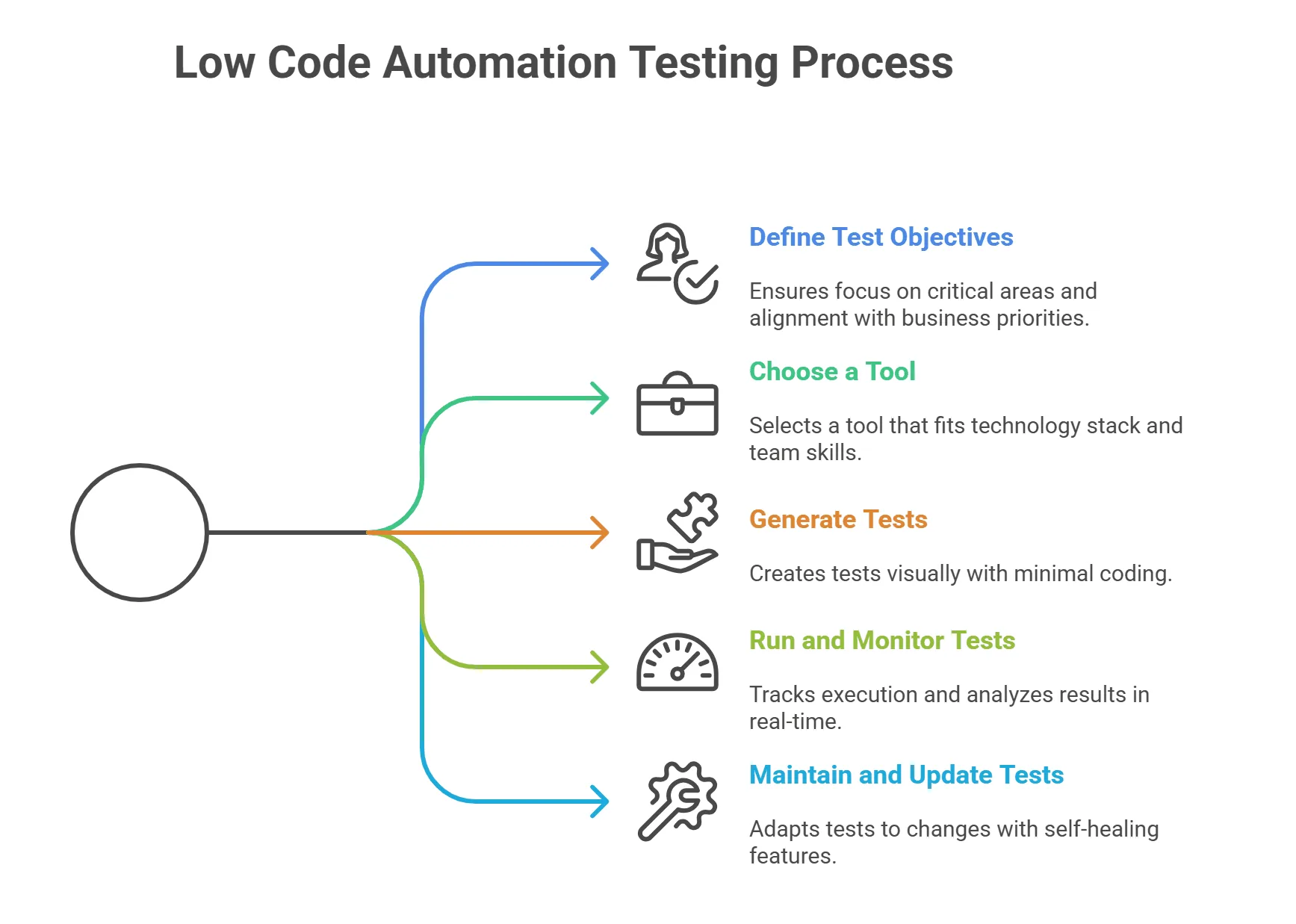
The Low Code Automation Testing Process
- Define objectives - Set goals for functionality, regression, integration, or performance.
- Choose a tool - Pick one that fits your stack, skills, integrations, and scale.
- Generate tests - Build them visually or from plain-English descriptions.
- Run and monitor - Execute across environments and track results on dashboards.
- Maintain - Let self-healing absorb UI changes so tests keep passing.
What Is Low Code Automation
Low code automation builds software and tests with minimal hand-coding, using visual interfaces, drag-and-drop workflows, and reusable components, while still letting engineers script complex logic.
This makes automation accessible to non-technical stakeholders while keeping flexibility for advanced users. These tools often integrate with CI/CD pipelines, AI-based test generation, and reporting to streamline the testing lifecycle.
How Does Low Code Automation Differ From Low Code Testing
Low code automation is the umbrella that cuts hand-coding across software delivery using visual builders, drag-and-drop workflows, reusable components, and integrations shared by every use case.
Low code automation testing applies that model to QA and adds testing-specific primitives: element resolution, assertions, test data handling, parallel execution, and self-healing that repairs locators when the UI changes.
The distinction matters when you evaluate tools. A business-process platform may share the visual layer but lack assertions, parallel runs, or self-healing, so for testing you need a tool built around those test primitives.
Why Use Low Code Testing
Teams use low code testing because automation needs heavy coding; visual workflows and reusable components let them validate behavior faster while stakeholders gain visibility into coverage.
Here are some reasons to use low code automation testing that help overcome various challenges in automation testing:
- Faster test creation - Ship functional and regression cases in hours, not days, using pre-built reusable workflows.
- Reduced Test Maintenance Cost - When application UI elements change, modular visual workflows minimize the need for manual script updates.
- Higher coverage with limited resources - Automate more cases without adding headcount, covering edge cases and regression.
- Consistent reporting and visibility - Actionable metrics on execution, failures, and coverage let stakeholders track QA progress.
- Integration With CI/CD Pipelines - Tests can run automatically on code commits, enabling continuous testing and early defect detection.

Note: Plan, author, and evolve low code tests in plain English with TestMu AI KaneAI. Start testing free!
Low Code vs No Code Automation Testing
Low code and no code test automation are often seen as similar, yet they address different requirements. Understanding these differences is key to selecting the approach that aligns best with your team's capabilities and objectives.
| Feature | Low Code Automation Testing | No Code Automation Testing |
|---|---|---|
| Target Users | Testers or QA engineers with technical knowledge. | Testers or business stakeholders with minimal technical knowledge. |
| Coding Requirement | Minimal coding for advanced scenarios. | No coding required; fully visual workflows. |
| Flexibility | High: supports scripting extensions for complex logic. | Limited; restricted to pre-built actions and templates. |
| Use Cases | Regression, UI, API, integration, complex workflows. | Simple UI validation, smoke tests, repetitive workflows. |
| Maintenance | Moderate; modular workflows simplify updates, and custom scripts require attention. | Low; visual workflows are easy to maintain but less adaptable. |
| Integration Capabilities | Supports CI/CD pipelines, version control, and external tools. | Basic integration; mostly pre-configured connectors. |
| Complexity Handling | Can handle complex conditional logic and workflows. | Best for simple, repeatable workflows; struggles with advanced logic. |
| Learning Curve | Moderate; testers may need coding knowledge. | Minimal; almost entirely visual and intuitive. |
How to Perform Low Code Automation Testing
To perform low code automation testing, define your objectives, choose a low code tool, generate tests visually or in plain English, run and monitor them, then maintain them with self-healing.
Here are the steps to perform low code test automation:
- Define test objectives - Set the purpose (functional, regression, integration, or performance) so you focus on critical areas.
- Choose a low code tool - Weigh coding flexibility, self-healing, framework export, integrations, and scale.
- Generate tests - Use drag-and-drop, prebuilt actions, or record-and-playback to define workflows, actions, and expected outcomes visually.
- Run and monitor tests - Track execution status, failures, and performance on the tool's dashboards, logs, and real-time reports.
- Maintain and update tests - As the app evolves, self-healing test automation auto-adjusts to minor UI changes, cutting manual effort.
Low Code Automation Testing With KaneAI
KaneAI is TestMu AI's GenAI-native test agent. Instead of writing scripts, you describe a flow in plain English, and KaneAI plans the steps, resolves the elements, and produces an executable test, no framework required. KaneAI by TestMu AI also tests native iOS and Android apps on real devices, so AI app testing covers mobile as well as web.
A FyscalTech case study reports that KaneAI's natural-language authoring cut test creation time by 60% and reclaimed over 600 engineering hours a month, per CTO Saurabh Chandolia.
Two capabilities matter most for low code teams. KaneAI's smart element detection and self-healing re-anchor a step when the UI changes, so a renamed button or shifted layout no longer breaks the suite.
That cuts maintenance instead of forcing rewrites, and every test exports to Selenium, Playwright, Cypress, or Appium, so teams keep their code and avoid lock-in.

Features
- Natural-language test generation - Describe scenarios in plain English; KaneAI turns them into executable test cases.
- Multi-language code export - Export tests to major languages and frameworks for compatibility with existing environments.
- Intelligent test planner - Generate and sequence steps from high-level objectives for comprehensive coverage.
- API Testing - Generate tests for API endpoints, checking if they behave as expected under various conditions.
- GenAI-Native Debugging - Use AI test observability and real-time root cause analysis to diagnose and correct failing tests, accelerating issue resolution.
- Tool integration - Connect Jira, GitHub, and Azure DevOps to turn tickets into tests and validate pull requests.
To explore in more detail, check out this guide on web app testing with KaneAI.

Common Myths About Low Code Automation Testing
While low code automation testing has gained popularity, some misconceptions persist. Let's clarify a few common myths:
- It can't handle complex scenarios - False; many low code tools extend tests with custom scripts and integrations.
- It's only for non-technical users - Developers benefit too, offloading repetitive tasks to focus on complex logic.
- Tests are less reliable - Modern tools add self-healing and AI features that keep tests stable as the app changes.
- It can't scale for enterprises - Enterprise platforms support large-scale runs, CI/CD, and cross-environment execution.
- It replaces manual testing - It complements manual work, automating repetitive tasks while exploratory and usability testing stay manual.
Future of Low Code Automation Testing
The future of low code automation testing points toward greater accessibility and efficiency, enabling more teams to implement reliable testing without deep coding expertise.
Advancements in AI and integration capabilities are set to make these tools even smarter and more adaptable.
- AI Testing: Low code test automation tools will increasingly integrate AI for self-healing, auto-generation of test cases, test scripts, and predictive analytics. This will reduce manual intervention and improve test stability as applications evolve faster.
- NLP Testing: Test creation will shift more toward natural language inputs. Teams will simply describe workflows in plain English, and tools will generate reusable, executable scripts instantly.
- Enhanced Test Intelligence: Future platforms will not only run tests but also provide insights like predicting flaky tests, suggesting optimizations, and tracking quality trends across releases.
TestMu AI's AI-native Test Intelligence platform already works this way, surfacing flaky-test patterns and quality trends across releases so teams act on them before they slow a pipeline.
- Closer Alignment With DevOps: Integration with CI/CD pipelines will become seamless, turning low code automation testing into a core part of continuous testing strategies. This will help teams deliver faster without compromising quality.
- Scalability With Cloud: Cloud-native low code tools will support massive parallel executions, real-device testing, and cross-environment validation at scale, making enterprise-level testing faster and more cost-effective.
Getting Started With Low Code Automation Testing
Start with one flow your team runs by hand every release, a login, a checkout, or a search, and describe it in plain English instead of scripting it. Review the generated steps, run it on the cloud, and let self-healing absorb the next UI change so the test keeps working without a rewrite.
From there, expand to regression and API checks, then wire the suite into CI. The getting started with KaneAI documentation walks through the first test end to end, and TestMu AI keeps both the authoring agent and the execution grid in one place.
Citations
- AI testing - Tools will add AI for self-healing, test-case auto-generation, and predictive analytics, cutting manual work.
- NLP testing - Test creation shifts to plain-English descriptions that tools turn into reusable scripts instantly.
- Enhanced test intelligence - Platforms will predict flaky tests and track quality trends; TestMu AI's Test Intelligence already does this across releases.
- Closer alignment with DevOps - Tighter CI/CD integration makes low code automation a core part of continuous testing.
- Scalability with cloud - Cloud-native tools enable massive parallel runs, real-device testing, and cross-environment validation at scale.
Conclusion
Start with one flow your team runs by hand every release, a login, a checkout, or a search, and describe it in plain English instead of scripting it.
Review the generated steps, run it on the cloud, and let self-healing absorb the next UI change so the test keeps working.
From there, expand to regression and API checks, then wire the suite into CI so every release runs the same low-code coverage without a rewrite.
Author

Frank Joseph


Frank Joseph is an API documentation engineer and technical writer based in Lagos, Nigeria, with a background in software engineering and a degree in Computer Science. With over four years of experience, he specializes in creating developer-focused API documentation using tools like Postman, Markdown, MDX, Docusaurus, and GitHub. On TestMu AI (formerly LambdaTest), he wrote the guides on PHP testing with Codeception and low-code automation testing.
Reviewer

Himanshu Sheth
Reviewer
Himanshu Sheth is the Director of Marketing (Technical Content) at TestMu AI, with over 8 years of hands-on experience in Selenium, Cypress, and other test automation frameworks. He has authored more than 130 technical blogs for TestMu AI, covering software testing, automation strategy, and CI/CD. At TestMu AI, he leads the technical content efforts across blogs, YouTube, and social media, while closely collaborating with contributors to enhance content quality and product feedback loops. He has done his graduation with a B.E. in Computer Engineering from Mumbai University. Before TestMu AI, Himanshu led engineering teams in embedded software domains at companies like Samsung Research, Motorola, and NXP Semiconductors. He is a core member of DZone and has been a speaker at several unconferences focused on technical writing and software quality.


Low Code Automation Testing FAQs
Did you find this page helpful?
More Related Learning Hubs
TestMu AI forEnterprise
Get access to solutions built on Enterprise
grade security, privacy, & compliance
- Advanced access controls
- Advanced data retention rules
- Advanced Local Testing
- Premium Support options
- Early access to beta features
- Private Slack Channel
- Unlimited Manual Accessibility DevTools Tests