
Test on 50,000+ Real Android and iOS Devices
Live and Automated Real Device Testing on 50,000+ iOS and Android Devices. No Need to Buy or Maintain Device Lab

Why You Shouldn’t Test on Rooted Devices
In this article, we discuss what are rooted devices and dig deep into why you should not test on rooted mobile devices.
Last Updated on:

In today’s fast-paced digital world, mobile devices have become an inevitable part of organization strategies to do more with less while delivering a quality experience to their customers or end-users. At present, the global landscape is much more interconnected than ever before. The proliferation of smartphones and the adoption of widespread technologies and applications have profoundly transformed how we work and interact.
But why so? It all comes down to mobile devices!
Mobile devices play a crucial role in creating a culture of innovation and fostering digital transformation, making it easier for businesses to interact with customers, significantly boosting productivity, and helping organizations gain a competitive edge.
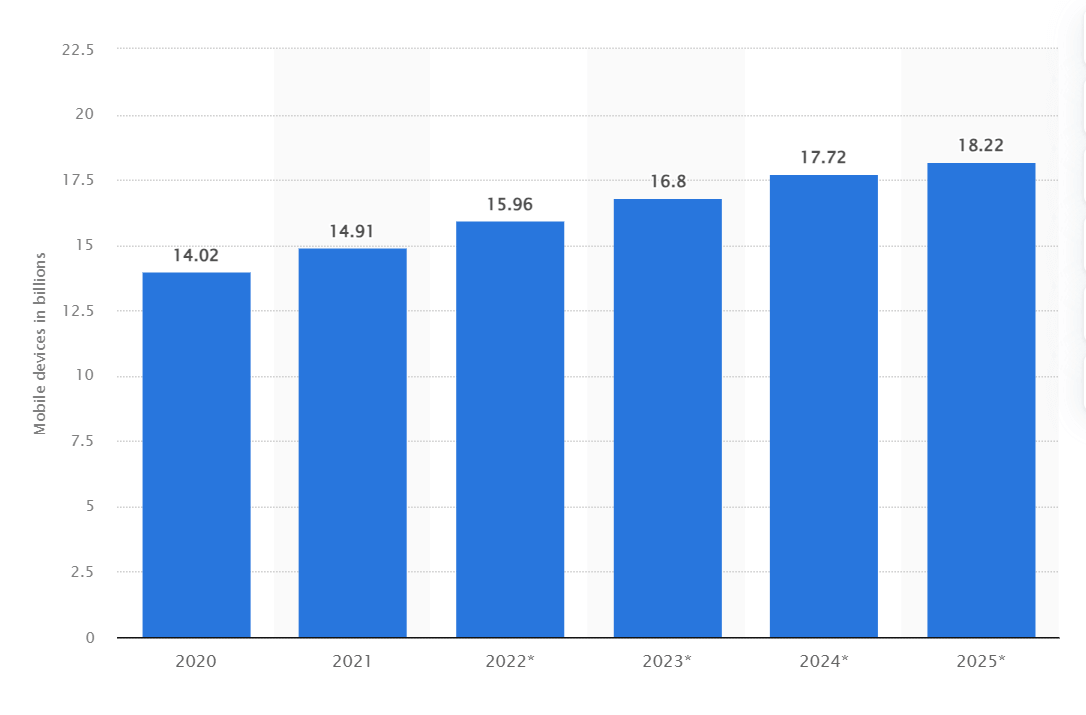
As of 2023, the global count of mobile devices reached nearly 17 billion, showing growth from slightly over 14 billion in the previous year. Projections indicate that by 2025, the total number of mobile devices is anticipated to surge to 18.22 billion, marking a substantial rise of 4.2 billion devices compared to the figures recorded in 2020.
With the rise of mobile devices, there is also an increase in mobile apps being developed. The Google Play Store witnesses an impressive average of 70k new Android apps being released every month. In fact, Android apps are being released at a rate nearly 2.5 times faster than iOS apps.
App releases (per month) on Google Play Store:

App releases (per month) on App Store:

To ensure a consistent user experience and fortified security, these apps must function and work flawlessly across different mobile devices and operating systems. However, when it comes to mobile app testing, one major challenge that arises during the testing phase is deciding whether to include rooted devices (or jailbroken devices) in the testing pool.
Rooting is a process of unlocking preset restrictions to attain privileged control of the device and the operating system. When a device is rooted or jailbroken, it grants you access to install apps from unknown sources, update OS, uninstall apps, underclock or overclock the device processor, and customize more aspects (or features) as needed.
However, rooting is a complicated process that comes with its pros and cons. In software testing, rooting mobile devices can be handy in some cases, such as testing software applications that require simulating global scenarios or automated tools that demand access to the mobile OS to make changes.
Even though rooting can help you ease the task of end-to-end testing, it can introduce a whole host of new risks into the test process. By gaining access to the operating system of the mobile device, rooting can compromise the device’s security and stability. Therefore, this may cause unexpected behavior during and after testing, resulting in issues that might not have existed in a non-rooted environment.
In this article, we will discuss what are rooted devices and dig deep into why you should not test on rooted mobile devices.
Key Takeaways
- Rooting an Android device, or jailbreaking an iOS device, removes the operating system's preset restrictions and gives the user privileged control to change settings, remove bloatware, and install apps from unknown sources.
- Rooting gives an Android device administrative root access similar to Linux, while jailbreaking an iOS device grants extra permissions but does not provide complete root access.
- Rooted devices lose pre-built security features, stop receiving automatic security patches and updates, void the device warranty, and can be bricked or lose data if the rooting process goes wrong.
- Automated tests on a rooted Android device give inconclusive results, because the rooted operating system configuration does not match what real users have, and failures are hard to trace to the app or the rooted device.
- Testing on rooted devices can hide security flaws, since an app that seems secure in an unrestricted rooted environment may fail to protect user data or behave erratically on a non-rooted device.
- Most end users run standard, unrooted devices, so testing on rooted devices misrepresents real user conditions and spends limited testing resources on a small fraction of the user base.
- Developers and testers should prioritize testing on non-rooted real mobile devices, and a real device cloud avoids the cost and scaling problems of an in-house device library.
- TestMu AI's real device cloud runs mobile web and native app tests on real Android and iOS smartphones and provides network logs, device logs, app logs, videos, and screenshots for debugging.
What are Rooted Devices?
Rooting (or jailbreaking) a mobile device involves gaining access to the preset restrictions in the smartphone’s operating system. With a rooted phone, users get privileged control to customize the device and hold administrative control over the subsystems of a mobile device. This enables them to bypass hardware or career restrictions in place for security reasons and modify/install anything on the rooted device.
Furthermore, rooted devices give the power to alter the operating system, replace or change system settings and applications, customize the look and feel of UI, bypass SSL pinning, download apps from external sources, etc.
The following are some of the things you can do with rooted devices:
- Configure advanced settings according to your preferences.
- Block ads in mobile apps and games.
- Enhance the performance of your device.
- Delete apps that can’t be uninstalled.
- Remove bloatware or pre-installed apps.
However, here are a few things to remember while rooting a mobile device:
- Once rooted, unrooting or setting the device back to its original configuration can be challenging.
- The warranty of a device ends once it is rooted.
- Rooted devices are inappropriate for regular usage and cannot provide a real user experience.


Difference Between Rooting and Jailbreaking
Until now in this article, you are familiar with these two terms: rooting and jailbreaking.
Rooting is the term used to describe removing hardware and software restrictions on an Android device. This grants users root access to the subsystem of an Android smartphone. As Android is built on a Linux kernel, rooting an Android device will give similar access to administrative permissions akin to Linux or other Unix-like operating systems like FreeBSD or OS X.
Jailbreaking is the term used in iOS that eliminates hardware restrictions by giving root access or privileges to the file system and manager of iOS devices. Using jailbroken devices, users can perform various operations, such as downloading applications that are unavailable on the App Store. While jailbreaking is a way to get additional permissions, however, it doesn’t provide complete root access. With jailbroken phones, one can use App Store, iTunes, and other standard functions (i.e., making voice calls).
Rooting or jailbreaking is not just about gaining the superuser access. Instead, it is an initial step in removing the software and hardware restrictions, enabling users to perform multiple actions like installing apps from unauthorized sources, removing ads in apps and games by blocking specific URLs, customizing games for game cheats, and so on.
If we compare rooting vs. jailbreaking, rooting in Android provides more extensive capabilities similar to other Linux systems. For example, accessing a file system component that was earlier restricted to specific apps.
In a nutshell, rooting and jailbreaking are similar in the process of obtaining elevated permissions on the device. The key point to note here is everything an iOS user is trying to achieve using jailbreaking is already covered in the basic functionality of rooting an Android device.

Note: Test your mobile apps on real Android and iOS devices. Sign up and start free.
Why is Device Rooting Needed?
Rooting or jailbreaking a device can help gain access to software functionalities or additional features including blocking ads, remove vendor “bloatware” for extra memory, and install software from other sources other than Apple’s official iOS App Store.
However, rooted and jailbroken devices have found utility for both reverse engineers and malicious users. The latter group may attempt to modify software, such as creating game cheats, intercepting data, and reverse-engineering applications.
With a jailbroken/rooted device, one can access parts of the local file system where sensitive data can be stored by an app. Additionally, these devices enable easy app hooking without the need to resign them, which becomes, particularly relevant when the app has built-in security features against resigning.
Risks Involved with Rooted Devices
Device rooting presents risks to both the users and mobile app developers. Rooted devices benefit malicious users and reverse engineers, which is one of the major concerns for app developers. As rooted or jailbroken devices don’t impose any software restrictions against the user, the device’s components are no longer secure for example, sensitive data stored in the keychain or the application’s sandbox.
Another risk that impacts Android and iOS devices is malware. It can infect a rooted or jailbroken device, either by a malicious application installed or via SSH. One of the reports highlights how an Internet worm targeted jailbroken SSH-enabled iOS device with the default password “alpine” and changed its wallpaper to a picture of 1980s singer Rick Astley.

Malware finds its path quickly into a jailbroken or rooted device, thereby having the potential to run commands with root privileges and control sensitive data of other applications.
While rooted devices give you more privileges and customization options, they can pose myriad risks for inexperienced users. A minor flaw in the rooting process can lead to substantial and sometimes irreversible issues. Let’s look at some risks associated with rooted devices.
- Security compromise: Device rooting disables the pre-built security features and is vulnerable to malware attacks. Therefore, using administrative access, malware can cause severe damage when it gains elevated privileges. No security patches and updates are automatically installed on rooted devices, leaving the user solely responsible for the device’s security.
- Device instability: During device rooting, certain code modifications can irreparably damage the software, leading to unstable and non-functional devices, also known as bricking.
- Warranty void: Rooting a device void its warranty, resulting in the carrier refusing to service the device since it violates the contract. As updates are no longer automatically installed, the device will become outdated and fail to sync with the latest technology.
- Limited services: Various streaming platforms restrict rooted devices from accessing their websites or application.
- Data loss: A rooted device often results in data loss from the device.
Is Testing on Rooted Devices Worth?
While using an Android or iOS device, you might encounter a situation where the pre-installed OS of these devices is restricting you from accessing desired functionalities. For instance, Apple only allows you to install apps available on the App Store but not from external sources.
As a tester, this can feel restrictive since it won’t allow you to make the changes and additions to the device’s functionality and ease the testing process. Mobile app developers have faced this particular challenge for years. This is because some automated solutions require them to use rooted devices to change the device OS.
Now here, the question is whether the tests performed on rooted devices are reliable and enable the testers to verify the desired functionality.
QA engineers leverage rooting and jailbreaking approaches, which gives them flexibility in setting up a test environment according to their needs. For example, Test Butler by LinkedIn is designed to provide a clean test environment that stabilizes the Android Emulator and can be run on rooted devices too. This gives testers complete control over their test environments without worrying about the ANR pop-ups, crashes, animations, etc., and challenges involved in running mobile app tests on emulated Android devices.
However, the above method opens the door to a plethora of risks in the testing process. Let’s understand this with an example. Assume you are performing Android application testing to verify the app works correctly over a particular network. You have test suites aiming to verify different test scenarios, such as logging in, performing application-specific tasks, and logging out.
When you perform automated tests on a rooted Android device, the configurations of an operating system might not match the original configuration that the actual users have. Therefore, the test results obtained are inconclusive. In case the test fails, it can be hard to pinpoint the root cause of the test failure, whether it was due to a network error, the issue with the unrooted device itself, or an issue specific to the rooted device.
In addition, the rooted devices don’t receive regular updates that are sent to unrooted devices. This is another reason why you shouldn’t test on rooted devices.
Reasons Not to Test on Rooted Devices
In this blog section, we will shed some light on why you should not test mobile applications on a rooted device.
Security Risks
When it comes to security risks, rooted devices can pose significant challenges. You see, a rooted device grants unrestricted access to its core file system and manager, providing elevated privileges that go beyond what a regular, non-rooted device would have. This may sound appealing to some users who want to customize their devices extensively, but it also opens the door for potential threats.
The problem lies in the fact that when a device is rooted, any app installed on it gains the ability to access sensitive system files and data. These are typically secured on a non-rooted device to prevent unauthorized access and maintain the integrity of the operating system, with these protective mechanisms removed, the device becomes more vulnerable to security breaches, malicious attacks, and even data theft.
Consider a scenario where a user unwittingly installs a seemingly harmless app on their rooted device. Due to the elevated privileges, this app now has the capability to access and modify critical system components. If the app is developed with malicious intent, it could exploit these privileges to compromise the device’s security and potentially cause significant harm.
When developers test their apps on rooted devices, they might unknowingly overlook some security vulnerabilities or issues. The app may appear to function perfectly in this unrestricted environment, leading developers to believe its secure.
However, when the same app is used on a non-rooted device, the limitations imposed by the standard (original) system might reveal security flaws or erratic behavior that were not identified during testing. This discrepancy between the behavior of an app on rooted and non-rooted devices can create a false sense of security. An app that seems secure on a rooted device may fail to protect user data or exhibit erratic behavior on a non-rooted device, putting users at risk.
Device Compatibility Issues
Compatibility issues are a common concern with rooted devices. As the rooted device has customized software and configuration, it can cause issues with specific applications. Typically, mobile app developers test apps on non-rooted devices to ensure the mobile application functions correctly on particular devices, browsers, and mobile OS.
However, if that specific app is installed on a rooted device, it might flood with numerous bugs, crashes, and all sorts of unexpected hiccups that weren’t found during the testing phase in a non-rooted environment.
Unrealistic User Conditions
In the vast realm of mobile devices, the majority of end-users use standard (unrooted) devices and generally do not root devices. However, when testers validate the mobile application on a rooted device, they might overlook the fact that this represents only a tiny fraction of the actual user base.
As potential usability issues remain unearthed until the app is released in the market, it fails to reflect the real user experiences of the non-rooted device users who form the majority of the target audience. Hence, rooted devices may develop a false perception of the device’s usability and functionality as it overlooks the constraints and limitations faced by real or actual device users.
Variations in Mobile App Behavior
With rooting, users can gain administrative privileges that allow them to access the core files and settings of the device’s operating system. While it offers customizations and access to exclusive apps, rooting can significantly modify the behavior of mobile apps. This, in turn, exposes the device to potential security risks, as malicious software can get unrestricted access and damage the mobile OS.
Another behavior variation you can observe in rooted devices is the potential for mobile apps to bypass security and licensing restrictions. When these restrictions are removed, some operations may not work. For instance, disabling in-app purchases, removing ads, or even bifurcating licensing checks can result in a loss of revenue for mobile app developers.
Some app stores have specific strict policies for compliance purposes. The rooting device can nullify the purpose of compliance, leading to app rejection or removal from the app store. Additionally, few applications rely on device integrity checks that may not work on rooted device, resulting in fewer app selection options.
Note: Test biometric authentication on real Android devices. Sign up and start free.
Time Constraints and Resources Complexities
Testing mobile apps on rooted devices introduces additional complexities and resource requirements. As mentioned above, rooted devices form a relatively small portion of the overall user base, and prioritizing testing efforts on standard mobile devices is often a go-to approach to allocate limited resources in an efficient manner.
Standard devices represent the majority of users and provide more accurate results when undergoing testing. On a rooted device, developers cannot address the majority of potential issues and ensure an optimum experience for the users who use real devices.
Legal and Ethics Concerns
Many countries have surpassed laws that make it illegal to root devices and gain unrestricted access. As per the Digital Millennium Copyright Act of 1999, the United States of America considers it unlawful to root your Android device without the manufacturer’s permission. However, there’s a possibility of getting exceptions if you root your device solely to download and install apps that are legally available but not accessible through the official Google Play Store. In such cases, the Librarian of Congress has the authority to grant those exceptions.
Considering this, performing app testing on rooted devices could be considered unlawful. When a device is rooted, it’s security features are breached, making it susceptible to potential security threats. Testing on these unsecure devices might inadvertently expose users to severe risks, compromising their personal information and private assets. So, it’s not feasible to run tests on rooted devices to breach the software integrity and expose user to risks.
Misinterpretation of Test Execution Results
When you test rooted devices, the results of the tests may not be reliable because of the complex interaction between app-related issues and the rooted environment itself rooting a device gives users elevated privileges, allowing them to access system files and modify system configurations.
While this gives users more control and customization options, it can also cause conflicts and differences during app testing. Here the challenging part is differentiating between issues that are related to the app and those that arise due to the rooted device. Issues that pop up in the application due to malfunction may be mistaken as issues with the application’s code, even though the exact cause is the with rooted device itself.
As a result, developers and testers may spend time in identifying and fixing issues whose root cause is incorrect, leading to confusion and wasted effort.
The above are the bare minimum risks that need to be considered if you plan to root the device for testing purposes.
Is There An Alternative?
The abovementioned risks, if left unaddressed, can result in negative user experiences and tarnish brand reputation in the global market. To mitigate such risks, developers, and testers should prioritize testing on non-rooted devices, i.e., real mobile devices, gaining insights into how the app performs in the hands of real users.
By doing so, the team can identify potential issues early on, ensuring a quality mobile experience across different devices, browsers, and operating systems. However, testing your mobile applications on physical devices can be challenging as procuring an in-house device library is not feasible as it is hard to scale, expensive, complex, and difficult to manage as your testing requirements scale. This is where a real device cloud can help you by offering testing on mobile devices hosted on the cloud.
For more information about physical device vs. real device cloud, we recommend checking our guide on the Real Device Cloud.
Scale Your Real Device Testing on Cloud
AI-powered test orchestration and execution platforms like TestMu AI lets you test on Android and iOS smartphones on a real device cloud of 3000+ real browsers, devices, and OS combinations and ensure accurate testing results. With its state-of-the-art GDPR-compliant and SOC Type II certified testing platform, you can install and test mobile web and native apps and never worry about security.

Furthermore, using TestMu AI, you can perform Android automation testing and iOS automation testing on a secure online device farm. This eliminates the need for an internal device library and reduces operating costs.
Using real device cloud testing on TestMu AI, you can use network logs, device logs, app logs, videos, and screenshots to debug your application. It is simple to test your apps by uploading .apk or .ipa files. Additionally, you can test apps by downloading them directly from the Google Play Store, App Store, TestFlight, and more.
To get started with real device cloud testing on TestMu AI, all it takes is a few steps!
- Login to the TestMu AI platform. Don’t have an account yet? Sign up for free.
- To perform real device testing, upload your app, select BRAND, DEVICE, and OS, and hit the START button.
- Now run the test in real user conditions hosted on a secured cloud across multiple devices and operating system versions.
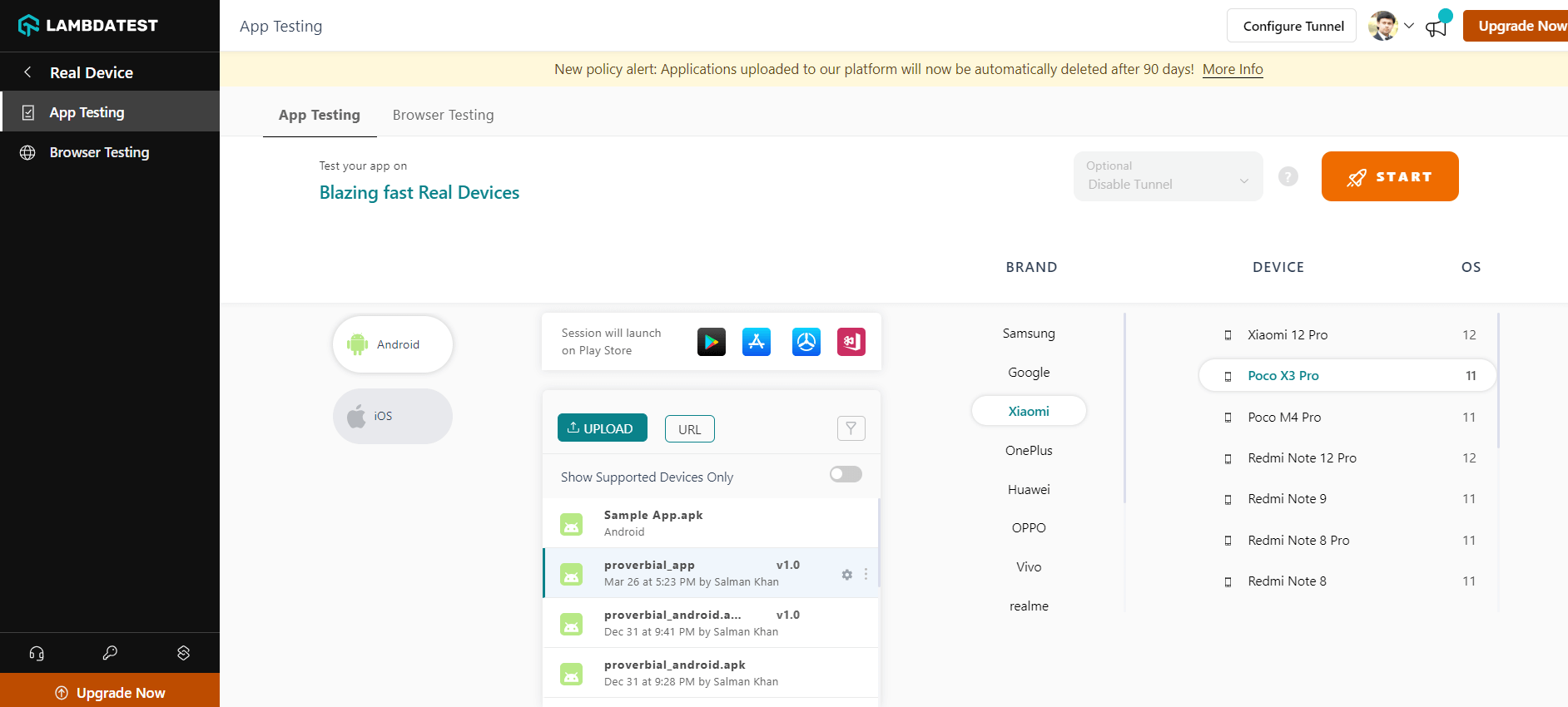
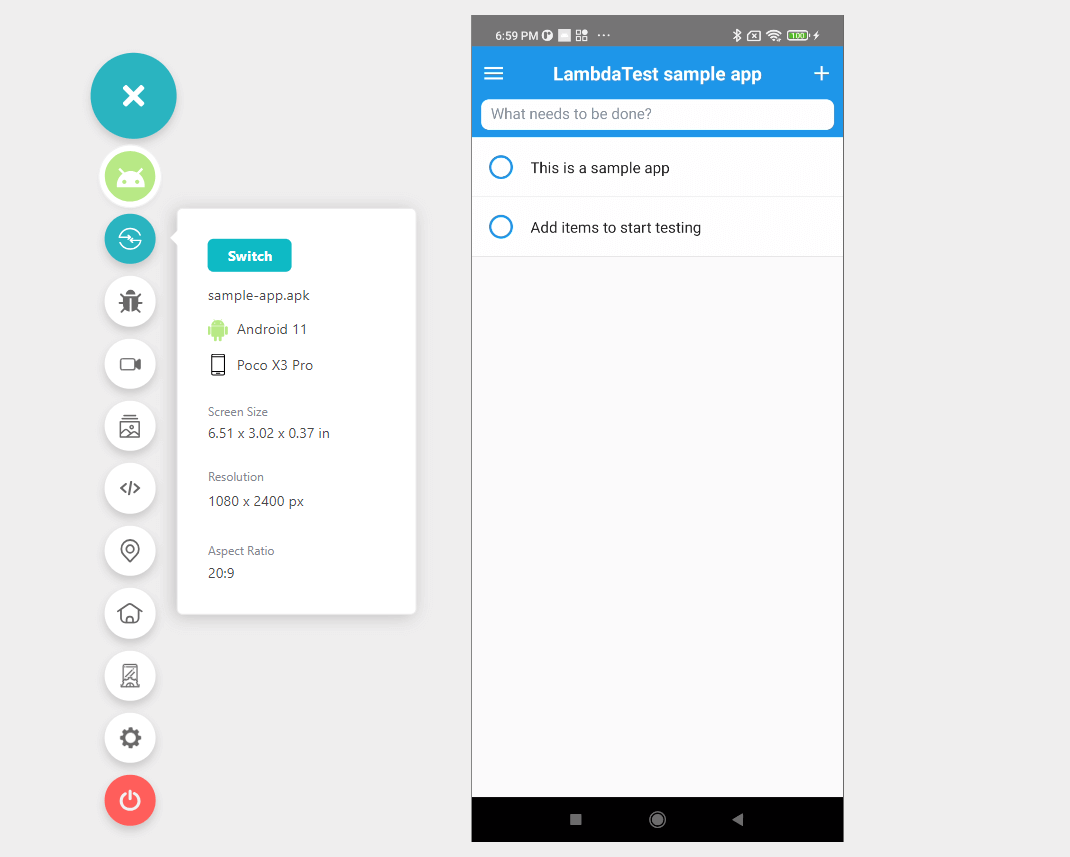
You can also follow the below tutorial that will give a basic understanding of how to test mobile apps on a real device cloud using TestMu AI.

Catch up on the latest tutorials around Selenium automation testing, Appium automation and more. Subscribe to the TestMu AI YouTube Channel for quick updates.
Conclusion
Rooted device comes with various benefits but simultaneously poses several risks. They can be outdated and unearthing bugs can be complicated due to changes at the OS level.
Non-rooted devices eliminate these risks since they receive regular updates and keep the original OS. You can control them explicitly and perform automation testing without rooting. This approach scales easily and provides accurate test results.
Ultimately, it’s best to avoid rooting device and test apps in real-world scenarios to ensure testing represents what actual users experience.

Testing web or mobile apps without writing code? KaneAI by TestMu AI turns plain-English instructions into tests.
Author

Shahzeb Hoda
Blogs: 7


Shahzeb Hoda is the Associate Director of Marketing and a Community Contributor at TestMu AI, leading strategic initiatives in developer marketing, content, and community growth. With 10+ years of experience in quality engineering, software testing, automation testing, and e-learning, he has authored and reviewed 70+ technical articles on software testing and automation. Shahzeb holds an M.Tech in Computer Science from BIT, Mesra, and is certified in Selenium, Cypress, Playwright, Appium, and KaneAI. He brings deep expertise in CI/CD pipeline automation, cross-browser testing, AI-driven testing practices, and framework documentation. On LinkedIn, he is followed by 3,700+ engineers, developers, DevOps professionals, tech leaders, and enthusiasts.
Reviewer

Sai Krishna
Reviewer
Sai Krishna is Director of Engineering at TestMu AI, where he leads agentic AI for quality engineering, building AI agents that autonomously drive mobile and conversational test automation. His current focus is Agent Testing and Model Context Protocol (MCP) support for mobile. He is a core contributor and member of the Appium open-source project and the creator of AppiumTestDistribution and appium-device-farm. With over 14 years of experience including more than 9 years at Thoughtworks as a Principal Consultant, he holds a BSc in Electronics and speaks regularly at TestMu and Appium Conf on Appium, mobile automation, and agentic AI in testing.


Frequently asked questions
Did you find this page helpful?
More Related Blogs













TestMu AI forEnterprise
Get access to solutions built on Enterprise
grade security, privacy, & compliance
- Advanced access controls
- Advanced data retention rules
- Advanced Local Testing
- Premium Support options
- Early access to beta features
- Private Slack Channel
- Unlimited Manual Accessibility DevTools Tests