

Power Your Software Testing with AI Agents and Cloud
The Native AI-Agentic Cloud Platform to Supercharge Quality Engineering. Test Intelligently and Ship Faster.


- TestMu AI (Formerly LambdaTest)
- /
- Blog
- /
- A Complete Guide To Flutter Testing
A Complete Guide To Flutter Testing
Learn Flutter testing with unit, widget, integration, and golden tests, then test Flutter apps manually and with Appium on real Android and iOS devices.
Last Updated on:
Flutter testing verifies that a Flutter app works on Android, iOS, web, and desktop through unit, widget, integration, end-to-end, and golden tests. The flutter_test package runs unit and widget tests, the integration_test package runs the full app, and Appium drives the built app on real Android and iOS devices.
This guide covers what Flutter is, why teams use it, why Flutter testing matters, manual and automated Flutter testing on real devices, and how AI agents help.
TL;DR
- Flutter lets teams build Android, iOS, web, and desktop apps from a single codebase.
- Flutter apps are commonly tested with unit, widget, integration, end-to-end, and golden tests.
- Flutter now recommends the integration_test package instead of flutter_driver for new integration tests.
- Google Pay's Flutter rewrite cut its codebase by 35%, from 1.7 million to 1.1 million lines of code.
- Flutter apps can be tested manually and with Appium automation on a real device cloud.
What is Flutter?
Flutter is an open-source framework developed by Google to ease out the process of mobile app development and facilitate the code reuse policy. Flutter follows a write-once, run-anywhere model. Therefore, a single code unit can be compiled for various platforms such as Android, iOS, web, Linux, Windows, and macOS.

Also, read - Cross Browser Testing Strategy Explained in Three Easy Steps

Flutter seems to be a great fan of widget-based development. It provides reusable code elements such as buttons and sliders for easy customizations according to the project needs. The second pillar of the Flutter framework is the SDK (Software Development Kit) that helps compile the code according to the operating system such as Android and iOS. Along with these two explicit and solid strengths, all the related features, such as time-saving, cost-cutting, come into the picture.
A case study on Flutter
In this tutorial on Flutter testing, the above-mentioned points seem good in theory, but I am sure they are not as exciting to read as Flutter is in reality. Therefore, I think a short case study on the framework would help you refine the image of Flutter in your mind and analyze how powerful it is.
This case study is about Google Pay, a Google application designed to manage and make payments to other users. The application’s codebase was documented to be 1.7 million lines of code before Flutter. With an application having two separate versions for both the operating systems, the engineer’s time was the major factor for the company. A growing application would soon add more and more features that could increase the complexity of the code. The application did not look sustainable at this point. The idea was suggested to move to Flutter initially as an experiment.

The proposal was initiated to develop the Add-to-app with Flutter. But soon, this proposal turned towards rewriting the complete code and moving to Flutter completely. Of course, betting on such a decision would be highly costly, but considering future developments and how fast Flutter apps are going ahead seemed practical and efficient.
This did not come as a smooth road either. Rewriting an application that itself is constantly updated in original languages and framework costs a lot of money and time. Furthermore, because the app has been re-written and is now essentially a new software with the previous name, you will need to obtain all security reviews and audits for the same app again. However, Google engineers bet that developing a single code copy would be only 1.2 times the work currently two times.
Soon, engineers closed the gap between legacy app maintenance & development. The new Flutter app had all the 300 features and then proceeded to beta-test it in India for 100 million users. The result of all the effort was a smaller-sized application with only 1.1 million lines of code (35% smaller, per the Flutter Google Pay case study) and blazing fast in operation.
It is true that Google has enough money to try something and fail with no impact on their business. But taking such a risk with Flutter only shows how effective the development in this framework is. So for us, it is worth considering before starting any project.
In the next section of this Flutter testing tutorial, we will see the importance of using Flutter before getting into Flutter testing.

Why use Flutter?
I am sure you must have got an idea by now around the benefits of using Flutter as a development framework. To summarize, the framework brings the following things to the table:
- Cross-platform application development framework.
- Brings out a fast application.
- Open-source platform and therefore tons of contribution from people who hear what you want to say.
- Flutter uses darts. If you are familiar with the language, it might become a de-facto choice for you.
- Flutter also comes with excellent IDE support. IntelliJ, Emacs, VSCode, and Android Studio all support Flutter development.
- The framework is often appraised for its exhaustive official documentation.
- Flutter reached its first stable release in December 2018 and has built a large community since.
Why Flutter Testing is Important
For high-quality, scalable Flutter apps, testing is one key critical area. Most teams and developers have a strong understanding of the importance of testing but often lack the experience of writing good tests, when to write, and where to write.
A good testing strategy helps ensure that current expectations and assumptions are met and increases confidence in the product.
With so many products using flutter, testing is even more crucial to ensure that the code we write now will still function properly no matter how many features we add or how many developers we onboard to the project.
Top products using Flutter
Flutter has been used by a lot of top companies (including Google as mentioned) to develop a fast cross-platform mobile application. Therefore, the top three products are hereby mentioned for Flutter users (or learners) to look around the design style for inspiration, thus making Flutter testing a must.
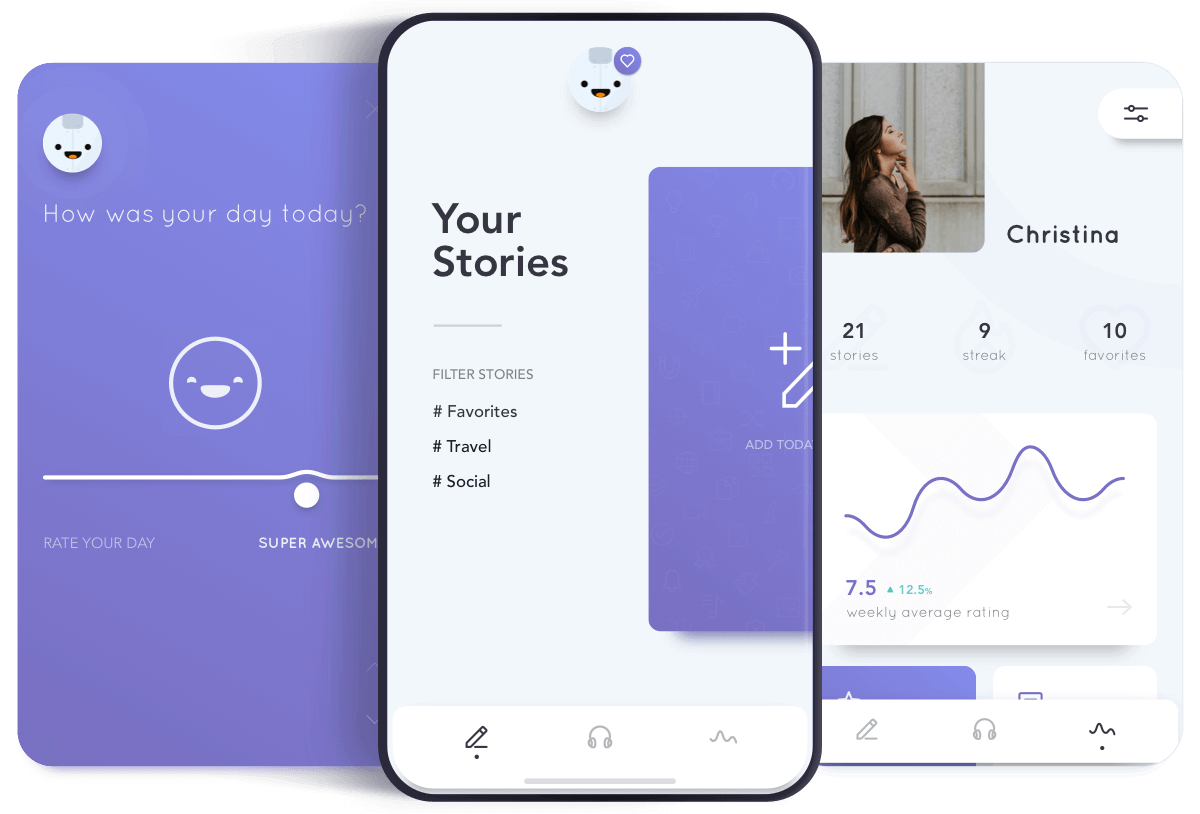
Reflectly
Reflectly is a journal application that runs artificial intelligence to deal with the negative thoughts and emotions of the user.
Groupon
Groupon helps in connecting users to local merchants for activities, goods, travel, etc. Groupon uses Flutter in its merchant app.

The New York Times
The new york times is a news-related application bringing news from all over the world in different sectors.
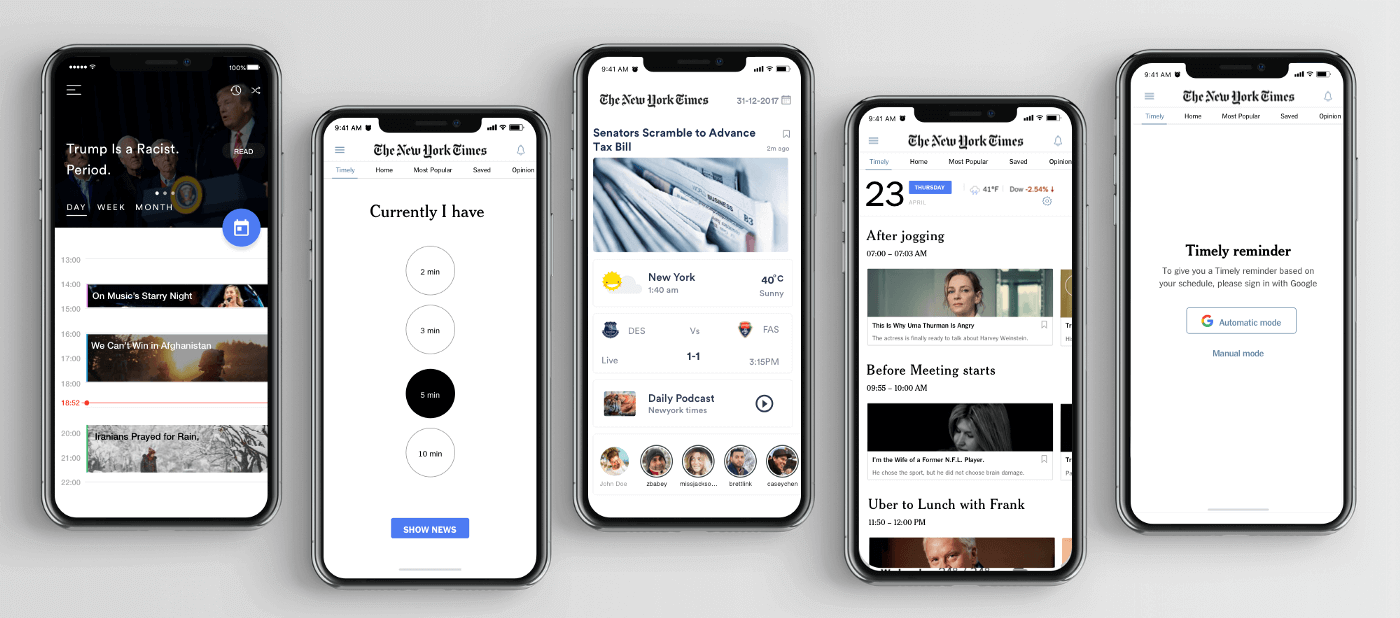
The above example shows the usage of Flutter across different domains, thus making Flutter testing absolutely necessary. However, the kind of tests you write for Flutter apps depends on your unique development workflow and needs, but here are some of the most common kinds of tests to get you started:
- Unit - Testing contract and business logic
- Widget - Testing UI separately
- Integration - Testing whether business logic breaks when units work together
- End-to-End - Testing to verify end-user experience
- Golden - Comparing widget screenshots against approved baseline images
How to test Flutter applications
By now, we are convinced that Flutter applications are easy to develop, and with the benefits it offers, it is always on the shortlist before starting a new project. But is it the same case with Flutter testing based on apps?
In Flutter testing, we have two methods:
- Manual testing for things such as user interface, experience, widget compositions, etc.
- Automation testing for verifying the functionality using various types of data and actions on the applications. If you are looking for a cloud-based solution, TestMu AI can serve both purposes on a single platform which is always recommended to work swiftly.
Flutter Testing manually on Real device cloud
Real device cloud could arguably be considered as one of the best choices for mobile app testing as compared to testing on emulators and simulators. It does not cost as much as building a new real device lab and gives us accurate results for the tests. Cloud-based applications host an array of emulators for mobile apps but as a tester, try to prefer real device cloud (I mean, why not!!) if the charges are nominal.
TestMu AI provides an online device farm with 10,000+ real devices over the cloud with an easy-to-use interface, which speeds up the app and web testing process. It provides features such as network throttling, detailed reporting, screenshot testing, and session recording, just to name a few. Testing an application is an easy step in TestMu AI.
- Login to the TestMu AI platform.
- Move to the “Real Device” section.
- Select “Real Time” from the options visible.
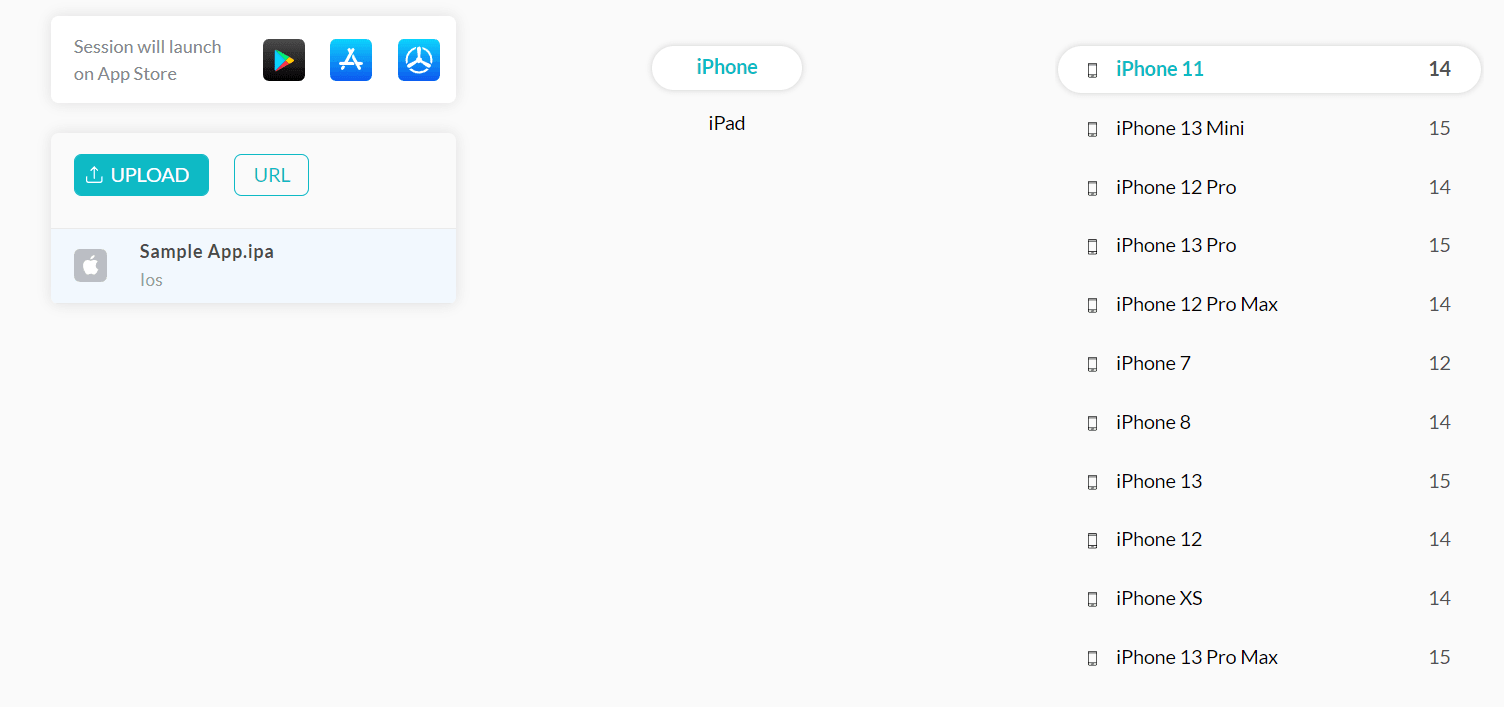
- A new panel will open up requesting the application binary from the tester. For convenience and trial purposes, a sample application will already be loaded into the system. We will use the same application here. If you have a binary already with you, you can upload the same.
- Select the device and OS version to run the application on.
- Here, I have chosen iPhone OS and iPhone 11 as the device. Press START once done.
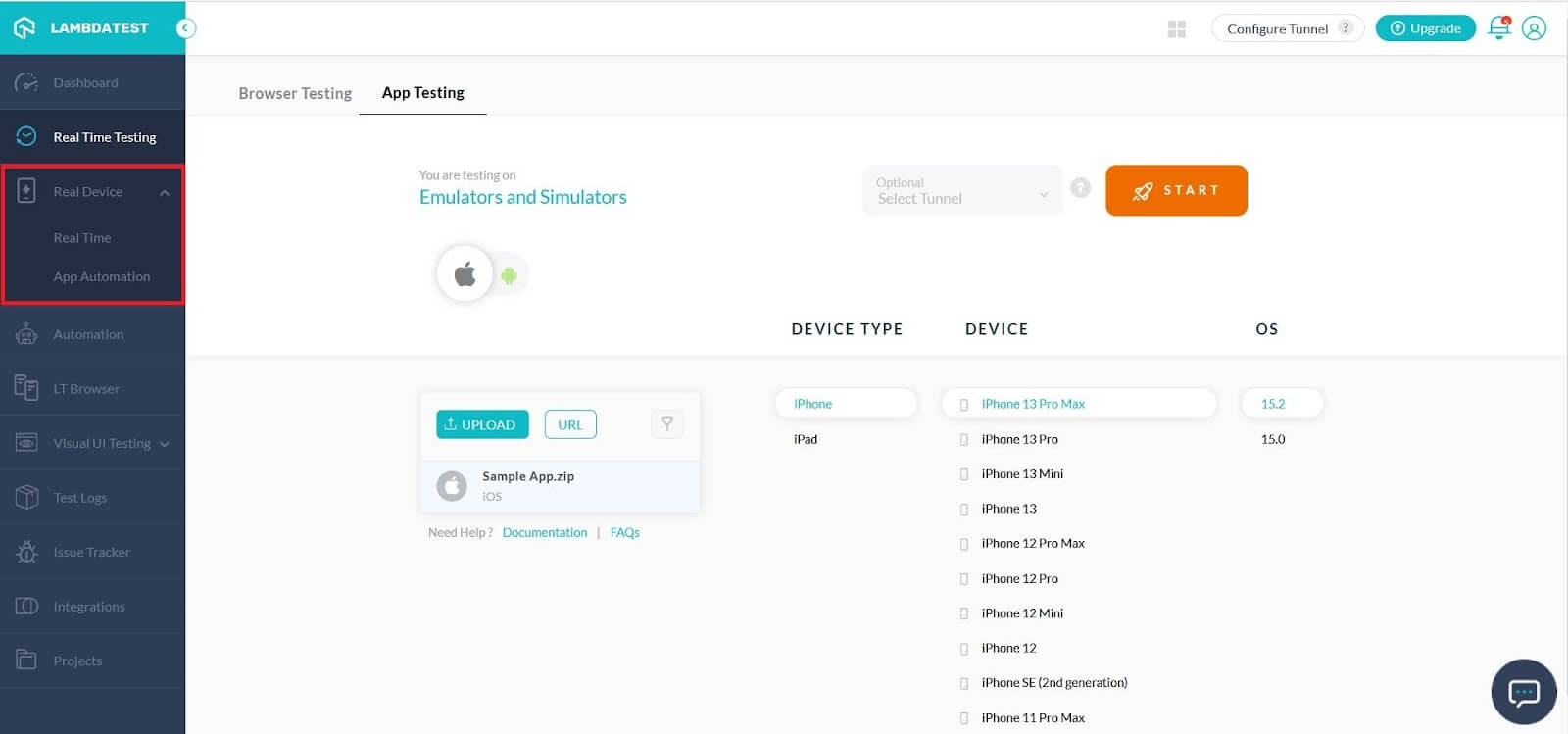

The application will start running on a real chosen device.
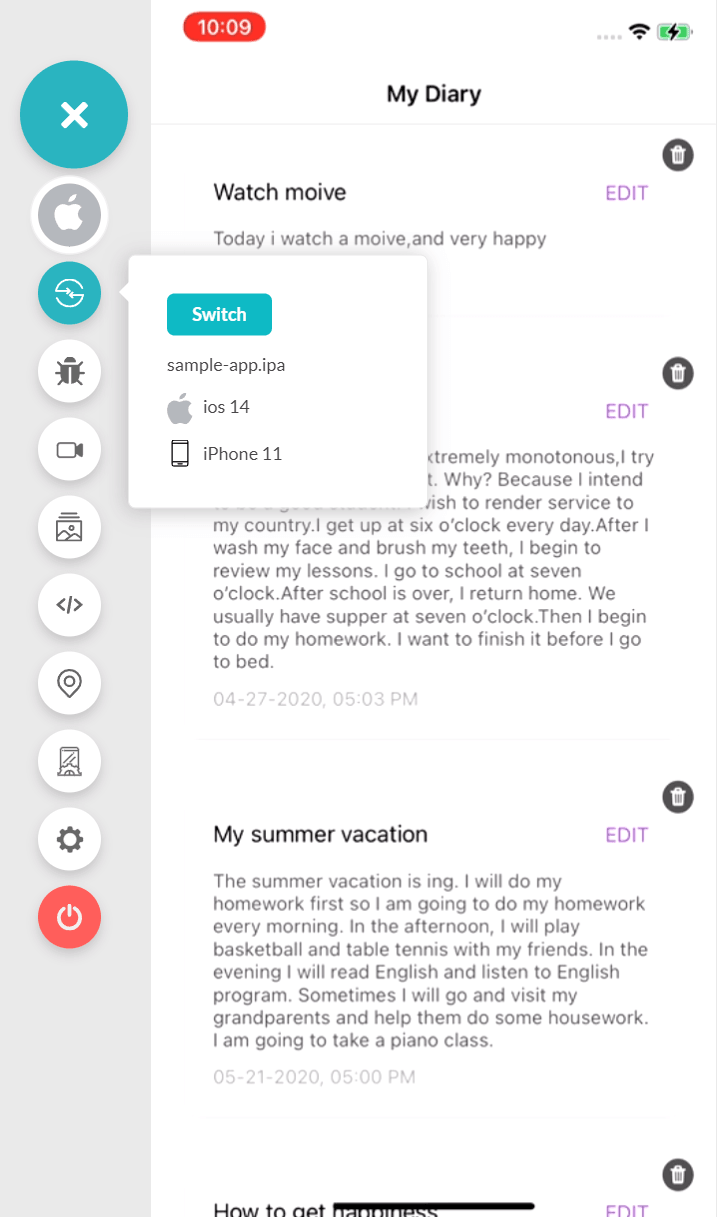
You can now interact in real time with your application and start Flutter testing right away. Of course, the same process can be used for automated browser testing but since we are talking about Flutter, let’s stick with app testing.
However, if you want to perform Flutter testing on Android emulator online or iOS Simulators, you can also do that by going to the Real Time Testing option and choosing the App Testing feature.
Here’s the short video on how to perform native mobile app testing on the TestMu AI platform:

You can also Subscribe to the TestMu AI YouTube Channel and stay updated with the latest tutorials around Selenium testing, Cypress testing, CI/CD, and more.
Flutter Testing using FlutterDriver
Flutter testing is fairly easy to implement, especially when using the FlutterDriver extension. FlutterDriver is an extension provided by the flutter_driver package for integration testing Flutter apps on real devices and emulators.
For new projects, Flutter now recommends the integration_test package instead, and publishes a flutter_driver to integration_test migration guide. Tests use the same tester API as widget tests and run with flutter test integration_test.
By using the Flutter Driver extension, we can run tests written in Dart and get results in a machine-readable format. Flutter Driver connects to an application and drives it like a user would, interacting with the widgets inside of it. This allows us to test our applications thoroughly, including edge cases that may be difficult to reach by hand. Unit and widget tests use the flutter_test package, and integration tests now use the integration_test package, which replaces Flutter Driver for new projects.
Flutter Driver is similar to Selenium WebDriver. It is used to automate the Flutter UI and run it against real devices or emulators. The advantage of using Flutter Driver is that we can automate our testing using a specific platform like Android Studio or through the command line.

Flutter Testing using Automation on Real device cloud
For automation testers using Appium as a go-to test automation platform is a good choice. The problem is just the device cloud that they need to have and maintain in-house for such a marathon. Real device cloud supporting Appium can be a feasible choice that can wrap up your app test automation faster than you can expect.
TestMu AI automation provides an Appium Grid for mobile testing with real devices at their end. This way, you can run tests in parallel and integrate CI/CD technologies on the same pipeline. Furthermore, covering all tests in a single place gives you organized and maintained test data and results for better analysis. For trials, you can explore a free plan that includes 100 lifetime automation minutes.
Looking to automate mobile apps on real devices, check out our video below.

Key Takeaway: Flutter apps can be tested manually on a real device cloud or automated with Appium on real devices, while in-code integration tests for new projects should use integration_test rather than flutter_driver.
How Do AI Agents Help With Flutter Testing?
AI coding agents help with Flutter testing by writing widget and integration tests, running them, and reading the failures through the official Dart and Flutter MCP server.
The Dart and Flutter MCP server starts with the dart mcp-server command. It gives an assistant real-time access to analyzer diagnostics, symbol resolution, test runners, and runtime inspection. Claude Code, Cursor, Codex, GitHub Copilot, and Antigravity can all connect to it.
That access changes four Flutter testing tasks:
- Test generation: The agent reads a widget's code and writes a widget test that pumps the widget with WidgetTester, taps it, and checks the result.
- Test execution: The agent runs the suite through the server's test runner and reads the failures itself, so you do not paste terminal output into a chat.
- Analyzer fixes: Analyzer diagnostics show the agent type errors and lint warnings before a run, so it repairs a broken test file first.
- Accessibility audits: Flutter's AI tooling includes an accessibility agent that audits widgets and proposes code fixes.
An agent can write a test that passes while it checks the wrong behavior, so a developer still reviews every assertion. Widget tests also run on the host machine without a device, so platform APIs, permissions, and device behavior still need runs on real Android and iOS hardware.
Conclusion
A Flutter test plan works best in layers, each matched to a different kind of risk:
- Unit and widget tests - Run on every commit to catch logic and UI regressions early.
- Integration tests - Use the integration_test package for new projects, not flutter_driver.
- Manual checks on real devices - Explore gestures, layouts, and platform quirks on real Android and iOS hardware.
- Automation on a real device cloud - Run Appium suites across many devices before release.
One Flutter codebase ships to Android and iOS, but platform APIs, permissions, and device behavior still differ, so every layer should run on both.
Author

Harish Rajora
Blogs: 100


Harish Rajora is a software developer at TestMu AI with over 6 years of hands-on experience in Python and cross-platform application development across Windows, macOS, and Linux. He has authored 800+ technical articles and worked on large-scale projects, including GenAI applications and core engineering features used by millions. Harish has led DevOps initiatives building CI/CD pipelines with Jenkins, AWS, GitLab, and GitHub, and holds an M.Tech in Software Engineering from IIIT Allahabad.
Reviewer

Shubham Soni
Reviewer
Shubham Soni is a Senior Member of Technical Staff at TestMu AI (formerly LambdaTest), building the Real Device Cloud and real-time testing infrastructure. He optimized the WebRTC services that power live testing to sub-100ms latency with adaptive bitrate streaming, led a frontend migration from Angular to React that cut page load time from 5-6 seconds to 1-1.5 seconds, and contributes to the official Device SDK. He led a team of four to build an accessibility testing product covering manual and automated testing and mentored a team of six on a real-time testing product. He brings over eight years of experience and earlier scaled a cloud code platform to 200K+ monthly users. Shubham holds a B.Tech in Computer Science.


Flutter Testing FAQs
Did you find this page helpful?
More Related Blogs
TestMu AI forEnterprise
Get access to solutions built on Enterprise
grade security, privacy, & compliance
- Advanced access controls
- Advanced data retention rules
- Advanced Local Testing
- Premium Support options
- Early access to beta features
- Private Slack Channel
- Unlimited Manual Accessibility DevTools Tests