
Run End-to-End Tests from Your Terminal with Kane CLI
Author and Run Tests Right from the Terminal in Natural Language, with an Evidence-Backed Pass or Fail from a Real Browser.
npm install -g @testmuai/kane-cli
11 Best Devin Alternatives in 2026 (and How to Test Them)
11 Devin alternatives and competitors for 2026, from Codex and Claude Code to OpenHands, with pricing, autonomy and how to test what each agent ships.
Last Updated on:
In the 2025 Stack Overflow Developer Survey, 66% of developers named "AI solutions that are almost right, but not quite" as their biggest frustration with AI tools.
That gap matters most when an agent works unattended, which is the job Devin, Cognition's autonomous software engineer, is built for. The Devin review covers how Devin itself performs, including the public record of the PRs it opens.
Teams look past Devin for open source code, self-hosting, model choice, or an agent that starts where they already work. This list ranks eleven Devin alternatives on how closely they match Devin's task-to-pull-request workflow, then shows how to trial your pick with TestMu AI's testing agents before you switch.
TL;DR
The closest Devin alternatives in 2026 are OpenAI Codex and Claude Code. Both hand a task to a cloud session that keeps working after you close your laptop and return a pull request for review, which is the workflow teams buy Devin for. The other agents trade some of that autonomy for open source code, self-hosting, or editor control.
Which Devin alternative fits which team?
- Best for async cloud tasks: OpenAI Codex - each cloud task gets its own workspace, keeps running while your computer sleeps, and ends in a commit or pull request; Codex comes with ChatGPT plans from Free upward.
- Best for terminal-first developers: Claude Code - reads the codebase, edits files, runs commands, and opens pull requests from the terminal, IDE, desktop app, or browser; cloud sessions need a paid Claude plan.
- Best for GitHub-native teams: GitHub Copilot cloud agent - starts from a GitHub issue, Slack, Jira, or GitHub's agents tab and opens a pull request, within a 59-minute session limit and one repository per run.
- Best for parallel cloud agents: Cursor - runs as many Cloud Agents as you want in isolated VMs, each on its own branch, returning merge-ready pull requests with artifacts.
- Best for tunable autonomy: Factory - Factory's Droid plans, implements, tests, and reviews changes, with autonomy levels from Off to High and bring-your-own-key model support.
- Best for self-hosting: OpenHands - MIT-licensed, runs locally, in Docker, on VMs, or in your own cloud, and works with any LLM that LiteLLM supports.
- Best free async tier: Google Jules - 15 daily tasks and 3 concurrent tasks on the free plan, each in a short-lived VM that clones, installs, and tests.
- Best for step-by-step approvals: Cline - an Apache 2.0 agent for the IDE, terminal, and desktop that asks before every file edit and command unless you turn on auto-approve.
- Best for terminal pair programming: Aider - an Apache 2.0 terminal pair programmer that can run your test suite after every edit and try to fix failures.
- Best for a multi-agent workspace: Eigent - an Apache 2.0 desktop app whose Developer Agent works alongside browser, research, and document agents on infrastructure you control; Eigent itself says it is not a one-for-one Devin clone.
- Best for issue-to-patch research: SWE-agent - an MIT-licensed Princeton and Stanford project that works a GitHub issue in a Docker or Modal sandbox and can open the pull request itself; the SWE-agent team now recommends mini-swe-agent instead.
Whichever agent you pick, TestMu AI's Kane CLI tests the app it built in a real browser, and Agent Assurance tests what the agent itself changed, so the switch rests on evidence rather than a demo.
What Is Devin?
Devin is Cognition's autonomous AI software engineer that can write, run, and test code. Cognition's own rule of thumb sets the scope: if you can do a task in three hours, Devin can most likely do it.
- Surfaces - Devin Cloud for delegated tasks, Devin Desktop and the Devin CLI for local work, and @Devin tags in Slack and Teams.
- Environment - Devin spins up its own Windows, Mac, and Linux virtual machines and tests in its own browser until the pull request is ready to merge. After it opens a PR, Devin can test the app end to end and attach an annotated screen recording.
- Pricing - self-serve plans are Free, Pro ($20/month), Max ($200/month) and Teams ($80/month plus $40 per full dev seat, up to 100 users), each paid plan with a usage allowance that refreshes daily and weekly and extra usage at API pricing, per Devin pricing. Enterprise is priced by contract and billed in Agent Compute Units (ACUs).
Cognition also owns Windsurf, which it renamed Devin Desktop on June 2, 2026, with Devin Local replacing Cascade as the local agent.
Windsurf is left off this list because it is now part of Devin.
Why Do Teams Look for a Devin Alternative?
Devin is improving: a 2026 study of 7,156 AI-authored pull requests from Codex, Copilot, Devin, Cursor, and Claude Code found Devin had the only consistent upward trend in acceptance rate, about 0.77% per week over 32 weeks. The same study found documentation tasks accepted 82.1% of the time against 66.1% for new features, so the task you delegate matters as much as the agent you pick.
The reasons to switch are usually about fit:
- Source access - Devin is proprietary, and its self-hosted option (Devin Outposts) still runs Cognition's software rather than code you can read and change.
- Model choice - Devin picks its models, while Factory, OpenHands, Cline, Aider, Eigent, and SWE-agent let you bring your own key or a local model.
- Where work starts - GitHub-centric teams want an agent that picks up issues, and terminal-first developers want a CLI they can script. Teams whose work starts from a written spec can compare the planning toolkits in the guide to spec-driven development tools. The guide to spec driven development covers what makes a spec an agent can build from.
- Billing model - Devin's allowances and compute units sit next to agents already bundled into ChatGPT, Claude, or Copilot plans a team pays for.
How These Alternatives Were Ranked
I ranked each agent on how well it replaces Devin, checking every capability against the vendor's own documentation. The criteria, in order of weight:
- Background hand-off - can it take a task, work in a sandbox while you do something else, and end in a pull request?
- Control - where it runs, whether you can self-host it, and how it fits CI.
- Openness - license and model choice.
- Built-in checks - whether it runs tests or drives a browser on its own change.
Prices change too often to compare as dollar figures, so each entry describes the billing model instead. TestMu AI's Kane CLI and Agent Assurance are not ranked because neither writes code; the trial section shows where they fit.
11 Best Devin Alternatives in 2026
1. OpenAI Codex
OpenAI Codex is the closest match to Devin's hand-off model.
Each Codex cloud task has its own workspace and can keep working while your computer is asleep. You inspect the changed files, request follow-up changes, and commit or open a pull request when you are ready.
- Runs in - the web, the Codex CLI, IDE extensions for VS Code, Cursor, Windsurf, Xcode, and JetBrains, iOS, and the ChatGPT desktop app, which Codex joined in July 2026.
- Open source - the CLI is Apache-2.0 with about 128k GitHub stars; the IDE extension and Codex cloud are not open source.
- Models - OpenAI models such as GPT-6.1 Sol, or a custom provider through a compatible Responses API endpoint.
- Pricing - included in ChatGPT plans from Free upward, or billed at API pricing with an API key.
- Watch for - API-key use drops the cloud features, and the built-in browser works only in the ChatGPT desktop app, not in the CLI or IDE extension.
Sandbox modes and output checks are covered in Codex CLI.
2. Claude Code
Claude Code is an agentic coding tool that reads your codebase, edits files, runs commands, and opens pull requests, in your terminal, IDE, desktop app, and browser. From the browser you can kick off long-running tasks and check back when they are done.
- Runs in - the terminal, VS Code, JetBrains, the desktop app, the browser, GitHub Actions, GitLab CI/CD, and Slack; cloud sessions keep running after you close your laptop.
- Browser checks - connects to Chrome to test web apps and debug with console logs.
- Open source - no; the GitHub repository is public, with about 150k stars, but its license reserves all rights to Anthropic.
- Models - Claude models only, through the Anthropic API, Amazon Bedrock, Microsoft Foundry, or Google Cloud.
- Pricing - included in paid Claude plans, or billed by API token through a Console account.
- Watch for - cloud sessions need a Pro, Max, Team, or premium Enterprise seat, and they are unavailable when Claude Code runs through Amazon Bedrock.
Setup, hooks, and subagents are covered in the Claude Code guide.
3. GitHub Copilot Cloud Agent
Copilot cloud agent can research a repository, plan changes, and implement them in the background, editing files and running tests and linters in an ephemeral cloud development environment. It works on one branch at a time, opens one pull request per task, and stops when a session reaches its 59-minute limit.
- Formerly - the Copilot coding agent; GitHub renamed it in 2026.
- Entry points - GitHub issues, the agents tab, Copilot Chat, IDEs, Slack, Jira, Linear, and the GitHub CLI, and some of them open a pull request automatically.
- Browser checks - the Playwright MCP server lets the agent read web pages, interact with them, and take screenshots.
- Scope - no changes across multiple repositories in one run, and GitHub-hosted repositories only.
- Models - Auto by default, or a chosen model from Anthropic, Google, OpenAI, xAI, or Microsoft; bring-your-own-key does not cover the cloud agent.
- Pricing - available on all paid Copilot plans and billed in GitHub AI credits since GitHub moved to usage-based billing on June 1, 2026.
- Open source - no; it is a hosted GitHub service.
4. Cursor
Cursor Cloud Agents, formerly Background Agents, run in isolated cloud VMs with full development environments. You can run as many in parallel as you want; each works on its own branch, can build, test, and use the changed software, and returns a merge-ready pull request with artifacts. Agents start from the desktop editor, the web, iOS, Slack, GitHub, Bitbucket, Linear, or the API.
Cursor is no longer independent: SpaceX completed its acquisition on August 14, 2026, as Cursor's joining SpaceX post confirms.
- Models - frontier models from OpenAI, Anthropic, Google, and SpaceXAI, Cursor's own Composer 2.5, and bring-your-own-key usage.
- Pricing - a free Hobby tier plus paid plans; Cloud Agents need a paid plan and are charged at API pricing for the selected model.
- Open source - no; the public GitHub repository is an issue tracker without source code.
- Watch for - an admin has to connect source control before Cloud Agents can work on your repositories.
Terminal workflows are covered in Cursor CLI. To check what a Cloud Agent built before you merge it, Kane CLI can test Cursor builds independently, and the side-by-side page shows how Kane CLI tests what Cursor ships next to Bugbot. Cursor's MCP setup is covered in Cursor MCP.
5. Factory
Factory's Droid plans, implements, tests, and reviews changes end to end while approval workflows keep you in control. It works from project files, repository instructions, and connected knowledge.
- Autonomy - set per session from Off to High, and the droid exec command runs a task headlessly and exits, which suits CI.
- Runs in - VS Code, Cursor, Windsurf, JetBrains IDEs, Zed, or any editor terminal, plus Slack, Linear, and Jira through Remote Delegations, which is in private preview.
- Models - Anthropic, OpenAI, Google, and xAI models, a pool of open models, or your own OpenAI or Anthropic keys and local models.
- Pricing - subscription tiers with rolling 5-hour, 7-day, and 30-day rate limits counted in Factory Standard Credits; Business and Enterprise are custom.
- Browser checks - the separately installed Droid Control plugin drives web apps through end-to-end flows and reports pass or fail with annotated screenshots.
- Open source - no; Factory's public GitHub repository holds docs only.
Because the Droid that wrote a change also tests it, an outside check helps: Kane CLI can test Droid builds before they merge. The side-by-side page shows how Kane CLI tests what Droids ship, saved tests and mobile devices included.
6. OpenHands
OpenHands is the closest open-source counterpart to Devin.
Its self-hosted Agent Canvas runs OpenHands, Claude Code, Codex, Gemini, or any ACP-compatible agent locally, in Docker, on VMs, or anywhere you can run an agent server backend. Automations integrate with Slack, GitHub, and Linear and run on a schedule or in response to webhook events.
- License - MIT, with about 90k GitHub stars on the main repository.
- Models - any LLM that LiteLLM supports, though the docs say it needs a powerful model to work well.
- Pricing - free to self-host while you pay your model provider; the hosted Cloud Individual plan is free with your own key or at-cost models, and Enterprise is custom.
- Watch for - the project's when to use OpenHands page lists session time limits and visual verification ("Can't see rendered UI easily") among current limitations.
- Headless mode - always runs in always-approve mode, executing every action without confirmation.
7. Google Jules
Jules is Google's experimental coding agent for fixing bugs, adding documentation, and building new features. It integrates with GitHub, works autonomously, and runs in a virtual machine where it clones your code, installs dependencies, and modifies files.
- Workflow - asynchronous: submit a task, approve its plan, and come back to a pull request; tasks start from the web app, a GitHub issue labeled jules, the Jules Tools CLI, or the Jules API.
- Free tier - 15 daily tasks and 3 concurrent tasks; Google AI Pro raises that to 100 and 15, and Ultra to 300 and 60.
- Models - Gemini only, with no bring-your-own-model option.
- Browser checks - the default base image includes Playwright for front-end testing, and Jules fixes CI failures on the pull requests it opens.
- Watch for - paid plans cover individual @gmail.com accounts only, setup scripts cannot run long-lived dev servers, and the public changelog has had no new entry since March 2026.
8. Cline
Cline is an AI coding agent that lives in your editor and your terminal. It can read and write files, run terminal commands, and use a browser, and every action requires your explicit approval by default.
- Unattended runs - auto-approve, the fully headless CLI for CI/CD, and cron-scheduled agents let it work without a human at each step.
- Runs in - VS Code, Cursor, Windsurf, JetBrains, Zed, and Neovim, a CLI, and native desktop apps for macOS and Windows.
- License - Apache 2.0, with about 70k GitHub stars; the JetBrains plugin is not open source.
- Models - Anthropic, OpenAI, Google, OpenRouter, Bedrock, local models through Ollama or LM Studio, or any OpenAI-compatible API.
- Pricing - free for individual developers, who pay only for inference on a usage basis; teams can add an Enterprise plan.
- Watch for - YOLO mode disables all safety checks, which Cline's own docs call dangerous.
If Cline is the agent you already use, its own replacements are ranked in Cline alternatives.
9. Aider
Aider is AI pair programming in your terminal. With the --test-cmd and --auto-test switches it runs your test suite after each edit and tries to fix any errors when the command fails.
- Scripting - a single --message run applies one change and exits, which is how you script it.
- License - Apache 2.0, with about 49k GitHub stars.
- Models - most LLMs, including local models through Ollama, though weaker models may not work well.
- Pricing - free; you pay your model provider.
- Watch for - there is no background or cloud mode, and the last tagged GitHub release, v0.86.0, dates from August 2025.
10. Eigent
Eigent is the one entry here that is not a dedicated coding agent. Its own Devin alternative comparison describes it as an Apache-2.0 multi-agent workspace that combines coding with browser, terminal, research, and document work on infrastructure you control, and says it should not be sold as a one-for-one Devin clone.
Built on the CAMEL-AI framework, Eigent's desktop app splits a task across a coordinator, a planner, and worker agents, including a Developer Agent that writes and runs code and terminal commands. The comparison suggests reviewing GitHub pull requests or refactoring a codebase with a human approval gate as a first workflow, with a focused tool such as OpenHands or Aider kept as the coding engine.
- Runs in - a desktop app for macOS, Windows, and Linux, with a local or self-hosted route.
- Background work - automations start a task on a cron schedule or from a webhook request.
- License - Apache 2.0, with about 15.5k GitHub stars.
- Models - a compatible hosted model with your own key, or a local model served through vLLM, SGLang, Ollama, or llama.cpp.
- Pricing - no application license fee; model, infrastructure, and operations costs remain.
- Watch for - by Eigent's own account it lacks Devin's dedicated environment, repository service, Slack and Linear workflow, review product, and enterprise guardrails, and its GitHub connector is still marked Coming soon.
Other cowork desktop apps are compared in Eigent alternatives.
11. SWE-agent
SWE-agent takes a GitHub issue and tries to fix it automatically, using the language model you choose. It is built and maintained by researchers from Princeton University and Stanford University, and its README describes it as made for research.
Its command line tutorial runs the agent in a Docker container, or on Modal for cloud-based execution. When it works on a GitHub issue, the --actions.open_pr flag has it open a pull request automatically if the issue has been solved.
- Batch runs - sweagent run-batch works through a list of issues, which is how the team benchmarks it on SWE-bench.
- License - MIT, with about 20.5k GitHub stars.
- Models - its FAQ says it supports probably all models, including local ones, and a per-instance cost limit caps spend on each run.
- Pricing - free; you pay your model provider.
- Watch for - the README says mini-swe-agent has superseded SWE-agent and recommends it going forward, and the last tagged release, v1.1.0, dates from May 2025. Eigent's comparison calls SWE-agent valuable for evaluation and controlled experiments, not a polished managed engineering service.
mini-swe-agent is the team's recommended successor: an agent class of about 100 lines of Python that uses only bash, works with any model through LiteLLM, OpenRouter, or Portkey, and runs locally or in Docker, Podman, Singularity, or Apptainer sandboxes.
Devin Alternatives Compared
| Agent | Background tasks | Where it runs | Open source | Models |
|---|---|---|---|---|
| Devin (reference) | Yes, in its own VMs | Cloud, Desktop, CLI, Slack, Teams | No | Chosen by Cognition |
| OpenAI Codex | Yes, Codex cloud | Web, CLI, IDE, ChatGPT app | CLI only (Apache-2.0) | OpenAI, or custom endpoint |
| Claude Code | Yes, cloud sessions on paid plans | Terminal, IDE, desktop, browser, CI | No | Claude only |
| Copilot cloud agent | Yes, up to 59 minutes | GitHub, IDEs, Slack, Jira | No | Model picker or Auto |
| Cursor | Yes, parallel Cloud Agents | Editor, web, iOS, Slack, API | No | Many providers, BYOK |
| Factory | Yes, cloud and local | Desktop, terminal, web, IDEs | No | Many providers, BYOK, local |
| OpenHands | Yes, automations and headless | Self-hosted or OpenHands Cloud | Yes (MIT) | Any LiteLLM model |
| Google Jules | Yes, in short-lived VMs | Web, GitHub issues, CLI, API | No | Gemini only |
| Cline | Headless CLI and schedules | IDEs, CLI, desktop | Yes (Apache 2.0) | Any provider, local |
| Aider | No, interactive or one-shot | Terminal | Yes (Apache 2.0) | Most LLMs, local |
| Eigent | Scheduled and webhook automations | Desktop app, self-hosted | Yes (Apache 2.0) | BYOK hosted or local |
| SWE-agent | Headless issue runs and batch mode | CLI with Docker or Modal sandbox | Yes (MIT) | Most models, local |
How to Trial a Devin Alternative Before You Switch
Vendor benchmarks run on someone else's repository. Run your shortlisted agent on yours, against a staging branch, and check two separate things: what the agent did while it worked, and whether the app it changed still works.
Every agent above can run tests, but an agent that checks its own change is still grading its own work, which is the case made in Devin builds, Kane CLI checks and in can coding agents test their own code.
Test What the Agent Did With Agent Assurance
Agent Assurance tests how your agents actually behave across workflows, tools, and actions, and it runs from your terminal as rook. Point it at a local agent CLI through a command profile and it records stdout, stderr, exit status, and the files that changed, then grades each criterion against that evidence rather than the agent's summary, as Pass, Fail, or Unable to Verify.
Discovery comes first. Run rook explore on the refund-desk sample in the public Rook repository, a Claude Code agent with declared tools and two MCP servers, and it reports findings before a single scenario runs:
$ rook explore --yes

agents analysed
  AGENT         FEATURES  FINDINGS  WORST
  refund-desk   8         3         critical
  order-lookup  3         3         critical

2 analysed, 0 unchanged, 17.68 credits
active agent: refund-desk - the only one registered
Both agents come back critical. The refund-desk agent's declared Bash capability can execute arbitrary commands, bypassing a refund policy that exists only in its prompt, and the order-lookup subagent calls itself read-only while its billing server still exposes a refund tool. A coding agent with shell access carries the same risk, because a guardrail written only into the prompt is not enforced.
- Install the CLI with npm install -g @testmuai/rook@latest (Node 20 or later), or through Homebrew.
- Run rook explore in your repository, then rook generate for functional, non-functional, and adversarial scenarios.
- Add a command profile that invokes the candidate agent on a staging branch, run the suite, and read rook report.
- To drive the same workflow from inside Claude Code, Codex CLI, or Gemini CLI, install the skill with npx @testmuai/rook-skill (Node 22 or later), as shown in Rook with coding agents.
Agent Assurance is self-serve, with a 14-day free trial. Point it at a staging target. The comparison of pre-production agent testing and observability explains what a staging run catches that later monitoring cannot.
Test What the Agent Built With Kane CLI
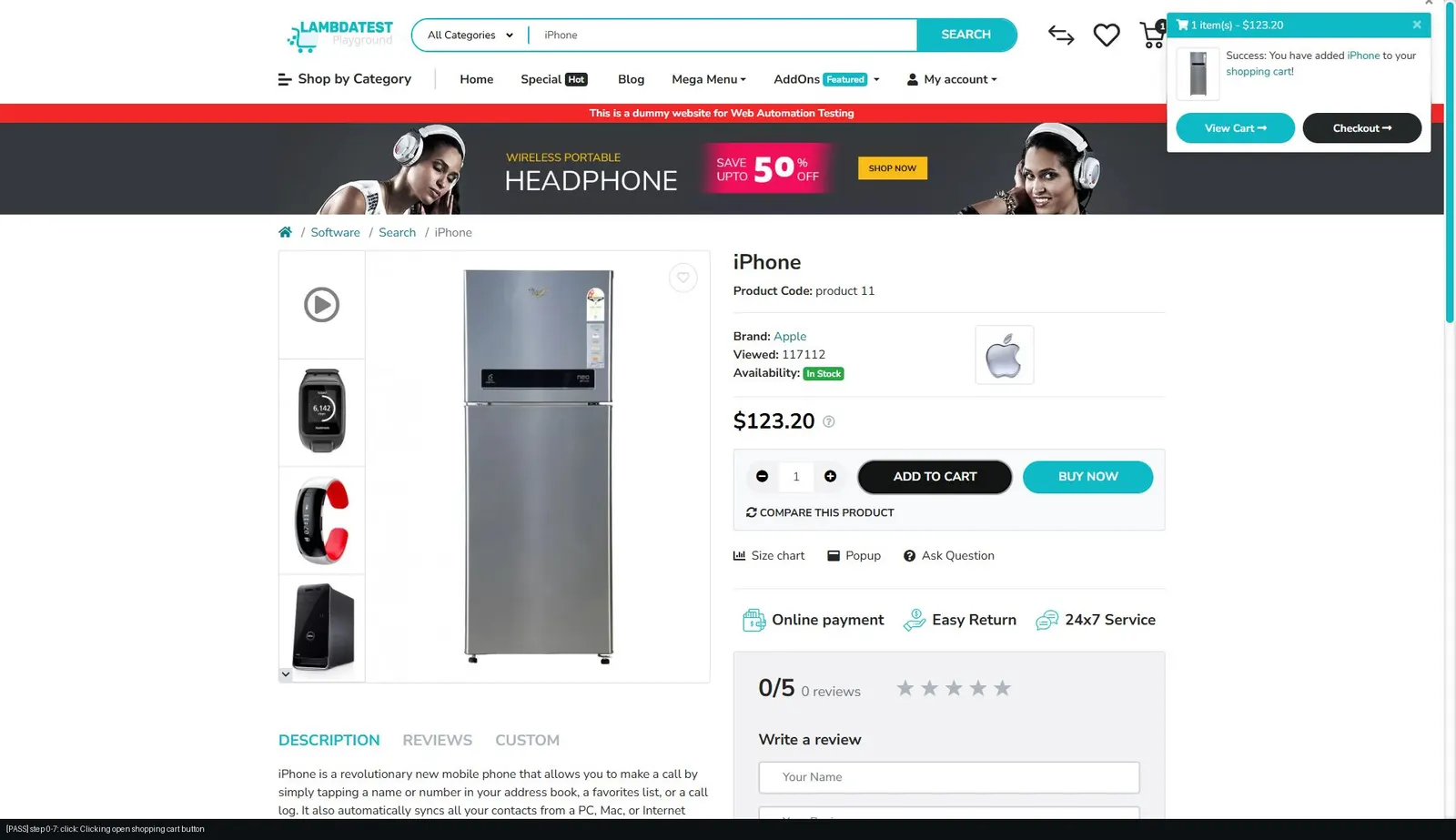
Kane CLI checks the other half: the running app. Give it a plain-English objective and it drives a real Chrome browser, then returns a pass or fail with a sealed evidence file; in agent mode it streams NDJSON a coding agent can read.
kane-cli run "go to https://ecommerce-playground.lambdatest.io/, search for 'iPhone', open the first product in the results, click Add to Cart, open the cart, assert the cart contains an iPhone product, store the cart total as 'cart_total'" --agent --headlessAgainst the TestMu AI ecommerce playground, the run passes in nine steps, from navigation to the cart assertion, and the final run_end event carries the stored value:
{
  "type": "run_end",
  "status": "passed",
  "one_liner": "added an iPhone to the cart on LambdaTest Ecommerce Playground",
  "final_state": {
    "cart_contains_iphone_product": "true",
    "cart_total": "$123.20"
  }
}
- Exit codes - 0 for pass, 1 for fail, 2 for setup or auth errors, and 3 for timeout, so a CI job can stop a merge without parsing prose.
- Agent skills - one skill install teaches Claude Code, Codex CLI, and Gemini CLI to call Kane CLI on their own changes. An instruction file and a hook can make that call part of every task, as the guide on how to add testing to AI coding tools explains. Skill discovery in Codex specifically is covered in Codex skills.
- Saved tests - a test saved as a _test.md file replays from cache on later runs, in seconds and with no LLM cost.
If you stay on Devin, the same check runs on Devin's branches: see Devin app testing and TestMu AI's Devin alternative comparison for testing Devin builds. For the head-to-head, read Kane CLI vs Devin: how its testing compares with Devin's own.

Which Devin Alternative Should You Choose?
Match the agent to how your team hands off work:
- Delegate tickets, review later - OpenAI Codex, or Copilot cloud agent if your repositories live on GitHub and tasks fit in under an hour.
- Long sessions from the terminal - Claude Code.
- Source access or your own model - OpenHands for a self-hosted platform, Cline for approvals inside the IDE, or Aider for pair programming in the terminal.
- Parallel agents next to your editor - Cursor, with its SpaceX ownership factored into vendor review.
- Autonomy levels and BYOK in one product - Factory.
- A free asynchronous tier to test the workflow - Google Jules.
- Coding alongside research and document work - Eigent, with OpenHands or Aider as the coding engine, as Eigent's own comparison suggests.
- Reproducible issue-to-patch experiments - mini-swe-agent, the SWE-agent team's recommended successor to SWE-agent.
Shortlist two agents, run each on the same staging branch for a week, and gate the merge on evidence. Install Kane CLI with npm install -g @testmuai/kane-cli and follow Kane CLI getting started to check the app in a real browser, then install Agent Assurance with npm install -g @testmuai/rook@latest to check what each agent changed.
Testing from the terminal? Kane CLI by TestMu AI lets SDETs and developers plan, write, run and debug tests from the command line.
Author

Samyak Goyal
Blogs: 35

Samyak Goyal is a Senior Member of Technical Staff at TestMu AI engineering Kane CLI, the command-line tool that runs browser automation from the terminal, where a flow described in natural language executes in a real Chrome browser and returns pass or fail with shareable proof. He is a backend engineer with 4+ years of experience, previously an SDE at Innovaccer, where he built APIs, introduced Kafka, and cut deployment from weeks to hours. Samyak also builds multi-agent systems, skill-orchestration frameworks, and a personal copilot that indexes 200+ microservice repositories.
Reviewer

Anubhav Singhmaar
Reviewer
Anubhav Singhmaar is an AI Product Manager at TestMu AI driving Kane CLI, the command-line tool that brings browser automation to the terminal, turning natural-language flows into runs in a real Chrome browser that return pass or fail with shareable proof. He owns the roadmap and prioritization and works with engineering to ship developer-facing features. Before TestMu AI, he spent over four years at Sprinklr owning enterprise voice AI across APAC and EMEA. A mechanical engineer turned product manager, he grounds guidance in real QA workflows.


Devin Alternatives FAQs
Did you find this page helpful?
More Related Blogs



TestMu AI forEnterprise
Get access to solutions built on Enterprise
grade security, privacy, & compliance
- Advanced access controls
- Advanced data retention rules
- Advanced Local Testing
- Premium Support options
- Early access to beta features
- Private Slack Channel
- Unlimited Manual Accessibility DevTools Tests