
Power Your Software Testing with AI Agents and Cloud
The Native AI-Agentic Cloud Platform to Supercharge Quality Engineering. Test Intelligently and Ship Faster.

- TestMu AI (Formerly LambdaTest)
- /
- Blog
- /
- Cursor MCP: How to Add, Test, and Control MCP Servers
Cursor MCP: How to Add, Test, and Control MCP Servers
Cursor MCP setup in mcp.json: add local and remote servers, test the config with MCP Inspector, set tool approvals in permissions.json, fix connection errors.
Published on:
On This Page
Most Cursor MCP trouble is a server that never starts, so its tools never appear in chat, or a server that starts and hands Cursor's agent more power than you meant to grant.
Playwright MCP, Microsoft's browser automation server, lists 25 tools. Its own annotations mark 18 of them destructive, including browser_hover and browser_run_code_unsafe, which runs arbitrary JavaScript.
This guide follows one .cursor/mcp.json from the first entry to a locked-down setup: Playwright MCP as a local server, TestMu AI's MCP server as a remote one, a test of the file outside Cursor, an approval allowlist, a guard hook, and a final check of what the agent actually changed.
TL;DR
Cursor MCP is Cursor's built-in support for the Model Context Protocol, which lets its agent call tools from the servers listed in .cursor/mcp.json or ~/.cursor/mcp.json, in chat, Plan Mode and the Cursor CLI. To set it up, add each server, test the file with MCP Inspector, then allowlist the tools that may run without asking.
How Do You Add an MCP Server to Cursor?
- Project config: Cursor reads .cursor/mcp.json for one repository and merges it with ~/.cursor/mcp.json, and the project entry wins a name clash. Shared with teammates: Yes, once the file is committed.
- Local stdio server: Local process: Yes. Cursor starts and stops a command such as npx -y @playwright/mcp@latest, and its secrets belong in env, an envFile, or ${env:NAME} variables, never in the committed file.
- Remote server: Local process: No. A url entry such as https://mcp.lambdatest.com/mcp, for TestMu AI's MCP server, connects Cursor over HTTP with an OAuth sign-in on first use.
- Pre-flight test: Needs Cursor running: No. MCP Inspector's CLI reads the same mcpServers JSON with --config and --server, lists the tools and calls one, so a broken Cursor MCP entry fails in the terminal first.
- Approval allowlist: Cursor runs the server:tool pairs listed under mcpAllowlist in .cursor/permissions.json without a prompt. Other tools go to an approval prompt or, in Auto-review mode, to Cursor's safety classifier.
What Is MCP in Cursor?
MCP in Cursor is the Model Context Protocol client built into the editor. Each MCP server you add exposes tools, and Cursor's agent decides when to call them during a chat, including in Plan Mode.
Cursor's MCP docs list support for tools, prompts, resources, roots, elicitation, and the MCP Apps extension, through which MCP tools can return interactive UI along with standard tool output. The same page lists three transports:
| Transport | Where it runs | What mcp.json holds | Auth |
|---|---|---|---|
| stdio | On your machine, as a process Cursor starts and stops | A shell command and its arguments | Manual, through environment variables |
| SSE | On a local or remote server you deploy | A URL to an SSE endpoint | OAuth |
| Streamable HTTP | On a local or remote server you deploy | A URL to an HTTP endpoint | OAuth |
The same configuration reaches past the editor. The Cursor CLI reads the mcp.json files you set up for the editor, and Cloud Agents use servers configured in the Cloud Agents dashboard or shared by a team admin.
Remote servers widen what the agent can reach. The Exposed by Design preprint on arXiv counts over 21,000 MCP server instances detectable on the public internet, which is why the approval and hook settings later in this guide matter as much as the setup.
For the protocol's building blocks from the Anthropic side, see Claude MCP.
How to Add an MCP Server to Cursor
Cursor reads two files and merges them: .cursor/mcp.json in the project and ~/.cursor/mcp.json in your home folder. Cursor's MCP help page says the project file takes priority when both define the same server name, so commit the project file and keep personal servers global.
The one-click route does the same job from the editor: open Customize in the sidebar, choose MCPs, and click Add to Cursor next to a listed server. Hand-written entries are easier to review in a pull request, so the steps below use the file.
Add a Local stdio Server
A stdio server is a command that Cursor launches and talks to over standard input and output. Playwright MCP gives the agent a real browser, which makes it a practical first server for testing work:
{
  "mcpServers": {
    "playwright": {
      "command": "npx",
      "args": ["-y", "@playwright/mcp@latest", "--headless"]
    }
  }
}
The key, playwright here, becomes the server name in approvals, hooks and CLI commands, so keep it short and stable. Pin an exact version, such as @playwright/mcp@0.0.84, when every teammate's agent should see the same tools.
Add a Remote Server With OAuth
A remote server needs only a url. TestMu AI's MCP server connects Cursor to HyperExecute jobs, automation and native app test runs, SmartUI comparisons, accessibility checks and Test Manager through one endpoint, added next to the local entry:
{
  "mcpServers": {
    "playwright": {
      "command": "npx",
      "args": ["-y", "@playwright/mcp@latest", "--headless"]
    },
    "mcp-lambdatest": {
      "url": "https://mcp.lambdatest.com/mcp"
    }
  }
}
On first use, Cursor opens a browser sign-in. It finds the authorization server through the server's protected resource metadata (RFC 9728) and signs in with the authorization code flow and PKCE. You can read that metadata yourself before you trust a server:
curl -s https://mcp.lambdatest.com/.well-known/oauth-protected-resource
{"authorization_servers":["https://auth.lambdatest.com"],"bearer_methods_supported":["header"],"resource":"https://mcp.lambdatest.com/mcp"}
Some providers need a fixed client ID or a registered redirect URL instead. For those, add an auth object with CLIENT_ID, an optional CLIENT_SECRET and scopes to the server entry, and register the desktop app's callback, http://localhost:8787/callback, with the provider.
Keep Secrets Out of mcp.json
Cursor resolves variables in the command, args, env, url and headers fields, so a committed file can reference a secret without containing it. ${env:NAME} reads an environment variable, ${workspaceFolder} is the folder that holds .cursor/mcp.json, and envFile loads a .env file for stdio servers only.
The same pattern moves Playwright MCP's browser off your laptop. Its --cdp-endpoint flag accepts the CDP endpoint described in TestMu AI's Puppeteer testing docs, so each session runs on a cloud Chrome instead of a local one:
{
  "mcpServers": {
    "playwright-cloud": {
      "command": "npx",
      "args": ["-y", "@playwright/mcp@latest", "--cdp-endpoint", "${env:TESTMU_CDP_ENDPOINT}"]
    }
  }
}
Build the endpoint once from your TestMu AI username and access key, then restart Cursor so the servers it starts can see the variable:
export TESTMU_CDP_ENDPOINT="$(node -e '
const caps = {
  browserName: "Chrome",
  browserVersion: "latest",
  "LT:Options": {
    platform: "Windows 11",
    build: "Cursor MCP",
    name: "Playwright MCP session",
    user: process.env.LT_USERNAME,
    accessKey: process.env.LT_ACCESS_KEY
  }
};
console.log("wss://cdp.lambdatest.com/puppeteer?capabilities=" + encodeURIComponent(JSON.stringify(caps)));
')"
How to Test an MCP Server Before Cursor Loads It
Debugging a broken server inside Cursor means restarting the editor and reading MCP Logs. MCP Inspector gives a faster loop: its CLI mode reads the same mcpServers JSON with --config, starts one server with --server, and prints the result as JSON. Inspector 2.13.0 declares Node.js 22.19 or newer.
npx @modelcontextprotocol/inspector --cli --config .cursor/mcp.json \
  --server playwright --method tools/list
Against the Playwright entry above, that call returns all 25 tools with their input schemas and annotations. Calling one tool proves the server can drive a browser, which a tool list alone does not:
npx @modelcontextprotocol/inspector --cli --config .cursor/mcp.json \
  --server playwright --method tools/call --tool-name browser_navigate \
  --tool-arg url=https://www.testmuai.com/selenium-playground/table-sort-search-demo/

### Ran Playwright code
```js
await page.goto('https://www.testmuai.com/selenium-playground/table-sort-search-demo/');
```
### Page
- Page URL: https://www.testmuai.com/selenium-playground/table-sort-search-demo/
- Page Title: Selenium Grid Online | Run Selenium Test On Cloud
A broken entry fails just as visibly. With the package name mistyped as @playwright/mcpp, npx cannot install the server, the process exits before the MCP handshake, and Inspector exits with code 1:
npm error 404 Not Found - GET https://registry.npmjs.org/@playwright%2fmcpp - Not found
{"error":{"code":"error","message":"Connection closed"}}
Inspector does not resolve Cursor's ${env:NAME} syntax, so the playwright-cloud entry fails this test with "Invalid URL" and exit code 5 even when the variable is set. Test entries like that through the server command instead, and let your shell expand the variable:
npx @modelcontextprotocol/inspector --cli --method tools/list -- \
  npx -y @playwright/mcp@latest --cdp-endpoint "$TESTMU_CDP_ENDPOINT"
Once the file passes, load it in Cursor and confirm each server's toggle is on in Customize. From the terminal, the Cursor CLI gives the same view: agent mcp list shows each configured server and its status, and agent mcp list-tools playwright prints every tool with its argument names.
How to Control Which MCP Tools Run Without Approval
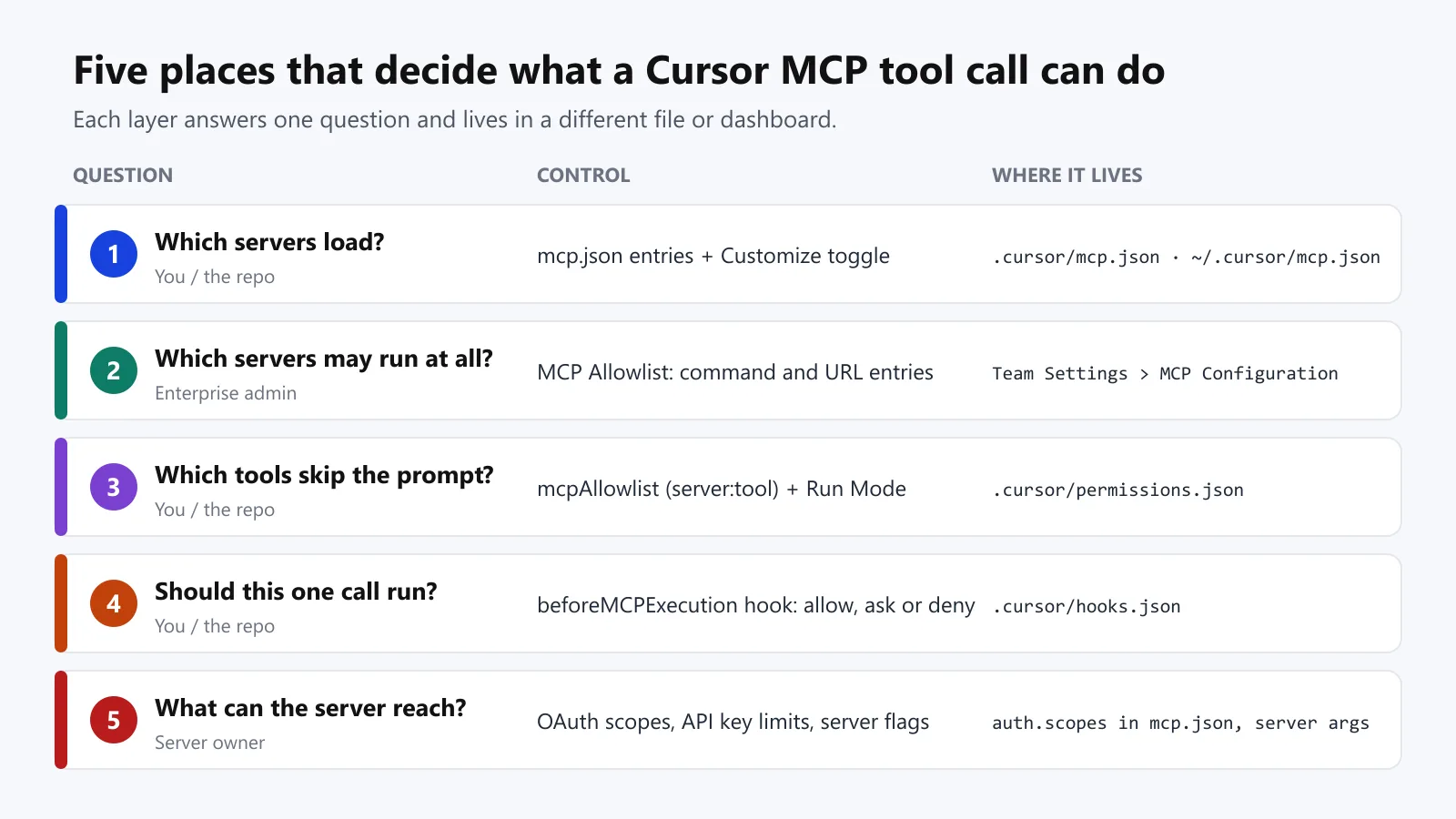
By default, Cursor asks for approval before it runs an MCP tool. Cursor's MCP help page adds that from Cursor 3.6, the default Auto-review mode runs allowlisted MCP tools immediately and routes every other call through a safety classifier, while Allowlist mode keeps the older allowlist-only behavior.
Write an Allowlist in permissions.json
The permissions.json reference describes an mcpAllowlist of server:tool entries in ~/.cursor/permissions.json or the repository's .cursor/permissions.json. Globs work inside names, and a file that sets mcpAllowlist replaces the allowlist in Cursor Settings, while a team admin's dashboard allowlist outranks both.
Start from the tool annotations. Playwright MCP marks 7 of its 25 tools read-only and the other 18 destructive, browser_navigate and browser_hover included. A glob such as playwright:browser_* would therefore also approve browser_run_code_unsafe, so name the read-only tools one by one:
{
  "mcpAllowlist": [
    "playwright:browser_snapshot",
    "playwright:browser_take_screenshot",
    "playwright:browser_console_messages",
    "playwright:browser_network_request*",
    "playwright:browser_find",
    "playwright:browser_wait_for",
    "mcp-lambdatest:list*",
    "mcp-lambdatest:getAutomationTest*",
    "mcp-lambdatest:getSession*",
    "mcp-lambdatest:getHyperExecute*",
    "mcp-lambdatest:tm_get_*",
    "mcp-lambdatest:tm_list_*"
  ],
  "autoRun": {
    "allow_instructions": [
      "Playwright navigation, clicks and typing on localhost or the TestMu AI Selenium Playground are test actions."
    ],
    "block_instructions": [
      "Ask before any mcp-lambdatest tool that deletes, stops, approves, rejects or uploads."
    ]
  }
}
Every tool the mcp-lambdatest patterns match carries the server's read-only annotation, so delete, stop and update tools stay off the allowlist, and the block_instructions entry steers the classifier to ask before them. The server's own instructions to the agent say the same: "Tools that delete, stop, approve, reject or upload change the account; confirm with the user before calling them."
The autoRun lists only steer the Auto-review classifier. The reference says to "treat both as steering, not enforcement": a call matching allow_instructions still goes through the safety check, and the lists do nothing in Allowlist mode.
Set the Same Rules in the Cursor CLI
The Cursor CLI keeps its own permissions in ~/.cursor/cli-config.json or the project's .cursor/cli.json, written as Mcp(server:tool) tokens under allow and deny:
{
  "permissions": {
    "allow": [
      "Mcp(playwright:browser_snapshot)",
      "Mcp(playwright:browser_take_screenshot)",
      "Mcp(playwright:browser_console_messages)"
    ],
    "deny": [
      "Mcp(playwright:browser_run_code_unsafe)",
      "Mcp(playwright:browser_evaluate)"
    ]
  }
}
Keep --approve-mcps out of shared scripts, because that flag approves every configured MCP server for the run. To take one server out of the CLI without editing mcp.json, run agent mcp disable with its name.
Add a Hook That Fails Closed
The allowlist only decides which tools skip the prompt. To refuse a call outright, add a beforeMCPExecution hook.
Cursor's hooks reference says the hook receives the tool name, its arguments and the server's key from mcp.json. Cursor runs every matching hook and merges their responses, so any deny wins over ask and ask wins over allow.
// .cursor/hooks.json
{
  "version": 1,
  "hooks": {
    "beforeMCPExecution": [
      { "command": "node .cursor/hooks/mcp-guard.js", "failClosed": true }
    ]
  }
}
// .cursor/hooks/mcp-guard.js
const KNOWN_SERVERS = ["playwright", "mcp-lambdatest"];
const BLOCKED_TOOLS = ["browser_run_code_unsafe", "browser_evaluate"];
let raw = "";
process.stdin.on("data", (chunk) => (raw += chunk));
process.stdin.on("end", () => {
const call = JSON.parse(raw);
let decision = { permission: "allow" };
if (!KNOWN_SERVERS.includes(call.mcp_server_name)) {
decision = { permission: "deny", user_message: `MCP server "${call.mcp_server_name}" is not on the project list.` };
} else if (BLOCKED_TOOLS.includes(call.tool_name)) {
decision = {
permission: "deny",
user_message: `${call.tool_name} runs arbitrary code and is blocked in this repo.`,
agent_message: "Use browser_snapshot, browser_click or browser_type instead."
};
}
console.log(JSON.stringify(decision));
});Pipe sample calls into the script to see both outcomes before Cursor ever runs it:
$ echo '{"tool_name":"browser_run_code_unsafe","mcp_server_name":"playwright"}' | node .cursor/hooks/mcp-guard.js
{"permission":"deny","user_message":"browser_run_code_unsafe runs arbitrary code and is blocked in this repo.","agent_message":"Use browser_snapshot, browser_click or browser_type instead."}

$ echo '{"tool_name":"browser_snapshot","mcp_server_name":"playwright"}' | node .cursor/hooks/mcp-guard.js
{"permission":"allow"}- failClosed - Fed input that is not JSON, the script exits with code 1. Without failClosed, Cursor treats that crash as a failed hook and lets the call through.
- Unknown servers - Any mcp_server_name outside KNOWN_SERVERS gets a deny, which follows the reference's advice to treat a missing or unexpected server name as a deny.
- Project path - Project hooks run from the repository root, so the command uses .cursor/hooks/ rather than ./hooks/.
Server-side limits are the last layer, and the Exposed by Design preprint shows they cannot be assumed on remote servers:
- Missing OAuth - 91.8% of the 414 internet-facing servers it tested dynamically had no OAuth authentication.
- Unguarded shell tools - 687 tool instances across confirmed servers exposed shell execution without access controls.
- Short-lived deployments - 41.6% of confirmed servers disappeared within three days between measurement runs.
For local servers you control, Playwright MCP's --allowed-origins and --blocked-origins flags narrow where its browser goes, though its own help text says they are not a security boundary and do not affect redirects. The wider threat model is in MCP security.
MCP Servers for Testing Work in Cursor
For testing work, these servers cover the browser, the results that live outside the repository, and a cloud browser that leaves a recording behind:
| Server | mcp.json entry | What Cursor's agent gets | Approval starting point |
|---|---|---|---|
| Playwright MCP | command npx, args -y @playwright/mcp@latest | 25 browser tools: navigate, click, type, accessibility snapshots, console and network logs | Allowlist the 7 read-only tools; leave navigation and code tools off the allowlist |
| Playwright MCP on a TestMu AI cloud browser | The same, plus --cdp-endpoint with your CDP URL | The same tools on a cloud Chrome session, recorded as a build with video | Same as the local server |
| TestMu AI MCP server | url https://mcp.lambdatest.com/mcp | Failed-test triage with logs, HyperExecute YAML and jobs, SmartUI diff summaries, accessibility reports, Test Manager cases and runs | Allowlist list and get tools; leave delete, stop, update and upload tools off the allowlist |
With TestMu AI's server connected, a prompt such as "Triage the last failed test on TestID 12345" makes the agent pull the run's command, network and console logs from the test cloud instead of guessing from the code. The same endpoint answers HyperExecute questions, summarizes SmartUI pixel, layout and DOM differences, and runs accessibility checks on hosted URLs or local React apps.
TestMu AI's walkthrough of Playwright MCP in Cursor turns a user story into five browser tests, four of which pass while the fifth exposes a real app bug:

Mobile work follows the same mcp.json shape: Appium MCP drives Android and iOS apps, and Selenium MCP drives WebDriver sessions.

Note: Run the browser sessions Cursor's agent opens on TestMu AI's cloud, with a video recording of each session. Try TestMu AI free!
How to Fix Cursor MCP Connection Errors
Start in the Output panel (Ctrl+Shift+U on Windows and Linux, Cmd+Shift+U on macOS) and choose MCP Logs, which shows each server's start-up, tool calls and errors. The TestMu AI MCP server docs add the fixes for a missing npx and for tools that do not appear, and the table maps each symptom to its usual cause:
| Symptom | Likely cause | Fix |
|---|---|---|
| Server never connects | The command failed before the MCP handshake, often a mistyped package or a crash on start | Run the entry through MCP Inspector's CLI, or the command in a terminal, and read the first error |
| npx command not found | Cursor cannot find Node.js on its PATH | Replace "npx" with the full path from where npx on Windows or which npx on macOS and Linux |
| Server starts, then API calls fail on auth | Variables set in your shell profile never reached Cursor | Restart Cursor after editing the profile, or load the values with envFile on a stdio server |
| Command server will not start on Windows | An admin turned on MCP network controls, and Windows does not support that sandbox | Ask the admin for a Command entry that uses the No sandbox network mode |
| Sign-in window never opens | Blocked pop-ups, an expired session, or a provider that needs a fixed redirect URL | Allow pop-ups, sign out and back in, or add a static CLIENT_ID and register the localhost callback |
| Tools missing after an edit | Cursor has not reloaded mcp.json | Quit Cursor fully and reopen it, then check the server's toggle in Customize |
| Old server version keeps loading | npx is serving a cached package | Remove the server in Customize, run npm cache clean --force, and add it again, or pin an exact version |
| Cloud Agents still signed in | Cloud Agents keep their own MCP sign-ins on Cursor's servers | Log out on the server's Cloud row in Customize |
A server that crashes or times out does not take the others down: Cursor marks that tool call as failed and the remaining servers keep working, so one broken entry rarely explains several missing ones.
How to Check What an MCP Tool Call Changed
A tool call that returns without an error proves only that the call ran. The playwright-cloud session shows the gap: TestMu AI recorded it as a build with a video, and its status read "cancelled". Playwright MCP never reports a pass or fail, so that status describes only how the session ended.
Kane CLI gives Cursor's agent a verdict to act on. The agent runs kane-cli run with --agent and --headless, reads the run_end event from the NDJSON stream, and branches on the exit code:
- Exit 0 - Every check in the objective passed.
- Exit 1 - An assertion failed, which points at the feature rather than the setup.
- Exit 2 - A setup, sign-in or parse error stopped the run, so the feature was never checked.
- Exit 3 - The run timed out or was cancelled.
- Credits - Kane CLI is free to install, each run uses KaneAI credits from your TestMu AI account, and you can start with 10,000 free credits valid for 30 days.
Cursor picks up Kane CLI through AGENTS.md. As the Kane CLI with AI coding agents guide shows, append its instructions once from the repository root:
curl -fsSL https://www.testmuai.com/kane-cli-agent/AGENTS.md >> AGENTS.md

kane-cli run "Go to https://www.testmuai.com/selenium-playground/table-sort-search-demo/, search for zzz, and verify the table shows No matching records found" --agent --headless
With both in place, Playwright MCP explores the page while the agent works, and Kane CLI decides whether the result passes, with an evidence pack of per-step screenshots and logs behind each verdict.
Conclusion
Start your Cursor MCP setup with one project file: add Playwright MCP to .cursor/mcp.json, run tools/list through MCP Inspector, and commit the file once that call returns tools. Then add the read-only tools to .cursor/permissions.json and the guard hook to .cursor/hooks.json, so the agent's reach is settled before teammates load the config.
When the agent starts changing UI through those tools, back each change with a Kane CLI run. The Kane CLI introduction covers sign-in and the first run.
Testing from the terminal? Kane CLI by TestMu AI lets SDETs and developers plan, write, run and debug tests from the command line.
Author

Saurabh Prakash
Blogs: 21

Saurabh Prakash is an Engineering Manager at TestMu AI, where he leads engineering on agentic AI development and scalable system architecture for the quality engineering platform. He has also contributed to Test at Scale, the company's open-source test intelligence platform. He brings over 9 years of experience across Node.js, Java, Spring, MVC, data structures, algorithms, and scalable system design, with earlier roles as SDE 2 at Zomato, Senior Software Engineer at LogicHub, and Software Development Engineer at Directi. Saurabh holds a B.Tech in Computer Science and Engineering from Delhi Technological University.
Reviewer

Navin Chandra
Reviewer
Navin Chandra is a Member of Technical Staff at TestMu AI, building the open-source automation that powers its Selenium and Appium cloud grid. A committer to both Selenium and Appium, he implemented WebDriver BiDi support in Selenium for real-time browser events and bidirectional control and is developing Apple's iOS RemoteXPC protocol in Appium to enable low-level wireless communication with iOS system services. He contributes to Selenium across multiple language bindings as a member of the Selenium GitHub organization. He has served as a Google Summer of Code mentee and mentor at openSUSE and an LFX mentee at CNCF's KubeArmor, and is a SUSE Certified Deployment Specialist. Navin holds a B.Tech in Computer Science.


Cursor MCP FAQs
Did you find this page helpful?
More Related Blogs

TestMu AI forEnterprise
Get access to solutions built on Enterprise
grade security, privacy, & compliance
- Advanced access controls
- Advanced data retention rules
- Advanced Local Testing
- Premium Support options
- Early access to beta features
- Private Slack Channel
- Unlimited Manual Accessibility DevTools Tests