

Power Your Software Testing with AI Agents and Cloud
The Native AI-Agentic Cloud Platform to Supercharge Quality Engineering. Test Intelligently and Ship Faster.


- TestMu AI (Formerly LambdaTest)
- /
- Blog
- /
- Claude Code Explained: From First Session to Extensions
You open a terminal inside a repository you have never read, describe a bug in one sentence, and watch something trace the failure across four files, apply a fix, run the suite, and hand back a diff for review. That session is what people mean when they talk about Claude Code, and it is a meaningfully different thing from pasting code into a chat window.
The part that gets less attention is everything sitting underneath that session. Claude Code ships with a documented extension model that decides which instructions the agent always reads, which tools it can reach, and which of your rules it is allowed to skip.
This article covers both halves: what Claude Code is and how a session actually runs, then the six extension layers that turn it from a general assistant into something shaped around your codebase.
Key Takeaways
Claude Code is Anthropic's agentic coding tool that reads your codebase, edits files, and runs commands from your terminal, with the same engine also available in VS Code, JetBrains, a desktop app, and the browser. Its behaviour is shaped by six extension layers that live as files inside your repository.
What Each Extension Layer Does
- CLAUDE.md - a markdown file Claude Code reads at the start of every session. Files found between the filesystem root and your working directory are concatenated rather than overridden, so team standards and personal preferences both survive.
- Skills - a SKILL.md file in a named directory that Claude loads when relevant or that you invoke as a slash command. Every frontmatter field is optional, and only description is recommended so Claude knows when to reach for it.
- Subagents - markdown definitions in .claude/agents/ that run a task in an isolated context window and return only a summary, which keeps a long investigation from crowding out the main conversation.
- MCP servers - external tools and data sources registered with claude mcp add, scoped either to one project through .mcp.json or to every project you open.
- Hooks - shell commands, HTTP calls, or subagents fired at any of 31 documented lifecycle events. Hooks are enforcement rather than suggestion, which is what separates them from instructions the model may decline to follow.
- The verification gap - none of these layers tell you whether the software still works in a real browser or on a real device, which is the check TestMu AI infrastructure is built to run after the agent finishes.
What Is Claude Code?
Anthropic defines it precisely in the Claude Code overview documentation: "an agentic coding tool that reads your codebase, edits files, runs commands, and integrates with your development tools." The operative word is agentic, because the tool holds file access, a shell, and an execution environment rather than only a conversation.
The documentation calls Claude Code an agentic harness around the model, meaning the model supplies the reasoning while the harness supplies tools, context management, and somewhere to run. A session moves through three phases: gather context, take action, then verify results.
That division of labour shows up clearly in Anthropic's own usage research. In a study of roughly 400,000 Claude Code sessions from about 235,000 people between October 2025 and April 2026, Anthropic reported that people make about 70% of the planning decisions but only 20% of the execution decisions.
You decide what should happen, and the agent decides how. That is exactly why the extension model matters, because the extension model is where you get to constrain the how.
Claude Code is one of several terminal-first agents that now compete for the same slot in a developer workflow, and our roundup of agentic coding CLI tools covers how the category has settled.
How Does a Claude Code Session Actually Work?
Claude Code reads files on demand rather than building its own index of your repository ahead of time. Its search tools are pattern and regex based, symbol-level navigation comes from separate code intelligence plugins, and the documentation treats a prebuilt code index as something your organisation runs and exposes to the agent instead of something the tool ships.
The consequence is that context is assembled fresh each time, which is why the instruction files described later in this article carry so much weight.
Between reading and writing sits the permission system, which is the setting most teams get wrong on day one. Claude Code documents six permission modes, and the mode you start in depends on your account type rather than on a preference you set.
| Permission mode | What the agent may do |
|---|---|
| default (shown as Manual) | Reads only, and asks before anything that writes |
| acceptEdits | Reads, edits files, and runs common filesystem commands |
| plan | Reads, plus commands a classifier has approved |
| auto | Everything, with a second model reviewing actions in the background |
| dontAsk | Only pre-approved tools, intended for locked-down CI |
| bypassPermissions | Everything, documented for isolated containers and VMs only |
Pro, Max, and Team plans start in auto mode, where a classifier model reviews actions instead of you, while Enterprise plans and Console API keys start in Manual. In Manual mode the agent is also bounded to the directory it was started in and asks before reading outside it, whereas auto mode reads beyond that boundary without asking.
There is a separate sandbox providing operating-system-enforced filesystem and network isolation for shell commands, and its platform support has a sharp edge worth knowing before you standardise on it.
- macOS - supported through the built-in Seatbelt framework, with nothing extra to install.
- Linux and WSL 2 - supported, and dependent on the bubblewrap and socat packages being present.
- Native Windows - not supported, so a Windows team that wants sandboxed command execution has to run Claude Code inside WSL 2 instead.
Teams that want stronger guarantees than a permission prompt usually reach for hooks, and our guide to pre-action checks for AI coding agents works through the patterns that hold up in practice.
Where Does Claude Code Run?
Claude Code is no longer only a terminal tool, though the terminal remains its most complete surface. Anthropic documents five first-party surfaces plus the Claude mobile apps as a thin client into cloud sessions.
| Surface | What you should know |
|---|---|
| Terminal CLI | The full-featured surface. Scripting and the Agent SDK are CLI-only. |
| VS Code extension | Adds inline diffs, plan review, and conversation history. Also installs into Cursor and other VS Code forks. |
| JetBrains plugin | Covers IntelliJ IDEA, PyCharm, WebStorm and others. Still marked Beta, and it needs the CLI installed separately. |
| Desktop app | macOS and Windows, with Ubuntu and Debian in beta. Bundles Claude Code and requires a paid subscription. |
| Web | Runs at claude.ai/code with no local setup, useful for long tasks and repos you do not have locally. |
The detail that matters for a team decision is that every surface connects to the same underlying engine, so a repository's CLAUDE.md files, settings, and MCP servers work identically across all of them. Configuring the extension model once means it follows whoever picks up the work, on whichever surface they prefer.
What Is the Claude Code Extension Model?
The extension model is six layers that each plug into a different part of the agentic loop: CLAUDE.md for persistent context, skills for reusable procedures, subagents for isolated work, MCP for external tools, hooks for deterministic enforcement, and plugins for packaging and sharing the rest. Each one lives as an ordinary file inside your repository or home directory, which means it is reviewable and version-controlled like any other code.
CLAUDE.md and Persistent Instructions
CLAUDE.md is a markdown file Claude Code reads at the start of every session, and it is the right home for coding standards, architecture decisions, and review checklists. It exists at four scopes: managed policy set by an administrator, user instructions at ~/.claude/CLAUDE.md, project instructions at ./CLAUDE.md, and local instructions at ./CLAUDE.local.md.
These files are additive rather than competing. Every file discovered between the filesystem root and your working directory is concatenated into context with the closest read last, so a personal preference does not silently erase a team standard. The documentation suggests keeping each file under 200 lines, and instructions can be split into .claude/rules/*.md files that load only when Claude touches matching paths.
Skills
A skill is a SKILL.md file of instructions that Claude either loads automatically when it looks relevant or that you invoke directly as a slash command. Unlike CLAUDE.md content, a skill's body loads only when used, so long reference material costs almost nothing until it is needed.
The skills documentation places them at three locations, and the precedence order is the opposite of what most people expect.
- Personal - ~/.claude/skills/skill-name/SKILL.md, available across all your projects.
- Project - .claude/skills/skill-name/SKILL.md, committed with the repository and shared with the team.
- Plugin - skills/skill-name/SKILL.md inside a plugin, namespaced so two plugins cannot collide.
- Precedence - across levels, enterprise overrides personal and personal overrides project, which means a developer's own skill quietly wins over the repository's version of the same name.
Custom slash commands have now been folded into skills, so a file at .claude/commands/deploy.md and a skill at .claude/skills/deploy/SKILL.md both produce /deploy. Existing commands directories keep working, and the skill form adds supporting files and frontmatter on top.
The frontmatter itself is more forgiving than most examples suggest, because the documentation states that all fields are optional and only description is recommended so Claude knows when to use the skill. The example below is trimmed from the real playwright-skill definition in the open-source library TestMu AI publishes.
---
name: playwright-skill
description: >
  Generates production-grade Playwright automation scripts and E2E tests
  in TypeScript, JavaScript, Python, Java, or C#. Supports local execution
  and TestMu AI cloud across 3000+ browser/OS combinations and real mobile
  devices. Use when the user asks to write Playwright tests, automate
  browsers, run cross-browser tests, test on real devices, debug flaky
  tests, mock APIs, or do visual regression.
languages:
  - JavaScript
  - TypeScript
  - Python
  - Java
  - C#
category: e2e-testing
---
Notice how much of that description is trigger vocabulary. The description is the only thing Claude reads when deciding whether a skill is relevant, so the words a developer would actually type belong in it. Our explainer on how agent skills make AI reliable for test automation goes deeper into writing descriptions that fire when they should.
Ready-made skills are the fastest way to see this layer working, and the walkthroughs for the Selenium skill with Claude Code and the Appium skill with Claude Code both install in a single command.
Skip the setup and install the Selenium Skill for Claude Code, Copilot & Cursor with one command.

Subagents
A subagent is a specialised assistant that runs in its own isolated context window and returns only a summary to the main conversation. That isolation is the whole value, because a subagent can read thirty files during an investigation without leaving thirty files of noise in the session you are still working in.
Subagents are single markdown files in .claude/agents/ for a project or ~/.claude/agents/ for all your projects. They are stricter than skills about frontmatter, requiring exactly two fields, name and description, with everything else optional.
Optional frontmatter covers tools, model, permissionMode, maxTurns, skills, mcpServers, and hooks, which means a subagent definition can itself register hooks and MCP servers rather than inheriting only what the parent session has. For how this behaves once several run together, see our write-up on Claude Code agent teams.
MCP Servers
The Model Context Protocol is the open standard Claude Code uses to reach systems it does not ship with, such as an issue tracker, a design tool, or an internal service. Where a skill teaches the agent a procedure, an MCP server gives it a new capability.
Servers are registered from the command line, and the two documented forms cover remote and local servers respectively.
# Remote server over HTTP
claude mcp add --transport http <name> <url>

# Local server over stdio, with -- separating Claude's flags from the command
claude mcp add <name> -- <command> [args...]
Scope decides both reach and storage. Local scope covers the current project only, project scope writes a .mcp.json file at the repository root so the team shares the same servers, and user scope applies across every project you open. When one name is defined more than once, local wins over project, project wins over user, and both win over plugin-provided servers.
If the protocol itself is new to you, our explainer on how the Model Context Protocol works covers the handshake and the tool schema in detail.
Hooks
Hooks are the layer that turns a preference into a rule. The hooks documentation describes them as user-defined commands run at specific lifecycle points, giving deterministic control so that certain actions always happen rather than relying on the model to choose to run them.
That distinction is the single most useful idea in the extension model. An instruction in CLAUDE.md asking the agent never to edit a generated file is a request it may reasonably decide to skip, whereas a PreToolUse hook that exits non-zero on the same edit is a guarantee.
Claude Code documents 31 lifecycle events, spanning far more than tool calls: SessionStart and SessionEnd, UserPromptSubmit, PreToolUse and PostToolUse, PermissionRequest and PermissionDenied, SubagentStart and SubagentStop, FileChanged, ConfigChange, PreCompact and PostCompact, and WorktreeCreate among them. Handlers come in five types, so a hook can be a shell command, an HTTP POST, a call to an already-connected MCP server, a single-turn LLM evaluation, or a full subagent.
Hooks are configured as a block in a settings file, keyed by event name, with a matcher selecting which tools trigger them.
{
  "hooks": {
    "PreToolUse": [
      {
        "matcher": "Edit|Write",
        "hooks": [
          {
            "type": "command",
            "command": "./scripts/check-protected-paths.sh"
          }
        ]
      }
    ]
  }
}
Where you put that block decides who it applies to: ~/.claude/settings.json for all your projects, .claude/settings.json for a shared project copy you commit, or .claude/settings.local.json for a gitignored personal one. Hooks are also the only layer that merges across sources instead of overriding, so a project hook and a personal hook both run.
Plugins and Marketplaces
Plugins are the packaging layer rather than a seventh capability. One plugin bundles skills, subagents, hooks, and MCP servers into a single installable unit defined by a manifest at .claude-plugin/plugin.json, whose name field becomes the namespace for everything inside.
One layout detail catches people out on a first attempt. Only the manifest lives in .claude-plugin/, while the skills/, agents/, hooks/ directories and .mcp.json sit at the plugin root beside it. Installation is a two-step flow: register a catalogue with /plugin marketplace add, then install from it with /plugin install.
Which Extension Mechanism Should You Use?
Most teams reach for CLAUDE.md first and then keep adding to it until it stops being read carefully. Matching the mechanism to the problem avoids that, and the choice usually comes down to whether you need a fact, a procedure, a capability, or a guarantee.
| If you need to... | Use | Because |
|---|---|---|
| State a standing fact about the codebase | CLAUDE.md | It loads every session and costs context whether used or not, so keep it short and factual. |
| Repeat a multi-step procedure | A skill | The body loads only when invoked, so long reference material is free until needed. |
| Investigate something without polluting the session | A subagent | It runs in an isolated context window and returns only a summary. |
| Reach a system Claude Code does not ship with | An MCP server | It adds a genuinely new capability rather than new instructions. |
| Guarantee something always happens | A hook | Hooks are enforcement, and the model does not get a vote. |
| Share a working setup with another team | A plugin | It packages the other five layers into one installable, namespaced unit. |
A practical rule falls out of that table: anything you would be unhappy to discover was skipped belongs in a hook, and everything else can start as a skill.
What Claude Code Cannot Verify About Its Own Work
The third phase of the documented loop is verify results, and it is worth being precise about what that phase can and cannot establish. Claude Code can run your test suite, read the output, and iterate until the output is green, which makes it very good at satisfying checks that already exist.
What it cannot do is act as an independent witness. The same system that wrote the code also decides whether the result counts as passing, so a green run is a self-report rather than a second opinion, and that distinction is the subject of our analysis of whether coding agents can test their own code.
There is a second, more concrete limit. The agent reasons about source text, so its idea of correct comes from compilation, type checks, and assertions rather than from rendered output. Giving the session a browser narrows that gap, and the Claude Code browser guide compares the routes, from the desktop Browser pane to Playwright MCP.
- Browser reality - a component that passes a unit test can still break in Safari, and nothing in the session opened Safari.
- Device reality - layout, gestures, and pixel density behave differently on real Android and iOS hardware than in any local approximation.
- Non-determinism - a flaky test that passed on this run tells you about this run, not about the change.
- Coverage gaps - when the agent writes both the feature and its tests, the untested path is the one neither of them considered.

Note: Claude Code writes the change, and something independent should confirm the application still works. TestMu AI runs that check on real browsers and real devices instead of on the agent's own assumptions. Start free
How Do You Wire Claude Code Into a QA Workflow?
Every layer described above is a file, which means a testing workflow can be distributed the same way a library is. TestMu AI publishes an open-source skill library for exactly this, and the repository below is the one cloned into the .claude/skills directory of the project this article was written in.
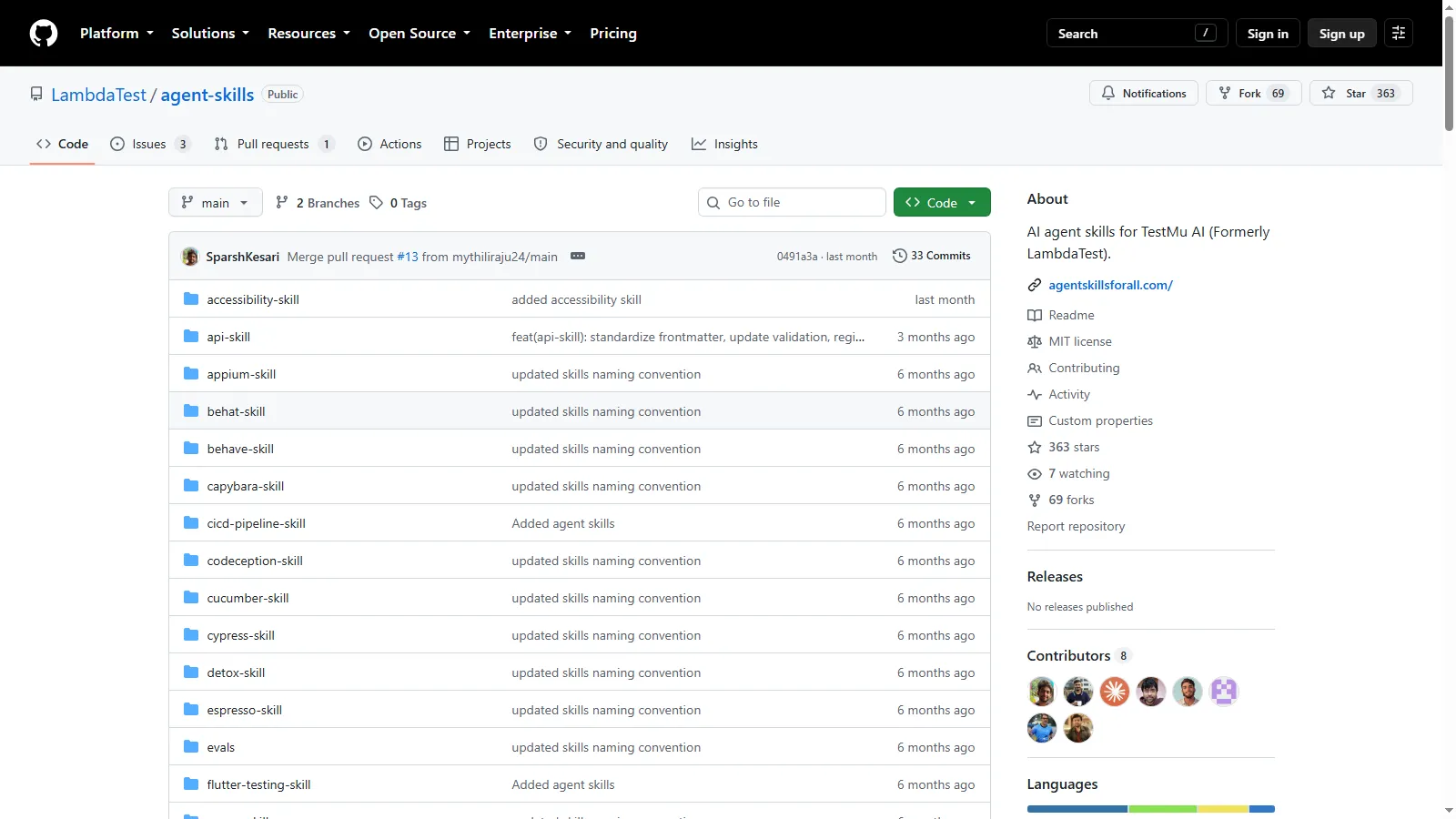
The library's own index declares 70 skills across 8 categories, covering api-testing, bdd-testing, cloud-testing, devops, e2e-testing, mobile-testing, unit-testing, and visual-testing, and it ships under the MIT licence at the agent-skills repository. Each framework directory is a SKILL.md plus supporting files, so installing one is a copy rather than an integration.
Three of the extension layers do useful and distinct work once a testing stack is involved.
- Skills for framework conventions - a Selenium or Appium skill carries the setup, cloud configuration, and patterns your team already agreed on, so generated tests match the suite instead of inventing a new style.
- MCP for capability - registering an MCP server gives the agent a tool it did not have, and TestMu AI ships servers for automation, visual testing, and accessibility that list Claude among their supported clients.
- Hooks for the gate - a Stop or PostToolUse hook is where an independent check belongs, because it runs whether or not the agent thought it was necessary.
The verification step itself is where TestMu AI's Kane CLI is designed to sit. It is distributed as the @testmuai/kane-cli package, needs Node.js 18 or later with Chrome on PATH, and runs one binary in three modes: an interactive TUI, a headless CLI, and an agent mode that emits NDJSON specifically so another agent can read the run. It completes up to 50 steps per flow by default, with the ceiling configurable per run through --max-steps.
It also installs as a Claude Code skill, at ~/.claude/skills/kane-cli/SKILL.md globally or .claude/skills/kane-cli/SKILL.md for one project, and Claude Code picks it up without a restart. The Kane CLI documentation covers the install and the flags for each mode.
Being honest about the boundaries matters as much as the capabilities. Kane CLI does not solve CAPTCHAs, does not download files initiated by browser actions, and cannot verify WebGL or 3D scene state, so those flows still need a human or a different approach.

Getting Started With Claude Code
Install the CLI first, because it is the surface where every other piece of the extension model can be tested quickly. The setup documentation lists the native installer as the recommended route, and native installs update themselves in the background.
# macOS, Linux, WSL
curl -fsSL https://claude.ai/install.sh | bash

# Windows PowerShell
irm https://claude.ai/install.ps1 | iex

# Confirm the install, then check configuration health
claude --version
claude doctor
From there, add the layers in the order that gives you the most return for the least configuration.
- Write a CLAUDE.md under 200 lines covering the conventions a new hire would need, and commit it.
- Check which permission mode your account starts in, because Pro, Max, and Team default to auto rather than Manual.
- Move your most-repeated instruction out of CLAUDE.md and into a skill, so it loads only when it is relevant.
- Install a framework skill that matches your suite, then read the tests it generates before trusting the next batch.
- Add one PreToolUse hook for the rule you would be unhappy to see skipped, and confirm it blocks by triggering it deliberately.
- Put the independent verification step behind a hook rather than in an instruction, so a green result comes from something other than the agent that wrote the code.
The first five steps make Claude Code fit your codebase. The sixth is the one that decides whether you can trust what comes out of it, and it is the step teams skip most often.
Author

Anubhav Singhmaar
Blogs: 42

Anubhav Singhmaar is an AI Product Manager at TestMu AI driving Kane CLI, the command-line tool that brings browser automation to the terminal, turning natural-language flows into runs in a real Chrome browser that return pass or fail with shareable proof. He owns the roadmap and prioritization and works with engineering to ship developer-facing features. Before TestMu AI, he spent over four years at Sprinklr owning enterprise voice AI across APAC and EMEA. A mechanical engineer turned product manager, he grounds guidance in real QA workflows.
Reviewer

Siddhant Sinha
Reviewer
Siddhant Sinha is a Lead Member of Technical Staff at TestMu AI architecting Kane CLI, the command-line tool for browser automation from the terminal, where natural-language flows run in a real Chrome browser and return pass or fail with shareable proof. He has spent over three years at TestMu AI (formerly LambdaTest) building scalable platforms that run tests at scale on real Android and iOS devices. His expertise covers platform architecture, large-scale distributed systems, and CLI design, shaped by earlier cloud-native engineering at Semut.io, including building Elasticsearch as a service.


Claude Code FAQs
Did you find this page helpful?
More Related Blogs
TestMu AI forEnterprise
Get access to solutions built on Enterprise
grade security, privacy, & compliance
- Advanced access controls
- Advanced data retention rules
- Advanced Local Testing
- Premium Support options
- Early access to beta features
- Private Slack Channel
- Unlimited Manual Accessibility DevTools Tests