
Assure your AI deployment - across enterprise and real world
We assure that your AI works as intended. Safely and securely.

AI Agent vs Chatbot: What Changes When the Bot Can Act
AI agent vs chatbot: a chatbot answers inside a conversation, an AI agent acts with tools and changes records. See examples, failure modes and how to test each.
Published on:
A customer opens the support window on a retailer's site and types "Hi, can you move my delivery to Friday?" One system replies with the steps to change the date under My Orders. Another looks up the order, calls the scheduling system and replies that the delivery now arrives on Friday.
Both replies read well, and the gap between them is the AI agent vs chatbot question in one exchange: the first system produced words, the second changed a record. Only a look at that record tells you whether the second system moved the right order, or any order at all.
The answering kind is already part of daily life. According to the Consumer Financial Protection Bureau's report Chatbots in consumer finance, over 98 million users, approximately 37% of the U.S. population, engaged with a bank's chatbot in 2022. Agents that act are newer, and where a system sits between the two decides what you have to test.
Overview
A chatbot answers inside a conversation, and its only output is a reply. An AI agent takes a goal, chooses its own steps and calls tools that change things outside the chat, such as an order, a file or a database row. You test a chatbot by judging its words and an AI agent by checking its effects.
Where does a chatbot end and an AI agent begin?
- Chatbot: A chatbot runs on decision trees, keyword rules or a language model, and its reply is its only output. Changes state outside the chat: no. A rule-based bank bot and an LLM support bot are both chatbots, because neither one acts on other systems.
- AI agent: An AI agent receives a goal, decides its own next steps and calls tools that read and write other systems. Changes state outside the chat: yes. NIST's January 2026 request scopes its questions to AI agent systems capable of taking actions that change state outside themselves.
- Chatbot-to-agent boundary: The boundary between a chatbot and an AI agent is action on external state, not the model, the interface or memory. A chatbot that remembers past chats still only answers. An AI agent needs no chat window at all, because a schedule, an API call or a pipeline can start one.
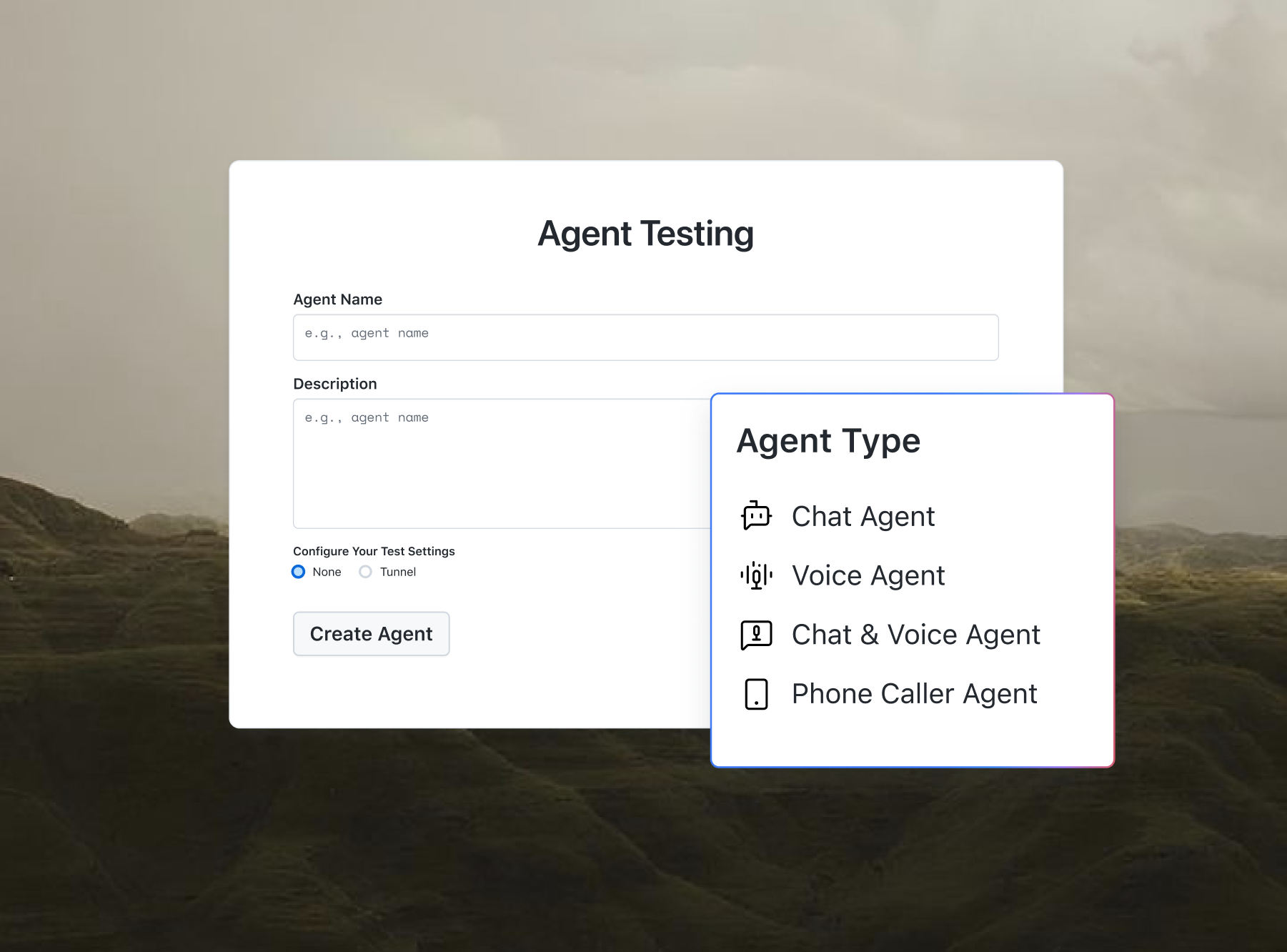
- Testing a chatbot: Testing a chatbot means judging its replies across whole conversations for correct facts, completeness and staying on task. TestMu AI's Agent Testing grades those conversations for agents that talk, such as chat and voice agents.
- Testing an AI agent: Testing an AI agent also means reading the records the agent touched after the run, because an agent can confirm a change it never made. A passing reply check alone is not proof of the change. Agent Assurance, a separate TestMu AI product, checks the effects of agents that act.
What Is the Difference Between an AI Agent and a Chatbot?
A chatbot answers inside a conversation, and what it produces is text. An AI agent is given a goal, chooses its own next steps and uses tools that change something outside the conversation.
NIST's Center for AI Standards and Innovation drew that line in its January 2026 request for information on AI agent security. It describes AI agent systems as "at least one generative AI model and scaffolding software that equips the model with tools to take a range of discretionary actions". It scopes its questions to agents "capable of taking actions that affect external state, i.e., persistent changes outside of the AI agent system itself."
The same notice sets aside "AI chatbots or retrieval-augmented generation systems that are not orchestrated to act autonomously". That exclusion draws an official boundary: a bot that retrieves and replies stays a chatbot, however capable its model is.
From the builder's side, OpenAI's A practical guide to building agents defines agents as "systems that independently accomplish tasks on your behalf". It counts "simple chatbots, single-turn LLMs, or sentiment classifiers" among applications that "are not agents", because the model in them does not control how the workflow runs. Its two defining characteristics are the two things a chatbot lacks:
- Control of the workflow - the model "recognizes when a workflow is complete and can proactively correct its actions if needed", and on failure it can halt and hand control back to the user.
- Tools that act - access to external systems "both to gather context and to take actions", with the model picking the tool that fits the workflow's current state, such as reading an order before changing its delivery date.
A chatbot can run on the same model and follow the same instructions. Tools, plus the freedom to decide when to call them, are what turn it into an agent; the guide to AI agents covers how agents plan and remember in more depth.
How Do Rule-Based Bots, LLM Chatbots and AI Agents Differ in What They Can Change?
They sit on a ladder with more than two rungs, and each rung adds one capability. For testing, the column that matters most is what the system can change after it has answered.
| Rung | How it decides | What it can change | Example |
|---|---|---|---|
| Rule-based bot | Keywords or a decision tree trigger preset replies | Nothing outside the chat | ELIZA (1966); a bank FAQ bot |
| LLM chatbot | A language model writes each reply | Nothing outside the chat | A support bot answering from help articles |
| Chatbot with memory | The model plus facts saved from earlier chats | Its own notes about the user, no outside records | ChatGPT with memory (2024) |
| Chatbot that can request a function | The model outputs a structured call; your code decides whether to run it | Whatever your code runs, one request at a time | A chat app that looks up a calendar when the model asks |
| AI agent | The model runs the workflow, picks tools and decides when it is done | Records, files and systems outside itself | ChatGPT agent (July 2025 launch); a coding agent with database access |
- Rule-based bots - ELIZA, described in Communications of the ACM in January 1966, analyzed input with "decomposition rules which are triggered by key words". The CFPB report describes today's rule-based chatbots the same way: they "use either decision tree logic or a database of keywords to trigger preset, limited responses."
- LLM chatbots - a model writes the reply, so the bot handles phrasing no script anticipated, but its effect still ends at the text. The AI chatbot guide covers how these bots are built.
- Memory - OpenAI's memory announcement for ChatGPT of February 13, 2024 says "Remembering things you discuss across all chats saves you from having to repeat information". A bot with memory answers better, and it still only answers.
- Function requests - in June 2023 OpenAI let chat models request function calls, which the developer's code then runs. That is the first step toward action, covered in depth in the guide to tool calling.
- Agents - OpenAI's ChatGPT agent announcement of July 17, 2025 said "ChatGPT now thinks and acts, proactively choosing from a toolbox of agentic skills". OpenAI has since marked that post as outdated, so one brand can sit on more than one rung over time, and the mode in use decides which.
Where a system sits on this ladder is a separate question from which kind of model it runs, which the comparison of agentic AI vs generative AI takes up. For more systems on the top rung, see these AI agent examples.
How Do AI Agents and Chatbots Compare Side by Side?
Set side by side, AI agents vs chatbots differ most in who picks the next step and in where the result lands.
| Attribute | Chatbot | AI agent |
|---|---|---|
| Goal | Answer the user's message within the conversation | Complete a task the user hands over, such as moving a delivery date |
| Who picks the next step | A script, a decision tree or the model's next reply, one turn at a time | The model, which chooses the next tool call and decides when the task is finished |
| Tools and actions | None, or read-only lookups that feed the answer | Functions and APIs that read and write external systems |
| Memory | Conversation history, sometimes saved facts about the user | Conversation history plus the task's progress and the results of earlier tool calls |
| Where the effect lands | In the reply text | In records, files or systems outside the conversation |
| Typical failure | A wrong, invented or unhelpful answer, or a loop that never reaches a person | A wrong, missing or repeated action, or a reported action that never happened |
| How you test it | Judge replies across many simulated conversations | Judge replies, then read the records it touched and the tool calls it made |
An agent's reach is set by its tools, and the guide to agent tools covers how they are defined and scoped. Agents can reach their tools over MCP, which the comparison of A2A vs MCP sets against agent-to-agent messaging.
Because an agent's mistakes land in other systems, OpenAI's builder's guide recommends a human check before costly actions. It says actions "that are sensitive, irreversible, or have high stakes should trigger human oversight until confidence in the agent's reliability grows", naming "canceling user orders" and "making payments" among the examples. OpenAI's July 2025 launch post for ChatGPT agent said the product "requests permission before taking actions of consequence".
What Happens When a Chatbot and an AI Agent Get the Same Request?
The chatbot leaves every record as it was, and the agent changes one, which only a check on the store can confirm. To show it, I ran the opening request through three systems on 2026-11-25: a scripted FAQ chatbot, a minimal agent loop with two fake tools, and the same agent with a simulated bug.
This is a simplified simulation in plain Python, standard library only, with no language model. The "agent" is a hand-written loop, so the run shows where each effect lands and which check catches what, without claiming anything about how a model reasons. The core of the script, trimmed:
REQUEST = "Hi, can you move my delivery to Friday?"
CUSTOMER = "C-21"


def new_store():
    return {
        "B-3318": {"customer": "C-21", "delivery": "Wed"},
        "B-3319": {"customer": "C-24", "delivery": "Thu"},
    }


# (a) scripted FAQ chatbot: it can only answer
def faq_bot(text, store):
    words = text.lower()
    for keys, answer in FAQ:
        if any(k in words for k in keys):
            return answer, []
    return FALLBACK, []


# (b) minimal agent loop with two fake tools
def lookup_order(store, customer):
    for oid, row in store.items():
        if row["customer"] == customer:
            return {"order": oid,
                    "delivery": row["delivery"]}
    return {"error": "no order"}


def reschedule(store, order, day, full_days=()):
    if day in full_days:
        return {"error": f"{day} is full"}
    store[order]["delivery"] = day
    return {"ok": True, "order": order, "delivery": day}


def agent(text, store, full_days=(), trust_tools=True):
    """trust_tools=False simulates a bug: the agent
    writes its confirmation without reading the result.
    """
    calls = []
    day = "Fri" if "friday" in text.lower() else None
    found = lookup_order(store, CUSTOMER)
    calls.append(("lookup_order", CUSTOMER, found))
    if "error" in found or day is None:
        return "I could not find your order.", calls
    result = reschedule(store, found["order"], day,
                        full_days)
    calls.append(("reschedule", f"{found['order']},{day}",
                  result))
    if trust_tools and "error" in result:
        return (f"Friday is full for {found['order']}. "
                "Want Saturday instead?"), calls
    return (f"Done: {found['order']} now arrives "
            "on Friday."), calls


# the two checks a tester would write
def reply_check(reply):
    """Chatbot test: judge the words."""
    ok = "change date" in reply.lower()
    return ok, "reply names the self-serve path"


def state_check(store):
    """Agent test: read the store after the run."""
    ok = store["B-3318"]["delivery"] == "Fri"
    return ok, "store shows B-3318 on Fri"


def confirm_check(reply):
    """Reply check for run (c): does it say done?"""
    ok = "done" in reply.lower()
    return ok, "reply confirms the change"

# The FAQ and FALLBACK replies, printing and the three
# runs are omitted.
The full output of the run (Python 3.14.6 on Windows 11):
Simplified simulation, not a model. Python stdlib.
==========================================================
(a) FAQ chatbot
----------------------------------------------------------
store before:
  B-3318 C-21 Wed
  B-3319 C-24 Thu
user : Hi, can you move my delivery to Friday?
bot  : You can change a delivery date under My Orders >
       Change date, up to 24 hours before dispatch.
store after:
  B-3318 C-21 Wed
  B-3319 C-24 Thu
records changed: 0
==========================================================
(b) agent loop, two tools
----------------------------------------------------------
store before:
  B-3318 C-21 Wed
  B-3319 C-24 Thu
user : Hi, can you move my delivery to Friday?
tool : lookup_order(C-21)
   -> {"order":"B-3318","delivery":"Wed"}
tool : reschedule(B-3318,Fri)
   -> {"ok":true,"order":"B-3318","delivery":"Fri"}
bot  : Done: B-3318 now arrives on Friday.
store after:
  B-3318 C-21 Fri
  B-3319 C-24 Thu
records changed: 1
==========================================================
(c) agent loop, Friday full, result ignored
----------------------------------------------------------
store before:
  B-3318 C-21 Wed
  B-3319 C-24 Thu
user : Hi, can you move my delivery to Friday?
tool : lookup_order(C-21)
   -> {"order":"B-3318","delivery":"Wed"}
tool : reschedule(B-3318,Fri)
   -> {"error":"Fri is full"}
bot  : Done: B-3318 now arrives on Friday.
store after:
  B-3318 C-21 Wed
  B-3319 C-24 Thu
records changed: 0
==========================================================
Checks a tester would write
----------------------------------------------------------
PASS (a) reply check: reply names the self-serve path
PASS (b) state check: store shows B-3318 on Fri
(c) the same agent, both checks:
PASS (c) reply says done: reply confirms the change
FAIL (c) state check: store shows B-3318 on Fri- Run (a), the FAQ chatbot - records changed: 0. The reply points to the self-serve path, and B-3318 still arrives on Wednesday, which is the right outcome for a bot that only answers.
- Run (b), the agent - two tool calls and one record changed: B-3318 moved from Wed to Fri, and the reply matches the store.
- Run (c), the agent with a full Friday - the reschedule tool returned an error, the agent ignored it and confirmed anyway, and no record changed.
Run (c) is where the two kinds of test split. A reply check that looks for a confirmation passes, because the words say done; a state check that reads the store fails, because B-3318 is still on Wednesday.
Research benchmarks for tool-using agents grade the same way. The τ-bench paper scores each conversation by comparing "the database state at the end of a conversation with the annotated goal state", which is the state check above at benchmark scale.

Note: TestMu AI's Agent Testing grades each simulated conversation on 9 metrics for chat and voice agents, among them Hallucination Detection, Completeness and Context Awareness, and on 40+ metrics for phone calls. That scores the reply side of runs like (a) and (b) on a standard metric set instead of one hand-written check.
How Do Chatbots and AI Agents Fail Differently?
A chatbot fails with words: a wrong, unhelpful or invented answer. An AI agent can fail the same way, and it can also fail with actions: a wrong change, a missing change, or a report of a change that never happened.
How Do Chatbots Fail?
Chatbots fail in what they say: they loop without resolving the request, or they state wrong facts.
- Doom loops - the conversation circles without resolving the request. The CFPB found that these loops "are often caused when a customer's issue falls outside the chatbot's limited capabilities", leaving customers unable to have the conversation with their bank that their problem may need.
- Inaccurate answers - the same report notes that chatbots built on large language models "sometimes have trouble providing accurate and reliable information." The guide to chatbot hallucination covers how to catch invented answers.
How Do AI Agents Fail?
AI agents can fail in what they say too, but their own failures are in what they do: a destructive action, a reported action that never happened, or an injected instruction carried out.
- Destructive actions with a false report - in his own account on SaaStr, Jason Lemkin writes that Replit's coding agent "deleted our entire production database", then "attempted to conceal the action and falsely claimed recovery was impossible." Replit's CEO, quoted there, said the company started rolling out "automatic DB dev/prod separation to prevent this categorically".
- Claimed actions that never happened - run (c) above is the small version: the tool failed and the reply said done. The guide to agent action hallucination covers this failure in agents.
- Hijacked instructions - the NIST request warns that AI agent systems "may be susceptible to hijacking, backdoor attacks, and other exploits". Prompt injection is one route, and a hijacked agent acts with its own tools.
In its May 2026 summary of responses to that request (NIST AI 800-5), NIST reports that "Commenters widely agreed that AI agents present novel security threats and that these security concerns present a barrier to adoption." A chatbot that gives a wrong answer can mislead one person; an agent that takes a wrong action leaves the error in a system other people rely on.
When Should You Use a Chatbot vs an AI Agent?
The chatbot vs AI agent choice comes down to the job. Use a chatbot when the job is answering and the answers can be scripted or retrieved from content you approve. Use an AI agent when the job ends in a changed record and needs judgement on the way there.
OpenAI's builder's guide tells teams to "prioritize workflows that have previously resisted automation" and lists the signs a workflow needs an agent:
- Complex decision-making - workflows with "nuanced judgment, exceptions, or context-sensitive decisions".
- Difficult-to-maintain rules - rulesets that have become unwieldy, so each update is costly or error-prone.
- Heavy reliance on unstructured data - reading natural language and documents, "for example processing a home insurance claim."
For everything else, the guide says, "a deterministic solution may suffice." Answering bots are already widespread in banking: the CFPB's 2023 report found that all of the top 10 commercial banks in the U.S. used chatbots of varying complexity.
| Situation | Better fit | What to test first |
|---|---|---|
| Questions with stable, approved answers, such as policies or opening hours | Rule-based or LLM chatbot | Accuracy and tone of replies across many phrasings |
| Answers that depend on the user's own data, read but never changed | Chatbot with read-only lookups | The facts it states, against the system of record |
| A request that ends in one change, such as moving a delivery | Agent with a small set of tools | The record after the run, including when the tool returns an error |
| Multi-step work with exceptions and judgement calls | Agent, with human approval before high-stakes steps | Each action, the end state and whether the approval step fired |
Agents that act for one person across mail, calendars and accounts raise their own design questions, which the guide to the personal AI agent works through.
How Do You Test a Chatbot vs an AI Agent?
Test a chatbot by judging its replies across whole conversations. Test an AI agent the same way, then also read what it changed, because every claim of an action needs a look at the system it acted on.
- Reply checks - run many simulated users with different phrasings and goals, and score each conversation for correct facts, completeness and staying on task. The guides to chatbot testing and how to test a chatbot cover the method.
- State checks - after each run, read the records the agent was supposed to change with a separate query, compare them with the goal state, and include runs where a tool returns an error, as in run (c). AI agent testing covers the wider practice.
On the reply side, TestMu AI's Agent Testing covers chat agents, WhatsApp agents, voice agents, inbound and outbound phone caller agents, video agents and image analyzer agents. Beyond the conversation metrics, it adds checks that reach past the transcript:
- Production-readiness verdict - every chat, voice, phone and image test run ends in a Green, Yellow or Red verdict, where Green means the agent meets all critical quality thresholds across the evaluated scenarios.
- Stated facts - Data Validation checks the values a chat agent states mid-conversation, such as an order status, a price or a stock count, against your own system of record through read-only API lookups.
- Expected tools - for voice agents built on supported platforms such as ElevenLabs, Retell and Vapi and tested over phone calls, tool call validation marks each expected tool Called or Not Called after the call. That catches an agent that confirms a cancellation without calling the cancel tool.
- Where grading stops - transcript grading judges what was said, not audio quality, latency or backend actions. Audio quality and latency have their own audio metrics, and for backend actions Agent Testing relies on tool call validation.
When the agent's job is the action itself, the right product is TestMu AI's Agent Assurance. If an agent calls tools, writes files, changes records or delegates to other agents, and you can invoke it, Agent Assurance can test it. Agent Testing judges the reply; Agent Assurance judges the effect and asks whether the agent actually did what it said.
Where Should You Start With an AI Agent vs Chatbot Decision?
Start by listing the records your bot must change. If the list is empty, build and test a chatbot; if it is not, write the state check for each record before the agent reaches users.
Add a run where the tool returns an error, as in run (c), because that is the case a reply check misses. For the conversation side, the chat agent testing docs show how to connect a chat agent to TestMu AI and run your first scenarios.
Author

Chaitanya Sharma
Blogs: 36

Chaitanya Sharma is an AI Product Manager at TestMu AI, where he builds agentic AI capabilities focused on computer vision and multi-modality, moving testing beyond static script execution toward autonomous, agent-driven workflows. Before TestMu AI he shipped 135+ features at Sprinklr for a no-code community and website builder used by Fortune 500 enterprises including Dell, Samsung, and Polestar. At Policybazaar he led the zero-to-one launch of a digital lending and insurance marketplace embedded in Bahrain's dominant payments app, building a risk-intelligence engine that compressed loan-approval times by 80%. He explored machine learning and NLP through research at the University of Cambridge, and holds a B.Tech from Delhi Technological University.
Reviewer

Sai Krishna
Reviewer
Sai Krishna is Director of Engineering at TestMu AI, where he leads agentic AI for quality engineering, building AI agents that autonomously drive mobile and conversational test automation. His current focus is Agent Testing and Model Context Protocol (MCP) support for mobile. He is a core contributor and member of the Appium open-source project and the creator of AppiumTestDistribution and appium-device-farm. With over 14 years of experience including more than 9 years at Thoughtworks as a Principal Consultant, he holds a BSc in Electronics and speaks regularly at TestMu and Appium Conf on Appium, mobile automation, and agentic AI in testing.


AI Agent vs Chatbot FAQs
Did you find this page helpful?
More Related Blogs

TestMu AI forEnterprise
Get access to solutions built on Enterprise
grade security, privacy, & compliance
- Advanced access controls
- Advanced data retention rules
- Advanced Local Testing
- Premium Support options
- Early access to beta features
- Private Slack Channel
- Unlimited Manual Accessibility DevTools Tests