
Power Your Software Testing with AI Agents and Cloud
The Native AI-Agentic Cloud Platform to Supercharge Quality Engineering. Test Intelligently and Ship Faster.


- TestMu AI (Formerly LambdaTest)
- /
- Blog
- /
- 9 Best Cline Alternatives in 2026 (and How to Test Them)
9 Best Cline Alternatives in 2026 (and How to Test Them)
Kilo Code, Copilot agent mode, OpenCode, Devin, and five more Cline alternatives for 2026, compared on approval defaults, plus how to test them before a switch.
Published on:
Better output is the most common reason developers switch AI tools. In the 2026 Stack Overflow Developer Survey, developers who moved to new AI tools did so mostly because the output was better (25%) or because their organization required it (11%), and only 6% switched because of cost.
You approve Cline's plan, then the first file edit, the package install, and the test run, one prompt at a time. Teams adopt Cline for that control and for its bring-your-own-model setup, and they start comparing Cline alternatives when they want agents that run without the prompts, inside a different editor, or on a plan they already pay for.
This list ranks nine Cline alternatives on how much of Cline's working model each one keeps, flags the tools older roundups still recommend after they shut down or changed hands, and shows how to check your pick with TestMu AI's testing agents before you switch.
TL;DR
The closest Cline alternatives in 2026 are Kilo Code and GitHub Copilot agent mode. Kilo Code is an MIT-licensed agent for VS Code, JetBrains IDEs, and the terminal that works with 500+ models or your own keys. Copilot agent mode asks before acting by default and accepts your own keys without a Copilot plan.
Which Cline alternative fits which team?
- Best Cline-style extension: Kilo Code - an open-source agent for VS Code, JetBrains IDEs, and a CLI that runs 500+ models through its gateway, your own keys, or local models through Ollama.
- Best for approvals inside VS Code: GitHub Copilot agent mode - Manual permissions are the default level, and your own keys or a local Ollama model work without a GitHub account.
- Best open-source terminal agent: OpenCode - an MIT-licensed agent with about 213k GitHub stars, 75+ model providers, and a read-only plan agent beside its build agent.
- Best for Claude models: Claude Code - runs in the terminal, IDEs, desktop, and web, reads AGENTS.md, and offers a Manual mode that asks before edits and commands.
- Best for OpenAI models: OpenAI Codex - an Apache-2.0 CLI plus IDE extensions that edit inside the workspace without asking unless you switch Codex to read-only mode.
- Best for Git-first pair programming: Aider - an Apache 2.0 terminal tool that commits every edit with a descriptive message, so Git history replaces approval prompts.
- Best for cloud hand-off: Devin - Devin Desktop and the Devin CLI run Devin Local with Deny, Ask, and Allow rules, and Devin Cloud takes tasks you delegate.
- Best integrated AI editor: Cursor - an editor with Cloud Agents in isolated VMs whose agent edits workspace files without approval and asks before terminal commands.
- Best open-source multi-agent desktop: Eigent - an Apache 2.0 cowork app whose agent workforce writes and runs code beside browser and document tasks, free with your own keys or local models.
Is Roo Code still a Cline alternative?
No. The Roo Code extension was shut down on May 15, 2026, and its repository is archived. Continue, another common pick, was acquired by Cursor and its repository is read-only. Whichever agent replaces Cline, TestMu AI's Kane CLI checks the app it built in a real browser, and Agent Assurance checks what the agent changed.
What Is Cline?
Cline is an open-source (Apache 2.0) coding agent for your IDE, terminal, and desktop. Every file edit and terminal command requires your approval unless you turn on auto-approve.
- Surfaces - VS Code and its forks, including Cursor, Windsurf, VSCodium, and Antigravity, plus a JetBrains plugin, a headless CLI for CI/CD, desktop apps, and an SDK.
- Plan and Act - in Plan mode Cline reads your codebase and discusses strategy but cannot modify files or run commands; Act mode carries out the plan.
- Models - Anthropic, OpenAI, Google, OpenRouter, Bedrock, Azure, Vertex, and local models through Ollama or LM Studio.
- Rules and tools - .clinerules, AGENTS.md, .cursorrules, and .windsurfrules for instructions, and MCP servers for external tools.
- Checkpoints - a shadow Git repository, separate from your project history, stores checkpoints you can roll back to.
- Pricing - free for individual developers, who pay only for inference with their own keys or the Cline provider; Enterprise adds SSO, an SLA, and dedicated support.
Why Do Developers Look for a Cline Alternative?
The reasons are usually about how much the agent should do without asking, and where it runs:
- Approval fatigue - per-step prompts suit careful work but slow long tasks, and the escape hatch, YOLO mode, disables every safety check, which Cline's own docs call dangerous.
- Billing - Cline bills inference to your keys or the Cline provider, while Copilot, ChatGPT, and Claude plans bundle an agent into a seat the team may already pay for.
- One model vendor - teams standardized on Claude or OpenAI models often prefer that vendor's own agent.
- Roo Code users - Roo Code, a Cline fork with about 24k GitHub stars, shut down this year, so its users need a new home.
If the editor is the only reason, check before switching: Cline already runs as the coding agent in Zed, JetBrains IDEs, Neovim, Emacs, and other clients that support the Agent Client Protocol.
Cline Alternatives That Changed in 2026
Several tools that still appear on Cline alternative lists are gone or have changed terms:
- Roo Code - the extension was shut down on May 15, 2026, and the repository is archived and read-only. The Roo Code README points users to Zoo Code, a community fork, and back to Cline, where Roo Code originated.
- Continue - acquired by Cursor, according to the Continue homepage.
- Gemini CLI - replaced by Antigravity CLI for unpaid and Google One users on June 18, 2026, while the quota page still lists daily request limits for Gemini Code Assist Standard and Enterprise.
- Windsurf - renamed Devin Desktop on June 2, 2026, with Devin Local replacing Cascade as its local agent.
How These Alternatives Were Ranked
I ranked each agent on how much of Cline's working model it keeps, checking every capability against the vendor's own documentation. The criteria, in order of weight:
- Approval control - does it ask before edits and commands by default, and can you make it ask?
- Openness - license, bring-your-own-key support, and local models.
- Editor fit - does it run inside VS Code or JetBrains, or replace your editor?
- Carry-over - does it read AGENTS.md and connect to MCP servers, so Cline rules and tools move without rework?
Prices change too often to compare as dollar figures, so each entry describes the billing model. TestMu AI builds Kane CLI and Agent Assurance, which test agents and their output rather than write code, so neither is ranked; the trial section shows where they fit. For agents compared on benchmarks rather than Cline fit, see AI coding agents.
9 Best Cline Alternatives in 2026
1. Kilo Code
Kilo Code is an open-source coding agent for VS Code, JetBrains IDEs, and the CLI, with MCP server support.
It is the closest match to Cline's setup on this list: an editor extension plus a terminal agent, running whichever model you bring.
- License - MIT, with about 27.6k GitHub stars; the Kilo CLI is a fork of OpenCode.
- Models - 500+ models through the Kilo Gateway at the provider's rate with zero markup, your own keys, or local models through Ollama or LM Studio.
- Approvals - each rule resolves to allow, ask, or deny, but most tools default to allow, and edits ask by default only in JetBrains.
- Carries over - AGENTS.md replaced Kilo's memory bank feature, and a built-in MCP marketplace installs servers.
- Pricing - the extension and CLI are free and usage is billed separately; Teams and Enterprise plans are available.
- Watch for - the --auto flag runs with no prompts for CI/CD, and Kilo's docs warn that auto-approve can result in data loss or file corruption; set edit and bash rules to ask if you want Cline's prompts.
2. GitHub Copilot Agent Mode
Copilot agent mode in VS Code uses Manual permissions by default, so any action that is not auto-approved requires your confirmation.
That matches Cline's default, so a Cline user already in VS Code changes the least by moving here.
- Other levels - Assisted permissions use an LLM judge for each tool call, Allow all runs every tool call without confirmation, and Autopilot is an agent mode that also auto-approves.
- Models - bring-your-own-key models work without a GitHub account or a Copilot plan, including local Ollama models through the Ollama extension.
- Carries over - reads .github/copilot-instructions.md or AGENTS.md, and MCP servers appear as tools.
- Pricing - signing in without a plan enrolls eligible accounts in Copilot Free; paid plans run from Pro to Enterprise, and every plan includes Copilot CLI.
- Open source - the Copilot Chat extension went MIT-licensed in June 2025 and has since moved into the main VS Code repository.
- Watch for - semantic search, inline suggestions, and embedding-based features still require a GitHub account.
3. OpenCode
OpenCode is an open-source AI coding agent available as a terminal interface, desktop app, or IDE extension.
It is the most-starred project on this list and the strongest open-source pick for teams that already work in the terminal.
- License - MIT, with about 213k GitHub stars.
- Models - 75+ LLM providers plus local models through Ollama, LM Studio, or llama.cpp.
- Agents - build has full access, while plan is read-only, denies file edits, and asks before bash commands.
- Approvals - most permissions default to allow, doom_loop and external_directory default to ask, and .env files are denied.
- Carries over - reads AGENTS.md, falling back to CLAUDE.md, and supports local and remote MCP servers.
- Automation - opencode run executes a prompt non-interactively, and /opencode in a GitHub comment runs a task on your Actions runner.
- Pricing - free; optional OpenCode Zen and OpenCode Go subscriptions sell model access.
- Watch for - the IDE integration runs the terminal agent inside the editor's terminal, not as a chat sidebar like Cline's.
4. Claude Code
Claude Code starts recent interactive terminal and VS Code sessions in auto mode, where a classifier model reviews actions instead of you. In Manual mode it stops and asks before most actions that edit files, run shell commands, or reach the network.
- Runs in - the terminal, IDE extensions for VS Code and JetBrains, a desktop app, and the web.
- Modes - Manual runs only reads without asking, and acceptEdits adds file edits and common filesystem commands.
- Models - Claude only; Anthropic does not support routing Claude Code to non-Claude models, though Claude itself is available through Amazon Bedrock, Google Cloud, and Microsoft Foundry.
- Carries over - reads AGENTS.md when the repository has no CLAUDE.md, and connects to MCP servers.
- Automation - claude -p runs non-interactively, and @claude in a pull request or issue runs it through GitHub Actions.
- Pricing - needs a Pro, Max, Team, Enterprise, or Console account; the free Claude plan does not include Claude Code.
- Watch for - not open source; the public GitHub repository's license reserves all rights to Anthropic.
Setup, hooks, and subagents are covered in the Claude Code guide.
5. OpenAI Codex
OpenAI Codex uses an Auto preset by default: it reads files, makes edits, and runs commands in the workspace without asking, and needs approval only to edit outside the workspace or run commands that need network access.
That default is the opposite of Cline's.
- Runs in - the CLI and IDE extensions for VS Code, Cursor, Windsurf, JetBrains IDEs, and Xcode.
- Match Cline - run Codex with --sandbox read-only --ask-for-approval on-request and it requests permission for anything beyond reading.
- License - the CLI is Apache-2.0 with about 128.8k GitHub stars; the IDE extension is not open source.
- Models - OpenAI models, custom providers, or local models through Ollama or LM Studio with --oss.
- Carries over - reads AGENTS.md before doing any work and connects to MCP servers.
- Automation - codex exec for scripts and pipelines, plus the openai/codex-action GitHub Action.
- Pricing - included with ChatGPT plans, with CLI and IDE access listed from Plus upward, or billed at standard API rates with an API key.
Sandbox modes and output checks are covered in Codex CLI.
6. Aider
Aider is AI pair programming in your terminal: whenever it edits a file, it commits the change with a descriptive message, so every step can be reviewed or reverted.
Git history takes the place of Cline's approval prompts.
- License - Apache 2.0, with about 49.5k GitHub stars.
- Models - almost any LLM, including local models through Ollama.
- Tests - --test-cmd with --auto-test runs your suite after each edit and tries to fix failures; --no-auto-commits turns off the commits.
- Editor - --watch-files picks up AI coding comments you add in any editor; there is no sidebar extension.
- Carries over - load AGENTS.md as a conventions file with --read; MCP support is not documented.
- Watch for - the last tagged GitHub release, v0.86.0, dates from August 2025, and the newest PyPI version, 0.86.2, from February 2026.
7. Devin
Devin Local, the agent harness that Devin Desktop shares with the Devin CLI, uses Deny, Ask, and Allow rules for file reads, file writes, command execution, HTTP fetches, and MCP tools. By default it prompts for approval before calling any MCP tool, and its Plan mode asks for your approval before implementing anything.
Devin fits teams that want a Cline-style local loop and Cognition's cloud agents for delegated tickets in one product.
- Surfaces - Devin Desktop (formerly Windsurf), the Devin CLI, Devin Cloud for delegated tasks, and Slack and Microsoft Teams integrations.
- Models - Cognition's own SWE-2 plus frontier models from OpenAI, Anthropic, Google, and SpaceXAI and leading open-source models on paid plans.
- Carries over - Devin Local supports rules and AGENTS.md files, and MCP servers are configured in .devin/config.json.
- Pricing - Free, Pro, Max, and Teams plans with usage quotas; newer Enterprise plans are billed in Agent Compute Units (ACUs).
- Open source - no.
- Watch for - Devin Desktop replaces your editor, and the Windsurf JetBrains plugin is in maintenance mode.
Cognition's agent is compared with its own replacements in Devin alternatives.
8. Cursor
Cursor agents can modify workspace files without approval, except configuration files, while terminal commands need approval by default.
That puts Cursor furthest from Cline's model on this list.
- Run modes - Auto-review, Allowlist, or Run Everything for tool calls, and Cursor notes that auto-review is not a security boundary.
- Models - OpenAI, Anthropic, Google, SpaceXAI, and Cursor's own Composer models; your own keys work for chat models only.
- Carries over - project rules live in .cursor/rules as .mdc files, AGENTS.md works as a simpler alternative, and MCP connects external tools.
- Cloud and CLI - Cloud Agents run in isolated cloud VMs, and the Cursor CLI has a print mode for scripts.
- Ownership - acquired by SpaceX in August 2026.
- Pricing - a free Hobby tier, then Pro, Pro+, Ultra, Teams, and Enterprise plans.
- Source - not public; the cursor/cursor GitHub repository holds only a README.
Terminal workflows are covered in Cursor CLI.
9. Eigent
Eigent is an open-source cowork desktop app that runs a task with a multi-agent workforce, and its recommended local setup needs no cloud account.
It sits furthest from Cline's editor workflow on this list, but it is open source and handles coding beside browser and document work.
- License - Apache 2.0, with about 15.5k GitHub stars; v1.0.5, the latest release, shipped in September 2026.
- Coding - its DeveloperAgent writes and executes code, runs terminal commands, and verifies solutions, while a coordinator agent routes subtasks and a task planner agent breaks work down.
- Models - any model you choose, including local models served through vLLM, Ollama, or LM Studio.
- Carries over - MCP integration with an MCP registry; AGENTS.md support is not documented.
- Pricing - free with your own keys or local models; Plus and Pro plans add monthly task credits, and Teams is listed as coming soon.
- Watch for - it is a desktop workspace rather than an editor extension, and the workforce docs describe runs as fully automated rather than approved step by step.
Cline Alternatives Compared
| Agent | Asks before edits by default | Open source | Models | Where it runs | Reads AGENTS.md |
|---|---|---|---|---|---|
| Cline (reference) | Yes, per tool call | Yes (Apache 2.0) | Any provider, local | VS Code, JetBrains, CLI, desktop | Yes |
| Kilo Code | JetBrains only; configurable | Yes (MIT) | 500+ via gateway, BYOK, local | VS Code, JetBrains, CLI | Yes |
| Copilot agent mode | Yes, Manual permissions | Chat extension (MIT) | Copilot models, BYOK, local | VS Code | Yes |
| OpenCode | No; configurable | Yes (MIT) | 75+ providers, local | Terminal, desktop, IDE terminal | Yes |
| Claude Code | In Manual mode; starts in auto mode | No | Claude only | Terminal, IDEs, desktop, web | Yes, without CLAUDE.md |
| OpenAI Codex | No, inside the workspace | CLI only (Apache-2.0) | OpenAI, custom, local | CLI, IDEs | Yes |
| Aider | No; commits each edit | Yes (Apache 2.0) | Most LLMs, local | Terminal | With --read |
| Devin | Set by Ask rules; MCP tools prompt | No | SWE-2, frontier and open models | Devin Desktop, CLI, cloud | Yes |
| Cursor | No; commands ask | No | Many providers, BYOK for chat | Cursor editor, cloud, CLI | Yes |
| Eigent | No; workforce runs automated | Yes (Apache 2.0) | Any model, local | Desktop app | Not documented |
How to Migrate From Cline
Most of a Cline setup moves with a few file changes, because most alternatives above share two standards with Cline: AGENTS.md for instructions and MCP for tools.
- Consolidate instructions in AGENTS.md. Cline rules support AGENTS.md as a standard format for cross-tool compatibility, so copying your .clinerules content into an AGENTS.md file at the repository root gives both agents the same instructions.
- Check the two exceptions. Claude Code reads AGENTS.md only when no CLAUDE.md exists, and Aider loads it only when you pass --read AGENTS.md.
- Re-add each MCP server in the new tool's MCP settings. The server command and arguments stay the same; only the config file changes.
- Match Cline's approvals before the first task: set edit and bash rules to ask in Kilo Code and OpenCode, keep Manual permissions in VS Code, pick Manual mode in Claude Code, add Ask rules for file writes and commands in Devin Local, and run Codex in read-only mode with on-request approvals.
- Replace checkpoints. Cline rolls back through its own shadow Git repository, while most alternatives rely on your project history, so commit before each task; Aider commits every edit on its own.

Note: Before you merge the first change from a new agent, run the flow it touched in a real browser with TestMu AI's Kane CLI. Sign up free
How to Test a Cline Alternative Before You Switch
Run your shortlisted agent and Cline on the same task, on a staging branch, then check two things: whether the app still works, and what the agent did while it worked. An agent that runs its own tests is still grading its own work, which is the case made in can coding agents test their own code.
Test What the Agent Built With Kane CLI
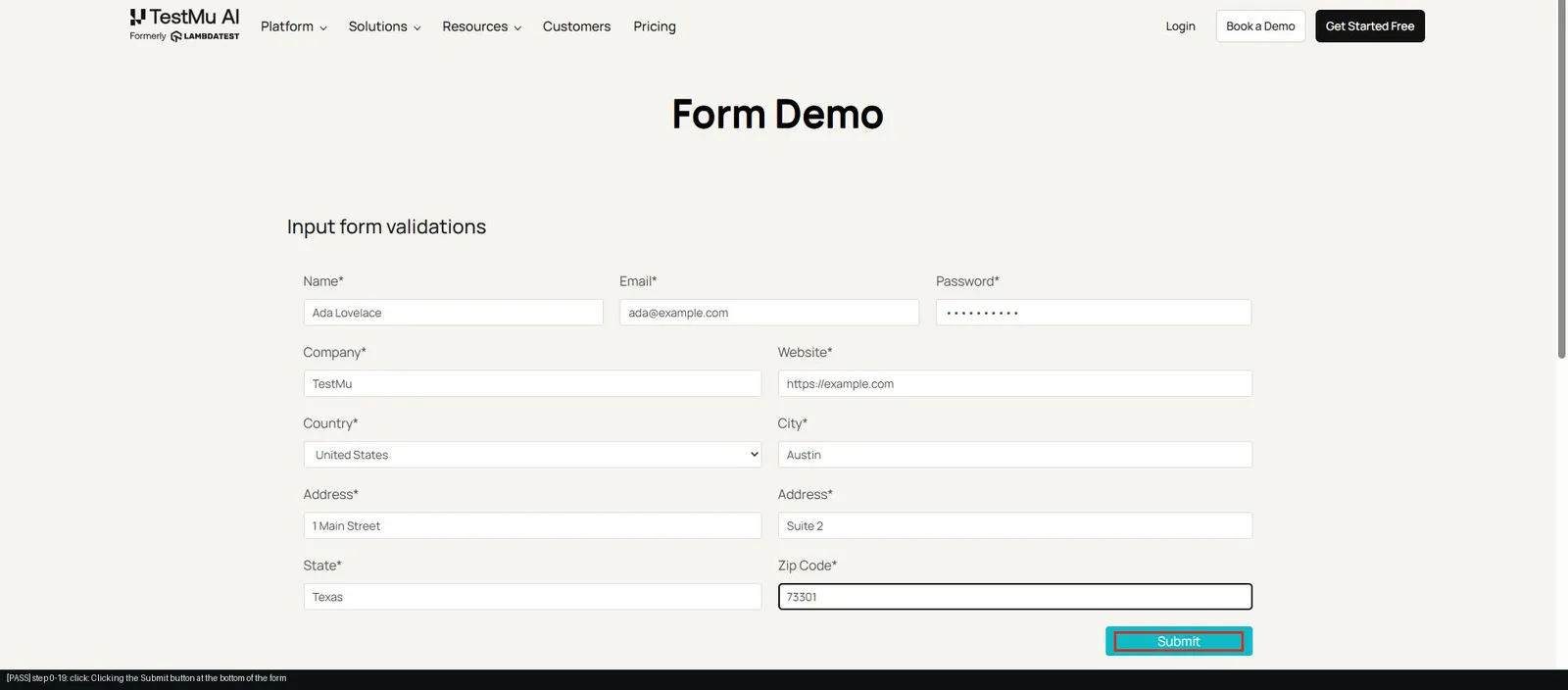
Kane CLI takes a plain-English objective, drives a real Chrome browser, and returns a pass or fail with a sealed evidence pack; in agent mode it streams NDJSON that a coding agent or CI job can read. Form validation is a common feature to hand an agent, so this check submits a form empty, then filled:
kane-cli run "go to https://www.testmuai.com/selenium-playground/input-form-demo/, click Submit with every field empty and assert that no success message appears, then fill Name with 'Ada Lovelace', Email with 'ada@example.com', Password with 'Test@12345', Company with 'TestMu', Website with 'https://example.com', select 'United States' in the Country dropdown, City with 'Austin', Address 1 with '1 Main Street', Address 2 with 'Suite 2', State with 'Texas', Zip code with '73301', click Submit, assert a success message is displayed, store the success message text as 'confirmation'" --agent --headlessOn the TestMu AI Selenium Playground form, the run passes in 21 steps: the empty submit shows no success message, Kane CLI fills eleven fields and submits, and the final run_end event stores the confirmation text.
{
  "type": "run_end",
  "status": "passed",
  "one_liner": "submitted an input form on testmuai.com",
  "duration": 123.6,
  "final_state": {
    "url": "https://www.testmuai.com/selenium-playground/input-form-demo/",
    "confirmation": "Thanks for contacting us, we will get back to you shortly."
  }
}
- Exit codes - 0 for pass, 1 for fail, 2 for setup or auth errors, and 3 for timeout, so a CI job can stop a merge without parsing prose.
- Called by the agent - any agent that runs terminal commands, Cline included, can call kane-cli with --agent and read the result, as Cline app testing shows.
- Agent skills - one install teaches Claude Code, Codex CLI, and Gemini CLI when to call Kane CLI on their own changes.

Test What the Agent Did With Agent Assurance
Agent Assurance tests how your agents actually behave across workflows, tools, and actions, and it runs from your terminal as rook. Point a command profile at the candidate agent's CLI and rook invokes it for real, records the files that changed, and grades each criterion as Pass, Fail, or Unable to Verify against that evidence rather than the agent's own summary.
- Discover and generate - rook explore reads the repository to find agents and their tools, and rook generate writes functional and adversarial scenarios by default, with non-functional ones on request.
- Gate on the report - a finished run exits 0 whether its scenarios passed or failed, so CI reads rook report --json rather than the exit code.
- From inside a coding agent - npx @testmuai/rook-skill installs the skill for Claude Code, Codex CLI, and Gemini CLI, as described in Rook with coding agents.
Agent Assurance is pre-alpha, so its commands can still change; point it at a staging target, because the agent's own writes are real.
Which Cline Alternative Should You Choose?
Match the alternative to the part of Cline you want to keep:
- The same setup with more models - Kilo Code, with edit and bash rules set to ask.
- Approvals by default inside VS Code - GitHub Copilot agent mode.
- An open-source terminal agent - OpenCode, or Aider for Git-first pair programming.
- One vendor's models and plan - Claude Code or OpenAI Codex.
- A local agent plus cloud hand-off - Devin.
- An integrated editor with cloud agents - Cursor.
- An open-source multi-agent desktop - Eigent.
Shortlist two Cline alternatives and run each beside Cline on the same staging task for a week. Install Kane CLI with npm install -g @testmuai/kane-cli and follow Kane CLI getting started to gate each merge on a real-browser pass.
Author

Samyak Goyal
Blogs: 31

Samyak Goyal is a Senior Member of Technical Staff at TestMu AI engineering Kane CLI, the command-line tool that runs browser automation from the terminal, where a flow described in natural language executes in a real Chrome browser and returns pass or fail with shareable proof. He is a backend engineer with 4+ years of experience, previously an SDE at Innovaccer, where he built APIs, introduced Kafka, and cut deployment from weeks to hours. Samyak also builds multi-agent systems, skill-orchestration frameworks, and a personal copilot that indexes 200+ microservice repositories.
Reviewer

Anubhav Singhmaar
Reviewer
Anubhav Singhmaar is an AI Product Manager at TestMu AI driving Kane CLI, the command-line tool that brings browser automation to the terminal, turning natural-language flows into runs in a real Chrome browser that return pass or fail with shareable proof. He owns the roadmap and prioritization and works with engineering to ship developer-facing features. Before TestMu AI, he spent over four years at Sprinklr owning enterprise voice AI across APAC and EMEA. A mechanical engineer turned product manager, he grounds guidance in real QA workflows.


Cline Alternatives FAQs
Did you find this page helpful?
More Related Blogs
TestMu AI forEnterprise
Get access to solutions built on Enterprise
grade security, privacy, & compliance
- Advanced access controls
- Advanced data retention rules
- Advanced Local Testing
- Premium Support options
- Early access to beta features
- Private Slack Channel
- Unlimited Manual Accessibility DevTools Tests