

Power Your Software Testing with AI Agents and Cloud
The Native AI-Agentic Cloud Platform to Supercharge Quality Engineering. Test Intelligently and Ship Faster.


- TestMu AI (Formerly LambdaTest)
- /
- Blog
- /
- RPA vs API Integration: Differences, Benchmarks, and How to Choose
RPA vs API Integration: Differences, Benchmarks, and How to Choose
A data-backed comparison of RPA and API integration: the same workflow automated both ways, measured, and turned into a decision framework.
Published on:
An operations engineer needs invoice totals pulled from a 2009-era billing portal into the ERP every night. The portal has no export button, no webhook, and no API, and the vendor's roadmap is silent. The team faces two realistic options: script a bot that logs in and reads the screen, or integrate against an interface that does not exist yet.
That is the RPA vs API integration decision, and most teams face it repeatedly because application estates are large and mostly disconnected. The MuleSoft 2026 Connectivity Benchmark Report, a survey of 1,050 IT leaders, found the average organization now manages 957 applications, and only 27% of them are connected.
This comparison defines both approaches, then does what the existing comparisons skip: we automated the same task both ways, ran the UI half on TestMu AI's cloud grid, and published the measurements. If you want the fundamentals first, start with our robotic process automation guide.
Overview
What Is the Difference Between RPA and API Integration?
RPA automates the front end; API integration automates the back end.
- RPA: Software bots operate application user interfaces the way a person does, so they work even when no programmatic access exists.
- API integration: Systems exchange structured data through documented, versioned contracts, which makes it faster, lighter, and more stable than driving a UI.
Which Is Faster?
In our measured test, the same 10-record task took 0.38 to 4.1 seconds over the API and 18.4 seconds through the UI, with about 50x less data transferred on the API path.
How Do You Choose?
If the system exposes an API that covers the workflow, integrate with it and validate those endpoints continuously on TestMu AI's API testing platform. Reserve UI automation for systems that offer nothing else, and expect to maintain it through UI changes.
What Is RPA?
Robotic process automation (RPA) is software that automates business tasks by operating application user interfaces the way a person does: it opens screens, types into fields, clicks buttons, and reads values off the rendered page. Because it works at the presentation layer, it can automate systems that expose no programmatic access at all.
A production RPA deployment is more than a click script. It typically combines:
- UI reading techniques: Selectors, OCR, and screen scraping to extract data from interfaces that were designed for eyes, not code.
- Triggers and schedulers: Bots run on timers, file drops, or queue events, attended (alongside a person) or unattended (fully headless on a VM).
- Operational scaffolding: Credential vaults, retry logic, exception queues, and audit logs that keep hundreds of bot runs accountable.
The structural weakness is coupling to the UI. In the Robocorp State of RPA survey of IT teams running RPA, 69% reported broken bots at least once a week, and 41% said a single broken bot takes over 5 hours to fix.
What Is API Integration?
API integration connects systems through their application programming interfaces: documented, versioned contracts that exchange structured data, usually JSON over HTTPS. Instead of reading what a page displays, your code asks the system of record for the data itself.
That contract changes the engineering properties of the automation:
- Stability by contract: Providers version their endpoints and deprecate on a schedule, so a UI redesign does not break the consumer.
- Machine-grade data: Responses carry exact typed values, not display strings, and error states arrive as status codes you can branch on.
- Testability: Endpoints can be validated continuously as part of API testing, and you can prototype a request in a cURL builder before writing a line of integration code.
- Scoped security: Token-based auth grants the integration only the permissions it needs, instead of a bot borrowing a human login.
This is also where the industry is heading. The Postman 2025 State of the API report, surveying over 5,700 developers, architects, and executives, found 82% of organizations have adopted an API-first approach to some degree, and 69% of developers spend 10+ hours per week on API-related work.

Note: Legacy systems without APIs still need dependable UI automation. TestMu AI runs your existing Selenium and Playwright scripts across 3,000+ browser and OS combinations with auto-healing locators and full session artifacts on every run. Try TestMu AI free!
RPA vs API Integration: Core Differences
The two approaches solve the same problem, moving data and actions between systems, from opposite ends of the stack. That placement drives every practical difference below.
| Dimension | RPA (UI automation) | API integration |
|---|---|---|
| Integration layer | Presentation layer: the rendered screen a human sees | Service layer: documented endpoints owned by the provider |
| Data exchanged | Whatever the page renders, parsed back out of HTML or pixels | Structured JSON or XML with exact typed values |
| Build effort | Days to script against an existing UI, no vendor cooperation needed | Fast when an API exists; slow and expensive when one must be built |
| Execution cost | Full browser rendering: in our test, 1,783 requests and about 3 MB for 10 records | One request per record: 10 requests and about 62 KB for the same task |
| Change resilience | Breaks when selectors, layout, or timing change without notice | Survives UI redesigns; breaks only on versioned contract changes |
| Data fidelity | Display values as shown to humans, like a star count of "92.4k" | Exact machine values, like 92417 from the same system |
| Scaling model | One browser or desktop session per bot; parallelism means more sessions | Concurrent requests up to a published rate limit |
| Auditability | Screenshots and bot logs reconstruct what the bot saw | Request and response logs give an exact, replayable trail |
There is also a business asymmetry worth noting. APIs are a revenue surface, with Postman's survey finding 65% of organizations generate revenue from their APIs, while RPA is almost always an internal cost-reduction play.
We Benchmarked Both: Methodology
None of the pages ranking for this comparison publish a single measurement, so we ran one. The task: fetch the name, star count, and description of 10 public GitHub repositories, a stand-in for any "read a record from another system" job, implemented both ways against the same live system on July 8, 2026.
- UI approach (RPA-style): Playwright drove a real Chrome browser on Windows 11 on TestMu AI's cloud grid, navigated to each repository page, and read the star counter and description from the DOM, with network, video, and console capture enabled.
- API approach: A Node.js script called GitHub's REST endpoint once per repository and parsed the JSON response.
- Metrics: Wall-clock time for extraction, HTTP requests issued, bytes transferred (resource transfer sizes for the UI run, response bytes for the API run), and what each implementation depends on to keep working.
The UI half connects to the cloud session like this:
const { Browser } = require('@testmuai/browser-cloud');

const client = new Browser();
const session = await client.sessions.create({
  adapter: 'playwright',
  lambdatestOptions: {
    browserName: 'Chrome',
    browserVersion: 'latest',
    'LT:Options': {
      platform: 'Windows 11',
      build: 'RPA vs API Integration Benchmark',
      name: 'UI scrape of 10 GitHub repo pages',
      network: true, video: true, console: true,
    },
  },
});
const { page } = await client.playwright.connect(session);

for (const repo of repos) {
  await page.goto('https://github.com/' + repo);
  const stars = await page.textContent('#repo-stars-counter-star');
  const description = await page.textContent('p.f4');
  rows.push({ repo, stars, description });
}
The API half is the whole integration:
for (const repo of repos) {
  const res = await fetch('https://api.github.com/repos/' + repo, {
    headers: { Accept: 'application/vnd.github+json', 'User-Agent': 'rpa-vs-api-benchmark' },
  });
  const data = await res.json();
  rows.push({ repo, stars: data.stargazers_count, description: data.description });
}
Honest caveats: the UI run executed in a cloud browser while the API calls ran from a workstation, timings exclude session provisioning, and the sample is one UI session against two API runs. Treat the absolute times as illustrative; the structural gaps in requests, bytes, and dependencies are the durable finding, and the scripts above let you reproduce all of it.
Benchmark Results: What the Numbers Show
Same task, same system, same data. Only the integration layer changed.
| Metric (10 records) | API integration | UI automation (RPA-style) |
|---|---|---|
| Wall-clock time | 4.1 s cold, 0.38 s on a warm rerun | 18.4 s (navigation and extraction only) |
| HTTP requests | 10 | 1,783 |
| Data transferred | 63,397 bytes (about 62 KB) | 3,176,693 bytes (about 3 MB) |
| Star count returned | Exact value: 92417 | Display string: "92.4k" |
| Breakage surface | One versioned REST contract | Two DOM selectors plus page structure and timing |
Three findings stand out beyond the headline ratios of 178x more requests and roughly 50x more data on the UI path:
- Caching does not close the gap: The first page load pulled 1.8 MB; later pages averaged far less because shared assets were cached, yet even the cheapest cached page (about 65 KB) outweighed the entire 10-record API run.
- The UI returns human data, not machine data: The bot read "92.4k" where the API returned 92417. Any downstream system doing arithmetic on scraped display values inherits that rounding error silently.
- The dependency count is the real risk: The API path depends on one contract GitHub promises to version. The UI path depends on element IDs, CSS classes, layout, and render timing, none of which carry any stability promise.
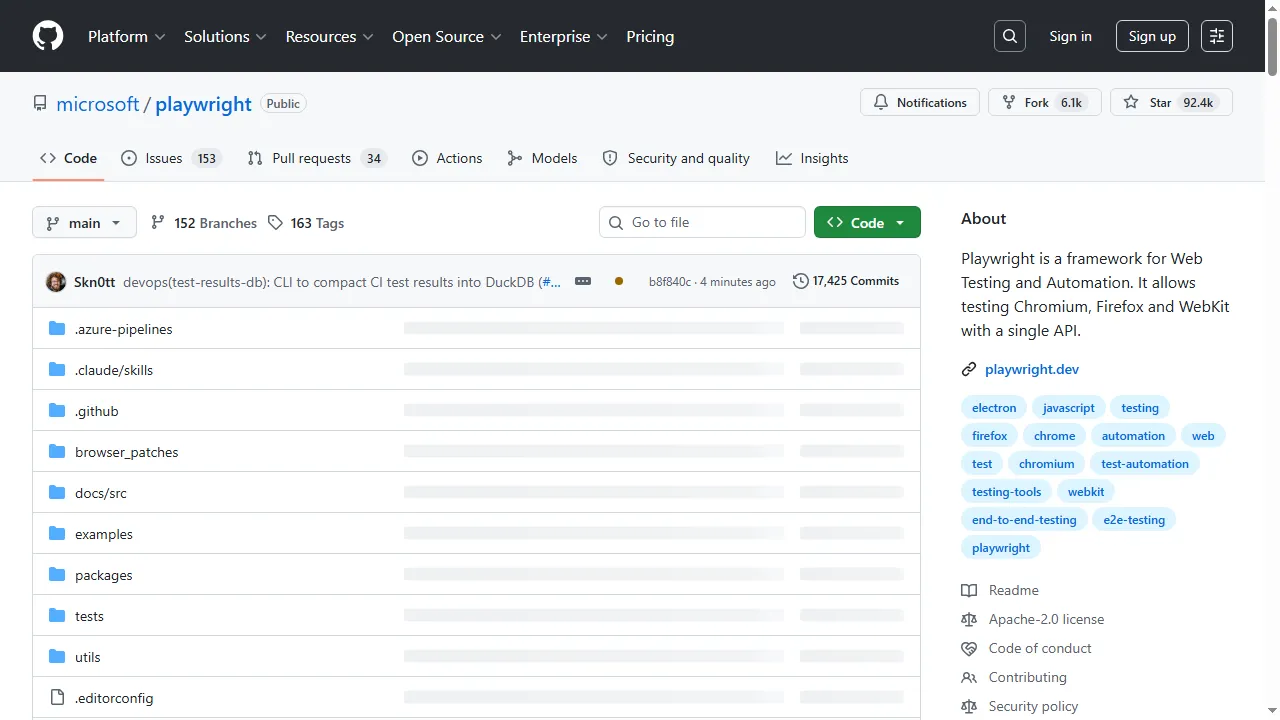
The screenshot below is from the live cloud session (build 96128249, test ID DA-WIN-17458-1783498891502354567KMK on TestMu AI Automation Cloud). The two values the bot needs, the star counter and the About description, are rendered, while the file table is still skeleton-loading, which is exactly the kind of partial render that UI automation must wait out.

When to Choose RPA, API Integration, or Both
The benchmark makes the per-transaction economics clear, but the decision in practice is about what the target system offers and how long the automation must live.
| Your situation | Pick | Why |
|---|---|---|
| Target system has no API and the vendor will not add one | RPA / UI automation | It is the only option; budget for weekly maintenance from day one |
| A documented API covers the workflow end to end | API integration | Faster, lighter, exact data, and stable across UI redesigns |
| APIs cover some steps, legacy screens cover the rest | Hybrid | API-first for covered steps keeps the fragile UI surface as small as possible |
| Process will be retired within months | Whichever ships fastest, usually UI | A short-lived bot can be cheaper than a properly engineered integration |
| Regulated process needing an exact audit trail | API integration | Request and response logs are replayable evidence; screenshots are not |
Hybrid is not a compromise, it is the normal end state at enterprise scale. The Camunda 2026 State of Agentic Orchestration report, surveying 1,150 senior IT and business leaders, found organizations already manage an average of 50 endpoints per business process, a footprint growing 14% year over year. A workable hybrid pattern:
- Inventory every step of the process and note which systems expose an API for it.
- Implement every API-covered step as an integration, even if that splits the flow.
- Wrap only the uncovered steps in UI automation, keeping each bot as small as one screen if possible.
- Coordinate both behind one orchestrator or queue so failures retry per step, not per process.
- Re-check vendor changelogs quarterly and replace UI steps the moment an API appears.
Whatever UI surface you keep inherits the operational pitfalls we cataloged in RPA implementation challenges: broken selectors, credential sprawl, and bots nobody owns after the author leaves.
How to Keep UI Automation From Breaking
Every UI-driven bot, whether you call it RPA or a test script, fails for the same three mechanical reasons:
- Selector decay: A release renames an ID or restructures the DOM, and the bot's locator finds nothing.
- Timing races: The bot acts before a lazy-loaded element is interactable, producing failures that vanish on retry.
- Environment drift: Browser versions, resolutions, and OS updates change rendering in ways a local machine never reproduces.
These are infrastructure problems more than scripting problems, which is why we ran the UI half of the benchmark on TestMu AI's Automation Cloud, a zero-infrastructure grid that runs existing Selenium, Cypress, Playwright, and Puppeteer scripts across 3,000+ browser and OS combinations. Two of its capabilities map directly onto the breakage above: Auto Healing monitors DOM changes and reformulates failed locators from recorded benchmarks of previously located elements, and SmartWait holds each action until the element is visible, enabled, and stable, configurable from 5 to 120 seconds. Every session also captures network logs, console logs, video, and command logs automatically, which is how we pulled per-page transfer sizes in the benchmark without writing any measurement code.
One honest caveat from the same playbook: Auto Healing is heuristic. It absorbs cosmetic drift well, but for strict regression checks where any UI change should fail the run, keep explicit selectors and leave healing off. Measured against the Robocorp finding that 41% of RPA users need over 5 hours to fix a broken bot, self-healing locators and full session artifacts attack the two slowest parts of that fix: reproducing the failure and finding what changed.
Conclusion
Start with one workflow, not a platform decision: rerun our benchmark scripts against a system you actually automate and let your own numbers settle the RPA vs API integration question. In our test the API path moved about 50x less data, finished 4.5x to 48x faster, and returned exact values instead of display strings, so when a contract exists, integrate with it.
Keep UI automation for the systems that offer nothing else, keep that surface as small as the hybrid pattern allows, and run it on infrastructure built to absorb UI change. The direction of travel favors contracts: Postman's data shows only 24% of developers design APIs with AI agents in mind so far, which means the machine-consumable share of your app estate will keep growing. To reproduce the UI half of the benchmark, the JavaScript with Playwright guide walks through the cloud connection, and the free tier includes 100 cloud minutes to run it.
Author

Sonali
Blogs: 4


Sonali is a QA Automation Tester with 4+ years of experience in designing automation frameworks and script coding using Selenium-BDD and Data-Driven frameworks, UFT, RPA, Appium, and API testing with Postman and Rest Assured. Skilled in Java, Python, Oracle, and SQL, she has delivered projects for clients including SBI, Aditya Birla Sun Life Insurance, and BNP Paribas. She holds certifications in MongoDB and Python.
Reviewer

Himanshu Sheth
Reviewer
Himanshu Sheth is the Director of Marketing (Technical Content) at TestMu AI, with over 8 years of hands-on experience in Selenium, Cypress, and other test automation frameworks. He has authored more than 130 technical blogs for TestMu AI, covering software testing, automation strategy, and CI/CD. At TestMu AI, he leads the technical content efforts across blogs, YouTube, and social media, while closely collaborating with contributors to enhance content quality and product feedback loops. He has done his graduation with a B.E. in Computer Engineering from Mumbai University. Before TestMu AI, Himanshu led engineering teams in embedded software domains at companies like Samsung Research, Motorola, and NXP Semiconductors. He is a core member of DZone and has been a speaker at several unconferences focused on technical writing and software quality.


RPA vs API Integration FAQs
Did you find this page helpful?
More Related Blogs
TestMu AI forEnterprise
Get access to solutions built on Enterprise
grade security, privacy, & compliance
- Advanced access controls
- Advanced data retention rules
- Advanced Local Testing
- Premium Support options
- Early access to beta features
- Private Slack Channel
- Unlimited Manual Accessibility DevTools Tests