

Power Your Software Testing with AI Agents and Cloud
The Native AI-Agentic Cloud Platform to Supercharge Quality Engineering. Test Intelligently and Ship Faster.


- TestMu AI (Formerly LambdaTest)
- /
- Blog
- /
- Process Mining and Task Mining
Process Mining and Task Mining: Differences and When to Use Each
Process mining and task mining both reveal how work really runs, from different angles. Compare their data sources, use cases, overlap, and when to use each.
Published on:
Process mining and task mining are two process-intelligence techniques that reveal how work actually runs: process mining reconstructs end-to-end processes from system event logs, and task mining records desktop interactions to show how people complete individual tasks.
Process mining separates into three classes of techniques, process discovery, conformance checking, and enhancement.[1]
This guide covers how each technique works, their key differences, where they overlap, real use cases, how they feed RPA and AI agents, and how to choose between them.
Overview
Use process mining to map end-to-end business processes across systems using event logs, and use task mining to record desktop interactions for detailed, user-level tasks. Together, these complementary process-intelligence methods reveal how work actually runs to help teams find and design automation.
- System-level analysis: Process mining reconstructs entire end-to-end processes across departments by analyzing system event logs from applications like ERP and CRM to find bottlenecks and compliance deviations.
- Desktop-level analysis: Task mining captures user interactions like clicks and keystrokes to reveal how individuals complete single tasks, exposing manual steps that do not leave traces in system logs.
- Software delivery quality: TestMu AI applies event-data logic to software testing by using a purpose-built set of AI agents to aggregate test execution records, identify flaky tests, and perform root-cause analysis.
What Is Process Mining?
Process mining is a data-driven technique that reconstructs how a business process actually runs by analyzing event logs, the digital records that systems such as ERP, CRM, and ticketing tools write for every step. Instead of relying on interviews or hand-drawn flowcharts, process mining builds the real process map directly from data.
Event logs are the raw material. Each event carries at least three fields: a case ID that ties events to one instance, an activity name, and a timestamp. From thousands of these events, process mining orders the steps each case followed and shows the real paths, the frequent variants, and the points where cases deviate from the intended flow.
The value is that the map is based on evidence, not memory. Real processes rarely match the official diagram. They contain rework loops, skipped approvals, and rare exception paths that only appear at scale. Process mining surfaces these hidden variants, which is why it is used for auditing, compliance monitoring, and process improvement.
What Is Task Mining?
Task mining is a technique that records how a person performs a task on their computer by capturing desktop interactions such as clicks, keystrokes, application switches, and copy and paste actions. Task mining reveals the detailed, user-level steps of work that leave no trace in system event logs, especially manual and repetitive tasks.
A task mining agent runs on the desktop and logs a stream of low-level interactions, often adding periodic screenshots and optical character recognition to read the text on screen. Machine learning then groups these raw actions into meaningful tasks and clusters the different ways people complete the same task.
The hard part is segmentation: deciding where one task ends and the next begins in an unbroken stream of clicks across many applications. Task mining also captures the work that happens between systems, such as re-keying data from an email into an ERP screen, which is exactly the manual effort process mining cannot see.
How Does Process Mining Work?
Process mining works in three ways, which the IEEE Task Force on Process Mining set out in its Process Mining Manifesto: discovery, conformance checking, and enhancement. Discovery builds a process model from raw event data, conformance checking compares that reality against a designed model, and enhancement improves the model with timing and resource data.
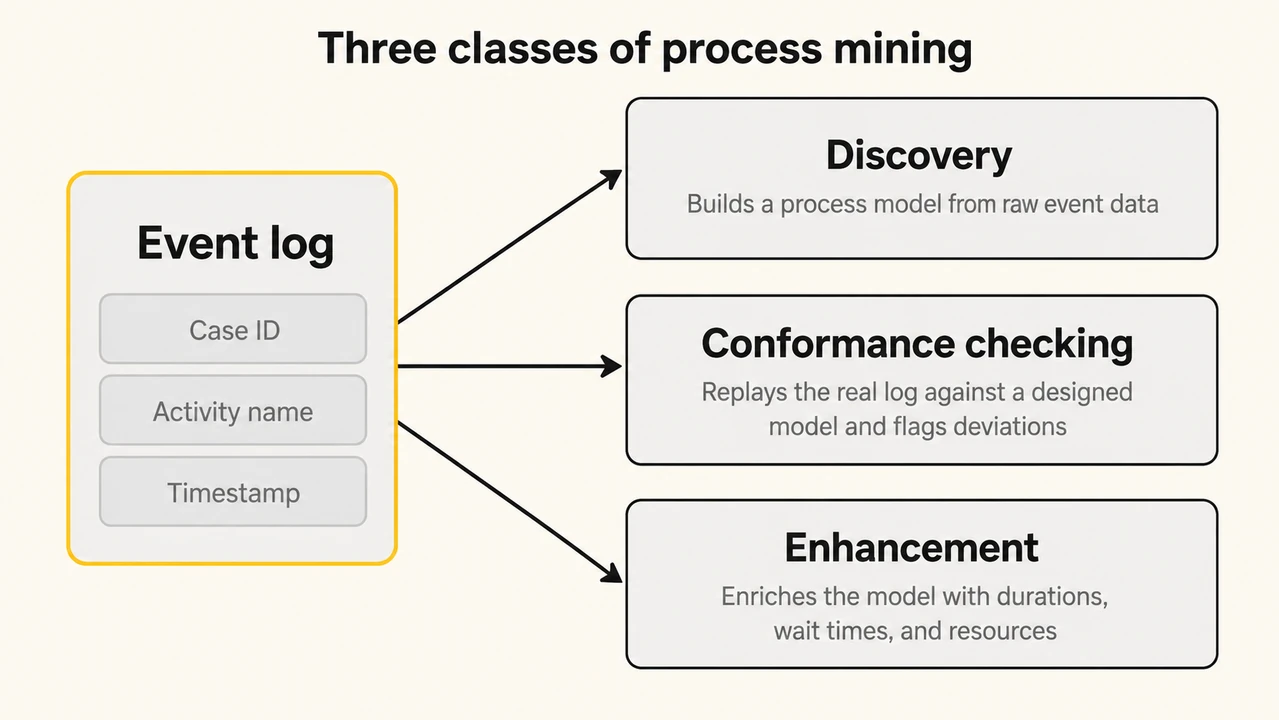
- Discovery: A discovery algorithm reads an ordered event log and infers the process model, including its paths, loops, and parallel branches, with no diagram supplied in advance. The output is a data-based map of what really happens.
- Conformance checking: Conformance checking replays a real event log against a designed model and flags every deviation, such as a skipped approval, an out-of-order step, or a path that should never occur. This is the basis of process auditing and compliance monitoring.
- Enhancement: Enhancement takes an existing model and enriches it with log data such as average durations, wait times, frequencies, and the resources involved. This turns a static diagram into a performance model that shows where a process is slow or expensive.
The catch is that all three depend on a clean event log, and real logs are messy. Getting reliable, correctly ordered events out of source systems is the part of the work that decides whether the resulting map can be trusted.
What Are the Key Differences Between Process Mining and Task Mining?
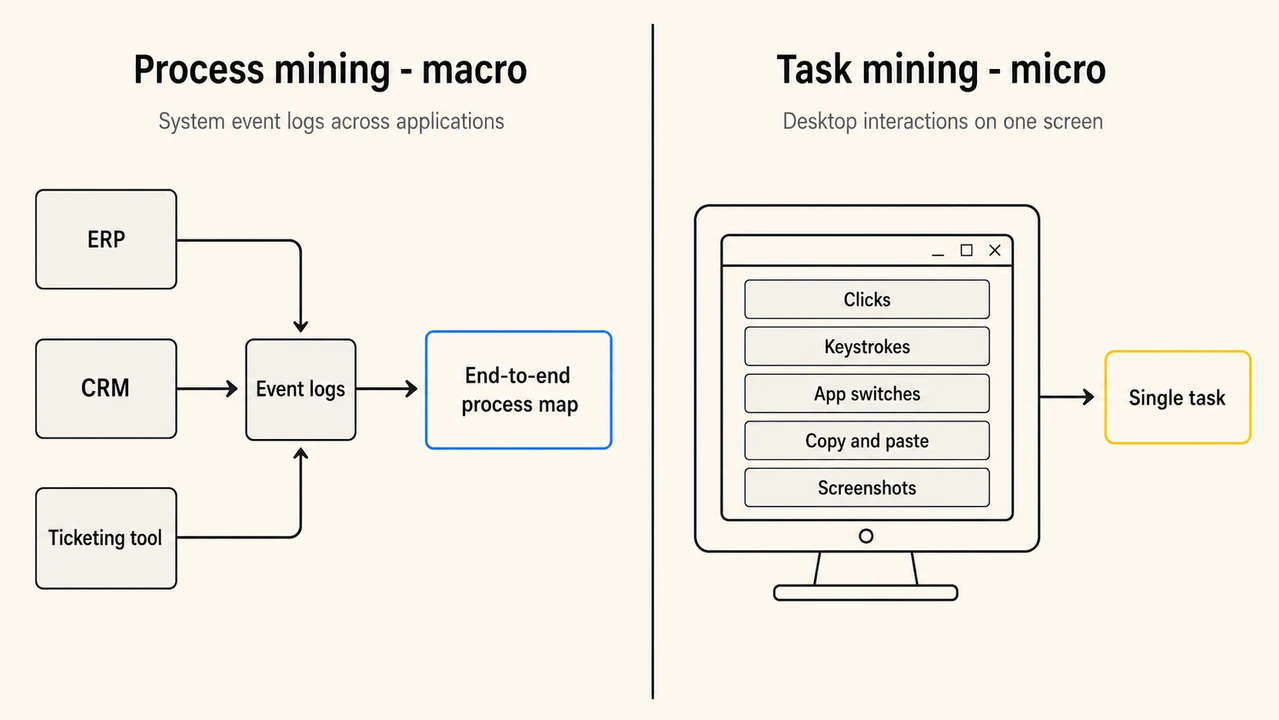
The key difference is the data source and the level of detail. Process mining uses system event logs to show an entire process across applications at a high level, while task mining captures desktop interactions to show in fine detail how a single task is performed. One covers the macro flow, the other the micro steps.
| Dimension | Process mining | Task mining |
|---|---|---|
| Data source | System event logs from ERP, CRM, and other applications. | Desktop interactions: clicks, keystrokes, and screenshots. |
| Level of analysis | Macro: the end-to-end process across systems. | Micro: a single task on one user's screen. |
| Scope | Cross-department, cross-application processes. | Individual, often manual and repetitive tasks. |
| Questions it answers | Where are the bottlenecks and deviations in the whole process? | How exactly do people perform this step, and where do they vary? |
| Typical output | Process maps, variant analysis, conformance and performance dashboards. | Task recordings, step variants, and automation-ready workflows. |
| Main limitation | Blind to manual work that leaves no system log. | Narrow scope and privacy-sensitive desktop capture. |
Neither is strictly better. Process mining covers the whole process but misses the manual work between systems, and task mining captures one task in detail but not the wider flow. The data source is the reason for every other difference: a log a system already writes versus a recording a tool must capture on the desktop.
How Do Process Mining and Task Mining Work Together?
Process mining and task mining work together by covering each other's blind spots. Process mining maps the full process and points to the slow or high-rework steps, then task mining records exactly how people work inside those steps. The first finds where the problem is, and the second explains why it happens.
Process mining often shows that a step takes far longer than it should, but the system log does not say why, because the real work happened on desktops between two applications. Task mining fills that gap by recording the manual copy and paste, the spreadsheet lookups, and the workarounds staff invented. Together they produce both the macro process map and the micro reason for a bottleneck.
This is why the two are increasingly bundled. Task mining supplies the user-level detail that turns a process map from a description into an actionable target for redesign or automation.
What Are Common Use Cases for Process Mining and Task Mining?
Common use cases for process mining and task mining include order-to-cash, procure-to-pay, accounts payable, and customer onboarding, where high volume and many hand-offs create hidden delays. Both are also used for compliance auditing, standardizing a process across teams, and preparing work for automation.
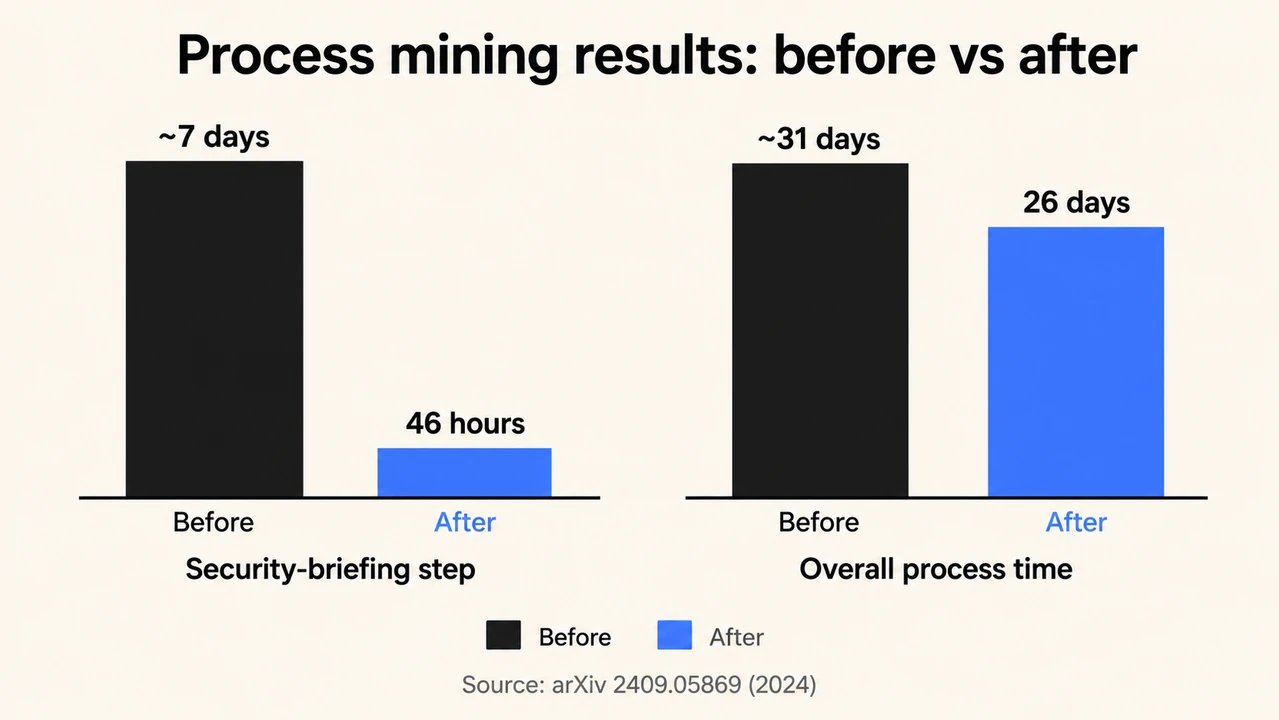
The payoff is concrete when a team acts on the findings. In one public-sector study, process mining exposed time-intensive loops caused by employees forgetting steps and the wrong staff being pulled into the process, and the resulting changes cut a security-briefing step from around 7 days to 46 hours and the overall process from about 31 days to 26 days.[2]

Note: See where your test suite loses time, across every run, with TestMu AI. Start for free
How Do Process Mining and Task Mining Connect to RPA and AI Agents?
Process mining and task mining are common first steps before automation. Process mining identifies which processes are worth automating, and task mining records how people perform them, so teams choose automation targets from real usage data instead of guesswork.
Process mining helps decide what to automate, and recording user interactions helps discover the routine steps that can be automated.[3]
For years the target of that discovery was robotic process automation, where a bot replays a fixed sequence of user-interface steps. The pipeline is direct: record how people work, discover the repeatable routine, then build the automation.
Automation is now moving from rule-based bots to agentic AI, where an AI agent decides steps at runtime instead of replaying a script. That raises the stakes for choosing the right candidates and for testing whatever gets automated, a trade-off covered in rpa vs ai.
TestMu AI, for example, ships a set of purpose-built AI agents, including a Test Orchestration Agent, a Root Cause Analysis Agent, an Auto Healing Agent, and a Test Insights Agent, that apply the same discover-then-automate idea to software quality.
Bring Purpose-Built AI Agents to Your Quality Workflow

Where Do Process Mining Ideas Fit in Software Testing and QA?
The core idea behind process mining, learning how work really runs from the events it leaves behind, applies directly to software testing. Every test run, build, and pipeline stage produces event data, and mining that data across runs reveals flaky tests, slow stages, and recurring failure causes that a single test report cannot show.
Engineering teams hit the same problem process mining solves for business operations. Each test run writes a per-run report, but those reports pile up with no view across builds, browsers, or time, so no one can see whether quality is improving, which tests fail most often, or where the pipeline is slow.
TestMu AI's Test Intelligence applies this event-data approach to test execution, aggregating the records every run produces into longitudinal quality intelligence rather than isolated pass or fail results.
- Failure-frequency analysis: Ranks tests by how often they fail across the whole history, so chronically flaky tests are surfaced by data instead of found one annoying failure at a time.
- Agentic Root Cause Analysis: Correlates network, console, and framework logs to localize the likely cause of a failure as a lead to verify, cutting time spent hunting across separate log systems.
- Cross-run trend dashboards: Show pass or fail, duration, and stability trends across builds, browsers, and teams, turning a pile of results into a release-readiness signal.
This is the same shift from raw records to insight that drives modern automation testing and data-driven testing.
What Are the Main Challenges of Process Mining and Task Mining?
The biggest challenge for both process mining and task mining is data. Process mining depends on clean, complete event logs, and task mining depends on high-volume desktop recordings that raise privacy concerns. In practice, extracting and preparing this data, not running the analysis, is where most of the effort goes.
- Event-log quality: Missing, incorrect, or inconsistently timestamped events distort the process map, and incomplete traces lead to misleading conclusions.
- Data extraction effort: Source systems were rarely built to export clean logs, so preparing and preprocessing a fit-for-purpose event log is a recognized challenge that often takes longer than the analysis itself.
- Task mining privacy: Recording keystrokes and screenshots on employee desktops can capture personal data, so anonymization, field masking, and consent are mandatory.
- Change management: A process map or task recording only creates value if the organization acts on it, which needs stakeholder buy-in, not just analysts.
In my experience building test-reporting pipelines, the split matches what process mining teams describe: the analysis is the fast part, and pulling consistently timestamped, correctly ordered event data out of tools that were never built to export clean logs consumes most of the project.

Austin Siewert
Co-Founder, Steadfast Systems
Discovered @TestMu AI yesterday. Best browser testing tool I've found for my use case. Great pricing model for the limited testing I do 👏
2M+ Devs and QAs rely on TestMu AI
Deliver immersive digital experiences with Next-Generation Mobile Apps and Cross Browser Testing Cloud

How Do You Choose Between Process Mining and Task Mining?
Choose process mining when you need an end-to-end view of a process that spans multiple systems and departments, such as order-to-cash or procure-to-pay. Choose task mining when the problem lives inside one manual, repetitive step on a user's desktop. Use both when you need the full picture and a target for automation.
- Choose process mining when: the process crosses several systems, the questions are about bottlenecks and compliance across the whole flow, and the systems already log events.
- Choose task mining when: the waste sits in a specific manual step, the work happens between applications with no system log, and you need automation-ready detail.
- Choose both when: you want to find the problem area at the macro level, then explain and automate it at the micro level.
For most teams the honest starting point is the process that hurts most. If it is cross-system and slow, start with process mining. If it is one painful manual task, start with task mining.
Conclusion
Process mining and task mining answer the same question at different zoom levels: how does work really run? Process mining reads system event logs for the end-to-end view, and task mining records desktop activity for the step-by-step detail. The strongest programs use both, then act on what they find.
- Pick the process that hurts most and decide whether the waste is cross-system, which points to process mining, or a single manual step, which points to task mining.
- Invest early in clean event data or reliable desktop recordings, because data preparation, not analysis, sets the timeline.
- Treat the output as a starting point for redesign or automation, and test whatever you automate before it ships.
The same evidence-first mindset pays off in software delivery, where mining test-execution data guides where to focus effort, a theme covered in ai in test automation.
Author

Samyak Goyal
Blogs: 31

Samyak Goyal is a Senior Member of Technical Staff at TestMu AI engineering Kane CLI, the command-line tool that runs browser automation from the terminal, where a flow described in natural language executes in a real Chrome browser and returns pass or fail with shareable proof. He is a backend engineer with 4+ years of experience, previously an SDE at Innovaccer, where he built APIs, introduced Kafka, and cut deployment from weeks to hours. Samyak also builds multi-agent systems, skill-orchestration frameworks, and a personal copilot that indexes 200+ microservice repositories.
Reviewer

Saurabh Prakash
Reviewer
Saurabh Prakash is an Engineering Manager at TestMu AI (formerly LambdaTest), where he leads engineering on agentic AI development and scalable system architecture for the quality engineering platform. He has also contributed to Test at Scale, the company's open-source test intelligence platform. He brings over 9 years of experience across Node.js, Java, Spring, MVC, data structures, algorithms, and scalable system design, with earlier roles as SDE 2 at Zomato, Senior Software Engineer at LogicHub, and Software Development Engineer at Directi. Saurabh holds a B.Tech in Computer Science and Engineering from Delhi Technological University.


Process Mining and Task Mining FAQs
Did you find this page helpful?
More Related Blogs
TestMu AI forEnterprise
Get access to solutions built on Enterprise
grade security, privacy, & compliance
- Advanced access controls
- Advanced data retention rules
- Advanced Local Testing
- Premium Support options
- Early access to beta features
- Private Slack Channel
- Unlimited Manual Accessibility DevTools Tests