

Power Your Software Testing with AI Agents and Cloud
The Native AI-Agentic Cloud Platform to Supercharge Quality Engineering. Test Intelligently and Ship Faster.


- TestMu AI (Formerly LambdaTest)
- /
- Blog
- /
- RPA vs IPA: Key Differences and When to Use Each
RPA vs IPA: Key Differences and When to Use Each
RPA vs IPA explained: how rule-based bots differ from AI-driven automation in data handling, change tolerance, and cost, plus when to choose each approach.
Last Updated on:
RPA vs IPA splits on input type: robotic process automation (RPA) executes predefined rules on structured data, while intelligent process automation (IPA) adds machine learning and natural language processing to handle unstructured inputs and decisions. The Business Research Company's January 2026 market report puts intelligent process automation at $17.95 billion in 2025 and projects $20.97 billion in 2026.[1]
This guide covers what RPA is, what IPA is, the differences that matter, how each handles the same invoice process, when to choose which, and where AI agents fit.
Key Takeaways
To automate business workflows, deploy Robotic Process Automation (RPA) for stable, rule-based tasks that rely on structured data, and use Intelligent Process Automation (IPA) when your processes involve unstructured inputs, variable document layouts, and decisions that require machine learning models.
- Best for structured tasks: Robotic Process Automation (RPA) executes predefined scripts on structured records, but these bots can break when user interface layouts or screen coordinates change.
- Best for variable workflows: Intelligent Process Automation (IPA) integrates machine learning and natural language processing to handle unstructured data and automatically route low-confidence extractions to human reviewers.
- Best for low-code desktop automation: Microsoft Power Automate builds desktop flows using drag-and-drop actions, though coordinate-bound steps are highly fragile and prone to failing after display-scaling changes.
- Best for quick model training: Microsoft AI Builder trains document processing models on as few as five sample documents to extract fields with confidence scores within cloud flows.
- Best for agent verification: TestMu AI provides Agent Testing to validate chat, voice, and phone agents, automatically generating test scenarios to evaluate hallucination, bias, and completeness.
- Best for goal-driven workflows: AI Agents plan steps and adapt to changes rather than following fixed paths, but their non-deterministic nature requires specialized testing before deployment.
What Is the Difference Between RPA and IPA?
The difference between RPA and IPA is scope: robotic process automation executes fixed, rule-based tasks on structured data, while intelligent process automation combines RPA with machine learning, natural language processing, and document AI to read unstructured inputs, make model-driven decisions, and route uncertain cases to people.
The 2 terms are related, not rivals. RPA is the execution layer inside an IPA stack: the bot still clicks, types, and moves data, while the models decide what the data says and which branch the bot should take.
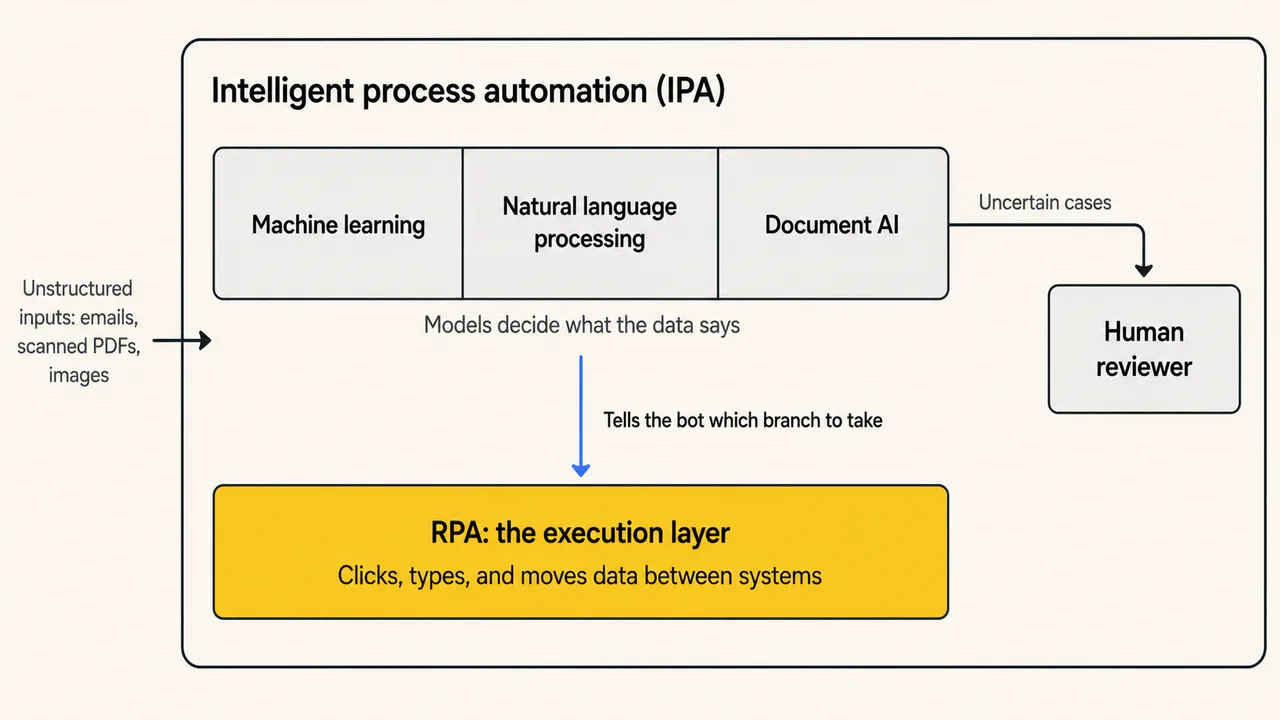
The vocabulary settled in 2017, when IEEE published the 2755-2017 guide to standardize intelligent process automation terminology because the field had no common definitions for its concepts and capabilities.[2]
What Is Robotic Process Automation (RPA)?
Robotic process automation is software that mimics human actions in digital systems: an RPA bot opens applications, reads fields, clicks buttons, and types values by following a predefined script. RPA fits repetitive, rule-based tasks such as data entry, report generation, and copying records between systems that lack APIs.
Microsoft's Power Automate, for example, builds desktop flows from prebuilt drag-and-drop actions, interacts with applications through UI elements, images, or coordinates, and automates legacy software such as terminal emulators alongside modern web and desktop apps.[3] The low-code automation guide covers this design style in more depth.
That addressing model is also where RPA breaks. In my experience migrating Jenkins-triggered UI automation across Windows machines, the flows bound to screen coordinates were the first to fail after any display-scaling change, and the failure surfaced as clicks landing on the wrong control rather than as an explicit error. Bot types and industry use cases are documented in the robotic process automation guide.
What Is Intelligent Process Automation (IPA)?
Intelligent process automation is the combination of RPA with artificial intelligence technologies, typically machine learning, natural language processing, and intelligent document processing. IPA automates end-to-end processes that involve unstructured data and judgment, and it routes cases the models cannot resolve confidently to human reviewers.
A 2020 arXiv paper on IPA evaluation describes intelligent process automation as an emerging sub-field of AI that supports the automation of long-tail processes which require coordinating tasks across different systems.[4]
In practice, teams pair an intelligent automation platform with document AI models, a rules engine, and a review queue for low-confidence results.
RPA vs IPA: Which Differences Actually Matter?
3 differences drive most RPA vs IPA decisions: what data each can read, how each behaves when inputs change, and how each fails. The table below compares the 2 approaches across 7 dimensions, from data handling to cost profile.
| Dimension | RPA | IPA |
|---|---|---|
| Core approach | Follows predefined rules and scripted steps on every run | Combines RPA execution with machine learning, NLP, and document AI |
| Data handling | Structured data only: forms, tables, and fixed fields | Structured and unstructured data: emails, scanned PDFs, and images |
| Decision-making | None; every branch is pre-programmed by a person | Model-driven decisions with confidence scores per prediction |
| Change tolerance | Breaks when the UI, layout, or input format changes | Absorbs input variation; models retrain on new document samples |
| Exception handling | Exceptions stop the bot or queue up for manual entry | Low-confidence cases route to a human review queue automatically |
| Implementation effort | Days to weeks per task with a low-code designer | Weeks to months per process; needs training samples and threshold tuning |
| Cost profile | Lower upfront cost; maintenance grows with every interface change | Higher build cost plus per-run model costs; savings compound on complex processes |
The change-tolerance row deserves the most attention. Microsoft's Power Automate documentation lists screen coordinates as one of 3 ways a bot addresses an application, and coordinate-bound automation is the most fragile of the 3 because any layout shift sends the click to the wrong place.
IPA absorbs more input variation because models generalize across formats. It also introduces a different failure mode: a wrong answer delivered with high confidence. Read the table column by column and one pattern repeats: structured plus stable favors RPA, variable plus unstructured favors IPA.

Note: Automated workflows still need automated verification. TestMu AI runs UI and workflow tests across 3,000+ browser and OS combinations. Try it free
How Do RPA and IPA Handle the Same Invoice Process?
Invoice processing shows the split clearly: an RPA bot keys invoice fields into an ERP system as long as every invoice matches a known template, while an IPA pipeline extracts fields from any layout with a document AI model and routes low-confidence extractions to a human reviewer.
The RPA version works from fixed rules. The bot downloads the PDF attachment, matches fields by their template positions, and types the values into the ERP form. A new vendor layout produces an exception, and exceptions accumulate in a queue for manual entry. The IPA version starts with a trained extraction model instead.
Microsoft's AI Builder document processing, for example, trains on as few as 5 sample documents and then runs inside a Power Automate cloud flow.[5]
Extraction results come back with confidence scores. Microsoft's Azure Document Intelligence guidance defines field confidence as an estimated probability between 0 and 1, reads a 0.95 score as likely correct 19 out of 20 times, and recommends flagging predictions below the threshold for human review.[6]
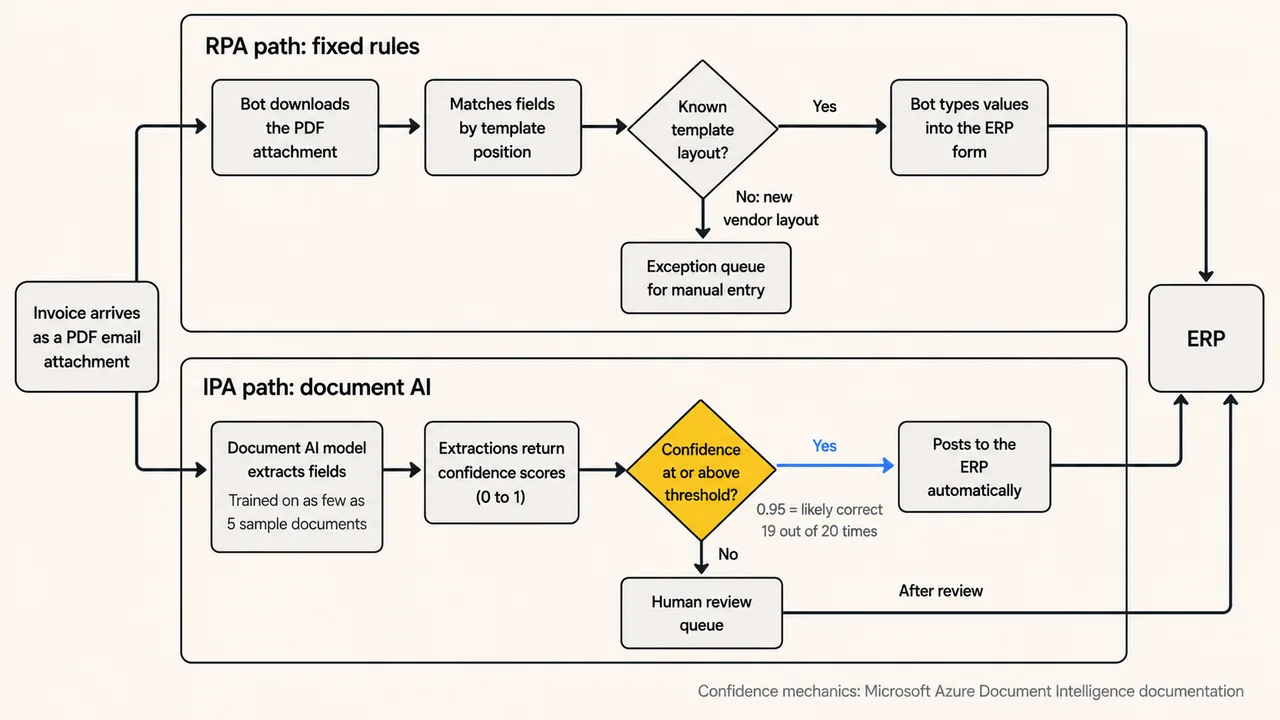
The human-in-the-loop queue is the part teams underestimate. Set the threshold too high and reviewers re-check almost everything; set it too low and wrong values post straight into the ERP. Tuning that threshold against real document volume decides whether an IPA rollout succeeds or stalls, and this confidence-and-review loop is the core pattern of AI automation.
When Should You Choose RPA and When IPA?
Choose RPA when the task is repetitive, rule-based, and fed by structured data that rarely changes shape. Choose IPA when inputs vary, documents arrive in mixed formats, exception rates climb, or the process needs a decision that a fixed rule cannot express.
- Input structure: Fixed forms, database rows, and stable templates run cheaper on RPA; emails, scanned PDFs, and free text need IPA's extraction models.
- Exception rate: A process where 9 in 10 cases follow the happy path suits RPA; when exceptions pile into manual queues, IPA's confidence routing absorbs them.
- Rate of change: Interfaces and formats that change often multiply RPA maintenance; IPA models tolerate variation but need retraining when document types shift.
- Budget shape: RPA costs less to launch and more to maintain; IPA costs more to build, adds per-run model costs, and pays back on complex processes.
- Team skills: RPA needs process analysts and a low-code designer; IPA adds model training, threshold tuning, and ongoing data work.
Most programs run both. Start with RPA on the stable tasks, measure where exceptions and rework concentrate, and introduce IPA there first. Comparing intelligent automation tools against that exception map produces a better shortlist than comparing feature lists.
Where Do AI Agents Fit Into RPA and IPA?
AI agents extend IPA from fixed workflows toward goal-driven automation: instead of executing a mapped process, an agent plans steps, calls tools, and adapts to what it finds. Vendors call this agentic process automation, and it extends RPA and IPA rather than replacing them. AI agents change the economics and the failure profile at the same time.
In the Reddit thread "Exploring the Future of RPA and Agentic AI" on r/rpa, practitioners discuss whether agents capable of independent decision-making will redefine automation. Several RPA developers in the thread describe upskilling toward data roles because plain RPA work is no longer in demand.
David Wyatt's October 2025 write-up on Power Automate's generative actions reported the prompt creating different inputs, outputs, and connections, the same inputs generating different outcomes, and per-run AI charges that erase the development-time savings on flows that run frequently.[7]
That non-determinism is the testing problem. A rule-based bot fails the same way on every run, so a fixed assertion catches it. An AI agent can produce a different answer to the same input on consecutive runs, so a test that passed yesterday proves little about today, and teams end up shipping agents without a reliable way to call them production-ready.
To close that gap, TestMu AI provides Agent Testing, an AI evaluation platform that validates chat, voice, and phone agents against standardized quality metrics before and after deployment. Key capabilities include:
- Scenario auto-generation: Upload a PRD, policy document, or knowledge base and the platform generates 60-100+ test scenarios covering happy paths, edge cases, and adversarial inputs.
- Specialized testing agents: 15+ autonomous evaluators probe specific failure modes, including hallucination, bias, completeness, and context awareness.
- Production-readiness verdict: Every run rolls up into a Green, Yellow, or Red verdict, so deployment decisions rest on evidence instead of spot checks.
You can explore the official documentation to get started with agent testing.
Platforms like TestMu AI provide purpose-built AI agents for the different stages of the testing lifecycle, from test authoring and orchestration to root cause analysis, maintaining the quality layer end-to-end across enterprise applications.
Validate AI Agents Before They Reach Production

Conclusion
RPA vs IPA is a scoping decision. Robotic process automation remains the right tool for stable, rule-based tasks on structured data, where a bot repeats a mapped procedure thousands of times with identical results. Intelligent process automation earns its higher build cost where documents vary, exceptions pile up, and decisions need a model rather than a rule.
The practical first step: pick one high-volume process, count how many cases leave the happy path each week, and automate the stable core with RPA before layering IPA onto the variable parts. When AI agents join that pipeline, treat verification as part of the rollout and validate agent behavior with a platform such as TestMu AI's Agent Testing before production traffic reaches it.
Citations
- [1] Global Intelligent Process Automation Market Report 2026 - The Business Research Company (January 2026)
- [2] IEEE 2755-2017: IEEE Guide for Terms and Concepts in Intelligent Process Automation - IEEE Standards Association (September 2017)
- [3] Introduction to Desktop Flows in Power Automate - Microsoft Learn (June 2025)
- [4] On the Evaluation of Intelligent Process Automation - Ferreira, Rozanova, Dubba, Zhang, Freitas, arXiv (January 2020)
- [5] Document Processing Model Overview in AI Builder - Microsoft Learn (January 2026)
- [6] Interpret and Improve Model Accuracy and Confidence Scores (Document Intelligence, Foundry Tools) - Microsoft Learn (November 2025)
- [7] Power Automate - Generative Actions - David Wyatt, DEV Community (October 2025)
Author

Harish Rajora
Blogs: 100


Harish Rajora is a software developer at TestMu AI with over 6 years of hands-on experience in Python and cross-platform application development across Windows, macOS, and Linux. He has authored 800+ technical articles and worked on large-scale projects, including GenAI applications and core engineering features used by millions. Harish has led DevOps initiatives building CI/CD pipelines with Jenkins, AWS, GitLab, and GitHub, and holds an M.Tech in Software Engineering from IIIT Allahabad.
Reviewer

Srinivasan Sekar
Reviewer
Srinivasan Sekar is Director of Engineering at TestMu AI (formerly LambdaTest), where he leads engineering and open-source initiatives behind the Selenium and Appium automation grid and owns TestMu AI's MCP Server. A committer to Appium and a contributor to Selenium, WebdriverIO, Taiko, and AppiumTestDistribution, he brings over 15 years of experience in quality engineering and open-source technologies. He is the author of the Apress book 'The MCP Standard: A Developer's Guide to Building Universal AI Tools with the Model Context Protocol,' a Certified Kubernetes and Cloud Native Associate, and an international conference speaker. Before TestMu AI he spent over eight years at Thoughtworks as a Principal Consultant and Quality Architect. Srinivasan holds a B.Tech in Information Technology from Anna University.


RPA vs IPA FAQs
Did you find this page helpful?
More Related Blogs
TestMu AI forEnterprise
Get access to solutions built on Enterprise
grade security, privacy, & compliance
- Advanced access controls
- Advanced data retention rules
- Advanced Local Testing
- Premium Support options
- Early access to beta features
- Private Slack Channel
- Unlimited Manual Accessibility DevTools Tests