

Power Your Software Testing with AI Agents and Cloud
The Native AI-Agentic Cloud Platform to Supercharge Quality Engineering. Test Intelligently and Ship Faster.


- TestMu AI (Formerly LambdaTest)
- /
- Learning Hub
- /
- What is DevOps Automation? The Ultimate Guide to Processes and Tools
What is DevOps Automation? The Ultimate Guide to Processes and Tools
Discover the power of DevOps automation. Simplify workflows, deploy faster, and boost efficiency with this comprehensive guide.
Last Updated on:
On This Page
- What is DevOps Automation?
- The 7 Phases of DevOps
- What DevOps Processes Should be Automated?
- Infrastructure as Code (IaC)
- Configuration Management
- How Automated Testing Shifts QA Left
- Benefits of DevOps Automation
- DevOps Automation Metrics
- How to Choose a DevOps Automation Tool?
- Best DevOps Automation Tools
- Common Challenges of DevOps Automation
- Best Practices for DevOps Automation
- Conclusion
OVERVIEW
DevOps automation refers to the process of automating various tasks and workflows within the DevOps (Development and Operations) environment. DevOps is a set of practices that combines software development (Dev) and IT operations (Ops) to improve collaboration and efficiency in the Software Development Life Cycle.
DevOps and automation are two essential elements that aid organizations in streamlining the development process. This causes substantial changes, such as collaboration between departments and teams should be improved, and repetitive manual work should be automated.
The SDLC becomes more effective when DevOps and automation are combined. To properly comprehend each word, let's define DevOps and automation individually.
The term DevOps refers to the combination of development and operations. It brings together the benefits of development and operations to enhance workflows. A cross-functional product team in DevOps is intended to manage features from development to production with the aid of developers and IT Ops.
In contrast, automation is applying technology to tasks requiring less human involvement. You can speed up processes, scale environments, and create continuous integration, delivery, and deployment (CI/CD) workflows with automation.
What is DevOps Automation?
DevOps automation is an approach to facilitate DevOps practices while minimizing the need for human interaction. Tools, specific practices, and processes are used in DevOps automation to automate manual and repetitive work.
With DevOps automation, you can accelerate the pace, effectiveness, and dependability of the software development process. Software engineering and information technology practices are combined in DevOps automation to enable automation and continuous delivery of software-related products.
Automation scripts can be used to automate DevOps procedures. These automation scripts guarantee quick software testing and consistent, dependable, and repeatable deployment. Organizations can decrease time to market, increase the quality of their software, and streamline other activities.
DevOps Automation vs Test Automation
These two get treated as competing choices, which is a category error. Test automation is one component inside DevOps automation, not an alternative to it. DevOps automation covers the whole delivery pipeline, from provisioning infrastructure to deploying and monitoring the release. Test automation covers one stage of that pipeline: verifying the software works.
| Parameters | DevOps Automation | Test Automation |
|---|---|---|
| Scope | The entire delivery pipeline | One stage of it, verification |
| Goal | Ship changes quickly and repeatably | Prove the change works before it ships |
| What it automates | Provisioning, configuration, builds, deployment, monitoring | Unit, integration, UI, API, and regression tests |
| Typical tools | Terraform, Ansible, Jenkins, Kubernetes | Selenium, Playwright, Cypress, JUnit |
| Owned by | DevOps and platform engineers | QA automation engineers and developers |
| Relationship | The pipeline that runs the tests | A stage the pipeline depends on |
So asking which is better is like asking whether an engine is better than a car. A DevOps pipeline without test automation just delivers unverified code faster, which is worse than no pipeline at all. Test automation without a pipeline runs on somebody's laptop and blocks nothing.
What Are the 7 Phases of DevOps?
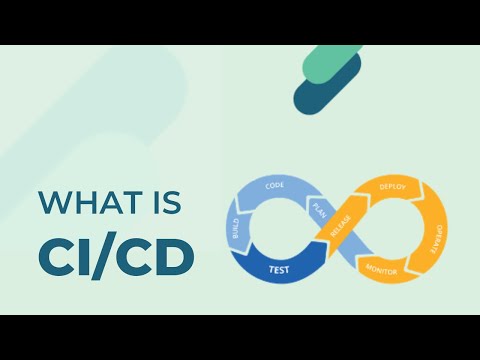
DevOps is usually described as a continuous loop of seven phases. Knowing them matters here because each phase is a candidate for automation, and the sections that follow map onto them directly.
- Plan: Define requirements, scope, and the work to be done. Automation shows up as issue tracking, roadmapping, and workflow triggers.
- Code: Developers write the software. Automation covers version control hooks, linting, formatting, and static analysis on commit.
- Build: Source is compiled and packaged into an artifact. This is where Continuous Integration lives, with the build triggered automatically on every merge.
- Test: The artifact is verified automatically. Continuous Testing runs the suite on every build rather than in a phase at the end.
- Release: A verified artifact is promoted and approved for production. Automation enforces the gates that decide whether it may proceed.
- Deploy: The release goes to production, ideally through Infrastructure as Code so the environment is provisioned the same way every time.
- Monitor: Production is observed for errors, latency, and usage. What you learn feeds back into Plan, which is what makes the loop a loop rather than a line.
The phases are continuous rather than sequential. In a mature pipeline several run at once, since one change is being monitored in production while the next is already being built.
What DevOps Processes Should be Automated?
The simple answer to this question is - almost everything that can be automated. In reality, however, the automated operations depend on outside variables like:
- Organization requirements
- Technology viability.
A competent DevOps team will be able to determine which procedures in their DevOps life cycle should be automated. Here are some typical procedures that would benefit greatly from automation.
- CI/CD (Continuous Integration/Continuous Delivery).
- Builds
- Code Commits.
- The deployment of packaged applications in specific testing and production environments.
- Software testing.
- Streamlined unit tests
- UX tests
- Smell testing.
- User interaction experiments.
- Monitoring.
- Availability of infrastructure
- Concerns with performance, security, etc.
- Infrastructure management.
- Logs management.
- Provisioning.
- Deployment.
- Collaboration workflows.
In any organization, CI/CD is the primary element that needs to be automated, according to the fundamental ideas and methods defining Agile development. All facets of this can be automated:
This is the perfect area to use automation everywhere. It is now simpler than ever to automate any type of test using test automation technologies like Selenium and Playwright. These might be:
Keeping track of components and modifications is extremely difficult due to the rapid pace of development. Automation is advantageous because it enables the DevOps team to develop automatic monitoring rules and produce alerts to monitor:
Automating the setup, configuration, and maintenance of infrastructure, such as networks and servers, can consume a substantial amount of time. However, by implementing software-defined infrastructure, we can revolutionize how we manage these systems, enabling seamless automation and minimizing the need for human intervention.
Logs are crucial for finding problems in an application. It's possible for an application to produce plenty of logs. You can quickly identify software problems using automation, log management technologies, and gathering and analyzing these data.
Automated provisioning, a key component of DevOps, allows you to provide computer resources on demand without requiring manual intervention. The organization can deliver apps more quickly than before by offering a flexible, scalable architecture that is highly scalable and has dynamic resource allocation.
Scheduling, handoffs, and status updates quietly consume a surprising amount of a team's week. Automating the routine coordination, such as triggering reviews, notifying the right people on a failed build, and moving tickets when a deploy lands, keeps the humans on the work that needs judgement.
The synchronization and deployment of resources across the dynamic infrastructure are made possible by deploying DevOps technologies. Deployment automation offers a robust framework that maintains synchronization of computing resources (both manually and automatically provisioned) when modifications are made.

Note: Automate your website testing across 3000+ environments. Try TestMu AI Now!
Catch up on the latest tutorials around Selenium automation, Cypress testing, CI/CD, and more. Subscribe to the TestMu AI YouTube Channel for quick updates.
Infrastructure as Code (IaC): Automating Environment Provisioning
Infrastructure as Code is one of the pillars that makes the rest of DevOps automation possible. The idea is to stop configuring servers by hand and instead define your infrastructure in machine-readable files that are committed to version control alongside your application code.
The problem it solves is familiar to anyone who has heard "it works on staging". When environments are built by hand, they diverge. Someone installs a package on production to fix an incident and never records it, and six months later staging and production are different systems that happen to share a name. IaC removes the human step: the file is the environment, so rebuilding it produces exactly what the file describes, every time.
Because infrastructure is now code, it inherits everything you already do with code. It gets reviewed in a pull request, versioned, diffed, and rolled back. Standing up an identical test environment stops being a ticket and becomes a command.
Declarative vs imperative IaC
IaC tools take one of two approaches, and the distinction decides how much you have to think about.
- Declarative (the what): You describe the desired end state, such as "three web servers of this size behind this load balancer", and the tool works out the steps to get there. Run it twice and nothing happens the second time, because the state already matches. That property is called idempotence, and it is why declarative tools are the default choice. Terraform and AWS CloudFormation both work this way.
- Imperative (the how): You write the sequence of commands to reach the state: create this, then attach that, then start the other. It gives you precise control, but running the script twice may well try to create everything again, so you carry the burden of handling what already exists.
Terraform is the common cross-cloud choice, since the same tool provisions AWS, Azure, and GCP, and it keeps a state file to track what it has built. AWS CloudFormation is AWS-native, which trades portability for tighter integration with AWS services. Pick declarative unless you have a specific reason not to, and put the definition files under the same review process as the application.
Configuration Management: Preventing Configuration Drift
IaC provisions the machine. Configuration management decides what runs on it and keeps it that way. The two are complementary, and teams routinely use both: Terraform creates the servers, and Ansible configures them.
Automated configuration management defines the desired state of your servers and applications, such as packages, versions, services, users, and settings, then continuously enforces it across development, staging, and production. Instead of trusting that a server is still set up correctly, the tool checks and corrects it.
What configuration drift is, and why it hurts
Configuration drift is the slow divergence of an environment from its intended state. Nobody causes it deliberately. An engineer SSHes in to debug an outage and bumps a memory limit. A patch lands on two of three servers. A certificate is renewed by hand on one node. Each change is small, reasonable, and undocumented.
The result is environments that are no longer comparable, which quietly destroys the value of everything upstream. Your tests passed on a staging box that no longer resembles production, so a green pipeline stops being evidence. Worse, drift is invisible until an incident, and then it is the reason one server in the pool behaves differently from the rest and nobody can say why.
Configuration management kills drift by making the declared state authoritative. If someone changes a server by hand, the next run puts it back, so the file is always the truth rather than a historical record of intent.
- Ansible: Agentless and works over SSH, using YAML playbooks. The easiest to adopt, because there is nothing to install on the managed machines.
- Puppet: Declarative and agent-based, with a long track record in large enterprise estates. It continuously enforces state rather than running when invoked.
- Chef: Uses Ruby-based recipes, giving strong flexibility for complex logic at the cost of a steeper learning curve.
The choice matters less than the discipline. Any of the three prevents drift if the declared state is the only way changes reach a server. None of them helps if people keep making manual changes and the tool is run once a quarter.
How Automated Testing Shifts QA Left in the DevOps Pipeline
Automation changes what QA is for. In the traditional model, QA sat at the end of the process as a gatekeeper: development finished, the build was thrown over the wall, and a team spent a week deciding whether it could ship. Defects were found at the point where they were most expensive to fix, and QA was structurally positioned as the thing standing between the team and a release.
Shift-Left moves that verification earlier, toward the left-hand side of the pipeline where the code is written. Rather than a phase that happens after building, testing becomes something that happens continuously during it. This is what people mean by Continuous Testing: the suite runs automatically on every commit and every build, so feedback arrives in minutes instead of weeks. Keeping that feedback fast as the suite grows is the job of test orchestration platforms such as TestMu AI's HyperExecute, which split the run across parallel virtual machines.
The economics are the whole argument. A defect caught by a unit test as the developer types costs almost nothing, because the person who wrote the code still has the context in their head. The same defect caught in a release candidate costs a triage meeting, a context switch, a fix, a re-test, and a delayed release. Nothing about the bug changed. Only when it was found.
What the QA Automation Engineer actually does
The role changes accordingly. A QA Automation Engineer is not a manual tester who also runs scripts. They build and maintain the reusable test suites that execute automatically during the CI/CD build phase, and their day looks more like a developer's than a traditional tester's:
- Writing reusable test scripts: Building maintainable suites in Selenium, Playwright, or Cypress that survive the application changing under them.
- Wiring tests into the pipeline: Making the suite run on every build, and deciding which failures block a merge rather than merely warn.
- Owning suite health: Keeping tests fast and trustworthy, because a slow suite gets skipped and a flaky one gets ignored, and both outcomes end with nobody reading the results.
- Choosing what to automate: Deciding which checks belong at unit, API, and UI level, and pushing coverage down to the cheapest layer that can catch the defect.
- Working alongside developers: Shaping testability while the feature is being designed rather than discovering it cannot be tested afterwards.
So QA stops being the last gate before release and becomes a property of the pipeline itself. The gate is still there, it is just automated, it runs on every change, and it fails in minutes rather than in a meeting.
Benefits of DevOps Automation
Automation is the guiding principle that supports every other DevOps principle, and the payoff is not only speed. By taking routine, error-prone, repetitive work off people, it frees teams to spend that time working with each other instead, which is why cross-team collaboration tends to improve as a side effect of automating rather than as a separate initiative.
Here are some compelling benefits of implementing automation in DevOps in your organization:
- Consistency
- Scalability
- Speed
- Flexibility
Using a robotic process automation solution throughout each stage of the DevOps cycle can help you improve the consistency of your product, app, or service. Robots are error-free unless the code is flawed.
Any highly automated process or operation has a consistent and foreseeable outcome. You've basically eliminated user errors because of the underlying static programme configuration and the absence of human interaction. Therefore, employ automated DevOps if you need to produce additional versions of software or services for diverse hardware and software platforms.
Scaling automated processes is significantly simpler than scaling manual ones. Scale automation operations by merely adding new processes to accommodate the rising demands.
The availability of team members substantially limits any scaling in a manual system. In contrast, scaling in an automated environment is only limited by the availability of the underlying software and hardware, which is not a problem in cloud-based systems as resources are scaled automatically in response to workload. Automatic Scale In/Out and Up/Down Functions is an excellent illustration of this.
The capacity to go through the life cycle stages quickly substantially impacts the project's deliverability, making it one of the most crucial aspects of DevOps.
We can complete each step without any delays because an automated process will be carried out independent of the time or availability of team members to initiate the operation manually. Additionally, using a standard template to automate a procedure is usually always faster than doing it by hand.
We can be flexible with automation regarding the process's scope and functionality.
The primary limitation on functionality and scope in an automated process is often the configuration, which can be easily adjusted to meet specific requirements. This adaptability surpasses the traditional approach of training team members to accommodate process changes. Moreover, the automated system allows for seamless updates of brand visuals across all products and services, providing added flexibility and enhanced features.
You must make quick configuration adjustments to apply across services and products in an automated DevOps approach. Consequently, you can continue to compete for changes in the market dynamics.

DevOps Automation Metrics
Effective DevOps automation is crucial for organizations that want to grow and succeed, and expanding DevOps to more software applications is essential for digital transformation.
As your team embarks on its journey towards DevOps automation, it's crucial to keep track of key DevOps metrics. These metrics not only help you assess your progress but also convince reluctant stakeholders to get on board with the changes:
- Deployment frequency: This measures how often a team successfully releases updates to production. It's a great way to gauge the efficiency and speed of your DevOps process in both the short and long term.
- Deployment speed: This refers to the time it takes to roll out a CI/CD deployment into production after it gets approval.
- Change failure rate: It's the percentage of code changes in your DevOps process that lead to failures in production. Keeping this rate low is essential for maintaining a stable and reliable system.
- MTTR (Mean Time to Recovery): MTTR measures the time it takes for your organization to recover from either a partial service interruption or a total failure in production. The quicker the recovery, the better it is for your users and business.
- Defect escape rate: This metric tracks the rate of issues and bugs that escape testing and end up affecting your software application after it's in production. Minimizing this rate is vital to providing a smooth user experience.
- Application availability: This measures the time your application is available and fully functional for end-users. It's an essential aspect of monitoring your digital experience and ensuring your customers have a positive interaction with your software.
By keeping an eye on these metrics and continuously working on improving them, your team can make the most of DevOps automation and drive your organization towards success
Note: Automate tests using CI/CD tools. Try TestMu AI Now!
How to Choose a DevOps Automation Tool?
The market for DevOps solutions is oversaturated, with options ranging from Agile collaboration platforms to frameworks that enable continuous delivery, making it challenging to select the best one for your business. But you won't find any advice on how to choose one.
The truth is that only some DevOps solutions can meet the specific requirements of every organization. We'll go over the best method for choosing the appropriate tools for your business in this section.
- Evaluate the overall health of your system
- Identify bottlenecks
- Automate as much as possible
- Integrate everything
- Employ the cloud
- Value vs. price
Take the time to evaluate the existing health of your distribution pipeline as a crucial first step. This will make it possible for you to spot any ineffective procedures or locations where the use of DevOps technologies would be advantageous.
Suppose testing takes longer than expected or new hardware is provisioned slowly. In that case, there may be bottlenecks in your system, such as labor-intensive manual procedures, ineffective or manual testing techniques, or downtime while waiting for shared resources to become available. These bottlenecks reduce productivity and lengthen the time it takes to develop features.
DevOps is all about speed and accuracy, and both can be dramatically improved by using automation tools. Your whole DevOps toolkit can be orchestrated by an enterprise-class automation solution, giving you a simple approach to expanding your workflows and continuously improving your procedures without adding a lot of extra labor.
There are different types of integrations. It's fragile and challenging to scale to tie your toolkit together using individual scripts. An application-agnostic automation solution can connect to any application that offers an API or web service and serve as a centralized console to control your complete environment.
Cloud computing and DevOps are closely connected concepts. Although DevOps can be performed on-premises, the cloud improves scalability and agility.
Your DevOps team may need more IT support due to the ongoing maintenance and updates needed for on-premise equipment. A cloud platform's technology will most likely be updated often to support new tools and solutions.
When evaluating the DevOps universal core values, collaboration is the most significant value. DevOps focuses on closing the communication gap between diverse teams and creating a collaborative environment where all teams work together to advance the product. The DevOps automation tools are a fair value for the money they cost.
Best DevOps Automation Tools
To speed up the distribution of iterative changes to applications in production, DevOps automation tools employ technology to support existing processes that enable feedback loops between operations and development teams.
DevOps technologies for automation increase delivery rate, dependability, steadiness, accuracy, and speed. All facets of development, deployment, and monitoring are covered by DevOps automation.
To highlight each tool's best use case, standout features, and use case, we've briefly summarized some of the DevOps automation tools below.
- Puppet
- Docker
- New Relic
- Raygun
- Buddy
You may configure, deploy, and manage your servers using the cross-platform configuration management tool Puppet. The tool enables you to manage your servers by dynamically scaling up and down the machines, configuring each host in your architecture, and managing containers.
Puppet automatically maintains your complete infrastructure in the intended state, allowing consistency for your team and compliance. The tool lets you keep an eye on your applications and has a sophisticated reporting feature that makes it simple to follow changes and problems.
Tools like GitHub, GitLab, BitBucket, and notification applications like Slack and PagerDuty are all integrated with Puppet.
Pricing for Puppet is available upon request. A free trial is also available for the tool.
Docker is an open-source, Linux-based platform that enables DevOps to build and run your CI/CD workflows and apps effectively. As a result, it lowers the infrastructure cost for operations teams and simplifies the configuration management of your development lifecycle. Docker offers platform-independent applications.
Docker offers a full range of DevOps tools to develop containerized environments for online and mobile applications. As a result, testing conflicts can be lessened, and the environments are more portable and secure thanks to the container. Additionally, the tool enables remote access to the containers and application execution.
Docker offers project management tool integration, including Azure DevOps.
Docker is a DevOps automation technology that is completely open-source and free to use.
Also, check out this tutorial: "Cypress Docker: A Step-by-Step Guide With Examples" for a practical guide on using Cypress with Docker.
Software developers and DevOps teams can use various monitoring and analytics tools from New Relic, a DevOps automation tool. It lets you keep a watch on the efficiency of your servers, applications, and infrastructure, making it simpler to spot problems and address them before they get out of hand. Both novice and experienced users will find it simple to get started with the tool because of its user-friendly interface and detailed instructions.
New Relic outperforms DevOps automation by offering extensive observability, application performance monitoring (APM), and infrastructure monitoring capabilities. Real-time application performance insights, transaction tracing to identify bottlenecks, and cloud infrastructure monitoring are just a few of its distinctive features.
A user-friendly interface, wide tool integration capabilities, and the capacity to gather and analyze data from diverse sources to provide a comprehensive perspective of system health set New Relic apart from its competitors.
Backend monitoring, Kubernetes monitoring, mobile monitoring, model performance monitoring, infrastructure monitoring, log management, error tracking, network monitoring, vulnerability management, and browser monitoring are just a few of the key features.
Over 500 apps, such as AWS, Google Cloud, and Microsoft Azure, as well as CI/CD tools, communication tools, such as Slack and PagerDuty, and other monitoring and analytics tools, such as Grafana, Datadog, and Splunk, are all integrated with the tool. Additionally, you can create unique integrations using its API.
DevOps teams can locate performance issues with Raygun, an application performance monitoring tool (APM). The tool allows users to connect back to the function, API call, or source code containing the error. Raygun also enables you to observe how users use your applications directly.
With Raygun's powerful crash reporting mechanism, you can find and address bugs right away. The functionality gives users the ability to identify and fix user experience problems. The functionality is simple to use because it frees engineers from relying solely on logs and support tickets to identify the causes of errors.
Asana, Jira, and other project management software, as well as Slack and PagerDuty, are all integrated with Raygun.
Buddy is a CI/CD tool that automates your DevOps process to eliminate tedious jobs. With just one git push command, you may develop and distribute projects using this tool's user-friendly UI.
Buddy allows you to specify each step in your continuous delivery process. In addition to allowing you to deploy your applications to the production environment and make builds and tests there, the tool also lets you write custom scripts and perform tests in the development environment. Buddy also allows you to monitor websites, which raises your stats.
Buddy supports simple configuration using YAML and the GUI in addition to continuous deployment using tools like GitHub, Docker, and Bitbucket.

Austin Siewert
Co-Founder, Steadfast Systems
Discovered @TestMu AI yesterday. Best browser testing tool I've found for my use case. Great pricing model for the limited testing I do 👏
2M+ Devs and QAs rely on TestMu AI
Deliver immersive digital experiences with Next-Generation Mobile Apps and Cross Browser Testing Cloud

Common Challenges of DevOps Automation
DevOps automation offers numerous benefits, such as increased efficiency, faster deployment cycles, and improved collaboration between development and operations teams. However, it also comes with its own set of challenges. Some common challenges of DevOps automation include:
- Lack of knowledge about tools and automation
- Lack of skilled DevOps professionals
- Resistance to change
- A surplus of tools
- Migration challenges
- Cybersecurity issues
DevOps requires various tools and automation to support continuous integration, delivery, and deployment. This calls for specific skill sets, and the current talent shortage across industries provides a good case study of how we are reverting to less effective methods to handle the up-skilling and reskilling of our workforce.
Organizations must spend money on education and training to equip their teams with the knowledge and abilities to apply DevOps to overcome this obstacle.
According to Statista, database software and DevOps were the two most in-demand tech skills in 2023. However, according to the Accelerate 2022 State of DevOps Report, only 11% of professionals have highly developed DevOps abilities, which makes it challenging to create a top-tier DevOps team because of competition from other businesses.
Cultural change is one of the biggest obstacles to implementing DevOps. Many organizations struggle with the mentality and approach change required by DevOps because they are accustomed to traditional, siloed approaches to software development.
To overcome this, enterprises must promote a culture of communication and collaboration while dismantling the silos between the development and operations teams.
A DevOps implementation approach is incomplete without automation toolkits. While implementing all DevOps technologies at once might seem like a smart idea, your team may find it too much to handle.
The best method is to concentrate on your team and the organizational structure since these factors will most likely determine whether your DevOps implementation plan is successful.
As teams adjust, there will inevitably be some kinks in any organizational transformation, and DevOps is no exception. Losing more time than you should with your old system is one of the most frequent issues with system changes, which negates the whole point of changing the system.
On the other hand, you need not battle with your migration. You can enlist the aid of a DevOps consultancy company to assist you in the procedure.
Cybersecurity threats represent yet another major obstacle for DevOps teams. Security must be incorporated into the DevOps process due to the growing prevalence of ransomware, DDoS attacks, and other forms of data breach. This could entail introducing automated security testing, employing shift-left security practices, and incorporating security tools and processes into the development process.
Staying updated with the constant changes in the technology industry poses a significant challenge for organizations. To ensure that their software performs as expected and delivers value efficiently, automation of repetitive testing processes becomes crucial. This is where a cloud-based AI-Native test orchestration and execution platform like TestMu AI proves to be invaluable.
With TestMu AI, you gain the ability to conduct both manual and automation testing on a large scale. Leveraging an online device farm of 3000+ real devices and operating systems, TestMu AI empowers you to achieve comprehensive testing coverage. The platform provides online Selenium Grid with local grid setups, providing a powerful testing infrastructure.

By harnessing the capabilities of TestMu AI, you can streamline your testing efforts, reduce time to market, and enhance the reliability of your software. The diverse range of real devices and operating systems available for testing ensures that your applications are thoroughly vetted across various environments. This ultimately leads to a smoother and more successful software deployment process.
Best Practices for DevOps Automation
Implementing DevOps automation effectively involves adopting best practices to maximize the benefits and minimize potential pitfalls. Here are some key best practices for DevOps automation:
- Keep engineers in the loop
- Embrace open standards
- Prioritize flexibility in tools
- Use dynamic variables
- Create a CDP (Continuous Delivery Pipeline)
- Activate AI
- Use flexible tooling
- Go headless
In practice, it’s usually not possible to automate every aspect of a DevOps pipeline. Automation in DevOps doesn't remove engineers from the picture entirely. Even the best-automated DevOps processes require human oversight and intervention when things go wrong or something needs to be updated.
But teams should strive to automate whenever and wherever possible because automation minimizes dependency on humans for managing basic, recurring tasks within a DevOps practice.
Prefer automation services that adhere to open standards. It simplifies onboarding, reduces the need for specialist training, and means you are not switching tools every time the team changes. This matters more once DevOps and deployment move to the cloud, where proprietary formats become expensive to leave.
Choose tools that adapt to your pipeline rather than forcing your pipeline to adapt to them, since the estate you automate today is not the one you will run in two years.
In the long term, prioritizing reusable code will reduce duplication and rework. Without changing the code, it is simple to adapt your automation to other contexts by using externally defined variables in scripts and specialized tools.
Remember to apply the same standards to your DevOps automation as to your regular code/feature development. Peer review, reuse, modularity, scalability, source control, and unit tests should be present.
A CDP is a pipeline that allows software products to move more quickly from conception to delivery. More minor code releases can be delivered thanks to a CDP, which improves corporate agility in response to shifting customer demands.
To locate bottlenecks and resolve issues, data-driven AI algorithms can be used to uncover specific patterns inside DevOps operations. Artificial Intelligence can also be helpful for DevOps solutions, particularly when it comes to monitoring production and development.
Although there aren't always solutions for every need, utilizing a DevOps tool that enables you to switch technologies will lessen the rework required when a business changes course. You may define your own set of best practices and get beyond any toolchain limitations with a solution that works with any cloud and provides a wide selection of partners and integrations.
Monolithic or traditional CMSs (Content Management Systems) were not designed to enable DevOps procedures. Contrarily, headless CMS is designed with automation and adaptability in mind, giving them an advantage in content delivery and assisting software development.
Conclusion
Due to its established advantages, DevOps automation is one of the most sought-after accomplishments for organizations. The workforce is still required to develop products, services, and apps using DevOps automation. Instead, it improves quality and reduces errors in your software products.
Traditional manual DevOps processes are automated by various tools and technologies, improving their accuracy and efficiency. The primary DevOps processes that can be automated include resource provisioning, software integration, deployment, testing, and monitoring. To automate these procedures, there are various software applications available. To get the most out of DevOps automation, it's crucial to adhere to best practices.
Author

Piyusha Podutwar
Blogs: 4


Piyusha Podutwar is a Senior Software Engineer at DPS with over 12 years of experience in mainframe application and system programming. She has authored 20+ technical tutorials for TestMu AI on API testing, Agile, DevOps automation, software testing, automation testing, and digital transformation. She is skilled in Assembler, COBOL, DB2, and JCL, and has led large-scale modernization and migration projects across banking, finance, retail, and insurance domains. A Certified Scrum Master, Piyusha previously worked with IBM, TCS, BMC Software, and T-Systems.
Reviewer

Sawan Garg
Reviewer
Sawan Garg is Senior Vice President of Engineering at TestMu AI (formerly LambdaTest), leading platform and infrastructure engineering across the testing cloud. He designed the microservices architecture and databases behind the platform and built the streaming technologies, including VNC, Guacamole, and WebRTC, that deliver live and real-time testing. He also contributed to the distributed proxy-based Tunnel that lets teams test firewall-protected and locally hosted websites. He brings 13+ years of engineering experience across Python, Java, Golang, Node.js, Kafka, Elasticsearch, Redis, and Kubernetes. Sawan holds a B.Tech in Computer Science and Engineering.


DevOps Automation FAQs
Did you find this page helpful?
More Related Learning Hubs
TestMu AI forEnterprise
Get access to solutions built on Enterprise
grade security, privacy, & compliance
- Advanced access controls
- Advanced data retention rules
- Advanced Local Testing
- Premium Support options
- Early access to beta features
- Private Slack Channel
- Unlimited Manual Accessibility DevTools Tests