

Power Your Software Testing with AI Agents and Cloud
The Native AI-Agentic Cloud Platform to Supercharge Quality Engineering. Test Intelligently and Ship Faster.


- TestMu AI (Formerly LambdaTest)
- /
- Learning Hub
- /
- UX Testing: Methods, Tools & Examples [2026]
UX Testing: Methods, Tools & Examples [2026]
Complete guide to UX testing in 2026: methods, tools, metrics, AI advances, and how to validate UX across 10,000+ real devices on TestMu AI.
Last Updated on:
On This Page
- What Is UX Testing?
- Why UX Testing Is Important
- How to Perform UX Tests
- Cross-Browser & Responsive Tests
- Types of UX Testing
- Steps to Conduct UX Testing
- AI in UX Testing (2026)
- Common UX Testing Tools
- Why Test on Real Devices
- UX Testing Best Practices
- Key UX Metrics & Benchmarks
- The ROI of UX Testing
- Conclusion
OVERVIEW
With 88% of online consumers unlikely to return to a site after a bad experience, and Forrester Research linking well-designed interfaces to conversion gains of up to 400%, UX testing evaluates real user behavior through methods like usability testing, A/B testing, eye tracking, and tree testing to catch friction before launch.
What Is UX Testing?
UX testing is a user-centered research method that evaluates a product's usability and overall user experience by recruiting real users to perform specific tasks while researchers observe and collect data. The primary objective is to identify usability issues, understand user behavior, and uncover areas for improvement, thereby refining the design and enhancing the user experience.
Unlike functional testing, which verifies whether features work as specified, UX testing asks whether users can actually accomplish their goals efficiently, intuitively, and with satisfaction. According to research from the Nielsen Norman Group, even testing with just five users can uncover approximately 85% of a product's usability problems, making it one of the most cost-effective quality assurance investments a team can make.
UX testing encompasses a range of evaluative research methods, from moderated lab sessions and remote unmoderated tests to behavioral analytics and AI-powered continuous monitoring. In 2026, with tools like Kane AI enabling natural language test creation and platforms like TestMu AI providing access to 10,000+ real device-browser combinations, UX testing has become more accessible and scalable than ever before.
Meet TestMu AI, the New LambdaTest — your trusted testing platform, now reimagined for the AI era.
Key Takeaway: UX testing is a research method where real users perform tasks on a product so teams can identify usability problems. With just 5 participants able to reveal 85% of issues (Nielsen Norman Group), it is one of the highest-ROI investments in product development.
Why UX Testing Is Important
UX testing is important because it reveals how real users interact with your product, exposing usability problems that internal teams often overlook due to familiarity bias. Without testing, teams rely on assumptions about user behavior rather than evidence, a practice that leads to costly redesigns, low adoption rates, and customer churn.
Reduces Development Costs
Identifying and fixing a usability issue during the design phase costs significantly less than fixing it post-launch. Research published by IBM's Systems Sciences Institute found that the cost of fixing a bug after product release is 4 to 5 times higher than fixing it during design and up to 100 times more expensive than addressing it in the requirements phase. UX testing catches these issues early, when changes are still inexpensive.
Improves Conversion Rates and Retention
Poor user experience directly impacts business metrics. According to Forrester Research, a well-designed user interface can raise conversion rates by up to 200%, and improved UX design can yield conversion rate improvements of up to 400%. Conversely, 88% of online consumers are less likely to return to a site after a bad experience, making UX testing essential for customer retention.
Validates Design Decisions With Evidence
UX testing enables organizations to assess the usability and effectiveness of their products from the user's perspective. By observing and analyzing user interactions, teams gain insights into user behavior, preferences, and pain points, which inform evidence-based design decisions rather than relying on internal opinions or assumptions.
Builds Competitive Advantage
In crowded markets where functional parity is common, user experience becomes the primary differentiator. UX testing helps organizations understand what users truly need, not what stakeholders assume they need, creating products that stand out through superior usability. User-friendly and intuitive products foster positive experiences, enhancing user satisfaction, customer loyalty, and market competitiveness.
Key Takeaway: UX testing saves money by catching issues early (post-launch fixes cost up to 100x more), improves conversion rates (up to 400% improvement per Forrester Research), and provides competitive advantage through evidence-based design. With 88% of users not returning after a bad experience, skipping UX testing is a business risk.
How to Perform User Experience Tests
User experience testing is a flexible process that varies based on the product and the type of testing it requires. While complex applications might need extensive user reviews and testing, typically even a small number of representative users can provide statistically significant data and cover most testing objectives.
Here are the primary methods of conducting user experience testing:
Laboratory-Based Product Testing
In laboratory-based UX testing, participants are brought into a controlled environment where they interact with the product while researchers observe from behind a one-way mirror or via screen-sharing tools. The facilitator assigns specific tasks, records participant behavior, and asks follow-up questions after each task. This method provides the highest quality observational data but is also the most resource-intensive, typically requiring a dedicated testing space, recording equipment, and significant scheduling coordination.
Guerrilla Usability Testing With Random Users
Not all user experience testing requires a large lab setup. Guerrilla usability testing involves approaching people in public places like coffee shops, co-working spaces, or campus common areas and asking them to review your product for 5 to 10 minutes. Following up with a short survey can provide additional valuable feedback. This method is fast, inexpensive, and useful for early-stage validation, though participants may not perfectly represent your target audience.
Remote Web Application Testing
Remote UX testing allows participants to test the application at their convenience, without the need to be physically present. It offers the flexibility of conducting tests at any time and from any location, and captures authentic usage contexts including real-world distractions, varying network conditions, and diverse hardware that lab environments cannot replicate.
When utilizing a real device cloud like TestMu AI, there is no need for an in-house device lab for usability testing. Users can test the application remotely on various device and browser combinations. Tools like the real device cloud and real-time browser testing facilitate remote testing on a wide range of devices and browsers, enhancing the accessibility and scalability of user experience testing.
Key Takeaway: UX testing can be performed in labs (highest data quality), through guerrilla testing (fastest and cheapest for early validation), or remotely via platforms like TestMu AI (most scalable, captures real-world conditions across 10,000+ device combinations). Choose the method that matches your project stage and budget.

Note: Validate UX across 10,000+ real Android and iOS devices, every major browser, and real network conditions on TestMu AI. Try TestMu AI free
How to Write and Execute User Experience Tests
The user experience is also determined by complementary tests such as responsiveness testing and cross-browser compatibility validation. TestMu AI provides cloud tools to test responsiveness and compatibility across multiple device and browser combinations.
Cross-Browser Compatibility Test
Cross-browser UX testing verifies that your application provides a consistent user experience across different browsers and operating systems. Below are the steps to perform cross-browser UX testing with TestMu AI:
- If you do not already have an account with TestMu AI, you can register for free.
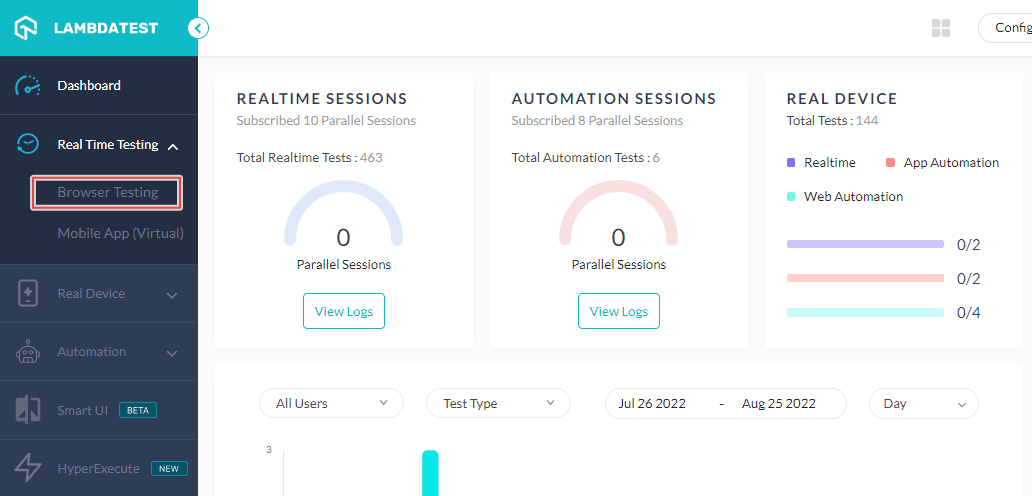
- From the left menu, select Real Time Testing > Browser Testing.
- Enter the URL, select Desktop, VERSION, OS, and RESOLUTION. Click START.
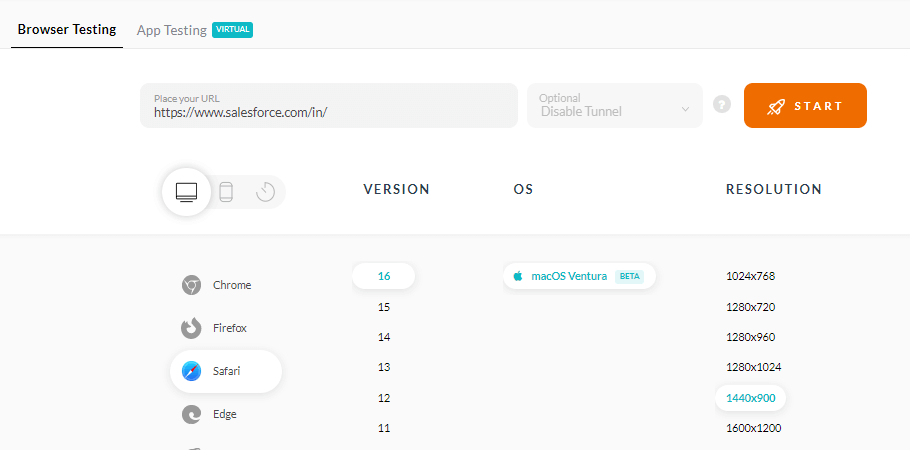
A new virtual machine will open based on the selected browser-OS combination where you can test websites or web applications for usability issues.

Testing Responsiveness
The responsiveness of your apps or sites is one of the most important aspects of user experience. A design that works perfectly on desktop may be unusable on mobile, and with mobile traffic accounting for over 58% of global web traffic (Statista, 2025), responsive UX testing is non-negotiable. You can check how responsive your app or site is on various screen sizes and resolutions (Portrait and Landscape) using responsive testing on real devices:
- Sign up and log in to your TestMu AI account. To get real device cloud access, contact sales.
- Go to Real Device > App Testing.

- Choose OS type (Android or iOS), upload your app, select BRAND and DEVICE/OS. Then click START.
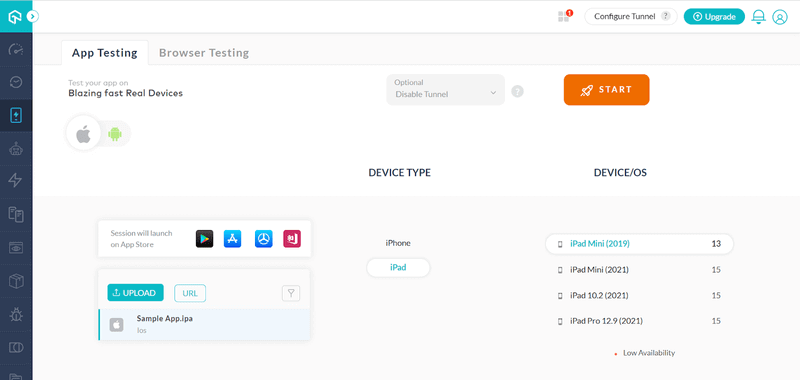
It will launch a real device cloud in which you can test the usability of your mobile apps.
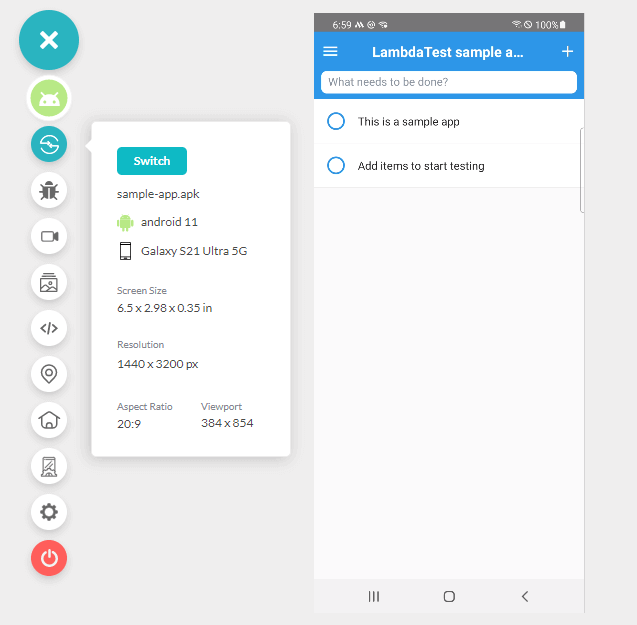
For deeper setup walkthroughs, see the Real Device Cloud documentation.
Key Takeaway: Cross-browser and responsive testing are critical UX validation steps. With mobile traffic exceeding 58% of web traffic globally, testing across real devices using cloud platforms like TestMu AI ensures your users get a consistent experience regardless of their device, browser, or operating system.
Types of UX Testing
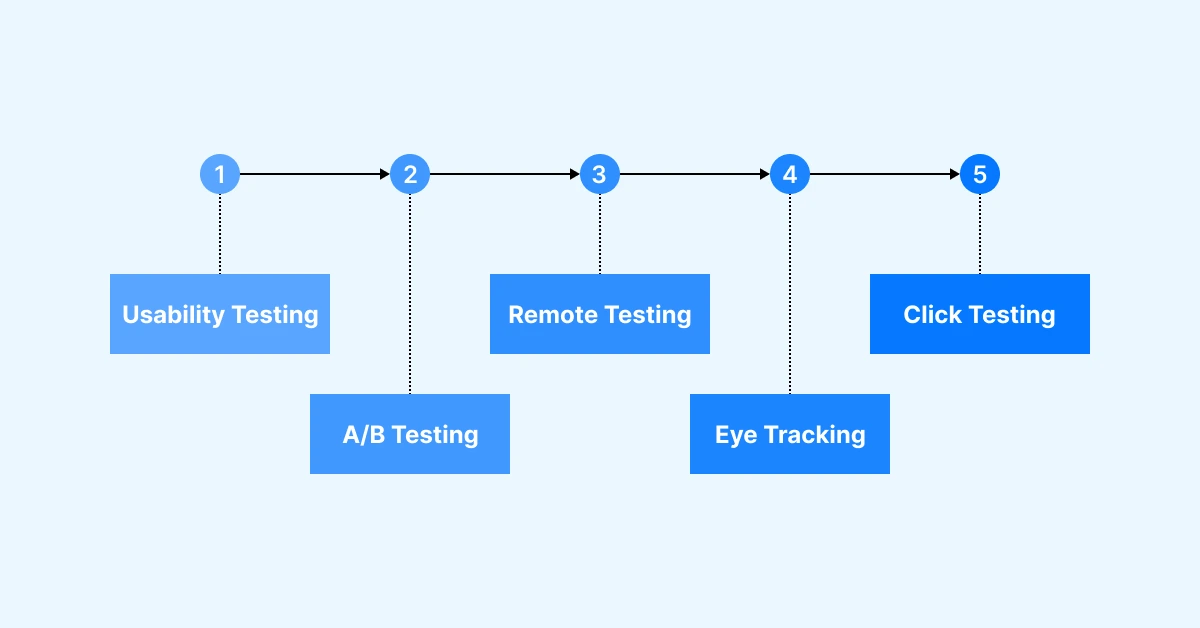
Several UX testing methods aid in evaluating and improving the user experience of a product or interface. The most effective UX testing programs combine multiple methods to capture both behavioral data and user attitudes across different stages of the product lifecycle.
Usability Testing
Usability testing is the most fundamental UX testing method. It involves observing individuals as they interact with a product to assess its ease of use, effectiveness, and overall satisfaction. Participants are assigned specific tasks, and their actions and feedback are closely observed. Usability testing helps identify issues related to usability, user dissatisfaction, and areas for enhancement. It can be conducted as moderated (with a facilitator present) or unmoderated (participants work independently).
A/B Testing
A/B testing, also known as split testing, compares two versions (A and B) of a webpage or interface to determine which performs better in terms of user engagement and conversion. It involves presenting different variants to user groups and comparing their interactions and outcomes. A/B testing facilitates data-driven decision-making and optimization of design elements. It is particularly effective for validating specific hypotheses, such as whether a new button color or CTA wording improves click-through rates.
Moderated vs Unmoderated Testing
Moderated UX testing involves a facilitator who guides participants through tasks in real time, enabling follow-up questions and deeper probing into user reasoning. Unmoderated testing lets participants complete tasks independently using automated testing platforms that record their sessions. The key trade-off is depth versus scale: moderated sessions produce richer qualitative insights but are time-intensive, while unmoderated sessions are faster, cheaper, and eliminate moderator bias.
Remote Testing
Remote UX testing takes place at a distance, allowing researchers to engage with a wider range of users and gather feedback from different locations. Participants are equipped with the necessary tools or software to carry out tasks remotely. Remote testing can be accomplished through various approaches, including online surveys, remote usability testing tools, or video conferencing. It offers benefits such as convenience, affordability, and insights from geographically dispersed users. Cloud-based platforms like TestMu AI enable remote testing across thousands of real device-browser-OS combinations.
Eye Tracking
Eye tracking measures and analyzes users' focus and gaze patterns when interacting with a product. Specialized hardware or software tracks the movements of the user's eyes, capturing data on visual attention and fixation points. Eye tracking provides valuable insights into information hierarchy, visual engagement, and the effectiveness of visual design elements. It is commonly used to optimize interfaces, advertisements, navigation menus, and call-to-action positioning.
Heuristic Evaluation
Heuristic evaluation is an expert-review method where UX professionals assess an interface against established usability principles, most commonly Jakob Nielsen's 10 Usability Heuristics for User Interface Design. While not a user test in the traditional sense, heuristic evaluation is a fast, cost-effective way to identify obvious usability violations before investing in participant-based testing. Typically, 3 to 5 evaluators independently review the interface and consolidate their findings.
Click Testing
Click testing, also known as first-click testing or clickstream analysis, evaluates user interactions by analyzing where users click first when given a specific task. Research shows that users who make a correct first click are significantly more likely to complete the overall task successfully. Click testing helps identify user preferences, areas of confusion or frustration, and opportunities for improving the user interface, navigation, and content placement.
Tree Testing
Tree testing evaluates the findability of items within a website's information architecture by presenting users with a text-only version of the site structure (no visual design elements). Participants attempt to locate specific items in the hierarchy, revealing whether navigation labels and categories make sense to users. Tree testing is especially useful during early design stages when the overall structure is still being defined.
| Method | Best For | Timing | Participants |
|---|---|---|---|
| Usability Testing | Comprehensive UX evaluation | Any stage | 5 per segment |
| A/B Testing | Validating specific design changes | Live product | 100+ per variant |
| Moderated Testing | Exploratory research, complex flows | Any stage | 5 per segment |
| Unmoderated Testing | Benchmarking, quantitative data | Post-prototype | 20 to 50+ |
| Remote Testing | Cross-device / geography validation | Any stage | 5 to 50+ |
| Eye Tracking | Visual attention, layout optimization | Post-prototype | 20 to 30 |
| Heuristic Evaluation | Quick expert audit | Early design | 3 to 5 experts |
| Click Testing | Navigation clarity | Wireframe / prototype | 20 to 50 |
| Tree Testing | Information architecture | Early design | 30 to 50 |
Key Takeaway: The nine major UX testing methods each serve different research goals. Usability testing provides comprehensive UX evaluation, A/B testing validates specific changes with statistical significance, and methods like tree testing and heuristic evaluation catch structural issues early. Effective programs combine multiple methods across the product lifecycle.

Key Steps in Conducting UX Testing
UX testing follows a structured workflow that can be adapted based on project scope, timeline, and budget. Whether you are testing a prototype or a live product, these core steps remain consistent across all testing methods.
Step 1: Define Goals and Metrics
Clearly articulate the objectives of your UX testing. Determine what specific aspects of the user experience you want to evaluate, such as ease of use, efficiency, discoverability, or user satisfaction. Identify the key metrics you will use to measure success, such as task completion rates, time on task, error rates, or System Usability Scale (SUS) scores.
Step 2: Create Test Scenarios
Develop realistic scenarios that mimic real-world user interactions and tasks. These scenarios should cover a range of user journeys and use cases. Avoid leading language that hints at the correct path. For example, instead of "Use the search bar to find running shoes," say "You want to buy running shoes for an upcoming marathon. Find a pair and add them to your cart."
Step 3: Recruit Test Participants
Select a diverse group of participants who represent your target audience. For qualitative usability studies, the Nielsen Norman Group recommends 5 participants per user segment to uncover the majority of usability issues. For quantitative benchmarking, aim for 20+ participants. Recruiting can be done through online panels, user research agencies, or by reaching out to your existing user base.
Step 4: Conduct the Test
Administer the test while observing and recording user interactions. Provide clear instructions to participants about the scenarios they need to complete. Encourage participants to think aloud and share their thoughts, feelings, and experiences during the test. This think-aloud method helps you understand their decision-making process and any challenges they encounter. Record the test sessions through audio, video, or screen capture software.
Step 5: Analyze and Act on the Results
Conduct a comprehensive analysis of the gathered data, encompassing observations, feedback, and task completion metrics. Identify patterns, emerging trends, and recurring usability challenges. Prioritize issues based on their severity and potential impact on user satisfaction, task completion rates, or alignment with business objectives.
Use an impact-effort matrix to prioritize fixes: high-impact, low-effort issues get addressed first. This process may involve modifying elements such as the interface, navigation system, content presentation, or product functionality, all aimed at achieving measurable improvements in user satisfaction and business outcomes.
Key Takeaway: Effective UX testing follows a five-step process: define clear goals and metrics, create realistic task scenarios, recruit representative participants (5 per segment for qualitative studies per NNGroup), conduct tests with think-aloud protocols, and prioritize fixes using severity and impact analysis.
How AI Is Transforming UX Testing in 2026
AI-powered tools are fundamentally changing how UX testing is conducted, analyzed, and scaled. While human observation remains the core of UX research, AI augments the process in several significant ways, making testing more efficient, comprehensive, and accessible to teams without dedicated UX researchers.
AI-Powered Analysis
AI tools can automatically transcribe test sessions, identify recurring usability themes across hundreds of recordings, and surface patterns that manual analysis would miss. Modern analytics platforms now use machine learning to detect rage clicks, confusion patterns, and abandonment triggers in real time across millions of user sessions.
Natural Language Test Creation
Platforms like TestMu AI's Kane AI enable teams to create and execute test scenarios using natural language commands, reducing the technical barrier to test automation. Instead of writing complex test scripts, QA teams and product managers can describe test flows in plain English and have them automatically translated into executable tests.
Continuous UX Monitoring
Traditional UX testing captured snapshots of user behavior during periodic studies. AI enables continuous monitoring, analyzing every user session in production to detect UX regressions, identify emerging friction points, and alert teams to problems before they impact key business metrics. This shift from periodic sample-based testing to continuous all-user monitoring represents one of the most significant advances in UX testing methodology.
Key Takeaway: AI is not replacing UX testing, it is making it faster and more scalable. AI-powered tools automate session transcription and pattern detection, enable natural language test creation (like Kane AI), and support continuous UX monitoring across all user sessions rather than periodic sample-based studies.
Common UX Testing Tools
Choosing the right UX testing tool depends on your testing methodology, budget, team size, and the type of product you are evaluating. Here are the most widely used UX testing tools in 2026.

1. UserTesting
UserTesting is a popular UX testing tool that allows you to gather user feedback through remote testing and video recordings. It enables you to create tasks or scenarios for participants to perform on your website or application. Users record their screen and provide real-time audio feedback while completing the tasks. UserTesting provides valuable insights into user behavior, preferences, and pain points, helping you understand how users interact with your product and identify areas for improvement.
2. Hotjar
Hotjar is a comprehensive UX testing tool that provides heatmaps, session recordings, and on-site surveys. Heatmaps visually represent where users click, move their cursor, or scroll on your website. Session recordings allow you to watch videos of individual users' interactions with your product, providing deeper insights into user behavior, frustrations, and areas of confusion. Hotjar's on-site surveys and polls help you understand user opinions and preferences directly.
3. Optimal Workshop
Optimal Workshop offers a suite of UX testing tools focused on evaluating and improving information architecture. It includes tree testing (for assessing site structure findability), card sorting (for understanding how users categorize information), and first-click testing (for evaluating navigation menu effectiveness). These tools are particularly valuable during early design stages when information architecture decisions have the highest impact.
4. Maze
Maze is a prototype testing platform that integrates with Figma, Sketch, and InVision. It enables unmoderated usability testing with automated metric collection, including task success rates, misclick rates, and time on task. Maze is particularly popular among design teams who want fast feedback on prototypes without the overhead of scheduling moderated sessions.
5. TestMu AI (Formerly LambdaTest)
TestMu AI is a cloud-based testing platform that enables users to test their websites and applications across various operating systems, browsers, and real devices before launching to the public. With access to 10,000+ browser-device-OS combinations via cloud services, TestMu AI simplifies cross-device UX validation. It includes features critical for thorough UX testing: geolocation testing, network simulation, accessibility testing, and responsive testing. AI-powered features like Kane AI enable natural language test creation, making UX test automation accessible to non-technical team members.
| Tool | Type | Key Features | Best For |
|---|---|---|---|
| UserTesting | Remote moderated and unmoderated | Video recordings, participant panel, highlight reels | Enterprise teams needing fast user feedback |
| Hotjar | Behavioral analytics | Heatmaps, session recordings, surveys, feedback widgets | Understanding on-site behavior patterns |
| Optimal Workshop | IA and navigation testing | Tree testing, card sorting, first-click testing | Information architecture validation |
| Maze | Prototype testing | Figma / Sketch integration, automated metrics | Design teams testing prototypes |
| TestMu AI | Cross-browser and real device testing | 10,000+ combos, Kane AI, real device cloud, accessibility | Verifying UX across devices and browsers |
Key Takeaway: No single UX testing tool covers all needs. Use behavioral analytics tools (Hotjar) for continuous monitoring, prototype testing tools (Maze) for design validation, IA tools (Optimal Workshop) for navigation assessment, and cross-device platforms (TestMu AI) to verify UX consistency across 10,000+ real device-browser combinations.

Why Should You Run User Experience Tests on Real Devices?
UX issues frequently manifest differently across devices, browsers, and operating systems. A checkout flow that works perfectly on desktop Chrome may break entirely on mobile Safari. Testing on emulators or simulators misses device-specific rendering quirks, touch interaction nuances, and real-world performance constraints.
When conducting user experience testing for a website or web application, the ideal approach involves testing across a diverse range of real devices and browsers. This method helps in uncovering UX issues that might arise in different environments. However, testing with numerous device and browser combinations can be expensive and resource-intensive without a cloud-based solution.
TestMu AI is a cloud-based testing platform that enables users to test their websites across various operating systems and web browsers before launching them to the public. By providing access to a wide array of real devices via cloud services, TestMu AI simplifies the testing process. It also includes additional features crucial for thorough testing, such as geolocation testing, testing apps with dependencies, network simulation, and more. These capabilities make TestMu AI an efficient and comprehensive solution for web application and website UX testing.
Key Takeaway: Real device testing catches UX bugs that emulators miss, including touch responsiveness issues, device-specific rendering problems, and real-world performance bottlenecks. Cloud-based platforms like TestMu AI eliminate the need for physical device labs while providing access to 10,000+ device-browser-OS combinations.
UX Testing Best Practices
Following established best practices ensures your UX testing produces reliable, actionable insights rather than anecdotal or biased findings. UX testing is a critical process in user-centered design that requires both methodological rigor and practical wisdom.
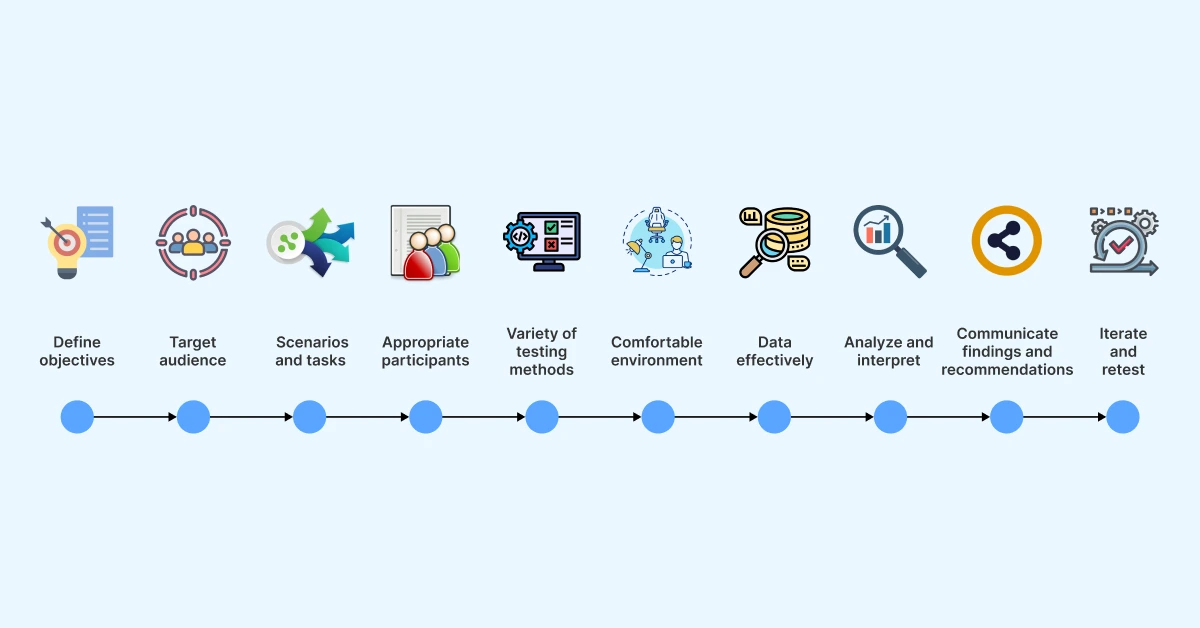
- Clearly define objectives: Before initiating UX testing, establish clear and specific objectives. Identify what aspects of the user experience you intend to evaluate and what insights you hope to gain. Clearly defined objectives help guide the testing activities and provide focus throughout the evaluation.
- Identify the target audience: Determine the target audience for the product being tested. Understand users' demographics, preferences, goals, and skill levels. By aligning the testing process with the characteristics of the intended users, you ensure that insights gathered are representative and relevant.
- Plan test scenarios and tasks: Develop test scenarios that simulate real-world situations users are likely to encounter. These should elicit meaningful interactions with the product. Strike a balance between providing enough structure to guide users and allowing for natural exploration. Use neutral task wording to avoid biasing participant behavior.
- Recruit appropriate participants: Carefully select participants who match your target audience characteristics, including age, technical proficiency, and relevant background. Recruiting a diverse set of participants helps capture a broad range of perspectives. For qualitative tests, 5 participants per segment uncovers most issues (NNGroup).
- Use a variety of testing methods: Employ a combination of qualitative and quantitative testing methods to gain a comprehensive understanding. This may include usability testing, surveys, eye-tracking, A/B testing, heuristic evaluation, and tree testing. Multiple methods allow you to triangulate findings for more robust insights.
- Create a comfortable testing environment: Establish a distraction-free environment that resembles the context in which the product is expected to be used. For remote tests, ensure participants have clear instructions and working tools. Comfortable participants provide more honest and authentic feedback.
- Capture data effectively: Use appropriate tools and techniques to capture data, including screen recordings, audio, video, observational notes, survey responses, and interaction analytics. Accurate and detailed data capture enables thorough analysis and interpretation of findings.
- Test across diverse devices and environments: Do not limit testing to a single device or browser. Use cloud-based platforms like TestMu AI to validate UX across multiple devices, screen sizes, browsers, and network conditions.
- Analyze and interpret results: Analyze findings to uncover patterns, trends, and insights. Identify usability issues and pain points. Use a combination of qualitative and quantitative analysis, and prioritize issues by severity and frequency using an impact-effort matrix.
- Communicate findings and recommendations: Present results clearly and concisely. Share actionable recommendations for improvement. Invite stakeholders to observe test sessions, direct exposure to user struggles builds organizational empathy and accelerates buy-in for UX improvements.
- Iterate and retest: UX testing should be an iterative process. After implementing design changes based on findings, retest the product to evaluate the impact of modifications. Schedule regular testing cadences, at least quarterly, to prevent UX debt from accumulating.
Key Takeaway: The most impactful UX testing practices are: test early and often, recruit participants matching real users, combine qualitative and quantitative methods, test across diverse device environments (via cloud platforms like TestMu AI), and always iterate and retest after implementing changes.
Measuring Key UX Metrics for Success
UX metrics are quantifiable measurements that assess various aspects of the user experience. These metrics enable businesses to track and evaluate user behaviors, preferences, and attitudes toward their digital products. By analyzing these metrics, organizations can identify areas of improvement, make data-driven decisions, and align their strategies with user needs and expectations.
Why Measuring UX Metrics Matters
To assess and continuously improve user experience, it is crucial to track effective metrics across testing iterations. The following key UX metrics serve as valuable indicators of success:
- Conversion Rate: The conversion rate measures the percentage of users who successfully complete a desired action or goal within a specific interaction. It provides insights into the effectiveness of the user experience in guiding users toward outcomes such as making a purchase, subscribing to a service, or completing a sign-up form.
- Task Success Rate: The task success rate evaluates the percentage of users who accomplish a given task successfully. This is the most fundamental usability metric. A benchmark task success rate across industries is approximately 78% according to research compiled by MeasuringU. Anything below 60% signals serious usability problems requiring immediate attention.
- Time on Task: Time on task measures the average duration for users to complete a specific task. A shorter time generally indicates better usability, though context matters: a task requiring careful reading should take longer than simple navigation. Tracking this metric across iterations quantifies efficiency improvements.
- Error Rate: The error rate quantifies the frequency of user errors encountered during interactions. It is essential for identifying usability issues. A low error rate signifies a well-designed experience with fewer obstacles, while a high error rate indicates potential usability challenges and the need for design adjustments.
- System Usability Scale (SUS): The SUS is a standardized 10-question survey producing a single score from 0 to 100 representing perceived usability. The average SUS score across products is 68. Scores above 80 indicate excellent usability; scores below 50 indicate serious problems requiring redesign.
| Metric | What It Measures | Benchmark | How to Collect |
|---|---|---|---|
| Task Success Rate | Can users complete tasks? | ~78% average (MeasuringU) | Observation during testing |
| Time on Task | How efficient is the experience? | Varies by task complexity | Timing during testing |
| Error Rate | Where do users make mistakes? | Lower is better | Observation + analytics |
| Conversion Rate | Are users completing goals? | Varies by industry | Analytics tools |
| SUS Score | Overall perceived usability | 68 average | Post-test survey |
By regularly monitoring and analyzing these metrics, organizations can make informed decisions to optimize UX, enhance user satisfaction, and drive desired user behaviors.
Key Takeaway: Track five core UX metrics: task success rate (benchmark ~78%), time on task, error rate, conversion rate, and SUS score (benchmark 68). Measure before and after design changes to quantify improvement and demonstrate ROI to stakeholders.
The ROI of UX Testing
The Return on Investment (ROI) of UX testing refers to the financial benefits an organization derives from investing in user experience evaluation and optimization. Understanding these returns helps justify UX research budgets and build executive support for user-centered design practices.

Reducing Development Costs
UX testing reduces development costs by identifying usability issues before they reach production. The cost to fix a defect increases dramatically as it moves through development stages, from approximately $100 during design to $10,000+ after deployment, according to widely cited software engineering research. By catching issues early through prototype testing and iterative usability studies, organizations avoid these exponential cost increases. A well-known Forrester Research study found that every dollar invested in UX yields an average return of $100, representing a 9,900% ROI.
Increasing Revenue
UX testing directly impacts revenue. Improved usability leads to higher conversion rates, lower bounce rates, and increased customer lifetime value. According to Forrester Research, a well-designed user interface can raise conversion rates by up to 200%, and improved UX design can yield conversion rate improvements of up to 400%. These numbers translate directly to top-line revenue growth.
Lowering Support Costs and Churn
UX testing helps uncover usability problems and friction points that may hinder conversion or lead to user frustration. By addressing these issues, organizations improve the efficiency of their digital platforms, streamline user flows, and optimize the overall experience. More intuitive products require less user hand-holding, reducing support ticket volume. Satisfied users who can accomplish their goals without frustration are less likely to churn and more likely to recommend the product to others, driving organic growth.
Key Takeaway: UX testing delivers ROI through three channels: reduced development costs (post-launch fixes cost up to 100x more than design-phase fixes), increased revenue (up to 400% conversion rate improvement per Forrester), and lower support costs through more intuitive products. The documented ROI of UX investment is 9,900%.
Conclusion
UX testing is a vital component of modern product development, enabling businesses to optimize user experiences and create successful products. By employing various testing methodologies, from traditional usability testing and A/B testing to AI-powered continuous monitoring, teams can make evidence-based design decisions that improve user satisfaction, increase conversion rates, and foster brand loyalty.
In 2026, the UX testing landscape has been transformed by AI tools that automate analysis, enable natural language test creation, and support continuous monitoring across all user sessions. Cloud-based platforms like TestMu AI have made cross-device UX validation accessible to teams of any size, eliminating the need for expensive physical device labs.
The key to successful UX testing is not choosing a single method but building a testing program that combines qualitative and quantitative approaches across the product lifecycle. Test early, test often, measure rigorously, and iterate continuously, your users and your business metrics will reflect the investment. Start by running a five-user usability test on your next release on TestMu AI's Real Device Cloud, then convert your strongest user flows into permanent regression checks with Kane AI.
Note: This article was researched and drafted with AI assistance, then reviewed, fact-checked, and published by Anupam Pal Singh, Community Contributor at TestMu AI, whose listed expertise includes Software Testing and Automation Testing. Every statistic, link, and product claim was verified against primary sources. Read our editorial process and AI use policy for details.
Author

Anupam Pal Singh
Blogs: 11


Anupam is a Community Contributor at TestMu AI with 4+ years of experience in software testing, AI, and web development. At TestMu AI, he creates technical content across blogs, tool pages, and video scripts, with a focus on CI/CD, test automation, and AI-powered testing. He has authored 25+ in-depth technical articles on the TestMu AI Learning Hub and holds certifications in Automation Testing, Selenium, Appium, Playwright, Cypress, and KaneAI.
Reviewer

Rahul Mishra
Reviewer
Rahul Mishra is a Lead Member of Technical Staff at TestMu AI (formerly LambdaTest), leading frontend engineering and accessibility testing across the quality engineering platform. He mentors frontend engineers, runs code reviews and sprint planning, optimizes React.js rendering performance, and makes product features accessible to users with disabilities through WCAG and ADA-compliant accessibility audits. He brings 10+ years of experience across React.js, VueJS, TypeScript, Swift, Objective-C, and AWS, with earlier work as a Technical Lead at VectoScalar Technologies. Rahul holds a B.E. in Information Technology.


Frequently asked questions on UX Testing
Did you find this page helpful?
More Related Blogs
TestMu AI forEnterprise
Get access to solutions built on Enterprise
grade security, privacy, & compliance
- Advanced access controls
- Advanced data retention rules
- Advanced Local Testing
- Premium Support options
- Early access to beta features
- Private Slack Channel
- Unlimited Manual Accessibility DevTools Tests