
Assure your AI deployment - across enterprise and real world
We assure that your AI works as intended. Safely and securely.

January’24 Updates: Latest Samsung Galaxy S24 Series, SmartUI SDK, and More
Level up your testing. Get hands-on with the new Samsung Galaxy S24, run visual tests using SmartUI SDK, and unlock more.
Last Updated on:
On This Page
- Test Your Mobile Apps on Latest Samsung Galaxy S24 Series
- Lighthouse Reports, New Selenium Versions, and HAR Log Viewer
- SmartUI SDK for Visual Regression Testing
- Latest Features in HyperExecute
- Perform Network Throttling and Automated Localization Testing
- View Test Trends for Real Device Browser Testing
- New: Get Certified With Appium 101 Certification
Hey everyone! We are here with our first Product Update for 2024.
We started the new year with a bang by introducing the latest Samsung Galaxy S24 series for real device testing and SmartUI SDK to run visual regression tests at scale.
And what’s more interesting is launching our first-ever mobile automation certification – Appium 101. We’ve also added some other powerful features like ability to generate Lighthouse reports using Playwright Lighthouse Library, Selenium Lighthouse reports using Lambda Hooks, latest Selenium versions 4.14.0 to 4.17.0, and a few other enhancements in HyperExecute and Test Analytics.

Test Your Mobile Apps on Latest Samsung Galaxy S24 Series
Testing on different devices is necessary, considering the proliferation of new devices. So, when you test your mobile apps on various devices, you make sure they run smoothly for everyone out there.
Recently, Samsung has launched its Galaxy S24 series. Therefore, ensuring your mobile apps work as expected when installed on these devices is important.
With TestMu AI real device cloud, you can now test your mobile apps on the latest Samsung Galaxy S24 series. This feature ensures your apps work like a charm on these brand-new Samsung devices.
Here are the below S24 models that TestMu AI supports:
- Galaxy S24
- Galaxy S24+
- Galaxy S24 Ultra

Lighthouse Reports, New Selenium Versions, and HAR Log Viewer
The latest release of Web Automation comes with a trio of powerful features to elevate your web testing game. Let’s look into the details:
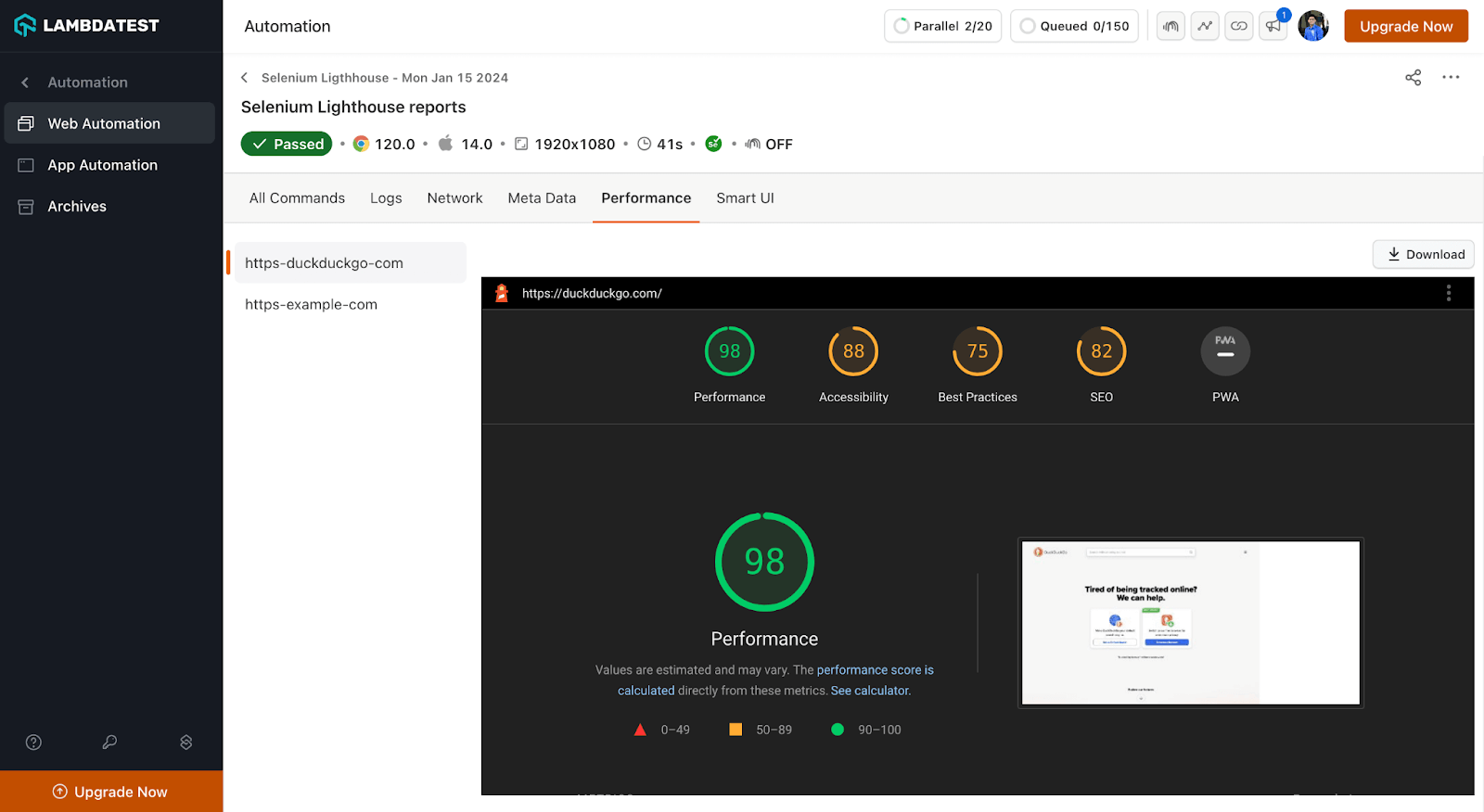
- Generate Multiple Lighthouse Reports in Selenium Using Lambda Hooks: To identify and address issues early in the development process, ensure consistent cross-browser compatibility, and continuously monitor and optimize web performance post-release, Google Lighthouse reports provide many benefits.
While performing Selenium automation testing, you now have the flexibility to generate multiple Lighthouse reports using Lambda Hooks.
You can run the Hook multiple times with a configurable URL. If Lighthouse report execution encounters an error, it will send a 200 status response with the message Failed to generate Lighthouse report. Please try again. However, the test execution will continue.
For browsers other than Chrome, it will throw a 4XX error stating that the Lighthouse report is supported only for the Chrome browser. A successful report generation will return a 200 status and a response body containing the relevant information.
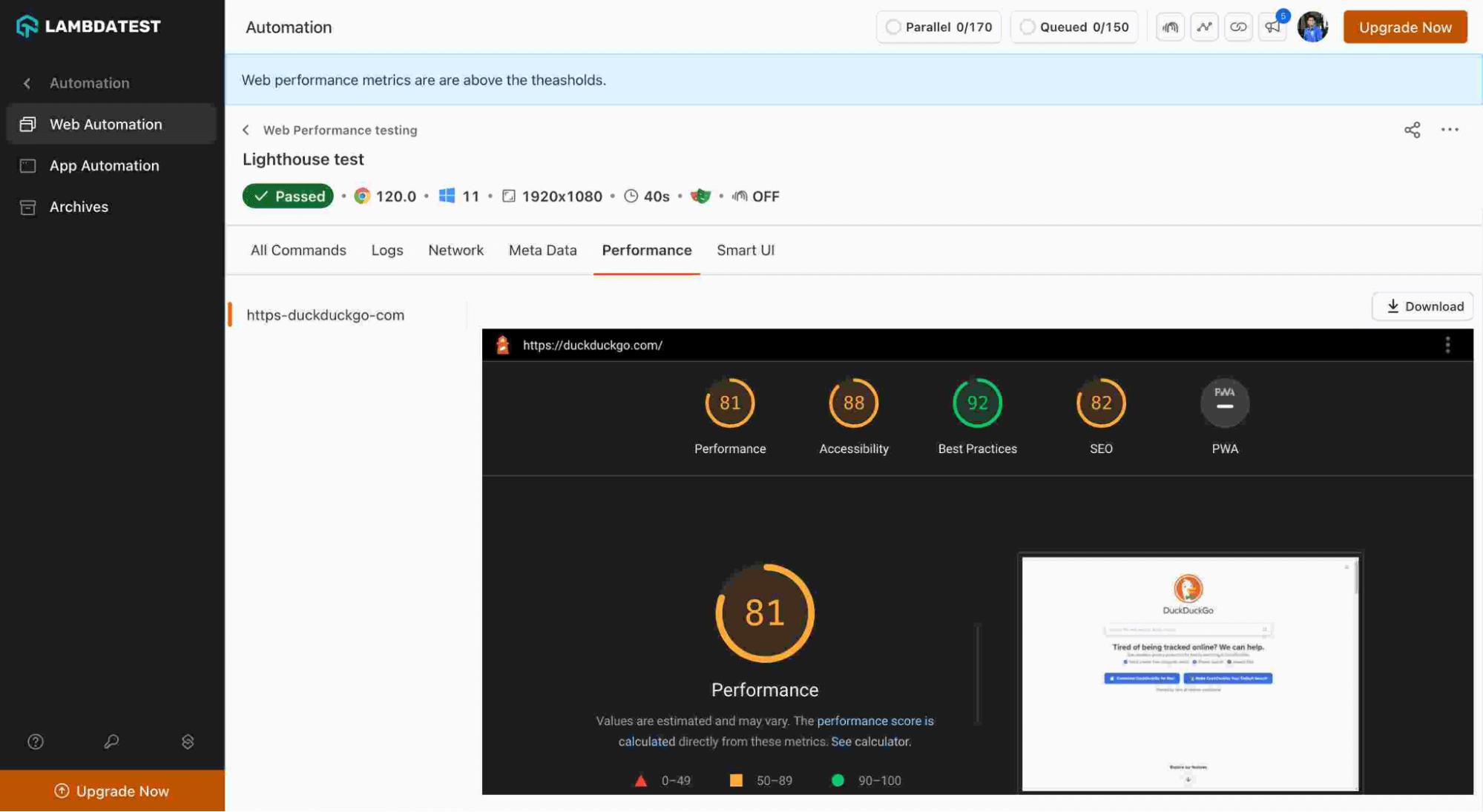
- Generate Lighthouse Reports With Playwright Lighthouse Library: Lighthouse is a tool developed by Google that measures the performance of web applications. It gathers performance metrics and offering insights into developer best practices. On the other hand, Playwright is a framework for browser automation.
We have now enabled the support for the Playwright Lighthouse library to generate Lighthouse reports – all in a single test.
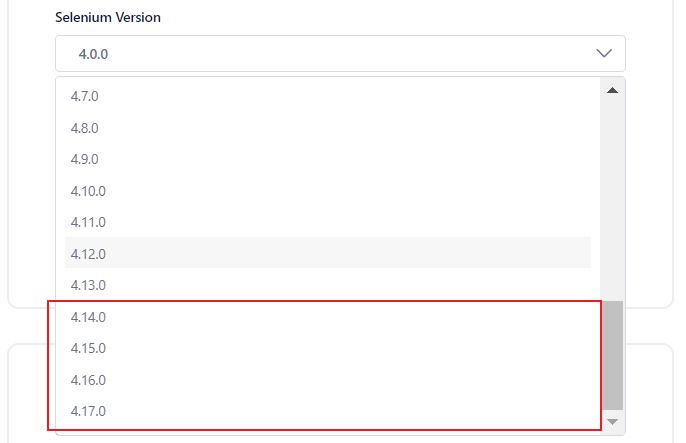
- Latest Selenium Versions: Now, you can perform automation testing using Selenium versions 4.14.0 to 4.17.0. We’ve leveled up the compatibility with the latest Java features, ensuring your tests run smoother and more stable. Also, with the streamlined WebDriver calls and an enhanced Selenium Grid, you can achieve fast test execution.
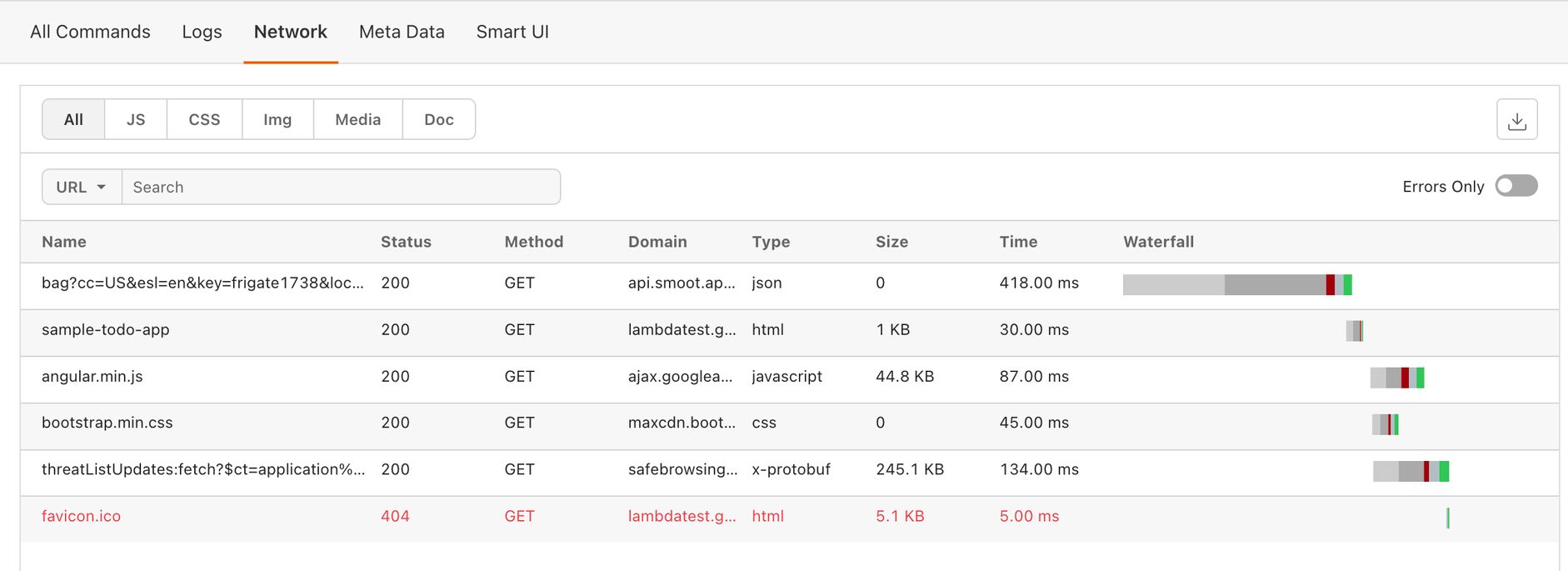
- HAR Log Viewer: Web Automation now supports HAR Log Viewer for Waterfall, enabling you to see how web page resources load and interact over time. Its “waterfall” view graphically shows the order and duration of requests as a web page loads.
To use this, pass the network.har=true in your desired capabilities. If you also want a response body, pass network.full.har=true.
SmartUI SDK for Visual Regression Testing
We have now released the SmartUI SDK for visual regression testing. Our new SmartUI SDK takes the DOM of your website/URL and renders it across different browsers and resolutions in a single call, allowing for a smooth testing of websites in multiple scenarios while assuring UI consistency between builds. It extends TestMu AI's visual testing tool with SDK-level access for custom test suites. For a broader comparison of options, see our roundup of the best visual testing tools.
You can also easily integrate it into your functional tests or batch-test multiple static URLs. Selenium is currently supported by SmartUI SDK in Java, Node.js, and Python. However, we are in the process of adding support for other frameworks as well. In addition, you can also handle dynamic data using SmartUI SDK.
Bonus: Besides SmartUI SDK, you can also handle dynamic data using Ignore/Select by XPath while performing Selenium visual testing.
Latest Features in HyperExecute
The latest patch release of HyperExecute has introduced some new features:
- Browser Testing on Latest Beta Browser Versions: HyperExecute supports testing on various browsers and versions, including beta versions on Windows.
- Maven Runtime Support: The
runtimeflag in HyperExecute for Maven-based projects simplifies test setup by automatically downloading and installing required languages and frameworks. Configure specific versions for languages like Java, Python, Node.js, and more. Install framework tools like Gauge and Gradle independently or alongside your main language. - Regex Retry Option: HyperExecute supports retrying failed tests based on regular expressions. This allows you to define specific conditions for retries, offering more control over how your tests behave.
- Artifact-Matrix Parameter Value: HyperExecute’s Artifacts-Matrix parameter value allows you to dynamically generate test artifact names based on values in your test matrix—this helps organize and identify tests systematically.
Perform Network Throttling and Automated Localization Testing
There are some exciting news for app developers and testers. We rolled out two valuable features to automate app testing more effectively:
- Network Throttling for Web and App Automation: You can test your app’s performance under different network conditions (2G, 3G, LTE, offline) using real devices while performing Appium automation. It will give you the ability to simulate real-world scenarios for both web and native app automation. With this, you can ensure a reliable testing experience by mimicking various network speeds and potential connectivity issues.
- Locale/Language Support for Espresso and XCUITest: You can now set locale and language preferences effortlessly during Espresso and XCUITest tests. Test your mobile apps thoroughly under different language and regional settings. With this, you can ensure proper functionality and user experience across different linguistic and cultural contexts.
To get started, refer to the following documentation:
View Test Trends for Real Device Browser Testing
In Test Analytics, you can now view test trends for browser testing on real devices that delivers deeper insights into mobile app testing.
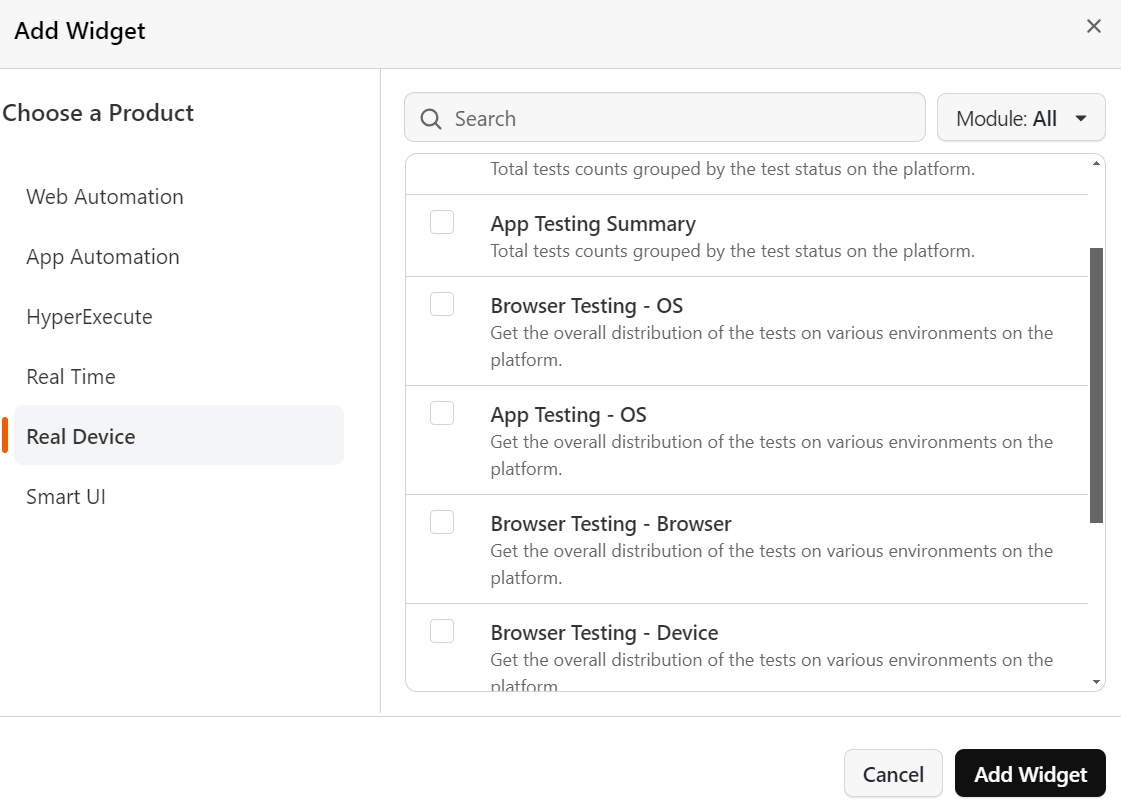
Here’s how these insights help you:
- Helps optimize test coverage by revealing which browsers and devices are used most frequently for testing.
- Enables you to identify areas where testing might be lacking or redundant.
- Allows you to tailor your testing approach based on real-world usage data.
- Ultimately, leads to better, more efficient testing and potentially improved website quality.
New: Get Certified With Appium 101 Certification
If you are looking to supercharge your mobile app testing skills and demonstrate your expertise, then you can do this with our newest Appium 101 Certification.
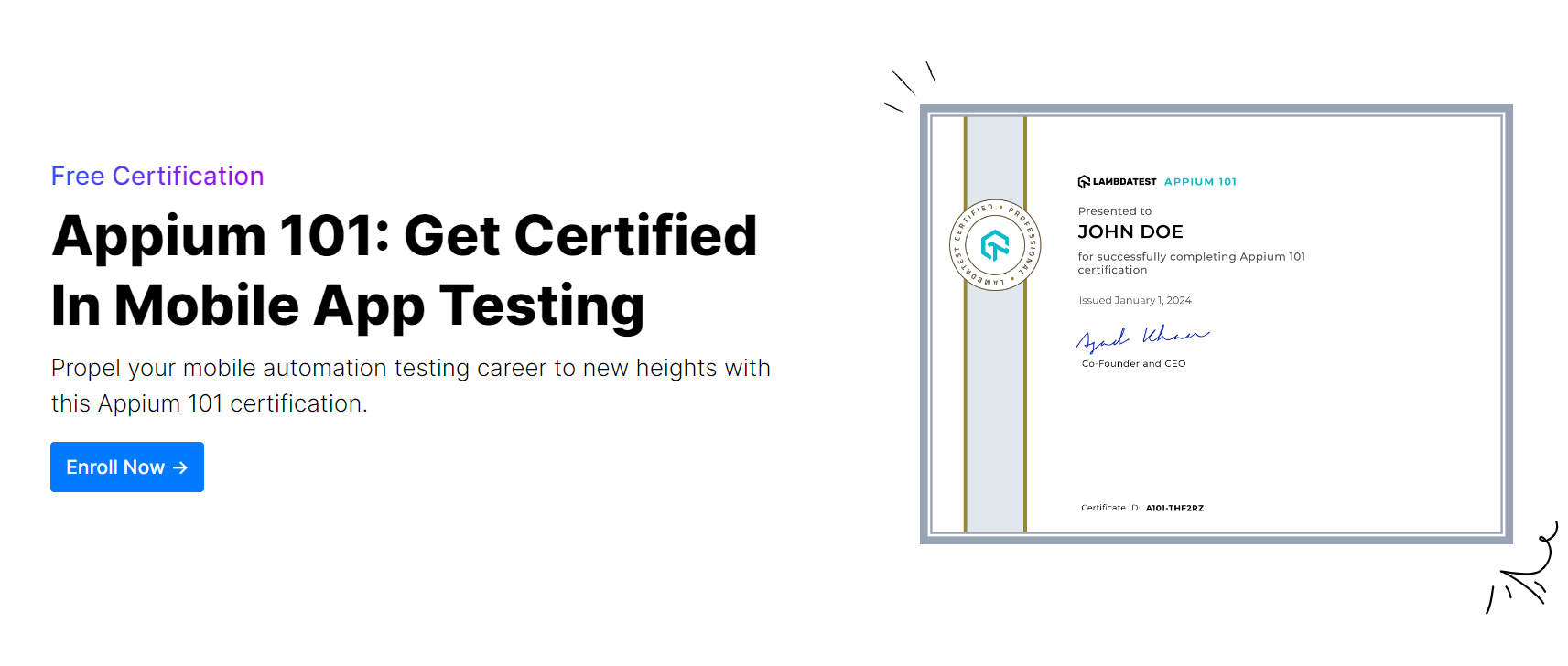
How to take Appium 101 Certification?
- Head over to the official LambdaTest Appium 101 Certification page to enroll for FREE. This is where you’ll find detailed information about the certification, exam format, and the certification process.
- If you haven’t already, ensure you’re on the LambdaTest Real Device plan. This plan is crucial for taking the practical part of the exam, which involves testing on real devices. If you’re not subscribed, simply raise a request to admin@testmuaicertifications.com to get your plan activated for FREE.
- The Appium 101 Certification requires you to tackle two challenges:
- Objective Test: This section consists of multiple-choice questions testing your theoretical knowledge of Appium concepts.
- Subjective Test: Put your practical skills to the test by automating a real-world test scenario using Appium on a real device.
- Achieve a cumulative score of 70% or higher, and you’ll be officially certified as an Appium 101 expert! You’ll receive a valuable certificate acknowledging your accomplishment and boosting your credibility in the mobile app testing world.
This certification is valid for two years.
Summing Up
We’re building powerful new features to streamline your workflow and stay ahead of the curve. Stay tuned for exciting updates and improvements coming soon – keep an eye on the LambdaTest Changelog for all the details.
We value your feedback! Become an active member of the LambdaTest Community and share your thoughts. Visit the LambdaTest Community to request enhancements, suggest improvements, or simply share your testing insights. Your ideas are instrumental in guiding the future of LambdaTest.
Did your last release break the UI? TestMu AI's SmartUI catches visual regressions by comparing every screen to its baseline.
Author

Salman Khan
Blogs: 136


Salman is a Test Automation Evangelist and Community Contributor at TestMu AI, with over 6 years of hands-on experience in software testing and automation. He has completed his Master of Technology in Computer Science and Engineering, demonstrating strong technical expertise in software development, testing, AI agents and LLMs. He is certified in KaneAI, Automation Testing, Selenium, Cypress, Playwright, and Appium, with deep experience in CI/CD pipelines, cross-browser testing, AI in testing, and mobile automation. Salman works closely with engineering teams to convert complex testing concepts into actionable, developer-first content. Salman has authored 120+ technical tutorials, guides, and documentation on test automation, web development, and related domains, making him a strong voice in the QA and testing community.


Did you find this page helpful?
More Related Blogs

TestMu AI forEnterprise
Get access to solutions built on Enterprise
grade security, privacy, & compliance
- Advanced access controls
- Advanced data retention rules
- Advanced Local Testing
- Premium Support options
- Early access to beta features
- Private Slack Channel
- Unlimited Manual Accessibility DevTools Tests