

Power Your Software Testing with AI Agents and Cloud
The Native AI-Agentic Cloud Platform to Supercharge Quality Engineering. Test Intelligently and Ship Faster.


- TestMu AI (Formerly LambdaTest)
- /
- Blog
- /
- Ionic testing: Complete guide with practical examples
Ionic testing: Complete guide with practical examples
Ionic is a framework for developing a hybrid app. This blog on ionic testing gives a comprehensive explanation of ionic testing with practical examples for better understanding.
Last Updated on:
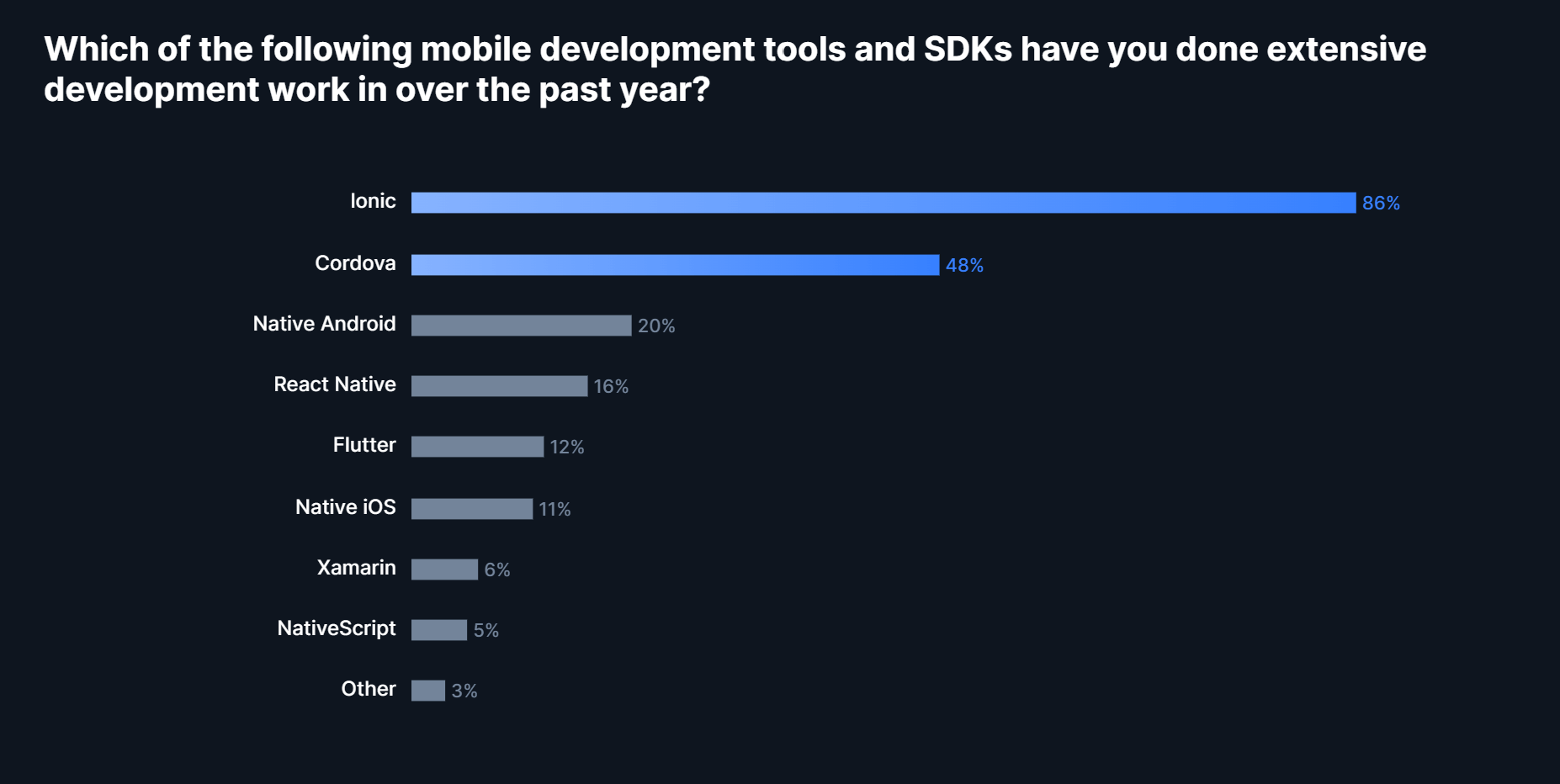
Ionic testing confirms that a hybrid app holds up once it leaves the Ionic CLI, since Ionic itself is built on web components that let developers pick Angular, React, or Vue for the interface. A developer survey found Ionic used by 86 percent of respondents, ahead of Cordova and PhoneGap at 48 percent.
In this article on Ionic testing, let’s explore what Ionic is, the different components of the Ionic framework, their features, building applications using Ionic, their advantages, limitations, challenges, and key aspects.
Let’s dive in!
What is the Ionic framework?
Before we understand the dynamics involved in Ionic testing, let us first try and understand Ionic. Ionic is an open-source SDK (framework) that allows hybrid mobile app development. The original version was released in 2013 and built on top of AngularJS and Apache Cordova.
However, significant changes are done in the latest version as it was built using a set of web components. This allows the user to pick and choose any of the interface’s frameworks, such as Angular, React, or Vue.js. You can also use ionic components with no user interface framework at all.
Different components of the Ionic framework
For those who are completely new to Ionic app development, it is essential to understand the different components of Ionic applications. These include:
- UI ComponentsIonic framework is a library of UI components that are reusable elements that serve as the basic building blocks of an application. Though the components are pre-built, they can be customized to meet different app requirements.
- Adaptive StylingThis built-in feature of the Ionic framework allows app developers to use the same code base for multiple platforms. Every ionic component changes its look according to the unique platform on which it is running.
- NavigationTraditional web apps use linear navigation where the user navigates forward to a page and can hit the back button to move back. In contrast, mobile apps use parallel nonlinear navigation just like Ionic apps.
- Native AccessThe Ionic apps can run on virtually any platform, be it desktop, mobile phones, or tablets. The same code base is used for multiple platforms as web standards and APIs are shared.
- ThemingIonic framework is built using CSS, meaning it is easier to design an app that looks appealing to end-users. You can customize different properties right from background color to footer.

Features offered by the Ionic framework
Multiple technologies enable the mobile app developer to create a unique user experience and include user-friendly functionalities for their intended audience. To learn more about ensuring the ultimate mobile experience, you can go through this blog on mobile app usability testing.
The following are some of the Ionic framework’s key features.
- Pre-Designed UI ComponentsIonic UI components provide a great experience on all mobile devices and platforms. Along with the premade components, a base theme can be used for every supported platform.
- Developer-Friendly ExperienceYou can create, build, test, and deploy your apps with the Ionic CLI. This provides developers with a seamless experience in handling Ionic applications.
- Build Using Desired Tech StackIonic is integrated with some of the best front end development trends, including Angular, React, and Vue. This means that you can pick and choose the desired tech stack based on your convenience.
Building applications using the Ionic framework
With Ionic, you can create applications for each platform using only HTML, CSS, and JavaScript while maintaining a single codebase. As a result, building an application using an Ionic framework is simple and easy.
Follow these steps to get started with the basics:
- Enter the name of the app to be built.
- Pick the theme color and icon.
- Pick a layout template.
- Pick a JavaScript framework.
- Click Continue.
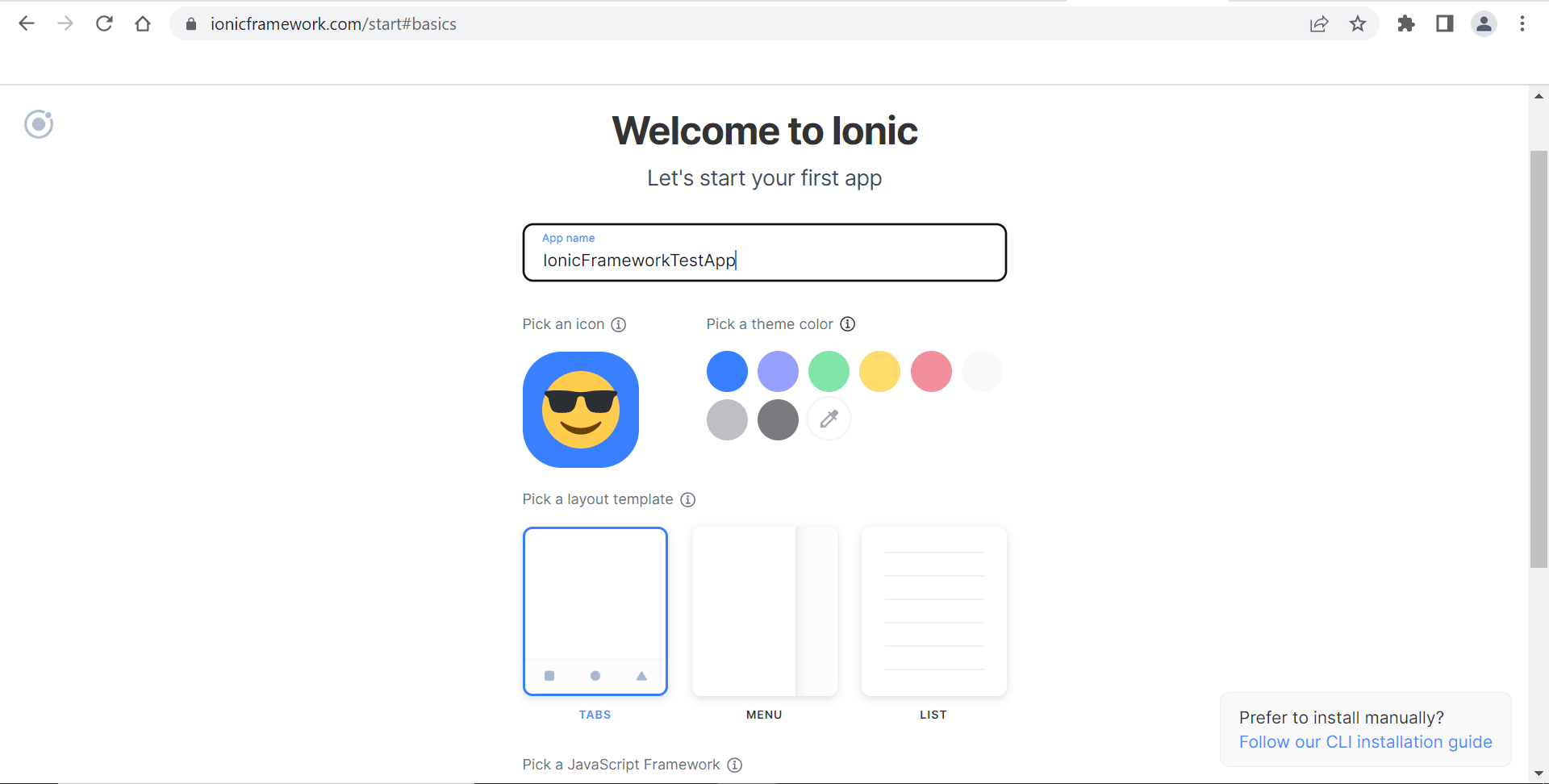

You can create a repository for your application that can be connected to your Ionic dashboard. You can also become a part of the development community related to the Ionic framework and be a part of meetups, forums, and events to understand the fundamentals behind this ever-evolving framework which keeps getting better.

Note: Run Real-time tests of your Ionic websites across 3000+ browser environments. Try TestMu AI Now!
Advantages offered by the Ionic framework
The Ionic framework takes care of most of the heavy lifting when it comes to building hybrid mobile applications while taking care not to compromise on performance or user experience. Here are some of the advantages offered by the Ionic framework:
- Useful for hybrid app development. This means that you can package your applications for iOS, Android, Windows Phone, etc., which helps to save a significant amount of effort.
- You can start your app without hassles since Ionic provides a useful pre-generated app setup with simplified layouts.
- The Ionic development team is working on improvising and improving the existing framework. Regular updates are done to ensure that new features and enhancements add great value to the development community in the long run.
- The apps built using this framework are crisp and clear with a modular approach. This means you can maintain and update apps as and when required.
Limitations of the Ionic framework
Working with the Ionic framework can have its limitations as well. The two prominent limitations are:
- Testing can be tricky since the browser does not always provide the right information about the environment if multiple devices or supported platforms are involved.
- The performance of hybrid apps can be an issue, but this will be improved in the near future due to rapid development in the mobile space.
Need for testing Ionic applications
Ionic is a prominent framework when it comes to building your hybrid applications. However, there is always a need to perform Ionic testing for applications and websites to make sure that the associated components and dependencies are working as expected. When you are working in a Software Testing Life Cycle, the testing teams must perform testing to ensure that the product requirements and associated scenarios are thoroughly tested before being handed over to the end customers.
This helps to ensure the following aspects:
- Code quality being maintained.
- Required code coverage and performance metrics being met.
- The validation of test cases.
- All the key stakeholders can provide a go-ahead if the testing requirements are met.
Key aspects to remember in the case of Ionic application testing
Here are some of the key aspects you should take into consideration when you are performing Ionic testing:
- Ensure that the components or functionalities that have the maximum business impact should be given the top priority. These components lay a solid foundation when you begin your testing.
- Communication about the key testing milestones to all the required stakeholders is critical.
- The roles and responsibilities should be communicated to the testing and development teams well in advance.
Challenges involved in Ionic application testing
It is crucial to have a working knowledge of the Ionic framework so that you are well aware of the complexities involved in Ionic testing. An overall strategy should be implemented to perform Ionic testing and achieve results. Automation testing can be equally challenging without prior knowledge or experience. There will always be challenges or blockers for companies performing testing on complex technologies and applications, but this is what the market demands.
When companies face challenges, they invest time and effort in rethinking or realigning their business strategies. Therefore, it is crucial to introduce innovative testing methodologies so that you remain competitive in the marketplace. That is why you will have more organizations trying out new tools when it comes to testing. Furthermore, when performing Ionic testing quickly with the desired outcomes, you can deliver significant value to your customers.
Performing Ionic testing using a cloud-based platform
We are in a competitive world where organizations are striving hard to deliver top-notch software solutions in real quick time. This means that you need to perform testing of your applications considering the multiple devices and supported platforms. You just cannot rely on traditional ways of testing because you can waste a significant amount of time and effort setting up your testing environments. Choosing a cloud-based cross browser testing platform like TestMu AI is the right choice here.
TestMu AI, one of the leading cloud platforms for Ionic testing, allows you to perform browser compatibility testing on an online browser farm of 3000+ browsers and operating systems. TestMu AI also provides a real device cloud to perform real-time app and automation testing over real devices running on real operating systems.
You can also test responsiveness of web applications and take full page screenshots while performing your unique testing activity.

Here are some great features that make the TestMu AI platform an excellent option for enterprise-based companies and startups for Ionic testing:
- You can integrate TestMu AI with your favorite project management tools like JIRA, Trello, etc., which means that you are not tracking your bugs and tasks manually.
- You can host your web testing locally by performing local page testing so your application or website can be tested immediately rather than relying too heavily on the production environment.
- The tool provides excellent stakeholder collaboration where different testing professionals conduct testing from different locations. The end-user experience is top-notch for geo-location testing.
- Allows testing teams to capture full-page screenshots of the web pages on multiple desktops and mobile browsers using a single click.
- The technical support provided by this platform is supreme. It provides 24*7 support to its customers for any queries related to tool usage or testing.
Looking at the unique features and capabilities offered, it is always preferable to opt for TestMu AI as your next testing platform. Additionally, when using cloud testing technology, the additional costs involved in the infrastructure and deployments are eliminated.
You can invest your time and resources in building a testing process around TestMu AI that can deliver exceptional outcomes. The market dynamics have changed completely in the past few years. Gone are those days when you had dedicated testing teams for manual and automated testing.
The testing teams had challenges setting up the testing environment, writing different test cases, and executing them on multiple browsers and devices. All of these functionalities are now being handled by cross-browser testing platforms. That is why unified cross-browser platforms have gained a lot of recognition in just a few years.
You can not only save a significant amount of effort, but the testing outcomes have improved drastically. This shows how critical it is to address customer pain points or challenges.

Other ways to perform Ionic testing
Apart from using the specialized cross-browser testing platform, other supported methods can be implemented for testing the ionic application. These include:
- Unit Testing of Ionic Application using Karma and JasmineUnit testing is used to perform testing related to a single point in the code. This could be related to a single feature or functionality. Unit tests can help verify that your code requirements are working according to the expected system behavior. The system being tested contains the real code.
You must set up the environment for testing the ionic application. This includes the server, language to write the specifications, and other required configurations. Use the following command to install the tabs version of the Ionic angular template:
ionic start ionic-testing tabs --type=angular --capacitor
After running the entire setup, you must validate that everything is in place and working fine. Execute the following command in your project directory to perform the validation:
ionic serve
You will get a screen confirming that the changes are working fine. This is just to validate that everything is working fine, and we are good to proceed further. Once the setup is checked, we need to check if the testing environment is working fine or not. You can execute the following command to check that as well:
npm test
The log will confirm that all the required tests have passed. The browser opens up and displays the test output. Before we perform testing, you need to be aware of the setup and configuration.
You can use Karma and Jasmine to run the unit tests in the application. Karma is a tool that executes source code against the test code for each of the connected browsers. The test results for every browser are examined and displayed to the developer so that they can evaluate the tests and see their real-time status. Jasmine is a JavaScript testing framework.
- Spies in Ionic TestingWe discussed how unit testing of Ionic applications could be performed using Karma and Jasmine. There is another key concept that is implemented during the Ionic testing known as Spies. It is a false implementation and runs instead of executing the actual function. A test spy is an object that records interaction with other objects all around the code base.
The following syntax is followed in the code base:
spyOn(TestFunction, ‘addParameters’);
The TestFunction is the parent object with the addParameters target function. Only the target functions will be spied upon in this implementation.
- Mocks in Ionic Application TestingMocks or Stubs is a fake object or class containing similar objects and methods to the original class. This allows you to test the unknown part of the code.
- Testing of Ionic Applications using Desktop BrowserYou can test your ionic application in a desktop browser. This is equivalent to executing the following serve command in the root folder of your project:
$ ionic serve
This allows a live reload server for your project requirements. When changes are made to your project files, the browser is automatically reloaded when the files are saved.
- Testing of Ionic Applications Using SimulatorYou can test your ionic applications using a simulator, using Cordova commands. For example, if you need to test in the iOS simulator, you can execute the following commands:
$ ionic cordova build ios
$ ionic cordova emulate ios
How to perform Ionic testing on TestMu AI?
Testing can always be tedious if you do not have the necessary testing resources. To overcome existing testing challenges involving multiple devices and supported platforms, we have a powerful cross browser testing platform known as TestMu AI.
Real Time Website And Web App Testing
These are the steps you must do to execute Real Time Ionic website and web application testing on the TestMu AI platform once you register and log in.
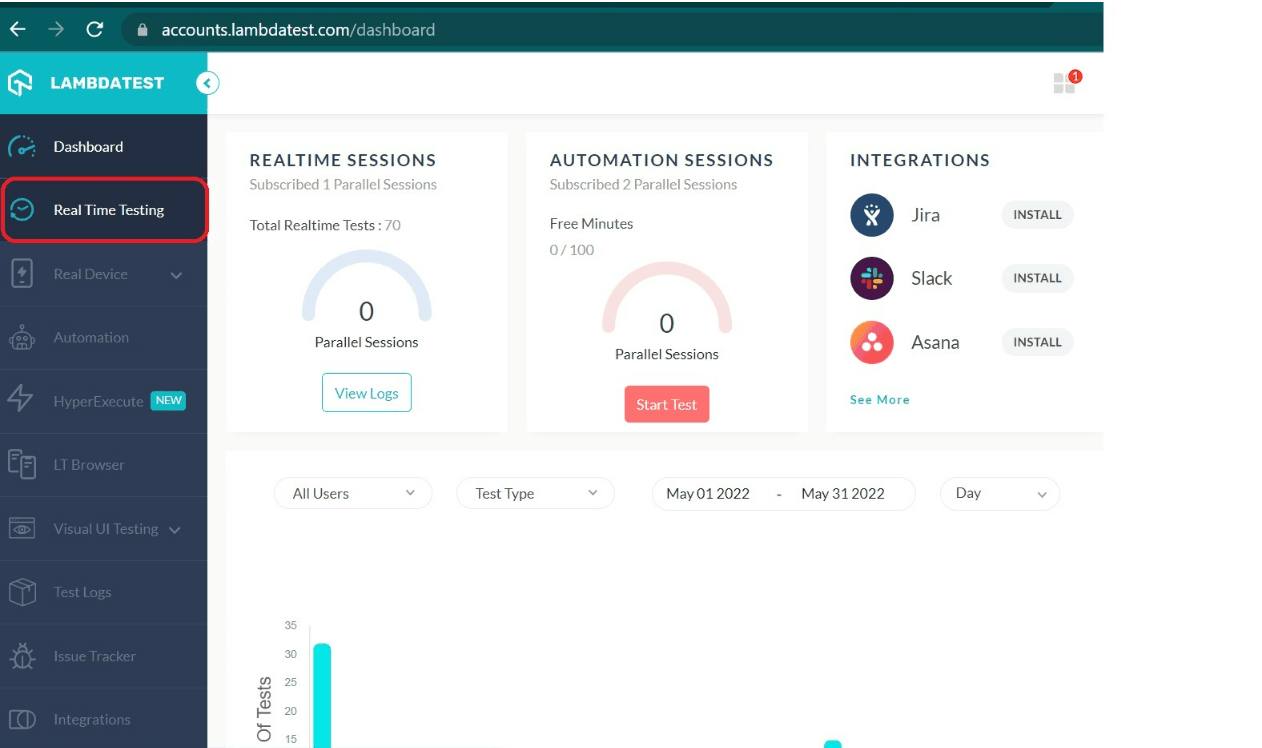
- Go to the Real Time Testing section present in the left menu bar.
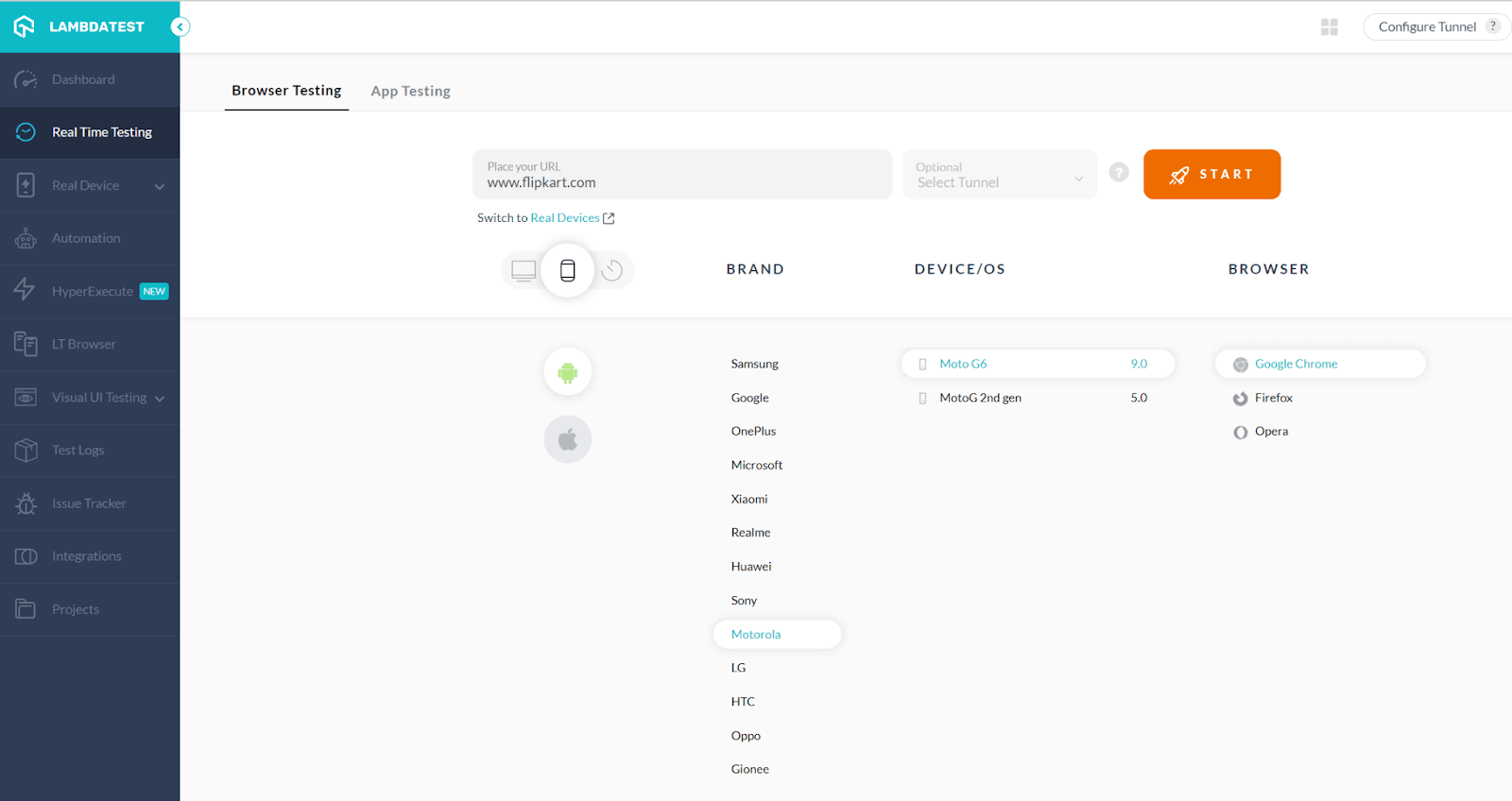
- Type the website URL in the Real Time Testing for testing. Choose the BRAND, DEVICE/OS, and BROWSER for mobile devices, as shown in the below screenshot.
- Post selecting it, click START. You can launch your website using the required configuration.
- You may access various functions when the website has launched, including the ability to capture screenshots, video recording of a test session, log bugs with a single click, and more.
Take a look at this video to learn more about real-time testing on TestMu AI:

You can also test the website responsiveness using the LT Browser. This comes with features such as hot reloading, network throttling, interacting with two devices simultaneously, and more.
Real Time Mobile App Testing
We have two choices for performing mobile app testing of Ionic apps on TestMu AI:
- Testing with emulators and simulators
- Testing with real devices
Thankfully, TestMu AI provides both options and it is up to the requirement which way to go.
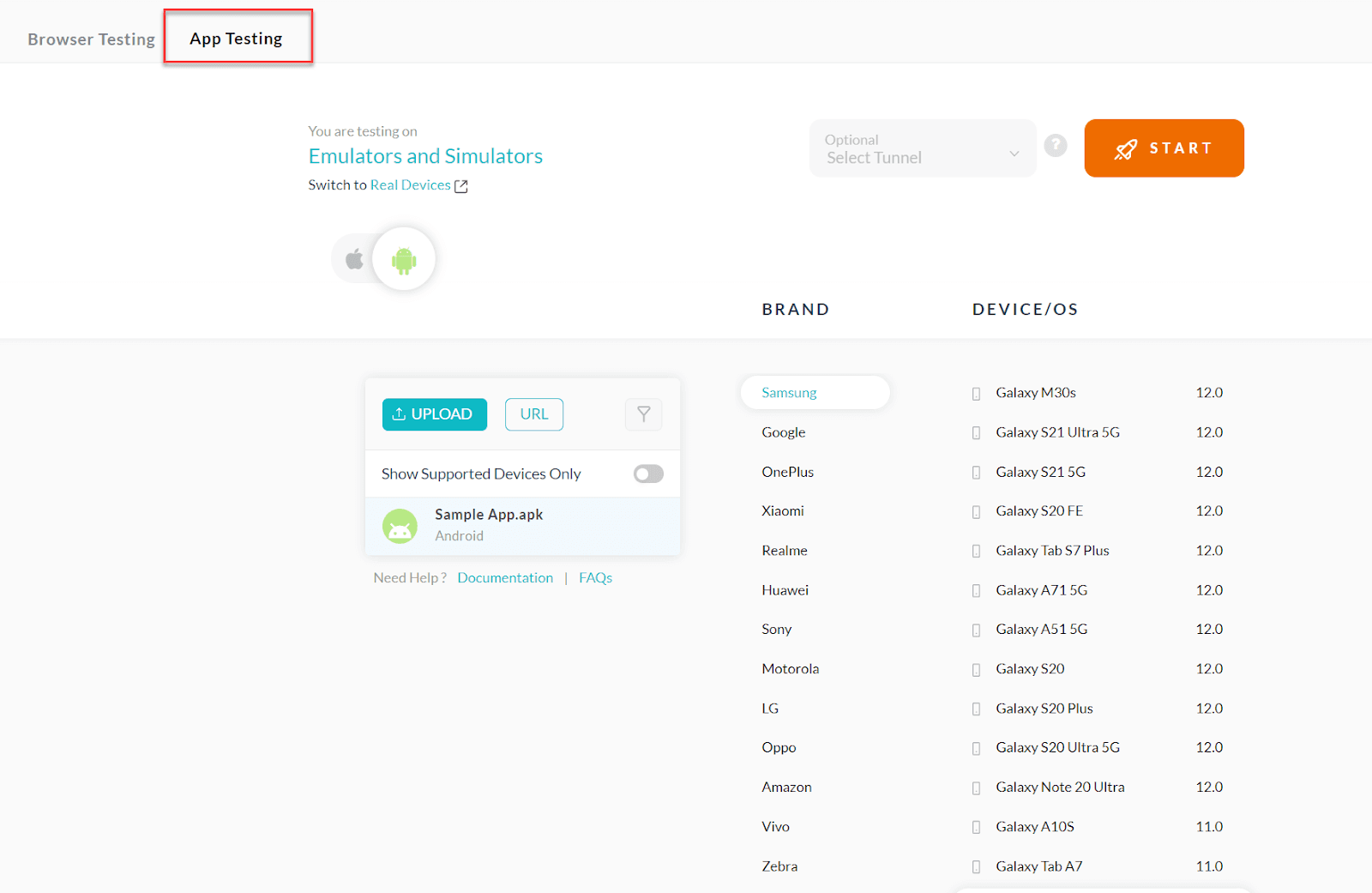
To perform Ionic testing with emulators and simulators on the TestMu AI platform, please follow the below-mentioned steps:
- To test your mobile application developed using Ionic, go to the Real Time Testing section from the left menu bar.
- Upload the Ionic app, and select BRAND, DEVICE/OS, which needs to be tested, from the App Testing tab.
- Press START to launch the test session on the selected configuration.
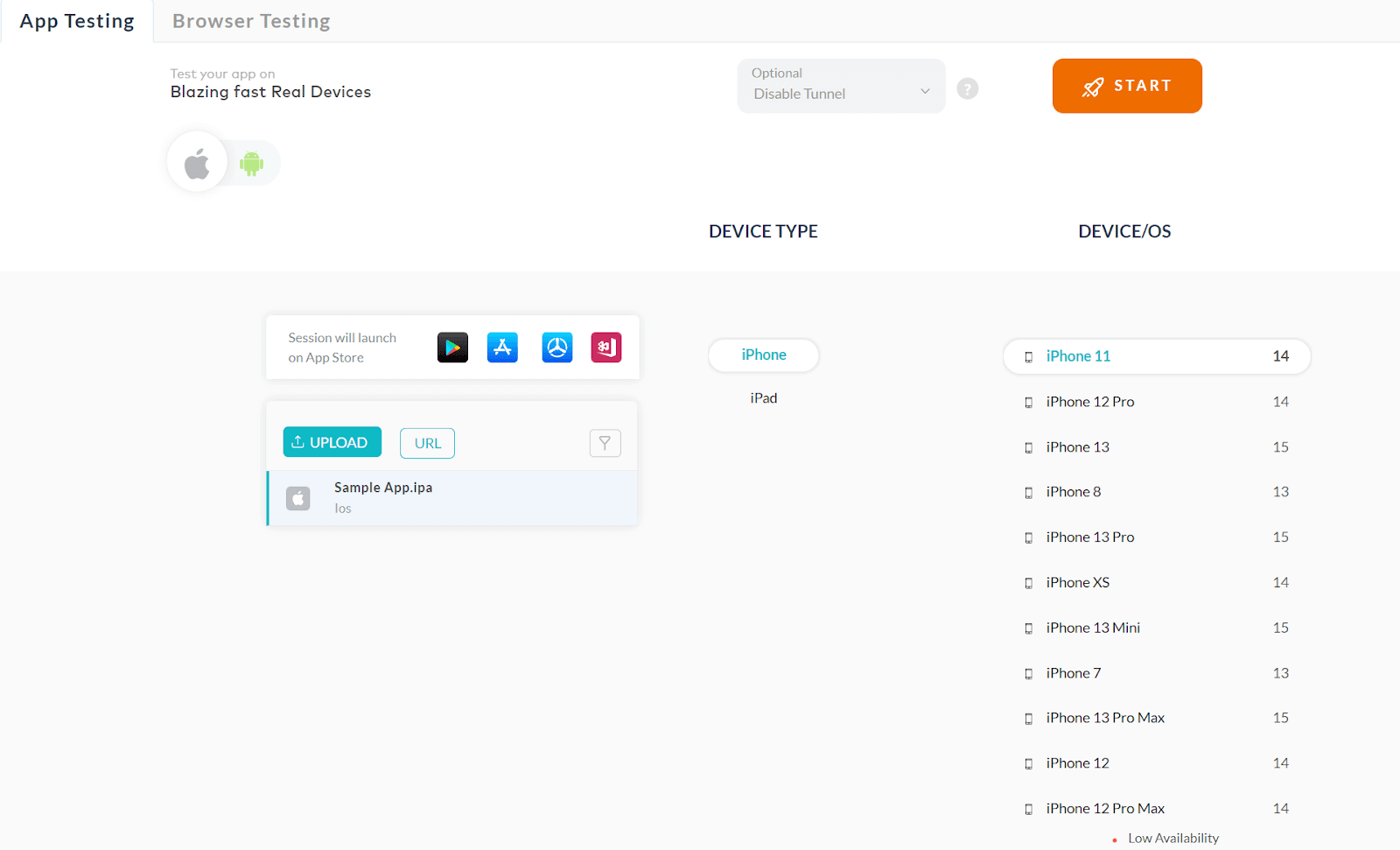
To perform Ionic testing with Real Devices on the TestMu AI platform, please follow the below-mentioned steps:
- Go to Real Device. Choose Real Time or App Automation.
- When installing the application on any device, Real Time’s primary focus is manual examination. Additionally, you can perform app test automation using a variety of mobile app testing frameworks, like Appium, Espresso, and others.
- Let’s choose Real Time. You need to choose the needed OS and device version for installing the app.
Now the app interaction can happen from your end.
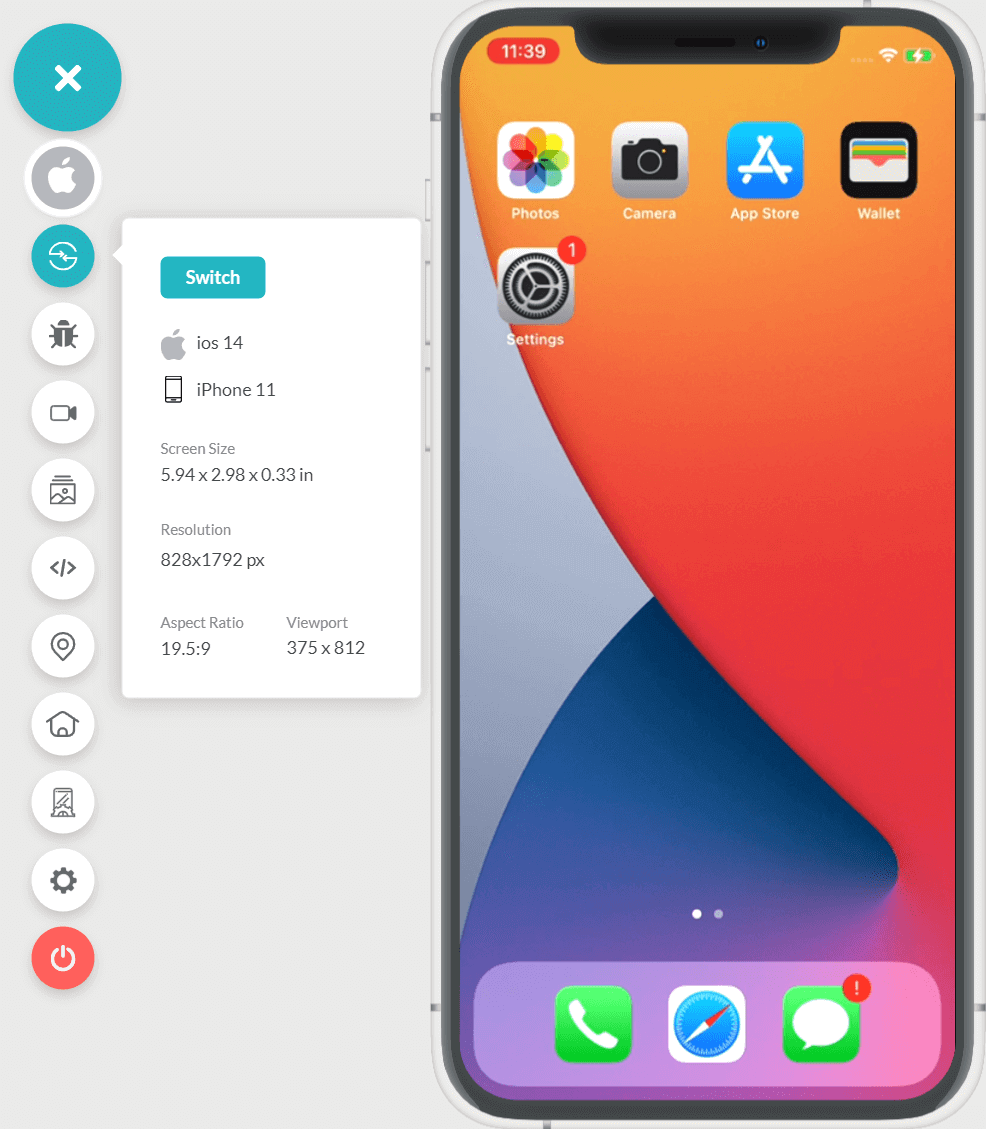
You can run Ionic testing on a real device cloud using various operating systems and devices by utilizing TestMu AI as a gateway. Watch this video to learn more about real device testing on TestMu AI:

Follow the TestMu AI YouTube Channel to stay updated with the latest videos on web testing, automated UI testing, Cypress E2E testing, and more.
Web Automation and App Testing
To perform automation testing for Ionic websites on the TestMu AI platform, follow the below steps:
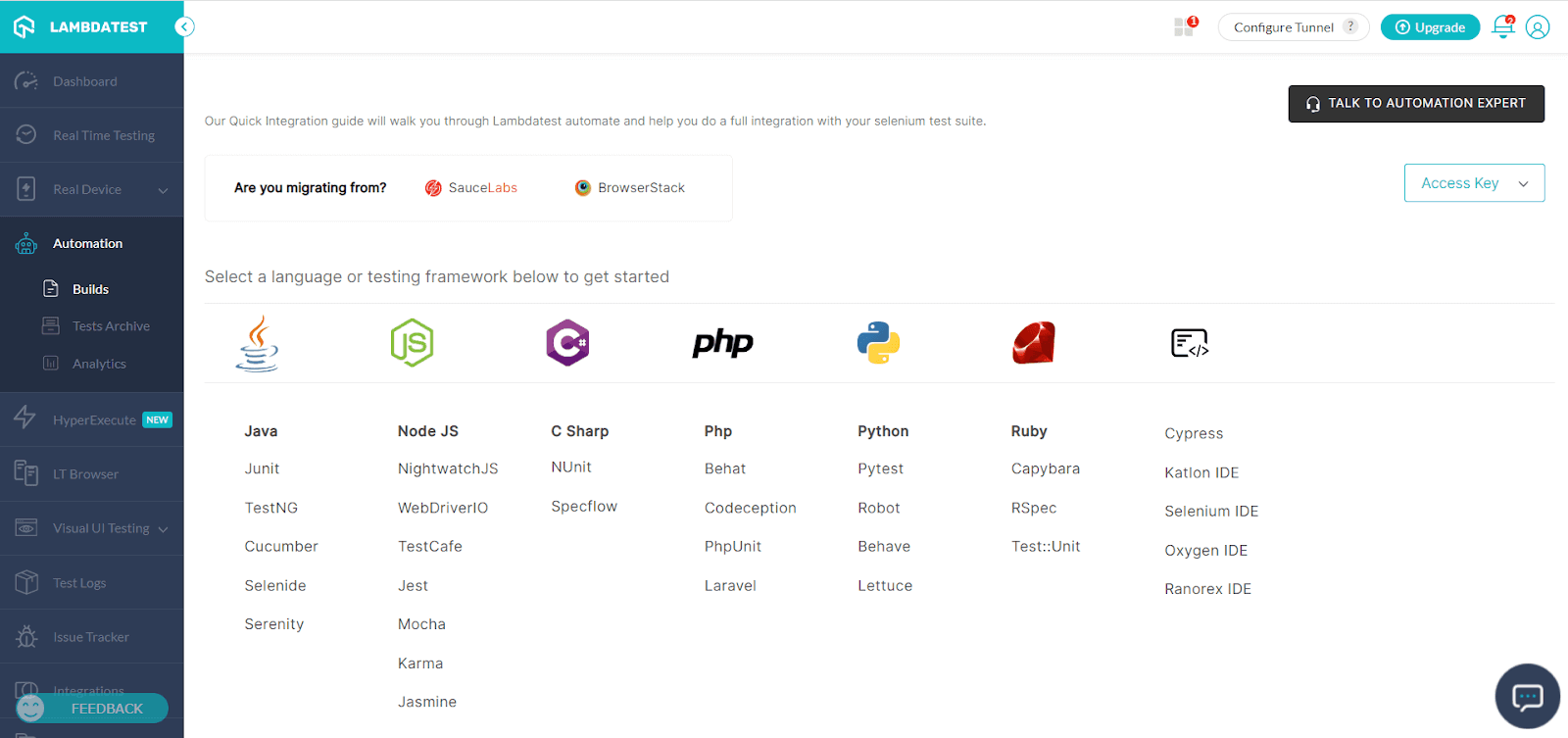
- Go to the Automation section in the left menu bar to perform Ionic automation testing.
- The TestMu AI platform allows you to perform automated testing, as seen in the screenshot above. You can also migrate your Ionic test scripts or suites from either SauceLabs, HeadSpin or BrowserStack. You can choose the preferred language or testing framework from the options on the screen if you don’t want to import or migrate your updates.
- You need to configure the project, add OS/Browser information, specify the required capabilities, and execute the test cases after selecting the desired options.
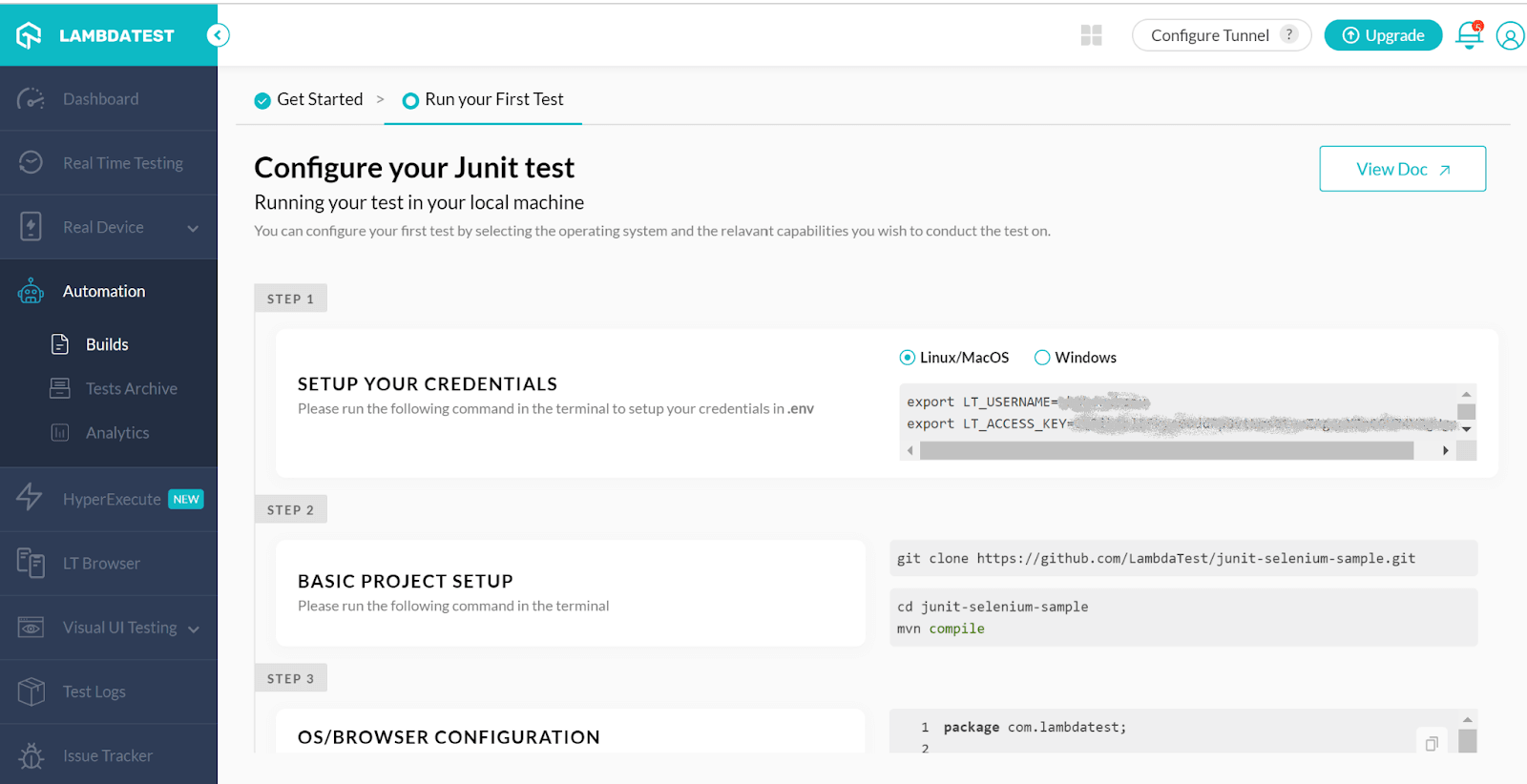
In the same way, you can perform mobile app automation for Ionic apps on the TestMu AI platform, using the App Automation feature in the Real Device:
Summary
We have discussed the basics and fundamentals related to Ionic applications. We’ve spoken about many Ionic testing techniques. To make your requirements simpler, use the appropriate methodology and available platforms. Our web and mobile app testing have advanced beyond the conventional methods, and automation is gaining traction quickly. To keep ahead of the rest of their competition and provide superior end-user service, organizations all over the world must enhance and improvise their current Ionic testing procedures.
Note: Automate your Ionic App Testing on real Android and iOS devices. Try TestMu AI Now!
Author

Irshad Ahamed
Blogs: 11


Irshad Ahamed is a Technical Writer and Information Architect with over 4 years of experience working across notable companies like Amazon, IBM, and Symantec. He specializes in crafting high-quality documentation, technical writing, and content strategies for software development, APIs, and process documentation. Irshad’s expertise spans across product documentation, creating instructional content, and collaborating with cross-functional teams to ensure clear, concise, and easily understandable outputs. His certifications include PMI-ACP and Camtasia 2019 Essentials.


Frequently asked questions
Did you find this page helpful?
More Related Blogs
TestMu AI forEnterprise
Get access to solutions built on Enterprise
grade security, privacy, & compliance
- Advanced access controls
- Advanced data retention rules
- Advanced Local Testing
- Premium Support options
- Early access to beta features
- Private Slack Channel
- Unlimited Manual Accessibility DevTools Tests