

Power Your Software Testing with AI Agents and Cloud
The Native AI-Agentic Cloud Platform to Supercharge Quality Engineering. Test Intelligently and Ship Faster.


- TestMu AI (Formerly LambdaTest)
- /
- Blog
- /
- Bugs vs Defects: Core Differences With Examples
Bugs vs Defects: Core Differences With Examples
Learn the key differences in bugs vs defects with examples, and discover how understanding them improves software quality, testing, and team efficiency.
Last Updated on:
On This Page
- What Is a Bug?
- What Is a Defect?
- Bugs vs Defects: Differences
- Errors, Faults, and Failures
- Types of Bugs
- Types of Defects
- Example of a Bug
- Example of a Defect
- Impact of Software Bugs and Defects
- Tools and Techniques for Bug/Defect Detection
- Smarter Reporting With TestMu AI AI Test Insights
- Best Practices for Managing Bugs and Defects
Bugs and defects differ by origin: a bug is a coding error that makes software behave unexpectedly, while a defect is a delivered feature that fails to match its documented requirement. Every bug can surface as a defect, but defects also come from ambiguous requirements and flawed design, so the two reach different owners during triage.
This guide covers what a bug is, what a defect is, their differences, how errors and failures relate to both, their types, examples, impact, detection tools, and best practices.
Key Takeaways
- A bug is a coding error that makes software behave unexpectedly, while a defect is delivered functionality that fails to match its documented requirement or design specification.
- Bugs originate from coding mistakes, faulty logic, or missed validations during development, and defects originate from ambiguous, incomplete, or misinterpreted requirements and flawed design decisions.
- Bugs surface during unit testing, integration testing, or while running the application, and defects surface during requirement reviews, system testing, user acceptance testing, or audits.
- Fixing a bug means correcting the source code, while resolving a defect needs developers, testers, and business analysts together to realign the requirement with the implementation.
- The ISTQB glossary treats bug, fault, and defect as names for the same flaw, and separates that flaw from the human error that created it and the failure a user observes.
- A login screen that rejects valid credentials is a functional bug, while a login flow that skips mandatory two-factor authentication is a defect, because the code ran exactly as written.
- TestMu AI Test Insights consolidates test execution data into one view, with a test summary report, error insights that group similar failures, browser and OS breakdowns, and an AI CoPilot dashboard.
- Reproduction steps, severity-based prioritization, and a regression run after every fix are the practices that keep bug and defect records reliable enough to drive release decisions.
What Is a Bug?
A software bug is an error, flaw, or unintended behavior that prevents it from working as intended by the development team. Bugs usually originate from mistakes in coding, faulty logic, missed validations, or overlooked conditions during development.
Bugs often surface when the application encounters inputs or scenarios that the developer did not anticipate. For instance, a login feature may crash when special characters are entered in the username field because the input validation was not coded properly.
Key Takeaway: A bug is a coding error, so fixing a bug means correcting the source code rather than renegotiating what the feature was supposed to do.
What Is a Defect?
A defect in a software application occurs when the delivered functionality does not align with documented requirements or design specifications. Unlike bugs, which are implementation errors, defects reflect a misalignment between the intended outcome and the actual behavior of the application.
Defects are often introduced before a single line of code is written. They stem from ambiguous requirements, misinterpreted business rules, or flawed designs. By the time development is complete, these defects may present themselves as fully functioning features, yet they fail to satisfy what was originally agreed upon.
Key Takeaway: A defect can exist in software that was coded exactly as written, because the flaw sits in the requirement or the design rather than in the code.
Bugs vs Defects: What Are the Differences?
A bug is a coding-level error that causes the software to behave unexpectedly, typically identified during development or testing.
In contrast, a defect refers to a deviation from the specified requirements or design, often discovered later in the development lifecycle when the software fails to meet user expectations or business goals.
| Aspect | Bug | Defect |
|---|---|---|
| Definition | An error in the software application’s code or logic that causes unintended or incorrect behavior. | A deviation of the software application from documented requirements or design specifications. |
| Origin | Introduced during development due to coding mistakes, logic flaws, or overlooked conditions. | Arises from ambiguous, incomplete, or misinterpreted requirements or flawed design decisions. |
| Nature | Technical issue caused by improper implementation. | Business or functional issue caused by misalignment with expectations. |
| Detection Stage | Typically identified during unit testing, integration testing, or while executing the application. | Usually detected during requirement reviews, system testing, UAT, or audits. |
| Impact | May cause crashes, incorrect results, poor performance, or usability problems. | May cause compliance violations, financial miscalculations, or unmet business goals. |
| Resolution | Fixed by developers by correcting or optimizing the code. | Requires collaboration between developers, testers, and business analysts to realign requirements and implementation. |
| Example | A login button fails to redirect users due to a missing event handler. | An application calculates tax monthly when the requirement specifies daily calculation. |
Key Takeaway: Bugs are found against the code and defects are found against the requirement, which is why bugs and defects are assigned to different owners during triage.

Note: Test websites and mobile apps across 3000+ real environments. Try TestMu AI Today!
How Do Errors, Faults, and Failures Relate to Bugs and Defects?
An error is the human mistake, a defect is the flaw that mistake leaves in the product, and a failure is the wrong behavior a user sees when that defect runs. Bug and fault are alternate names for the defect itself.
The ISTQB glossary treats bug, fault, and defect as names for the same object, and separates them from the error that caused it and the failure it produces. Keeping the four stages apart tells a team where to intervene.
- Error: A human mistake made while writing code, a requirement, or a design. A misread specification is an error before the software contains anything wrong.
- Fault: The flaw the error leaves behind in the work product. ISTQB uses fault, defect, and bug for the same object, which is why teams swap the words freely.
- Failure: The observable wrong behavior produced when a fault is executed. A fault in a code path nobody runs never becomes a failure, so failure counts understate fault counts.
- Incident: The report raised when someone observes a failure. Support desks log incidents, and QA converts the confirmed ones into defect records with reproduction steps.
The practical value of the split is ownership. An error is prevented by improving how requirements and code are written, a fault is fixed in the work product, and a failure is what the user reports. Defect metrics count faults, not failures, so a team measuring only user-reported failures will understate the defects already sitting in the build.
Key Takeaway: An error is the human mistake, a defect is the flaw that error leaves in the product, and a failure is the wrong behavior a user finally sees.
What Are Different Types of Bugs in Software Testing?
Software developers and testers encounter several types of bugs during the software development lifecycle. Recognizing these types helps teams diagnose, prioritize, and resolve issues efficiently while improving overall software quality.
- Functional Bugs: These occur when software applications fail to perform intended tasks. Features behave differently than expected, disrupting workflows and user experiences.
- Security Bugs: Such bugs expose vulnerabilities attackers can exploit. They compromise data integrity, privacy, or access controls, threatening user safety and organizational trust.
- Compatibility Bugs: These arise when software applications work in one environment but fail elsewhere. Issues appear across devices, browsers, operating systems, or configurations.
- Logical Bugs: Applications run but produce wrong outcomes due to flawed logic. Incorrect algorithms, misapplied business rules, or faulty conditionals often cause issues.
- Performance Bugs: These degrade speed, responsiveness, and scalability. Slow interfaces, memory leaks, or unoptimized processes reduce stability and negatively impact user satisfaction.
- Usability Bugs: Applications function but remain confusing, inconsistent, or inaccessible. Poor navigation, unreadable content, or weak accessibility hinder smooth user interactions significantly.
- Unit Level Bugs: These defects occur within individual components. They often stem from coding mistakes, improper logic, or overlooked test cases during development.
- System Level Integration Bugs: Such bugs appear when combining modules. Interfaces break, data misaligns, or workflows fail across systems, harming application consistency and reliability.
- Boundary Bugs: These emerge at input limits like maximum values, indices, or dates. They cause crashes, wrong outputs, or unpredictable behavior often.
- Syntax Bugs: Coding rule violations create these issues. Missing punctuation, mismatched brackets, or wrong keywords prevent software applications from executing correctly.
Key Takeaway: Classifying a bug as functional, security, compatibility, logical, performance, usability, boundary, or syntax tells a developer which part of the code to open first.
What Are Different Types of Defects in Software Testing?
In software development, defects can exist in various forms, each impacting different aspects of the software application. Understanding these types helps developers and testers address issues more effectively and ensure the final product meets all intended specifications and user expectations.
- Functional Defects: Features fail to meet requirements, causing workflows to break and preventing the software application from delivering expected results.
- Performance Defects: Applications respond slowly, consume excessive resources, or fail under load, reducing scalability, responsiveness, and overall system stability significantly.
- Usability Defects: Applications work technically but frustrate users through poor design, unclear navigation, inconsistent layouts, or inadequate accessibility support for everyone.
- Security Defects: Vulnerabilities allow unauthorized access or exploitation. These include weak authentication, poor encryption, or unsafe coding practices exposing sensitive information.
- Compatibility Defects: Software works in one environment but fails in others. Differences in devices, browsers, or operating systems often create issues.
- Interface Defects: Errors in communication between systems, modules, or APIs. Mismatched data, broken endpoints, or misaligned user interfaces cause disruption.
- Syntax Defects: Violations of coding language rules. Missing punctuation, wrong keywords, or unmatched brackets stop software applications from executing correctly.
- Arithmetic Defects: Numeric operations produce incorrect results. Misused formulas, faulty calculations, or rounding errors often disrupt financial or scientific software accuracy.
- Logical Defects: Software runs but produces incorrect outcomes due to flawed logic, broken algorithms, or misapplied business rules in workflows.
- Multithreading Defects: Issues occur in concurrent systems. Race conditions, deadlocks, or synchronization failures cause unpredictable behavior or application crashes.
Key Takeaway: Defect types such as interface, arithmetic, and multithreading point to where requirements or design were misread, not to a single line of faulty code.
What Is an Example of a Bug?
A login feature in a software application rejects valid credentials, stopping users from accessing their accounts and completing tasks properly.
- Expected Behavior: Users with correct usernames and passwords should be able to log in successfully. The software application must grant access immediately.
- Actual Behavior: The application shows an “Invalid Credentials” error message. Users cannot log in even when entering correct login information.
- Impact: Prevents access to essential features. Disrupts workflows, frustrates users, reduces trust, and may result in increased support tickets.
- Category: Functional bug. The login feature fails to perform its intended task correctly, violating requirements and user expectations consistently.
Key Takeaway: A login screen that rejects valid credentials is a functional bug, because the code fails to perform a task the requirement already specified correctly.
What Is an Example of a Defect?
After release, users report that the login feature allows access without two-factor authentication, violating mandatory security requirements completely.
- Expected Behavior: Users must enter correct credentials and a one-time verification code. This ensures secure login and prevents unauthorized account access completely.
- Actual Behavior: Users can log in using only username and password. The system bypasses required security checks, creating unsafe access for accounts.
- Impact: This security issue exposes user accounts to potential unauthorized access. It violates company policies and may reduce customer trust.
- Category: Functional defect. The delivered software does not meet documented requirements or specifications, failing to implement necessary security measures fully.
Key Takeaway: A login flow that skips mandatory two-factor authentication is a defect, because the delivered software runs as coded yet misses a documented security requirement.
Impact of Software Bugs and Defects
Both bugs and defects can have significant consequences for businesses, affecting everything from user satisfaction to financial outcomes and brand reputation. Understanding these impacts can help prioritize the resolution of these issues before they escalate.
- Reduced User Satisfaction: Bugs and defects frustrate users, causing negative experiences and decreasing overall trust and confidence in the software application.
- Business Losses: Critical defects can lead to lost revenue, missed opportunities, or financial penalties if the software fails in production.
- Delayed Releases: Identifying and fixing defects late in development can push back release timelines and increase overall project costs significantly.
- Increased Maintenance Costs: More resources and time are required to identify, diagnose, and resolve bugs in released software applications.
- Security Risks: Defects in authentication, encryption, or access control can expose sensitive data, allowing unauthorized access and potential breaches.
- Reputation Damage: Persistent or critical defects harm the company’s credibility, reducing customer trust and damaging the brand image over time.
- Operational Disruption: Bugs can disrupt workflows, processes, and system integrations, reducing efficiency and potentially halting business-critical operations.
Key Takeaway: Unresolved bugs and defects raise maintenance cost, delay releases, and expose security gaps, so severity-based prioritization matters more than raw issue counts.
Tools and Techniques for Bug/Defect Detection
To effectively detect and resolve bugs and defects, leveraging the right tools and techniques is critical. These tools streamline the identification, documentation, and resolution of issues, making the software development process more efficient and ensuring higher-quality releases.
Tools for Bug/Defect Detection
Effective bug tracking tools help teams identify, track, and resolve issues efficiently throughout the software development lifecycle.
- Debuggers: Step through software code line by line, also known as debugging. Inspect variables and trace logic. Identify and fix programming errors efficiently during development cycles.
- Static Code Analysis Tools: Analyze source code without executing it. Detect syntax mistakes, coding violations, and potential security vulnerabilities early in development phases consistently.
- Automated Testing Tools: Execute test scripts automatically using automation testing tools. Cover functional, regression, and performance scenarios. Detect defects faster, reliably, and with minimal manual effort.
- Performance Monitoring Tools: Track CPU, memory, and response times during execution. Identify slowdowns, memory leaks, or performance bottlenecks in real-world conditions effectively.
- Bug/Defect Tracking Tools: Use platforms like Jira or Bugzilla. Log, assign, and monitor defects. Ensure every issue is tracked until final resolution.
- Version Control Systems: Track and manage code changes. Identify when defects were introduced. Facilitate rollback and collaboration among developers efficiently across projects.
- Code Review Platforms: Peer-review code before deployment. Detect errors, enforce standards, and catch defects early. Improve overall software quality and maintainability consistently.
Techniques for Bug/Defect Detection
Testing techniques help teams systematically identify, analyze, and resolve defects, ensuring software applications meet requirements and function reliably for end users.
- Unit Testing: Test individual software components in isolation. Verify correct behavior. Detect and resolve defects at the module level early in development.
- Integration Testing: Test combined modules and their interactions. Identify interface, workflow, or data-related defects to ensure smooth operation across the application.
- System Testing: Test the complete application against requirements. Detect functional, performance, and usability defects before release. Ensure software meets expected standards.
- Regression Testing: Re-run existing test cases after code changes. Confirm new updates do not break previously working features or introduce new defects.
- Exploratory Testing: Testers explore the software intuitively without predefined scripts. Uncover unexpected defects, usability issues, or hidden problems missed by automated testing approaches.
- Performance Testing: Simulate real-world load and stress conditions. Detect slowdowns, crashes, or resource bottlenecks. Ensure software handles expected traffic efficiently and reliably.
- Security Testing: Identify vulnerabilities, injection flaws, and authentication bypasses. Prevent data leaks and ensure software meets required security and compliance standards thoroughly.
Effective defect tracking helps trace these gaps back to their source, making it easier to understand how and why they occurred. By maintaining this visibility, teams can prevent the same issues from repeating in future cycles.
Key Takeaway: Static analysis and code review catch coding errors before execution, while system testing and user acceptance testing expose requirement mismatches that no compiler can detect.
Smarter Reporting With TestMu AI AI Test Insights
Bug reporting is a crucial part of QA, but it can often feel cumbersome. Teams traditionally rely on spreadsheets, manual logs, or scattered dashboards, which makes it challenging to track trends, prioritize fixes, or clearly communicate the impact of issues to stakeholders.
TestMu AI Test Insights transforms this process by combining AI analysis, automation, and integrations in a single, streamlined platform. It makes bug reporting not just simpler, but smarter and more effective.
It brings real-time test execution data into one unified view, offering actionable insights into performance, coverage, and results. This empowers teams to make data-driven decisions, quickly identify areas for improvement, and continuously enhance their testing strategies.
You can get started by checking out this TestMu AI Test Insights guide.
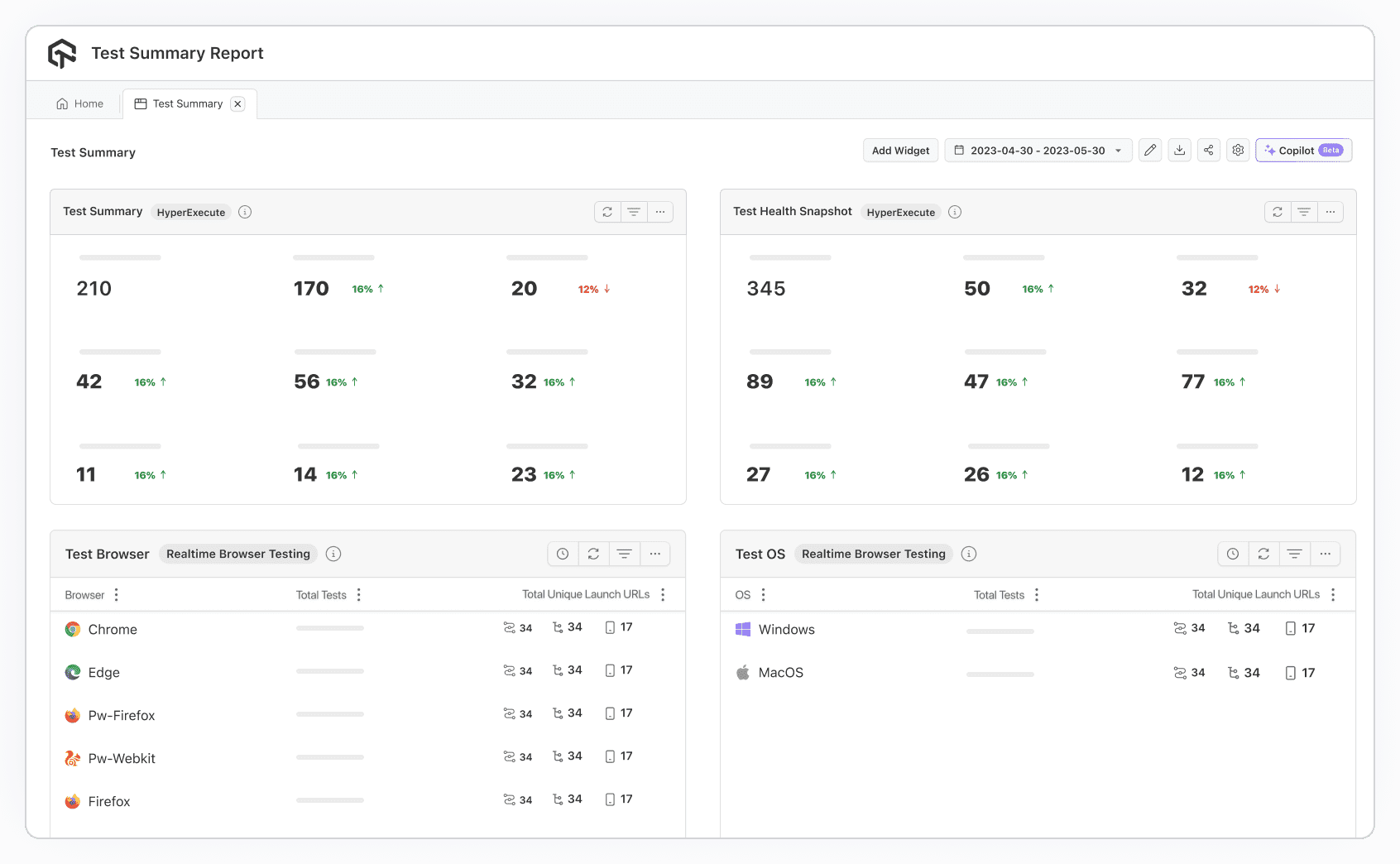
Key Features:
- Test summary report: Provides a clear overview of execution outcomes and status distribution. Teams instantly see pass/fail ratios, skipped tests, and progress trends, making tracking effortless.
- Error insights report: Highlights error patterns, groups similar failures, and identifies the most common causes of instability. This makes analyzing and resolving issues faster and more efficient.
- All trends report: Tracks long-term test performance and stability trends, helping QA leaders pinpoint recurring issues, monitor release readiness, and optimize resource allocation.
- Browser and OS report: Displays results by operating system and browser, making cross-platform compatibility issues easy to spot before they impact users.
- Resource and concurrency report: Reveals how tests perform under parallel execution and varying resource conditions, helping teams identify and resolve performance bottlenecks effectively.
- AI CoPilot dashboard: Offers real-time monitoring with AI-driven recommendations. Teams can explore failures, understand context, and take immediate action to maintain high-quality results.
- Custom widgets and reports: Tailor dashboards and reports to match each stakeholder’s needs. Developers can dive into logs, while managers see high-level trends and release readiness insights.
- Test Intelligence: Goes beyond basic reporting by using AI to optimize testing. TestMu AI Test Intelligence identifies flaky tests, stabilizes results, and helps teams focus on meaningful issues.
Key Takeaway: Consolidating test execution results into one reporting view lets QA teams spot recurring failure patterns instead of re-triaging the same issue every release cycle.

Best Practices for Managing Bugs and Defects
Effectively managing bugs and defects is essential for delivering high-quality software. By following best practices, teams can streamline the process of identifying, prioritizing, and resolving issues in a timely manner, ensuring that both functionality and user experience are maintained at the highest standards.
Whichever term your team uses, both travel the same route once logged. The bug life cycle sets out all nine states and names who owns each one.
- Clear Documentation: Record bugs with reproduction steps, expected behavior, and actual results. This ensures developers can understand and resolve issues efficiently.
- Prioritization: Rank defects based on severity and impact. Critical issues affecting functionality or users should be addressed before minor cosmetic problems.
- Continuous Testing: Perform testing continuously throughout development. Early detection of defects reduces rework, shortens release cycles, and improves overall software quality.
- Collaboration: Foster communication between developers, testers, and stakeholders. Sharing context and insights ensures quicker resolution and prevents repeated mistakes.
- Regression Testing: After fixes, rerun existing test cases to ensure resolved defects don’t introduce new problems or break previously working functionality.
- Version Control Awareness: Track changes in code carefully. Linking defects to specific code versions helps identify when and where the problem was introduced.
- Automated Alerts: Set up notifications for critical defects. Prompt alerts ensure high-priority issues receive immediate attention, reducing risk in production environments.
- Knowledge Sharing: Maintain a knowledge base of common defects, resolutions, and lessons learned. This improves team efficiency and prevents repeated errors.
- Metrics and Reporting: Track defect metrics such as open counts, resolution times, and severity trends. Use reports to guide process improvement and decision-making.
- Test Coverage Review: Ensure all functionalities and critical paths are tested. Gaps in coverage increase the likelihood of undetected defects reaching production.
Key Takeaway: Reproduction steps, severity-based prioritization, and a regression run after every fix keep bug and defect records reliable enough to drive release decisions.
Conclusion
Knowing the difference between a bug and a defect improves communication across testing and development. Bugs point to coding mistakes, while defects reveal gaps against requirements. Clear classification avoids confusion, ensures proper ownership, and keeps metrics accurate. For QA teams, this clarity streamlines collaboration, speeds issue resolution, and supports delivering reliable software that meets business and user needs.
Author

Abhishek Mishra
Blogs: 15

Abhishek Mishra is a Technical Product Manager at TestMu AI (formerly LambdaTest), where he owns Test Manager, the test management product. He has over 8 years of experience in product management and market analysis, spanning AI-native software testing, product strategy, and analytics. On TestMu AI, he authored guides on test management and test case management. Previously, he served as the Product Lead at IndiaClan and co-founded Gartley618 Technologies, a firm focused on quantitative trading and blockchain. He holds a B.Tech degree.
Reviewer

Mayank Bhola
Reviewer
Mayank Bhola is Co-Founder and Head of Products at TestMu AI (formerly LambdaTest), where he leads the entire product portfolio across KaneAI, Kane CLI, HyperExecute, SmartUI, the Real Device Cloud, Accessibility, and other software testing product lines. As an early Lead Architect he designed and built the company's flagship Tunnel technology from scratch, created the React-based automation platform, and architected the data-intensive pipelines and FAAS services that scale it. He brings more than 10 years of experience in software development and product engineering, with earlier roles as Head of Technology at Juggernaut Books and Senior Software Engineer at PressPlay TV and Zomato. Mayank holds a B.Tech in Computer Engineering from JIIT Noida.


Bugs vs Defects FAQs
Did you find this page helpful?
More Related Blogs
TestMu AI forEnterprise
Get access to solutions built on Enterprise
grade security, privacy, & compliance
- Advanced access controls
- Advanced data retention rules
- Advanced Local Testing
- Premium Support options
- Early access to beta features
- Private Slack Channel
- Unlimited Manual Accessibility DevTools Tests