

Power Your Software Testing with AI Agents and Cloud
The Native AI-Agentic Cloud Platform to Supercharge Quality Engineering. Test Intelligently and Ship Faster.


- TestMu AI (Formerly LambdaTest)
- /
- Learning Hub
- /
- Web Services Testing: Types, Tools, and Best Practices
Web Services Testing: Types, Tools, and Best Practices
Web services testing checks the functionality, security, and performance of SOAP and REST services. Learn the types, tools, steps, and best practices.
Last Updated on:
On This Page
- What Is a Web Service?
- What is Web Services Testing?
- What Are the Types of Web Services Testing?
- Why is Web Services Testing Needed?
- What Are the Advantages of Web Services Testing?
- What Is Web Services Automation Testing?
- When to Automate Web Services Testing?
- What is the Difference Between Web Services and APIs?
- Which Tools Are Used for Web Services Testing?
- How Do You Choose a Web Services Testing Tool?
- What Do SOAP and REST Requests Actually Look Like?
- How to Perform Web Services Testing?
- What Are the Challenges in Web Services Testing?
- What Are the Best Practices for Web Services Testing?
- How Is AI Changing Web Services Testing?
- Where Should You Start With Web Services Testing?
Web services testing evaluates the functionality, performance, security, and reliability of web services, the technology that lets different applications exchange data over a network using standards such as SOAP or REST.
Modern applications depend heavily on this machine-to-machine communication: more than 5.18 billion people use the internet and around 15.14 billion connected IoT devices were online as of 2023, and the services tying them together keep growing in number and complexity. When one of those services fails, every application depending on it fails with it, which is why testing them on their own is essential.
What Is a Web Service?
A web service is code that one application calls over a network, usually HTTP, to exchange data with another application, whatever language either one uses.
A web service is a unit of code that one application can call over a network, usually over HTTP, to exchange data with another, regardless of the languages or platforms on either side. A client sends a request and gets a structured response back, typically using SOAP (XML) or REST (usually JSON).
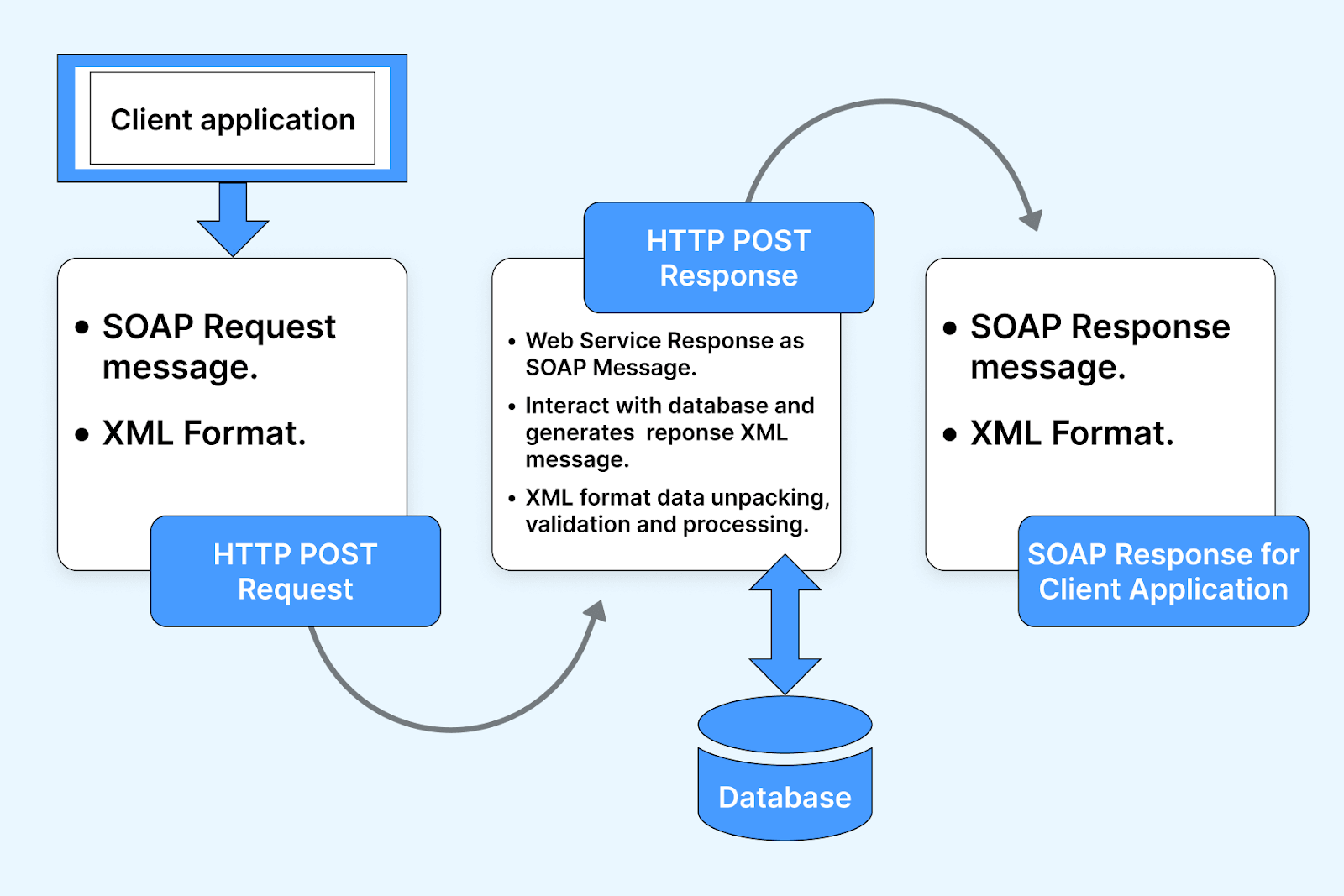
An API is the interface a web service exposes. Every web service has an API, but not every API is a web service, since an API can also sit between components that never cross a network. Because product behavior depends on these interfaces working correctly, they need testing in their own right, which is what the rest of this guide covers.
What is Web Services Testing?
Web services testing is defined as the test approach that evaluates the security, performance, functionality, and reliability of web services. In other words, web services testing encompasses testing a web service's API, which outlines the interactions between distinct software components.
This process involves inspecting different aspects of the API, including endpoints, parameters, and methods, to validate their alignment with expectations and fulfillment of functional prerequisites. You can conduct manual testing for a web service, develop your custom automation code, or utilize existing automated testing tools.
Test on Selenium grid cloud of real desktop browsers. Try TestMu AI Now!
What Are the Types of Web Services Testing?
The main types of web services testing are functional, load and performance, security, integration, and regression testing of each service and its consumers.
Following are the different types of software tests conducted in web services testing:
- Functional testing: This centers on verifying the web service's alignment with its functional requirements. It involves analyzing the exchange of information and the quality of responses. This process helps confirm that the outcomes align with the intended purpose of implementing the web service.
- Performance testing: It is important for evaluating scalability, reliability, and responsiveness across diverse load conditions. This involves subjecting the web service to heavy loads, determining its maximum capacity, and assessing performance thresholds.
- Compliance testing: Given the need to adhere to specific standards like HIPAA or PCI-DSS, compliance testing ensures that the web service aligns with these prescribed regulations.
- Regression testing: As web services interact with varied networks, architectures, and environments due to their platform independence, regression testing ensures smooth functioning and consistent, accurate results.
- Security testing: Since communication occurs over the Internet, security threats like infiltration and Denial-of-Service (DOS) attacks are prevalent. Incorporating a Service Oriented Architecture (SOA) at the network level protects both the software applications and the network.
- Load testing: The rapid integration of web services into new software applications introduces enhanced features and functionalities. As usage surges, especially with numerous applications adopting web services, regular load testing is imperative to maintain stability and scalability in each build and release.
- Integration testing: Web services frequently serve as the means to integrate diverse software systems, and integration testing guarantees the smooth and flawless interaction of the web service with other software components and systems.
Why is Web Services Testing Needed?
A web service is exposed over the network and relied on by other applications, so a defect in it fails every consumer at once. Testing it matters for four reasons:
- It is network-facing, which makes it an attack surface. Vulnerabilities have to be found before they are exposed.
- Hosts and clients change on their own release cycles, so a service that worked yesterday can break when either end updates. Regression testing catches that.
- Services that respond fine for one user can degrade under real traffic, so load testing confirms they hold up under stress.
- Beyond functionality, the service has to meet its performance, reliability, and compliance expectations across the network, not just return the right value in isolation.
What Are the Advantages of Web Services Testing?
Web services testing catches defects before they reach every consuming application, verifies security and performance, and supports faster, safer releases.
Web services and web services testing are changing software and application development and architectural paradigms. This transformation brings many user advantages, augmenting interoperability, usability, and various facets of software applications. Several other advantages of web services testing include:
- Validation of full functional test coverage: Developers can detect any error in the web services during the early stage of the development cycle, which helps them fix them before they become a costly issue. In this, web services testing validates complete functional test coverage. It verifies the conformity of all APIs exposed by applications with the anticipations of stakeholders and development teams alike.
- Enhanced performance and reliability of Service-Oriented Architecture (SOA): Service Oriented Architecture has a network of intercommunicate services. These services, facilitated by web services, can include data transfers or orchestrate multifaceted activities. Leveraging web services testing contributes to improving performance and reliability within SOAs. This stems from their efficient communication ability and capacity to undergo comprehensive testing.
- Comprehensive testing assurance: Using test automation eliminates the idea of testing isolated software application units. Instead, this approach ensures a comprehensive, complete test of the applications, ultimately leading to enhanced performance. Therefore, organizations are advised to use web service test automation due to its ease of use, time-saving attributes, and performance-enhancing capabilities.
- Simplified regression testing cycle: Regression testing, a critical aspect of software testing, is designed to verify the consistency of software behavior across different versions or interactions with other software. Web service automation testing plays a pivotal role in reducing the time and effort required for conducting software tests during regression cycles, thereby streamlining the testing process.
- Streamlined testing: The integration of web services testing simplifies the complexities of web application testing. This proficiency in seamless interaction with web applications enhances their ability to deliver the intended performance. As a result, these tools prove indispensable for assessing web services based on Service-Oriented Architecture (SOA) and Representational State Transfer (REST) APIs.
To perform a complete test of web services that includes both functional and non-functional types of software testing. Learn this from the below section.
What Is Web Services Automation Testing?
Web services automation testing runs scripted requests against a service and checks the responses automatically, so the same tests repeat on every build.
Web service automation testing streamlines the ability to perform tests iteratively as needed. This approach enhances the development of robust and efficient web services and facilitates the evaluation of their functionality, performance, and scalability.
Here are some key aspects of web service automation testing:
- Test automation framework: It is a structured set of guidelines that provides a foundation for designing, implementing, and executing automated tests for software applications.
- Test environment: This is where all the action happens, encompassing the setup, including hardware, software, and network configurations used for automated tests.
- Test cases: Consider these as detailed test instructions, specifying what actions to take and what results to expect. Test cases should cover all possible scenarios, including the trickier ones.
- Test data: This information is fed into tests, essentially what's needed to make tests work. Ensuring the right data for all possible scenarios and tricky situations is crucial.
- Test execution: This is when automated tests are run in the configured test environment, following the guidelines from the test framework. Subsequently, the results are analyzed to identify any problems or defects.
- Test reporting: Think of it as creating a report card for tests. Clear and concise reports are generated to showcase how the tests are performed. These reports provide information about the test cases, the data used, and any problems encountered.
- Continuous testing: This approach means that testing doesn't stop. Automated tests run continuously as part of the development process, acting as a safety net to catch any issues that might arise during the development of web services.
Leveraging automation testing can yield numerous benefits, including time and effort savings, error reduction, and enhanced test coverage. Automated testing tools allow for fast, repetitive, and precise test execution. Moreover, automation testing can identify problems early in the development process, enabling the development team to receive prompt feedback.

AI-native test orchestration and execution platforms like TestMu AI let you perform automated testing at scale across 3,000+ browser and OS combinations, devices, and operating systems. It simplifies test environment management, accelerates test execution, provides insightful reporting, and supports continuous testing, ultimately leading to robust and efficient testing.
Want to get started with test automation on TestMu AI? Check documentation: Automation testing on TestMu AI.
Also, here is a getting started video on performing automation testing on TestMu AI.

Subscribe to the TestMu AI YouTube Channel for software testing tutorials around Selenium testing, Playwright testing, Appium, and more.
When to Automate Web Services Testing?
Automation in web services testing is a powerful tool, but knowing when to implement it is key to maximizing its benefits. Here are scenarios and indicators that suggest it's time to automate your web services testing:
- Repetitive Tests: If you find yourself running the same set of tests repeatedly, automation can save time and reduce the likelihood of human error. Automated tests ensure consistency in repetitive tasks, making them ideal for regression testing and routine checks.
- High Volume of Tests: When the volume of tests becomes too large to manage manually in a reasonable timeframe, automation can help. It's particularly useful for handling a large suite of tests that need to be executed against multiple web service endpoints.
- Complex Test Scenarios: Complex tests, especially those involving multiple web service components or intricate data sets, can benefit from automation. Automated testing can more easily handle complex scenarios and validate the integration between different services.
- Load and Performance Testing: Automated testing is essential for load and performance testing, as it can simulate thousands of simultaneous users and interactions, which is not feasible with manual testing.
- Ensuring Consistency and Accuracy: Automated tests perform the same steps precisely every time they are executed. This consistency is crucial for ensuring the accuracy of test results, especially when testing is required across different environments and configurations.
What is the Difference Between Web Services and APIs?
Web Services and APIs are crucial in the digital world, facilitating communication and data exchange between applications. While they are often used interchangeably, there are key differences that set them apart.
| Aspect | Web Services | APIs |
|---|---|---|
| Definition | A platform-independent way of exchanging data between different systems and applications. | A set of rules and protocols for building and interacting with software applications. |
| Communication | Can use SOAP (Simple Object Access Protocol), REST (Representational State Transfer), or other protocols. | Primarily uses HTTP/HTTPS for requests and responses. |
| Data Format | Often uses XML for data exchange. | Can use JSON, XML, or other formats. |
| Standards | Follows specific standards like SOAP or REST. | More flexible with fewer strict standards. |
| Use Case | Ideal for enterprise-level services where detailed standards are required. | More common in web applications for simpler, more flexible interactions. |
Which Tools Are Used for Web Services Testing?
Popular web services testing tools include SoapUI for SOAP and REST, Postman, REST Assured, JMeter for load, and cloud platforms that run suites at scale.
To perform web services testing, different types of tools are leveraged, allowing testers to execute the test. The tools are capable enough to perform different types of tests included in web services testing. Learn more about web service test tools in this section:
- SoapUI: SoapUI is a versatile tool used to test web services. It has been in existence since 2005. The tool caters to testing web services designed with SOA and REST architectures. SoapUI supports various protocols like SOAP, REST, JMS, and AMF. Additionally, it facilitates HTTP(S) calls for web applications and JDBC connections for databases.
- JMeter: JMeter, an open-source application developed by the Apache Software Foundation, is tailored for executing application load tests and performance measurements. Written entirely in Java, JMeter's initial purpose was to test web applications, but its capabilities have since expanded. JMeter is equipped to perform load and performance tests across various applications, servers, and protocols, encompassing HTTP, HTTPS, SOAP, REST web services, FTP services, databases through JDBC, LDAP directory services, JMS for message-oriented middleware, and more.
- Postman: Postman, a tool optimized for testing web services and APIs in REST architecture, allows users to send post requests to web servers and categorize the responses. Noteworthy features of Postman include its suitability for both exploratory and automated tests, compatibility with various platforms, integration with Swagger and RAML formats, capabilities for executing, testing, documenting, and monitoring tests, and its user-friendly nature that obviates the need for learning new programming languages.
- SOAPSonar: SOAPSonar, a tool by Cross Check Networks, enables comprehensive testing of web services across HTML, XML, SOAP, REST, and JSON formats. This tool facilitates functional, performance, compliance, interoperability, and security testing while adhering to OASIS and W3C standards.
- Wizdler: Wizdler, a user-friendly browser extension available for Google Chrome and Mozilla Firefox, simplifies testing for SOA architecture. Upon installation, simply input a WSDL address into your browser, and Wizdler promptly identifies and lists all accessible operations and services.
With SoapUI, users can create and automate software tests for web services, including functional tests, regression tests, service simulation (mocking), load and performance tests, and security tests.
Available in personal, professional, and server editions, SOAPSonar offers diverse features such as vulnerability tests with XSD mutation, functions to interpret WSDL and Schema, non-functional tests like behavioral modeling, simultaneous transaction loading for load tests, and varied reporting formats like XML, DOC, XLS, PDF, RTF, and RPT. It also integrates with the HP Quality Center.
How Do You Choose a Web Services Testing Tool?
Choose a web services testing tool by the protocols it supports, such as SOAP and REST, its fit with your CI pipeline, your team's language skills, and its cost.
If you are not currently utilizing automation testing for web services testing, the subsequent criteria can guide for selecting an automation tool:
- Is the tool user-friendly and easy to learn, requiring minimal training?
- Does it have built-in support for XML, WSDL, HTTP, REST, JMS, and similar protocols?
- Does the tool incorporate a "drag-and-drop" feature for creating and modifying test cases?
- Does it provide a fully or partially visual interface (GUI)?
- Can the tool decrease repetitive tasks? For instance, can users generate new tests using templates from prior efforts?
- Does it have compatibility with text-based tables and Excel files?
- Is the tool customizable, permitting the inclusion of custom code or event handlers?
- Does it support configuring web services security (e.g., X509, Kerberos)?
- Does it accommodate API testing?
- Does it include features for test data management?
Automate your Selenium tests across 3,000+ browser and OS combinations. Try TestMu AI Now!
What Do SOAP and REST Requests Actually Look Like?
A SOAP request is an XML envelope sent by POST to one endpoint, while a REST request uses an HTTP method and a resource URL and usually returns JSON.
Everything above describes the workflow. This is the thing you will actually be looking at. Both examples below fetch the same user, so the difference between the two styles is easy to see side by side.
A SOAP request and response
SOAP always posts an XML envelope, regardless of what you are asking for. The operation name and its parameters live inside the body, and the service contract comes from the WSDL file.
POST /UserService HTTP/1.1
Host: api.example.com
Content-Type: text/xml; charset=utf-8
SOAPAction: "http://api.example.com/GetUser"

<?xml version="1.0" encoding="utf-8"?>
<soap:Envelope xmlns:soap="http://schemas.xmlsoap.org/soap/envelope/">
  <soap:Body>
    <GetUser xmlns="http://api.example.com/">
      <userId>42</userId>
    </GetUser>
  </soap:Body>
</soap:Envelope>
The response mirrors that shape:
HTTP/1.1 200 OK
Content-Type: text/xml; charset=utf-8

<?xml version="1.0" encoding="utf-8"?>
<soap:Envelope xmlns:soap="http://schemas.xmlsoap.org/soap/envelope/">
  <soap:Body>
    <GetUserResponse xmlns="http://api.example.com/">
      <User>
        <Id>42</Id>
        <Name>Mike Chen</Name>
        <Email>mike.chen@example.com</Email>
      </User>
    </GetUserResponse>
  </soap:Body>
</soap:Envelope>
Here is the part that catches testers out. When a SOAP operation fails, the transport still frequently succeeds: the service returns a fault inside the envelope, and asserting only on the HTTP status code will mark this a pass.
<?xml version="1.0" encoding="utf-8"?>
<soap:Envelope xmlns:soap="http://schemas.xmlsoap.org/soap/envelope/">
  <soap:Body>
    <soap:Fault>
      <faultcode>soap:Client</faultcode>
      <faultstring>User 999 not found</faultstring>
    </soap:Fault>
  </soap:Body>
</soap:Envelope>
So a SOAP test asserts on two things: the HTTP status, and the absence of a soap:Fault element in the body.
The same call as REST
REST puts the operation in the HTTP method and the resource in the URL, so there is no envelope. The contract usually comes from an OpenAPI (Swagger) description rather than a WSDL.
GET /api/users/42 HTTP/1.1
Host: api.example.com
Accept: application/json
Authorization: Bearer <token>HTTP/1.1 200 OK
Content-Type: application/json
{
"id": 42,
"name": "Mike Chen",
"email": "mike.chen@example.com"
}Unlike SOAP, REST signals failure through the status code itself, so a request for a missing user returns 404 with a body describing the error. That is why the two styles need different assertions:
| SOAP | REST | |
|---|---|---|
| Contract | WSDL | OpenAPI / Swagger, when one exists |
| Payload | XML envelope, always | Usually JSON |
| Operation lives in | The body, as an element name | The HTTP method plus the URL |
| How errors surface | A soap:Fault inside a 200 response | The HTTP status code (400, 404, 500) |
| What to assert | Status code, no fault element, then the values | Status code, then the response body |
How to Perform Web Services Testing?
Web services testing involves a series of critical steps to ensure the intended functionality of web services. Here are the key stages for effective web services testing:
- Understanding the WSDL definition: In the initial phase, it's crucial to comprehend the Web Services Description Language (WSDL) file's definition. This foundational document serves as a blueprint, outlining the web service's functionalities, communication protocols, data types, and available operations.
- Identifying available operations: During this stage, testers need to enumerate and document the operations accessible through the web service. These operations represent the various tasks or functions the web service can perform, providing insights into its capabilities.
- Test environment setup: Start by configuring the test environment to match the production setup closely. Ensure hardware, operating systems, software dependencies, network configurations, and virtualization technology align with the production environment. Verify the necessary access, privileges, and permissions for testing.
- Determining XML request message structure: Client interaction with a web service involves sending requests in XML format. Testers must ascertain the precise XML structure that clients should adhere to when submitting requests. This includes defining essential data elements, their sequence, and any mandatory attributes.
- Establishing XML response message configuration: Web services respond with XML-formatted messages similar to requests. Testers must specify the configuration of the XML response generated by the service after processing a client's request. This involves identifying data elements, their arrangement, and any additional data or error codes within the response.
- Developing a test program: In the final phase, testers create a dedicated test program or leverage a testing tool designed to send XML message requests to the web service and receive corresponding XML message responses. This tool simulates client-service interactions by sending predefined XML requests, including various test scenarios, to evaluate the service's handling of different inputs.
- Execution of web service tests: Define test scenarios that encompass both functional and non-functional requirements of the web service. Include positive and negative test cases within these scenarios. Utilize a test management tool to streamline test case execution. After running the test cases, validate the results against expected outcomes. Improve testing efficiency and reduce manual effort through automation tools, especially for regression and load-testing tasks.
- Real-time monitoring of test results: Continuously monitor test results in real-time. Check for errors or failed tests, assess response times, and track network and system performance. Employ monitoring tools to oversee logs, metrics, and alerts.
- Analysis of test results: Carefully analyze test results to identify the root causes of failures. Use logs, reports, and metrics to gain insights into the web service's behavior. Examine response times, resource utilization, and system performance. Utilize these findings to enhance the overall quality of the web service.
- Generation of test reports: Compile a comprehensive report of the test results. Include details about test cases, execution statuses, and test metrics. Share this report with stakeholders such as the development team, project managers, and product owners. Additionally, provide recommendations for improvements based on the analysis of test results.
What Are the Challenges in Web Services Testing?
The main challenges in web services testing are complex test data, dependent services, security and authentication, versioning, and slow or unstable environments.
During the process of web services testing, several challenges can emerge that can undermine the effectiveness of testing, impede performance, and disrupt the services offered by a specific application. The team faces different types of obstacles while conducting web services testing, including
- Scalability: A primary challenge for testers during web services testing lies in ensuring both scalability and security. Since web services are typically developed and deployed across diverse platforms, networks, and environments, it becomes difficult for the team to manage or regulate the influx of users connected to the service. This can adversely affect the performance and operational efficiency of the web service, especially if it hasn't been optimized for handling substantial user loads.
- Security: The challenge of upholding security within web services testing is pronounced, primarily due to the decentralized nature of Internet web services. The team struggles with the task of implementing essential security measures while lacking direct control over these services. Consequently, the team employs diverse methodologies to validate the security of user access to web services.
- Absence of user interface: The absence of a user interface in web services introduces a significant hurdle during testing, as manual assessment is unfeasible. Instead, the creation of test cases becomes imperative. Creating and formulating these test cases mandates a solid grasp of programming skills and an extensive understanding of the core principles of web services, thereby posing a challenge to the team.
- Distributed network architecture: The substantial distribution of web services across diverse networks, operating systems, and various deployment environments amplifies the complexity and challenges of testing. The team must account for various aspects, ranging from performance, functionality, reliability, and availability to security, ensuring the precision and success of the testing process.
- Selection of appropriate tools: The selection of suitable web services testing tools is of paramount importance as they significantly influence the successful implementation of web services. Identifying the right tool poses a problematic challenge for the team, as it needs to align with expected output responses, adhering to predefined compliance standards.

By knowing the above challenges, the developer and Quality Analyst (QA) can take robust steps to address them and ensure web services are accurately and completely tested. One of the best approaches is to automate web services testing.
What Are the Best Practices for Web Services Testing?
The best practices for web services testing are to validate schemas and status codes, test negative cases, mock dependencies, automate in CI, and monitor in production.
To enhance the effectiveness of web services testing, focus on these key strategies:
- Understanding web service test metrics: Get a solid grasp of important testing metrics. These metrics provide valuable insights into performance. Some common web service test metrics include:
- Response time: Measures how quickly the web service responds to a request. This helps identify performance issues and improves web service speed.
- Defect density: Counts the number of defects in the code. It helps identify areas that need more testing or optimization.
- Test coverage: Measures the percentage of tested web service functions. This highlights areas that need additional attention.
- Test execution time: Evaluate how long it takes to run a test suite. Identifies lengthy tests and helps optimize test suite execution time.
- Implementing best practices: Incorporate the following practices:
- Strategic planning: Create a clear plan that outlines testing goals, scope, and expectations. Include details about test cases, data, and expected outcomes.
- Automation: Use automation tools like SoapUI, Postman, or Apache JMeter to streamline testing and reduce the risk of human errors. Automation ensures test accuracy and consistency.
- Reusable test cases: Build libraries of reusable test cases to easily repeat scenarios for various web services.
- Version control: Use version control systems like Git to manage test, data, and configuration changes. This promotes collaboration and keeps testing organized.
- Isolation testing: Verify web services independently before integration to minimize surprises during integration.
- Performance analysis: Utilize tools like Apache JMeter or Gatling to simulate user traffic, measure response times, and identify performance bottlenecks.
- Automation of web service tests: Automated tests expedite testing, reduce errors, and increase coverage. They allow for fast, repeatable, and accurate test execution. Automation testing tools also help detect issues early and provide prompt feedback to developers.
- Continuous improvement of the testing process: Continuously refine your testing process through vigilant monitoring, analysis of metrics, and adaptation to changing requirements. This iterative approach sharpens your testing process and enhances its effectiveness.
How Is AI Changing Web Services Testing?
AI is changing web services testing by generating test cases from WSDL and OpenAPI definitions, producing realistic test data, and flagging response changes that break consumers.
AI agents are also becoming web service consumers. Assistants call services through tools and the Model Context Protocol, so services need clear schemas, precise error messages, and stable behavior that an agent can rely on without reading the docs.
Review AI-generated service tests for assertions that only mirror current responses, and pair them with contract and negative tests. The same approach applies to rest api testing.
Where Should You Start With Web Services Testing?
Start web services testing with functional checks on your most used endpoints, add negative and security cases, then automate them in your CI pipeline.
Web services have emerged as a cutting-edge technology highly embraced by developers and testers. These services enable seamless connection between diverse web-based software applications across the globe, delivering both convenient and secure solutions. Nonetheless, to uphold the sustained popularity and provision of top-notch services, thorough testing practices are essential for all web services.
This test can be performed manually and automatically to find potential errors and enhance the quality of the web applications. By adhering to best practices, leveraging suitable tools, and continuously refining testing approaches, organizations can confidently offer web services that align with the demands of a dynamic digital landscape.
Author

Nazneen Ahmad
Blogs: 39


Nazneen Ahmad is a freelance Technical Content SEO Writer with over 6 years of experience in crafting high ranking content on software testing, web development, and medical case studies. She has written 60+ technical blogs, including 50+ top-ranking articles focused on software testing and web development. Certified in Automation Basic and Advanced Training - XO 10, she blends subject knowledge with SEO strategies to create user focused, authoritative content. Over time, she has shifted from quick, keyword-heavy drafts to producing content that prioritizes user intent, readability, and topical authority to deliver lasting value.
Reviewer

Sri Harsha
Reviewer
Sri Harsha is Engineering Manager of the Open Source Program Office at TestMu AI (formerly LambdaTest), where he leads open-source engineering behind the Selenium and Appium automation grid and builds agentic AI systems for quality engineering. He is a member of the Selenium Technical Leadership Committee and a committer to WebdriverIO and Appium, and was recognized with the LambdaTest Delta Award 2023 for Best Contributor in open-source testing. He brings over 10 years of experience in software testing and automation, with earlier roles at EPAM Systems and ZenQ. Sri Harsha holds a B.Tech in Computer Science from Jawaharlal Nehru Technological University.


Web Services Testing FAQs
Did you find this page helpful?
More Related Learning Hubs
TestMu AI forEnterprise
Get access to solutions built on Enterprise
grade security, privacy, & compliance
- Advanced access controls
- Advanced data retention rules
- Advanced Local Testing
- Premium Support options
- Early access to beta features
- Private Slack Channel
- Unlimited Manual Accessibility DevTools Tests