

Power Your Software Testing with AI Agents and Cloud
The Native AI-Agentic Cloud Platform to Supercharge Quality Engineering. Test Intelligently and Ship Faster.


- TestMu AI (Formerly LambdaTest)
- /
- Learning Hub
- /
- What Is a QA Environment?
What Is a QA Environment?
Learn how to set up, manage, and optimize QA environments, explore types, components, common challenges, and best practices for reliable software testing.
Last Updated on:
A QA environment is essential for ensuring software functions as intended before it reaches end users. It provides a controlled space where teams can execute tests, detect and resolve bugs, and verify that new features integrate smoothly with existing functionality. With a well-set-up QA environment, testing becomes consistent, efficient, and reliable, helping teams deliver high-quality software with confidence.
Overview
QA environments allow developers and testers to reproduce production-like conditions, execute test cases, manage versions, and verify changes, ensuring accurate, predictable, and quality-assured releases.
What Are the Key Components of a QA Environment?
A QA environment is made up of key components that work together to create realistic testing conditions, ensuring accurate results and reliable software releases. The main elements include:
- Test Servers and Infrastructure: Provide production-like conditions with sanitized data, isolated environments, and scalable execution via TestMu AI’s real device cloud.
- Version Control and Build Management: Use CI/CD pipelines to compile, store, and align builds with branches, ensuring reproducibility, consistency, and clear traceability.
- Test Data Management: Leverage masked production or synthetic datasets, automatically refreshed and reset, to support accurate, repeatable, and compliant test cycles.
- Testing Tools: Integrate test management, automation frameworks, performance testing, and monitoring solutions to scale execution and analyze results effectively.
- Environment Configuration: Apply configuration management tools, environment variables, and sandboxed integrations to maintain stable, predictable, and reliable QA environments.
- Reporting and Feedback Mechanisms: Streamline bug tracking and analytics to capture, prioritize, and communicate defects, strengthening collaboration and accelerating feedback loops.
How Do You Stand One Up?
Setting up a QA test environment involves key steps that ensure reliable, repeatable, and production-like testing. The process includes the following actions:
- Define Scope and Requirements: Collaborate with developers, testers, and product managers to define devices, browsers, APIs, and middleware, ensuring all required test cases and integrations are fully covered.
- Mirror the Production Environment: Replicate production operating systems, servers, databases, and integrations to eliminate mismatches, reduce environment-specific defects, and validate functionality under conditions closely matching real-world deployments.
- Use Realistic and Secure Test Data: Leverage masked production data or synthetic datasets, refreshed frequently, to simulate real user behavior, maintain compliance, and ensure accurate, reproducible QA test results.
- Isolate Environments for Reliability: Assign containers, VMs, or cloud environments per team or feature branch, preventing conflicts, avoiding test contamination, and simplifying defect triage through environment isolation.
- Automate Setup and Teardown: Use Terraform, Ansible, or CI/CD pipelines to automate environment creation, execution, and cleanup, eliminating variability and increasing efficiency during iterative test cycles.
- Configure Version Control: Store environment scripts, variables, and configuration files in Git to enable reproducibility, rollbacks, audit trails, and consistency across evolving QA environment setups.
What Is a QA Environment?
A QA environment (also known as a test environment) is a dedicated setup where software is tested under conditions that closely replicate production. It is designed to validate functionality, performance, integration, and stability before code reaches end users.
A robust QA environment includes hardware and software configurations that mirror production environments, realistic test data that reflects actual usage scenarios, QA testing tools for repeatable and consistent test execution, and monitoring tools to track software behavior during tests.
This combination allows teams to simulate edge cases, stress conditions, and unexpected user interactions. Maintaining test environment consistency ensures reliable results and reduces surprises when the software is deployed.
Why Is a QA Environment Needed?
A QA environment is needed to safely test code, catch bugs, validate features, and ensure stability before production, protecting users and preventing costly live errors.
Here is why it's important:
- Isolates Testing from Production: By creating a separate environment, you can test new features, configurations, and updates without affecting the live production environment. This isolation ensures that any issues discovered during testing do not impact end users or disrupt business operations.
- Simulates Real-World Conditions: QA environments are designed to replicate the production environment as closely as possible. This includes matching hardware configurations, software versions, network settings, and other dependencies. Such fidelity allows for more accurate testing of how the software application will perform under actual user conditions.
- Supports Comprehensive Testing: A dedicated QA environment facilitates various types of software testing, including functional, performance, security, and integration tests. This comprehensive approach helps identify a wide range of potential issues before the software reaches production.
- Enhances Collaboration: With a stable and consistent testing environment, developers, testers, and operations teams can work more effectively together. It reduces discrepancies between development and testing phases, leading to smoother transitions and better communication across teams.
- Improves Release Confidence: Rigorous testing in a QA environment builds confidence in the software's stability and performance. Teams can address issues proactively, leading to more reliable releases and a better user experience.
- Reduces Post-Release Issues: By catching defects early in a controlled environment, the likelihood of encountering critical issues after deployment decreases. This proactive approach can save time, resources, and protect the organization's reputation.

Note: Run manual and automated tests across 3000+ environments. Try TestMu AI Now!
What Are the Components of a QA Environment?
A QA environment includes test servers mirroring production, version control and build management, realistic test data, automation and monitoring tools, environment configuration, and reporting systems.
Here are the core components making up a standard QA environment:
Test Servers and Infrastructure
The foundation of any QA environment is the test infrastructure that hosts the software application. This typically mirrors production as closely as possible, though sometimes scaled down for cost efficiency. Application servers run the core code and services, while database servers provide the data backbone.
The QA database should include realistic but sanitized data that reflects production scenarios without risking privacy issues. Network configuration must mimic production, including firewalls, load balancers, and routing. Just as important, QA environments should remain isolated from production to avoid accidental impacts on the live environment.
To expand testing coverage efficiently, teams can leverage cloud-based platforms like TestMu AI. TestMu AI provides a scalable platform with access to a real device cloud of different browsers and device combinations, eliminating the need for local infrastructure while ensuring tests run in isolated, production-like environments.
Version Control and Build Management
QA depends on knowing exactly what code is being tested. Automated build servers compile and package the application, ensuring consistency through continuous integration pipelines.
Artifact repositories provide a central store of tested builds so teams can reproduce results or roll back when needed. To keep things organized, environments often align with specific branches such as features, release candidates, or hotfixes. Mismanaging these branches leads to confusion and inconsistent results.
Test Data Management
The effectiveness of testing hinges on high-quality data. Using masked production data or carefully generated synthetic data ensures QA results are meaningful. Many teams maintain snapshots of databases for different test cycles so they can roll back to a known state and reproduce results. Automated scripts or tools that reset data between test cycles are essential to avoid residual information contaminating results.
Pro-tip: To enhance the process of test data generation, you can leverage Generative AI testing tools like TestMu AI KaneAI for synthetic test data generation. KaneAI is a GenAI-native test agent that lets you create, author and evolve end-to-end tests using natural language prompts.
To begin with, check out this guide on getting started with KaneAI.

Testing Tools
A QA environment is powered by test tools that execute, monitor, and report on testing. Test management platforms keep track of test cases, execution history, and defects. Test automation frameworks such as Selenium, Cypress, and Playwright handle regression, functional, and UI testing at scale, and a QA environment must have the runtimes, drivers, and browser versions these frameworks need already installed and version-pinned.
Performance and load testing tools simulate real-world user behavior, highlighting bottlenecks before users experience them. Logging and monitoring solutions provide visibility into application behavior so teams can investigate issues quickly.
Environment Configuration
Consistency across environments is key. Configuration management tools ensure servers and services are aligned and predictable. Environment variables control aspects like feature toggles, API endpoints, and authentication, which must be carefully managed to prevent misleading results. For external integrations, QA often relies on mocked services or sandboxed environments to simulate real-world interactions without side effects.
Reporting and Feedback Mechanisms
The QA environment must not only find issues but also communicate them effectively. Bug tracking tools capture and prioritize issues so development teams can act quickly. Dashboards and metrics provide a clear view of test coverage, pass and fail rates, and overall quality trends. Continuous feedback loops with automated reporting ensure problems are flagged early, helping teams make informed release decisions.
To streamline your test reporting process, you can use the TestMu AI AI-native Test Analytics platform. It allows you to gain actionable insights into test performance and outcomes. You can use these data-driven insights to optimize testing efforts, identify trends, and make informed decisions that improve software quality.
To get started, head over to this TestMu AI Analytics guide.
What Are the Different Types of QA Environments?
QA environments are used for various purposes across testing stages, with key types such as development, staging, production-like, sandbox, and cloud-based outlined below to guide effective testing practices.
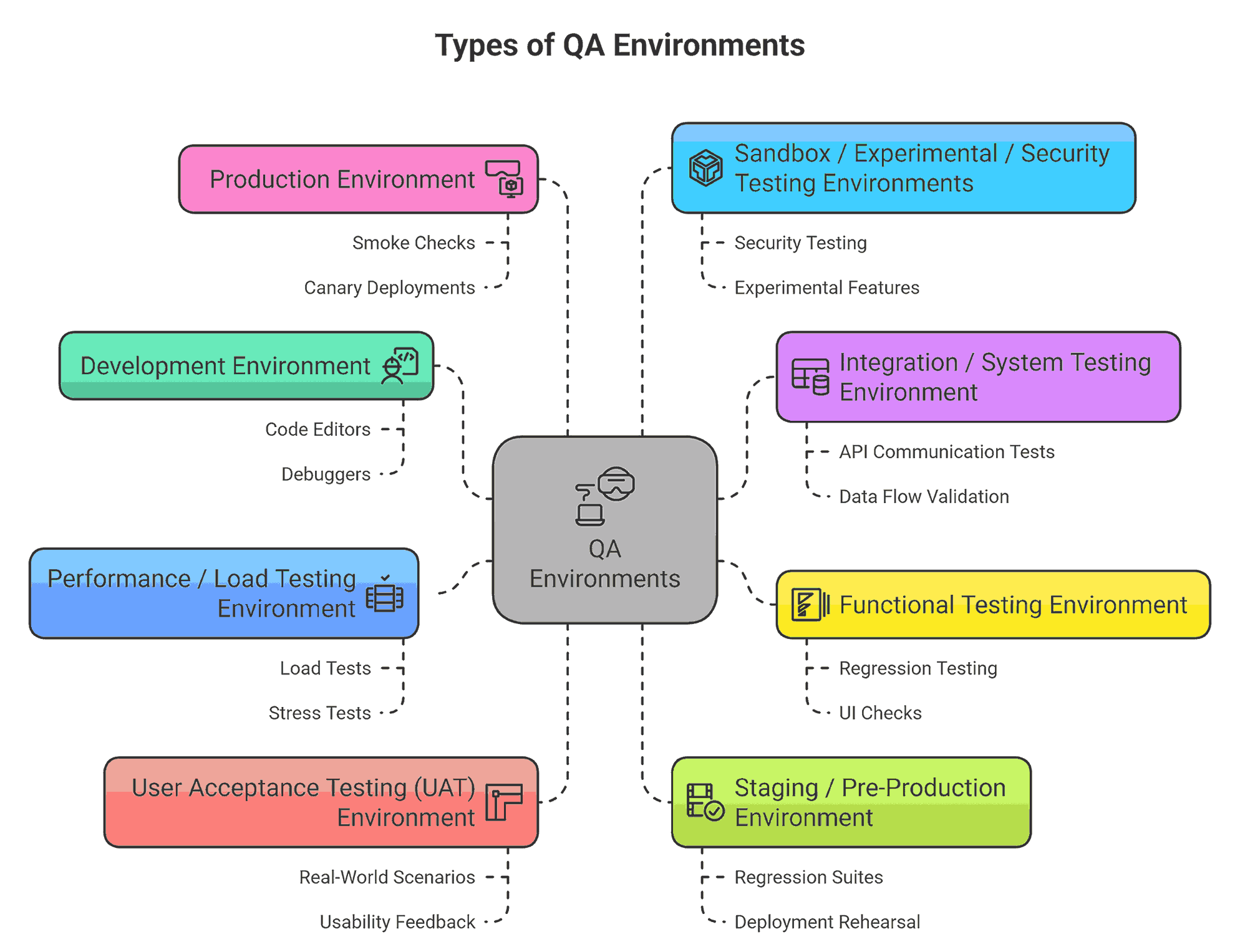
- Development Environment: The development environment is the origin point in the software lifecycle where developers write, build, and locally test new code. It commonly exists on a developer’s workstation or shared development server and includes tools like code editors, compilers, local databases, version control, and debuggers.
In this environment, developers perform unit tests, mock or stub external dependencies, and execute basic sanity checks. Because this environment prioritizes speed and flexibility, it often diverges from production configurations in areas like infrastructure, integrations, and scale. Its role is to enable rapid iteration and early validation before handing off code to formal testing.
- Integration / System Testing Environment: Once individual modules or services are ready, they are deployed into the integration (or system) environment, which aims to test their interactions. This environment is more stable than development, and dependencies are less likely to be stubbed.
Here, QA engineers (or integration teams) run interface contracts, API communication tests, data flow validation, and multi-module workflows. The goal is to detect mismatches in data formats, service agreements, or boundary conditions that unit tests would not catch.
- Functional Testing Environment: This environment is dedicated to broader functional testing, regression, user interface checks, and exploratory testing. It is more rigorously managed than the integration environment.
Builds here are aligned with release candidates or feature branches, and configurations, while not always identical to production, they are closer in behavior. Realistic but sanitized data is used, and the environment supports end-to-end functional tests, automation suites, and defect validation cycles.
- Performance / Load Testing Environment: A performance or load testing environment is designed specifically to assess system behavior under stress, concurrency, endurance, or volume. Its configuration (hardware, network, caching, database size) is intended to approximate production or a scaled version thereof.
In this environment, engineers execute load tests, stress tests, soak tests, spike tests, and concurrency checks. The objective is to uncover bottlenecks or failure modes that only present under scale, such as connection pool exhaustion, latency spikes, database locking, or memory leaks.
- User Acceptance Testing (UAT) Environment: The UAT environment bridges technology and business expectations. It is used by stakeholders, product owners, or representative users to validate that the software aligns with requirements and expected workflows.
This environment mimics production behavior closely, integrating business logic, UI while maintaining controlled data sets (often masked for privacy). In User Acceptance Testing, users execute real-world scenarios, report usability or functional gaps, and approve features or raise objections. Changes in UAT are usually limited and carefully controlled.
- Staging / Pre-Production Environment: The staging environment (or pre-production), is the final gate before a release reaches production. It is built to mirror the production environment as closely as possible in infrastructure, configuration, ntwork topology, and sometimes even data.
Release candidates are deployed here for full regression suites, smoke testing, deployment rehearsal (rollback paths, migration scripts), and sanity checks. Because staging is the last layer of defense against configuration drift or deployment errors, discrepancies here often become red flags that block the release.
- Production Environment: Production is the live environment hosting real users and real data. It demands maximum stability, monitoring, fault tolerance, and security. Testing in production is minimal and tightly controlled (e.g., smoke checks, canary deployments, feature flags). Hotfixes or urgent patches may be deployed with strict release protocols. Any failure here directly impacts business operations and user experience.
- Sandbox / Experimental / Security Testing Environments: These environments are optional in many organizations but useful in specialized contexts:
- Sandbox / Experimental: Used for prototyping, spikes, or feature exploration. May have relaxed constraints and use mocks instead of full integrations.
- Security / Penetration Test Environment: Isolated setup where security analysts test for vulnerabilities, penetration vectors, and compliance. Integrations may be real or mirrored, and logging, monitoring, and isolation are key safeguards.
QA Environment vs. Dev, Staging, and Production
A QA environment only makes sense in relation to the environments on either side of it. Code moves through a pipeline of environments, each with a different job, a different kind of data, and a different set of people allowed in. Confusing them is how test data ends up in production or how a bug slips through because QA was pointed at the wrong database.
| Dimension | Dev | QA | Staging | Production |
|---|---|---|---|---|
| Primary purpose | Write and debug code | Verify features against requirements | Final production-like rehearsal | Serve real users |
| Data type | Minimal or synthetic | Synthetic or masked | Masked production data | Real live data |
| Stability | Unstable, changes constantly | Controlled, version-pinned builds | Highly stable, mirrors prod | Must stay stable |
| Who has access | Developers | QA and testers | QA, release, select stakeholders | End users; restricted internal access |
| Resembles production | Loosely | Closely on the parts under test | As closely as possible | It is production |
The distinction people blur most is QA versus staging. QA is where you hunt for defects against known, controlled data. Staging is the dress rehearsal on production-like data where you confirm nothing breaks in the real configuration, and it is deliberately kept boring. A bug found in QA is expected; a bug found in staging means QA missed something.
The Rise of Ephemeral (On-Demand) QA Environments
The traditional model has one or two long-lived, shared QA environments that every team queues for. That queue is the bottleneck: two features under test at once contaminate each other's data, and "who broke the QA environment?" becomes a daily question. Ephemeral environments remove the queue by making environments disposable.
An ephemeral (on-demand) QA environment is a temporary, fully isolated environment spun up automatically for a single pull request or test cycle, then destroyed the moment it is done. Each change gets its own clean environment, so nothing contends for shared state. The same idea applied at a finer grain, one isolated environment per test run rather than per pull request, is a sandbox environment.
- Auto-provisioned: Opening a pull request triggers a fresh environment, typically defined as Infrastructure as Code (IaC) and packaged in containers with Docker and orchestrated by Kubernetes, so the environment is reproducible rather than hand-built.
- Isolated per change: One environment per PR means two features under test never share a database or step on each other's data. The "it works in QA but only when nobody else is testing" class of bug disappears.
- Auto-destroyed: Merging or closing the PR tears the environment down, so you pay for compute only while a test cycle is actually running instead of keeping idle environments alive around the clock.
The trade is upfront: ephemeral environments only work if the entire environment can be described in code and stood up automatically, which forces a discipline many teams lack. But once that exists, the shared-environment bottleneck is gone, and running the test suite on a fresh environment per change pairs naturally with cloud execution. TestMu AI's HyperExecute orchestrates that suite across just-in-time infrastructure so a per-PR environment gets its results back fast.
How to Set Up a QA Environment?
To set up QA environment, you need to define requirements, mirror production, use realistic test data, isolate environments, automate setup/teardown, and version-controlling configs for reliable, reproducible testing.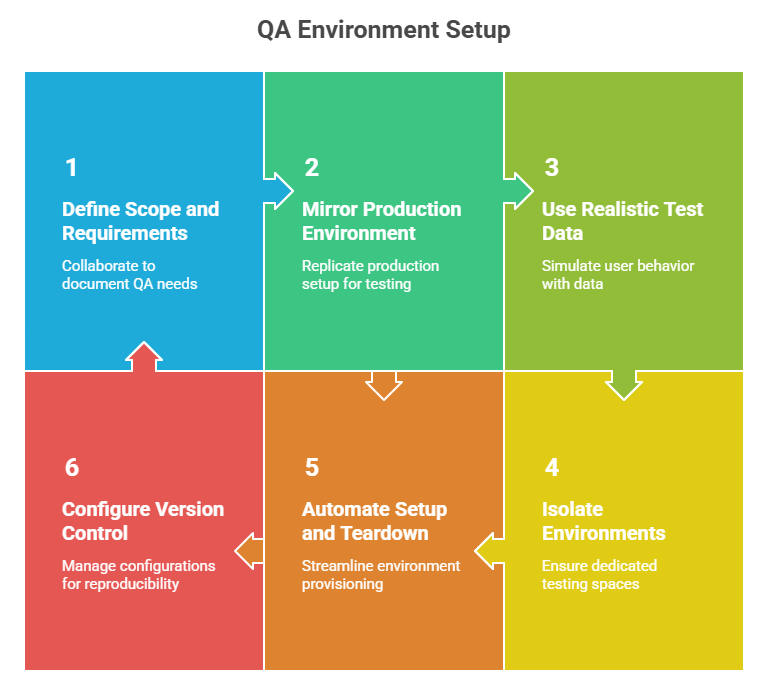
Below are the steps to setup a QA environment:
1. Define Scope and Requirements: Begin by collaborating with developers, testers, and product managers to document exactly what your QA environment must support. Which operating systems, browsers, or mobile devices require testing?
Are there specific APIs, middleware, or security layers to include? Defining these requirements early ensures every planned test case is executable and reduces last-minute gaps or environment mismatches.
2. Mirror the Production Environment: QA environments should replicate production as closely as possible. If production runs on Linux servers, use Linux for testing. Integrate third-party services or databases as they exist in production. Accurate replication minimizes “works on my machine” defects and increases confidence that test results reflect real-world behavior.
3. Use Realistic and Secure Test Data: Test data should resemble actual user behavior to uncover genuine defects. Mask sensitive production data or generate synthetic datasets that simulate peak usage. Refresh these datasets regularly to prevent tests from passing on stale or unrepresentative data.
4. Isolate Environments for Reliability: Shared QA sandboxes can cause interference between teams or feature branches, leading to corrupted data and false negatives. Assign dedicated environments through containers, virtual machines, or separate cloud testing tools. Isolation ensures one team’s tests do not disrupt another’s and simplifies root cause analysis when defects appear.
5. Automate Setup and Teardown: Manual environment provisioning introduces variability and slows testing. Automate creation and cleanup using tools like Terraform, Ansible, or CI/CD pipelines. Aim for a single command that provisions the environment, executes tests, and tears down resources. This consistency reduces setup errors and maximizes time spent validating functionality.
6. Configure Version Control Environment: Store scripts, container definitions, environment variables, and setup instructions in Git or another VCS alongside your application code. Versioned configurations allow easy reproduction of past environments, enable quick rollbacks, and provide an audit trail for changes.
Challenges While Setting Up a QA Environment
Below are some of the most common challenges teams experience with the process, along with suggestions and approaches to resolve these common challenges.
- Mismatch Between QA and Production Environments: QA may not fully mirror production, causing undetected defects, so teams should use Infrastructure-as-Code (Terraform) or containers (Docker) and maintain consistent configuration baselines with production.
- Inadequate or Unsafe Test Data: Partial or unrealistic datasets can hide defects or create compliance risks, so teams should generate synthetic data or anonymize production data and refresh datasets regularly to ensure accuracy and relevance.
- Resource Constraints and Cost Pressures: Multiple QA environments running continuously can strain infrastructure and budgets, so teams should use ephemeral, on-demand environments and leverage cloud infrastructure with autoscaling.
- Environment Contention Among Teams: Shared QA environments can cause conflicts, database corruption, and redundant test cycles, so teams should create isolated environments for each team, feature, or branch using containers, virtual machines, or dedicated cloud instances.
- Manual and Error-Prone Environment Setup: Manual configuration increases inconsistencies and false negatives, so teams should automate environment provisioning using scripts and configuration management tools via CI/CD tools like Jenkins or GitHub Actions.
- Outdated or Redundant Test Cases: Bloated or obsolete test suites reduce efficiency and clarity, so teams should perform regular test audits, focus on high-risk scenarios, and remove or restructure low-value tests.
- Dependency on Other Teams for Access or Setup: Waiting on DevOps or IT slows your QA process that reduces agility, so teams should provide self-service portals, role-based access, and clear workflows for QA.
- Unreliable Test Results Due to System Instability: Environment issues like downtime, database errors, or configuration drift can cause false failures, so teams should implement monitoring and alerts to track system health, uptime, and resource usage.
- Test Automation Fragility: Automated tests, especially UI scripts, often break due to minor design changes, so teams should build reusable components, use stable selectors and frameworks like the Page Object Model, and review scripts regularly.
- Lack of Centralized Documentation: Out-of-date or uncoordinated documentation slows onboarding and troubleshooting, so teams should maintain a centralized, up-to-date knowledge base with environment setups, data refresh procedures, and known issues.
How to Detect and Prevent QA Environment Drift
Configuration drift is the slow, silent divergence of a QA environment from production (and from what its own documentation claims it is). It happens through a hundred small manual changes: a hotfixed config value, a library bumped by hand, a firewall rule added to unblock someone. None is logged, and over months the "production-like" environment stops resembling production.
Drift is dangerous precisely because it is invisible. A test that passes in a drifted QA environment tells you nothing about production, and a green result you cannot trust is worse than no result, because it carries false confidence into a release.
Three practices, in increasing order of strength, keep it in check:
- Automated drift detection: Tools continuously compare the running environment against its declared desired state and alert on any difference. This catches drift after it happens, but at least it makes the invisible visible.
- GitOps: Make a version-controlled Git repository the single source of truth for environment configuration. Changes are made by editing the repo, never the live environment, and an automated process reconciles the environment back to what the repo says. Drift becomes a diff you can see and revert.
- Immutable infrastructure: The strongest defense. Instead of patching a running environment, you never modify it at all; you replace it wholesale with a freshly built one from a known-good image. An environment that is never changed in place cannot drift. This is also why the ephemeral, per-PR model above resists drift by design: each environment is born fresh and thrown away before it can rot.
Best Practices for a Stable QA Environment
Once your QA environment is up and running, the work doesn’t stop. These best practices help ensure it stays efficient, secure, and reliable over time. It's about maintaining quality and scalability without adding manual overhead.
- Environment Configuration and Consistency: Maintain a setup that closely replicates production hardware, software, and network parameters. Choose the right environment type, whether dedicated, shared, or cloud-based, based on team size and performance needs.
- Independent Test Data Management: Isolate QA data from other environments to prevent cross-contamination and ensure repeatable results. Generate or anonymize production-like datasets, refresh them regularly, and automate cleanup to maintain data integrity and reduce compliance risk.
- Automation and CI/CD Integration: Integrate environment provisioning, test execution, and teardown into CI/CD pipelines such as Jenkins or GitHub Actions. Automate regression and smoke tests, leverage parallel or ephemeral environments, and support concurrent feature-branch testing to shorten feedback cycles.
- Monitoring, Change Control and Stability: Track environment changes, patches, and configuration updates through robust change-management processes. Implement real-time monitoring of logs, metrics, and resource usage using tools such as ELK Stack or Grafana, and maintain rollback plans to quickly address instability.
- Collaboration and Documentation: Align QA, development, and operations through clear communication channels. Version-control environment diagrams, runbooks, and ownership guides. Use booking tools or dashboards to manage access, prevent conflicts, and provide audit trails.

Conclusion
A QA environment is a controlled space where software is tested to ensure quality, reliability, and performance before reaching end users. It is essential for validating software, detecting defects, and verifying that new features integrate smoothly with existing functionality.
A complete QA environment combines test servers and infrastructure, version control, build management, test data, tools for QA automation, environment configuration, and reporting mechanisms.
Different types of QA environments support specific testing needs, from development to staging. Setting up and maintaining these environments effectively requires careful planning, appropriate tools, awareness of common challenges, and adherence to best practices for stability and efficiency.
Citations
- Test environments for large‐scale software systems: https://www.researchgate.net/publication/366850641
Author

Zikra Mohammadi
Blogs: 18


Zikra brings 5+ years of hands-on expertise in AI, web development, and software testing to her role as a technical content strategist. Certified in AI, manual, and automation testing, she breaks down complex ideas into step-by-step guides, tutorials, and reference docs, helping teams unlock the full power of AI-driven, codeless automation on web and mobile.
Reviewer

Aman Chopra
Reviewer
Aman Chopra is a DevOps Engineer and Community Contributor with over 7 years of experience in cloud technologies, software development, and software testing. Currently working at TestMu AI, Aman specializes in optimizing Azure cloud infrastructure, enhancing API accessibility, and integrating cloud platforms like AWS and GCP. With expertise in Git, Docker, Kubernetes, and CI/CD practices, Aman has contributed to various open-source projects and authored guides on cloud computing, containers, and CI/CD. He holds a B.Tech in Computer Science.


Frequently asked questions
Did you find this page helpful?
More Related Learning Hubs
TestMu AI forEnterprise
Get access to solutions built on Enterprise
grade security, privacy, & compliance
- Advanced access controls
- Advanced data retention rules
- Advanced Local Testing
- Premium Support options
- Early access to beta features
- Private Slack Channel
- Unlimited Manual Accessibility DevTools Tests