

Power Your Software Testing with AI Agents and Cloud
The Native AI-Agentic Cloud Platform to Supercharge Quality Engineering. Test Intelligently and Ship Faster.


- TestMu AI (Formerly LambdaTest)
- /
- Learning Hub
- /
- 20 Best Mobile Device Management Tools for 2026
20 Best Mobile Device Management Tools for 2026
Compare 20 mobile device management tools for 2026 by platform support, enrollment, and fleet type, from Microsoft Intune and Jamf Pro to open-source Fleet.
Last Updated on:
A 40-phone test lab drifts out of shape within a few sprints: one iPhone installs a new iOS release overnight, two Android tablets lose their Wi-Fi profile, and a Pixel still carries a departed tester's Google account. Mobile device management tools stop that drift by enrolling every device into one console that pushes settings, apps, OS update rules, and remote wipe commands.
IT teams use the same tools to run company phones, tablets, and laptops, and every tool below was checked against its vendor's own site or documentation in September 2026.
Key Takeaways
- Mobile device management enrolls organization-owned phones, tablets, and computers into one console that pushes configuration, security policies, apps, and OS update rules, and can lock or wipe a device remotely.
- Verizon's 2025 Mobile Security Index reports that 63% of organizations using MDM regularly audit AI-generated content, compared with 48% of organizations without MDM.
- Microsoft Intune manages Android, iOS/iPadOS, macOS, Windows, Linux, and ChromeOS from the Intune admin center, which fits organizations already running Microsoft 365 and Microsoft Entra ID.
- Jamf Pro manages Mac, iPhone, iPad, and Apple TV with Declarative Device Management Blueprints, Smart Groups, and a Self Service+ catalog, and leaves Android and Windows to a second tool.
- Apple Business launched on April 14, 2026 as a free service with built-in device management and Blueprints for zero-touch setup, replacing Apple Business Manager and Apple Business Essentials.
- Fleet is open source, defines device settings as version-controlled configuration for macOS, Windows, Linux, iOS, iPadOS, Android, and ChromeOS, and runs on premises, in the cloud, or air-gapped.
- Lab phones have to be enrolled as fully managed Android devices to follow a system update policy, because a work profile cannot set update postponements or freeze periods.
- TestMu AI's real device cloud adds 10,000+ real Android and iOS devices with no MDM enrollment or cabling, and wipes each device at the end of a session.
What Is Mobile Device Management (MDM)?
Mobile device management (MDM) is the practice of enrolling organization-managed phones, tablets, and computers into a central service that applies configuration, security policies, apps, and OS update rules, and that can lock or wipe a device remotely.
NIST's SP 800-124 Revision 2, published in May 2023, sets out guidelines for managing the security of mobile devices in the enterprise and covers centralized device management for both organization-provided and personally owned devices.
Verizon's 2025 Mobile Security Index links MDM to closer oversight of generative AI use: 63% of organizations using MDM regularly audit AI-generated content, compared with 48% of organizations without MDM.
What Are Mobile Device Management Tools?
Mobile device management tools are the software that runs MDM: an admin console plus a device enrollment process that lets IT push settings, deploy and remove apps, enforce passcodes and encryption, collect inventory, and send remote lock or wipe commands. Vendors also market them as mobile device management software, MDM solutions, or device management platforms.
Most current tools also manage laptops and desktops, so vendors increasingly call them unified endpoint management (UEM). For QA teams, the same controls keep devices used for mobile automation testing on known OS versions and settings, so a failing test points at the app rather than at a misconfigured phone.
MDM vs MAM vs MCM vs UEM
MDM, MAM, MCM, and UEM describe how much of a device the organization controls, and most tools on this list bundle several of them.
| Approach | What It Controls | Typical Fit |
|---|---|---|
| Mobile Device Management (MDM) | The whole device: enrollment, configuration profiles, passcodes, OS update rules, and remote lock or wipe | Company-owned phones, tablets, and dedicated devices |
| Mobile Application Management (MAM) | Individual managed apps and their data, without control over the rest of the device | Personally owned phones and contractor devices |
| Mobile Content Management (MCM) | Corporate documents and files inside managed apps, including sharing and encryption rules | Teams that send sensitive files to mobile users |
| Unified Endpoint Management (UEM) | MDM, MAM, and MCM plus laptops, desktops, wearables, and IoT endpoints from one console | Mixed fleets that need one policy set across every endpoint |
Teams usually start with MDM for company-owned devices, add MAM for personally owned phones, and adopt UEM once laptops and phones need the same security policies.
Securing BYOD With Containerization and DLP
Bring your own device (BYOD) programs let employees use personal phones for work, and both major mobile platforms now separate work data at the operating system level. Apple's account-driven User Enrollment is designed for devices the user owns, and the organization can manage only its own accounts, settings, and information, never the user's personal account.
Android uses a work profile for the same purpose, and Google's Android work profile help page states that personal apps, data, and usage remain private while the organization manages only work apps and data.
Data leakage prevention (DLP) policies harden that boundary by restricting copy and paste between managed and unmanaged apps, blocking saves of corporate files to personal cloud storage, and enforcing encryption on managed data, so regulated information stays inside the work container.
MDM Enrollment Methods
Enrollment registers a device with the MDM service, and the method you pick decides how much control IT gets and how much hands-on setup each device needs.
- Automated Device Enrollment (Apple) - enrolls company-owned Apple devices assigned through Apple Business (formerly Apple Business Manager) for zero-touch deployment, and Apple's enrollment guide notes that it leaves each device supervised.
- Android zero-touch enrollment - company-owned Android devices bought from a reseller partner check for an enterprise configuration on first boot and then provision themselves as fully managed devices, according to Google's Android Enterprise help.
- Samsung Knox Mobile Enrollment - Samsung's free tool bulk-enrolls corporate Samsung devices into an EMM straight out of the box when they are purchased from a trusted reseller.
- QR code provisioning (Android) - the setup wizard prompts the user to tap the Welcome screen six times in the same place to start QR provisioning, which suits kiosks and shared devices staged by a technician.
- Enrollment links for BYOD - IT sends a link that employees open to enroll their own phones through self-service; SimpleMDM, for example, offers enrollment by link.
What Are the Best Mobile Device Management Tools?
The tools below are grouped by the fleet they fit rather than ranked by score: cross-platform suites first, then Apple specialists, Android and frontline tools, open-source options, and specialist picks for HR-driven onboarding and theft recovery. Platform lists and features come from each vendor's own site or documentation, checked in September 2026.
1. Microsoft Intune
Microsoft Intune is Microsoft's endpoint management service, run from the Intune admin center, and its official platform list covers Android, iOS/iPadOS, macOS, Windows, Linux, and ChromeOS.
- Linux management - covers Ubuntu 24.04 and 26.04 LTS and Red Hat Enterprise Linux 9 and 10 next to phones and Windows PCs.
- Android Enterprise modes - supports personally owned and corporate-owned work profiles, fully managed devices, and dedicated devices; Intune ended Android device administrator support on devices with Google Mobile Services in December 2024.
- Samsung Knox activation - attempts Knox activation during enrollment on supported Samsung models and enrolls the rest as standard Android devices.
- Best for - organizations already on Microsoft 365 and Microsoft Entra ID that want laptops and phones in one admin center.
- Watch out for - Microsoft's platform list notes that app protection policies are not supported on ChromeOS.
2. ManageEngine Mobile Device Manager Plus
ManageEngine Mobile Device Manager Plus manages smartphones, tablets, laptops, desktops, TVs, and rugged devices running Android, iOS, iPadOS, tvOS, macOS, Windows, and ChromeOS. It is sold both as a cloud service and as an on-premises server, with separate pricing for each.
- Kiosk Mode - restricts a device to enterprise-approved apps.
- Remote control - lets admins view and control devices to troubleshoot problems.
- Content management and containers - distributes documents to devices and separates corporate data from personal data.
- Best for - IT teams that need an on-premises server or manage TVs and rugged devices alongside phones and laptops.
- Watch out for - the cloud and on-premises editions are priced separately, so choose the deployment model before comparing quotes.
3. Hexnode UEM
Hexnode UEM is a cloud-based unified endpoint management platform whose product page lists Android, iOS, macOS, Windows, Linux, ChromeOS, Apple TV, Android TV, visionOS, and Fire OS.
- Zero-touch deployment - supports Android zero-touch enrollment, Samsung Knox Mobile Enrollment, and Apple DEP integration for hands-free provisioning.
- Kiosk mode - turns devices into single-purpose kiosks across several platforms.
- Remote assistance and control - troubleshoot a device from anywhere without physical access.
- Best for - mixed fleets that include TVs, Fire OS tablets, or visionOS devices next to standard phones and laptops.
4. Scalefusion
Scalefusion manages Windows, macOS, iOS, Android, ChromeOS, and Linux devices, plus Android TV, from a single dashboard. Its AirThink AI assistant uses a GPT-powered model to generate PowerShell and shell scripts for device automation.
- Screen mirroring and control - mirrors a remote device screen and takes control of it for troubleshooting.
- Kiosk modes - offers single-app and multi-app kiosk modes, including Windows, Android, and iPad kiosks.
- Best for - mixed fleets that include ChromeOS and Linux and want scripting help inside the MDM console.
5. SureMDM
SureMDM by 42Gears covers Android, iOS/iPadOS, macOS, Windows 10 and 11, Linux, Wear OS, VR headsets, ChromeOS, and IoT platforms. It runs as SaaS hosted on AWS, Azure, or Google Cloud Platform, or on your own servers if you choose the on-premises option.
- SureLock kiosk - included in every SureMDM plan to limit a device to a dedicated purpose.
- BYOD containers - uses Android Work Profiles and Apple User Enrollment to separate company data on employee-owned devices.
- Remote troubleshooting - fixes devices from anywhere and pushes app updates to every device from the central console.
- Best for - frontline and dedicated-device fleets, including wearables and VR headsets, that may need on-premises hosting.
6. IBM MaaS360
IBM MaaS360 is an AI-driven unified endpoint management platform with built-in Watson AI. IBM's documentation lists MDM support for iPhone and iPad on iOS 15 or later, Apple TV 4th generation or later, macOS 12 or later, Android 7 or later, and Windows 10 or later.
- AI & Analytics Advisor - adds Watson-based insights and a Policy Recommendation Engine to guide policy decisions.
- Mobile threat defense - an add-on that protects users, devices, and apps from malware, man-in-the-middle, and phishing attacks.
- Containerization - the Deluxe plan adds email and chat containerization to separate personal and business data.
- Best for - security-led teams that want threat defense and AI policy guidance in the same console as device management.
- Watch out for - rugged or custom Android models without Google certification enroll through QR code or ADB and need manufacturer support, per IBM's documentation.
7. NinjaOne
NinjaOne MDM enrolls and secures Android and Apple devices inside NinjaOne's wider IT management platform, which also covers Windows, macOS, and Linux endpoints. The same console handles OS and third-party application patching, so phones and laptops share one patch workflow.
- Zero-touch enrollment - enrolls devices with policy templates instead of hands-on setup.
- Remote support - views device screens and runs lock, wipe, and passcode reset actions.
- Kiosk mode and geolocation - locks dedicated devices to set experiences and tracks location for inventory and loss prevention.
- Best for - IT teams already patching laptops in NinjaOne that want mobile devices managed in the same place.
8. JumpCloud
JumpCloud manages, configures, and secures Windows, Linux, macOS, iOS, iPadOS, and Android devices alongside its identity and access services. Its Zero-Touch Enrollment for Apple devices requires an Apple Business (formerly Apple Business Manager) or Apple School Manager account.
- Best for - teams that want identity and device management from a single provider.
- Watch out for - the agent must be installed on every Mac, Windows, and Linux device you want to manage, so plan that rollout first.
9. Miradore
Miradore, now sold as LogMeIn Miradore within the GoTo family, manages Android, Apple, and Windows devices from one platform. Its Business Policies automate enrollment and configuration, so a new device picks up the right settings as it joins the fleet.
- Data protection - encrypts confidential data and separates business use from personal use.
- App management - distributes and manages apps across the enrolled fleet.
- Best for - teams that want policy-driven enrollment for Android, Apple, and Windows devices without running their own server.
10. Citrix Endpoint Management
Citrix Endpoint Management combines device management with mobile app management, including a MAM-only mode for devices that are not fully enrolled. Its documentation lists support for Android 10 through 17, iOS and iPadOS 13 through 27, macOS 11 through 15, and Windows 10 and 11 desktops and tablets.
- Android Enterprise - Citrix recommends Android Enterprise over legacy device administration for Android devices.
- Best for - organizations that need app-level controls on devices they do not fully manage.
- Watch out for - ChromeOS is not on Citrix's supported platform list.
11. Relution
Relution is a UEM and MDM platform made in Germany for school boards, schools, public authorities, and companies.
- Platform coverage - manages iOS, iPadOS, tvOS, watchOS, visionOS, macOS, Android Classic and Android Enterprise, Windows 10 and 11, ChromeOS, Linux, and interactive whiteboards.
- Hosting choice - runs on premises or in the cloud as a GDPR-compliant solution.
- Best for - European schools and public-sector bodies that want GDPR-focused hosting choices.
12. Jamf Pro
Jamf Pro manages and secures Mac, iPhone, iPad, and Apple TV, with hands-free zero-touch deployment for company-owned devices and BYOD.
- Declarative Device Management Blueprints - manage device settings, commands, app installs, and restrictions across Apple devices.
- Self Service+ - lets users install apps, update software, and maintain their own devices.
- Smart Groups - builds dynamic device and user groups that admins can navigate with an AI Assistant.
- Best for - Apple-only fleets that want depth on Apple-specific management features.
- Watch out for - Jamf Pro manages Apple devices only, so Android and Windows need a second tool.
13. Iru (Formerly Kandji)
Iru is the new name for Kandji, and its site now lists Mac, iPhone, iPad, Apple TV, Vision Pro, Windows, and Android under one lightweight agent.
- Security modules - Endpoint Detection & Response and Vulnerability Management sit in the same platform as device management.
- Identity and compliance - Workforce Identity, Compliance Automation, a Trust Center, and Iru AI round out the platform.
- Best for - Apple-heavy teams that have added Windows or Android and want identity, security, and MDM from one vendor.
14. SimpleMDM
SimpleMDM, part of PDQ's product family, is an Apple-only MDM for iOS and macOS devices. It supports automated enrollment through Apple Business Manager, now Apple Business, and enrollment by link for BYOD devices.
- Hosted Munki - installs macOS software beyond what native MDM channels allow.
- REST API - automates management and security tasks across the Apple fleet.
- Configuration profiles - choose premade profiles or upload your own.
- Best for - small and midsize Apple fleets that want API access and Munki without hosting either themselves.
15. AirDroid Business
AirDroid Business manages Android endpoints ranging from smartphones to POS terminals and dedicated devices, plus Windows 10 and higher. It targets digital signage, kiosks, and transportation and logistics fleets where devices run unattended.
- Unattended remote access - includes a black screen mode that hides the display during remote sessions.
- Kiosk mode and bulk apps - secures public-facing devices and installs, updates, or removes apps in bulk.
- Real-time alerts - monitors device status and flags potential issues as they happen.
- Best for - field and public-facing Android fleets that need remote support without on-site visits.
- Watch out for - the product page describes Android and Windows management, so Apple devices need another tool.
16. TinyMDM
TinyMDM is an Android-only MDM and a partner for both Android zero-touch enrollment and Samsung Knox Mobile Enrollment. Its free trial includes all features and needs no credit card.
- Kiosk lockdown - enforces single-app and multi-app lockdown with automated app launches and custom branding.
- Internet filtering - filters web access and includes malware protection.
- Remote view and control - troubleshoots company devices remotely.
- Location tracking - shows real-time and historical device location on a map.
- Best for - Android-only fleets that want quick setup and kiosk controls.
17. Fleet (FleetDM)
Fleet is an open-source device management platform that configures, updates, and secures macOS, Windows, Linux, iOS, iPadOS, Android, and ChromeOS devices.
- Devices as code - defines, targets, and deploys settings through version-controlled configuration, so every change can be reviewed and reverted.
- Deployment options - runs on premises, in the cloud, or air-gapped.
- Live device connection - keeps a live connection to every device for fast reporting.
- Best for - engineering-led IT teams that manage configuration through Git and want open-source control.
18. NanoMDM
NanoMDM is a minimalist open-source Apple MDM server and library, released under the MIT license and heavily inspired by MicroMDM. The MicroMDM README says support for MicroMDM v1 officially ended at the end of 2025 and points users to NanoMDM and the other Nano projects.
- Minimal core - leaves out SCEP, TLS, ADE (DEP) API access, enrollment profiles, a JSON command API, and VPP, which you supply with other components.
- Server and library - ships as both an MDM server and a library.
- Best for - engineering teams building their own Apple MDM stack.
19. Rippling
Rippling ties device management for Apple and Windows devices to its HR platform, so a single hire event can trigger device purchase, configuration, app installs, security policies, and shipment.
- Attribute-based setup - configures laptops, iPhones, and iPads based on location, department, and role.
- Scheduled lock and wipe - syncs with HR's offboarding flow so IT can set the exact time a device locks and wipes.
- Inventory logistics - sends return boxes, stores inactive devices in Rippling's warehouses, and reassigns them to new hires.
- Best for - companies that already run HR on Rippling.
- Watch out for - the device management page covers Apple and Windows devices and does not list Android.
20. Prey
Prey is a device tracking and security tool for IT teams that covers Windows, macOS, Linux, Android, iOS, and Chromebooks. Its site says location history goes back up to a year, and custom wipe can delete specific files, folders, or the entire disk.
- Geofences - sets safe perimeters that trigger automatic actions and alerts.
- Remote lock - freezes any device instantly when it goes missing.
- Device assignment - assigns devices with due dates and locks them automatically when they are overdue.
- Best for - schools and companies that lend laptops and tablets and need loss and theft recovery.
- Watch out for - Prey centers on tracking, wipe, and inventory, so pair it with a full MDM when you need app deployment and configuration profiles.
Key Takeaway: The 20 tools group by fleet. Cross-platform suites such as Microsoft Intune, ManageEngine MDM Plus, Hexnode UEM, and Scalefusion manage phones and laptops together, while Jamf Pro, Iru, SimpleMDM, and NanoMDM concentrate on Apple devices. AirDroid Business, SureMDM, and TinyMDM cover kiosks and frontline Android, Fleet offers open-source control, and Rippling and Prey handle HR-driven onboarding and theft recovery.
Mobile Device Management Tools Comparison
Shortlist by platform first, because an unsupported operating system rules a tool out whatever its other features.
| Tool | Platforms Managed | Standout Capability | Best For |
|---|---|---|---|
| Microsoft Intune | Android, iOS/iPadOS, macOS, Windows, Linux, ChromeOS | Android Enterprise modes and Linux management in one admin center | Microsoft 365 organizations |
| ManageEngine MDM Plus | Android, iOS, iPadOS, tvOS, macOS, Windows, ChromeOS | Cloud or on-premises server | On-premises hosting, TVs, rugged devices |
| Hexnode UEM | Android, iOS, macOS, Windows, Linux, ChromeOS, tvOS, Android TV, visionOS, Fire OS | Zero-touch, Knox, and Apple enrollment with kiosk mode | Mixed fleets with TVs and Fire tablets |
| Scalefusion | Windows, macOS, iOS, Android, ChromeOS, Linux, Android TV | AirThink AI script generation | Mixed fleets with ChromeOS and Linux |
| SureMDM | Android, iOS/iPadOS, macOS, Windows, Linux, Wear OS, VR, ChromeOS, IoT | SureLock kiosk in every plan | Frontline, wearable, and VR fleets |
| IBM MaaS360 | iOS, iPadOS, tvOS, macOS, Android, Windows | Watson-based AI & Analytics Advisor | Security-led teams |
| NinjaOne | Android, iOS, iPadOS, macOS, Windows, Linux | OS and third-party patching in the same console | Teams already on NinjaOne |
| JumpCloud | Windows, Linux, macOS, iOS, iPadOS, Android | Identity and devices from one vendor | Identity-first IT teams |
| Miradore | Android, Apple, Windows | Business Policies that automate enrollment | Policy-driven cloud MDM |
| Citrix Endpoint Management | Android, iOS, iPadOS, macOS, Windows | MAM-only mode | App-level control on unmanaged devices |
| Relution | Apple (incl. watchOS, visionOS), Android, Windows, ChromeOS, Linux, whiteboards | Made in Germany, on premises or cloud | European schools and public sector |
| Jamf Pro | macOS, iOS, iPadOS, tvOS | Declarative Device Management Blueprints | Apple-only fleets |
| Iru (formerly Kandji) | macOS, iOS, iPadOS, tvOS, visionOS, Windows, Android | EDR and vulnerability management beside MDM | Apple-heavy teams adding Windows or Android |
| SimpleMDM | iOS, macOS | Hosted Munki and REST API | Small and midsize Apple fleets |
| AirDroid Business | Android, Windows | Unattended remote access with black screen mode | Kiosks, POS, and signage |
| TinyMDM | Android | Single-app and multi-app kiosk lockdown | Android-only fleets |
| Fleet | macOS, Windows, Linux, iOS, iPadOS, Android, ChromeOS | Open source, devices as code, air-gapped option | Engineering-led IT teams |
| NanoMDM | Apple devices | MIT-licensed server and library | Building a custom Apple MDM |
| Rippling | macOS, iOS, iPadOS, Windows | Device lifecycle driven by HR events | Companies running HR on Rippling |
| Prey | Windows, macOS, Linux, Android, iOS, ChromeOS | Up to a year of location history | Loss and theft recovery |

How to Choose the Right Mobile Device Management Tool
Start from the devices you actually run, then narrow by hosting and identity requirements.
| If Your Fleet Is | Shortlist | Deciding Fact |
|---|---|---|
| Windows laptops and phones on Microsoft 365 | Microsoft Intune | One admin center for Android, iOS/iPadOS, macOS, Windows, Linux, and ChromeOS |
| Apple only, small team | Apple Business, then SimpleMDM | Apple Business is free with built-in device management; SimpleMDM adds hosted Munki and a REST API |
| Apple only, large or security-focused | Jamf Pro, Iru | Jamf Pro uses Declarative Device Management Blueprints; Iru adds EDR and vulnerability management |
| Mixed Android, Apple, and Windows | Hexnode UEM, Scalefusion, NinjaOne, Miradore | Each manages the major mobile and desktop platforms from one console |
| Kiosks, POS, signage, or rugged Android | AirDroid Business, SureMDM, TinyMDM | Kiosk lockdown plus unattended remote access or SureLock |
| Must stay on your own servers | ManageEngine MDM Plus, SureMDM, Relution, Fleet | Each vendor documents an on-premises option, and Fleet also runs air-gapped |
| Security and threat defense first | IBM MaaS360 | AI & Analytics Advisor and a mobile threat defense add-on |
| Identity-first or HR-driven | JumpCloud, Rippling | Identity services or HR events drive device setup and offboarding |
| App-only control on devices you do not own | Citrix Endpoint Management | MAM-only mode manages apps without full enrollment |
| European schools or public sector | Relution | Made in Germany, GDPR compliant, and manages interactive whiteboards |
| Loaned laptops and tablets | Prey | Location history, geofences, and automatic lockouts for overdue devices |
| Custom Apple MDM built in-house | NanoMDM | Minimal MIT-licensed server that you extend with your own components |
Apple-only teams should check Apple Business before paying for a tool. Apple announced Apple Business on March 24, 2026 as a free service in the U.S. and 200+ countries and regions, with built-in device management and Blueprints for zero-touch deployment. It replaced Apple Business Manager, Apple Business Essentials, and Apple Business Connect when it launched on April 14.
Before signing, check each of these on devices you already own:
- Enrollment path - if you buy devices in bulk, confirm support for Apple Automated Device Enrollment, Android zero-touch, and Samsung Knox Mobile Enrollment so devices arrive managed.
- OS update control - for test labs, confirm the tool exposes Apple's Software Update declarative configuration and Android system update policies, covered in the next section.
- BYOD model - if employees use personal phones, confirm support for Apple account-driven User Enrollment and Android work profiles.
Trials make these checks cheap: Hexnode and Scalefusion list 14-day free trials on their product pages, while ManageEngine, SimpleMDM, and IBM MaaS360 list 30-day trials. If you are comparing test tools rather than device management, the guide to mobile app testing tools covers that decision.
MDM for Mobile App Testing Teams
QA teams use MDM to keep an owned test lab consistent, and they also test their own apps against the MDM policies that enterprise customers apply. Both jobs belong in the mobile testing strategy of any app sold to businesses.
Managing a Test Device Lab With MDM
OS version control matters most in a lab, because an unplanned update invalidates yesterday's baseline. On supervised iPhone, iPad, and Apple TV devices, Apple's Software Update declarative configuration can defer OS updates and upgrades for 1 to 90 days, and the MDM can still enforce a specific version by a chosen date.
On Android, a fully managed device can follow an automatic, windowed, or postponed system update policy, where postponing holds updates for 30 days, and from Android 9 it can add freeze periods of up to 90 days with at least 60 days between them. A work profile cannot set these policies, so enroll lab phones as fully managed devices.
- Kiosk or single-app mode - lock a dedicated device to the app under test; Hexnode, Scalefusion, SureMDM (through SureLock), TinyMDM, and AirDroid Business all document kiosk modes.
- Remote wipe between testers - clear accounts and test data before the next person or test run uses the device.
- Inventory export - record the model and OS version of every device so the mobile device testing report shows exactly what was covered.
Teams that host their own phones with an open source device farm can apply the same policies, since the farm software handles test sessions while the MDM handles device state.
Testing Your App Against MDM Policies
Enterprise customers often configure your app through their MDM. On Android, managed configurations let an IT admin set values such as allowed or blocked URLs, whether sync runs over cellular, and email settings, and the app declares those keys in an app_restrictions.xml resource and reads them through RestrictionsManager.
The AppConfig Community documents the same approach for iOS and Android, built on each operating system's native capabilities. Enterprise apps often have to support specific Samsung Knox versions or Intune requirements as well, so add these checks to the mobile app testing plan for every enterprise release.
- Managed configuration values - test the default, an invalid value, and a value that changes while the app is running.
- Restricted device states - repeat login and sync flows with copy and paste blocked, the camera disabled, and a required VPN turned on.
- Work profile and User Enrollment - install the app inside an Android work profile and on a User Enrolled iPhone to confirm it never depends on data outside the managed space.
- OS version floor - test the oldest OS version the customer's MDM allows as well as the newest; Microsoft documents full Intune support only for the three most recent iOS/iPadOS and macOS versions.
Extending an MDM Lab With Real Devices
An owned lab holds one OS version per phone at a time. A capture of the public TestMu AI device list on September 11, 2026 (TestMu AI build 104560169) returned 89 Android models across Android 9 to Android 17 and 55 iPhone and iPad models across OS versions 14 to 27, with models such as the iPhone 17 Pro Max offered on both iOS 26 and iOS 27.
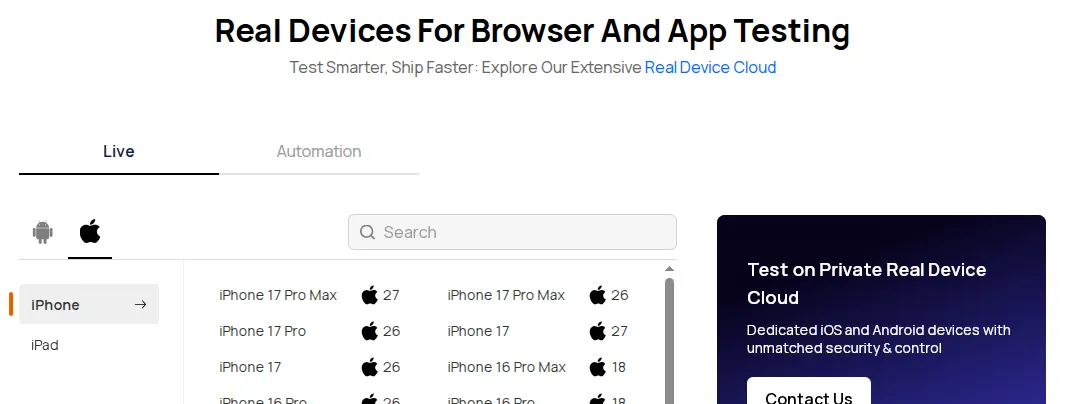
TestMu AI's real device cloud provides 10,000+ real Android and iOS devices with no MDM enrollment, USB cables, or IT provisioning, and it wipes each device at the end of a session, removing installed apps, cached credentials, and stored data. When a team needs devices that keep a fixed configuration, the private real device cloud reserves dedicated devices for one organization, with pre-installed apps, saved credentials, and configured network settings maintained by TestMu AI.
Key Takeaway: QA teams use MDM for two jobs: holding a test lab on fixed OS versions through Apple Software Update declarative configuration and Android system update policies, and checking their own app against managed configurations, restricted device states, and work profiles. An owned lab still carries one OS version per phone, so a real device cloud covers the models and versions the lab does not hold.

Note: Keep older and newer OS versions in your test matrix without buying more phones, using 10,000+ real Android and iOS devices on TestMu AI. Start testing free
Conclusion
Match your fleet to a row in the decision table, trial two of the mobile device management tools it names on spare Android and Apple devices, and confirm that update deferrals and kiosk mode behave as expected before a full rollout. For coverage beyond your lab, follow TestMu AI's Real Device App Testing guide to start a session, then move regression suites to App Automation, which runs Appium, Espresso, XCUITest, and Detox tests on real devices.
Author

Sai Krishna
Blogs: 24

Sai Krishna is Director of Engineering at TestMu AI (formerly LambdaTest), where he leads agentic AI for quality engineering, building AI agents that autonomously drive mobile and conversational test automation. His current focus is Agent Testing and Model Context Protocol (MCP) support for mobile. He is a core contributor and member of the Appium open-source project and the creator of AppiumTestDistribution and appium-device-farm. With over 14 years of experience including more than 9 years at Thoughtworks as a Principal Consultant, he holds a BSc in Electronics and speaks regularly at TestMu and Appium Conf on Appium, mobile automation, and agentic AI in testing.
Reviewer

Srinivasan Sekar
Reviewer
Srinivasan Sekar is Director of Engineering at TestMu AI (formerly LambdaTest), where he leads engineering and open-source initiatives behind the Selenium and Appium automation grid and owns TestMu AI's MCP Server. A committer to Appium and a contributor to Selenium, WebdriverIO, Taiko, and AppiumTestDistribution, he brings over 15 years of experience in quality engineering and open-source technologies. He is the author of the Apress book 'The MCP Standard: A Developer's Guide to Building Universal AI Tools with the Model Context Protocol,' a Certified Kubernetes and Cloud Native Associate, and an international conference speaker. Before TestMu AI he spent over eight years at Thoughtworks as a Principal Consultant and Quality Architect. Srinivasan holds a B.Tech in Information Technology from Anna University.


MDM Tools FAQs
Did you find this page helpful?
More Related Learning Hubs
TestMu AI forEnterprise
Get access to solutions built on Enterprise
grade security, privacy, & compliance
- Advanced access controls
- Advanced data retention rules
- Advanced Local Testing
- Premium Support options
- Early access to beta features
- Private Slack Channel
- Unlimited Manual Accessibility DevTools Tests