
Assure your AI deployment - across enterprise and real world
We assure that your AI works as intended. Safely and securely.

Bulk API Import and Response Assertions in KaneAI
Import Postman collections and OpenAPI specs into KaneAI as API steps, add header, JSONPath and schema assertions, and debug each call in the API Console.
Published on:
If you maintain a Postman collection, your API coverage is already written down. Moving it into a test that also drives the UI used to mean retyping every request, header, and variable by hand.
Bulk API Import now brings a Postman collection or an OpenAPI specification in as editable API steps. API response assertions check the returned data with JSONPath expressions or a JSON Schema. The API Console shows the request KaneAI actually sent, resolved variables included, so you debug a failing call from evidence.
For the single-request workflow and cURL pasting that came before it, see API testing with KaneAI.
Importing a Postman Collection or OpenAPI Spec
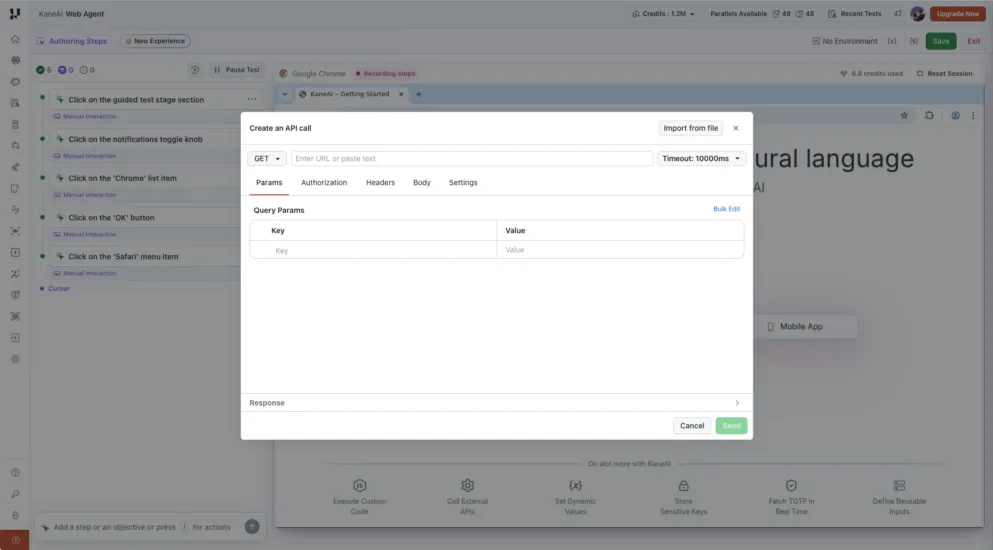
The import wizard opens from the /API command in the instruction input. Choose Import from file inside Create an API call, then upload the collection or specification.
| Input | Supported format | What it does |
|---|---|---|
| Postman Collection | .json (v2.1) | Imports requests from the collection, grouped by the folders they already sit in |
| OpenAPI specification | .json, .yaml, .yml | Imports API operations defined in the specification |
| Environment file (optional) | Postman environment .json, or .env | Supplies values for the variable mapping step |
The maximum file size is 500 KB. After upload, KaneAI reports the detected file type, request count, folders, authentication schemes, and environment variables, so you catch a wrong file before KaneAI creates a step. You can Replace or Remove the file at that point.
Each imported request becomes an editable API step. The fundamentals in Postman API testing map onto these steps.
How the Import Wizard Works
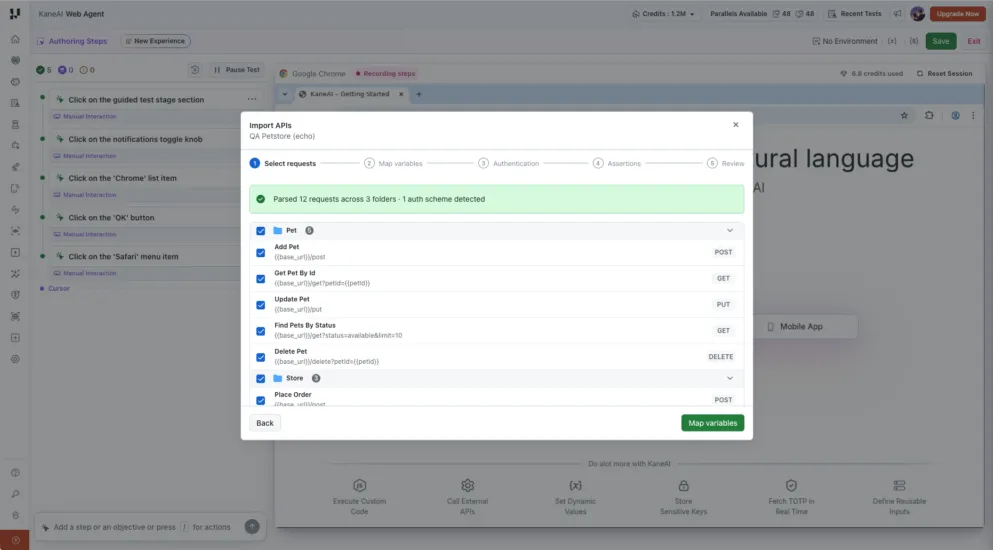
The wizard runs in five stages: Select requests, Map variables, Authentication, Assertions, and Review. KaneAI adds nothing to the test until the final step.
- Select requests - listed by folder, each showing its name, HTTP method, and URL with variable placeholders intact. A folder checkbox clears or selects its whole group, and KaneAI imports only what you select.
- Map variables - KaneAI matches every detected variable against the variables already in your workspace.
- Authentication - review what the file declared and fill the gaps the importer cannot resolve.
- Assertions - apply response-header checks across every selected API, or skip the stage.
- Review - confirm the step counts, set a request timeout, and import.
Variable mapping decides whether the imported calls reach the right environment. Each row shows the variable's source, how many requests use it, what KaneAI will do with it under Kane will, and the destination under Goes to. Where the current value and the file value disagree, you choose.
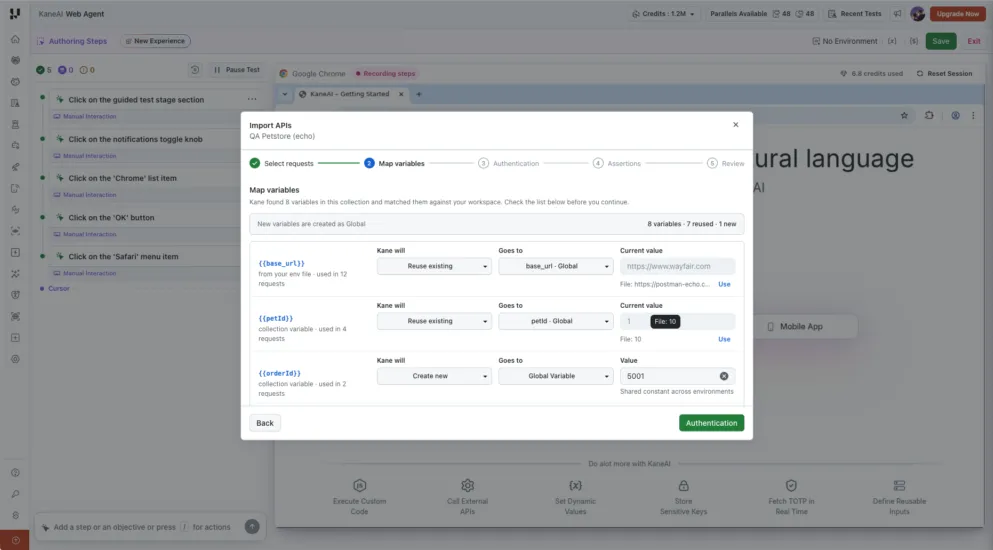
Check the base URL row. An existing base_url in your workspace can point at a different environment from the one the collection was written against, and a reused value sends every imported request somewhere you did not intend. Secret values stay masked.
KaneAI natively supports Basic, Bearer, and AWS Signature v4. API Key authentication sent in a header uses the header fallback: give the header name and a value, which can reference a variable such as a secret. Leaving it blank imports the request without it, which works if you add the header before that request runs.

Note: KaneAI authors web, mobile, API, and database checks as steps in one connected test on TestMu AI. Start free with TestMu AI
Response Header Assertions Across Imported APIs
The Assertions stage applies a response-header check to every API you selected, in one pass. Headers in the wizard include Content-Type, Cache-Control, X-Request-Id, and X-RateLimit-Remaining, each with its own operator.
| Operator | Check | Expected value |
|---|---|---|
| is present | The response includes the header | Not required |
| equals | The header equals the specified value | Required |
| contains | The header contains the specified value | Required |
Assertion steps equal selected headers multiplied by selected APIs, so 12 APIs with two selected headers produce 24 assertion steps and 36 steps in total. Leaving every header unselected imports the API steps alone.
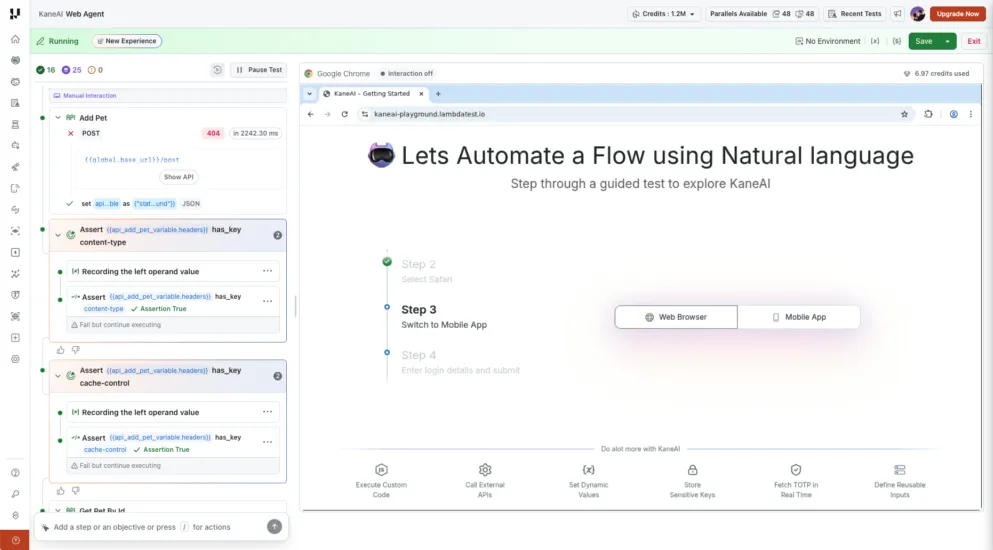
KaneAI inserts each assertion right after the API step it belongs to, so the list reads request, checks, next request. Each one stays editable.
A header assertion does not establish that the call succeeded. An error response carries Content-Type and Cache-Control exactly as a successful one does, so a suite built only on header checks can pass while the API returns 404s. The screenshot above shows that: a failed POST whose content-type and cache-control assertions both report Assertion True.
JSONPath and Schema Assertions on a Response
Open Assert API response from the slash menu to validate the response body. Both of its tabs create assertion steps.
| Validation | Use it to check | Example |
|---|---|---|
| JSONPath | A field, nested value, array item, or filtered set of items | A product price is greater than zero |
| Schema | The response structure and the rules a JSON Schema defines | Each product has a required ID and a numeric price |
The source API step has to run before the assertion that reads its response, since the assertion works against a captured response, not a live call.
For a JSONPath assertion, pick the response variable under Source Variable, then expand Response tree and click a field, or type the expression. A path starts with $, the response body.
| JSONPath | What it selects |
|---|---|
| $.data.total | The total value in the data object |
| $.data.products[0].name | The first product's name, since array indexes start at zero |
| $.data.products[*].price | The prices of every product in the array |
| $.data.products[?(@.available==true)] | Only the products whose available value is true |
| $..price | Values of any property named price, at any depth |
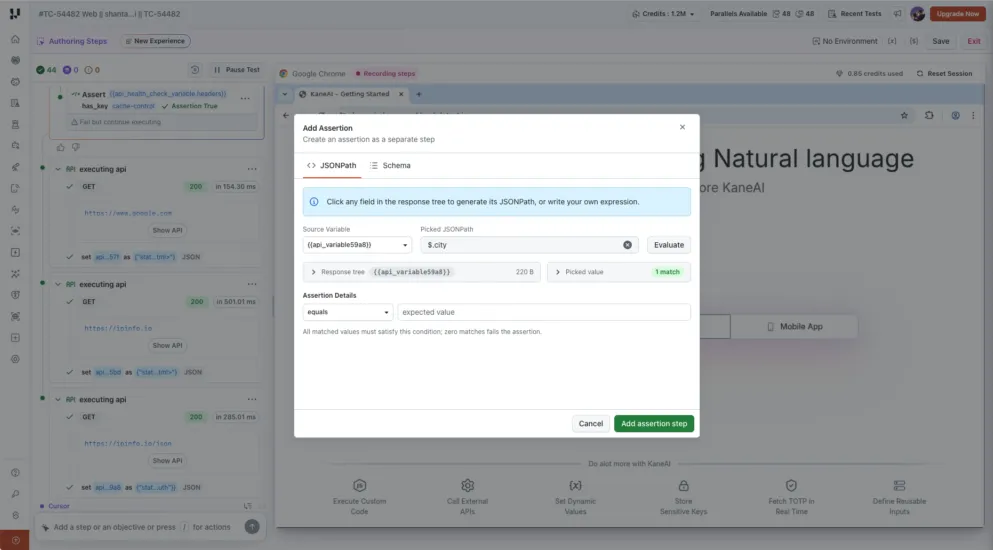
Use Evaluate before you save. It reports the match count and the matched values, which catches a path that selects nothing, or more than you meant. Every matched value must satisfy the comparison, and zero matches fails the assertion. When you only need a filter to find something, use is not empty.
KaneAI renders a sampled response tree for a large response, so the preview can hold less data than the stored response the evaluation runs against. Use the expression and its evaluation result to check beyond the sample, rather than scrolling the tree.
Schema validation describes the shape you expect, using JSON Schema, and checks the response against it with no expected-value comparison. Generate a schema from the captured response and edit it, or select a saved one.
{
  "type": "object",
  "properties": {
    "id": { "type": "integer" },
    "name": { "type": "string" },
    "price": { "type": "number" }
  },
  "required": ["id", "price"],
  "additionalProperties": false
}
KaneAI infers that schema from one sample response, so treat it as a draft. Arrays holding different object shapes, mixed value types, and optional fields need manual edits. The example above fits a single product object. For a response wrapped in data, or an array of products, describe the surrounding structure too.

The API Console
The Console sits in the response section of the API modal, beside Body, Cookies, and Headers. It opens after you validate an API or reopen an API step, and it shows what KaneAI sent even when the call returned nothing and the response tab is empty.
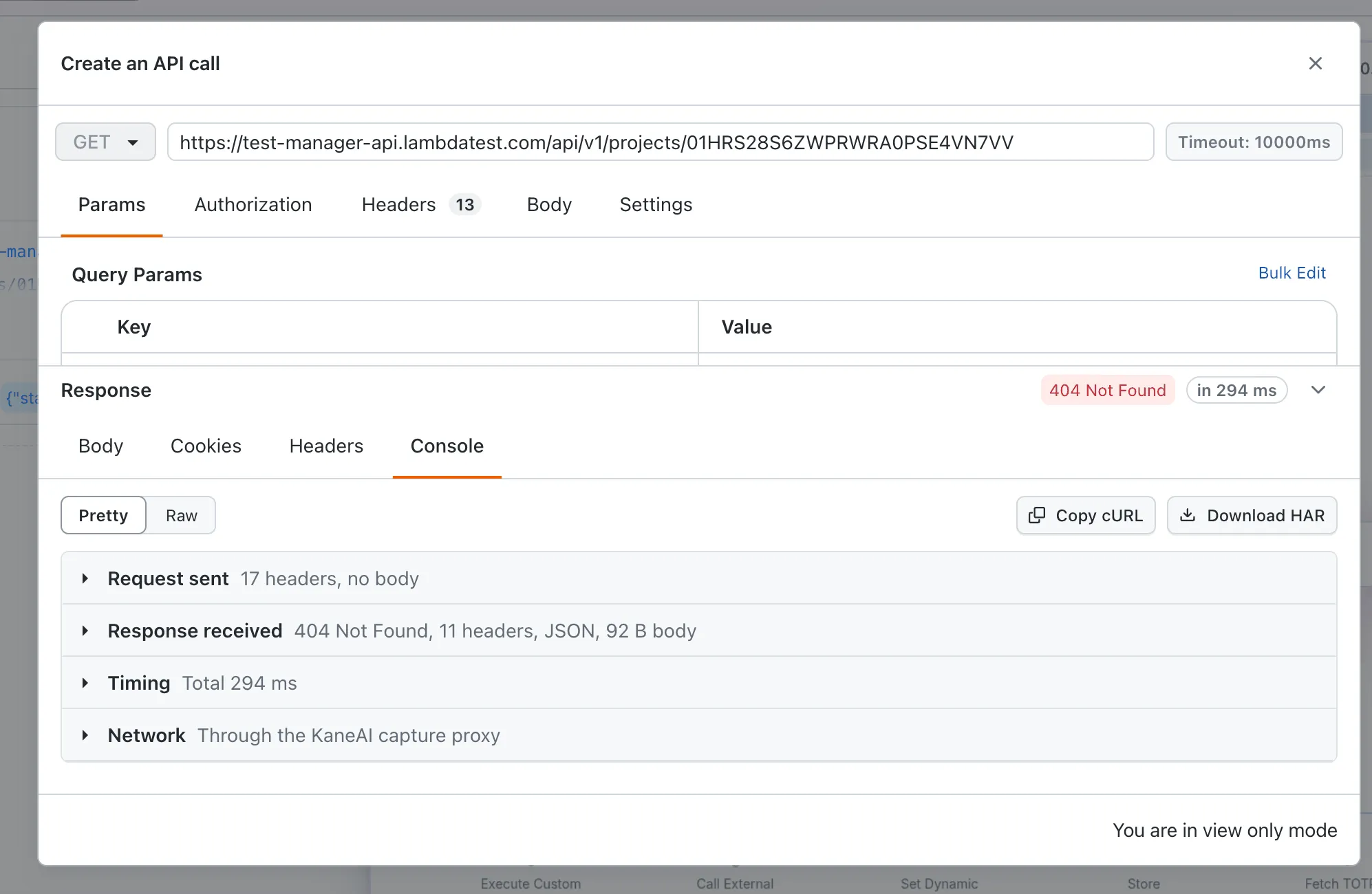
It opens in Pretty view, which groups the call into sections. Raw shows the request and response as plain HTTP text, as they went over the wire.
- Request sent - the method and fully resolved URL, plus every variable, the value it resolved to, and its source: variable, parameter, secret, or environment. KaneAI flags a variable with no value as empty, which is how you spot a missing environment.
- Headers and their origin - every header sent and its source: typed in the Headers tab, generated from the Authorization tab, or added by KaneAI. Host, User-Agent, Accept, Accept-Encoding, Connection, and Content-Length are among those KaneAI adds.
- Response received - the status code, the response headers, and the body with its format and size.
- Timing - the total broken into preparing the request, DNS lookup, connecting, the TLS handshake, waiting for the first byte, and downloading, matching the time shown on the API step.
- Network - the IP address and region it came from, the server address it reached, the route as a direct connection, tunnel, or proxy, whether a connection was reused, and TLS and certificate details for HTTPS.
On a failure, the Console names the phase where the call stopped, so you separate a DNS failure from a connection failure, and a connection failure from a TLS failure, without opening a log. Where KaneAI reused a connection, it marks those phases skipped.
Copy cURL and Download HAR move the problem out of KaneAI when someone else has to look at it. Copy cURL gives the resolved request as a cURL command to rerun in a terminal or hand to a backend developer. Download HAR saves the call as an HTTP Archive file for browser developer tools or a bug report. The sent-from IP address is also what an API owner needs when the endpoint accepts only allowlisted addresses.
Import Limits and Common Issues
- 500 KB file ceiling - split a collection above it before importing.
- No Postman scripts - pre-request and post-response scripts are neither imported nor executed. You rebuild their logic as KaneAI instructions or slash commands.
- Wizard assertions are header-only - you create JSONPath and schema checks for the response body separately.
- One-way import - no live connection to the Postman workspace and no sync of later changes, so a changed collection means a fresh import.
| Symptom | What to check |
|---|---|
| The file cannot be parsed | Confirm it is a supported collection or specification with valid JSON or YAML, rather than an arbitrary JSON file |
| A request reaches the wrong endpoint | Check the mapped base URL and other reused values, then use the API Console to inspect the resolved request |
| A request returns an authentication error | Review its Authorization and Headers settings, variable values, and any authentication skipped during import |
| An API errors while its header assertion passes | Inspect the status and body, because header presence alone does not validate the business outcome |
| A header assertion fails on some APIs only | Confirm those endpoints return that header and value, then edit the individual assertions the bulk pass created |
For the full reference on both wizards, read the documentation on Bulk API Import and on API response assertions.
Conclusion
Import one folder rather than the whole collection, and check the mapped base URL on the Map variables stage before you continue. That one value decides whether every imported request hits the environment you meant.
Then add a JSONPath or schema assertion on the response your test depends on, since header checks alone pass against an error response. KaneAI runs those API steps in the same test as the UI actions around them, so a click, the call behind it, and the data it returned are validated as one path. The API testing guide covers the practice, and the KaneAI API testing documentation covers setup.
Author

Bhavya Hada
Blogs: 30


Bhavya Hada is a Community Contributor at TestMu AI with over three years of experience in software testing and quality assurance. She has authored 20+ articles on software testing, test automation, QA, and other tech topics. She holds certifications in Automation Testing, KaneAI, Selenium, Appium, Playwright, and Cypress. At TestMu AI, Bhavya leads marketing initiatives around AI-driven test automation and develops technical content across blogs, social media, newsletters, and community forums. On LinkedIn, she is followed by 4,000+ QA engineers, testers, and tech professionals.
Reviewer

Shantanu Wali
Reviewer
Shantanu Wali is Vice President of Product Management at TestMu AI, where he owns several product lines across the testing platform, including the Real Device Cloud and the Digital Experience Testing Cloud. He has also contributed significantly to the development and scaling of KaneAI, TestMu AI's flagship GenAI-native testing agent that uses natural language to make software testing faster and more reliable in this AI era. He brings 7+ years of experience across software development and product management, starting as a backend developer at Infosys building solutions for Fortune 500 clients. Shantanu holds an MBA from IIM Calcutta and a B.Tech in Mechanical Engineering.


Bulk API Import FAQs
Did you find this page helpful?
More Related Blogs





TestMu AI forEnterprise
Get access to solutions built on Enterprise
grade security, privacy, & compliance
- Advanced access controls
- Advanced data retention rules
- Advanced Local Testing
- Premium Support options
- Early access to beta features
- Private Slack Channel
- Unlimited Manual Accessibility DevTools Tests