
Run Tests Up to 70% Faster than Traditional Test Grids
HyperExecute Is an AI-Native Test Orchestration Platform to Run Your Automation Test Suites with Blazing Fast Speed.

GitHub Actions Matrix: How to Run Tests Across OS, Browsers and Shards
Learn how a GitHub Actions matrix fans one job out across OS, browsers and shards, with include, exclude, fail-fast and dynamic matrix examples.
Published on:
A GitHub Actions matrix will run one job definition many times (once for each combination of the values you specify under strategy.matrix), e.g., operating systems, browser projects or shard numbers. GitHub will create a separate job for each combination, up to 256 jobs per workflow run. You can control the outcome with include, exclude, fail-fast and max-parallel.
A matrix is the quickest way to get coverage across a large number of environments in CI without having to copy jobs. It also becomes very slow and very noisy very quickly if every combination is running on every push. This guide covers the syntax, the rules that GitHub applies to determine which combinations get included and which get excluded, how to shard a test suite and when it's time to move the matrix off GitHub runners.
TL;DR
A GitHub Actions matrix strategy runs one job definition once for every combination of the values listed under strategy.matrix, such as operating systems, browser projects or shard numbers. For test suites, shape the combinations with include and exclude, set fail-fast to false so every browser reports, and name each artifact by its matrix values.
GitHub Actions Matrix Strategy Keys
- strategy.matrix: Lists the variables a GitHub workflow matrix expands, such as os and project. Each generated job reads its own values through the matrix context, for example matrix.os in runs-on.
- exclude: The GitHub Actions matrix exclude key removes every combination that matches an exclude entry, even on a partial match. GitHub applies all exclude entries before it processes any include entry.
- include: A GitHub Actions matrix include entry adds its keys to the original combinations it fits without overwriting a value, or becomes a new job when it cannot fit any original combination.
- fail-fast: The GitHub Actions fail-fast setting cancels in-progress and queued matrix jobs when one job fails, so test matrices set it to false to keep every result. Default: true.
- max-parallel: Caps how many matrix jobs run at the same time, which protects a shared staging server or test account from a burst of parallel jobs.
Build Matrix Options for Large Test Suites
- Sharding: GitHub Actions matrix sharding splits one suite into numbered slices with shardIndex and shardTotal values and the Playwright --shard flag, and a merge job combines the blob reports into one HTML report. Runs on GitHub runners: Yes.
- Dynamic matrix: Builds the matrix list from an earlier job's output with fromJSON and needs, so the list of suites lives in a data file rather than in workflow code.
- HyperExecute: The TestMu AI test orchestration platform runs Matrix mode or AutoSplit from one GitHub Actions step and a hyperexecute.yaml file, on its own machines instead of runner jobs. Runs on GitHub runners: No.
What Is a GitHub Actions Matrix?
A GitHub Actions matrix is a list of variables under jobs.<job_id>.strategy.matrix. GitHub will run the job once for every combination of those variables.
Two variables, each with two values, result in four jobs. Three variables, each with three values, result in 27.
Each job reads its own values through the matrix context, e.g., ${{ matrix.os }}. The ceiling is very clearly stated in the GitHub workflow syntax reference: a matrix can generate a maximum of 256 jobs per workflow run (GitHub workflow syntax).
Teams use a matrix in automation testing for three jobs that otherwise mean copy-pasted YAML:
- Environment coverage: the same unit or end-to-end suite on Linux, Windows and macOS runners.
- Browser coverage: same Playwright or Selenium suite per browser project.
- Speed: one suite chopped up into numbered shards that all run at the same time.
If you're still not quite sure what goes in that suite at all, start with the basics of automation testing and then come back to the matrix.
For a quick visual walkthrough of this concept, watch the video below from TestMu AI.
Subscribe to the TestMu AI YouTube channel for more tutorials on testing and automation.
How Do You Write Your First Matrix for a Test Suite?
A first matrix requires nothing more than the strategy.matrix block and a step that reads the values. This workflow runs a Node.js test suite against two OSes and two Node versions; hence, it creates four jobs:
name: unit-tests
on: [push, pull_request]
jobs:
  unit:
    runs-on: ${{ matrix.os }}
    strategy:
      matrix:
        os: [ubuntu-latest, windows-latest]
        node: [20, 22]
    steps:
      - uses: actions/checkout@v6
      - uses: actions/setup-node@v6
        with:
          node-version: ${{ matrix.node }}
      - run: npm ci
      - run: npm test
The browser version of that same concept uses the Playwright project name as the matrix value. That will work provided your playwright.config has projects defined with the names you list:
jobs:
  e2e:
    runs-on: ubuntu-latest
    strategy:
      fail-fast: false
      matrix:
        project: [chromium, firefox, webkit]
    steps:
      - uses: actions/checkout@v6
      - uses: actions/setup-node@v6
        with:
          node-version: lts/*
      - run: npm ci
      - run: npx playwright install --with-deps
      - run: npx playwright test --project=${{ matrix.project }}
Each combination runs as its own job, so a failure will point to one environment rather than "the test job". For the remainder of the Playwright pipeline (artifacts, failure triage and running on a cloud grid), see the full Playwright GitHub Actions setup.

Note: Running a massive browser matrix on every PR? HyperExecute (the test orchestration platform from TestMu AI) runs the same suite from a single GitHub Actions step and then splits it out across its own machines. You're no longer maintaining your matrix keys and shard lists. See how HyperExecute speeds up your GitHub Actions tests.
How Do Include and Exclude Change the Matrix?
exclude removes the combinations, and include adds to them (or extends them). GitHub processes every include after the exclude, so an include can in fact put a combination back which you've previously excluded.
GitHub applies these rules (About matrix strategies):
- Exclude first. Any combination that matches an exclude entry is dropped.
- Include extends where it can. An include entry's key/value pairs are added to every original combination (they don't overwrite).
- Include adds where they must. If an include entry can't be added without overwriting an existing value, it becomes a new combination.
This browser-by-OS matrix uses all three rules:
strategy:
  matrix:
    os: [ubuntu-latest, windows-latest, macos-latest]
    project: [chromium, firefox, webkit]
    exclude:
      - os: windows-latest
        project: webkit
    include:
      - os: ubuntu-latest
        project: chromium
        smoke: true
      - os: ubuntu-latest
        project: msedge
Here is what GitHub builds from that block:
- 3 operating systems x 3 projects = 9 combinations.
- The exclude entry drops Windows/WebKit, leaving 8.
- The first include entry corresponds to the existing Ubuntu + Chromium job (so nothing gets overwritten), and that job also gets
smoke: true. - The second include entry would overwrite the project on every original combination, so GitHub adds it as a new ninth job.
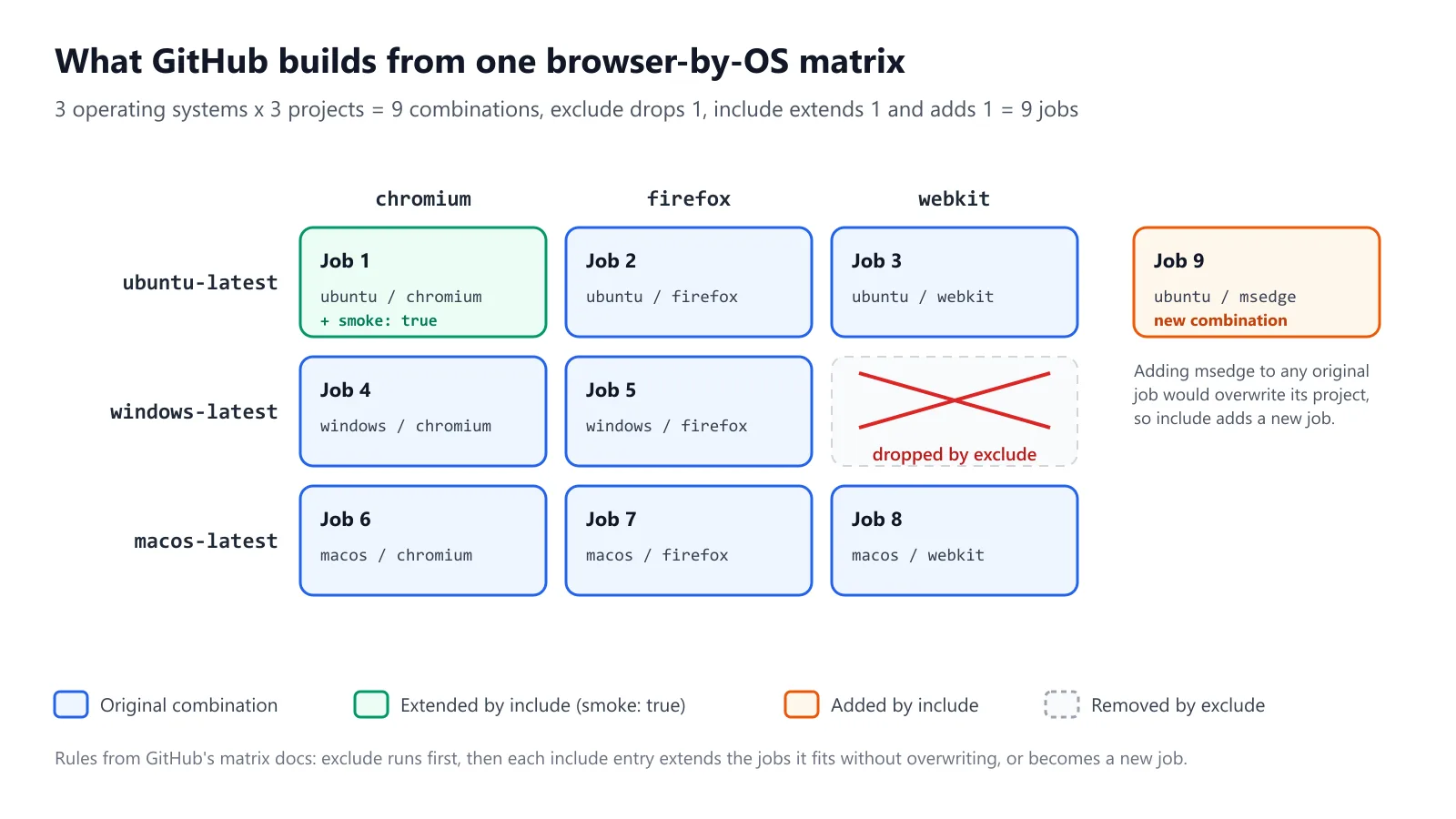
Read matrix.smoke to run a tagged smoke subset on just that one job. The msedge job will only work if your Playwright config has an msedge project defined.
What Do fail-fast, max-parallel and continue-on-error Do?
These three keys determine what happens when a matrix job fails and how many jobs run in parallel. For test suites, the defaults are almost certainly not what you want.
| Setting | Default | What it does | For test suites |
|---|---|---|---|
| fail-fast | true | Cancels in-progress and queued matrix jobs when any job fails | false, so one red browser doesn't hide results from the others |
| max-parallel | As many as runner availability allows | Caps how many matrix jobs run at the same time | Set it when jobs share a rate-limited staging server or test account |
| continue-on-error | false | Lets a job fail without failing the workflow | Point it at a matrix flag for experimental combinations only |
The defaults in that table come from GitHub's workflow syntax reference. Playwright's own sharding example also has fail-fast set to false (Playwright sharding docs).
GitHub documents this pattern for an experimental combination that may fail without failing the run:
jobs:
  e2e:
    runs-on: ubuntu-latest
    continue-on-error: ${{ matrix.experimental }}
    strategy:
      fail-fast: false
      max-parallel: 4
      matrix:
        project: [chromium, firefox]
        experimental: [false]
        include:
          - project: webkit
            experimental: true
That block kicks off three jobs. A WebKit failure will appear as 'failed' in the run graph but won't cause the workflow to turn red. A Chromium or Firefox failure still does.
How Do You Shard a Test Suite With a Matrix?
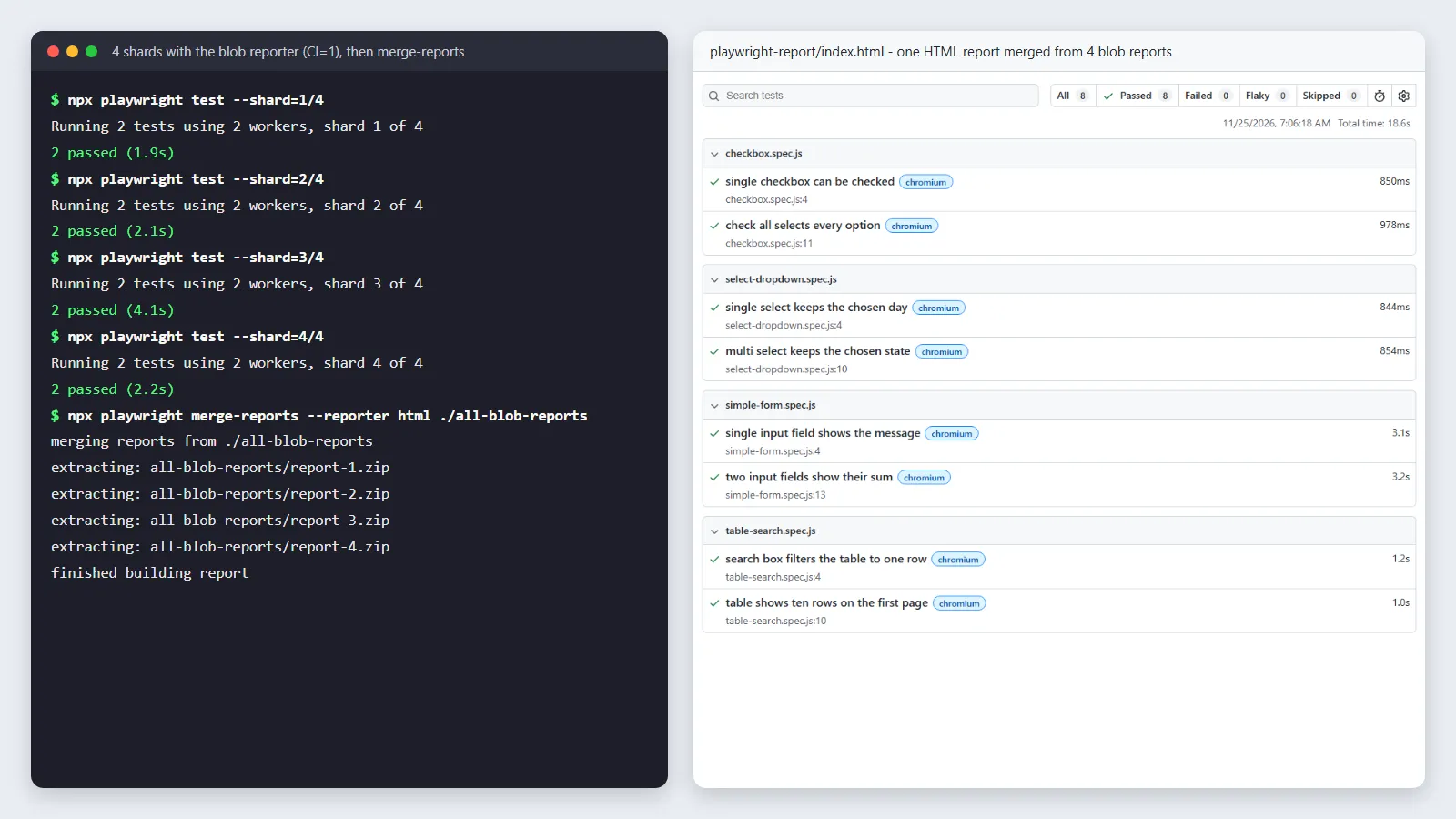
Sharding uses the matrix for speed rather than coverage. Each job runs one slice of the same suite, and there's a final job which merges the reports. Playwright documents the pattern via a shardIndex and shardTotal matrix and the --shard flag.
First, set the blob reporter for CI in playwright.config, so every shard writes a mergeable report to blob-report/:
// playwright.config.ts
export default defineConfig({
  testDir: './tests',
  reporter: process.env.CI ? 'blob' : 'html',
});
Then add the shard matrix and a merge job:
jobs:
  playwright-tests:
    runs-on: ubuntu-latest
    strategy:
      fail-fast: false
      matrix:
        shardIndex: [1, 2, 3, 4]
        shardTotal: [4]
    steps:
      - uses: actions/checkout@v6
      - uses: actions/setup-node@v6
        with:
          node-version: lts/*
      - run: npm ci
      - run: npx playwright install --with-deps
      - run: npx playwright test --shard=${{ matrix.shardIndex }}/${{ matrix.shardTotal }}
      - uses: actions/upload-artifact@v5
        if: ${{ !cancelled() }}
        with:
          name: blob-report-${{ matrix.shardIndex }}
          path: blob-report
          retention-days: 1
  merge-reports:
    if: ${{ !cancelled() }}
    needs: [playwright-tests]
    runs-on: ubuntu-latest
    steps:
      - uses: actions/checkout@v6
      - uses: actions/setup-node@v6
        with:
          node-version: lts/*
      - run: npm ci
      - uses: actions/download-artifact@v5
        with:
          path: all-blob-reports
          pattern: blob-report-*
          merge-multiple: true
      - run: npx playwright merge-reports --reporter html ./all-blob-reports
      - uses: actions/upload-artifact@v5
        with:
          name: html-report--attempt-${{ github.run_attempt }}
          path: playwright-report
          retention-days: 14
Four details make this work:
- Unique artifact names. Every shard uploads
blob-report-<index>so the shards don't overwrite each other's results. if: ${{ !cancelled() }}. Reports will upload even if the tests fail (which is precisely when you want them to).- The blob reporter on CI. Without the reporter (
process.env.CI ? 'blob' : 'html'), there is noblob-report/folder, the uploads are empty, and the merge step has nothing to merge. - A merge job that runs after failures.
merge-reportswaits for every shard that needs to run, will run even if the shards fail (!cancelled()) and then collects all theblob-report-*artifacts into one folder withmerge-multiple: true. This is in accordance with the Playwright sharding docs.
How to pick a shard count and how to debug uneven shards is all in the Playwright sharding guide. A fixed shard list won't rebalance itself as your suite grows. If one shard is always the last to finish, then you need to add shards or move to timing-based splitting.

How Do You Build a Dynamic Matrix From a Job Output?
A dynamic matrix reads its values from the output of a prior job rather than from hard-coded YAML. GitHub has documented this pattern using fromJSON and needs. In this example, the suite list is read from a JSON file in the repo, so the list of suites remains as data rather than as workflow code:
jobs:
  define-matrix:
    runs-on: ubuntu-latest
    outputs:
      suites: ${{ steps.list.outputs.suites }}
    steps:
      - uses: actions/checkout@v6
      - id: list
        run: echo "suites=$(cat ci/suites.json)" >> "$GITHUB_OUTPUT"
  test:
    needs: define-matrix
    if: needs.define-matrix.outputs.suites != '[]'
    runs-on: ubuntu-latest
    strategy:
      fail-fast: false
      matrix:
        suite: ${{ fromJSON(needs.define-matrix.outputs.suites) }}
    steps:
      - uses: actions/checkout@v6
      - uses: actions/setup-node@v6
        with:
          node-version: lts/*
      - run: npm ci
      - run: npx playwright install --with-deps
      - run: npx playwright test tests/${{ matrix.suite }}
ci/suites.json is a single line of JSON array containing folder names (e.g. ["checkout","search","account"]). Adding a suite is just a one-line change to the data. There's a script that can generate a different list for each PR (e.g. just the folders that the change touched), and that plugs into the same define-matrix job.
The if: line is there to prevent an empty list, a list with no values to expand on. With that guard in place, the test job is simply skipped. GitHub reports a job as "Success" when it's skipped via a conditional, so a PR that touches no suite at all can still merge (GitHub: troubleshooting required status checks).
How Do You Name the Matrix Jobs and Pass the Results Out?
Matrix jobs are easy to get going and difficult to finish. You need readable names, branch protection and results that actually leave the job to be set up deliberately.
Name each job from its matrix values. jobs.<job_id>.name is what the GitHub UI will display, and it can read the matrix context:
jobs:
  e2e:
    name: e2e (${{ matrix.os }}, ${{ matrix.project }})
    runs-on: ${{ matrix.os }}
    strategy:
      fail-fast: false
      matrix:
        os: [ubuntu-latest, windows-latest]
        project: [chromium, firefox]
Need just one gate job rather than one for every combination. Branch protection will find the required status checks by name. Each matrix combination will report its own check, so if you rename an axis or add a value, the set of checks a PR will produce will be different.
A single gate job that needs the matrix gives branch protection a stable name. GitHub recommends always() with needs for required checks so the gate will still report if a matrix job fails:
  tests-passed:
    needs: [e2e]
    if: ${{ always() }}
    runs-on: ubuntu-latest
    steps:
      - run: test "${{ needs.e2e.result }}" = "success"
Mark tests-passed as the required check. It fails whenever any e2e combination fails or is canceled.
Pass per-combination results through artifacts rather than job outputs. GitHub will combine the job outputs from all the jobs in a matrix and will not guarantee the order in which the matrix jobs run. If two combinations write an output with the same name, the final one to complete will overwrite the value (GitHub workflow syntax). For things like reports, timings or failed test lists, you should upload an artifact with a name of results-${{ matrix.os }}-${{ matrix.project }} and then read all of them in a later job.
Matrix, Sharding or HyperExecute? Which One Is Right for Your Suite?
A GitHub matrix is the perfect tool for environment coverage. It becomes a maintenance nightmare if you use it to speed up a large end-to-end suite. The table below compares the four ways that teams have split their tests from GitHub Actions:
| GitHub Actions matrix | Matrix sharding | HyperExecute Matrix mode | HyperExecute AutoSplit | |
|---|---|---|---|---|
| Splits by | Values you list | Shard number (--shard=i/n) | matrix keys in hyperexecute.yaml (os, browser, files) | Discovered tests (files, modules or scenarios) |
| Who balances the work | You | You (shard count) | You choose combinations | HyperExecute, using run history in local discovery mode |
| Ceiling | 256 jobs per workflow run | 256 jobs per workflow run | Your HyperExecute concurrency | concurrency value (parallel VMs) |
| Where tests run | GitHub-hosted or self-hosted runners | GitHub-hosted or self-hosted runners | HyperExecute machines, started from one GitHub step | HyperExecute machines, started from one GitHub step |
| Failure controls | fail-fast, continue-on-error | fail-fast, continue-on-error | failFast, retryOnFailure / maxRetries (1-5) | failFast, retryOnFailure / maxRetries (1-5) |
| Best for | Proving the suite passes everywhere | Cutting wall time of one suite | Browser × OS coverage without many runner jobs | Long suites that outgrew a hand-tuned shard list |
The HyperExecute columns (including history-based balancing in local discovery mode) are from the HyperExecute YAML reference.
Matrix Readiness Checklist (8 Checks Before You Merge)
- Count the jobs, multiply every list and then subtract the excludes. Anything near 256 requires a complete rethink.
- Set
fail-fast: falseon test matrices so that one failure doesn't cancel out the evidence from the other combinations. - Name your artifacts with matrix values (
report-${{ matrix.project }}) so that your uploads don't collide. - Upload reports
if: ${{ !cancelled() }}so that failed runs still leave some evidence. - Cap shared resources with
max-parallelwhen the jobs hit the same staging environment or test account. - Keep the secrets in the job's env (i.e., the job object itself), never in the matrix itself or in URLs.
- Tag a smoke subset with 'include' so that the PRs can run a small subset of the matrix whilst the nightly runs cover the full matrix.
- Require one gate job (needs + always()) in the branch protection, not one for each generated combination.
How Does HyperExecute Run a Matrix From GitHub Actions?
HyperExecute runs the matrix outside of GitHub's runners. A GitHub Actions job is triggered from a hyperexecute.yaml file in your repository.
The GitHub Actions integration doc shows the step where the HyperExecute CLI is downloaded. This version of the CLI reads its credentials from the repository secrets via environment variables:
jobs:
  hyperexecute:
    runs-on: ubuntu-latest
    steps:
      - uses: actions/checkout@v6
      - name: Download HyperExecute CLI
        run: |
          curl https://downloads.lambdatest.com/hyperexecute/linux/hyperexecute -o hyperexecute
          chmod +x hyperexecute
      - name: Run tests on HyperExecute
        env:
          LT_USERNAME: ${{ secrets.LT_USERNAME }}
          LT_ACCESS_KEY: ${{ secrets.LT_ACCESS_KEY }}
        run: ./hyperexecute --user "$LT_USERNAME" --key "$LT_ACCESS_KEY" --config hyperexecute.yaml
The matrix is in hyperexecute.yaml. Those are the Matrix mode keys from the HyperExecute YAML reference. The rest of the file (runtime, test discovery and test command) is taken from the sample for your framework:
runson: ${matrix.os}
matrix:
  os: ["win", "linux"]
  browser: ["Chrome", "Firefox"]
combineTasksInMatrixMode: true
concurrency: 2
Two rules from the reference material. In Matrix mode, HyperExecute will ignore concurrency unless you set combineTasksInMatrixMode to true. With that flag set, all the combinations will run on the number of machines that concurrency is set to rather than one machine per combination.
For long suites, autosplit set to true with a concurrency value will distribute the discovered tests across that many VMs.
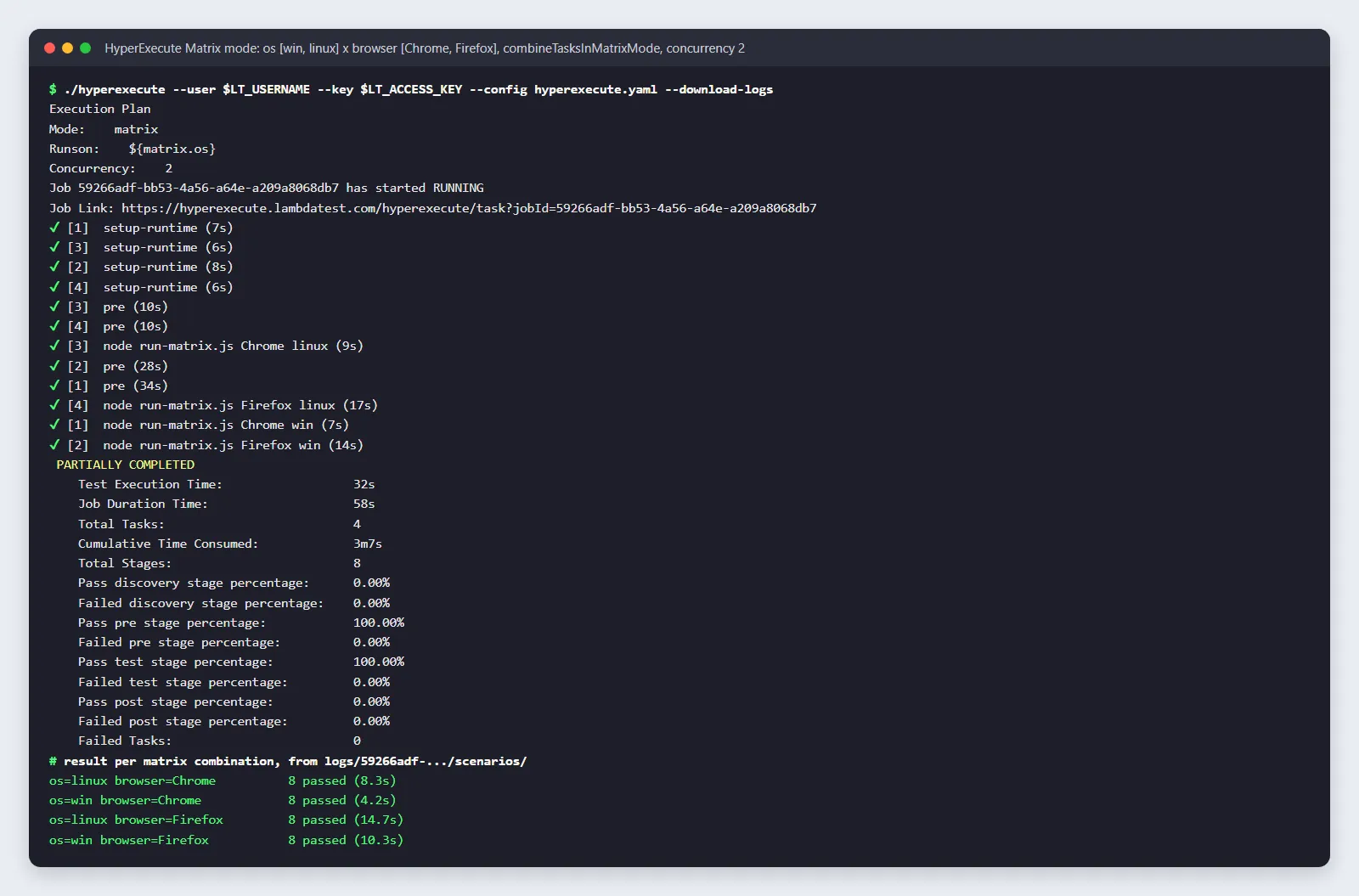
Teams measure it on their own suites. Boomi reports 78% faster test execution with HyperExecute (source: HyperExecute GitHub Actions page).
What Are the Common GitHub Actions Matrix Mistakes?
Most broken matrices come from one of six mistakes:
- Expecting to just add jobs. An include entry that fits with the existing combinations will extend those. You'll want to check the run graph after every include change.
- Leaving fail-fast on. One flaky WebKit test cancels Chromium and Firefox, and you lose their results.
- Colliding artifact names. Two jobs that upload the report will overwrite each other.
- Matrix values that don't match the config.
--project=${{ matrix.project }}will fail when the config has no project with that name. - Put the entire matrix on every push. Use a small
include-taggedset for PRs and the full matrix on a schedule. - Require every combination in branch protection. Rename one axis and the old required check names simply cease to report, so the PR ends up waiting on checks that never come. Require a single gate job instead.
Watch: Matrix Multiplexing and AutoSplit in Practice


Conclusion
A GitHub Actions matrix is by far the cleanest way to demonstrate that your suite passes on every OS and browser that you support. Keep it small on PRs, set fail-fast: false and name every artifact by its matrix values. When the matrix itself becomes a performance issue rather than a coverage issue, then run the same workflow on HyperExecute alongside your current matrix and compare the two.
Running a large browser matrix in CI? HyperExecute by TestMu AI runs the matrix combinations, or auto-splits the discovered tests, across parallel cloud VMs from one hyperexecute.yaml file, with retries and fail-fast in the same job.
Author

Japneet Singh Chawla
Blogs: 11

Japneet Singh Chawla is an Engineering Manager at TestMu AI, where he leads a team driving HyperExecute, the AI-native Test Orchestration Cloud Platform, and integrations with Cypress, Provar, Tosca, and Selenium, improving test execution efficiency and driving adoption across 500+ enterprise clients. He also spearheaded zero-downtime deployments that cut release-related downtime by 90%, and mentors new engineers into productive contributors. He brings 9+ years of experience building and scaling distributed systems, SaaS platforms, and developer tools, with deep hands-on backend engineering across Golang, Python, Node.js, Kafka, and Redis. Earlier at Sumo Logic he built award-winning developer tools, including a VS Code Parser Linter, and at Indus Valley Partners he was a founding member of the Sentiment Analyzer team, building ML-powered solutions for financial clients. Japneet holds an MCA in Computer Science from GGSIPU.
Reviewer

Mayank Bhola
Reviewer
Mayank Bhola is Co-Founder and Head of Products at TestMu AI, where he leads the entire product portfolio across KaneAI, Kane CLI, HyperExecute, SmartUI, the Real Device Cloud, Accessibility, and other software testing product lines. As an early Lead Architect he designed and built the company's flagship Tunnel technology from scratch, created the React-based automation platform, and architected the data-intensive pipelines and FAAS services that scale it. He brings more than 10 years of experience in software development and product engineering, with earlier roles as Head of Technology at Juggernaut Books and Senior Software Engineer at PressPlay TV and Zomato. Mayank holds a B.Tech in Computer Engineering from JIIT Noida.
GitHub Actions Matrix FAQs
Did you find this page helpful?
More Related Blogs






TestMu AI forEnterprise
Get access to solutions built on Enterprise
grade security, privacy, & compliance
- Advanced access controls
- Advanced data retention rules
- Advanced Local Testing
- Premium Support options
- Early access to beta features
- Private Slack Channel
- Unlimited Manual Accessibility DevTools Tests