
Power Your Software Testing with AI Agents and Cloud
The Native AI-Agentic Cloud Platform to Supercharge Quality Engineering. Test Intelligently and Ship Faster.


- TestMu AI (Formerly LambdaTest)
- /
- Blog
- /
- Using Playwright With GitHub Actions: CI/CD With AI Triage and Healing
Using Playwright With GitHub Actions: CI/CD With AI Triage and Healing
Build a Playwright GitHub Actions pipeline with AI steps: triage failures from error-context.md, heal locators in a reviewed PR commit, and run cloud browsers.
Published on:
Only 8% of organizations run AI-powered steps directly inside a build or test, even though 48.8% use AI for at least one CI/CD task, the JetBrains State of CI/CD 2026 report found. Most of that AI use sits around the pipeline, in code review, test writing, and diagnosing build failures.
The gap shows on every red pull request. The Run Playwright step fails, the log says locator.click timed out waiting for a button named Get Value, and someone has to decide whether the app lost the button or the test still uses an old name. That decision is the slow part of a Playwright GitHub Actions run, and a model can draft it when the job hands it the right evidence.
This guide puts the AI inside the pipeline with three additions to a standard workflow: an advisory triage step that classifies each failure, a healer job that proposes locator fixes as a commit on the pull request, and cross-browser runs on TestMu AI. The examples run against the TestMu AI Selenium Playground, so you can copy them unchanged.
If you need the base workflow for Jenkins, GitLab CI, or Azure DevOps instead, start with Playwright CI/CD.
TL;DR
A Playwright GitHub Actions pipeline with AI is a CI workflow that runs Playwright tests on every pull request and adds model-driven steps around the result: one classifies each failure from Playwright's error context, and another repairs broken locators in a reviewed commit. It exists because a red build needs a diagnosis before anyone can fix it.
- Playwright error context: Playwright writes an error-context.md file for every failed test with the error, the test source, and an accessibility snapshot of the page, which is enough for a model to tell a stale locator from an app bug.
- AI triage step: A Node script reads the Playwright JSON report, sends only failed tests to an OpenAI-compatible model, lists flaky tests without a model call, and writes a table to the job summary and the pull request. It never changes the job's pass or fail result.
- Can the healer agent merge its own fix? No. The Playwright healer runs through claude-code-action only after someone adds the ai-heal label, pushes a commit to the pull request branch, and cannot approve or merge, so a reviewer still signs off.
- Does AI triage run on fork pull requests? No. GitHub does not pass repository secrets to workflows triggered from forks, so the triage step finds no API key and writes a note that no failures were classified.
- Cross-browser runs: A Playwright suite runs on TestMu AI through Playwright projects that connect to a remote browser endpoint, so an Ubuntu runner can test WebKit on macOS and Chrome on Windows 11 without installing either browser.
Stages of a Playwright GitHub Actions Pipeline With AI
The test job stays in charge of pass or fail. The AI steps read what the test job produced and write advice or a proposed commit, and each job gets only the token permissions its step needs.
| Stage | Runs when | Uses a model | Token permissions | Produces |
|---|---|---|---|---|
| Test (chromium, testmu-chrome, testmu-webkit) | Every pull request and every push to main | No | contents: read | HTML report, results.json, and an error-context.md per failure |
| AI triage (a step in the test job) | The Playwright step fails | Yes, one call per failed test | contents: read | triage.md and a job summary table |
| Comment | A test leg fails on a pull request | No | pull-requests: write | One pull request comment with every leg's triage |
| Heal | Someone adds the ai-heal label to a same-repository pull request | Yes, the Playwright healer agent through Claude Code | contents, pull-requests, issues, and id-token: write | A commit on the pull request branch |
The healer is one of three Playwright test agents. The planner explores the app and writes a Markdown test plan, the generator turns the plan into test files, and the healer "executes the test suite and automatically repairs failing tests".
The Playwright release notes list the three agents under version 1.56. This pipeline uses only the healer: a CI job repairs what a pull request broke, and planning new coverage belongs in an editor.
How to Set Up the Playwright GitHub Actions Workflow
Start with a config that runs the same tests locally, in CI, and on cloud browsers, and that writes a machine-readable report the AI step can parse:
import { defineConfig, devices } from '@playwright/test';

// One TestMu AI session per worker; the build name groups every run of this workflow.
const testmu = (browserName: string, platform: string) => ({
  connectOptions: {
    wsEndpoint: `wss://cdp.lambdatest.com/playwright?capabilities=${encodeURIComponent(
      JSON.stringify({
        browserName,
        browserVersion: 'latest',
        'LT:Options': {
          platform,
          build: `playwright-gha-${process.env.GITHUB_RUN_ID ?? 'local'}`,
          name: `${browserName} on ${platform}`,
          user: process.env.LT_USERNAME,
          accessKey: process.env.LT_ACCESS_KEY,
          network: true,
          video: true,
          console: true,
        },
      }),
    )}`,
  },
});

export default defineConfig({
  testDir: './tests',
  fullyParallel: true,
  forbidOnly: !!process.env.CI,
  retries: process.env.CI ? 1 : 0,
  workers: process.env.CI ? 1 : undefined,
  globalTimeout: 15 * 60 * 1000,
  reporter: [
    ['list'],
    ['html', { open: 'never' }],
    ['json', { outputFile: 'reports/results.json' }],
  ],
  use: {
    baseURL: 'https://www.testmuai.com',
    trace: 'on-first-retry',
  },
  projects: [
    { name: 'chromium', use: { ...devices['Desktop Chrome'] } },
    { name: 'testmu-chrome', use: { browserName: 'chromium', ...testmu('Chrome', 'Windows 11') } },
    { name: 'testmu-webkit', use: { browserName: 'webkit', ...testmu('pw-webkit', 'macOS Sequoia') } },
  ],
});- JSON reporter - reports/results.json is the triage step's input. It records each test's status as expected, unexpected, or flaky, and the path of every attachment.
- One retry in CI - a single retry separates a flaky test, which fails and then passes, from a real failure, which fails twice. The triage step uses that split to decide which tests need a model call.
- One worker - the Playwright CI docs recommend setting workers to 1 in CI environments "to prioritize stability and reproducibility", and suggest sharding across jobs for wider parallelization.
- globalTimeout - Playwright's CI setup guide suggests a global timeout in the config instead of a job-level timeout-minutes, so the reporters still write a report when a run is cut short.
- Cloud projects - testmu-chrome and testmu-webkit connect to TestMu AI browsers over a WebSocket endpoint. The cloud section below covers them.
The workflow runs one job per project, adds the triage step after the tests, and posts the result on the pull request from a separate job:
name: Playwright

on:
  pull_request:
  push:
    branches: [main]

permissions:
  contents: read

concurrency:
  group: playwright-${{ github.ref }}
  cancel-in-progress: true

jobs:
  test:
    name: test (${{ matrix.project }})
    runs-on: ubuntu-latest
    strategy:
      fail-fast: false
      matrix:
        project: [chromium, testmu-chrome, testmu-webkit]
    steps:
      - uses: actions/checkout@v7
      - uses: actions/setup-node@v7
        with:
          node-version: lts/*
          cache: npm
      - run: npm ci
      - name: Install Chromium for the local project
        if: matrix.project == 'chromium'
        run: npx playwright install --with-deps chromium
      - name: Run Playwright
        id: tests
        env:
          LT_USERNAME: ${{ secrets.LT_USERNAME }}
          LT_ACCESS_KEY: ${{ secrets.LT_ACCESS_KEY }}
        run: npx playwright test --project=${{ matrix.project }}
      - name: AI failure triage
        if: failure() && steps.tests.outcome == 'failure'
        env:
          AI_API_KEY: ${{ secrets.AI_API_KEY }}
          AI_BASE_URL: https://generativelanguage.googleapis.com/v1beta/openai
          AI_MODEL: gemini-2.5-flash
        run: node scripts/ai-triage.mjs reports/results.json
      - uses: actions/upload-artifact@v7
        if: ${{ !cancelled() }}
        with:
          name: playwright-${{ matrix.project }}
          path: |
            playwright-report/
            reports/
            triage.md
          retention-days: 14

  comment:
    needs: test
    if: failure() && github.event_name == 'pull_request'
    runs-on: ubuntu-latest
    permissions:
      pull-requests: write
    steps:
      - uses: actions/download-artifact@v8
        with:
          pattern: playwright-*
          path: artifacts
      - name: Post triage to the pull request
        env:
          GH_TOKEN: ${{ github.token }}
        run: |
          cat artifacts/*/triage.md > triage-all.md 2>/dev/null || exit 0
gh pr comment ${{ github.event.pull_request.number }} --repo ${{ github.repository }} --body-file triage-all.md- Browser install - only the chromium leg runs npx playwright install --with-deps. The cloud legs drive remote browsers and need no local binaries.
- Secrets per step - LT_USERNAME and LT_ACCESS_KEY reach only the Run Playwright step, and AI_API_KEY reaches only the triage step.
- Triage condition - checking steps.tests.outcome runs triage when Playwright failed, not when npm ci did, so the script always finds a report.
- Artifacts - the !cancelled() condition uploads the HTML report, results.json, and triage.md even when tests fail, which is when you need them.
- Comment job - it is the only job with pull-requests: write, and it never checks out or runs pull request code. It posts with gh, which GitHub preinstalls on hosted runners and which reads its token from GH_TOKEN.
When the suite outgrows one job per project, split each leg with Playwright sharding. The triage step then runs once per shard on that shard's report.
Playwright's Failure Artifacts as AI Input
A failed test leaves an entry in the JSON report, a trace on its retry, and an error-context.md file. The HTML report shows the same failure to a person:
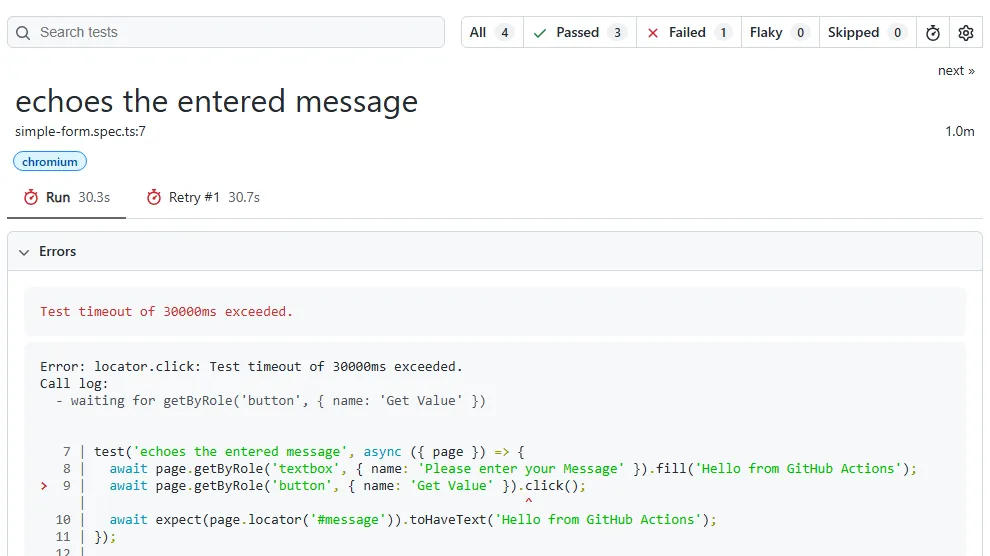
The error-context.md file is built as a prompt. It opens with fix-the-test instructions ("Explain why, be concise, respect Playwright best practices"), then adds the error, an accessibility snapshot of the page at the moment of failure, and the test source:
# Instructions

- Following Playwright test failed.
- Explain why, be concise, respect Playwright best practices.
- Provide a snippet of code with the fix, if possible.

# Test info

- Name: simple-form.spec.ts >> echoes the entered message
- Location: tests\simple-form.spec.ts:7:5

# Error details

```
Test timeout of 30000ms exceeded.
```

```
Error: locator.click: Test timeout of 30000ms exceeded.
Call log:
  - waiting for getByRole('button', { name: 'Get Value' })

```

# Page snapshot

```yaml
- generic [ref=e1]:
[... header and navigation ...]
              - generic [ref=e52]:
                - paragraph [ref=e53]: Enter Message
                - textbox "Please enter your Message" [active] [ref=e54]: Hello from GitHub Actions
                - button "Get Checked Value" [ref=e55] [cursor=pointer]
[... rest of the page ...]
```

# Test source

```ts
[...]
  7  | test('echoes the entered message', async ({ page }) => {
  8  |   await page.getByRole('textbox', { name: 'Please enter your Message' }).fill('Hello from GitHub Actions');
> 9  |   await page.getByRole('button', { name: 'Get Value' }).click();
     |                                                         ^ Error: locator.click: Test timeout of 30000ms exceeded.
  10 |   await expect(page.locator('#message')).toHaveText('Hello from GitHub Actions');
  11 | });
```- The answer is in the snapshot - the test waited for a button named Get Value, while the snapshot lists button "Get Checked Value" in the same form. A model that reads both sees that the test, rather than the app, is out of date.
- Size - this file is 27,451 bytes, mostly site header, navigation, and footer. A 12,000-character cap keeps the error, the call log, and the form; the test source at the end of the file falls outside it, which the call log makes up for.
- Cloud runs - the file carries the same page snapshot when the test runs on a TestMu AI browser through connectOptions, so triage works unchanged on the cloud legs.
- Keep the snapshot on - Playwright skips the snapshot when the PLAYWRIGHT_NO_COPY_PROMPT environment variable is set, so leave that variable out of CI.
Treat these files as sensitive. The Playwright CI intro warns that trace files, HTML reports, and console logs can contain user credentials, access tokens to a staging backend, and source code.
Send the model error-context.md only, keep traces in the artifact store, and use a model provider your data agreements already cover. For the other reporters Playwright ships, see Playwright reporting.
How to Add an AI Failure Triage Step
The triage step is one Node script with no dependencies. It walks the JSON report, sends each failed test's error context to a chat-completions endpoint, and writes a Markdown table into the job summary and into triage.md for the comment job:
// Classify Playwright failures from the JSON report and write a Markdown summary.
// Advisory only: it never changes the test job's result.
import fs from 'node:fs';

const REPORT = process.argv[2] ?? 'reports/results.json';
const MAX_FAILURES = Number(process.env.TRIAGE_MAX_FAILURES ?? 5);
const MAX_CONTEXT_CHARS = Number(process.env.TRIAGE_MAX_CONTEXT_CHARS ?? 12000);
const BASE_URL = process.env.AI_BASE_URL ?? 'https://api.openai.com/v1';
const MODEL = process.env.AI_MODEL ?? 'gpt-4.1-mini';

const report = JSON.parse(fs.readFileSync(REPORT, 'utf8'));
const tests = [];
const walk = (suite) => {
  for (const spec of suite.specs ?? []) {
    for (const t of spec.tests) tests.push({ title: spec.title, file: spec.file, line: spec.line, ...t });
  }
  for (const child of suite.suites ?? []) walk(child);
};
report.suites.forEach(walk);

const flaky = tests.filter((t) => t.status === 'flaky');
const failed = tests.filter((t) => t.status === 'unexpected');

const SYSTEM = `You triage Playwright test failures from CI.
Classify the failure as exactly one of:
- test-bug: the test is out of date (locator, assertion, or test data no longer matches the app)
- app-bug: the application behaved incorrectly
- environment: network, auth, rate limits, or infrastructure unrelated to the app's logic
- unknown: the evidence does not support a classification
Use only the evidence provided. Reply with JSON: {"category": string, "confidence": number between 0 and 1, "evidence": string quoting the line that decided it, "fix": string with at most two lines}.`;

async function classify(test) {
  const last = test.results.at(-1);
  const ctx = last.attachments.find((a) => a.name === 'error-context');
  const context = ctx?.path ? fs.readFileSync(ctx.path, 'utf8').slice(0, MAX_CONTEXT_CHARS) : last.error?.message ?? '';
  const res = await fetch(`${BASE_URL}/chat/completions`, {
    method: 'POST',
    headers: { Authorization: `Bearer ${process.env.AI_API_KEY}`, 'Content-Type': 'application/json' },
    body: JSON.stringify({
      model: MODEL,
      temperature: 0,
      response_format: { type: 'json_object' },
      messages: [
        { role: 'system', content: SYSTEM },
        { role: 'user', content: context },
      ],
    }),
  });
  if (!res.ok) throw new Error(`model call failed: ${res.status} ${await res.text()}`);
  const body = await res.json();
  return { ...JSON.parse(body.choices[0].message.content), tokens: body.usage?.total_tokens };
}

const cell = (text) => String(text ?? '').replaceAll('|', '\\|').replaceAll('\n', '<br>');
const rows = [];
const toClassify = process.env.AI_API_KEY ? failed.slice(0, MAX_FAILURES) : [];
for (const t of toClassify) {
  try {
    const v = await classify(t);
    console.error(`classified ${t.title} (${t.projectName}): ${v.tokens} tokens`);
    rows.push(`| ${t.file}:${t.line} ${t.title} | **${v.category}** (${v.confidence}) | ${cell(v.evidence)} | ${cell(v.fix)} |`);
  } catch (err) {
    rows.push(`| ${t.file}:${t.line} ${t.title} | not classified | ${cell(String(err.message).slice(0, 120))} | |`);
  }
}

const projects = [...new Set(tests.map((t) => t.projectName))].join(', ');
const lines = [`## AI failure triage (${projects})`, ''];
if (failed.length && !process.env.AI_API_KEY) lines.push('AI_API_KEY is not set, so no failures were classified.');
if (!failed.length && !flaky.length) lines.push('No failed or flaky tests.');
if (rows.length) lines.push('| Test | Category | Evidence | Suggested fix |', '|---|---|---|---|', ...rows);
if (failed.length > MAX_FAILURES) lines.push('', `${failed.length - MAX_FAILURES} more failures were not sent to the model (TRIAGE_MAX_FAILURES=${MAX_FAILURES}).`);
if (flaky.length) lines.push('', '**Flaky (passed on retry, no model call):**', ...flaky.map((t) => `- ${t.file}:${t.line} ${t.title}`));
lines.push('', '_Advisory only. A human decides whether to fix the test, file a bug, or rerun._');

const md = lines.join('\n');
fs.writeFileSync('triage.md', md);
if (process.env.GITHUB_STEP_SUMMARY) fs.appendFileSync(process.env.GITHUB_STEP_SUMMARY, md + '\n');
console.log(md);- Flaky tests skip the model - a test that failed and then passed on retry is already classified by the report, so the script lists it without spending tokens.
- Hard caps - TRIAGE_MAX_FAILURES (default 5) and TRIAGE_MAX_CONTEXT_CHARS (default 12,000) bound the spend when a bad merge fails fifty tests at once.
- Any OpenAI-compatible endpoint - AI_BASE_URL and AI_MODEL pick the provider. The workflow points at Gemini's OpenAI-compatible endpoint with gemini-2.5-flash; leave both unset and the script calls OpenAI with gpt-4.1-mini.
- Advisory only - a failed model call becomes a "not classified" row, the script exits 0, and the Playwright step's failure still decides the job.
- Summary size - GitHub caps each step's job summary at 1 MiB, far above what five table rows need.
Run against the stale-locator failure above, the step prints this:
$ node scripts/ai-triage.mjs reports/results.json
classified echoes the entered message (chromium): 4424 tokens
## AI failure triage (chromium)

| Test | Category | Evidence | Suggested fix |
|---|---|---|---|
| simple-form.spec.ts:7 echoes the entered message | **test-bug** (1) | Error: locator.click: Test timeout of 30000ms exceeded. Call log: - waiting for getByRole('button', { name: 'Get Value' }) | The button's accessible name is 'Get Checked Value', not 'Get Value'.<br>Change `page.getByRole('button', { name: 'Get Value' })` to `page.getByRole('button', { name: 'Get Checked Value' })`. |

_Advisory only. A human decides whether to fix the test, file a bug, or rerun._- Classification - test-bug at confidence 1, with the call log quoted as evidence and a fix that uses the accessible name from the page snapshot.
- Cost - the classification used 4,424 tokens with the 12,000-character cap and came back in about five seconds.
Flaky tests take the other path. The sum test on the same page is a real example: its first attempt can fail with an empty result and then pass on retry.
Error: expect(locator).toHaveText(expected) failed

Locator:  locator('#addmessage')
Expected: "42"
Received: ""
Timeout:  5000ms

Call log:
  - Expect "toHaveText" locator('#addmessage') with timeout 5000ms
  - waiting for locator('#addmessage')
    13 × locator resolved to <p class="mt-20" id="addmessage"></p>
       - unexpected value ""
The report marks that test flaky, and the script files it under "Flaky (passed on retry, no model call)" instead of asking a model to explain a race it cannot see in one snapshot. Retries hide this kind of failure inside the pass count, so track how often each test lands in that list.
The GitHub ai-inference action now runs only through the GitHub Copilot CLI, which you install in the job and authenticate with a Copilot token.
That makes it a poor fit for this step, which needs only an API key for any chat-completions endpoint.
To run triage in its own workflow after CI finishes, triggered by workflow_run, follow the pattern in agent-native CI/CD.

How to Run the Playwright Healer Agent With Claude Code GitHub Actions
The healer needs its agent definition in the repo. Generate it once with init-agents; in Playwright 1.64.1 the --loop option accepts claude, codex, copilot, opencode, vscode, and vscode-legacy:
$ npx playwright init-agents --loop=claude
 🎭 Using project "chromium" as a primary project
 📝 specs\README.md - directory for test plans
 🌱 tests\seed.spec.ts - default environment seed file
 🤖 .claude\agents\playwright-test-generator.md - agent definition
 🤖 .claude\agents\playwright-test-healer.md - agent definition
 🤖 .claude\agents\playwright-test-planner.md - agent definition
 🔧 .mcp.json - mcp configuration
 ✅ Done.
Read .claude/agents/playwright-test-healer.md before you put it in CI. It grants file-editing tools plus the Playwright test MCP tools such as test_run, test_debug, browser_snapshot, and browser_generate_locator, sets model: sonnet, and includes three instructions that matter for a merge gate:
- It lists "Fixing assertions and expected values" among its remediations, which can turn a real app bug into a passing test.
- When a test keeps failing and the agent believes the test is correct, it marks the test test.fixme(), which skips it on the next run.
- It tells the agent "Do not ask user questions, you are not interactive tool, do the most reasonable thing possible to pass the test."
The workflow below keeps the useful part, locator and wait repair, and blocks the rest:
name: Playwright heal

on:
  pull_request:
    types: [labeled]

jobs:
  heal:
    if: github.event.label.name == 'ai-heal' && github.event.pull_request.head.repo.full_name == github.repository
    runs-on: ubuntu-latest
    timeout-minutes: 30
    permissions:
      contents: write
      pull-requests: write
      issues: write
      id-token: write
    steps:
      - uses: actions/checkout@v7
        with:
          ref: ${{ github.event.pull_request.head.ref }}
      - uses: actions/setup-node@v7
        with:
          node-version: lts/*
          cache: npm
      - run: npm ci
      - run: npx playwright install --with-deps chromium
      - name: Point Claude at the Playwright test MCP server
        run: |
          echo '{"mcpServers":{"playwright-test":{"command":"npx","args":["playwright","run-test-mcp-server"]}}}' > /tmp/mcp.json
      - uses: anthropics/claude-code-action@v1
        with:
          anthropic_api_key: ${{ secrets.ANTHROPIC_API_KEY }}
          prompt: |
            Follow .claude/agents/playwright-test-healer.md to fix the failing tests in the chromium project.
            Change only locators, waits, and test data.
            Do not change an expected value in an assertion and do not add test.fixme().
            If a test can pass only that way, leave it failing and explain why in a pull request comment.
          claude_args: |
            --mcp-config /tmp/mcp.json
            --max-turns 30
--allowedTools Read,Glob,Grep,Edit,mcp__playwright-test__test_list,mcp__playwright-test__test_run,mcp__playwright-test__test_debug,mcp__playwright-test__browser_snapshot,mcp__playwright-test__browser_generate_locator- Human trigger - the job starts only on an ai-heal label, and only for pull requests from the same repository, so code from a fork never runs with ANTHROPIC_API_KEY in reach.
- Linux MCP config - init-agents writes .mcp.json with cmd /c npx on Windows and plain npx everywhere else, so a file generated on a Windows laptop does not start on an Ubuntu runner. The workflow writes its own copy to /tmp/mcp.json and passes it with --mcp-config.
- No shell - --allowedTools lists Read, Glob, Grep, Edit, and five Playwright test tools. The agent runs tests through the MCP server, not through Bash.
- Prompt rules - the prompt forbids changing expected values and adding test.fixme(), and asks for a pull request comment when a test can pass only that way.
- Pushes, never merges - the claude-code-action capabilities and limitations page says it pushes directly to the existing branch when triggered on an open pull request, and that it cannot approve pull requests or merge branches.
- Setup - install the Claude GitHub app and add ANTHROPIC_API_KEY as a repository secret; running /install-github-app in Claude Code does both. The id-token: write permission is required on the default GitHub app path, because the action fetches a GitHub OIDC token.
Review a healer commit like any other change: the diff should touch locators and waits, no expected value should move, and the test job should pass on the new commit. For what the planner and generator do outside CI, see Playwright agents.
How to Run the Same Suite on TestMu AI From GitHub Actions
A GitHub-hosted Ubuntu runner gives you the browsers Playwright can install on Linux. The testmu-chrome and testmu-webkit projects send the same tests to Chrome on Windows 11 and Playwright WebKit on macOS Sequoia by pointing connectOptions at the wss://cdp.lambdatest.com/playwright endpoint, with the capabilities in the URL.
The config in the setup section already defines both projects. A connectOptions session never learns the Playwright verdict on its own and ends as completed, so add a fixture that reports each test's status and error to its session, and import test and expect from it in your specs:
import { test as base } from '@playwright/test';

// On TestMu AI projects, report each test's verdict to its cloud session.
// Playwright replaces the worker after a failure, so a failed test is always
// the last one in its session and the session ends with that status.
export const test = base.extend<{ testmuStatus: void }>({
  testmuStatus: [async ({ page }, use, testInfo) => {
    await use();
    if (!testInfo.project.name.startsWith('testmu')) return;
    const status = testInfo.status === testInfo.expectedStatus ? 'passed' : 'failed';
    const remark = (testInfo.error?.message ?? 'OK').replace(/\u001b\[\d+m/g, '').slice(0, 250);
    await page.evaluate(() => {}, `lambdatest_action: ${JSON.stringify({
      action: 'setTestStatus',
      arguments: { status, remark },
    })}`);
  }, { auto: true }],
});

export { expect } from '@playwright/test';
Add LT_USERNAME and LT_ACCESS_KEY as repository secrets, and run the cloud projects locally with CI=1 first to confirm the capabilities resolve:
$ CI=1 npx playwright test --project=testmu-chrome --project=testmu-webkit

Running 8 tests using 1 worker

  ok 1 [testmu-chrome] › tests\checkbox.spec.ts:3:5 › checks the single checkbox (2.9s)
  ok 2 [testmu-chrome] › tests\seed.spec.ts:4:7 › Test group › seed (365ms)
  ok 3 [testmu-chrome] › tests\simple-form.spec.ts:7:5 › echoes the entered message (2.8s)
  ok 4 [testmu-chrome] › tests\simple-form.spec.ts:13:5 › adds two values (2.6s)
  ok 5 [testmu-webkit] › tests\checkbox.spec.ts:3:5 › checks the single checkbox (4.9s)
  ok 6 [testmu-webkit] › tests\seed.spec.ts:4:7 › Test group › seed (389ms)
  ok 7 [testmu-webkit] › tests\simple-form.spec.ts:7:5 › echoes the entered message (3.1s)
  ok 8 [testmu-webkit] › tests\simple-form.spec.ts:13:5 › adds two values (2.1s)

8 passed (1.0m)- Sessions per worker - connectOptions opens one TestMu AI session per worker, named after the project, so one session holds several tests. With the fixture, a passing run shows its sessions as passed, and a failing test marks its session failed and stores the error message as the session's reason.
- Evidence for triage - Automation Cloud runs Playwright suites across 3,000+ browser and OS combinations and records network logs, console logs, video, screenshots, and command logs for every session, with no grid to maintain. When triage says environment, the session video and network log are where you confirm it.
- No local browsers - the cloud legs skip playwright install, which also takes the browser download out of their run time.
- More browsers - add one project per browser and platform pair. The TestMu AI Playwright docs list Chrome, MicrosoftEdge, pw-chromium, pw-firefox, and pw-webkit as browserName values.
The CI triage step sees one run. Once cloud sessions carry a failed status and a remark, Test Insights looks across runs: its Failure Categorization AI sorts failures into Product Bug, Test Automation Bug, Environment Issue, and No Action Required after you label the first one, and failure-frequency analysis ranks the tests that keep failing.
For a single failure, AI root cause analysis separates the primary cause from cascading symptoms and suggests a fix, either on demand or automatically for failures that match your targeting rules. Both features are available on Web Automation and HyperExecute plans, and RCA runs only while credits are available. Treat its output the way you treat the CI triage table, as a lead to verify before anyone acts on it.

Note: Every TestMu AI session from these GitHub Actions legs keeps its video, console log, and network log, so a red cloud leg comes with a replay of the browser that failed. Try TestMu AI free!
Guardrails and Rollout Order for AI CI/CD Steps
GitHub's guide to use secrets notes that, with the exception of GITHUB_TOKEN, secrets are not passed to the runner when a workflow is triggered from a forked repository.
That rule already keeps AI steps away from fork pull requests. Every other risk needs a control of its own before an AI stage runs on every pull request:
| Risk | Control in this pipeline |
|---|---|
| The model call fails, times out, or hits a rate limit | The script records "not classified" and exits 0; the Playwright step still fails the job |
| Secrets or source code reach the model | Only error-context.md is sent, capped at 12,000 characters; traces and reports stay in artifacts |
| Pull requests from forks | No secrets reach the job, so triage writes a skip note and the healer's same-repository condition stops it |
| The healer weakens a test | Prompt rules, no Bash, and a reviewer who checks the diff for changed expected values and test.fixme() |
| Token spend on a mass failure | Five failures per leg, no model call for flaky tests, and about 4,400 tokens per classified failure at the cap |
| A wrong classification | Triage is advisory, and every comment ends by saying a human decides |
Turn the stages on in this order:
- Ship the test job with the cloud legs, and fix the flaky tests that the retries expose.
- Add the triage step and the comment job. For two weeks, compare each category with the engineer's own diagnosis and adjust the system prompt where they disagree.
- Turn on the ai-heal label for failures that triage marks test-bug, and keep app-bug and environment failures with people.
- When triage returns unknown, work through the manual steps to debug E2E test failures.
Conclusion
Add the triage step first: copy ai-triage.mjs, store an AI_API_KEY secret, and let it comment on failing pull requests for two weeks before you enable the ai-heal label. The step changes no verdicts, so trying it costs a few thousand tokens per failure.
Then point the cloud projects at the browsers your users run. The TestMu AI Playwright testing docs list the capabilities and walk through the first cloud run.
Author

Srinivasan Sekar
Blogs: 20


Srinivasan Sekar is Director of Engineering at TestMu AI, where he leads engineering and open-source initiatives behind the Selenium and Appium automation grid and owns TestMu AI's MCP Server. A committer to Appium and a contributor to Selenium, WebdriverIO, Taiko, and AppiumTestDistribution, he brings over 15 years of experience in quality engineering and open-source technologies. He is the author of the Apress book 'The MCP Standard: A Developer's Guide to Building Universal AI Tools with the Model Context Protocol,' a Certified Kubernetes and Cloud Native Associate, and an international conference speaker. Before TestMu AI he spent over eight years at Thoughtworks as a Principal Consultant and Quality Architect. Srinivasan holds a B.Tech in Information Technology from Anna University.
Reviewer

Sri Harsha
Reviewer
Sri Harsha is Engineering Manager of the Open Source Program Office at TestMu AI, where he leads open-source engineering behind the Selenium and Appium automation grid and builds agentic AI systems for quality engineering. He is a member of the Selenium Technical Leadership Committee and a committer to WebdriverIO and Appium, and was recognized with the LambdaTest Delta Award 2023 for Best Contributor in open-source testing. He brings over 10 years of experience in software testing and automation, with earlier roles at EPAM Systems and ZenQ. Sri Harsha holds a B.Tech in Computer Science from Jawaharlal Nehru Technological University.


Playwright GitHub Actions FAQs
Did you find this page helpful?
More Related Blogs

TestMu AI forEnterprise
Get access to solutions built on Enterprise
grade security, privacy, & compliance
- Advanced access controls
- Advanced data retention rules
- Advanced Local Testing
- Premium Support options
- Early access to beta features
- Private Slack Channel
- Unlimited Manual Accessibility DevTools Tests