
Catch Visual UI Bugs with SmartUI Visual Testing
Catch Layout, CSS, and Rendering Bugs across Browsers and Real Devices. Visual AI Filters Out Pixel Noise.

Visual Testing False Positives: Causes, Fixes, and Measured Noise
Part of: Visual Testing Tool
Visual testing false positives measured on a real page: what makes an unchanged page fail, the fix for each cause, and thresholds that still catch real bugs.
Published on:
When a visual test fails on a page nobody touched, reviewers start approving diffs without looking, and the next real regression gets approved along with the noise. Visual testing false positives are those failures: screenshot differences caused by the test setup rather than by a change in the product.
To find where the noise comes from, I captured the same unchanged page five times per setup in Chrome on TestMu AI's cloud and compared every capture with a baseline from a separate session. The naive setup failed three of five runs. After five fixes, all five matched the baseline pixel for pixel, and two planted defects still failed.
Overview
A visual testing false positive is a screenshot diff caused by the test setup instead of a product change. On a real e-commerce page, the causes were images still loading, moving sliders, a page still scrolling, a live countdown and a bad baseline; fixing each one took an unchanged page to zero differing pixels.
Causes and Fixes
- Loading and motion: Wait for network idle, document.fonts.ready and every visible image to finish, then turn off CSS animations and pause carousels before the screenshot, because waiting alone gave autoplay sliders more time to move.
- Smooth scrolling: On a page with scroll-behavior: smooth, window.scrollTo(0, 0) keeps animating after the call returns, so set scroll-behavior: auto in the test stylesheet and wait until window.scrollY is 0 before you capture or mask.
- Clocks and countdowns: Freeze time with Playwright's page.clock.setFixedTime so countdowns, timestamps and relative dates render the same in the baseline and in every later run.
- Cross-OS baselines: Comparing screenshots across operating systems produces false positives. The same page in Chrome on macOS and Windows differed in 12.9% of its pixels, and 21,141 pixels still differed with anti-aliasing detection on, so keep one baseline per operating system and browser.
Thresholds and Masks
- Ratio tolerance: A changed price covered 1,116 pixels of a 7.7-megapixel full-page capture, under 0.015%, so a 0.1% ratio tolerance would pass it. Remove noise at the source and keep tolerances small and absolute.
- Masks: Hiding the hero image inside a masked carousel produced zero differing pixels. TestMu AI's SmartUI layout regions keep checking the structure of an area instead of skipping it.
What Is a False Positive in Visual Testing?
A false positive in visual testing is a reported visual difference that is not a product defect. The comparison worked and the pixels do differ, but the difference comes from timing, data, rendering or the baseline rather than from code that changed.
The opposite error is a false negative: a real defect that the test lets through, usually because a tolerance or a mask hid it. The general difference between the two is covered in false positive and false negative testing. In visual regression testing the two trade against each other, because most fixes for noise also make the test less sensitive, so this guide measures both.
Measured Noise: One Unchanged Page, Six Setups
The test page was the Ecommerce Playground home page, which has a hero carousel, autoplay product sliders, lazy-loaded images, a web font and a deal countdown. The setup:
- Browser - Chrome 158 on Windows 11 in TestMu AI's cloud, driven by Playwright 1.60, at a 1366 x 768 viewport. Each full-page capture was 1352 x 5704 pixels, or 7,711,808 pixels.
- Protocol - for each setup, one baseline captured in one browser session, then five captures in a second session, each in a fresh browser context. No code on the page changed.
- Comparison - pixelmatch, once strict (threshold 0, anti-aliased pixels counted) and once tolerant (threshold 0.1, anti-aliasing detection on).
Each setup keeps every fix from the setup above it:
| Setup | Runs that differed | Differing pixels, strict | Differing pixels, tolerant | What differed |
|---|---|---|---|---|
| 1. Screenshot at the load event | 3 of 5 | 0 to 92,343 | 0 to 32,749 | Product thumbnails still loading |
| 2. Wait for network idle and fonts, scroll to trigger lazy images | 5 of 5 | 49,070 to 137,256 | 9,600 to 16,880 | Autoplay product sliders moved during the longer wait |
| 3. CSS animations and transitions off, carousel paused | 5 of 5 | 39,462 | 14,074 | One promo banner, captured while the page was still smooth-scrolling back to the top |
| 4. scroll-behavior: auto, wait for scrollY 0 | 5 of 5 | 204 | 27 | A deal countdown read 59:56 in the baseline and 59:55 in the runs |
| 5. Clock frozen with page.clock | 5 of 5 | 357,106 | 122,745 | The new baseline itself had 7 product thumbnails blank |
| 6. Images forced to load and decode, wait until complete | 0 of 5 | 0 | 0 | Nothing |
Waiting longer made setup 2 noisier than setup 1, because the extra seconds gave the sliders time to change. Setup 5 failed every run identically, which is the signature of a bad baseline rather than a flaky page.
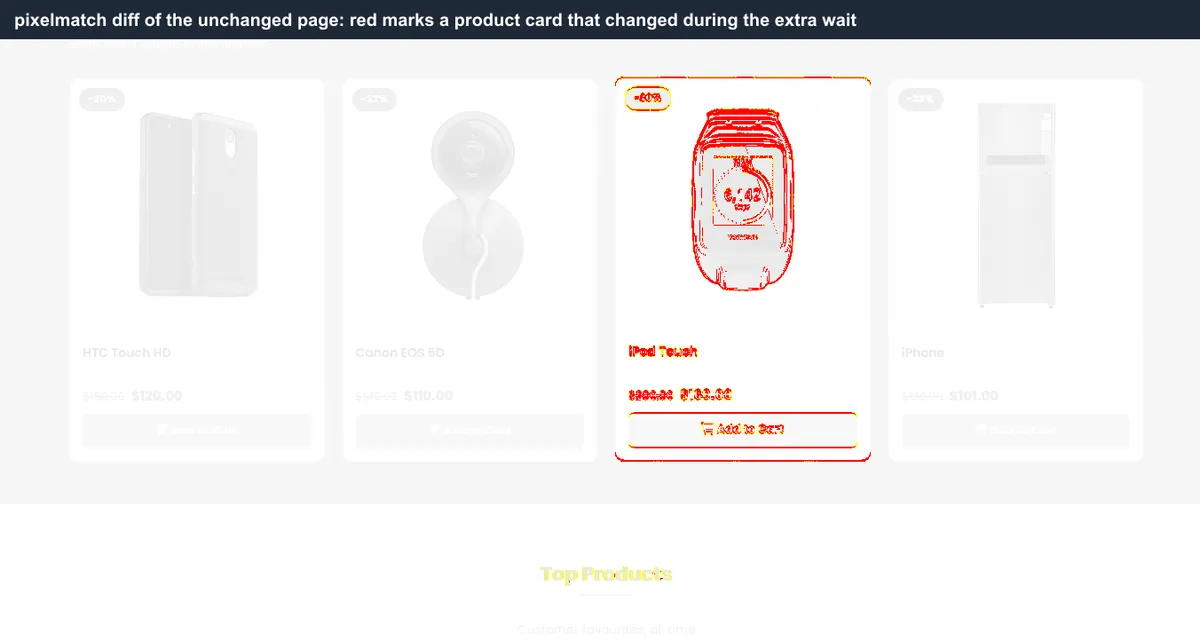
Visual Testing False Positives: Causes and Fixes
Use the shape of the diff to find the cause. The measured column refers to the experiment above; the last two rows did not occur on the test page.
| Cause | What the diff looks like | Fix | Measured |
|---|---|---|---|
| Images still loading | Blank or half-drawn images in some runs | Force eager loading, call decode(), wait until every visible image is complete | 3 of 5 naive runs failed |
| Sliders and carousels | A whole card or slide swapped | Pause them in a setup script and show the first slide | Up to 137,256 pixels |
| Smooth scrolling | Masks and scroll-dependent elements in the wrong place | scroll-behavior: auto, then wait for scrollY 0 | Mask boxes 48 to 147 pixels off target |
| Clocks, countdowns, timestamps | Small, digit-sized changes in the same spot | Freeze the clock, or ignore that one element | 204 pixels |
| Bad baseline | Every run fails with the same diff | Capture the baseline with the full setup and review it before approving | 357,106 pixels in 5 of 5 runs |
| Operating system and fonts | Edges of text and icons differ across the whole page | One baseline per operating system and browser | 12.9% of pixels, macOS vs Windows |
| Live data and personalization | Prices, names, counts or recommendations change | Mock the API or use fixed test accounts; ignore or select DOM elements | Not on the test page |
| Banners and popups | An overlay present in one run only | Accept or dismiss it in the setup script | Not on the test page |
Timing Noise: Loading, Motion and Scrolling
Timing noise comes from capturing a page that has not finished settling, and the test framework handles only part of it.
Playwright's toHaveScreenshot assertion waits until two consecutive page screenshots yield the same result, and its animations option, "disabled" by default, stops CSS animations, CSS transitions and Web Animations.
The remaining gaps all showed up on the test page:
- Timers - the hero carousel and product sliders advance on JavaScript timers, which no CSS rule stops. Pause them in a setup script.
- Lazy images - scrolling down and waiting for network idle still left product images unloaded in some sessions. Set the images to eager loading, call decode(), and wait until each visible image reports complete.
- Smooth scrolling - the page sets scroll-behavior: smooth. Right after window.scrollTo(0, 0), scrollY was still 4692, and one second later it was 34. Anything measured in that window, such as a mask position, lands in the wrong place.
Fonts are the other timing gap. MDN describes document.fonts.ready as a promise that resolves once the document has completed loading fonts, layout operations are completed, and no further font loads are needed, so await it before the screenshot.
This is the setup that produced zero differing pixels. I ran it twice on TestMu AI's cloud as published here, and the two captures matched exactly:
import { chromium } from 'playwright';

const capabilities = {
  browserName: 'Chrome',
  browserVersion: 'latest',
  'LT:Options': {
    platform: 'Windows 11',
    build: 'Visual false positives',
    name: 'Stable full-page screenshot',
    user: process.env.LT_USERNAME,
    accessKey: process.env.LT_ACCESS_KEY,
  },
};

const STABLE_CSS =
  'html { scroll-behavior: auto !important; } ' +
  '*, *::before, *::after { animation: none !important; transition: none !important; caret-color: transparent !important; }';

async function stableScreenshot(page, url, path) {
  // Same date and time in every run, so countdowns and timestamps render identically
  await page.clock.setFixedTime(new Date('2026-11-20T10:00:00Z'));
  await page.goto(url, { waitUntil: 'networkidle' });
  await page.addStyleTag({ content: STABLE_CSS });
  await page.evaluate(() => document.fonts.ready);

  // Scroll through the page so lazy content is requested, then return to the top
  await page.evaluate(async () => {
    for (let y = 0; y < document.body.scrollHeight; y += 600) {
      window.scrollTo(0, y);
      await new Promise((r) => setTimeout(r, 150));
    }
    window.scrollTo(0, 0);
  });
  await page.waitForFunction(() => window.scrollY === 0);
  await page.waitForLoadState('networkidle');

  // Load and decode every visible image, then wait until each one has finished or failed
  await page.evaluate(async () => {
    const imgs = Array.from(document.images).filter((i) => i.offsetParent !== null);
    imgs.forEach((i) => { i.loading = 'eager'; });
    await Promise.all(imgs.map((i) => i.decode().catch(() => {})));
  });
  await page.waitForFunction(() => Array.from(document.images)
    .filter((i) => {
      const r = i.getBoundingClientRect();
      return i.offsetParent !== null && r.width > 0 && r.left >= 0 && r.right <= window.innerWidth;
    })
    .every((i) => i.complete), null, { timeout: 45000 });

  // Stop the hero carousel's timer and show its first slide
  await page.evaluate(() => {
    const hero = document.querySelector('#pgHero');
    if (!hero) return;
    if (window.bootstrap && window.bootstrap.Carousel) window.bootstrap.Carousel.getOrCreateInstance(hero).pause();
    if (window.jQuery && window.jQuery.fn.carousel) window.jQuery(hero).carousel('pause');
    hero.querySelectorAll('.carousel-item').forEach((item, i) => {
      item.classList.remove('active', 'carousel-item-next', 'carousel-item-prev', 'carousel-item-start', 'carousel-item-end');
      if (i === 0) item.classList.add('active');
    });
  });

  await page.screenshot({ path, fullPage: true, animations: 'disabled' });
}

const browser = await chromium.connect(
  'wss://cdp.lambdatest.com/playwright?capabilities=' + encodeURIComponent(JSON.stringify(capabilities))
);
const context = await browser.newContext({ viewport: { width: 1366, height: 768 } });
const page = await context.newPage();
await stableScreenshot(page, 'https://ecommerce-playground.lambdatest.io/', process.argv[2] || 'home.png');
await browser.close();
The carousel lines are specific to this page; replace them with whatever pauses your own sliders. The same waits apply with any framework, and the Playwright screenshot comparison guide shows how to feed the captures into toHaveScreenshot.

Filter rendering noise before it reaches a reviewer
Note: SmartUI's Smart Ignore mode filters rendering noise, anti-aliasing and displacement differences before results are presented, so reviewers spend their time on content changes. See how Smart Ignore works
Content Noise: Clocks, Countdowns and Live Data
After the timing fixes, the only difference left on the test page was a deal countdown. It changed by one second between the baseline and the comparison runs (setup 4 in the table):

Playwright's clock API recommends setFixedTime, which sets a fixed time for Date.now() and new Date().
With the time fixed, any countdown, timestamp or relative date computed from the clock renders the same value in every run. That also covers time-based content you have not noticed yet, such as a copyright year or a relative "updated ... ago" label.
Data that comes from a server, such as prices, user names or recommendations, needs a fixed source: a mocked API response or a test account whose data does not change. When neither is possible, SmartUI's dynamic data handling takes an ignoreDOM option to exclude specific elements by ID, class, CSS selector or XPath, and a selectDOM option to compare only the elements you name.
Rendering Noise: Anti-Aliasing, Fonts and Operating Systems
Playwright's visual comparisons guide warns that browser rendering can vary based on the host OS, version, settings, hardware, power source (battery vs. power adapter), headless mode, and other factors, and tells you to run tests in the same environment where the baseline screenshots were generated.
I checked how large that effect is by capturing the fully stabilized page in Chrome 158 on macOS Sonoma and comparing it with the Windows 11 baseline. Both pages had the same layout and the same height:
- Strict comparison - 992,303 differing pixels, 12.87% of the page, spread across gradient backgrounds and product photos as well as text.
- Tolerant comparison - 21,141 differing pixels with a per-pixel threshold of 0.1 and anti-aliasing detection on, a 98% reduction. Almost all of the rest sat on text, where the two systems draw the same font differently.
- Against a real defect - those 21,141 pixels are almost 38 times the 561 pixels that a changed price produced in the same tolerant comparison.
The pixelmatch README describes its threshold as a per-pixel perceptual color difference, 0.1 by default, and says it detects anti-aliasing with the anti-aliased pixel and intensity slope detector.
In this comparison those two settings absorbed the small color shifts in gradients and photos, but text drawn with different glyph shapes still failed. Tolerance shrinks cross-platform noise without making operating systems comparable, so keep one baseline per operating system and browser.
The same rule applies to device state on phones: a phone in a battery-saving mode renders and animates differently, which is why low power mode testing treats it as a separate test condition.
Baseline Noise: Bad and Shared Baselines
In setup 5, every comparison differed from the baseline by exactly the same pixel count, and the cause was the baseline itself. Seven product thumbnails had not loaded when it was captured, and every later run, with the thumbnails loaded, failed against it:

- Identical diffs - when every run fails with the same pixel count, open the baseline before you open the run.
- Same setup for baselines - capture baselines with the full stabilization script, not with a quicker one, and review the image before approving it.
- Branch baselines - when two branches change the same page, one shared baseline fails both. SmartUI keeps a baseline per Git branch, described in its Git branching strategy docs.
Updating baselines on purpose, after an intended change, is covered in smart baseline and overwrite screenshot.
Add SmartUI visual checks to your Playwright tests with one snapshot call.

How to Set a Threshold That Still Catches Real Bugs
Two different numbers are both called a threshold. The per-pixel threshold decides how different two colors must be before a pixel counts as changed: pixelmatch's default is 0.1, and Playwright's toHaveScreenshot defaults to 0.2. The page-level tolerance, maxDiffPixels or maxDiffPixelRatio in Playwright, decides how many changed pixels are acceptable before the test fails.
To see where real defects fall, I planted them in the stabilized page and compared each against the clean baseline:
| Difference | Kind | Pixels, strict | Pixels, tolerant | Share of page, strict |
|---|---|---|---|---|
| Countdown one second apart | Noise | 204 | 27 | 0.0026% |
| Nav link moved 2 pixels | Defect | 363 | 226 | 0.0047% |
| Product price changed to $999.00 | Defect | 1,116 | 561 | 0.0145% |
| Hero image hidden | Defect | 618,981 | 582,606 | 8.03% |
| macOS vs Windows, same page | Noise | 992,303 | 21,141 | 12.87% |
The countdown row comes from setup 4, before the clock was frozen. The hero row comes from the same run, so it includes those 204 countdown pixels.
- Ratio tolerances scale with the page - a 0.1% maxDiffPixelRatio on this 7.7-megapixel page allows 7,712 pixels, so both the price change and the 2-pixel shift would pass.
- Fix the source, then tolerate little - once timing, content and baseline noise were gone, the clean page differed by 0 pixels, so any absolute tolerance below 363 pixels, the size of the 2-pixel shift, would still have caught both planted text-level defects.
- Smaller captures help - an element screenshot of a price card turns the same 1,116-pixel change into a large share of the image, so ratio tolerances work better on components than on full pages.
- Prove it with a planted defect - after any change to a threshold or a mask, plant a small known defect, such as a 2-pixel shift, and confirm the test fails.
SmartUI expresses this as two mismatch thresholds: screenshots at or below the approval threshold pass automatically, screenshots at or above the rejection threshold fail, and everything in between goes to a reviewer. On long full-page captures, keep the approval threshold close to zero, because the planted price change in the table above covered a tiny share of the page.
Masking Without Creating False Negatives
A mask removes an area from the comparison. Playwright's mask option overlays each masked locator with a pink box that completely covers its bounding box. In the experiment, masks failed in both directions:
- The mask missed - captured while the page was still smooth-scrolling, the mask over the hero carousel landed between 48 and 147 pixels above the carousel, covering part of the navigation and leaving the bottom of the moving carousel exposed. Masked runs were noisier than unmasked ones: 98,950 to 307,158 differing pixels.
- The mask hid a real bug - with the scroll fixed, hiding the hero image inside the masked carousel produced 0 differing pixels. The same change without the mask produced 618,981.
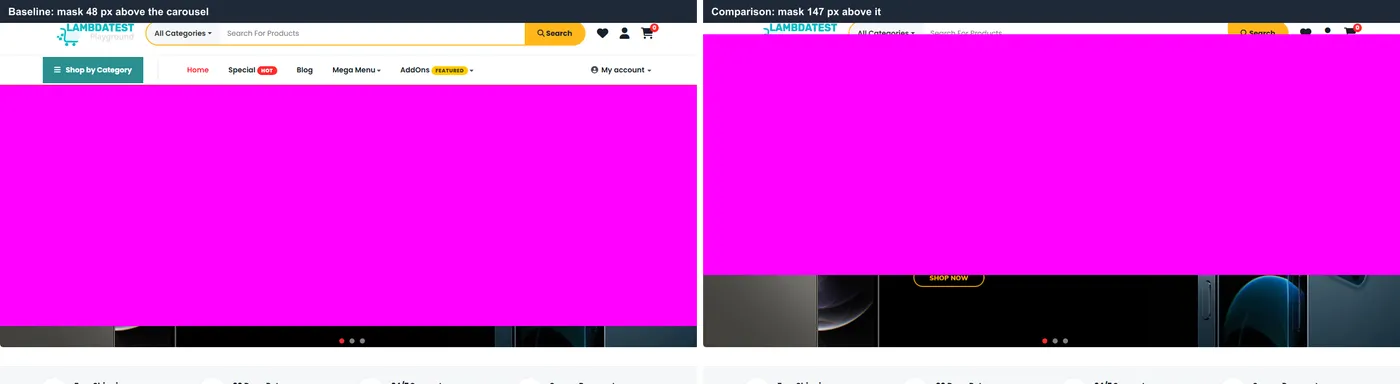
Mask the smallest element that changes, not the section around it, and check one masked baseline by eye to confirm the box covers its target. When an area has noisy content but its structure still matters, a full ignore is the wrong tool. SmartUI's layout regions offer finer region types:
| Region type | Structure checked | Content checked | Colors checked | Use it for |
|---|---|---|---|---|
| Ignore Region | No | No | No | Fully dynamic areas you do not need validated |
| Ignore Colors | Yes | Yes | No | Themed or A/B tested areas |
| Layout Region | Yes | No | No | Feeds, dashboards and listings whose rows change but whose arrangement must hold |
These region types, Smart Ignore and per-branch baselines are part of SmartUI visual testing from TestMu AI, which captures the same page across Chrome, Firefox, Safari and Edge and lets a team review the diffs together.
Note: To run your visual tests with Smart Ignore, layout regions and per-branch baselines, start free with TestMu AI.
How to Triage a Diff as Real or Noise
Work through these checks in order; each one rules out a cause from the table above before you spend time on the next.
- Same diff in every run? Open the baseline first. Identical pixel counts across runs point at the reference image, as in setup 5.
- Diff spread across all text? Compare the environments. Edges of text and icons changing everywhere point at a different operating system, browser version, font or scale factor.
- Diff changes between reruns of the same build? It is timing or content noise. Fix the setup instead of approving the image.
- Diff confined to one component? Check whether the pull request touched that component, its styles or its data. If it did, review it as a real change.
- No code change explains it? Reject it and file it with the baseline, the run and the diff attached.
The same order works with any tool, including a self-hosted setup like the one in the BackstopJS tutorial.
Conclusion
Take the noisiest page in your suite, capture it five times against one baseline with no code change, and fix causes in the order of the table until all five runs match. Then plant one small defect, such as a 2-pixel shift, and confirm the test still fails. To run the same check across browsers with shared review and per-branch baselines, start with the SmartUI getting started guide.
Did your last release break the UI? TestMu AI's SmartUI catches visual regressions by comparing every screen to its baseline.
Author

Parth Mistry
Blogs: 3

Parth Mistry is a Member of Technical Staff at TestMu AI, building SmartUI, the visual regression testing product. He developed and owns the SmartUI CLI, a modular TypeScript tool built on Playwright for multi-browser automation, and built the Storybook CLI for visual regression of UI components. He maintains cross-language SDKs in Python, Java, Ruby, C#, and Node.js, and engineered a Node-based visual rendering service on Kafka, Redis, MySQL, and S3. His migration of that service to an event-driven, KEDA-autoscaled architecture improved execution speed by 60% and cut annual infrastructure cost by $9,600. He also built the end-to-end SmartUI integration with KaneAI. Parth is a Google Summer of Code 2024 contributor and an alumnus of IIT Jodhpur.
Reviewer

Sushobhit Dua
Reviewer
Sushobhit Dua is an Engineering Manager at TestMu AI, leading SmartUI, the visual regression and visual testing product. He manages the team that builds and ships SmartUI and maintains and cuts releases of the open-source SmartUI CLI. He works primarily in Core Java, Spring Boot, and Gradle, and is an AMCAT Certified Software Engineer. He brings over 10 years of software engineering experience, with earlier work as a Software Engineer at ecare Technology Labs. Sushobhit owns the SmartUI roadmap and the engineering decisions behind it.


Visual Testing False Positives FAQs
Did you find this page helpful?
More Related Blogs




TestMu AI forEnterprise
Get access to solutions built on Enterprise
grade security, privacy, & compliance
- Advanced access controls
- Advanced data retention rules
- Advanced Local Testing
- Premium Support options
- Early access to beta features
- Private Slack Channel
- Unlimited Manual Accessibility DevTools Tests