
Test on 50,000+ Real Android and iOS Devices
Live and Automated Real Device Testing on 50,000+ iOS and Android Devices. No Need to Buy or Maintain Device Lab

Firebase Test Lab Is Shutting Down: How to Migrate (2026)
Firebase Test Lab shuts down on September 30, 2027. What changes, Google's Developer Device Platform, other real device clouds, plus a migration checklist.
Published on:
Every gcloud firebase test step in your CI pipeline now has an end date.
Google's Firebase Test Lab migration page says Test Lab "is deprecated and will be fully shut down as of September 30, 2027" and asks teams to move to the Developer Device Platform (DDP) "to prevent CI/CD interruptions."
For Espresso and XCTest suites, Google's path is the shortest move. Robo crawls, Game Loop tests and Appium suites have no DDP equivalent yet, so those need a second home, such as the real devices on TestMu AI, before the deadline.
TL;DR
Firebase Test Lab shuts down on September 30, 2027, when its console and API stop. Google's replacement, the Developer Device Platform on Google Cloud, is in Preview, matches Test Lab rates until April 30, 2027 and requires billing. Robo and Game Loop tests have no equivalent there yet, so they need another home, such as TestMu AI real devices.
Key Firebase Test Lab Shutdown Dates
- September 30, 2027: The Firebase Test Lab console and API shut down, and no test workflows run after that date. Google's deprecation FAQ recommends moving to the Developer Device Platform as soon as possible.
- April 30, 2027: The Developer Device Platform stops matching Firebase Test Lab rates and moves to pay-per-use and per-device slot subscription pricing. Billing required: Yes, on every project from the first run.
Where Each Test Lab Test Type Goes
- Instrumentation tests: Firebase Test Lab Espresso and UI Automator suites run on the Developer Device Platform with
gcloud beta device-run sessions submit instrumentation. The same app and test APK pair also runs as an Espresso build on TestMu AI real devices. - XCTest: Firebase Test Lab XCTest suites run on the Developer Device Platform through
gcloud alpha device-run sessions submit xcteston physical iPhones. On TestMu AI they run as XCUITest builds from an app .ipa and a test runner .ipa. - Robo tests: Firebase Test Lab Robo tests have no entry in Google's command and flag translation guide. Robo equivalent on the Developer Device Platform: No. A scripted Appium smoke check on real devices keeps the crash-on-launch signal that Robo gave.
Firebase Test Lab Shutdown Dates and What Changes
Google's Firebase Test Lab deprecation FAQ sets the dates that matter for budgets and CI. Test executions keep running until September 30, 2027, and the price match on the new platform ends on April 30, 2027, five months earlier.
| Date | What Google says happens | What to do |
|---|---|---|
| Now | Test Lab is deprecated but still runs tests from the Firebase console, the gcloud CLI and Android Studio. | List every test matrix your CI submits, with its test type and devices. |
| Through April 30, 2027 | The Developer Device Platform matches Firebase Test Lab rates for all customers. | Run DDP and Test Lab side by side while the prices are the same. |
| After April 30, 2027 | DDP pricing switches to pay-per-use and per-device slot subscriptions, and the Test Lab rate match ends. | Re-estimate monthly device minutes before this date. |
| September 30, 2027 | The Firebase Test Lab console and API shut down, and no workflows run. | Remove every gcloud firebase test call from CI before this date. |
| No end date | Android Device Streaming is not deprecated and continues as a DDP feature. | Nothing to migrate. |
Billing changes too. The same FAQ notes that "while Firebase Test Lab supported some usage without billing, the Developer Device Platform requires your project to have billing enabled," so a team on the no-cost Spark plan needs a billing account before its first DDP run.
How to Migrate to Google's Developer Device Platform
Google describes the Developer Device Platform as a managed device farm on Google Cloud. It has four parts: Device Run for automated tests, Device Streaming for interactive sessions, a Device Catalog, and an agent skill that lets AI coding agents reserve and drive devices.
DDP is in Preview under Google's Pre-GA terms, so features are available "as is" and "might have limited support." For instrumentation and XCTest suites, it is still the closest match to how Test Lab works.
DDP Gains Over Test Lab
Google's DDP migration overview lists what changes for Test Lab users, from smart sharding on up to 30 days of execution history to a 3-hour shard timeout:
- Smart sharding - shards are built from up to 30 days of execution history and timed per device model, instead of Test Lab's single-run timing data.
- Test-case retries - with
--flaky-test-retry-level=test, only the failing test reruns instead of its whole shard (the default level is still shard), and retries run one after another by default to cut billed device time. - Longer shards - one instrumentation shard can run for 3 hours, up from Test Lab's 45-minute cap.
- Test APK only - self-instrumenting tests no longer need a dummy app APK.
- Deeper artifacts - dumpsys and bugreport output, mocked GPS coordinates and direct installs of .apks files.
- Live availability - the Device Catalog shows real-time device availability, so you can pick devices with short queues.
Set Up DDP Before the First Run
Google's DDP quickstart assumes a Google Cloud project with billing enabled. These commands cover the CLI side:
# Get the gcloud device-run commands
gcloud components update

# Enable the APIs DDP uses (Cloud Testing is still required in Preview)
gcloud services enable devicerun.googleapis.com devicestreaming.googleapis.com testing.googleapis.com

# Create local credentials (skip this in Cloud Shell)
gcloud auth application-default login
Results go to a Cloud Storage bucket named PROJECT_ID-devicerun unless you pass --bucket-name. You own that bucket, so set a lifecycle rule if you do not want old artifacts to pile up.
Translate Test Lab Commands to gcloud device-run
Google's command and flag translation guide maps Test Lab and Flank flags to their DDP equivalents. Its standard instrumentation test example shows the shape of the change:
# Firebase Test Lab
gcloud firebase test android run \
  --app=app-debug.apk \
  --test=app-debug-androidTest.apk \
  --device model=shiba,version=36 \
  --timeout=5m \
  --num-flaky-test-attempts=2 \
  --directories-to-pull=/sdcard/screenshots \
  --environment-variables key=value

# Developer Device Platform
gcloud beta device-run sessions submit instrumentation \
  --device=shiba-36 \
  --apps=app-debug.apk \
  --test=app-debug-androidTest.apk \
  --instrumentation-timeout=5m \
  --flaky-test-attempts=3 \
  --paths-to-pull=/sdcard/screenshots \
  --additional-test-options key=value
The same guide lists the flags that behave differently after the move:
- Retries - Test Lab's
--num-flaky-test-attempts=2counts retries, while DDP's--flaky-test-attempts=3counts total attempts, so add one when you convert. - Apps -
--appand--additional-apksmerge into one ordered--appslist. - Timeouts -
--timeoutbecomes--instrumentation-timeout, with a valid range of 1 minute to 3 hours and a 5-minute default. - Sharding -
--num-uniform-shardsbecomes--sharding-option=uniformplus--uniform-sharding-count, up to 20 shards on physical devices and 200 on virtual ones. - Results - DDP does not launch with a graphical web UI like the Firebase console, so
sessions list,sessions describeandsessions cancelhandle results from the CLI, with artifacts in your Cloud Storage bucket. - iOS - XCTest runs go through the alpha command group,
gcloud alpha device-run sessions submit xctest, not the beta one.
Use Google's Migration Skill for the First Draft
Google also publishes a migration skill, migrating-device-run, for AI coding agents such as Antigravity, Claude Code and Codex. You paste its ruleset URL and your Test Lab command or Flank YAML into a prompt, and the agent returns the gcloud beta device-run version.
Treat that output as a draft. Run the old and new commands on the same commit and compare test counts per device before you delete the Test Lab step.
Developer Device Platform Limits in Preview
Check these Preview limits against your suite before you plan a one-step move:
- Two test types - in the Preview release, Device Run supports Android instrumentation and iOS XCTest, according to Google's DDP migration overview.
- No Robo or Game Loop - the command and flag translation guide maps instrumentation and XCTest flags and has no Robo or Game Loop entries.
- Frameworks without a commitment - Google's DDP troubleshooting FAQ says Appium, Flutter Driver, React Native with Jest and Cucumber are partly on its roadmap, but Google is "unable to provide commitment" to them. Flutter apps can still run Espresso-based instrumentation tests.
- No VPC Service Controls - the same FAQ says DDP does not work with VPC-SC, which blocks copying apps and artifacts between DDP and your results bucket.
- iOS still settling - Google's DDP product overview says Preview is for Android developers with iOS support "coming soon," while the Device Run docs already list XCTest on physical iPhones through the alpha command group.
- Billing from day one - every DDP project needs billing enabled, including small projects that ran inside Test Lab's no-cost quota.
If your suites are pure Espresso or XCTest and your projects already live on Google Cloud, these limits may not affect you. If you run Robo crawls, Game Loop tests, Appium suites or VPC-SC-protected projects, plan a second home for those tests now.

Note: Robo and Appium coverage that DDP does not run yet can move to TestMu AI, which runs Appium, Espresso, XCUITest and Detox suites on real Android and iOS devices and records video, device logs and network logs for every session. To try it on your own build, start free.
Map Each Test Lab Test Type to Its New Home
Google's Test Lab overview lists four test types: instrumentation and Robo tests on Android, Game Loop tests on Android and iOS, and XCTest on iOS. This table maps each one, plus Appium and Device Streaming, to DDP and to TestMu AI:
| Test Lab workload | Developer Device Platform (Preview) | TestMu AI |
|---|---|---|
| Instrumentation (Espresso, UI Automator) | gcloud beta device-run sessions submit instrumentation on physical and virtual Android devices, with smart sharding and test-case retries. | Espresso builds from the same app APK and test APK on real Android devices, started through a REST API. |
| Robo test (no script) | Not listed in the command and flag translation guide. | No crawler. A scripted Appium smoke check on real devices, or KaneAI tests written as plain-English steps. |
| Game Loop (Android, iOS) | Not listed in the command and flag translation guide. | No Game Loop runner. Port the loop's scenarios to instrumentation or XCUITest tests, which both platforms run. |
| XCTest (iOS) | gcloud alpha device-run sessions submit xctest on physical iPhones. | XCUITest builds from an app .ipa and a test runner .ipa on real iPhones, with sharding through HyperExecute. |
| Appium (never a Test Lab test type) | On the roadmap, with no commitment from Google. | Appium in Java, Python, JavaScript and other client languages on real devices, emulators and simulators. |
| Android Device Streaming | Continues as a DDP feature. | Manual app testing on real devices in the browser. |
On the TestMu AI side, App Automation runs Appium, Espresso, XCUITest and Detox on 50,000+ real Android and iOS devices, and every session saves device logs, network logs, video and screenshots without extra configuration. Espresso and XCUITest run on real devices, while emulator and simulator runs use Appium.
For a wider plan of which checks belong on emulators and which on hardware, see the mobile app testing guide.
How to Move Test Lab Suites to a Real Device Cloud
A real device cloud takes the same build artifacts Test Lab took, so most of the move is an upload step and a new run command. If you are still choosing a provider, the real device cloud platforms comparison covers device counts, frameworks and pricing models, and the steps below use TestMu AI.
Instrumentation Tests: Reuse the Same Two APKs
Test Lab's --app and --test flags map to two uploads on TestMu AI. The Espresso testing guide documents the REST calls:
- Upload the app APK to the
uploadFrameworkendpoint with typeespresso-androidand keep thelt://app ID from the response. - Upload the androidTest APK the same way to get a test suite ID.
- POST both IDs and a device list to the Espresso build endpoint. Listing several devices runs them in parallel.
- Open the build in the App Automation dashboard for each test's status, video and device logs.
If you ship builds through Firebase App Distribution, the Firebase integration for mobile testing pushes those builds to real devices for testing, so the distribution step can stay as it is.
Robo Tests: Replace the Crawl With a Scripted Smoke Check
Test Lab's Robo test needs no pre-written test: it analyzes the app's UI, explores it while simulating user activity, and records screenshots and video that help trace crashes. A scripted smoke check keeps that crash signal with fixed steps: open the app, tap each main control, and fail if the app leaves the foreground.
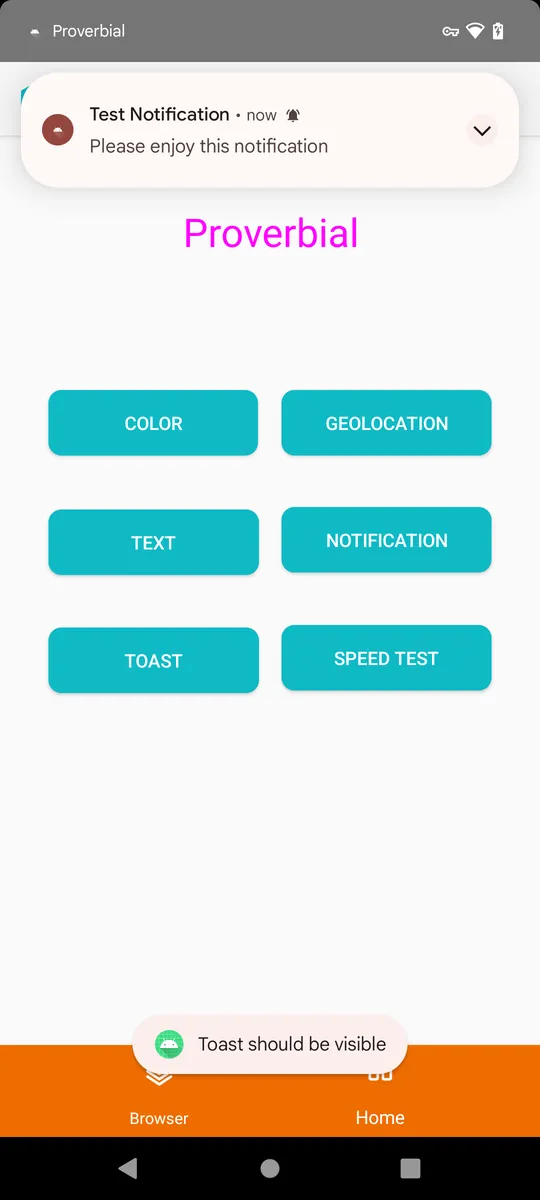
I ran the check below on a real Pixel 6 with Android 12 on TestMu AI, against the Proverbial sample APK from TestMu AI's docs. First, upload your APK for real-device Appium runs:
curl -u "$LT_USERNAME:$LT_ACCESS_KEY" \
  -X POST "https://manual-api.lambdatest.com/app/upload/realDevice" \
  -F "appFile=@app-debug.apk" \
  -F "name=app-debug"
# The response holds "app_url": "lt://APP..." for the next step
Then save the check as smoke.mjs. It uses WebdriverIO and the Appium UiAutomator2 driver; swap the Proverbial IDs for your own app's main controls:
// smoke.mjs - a scripted stand-in for a Robo smoke run, on a real Android device
import { remote } from 'webdriverio';
import { writeFileSync } from 'node:fs';

const PKG = 'com.lambdatest.proverbial';
const driver = await remote({
  protocol: 'https', hostname: 'mobile-hub.lambdatest.com', port: 443, path: '/wd/hub',
  user: process.env.LT_USERNAME, key: process.env.LT_ACCESS_KEY,
  logLevel: 'warn',
  capabilities: {
    platformName: 'Android',
    'appium:deviceName': process.env.DEVICE || 'Pixel 6',
    'appium:platformVersion': process.env.OS_VERSION || '12',
    'appium:app': process.env.APP_URL, // lt://APP... from the upload step
    'appium:automationName': 'UiAutomator2',
    'LT:Options': { w3c: true, isRealMobile: true, video: true,
      build: 'Firebase Test Lab migration - smoke', name: 'launch and tap main controls' },
  },
});

let status = 'failed';
try {
  const greeting = await driver.$(`id:${PKG}:id/Textbox`);
  const before = await greeting.getText();
  for (const control of ['color', 'Text', 'toast', 'notification']) {
    await driver.$(`id:${PKG}:id/${control}`).click();
    const state = await driver.queryAppState(PKG); // 4 = running in foreground
    console.log(`tap ${control}: app state ${state}`);
    if (state !== 4) throw new Error(`app left the foreground after tapping ${control}`);
  }
  const after = await greeting.getText();
  if (after === before) throw new Error('TEXT button did not change the greeting');
  console.log(`greeting changed: "${before}" -> "${after}"`);
  writeFileSync('smoke-real-device.png', await driver.takeScreenshot(), 'base64');
  status = 'passed';
} finally {
  await driver.execute(`lambda-status=${status}`);
  console.log(`session ${driver.sessionId}: ${status}`);
  await driver.deleteSession();
}
Run it with your credentials and the app URL from the upload:
npm install webdriverio
LT_USERNAME=<username> LT_ACCESS_KEY=<access key> APP_URL=lt://APP<id> node smoke.mjs
The run passed, and this is its console output:
tap color: app state 4
tap Text: app state 4
tap toast: app state 4
tap notification: app state 4
greeting changed: "Hello! Welcome to lambdatest Sample App called Proverbial" -> "Proverbial"
session 41eda4b4-8a89-4552-8e11-156cd3b56f0a: passed
The screenshot the script saved at the end shows the state after the last tap: the posted notification, the toast and the changed greeting.
If you would rather not write the script, KaneAI authors native Android and iOS app tests from plain-English steps, runs them on real devices and exports Appium code. Unlike Robo, it follows the steps you describe instead of exploring the app on its own.
XCTest Suites: Two .ipa Files and Optional Sharding
On TestMu AI, an iOS UI suite runs from two .ipa files, the app and the UI test runner, uploaded with type xcuit-ios and started through the XCUI build endpoint. The XCTest tutorial covers packaging both files and the build call.
For long suites, HyperExecute splits XCUITest runs into shards across real devices and retries flaky tests automatically, the job that smart sharding does on DDP.
Firebase Test Lab Migration Checklist
Work through these steps in order, with the April 30 and September 30, 2027 dates from Google's deprecation FAQ as hard stops:
- Inventory - search CI configs for
gcloud firebase test, Flank YAML files and Gradle or Fastlane steps that call Test Lab, and record each job's test type, devices and shard count. - Sort by test type - send instrumentation and XCTest jobs to DDP or a real device cloud, Robo and Appium jobs to a real device cloud, and Game Loop scenarios into instrumentation or XCUITest tests.
- Set up billing and APIs - enable billing on each Google Cloud project you keep, plus the Device Run, Device Streaming and Cloud Testing APIs.
- Translate commands - draft with Google's migration skill or the flag guide, and add one to every retry count.
- Run both side by side - run old and new jobs on the same commits and compare test counts, pass rates and durations per device model.
- Re-budget before April 30, 2027 - estimate device minutes under DDP's pay-per-use and per-device slot pricing before the Test Lab rate match ends.
- Cut over before September 30, 2027 - remove every Test Lab call from CI and export any test matrix results you need to keep for audits.
Teams that only use Android Device Streaming from Android Studio have nothing to migrate, since Google is keeping it as part of DDP.
Conclusion
Start with the inventory: search your CI configuration for gcloud firebase test today and tag each job by test type. Instrumentation and XCTest jobs can follow Google's flag guide to DDP, and anything DDP does not run yet needs a new home before September 30, 2027.
For Robo-style smoke checks and Appium suites on real devices, start from TestMu AI's Appium testing guide and point the smoke check above at your own APK.
Testing web or mobile apps without writing code? KaneAI by TestMu AI turns plain-English instructions into tests.
Author

Sai Krishna
Blogs: 23

Sai Krishna is Director of Engineering at TestMu AI, where he leads agentic AI for quality engineering, building AI agents that autonomously drive mobile and conversational test automation. His current focus is Agent Testing and Model Context Protocol (MCP) support for mobile. He is a core contributor and member of the Appium open-source project and the creator of AppiumTestDistribution and appium-device-farm. With over 14 years of experience including more than 9 years at Thoughtworks as a Principal Consultant, he holds a BSc in Electronics and speaks regularly at TestMu and Appium Conf on Appium, mobile automation, and agentic AI in testing.
Reviewer

Srinivasan Sekar
Reviewer
Srinivasan Sekar is Director of Engineering at TestMu AI, where he leads engineering and open-source initiatives behind the Selenium and Appium automation grid and owns TestMu AI's MCP Server. A committer to Appium and a contributor to Selenium, WebdriverIO, Taiko, and AppiumTestDistribution, he brings over 15 years of experience in quality engineering and open-source technologies. He is the author of the Apress book 'The MCP Standard: A Developer's Guide to Building Universal AI Tools with the Model Context Protocol,' a Certified Kubernetes and Cloud Native Associate, and an international conference speaker. Before TestMu AI he spent over eight years at Thoughtworks as a Principal Consultant and Quality Architect. Srinivasan holds a B.Tech in Information Technology from Anna University.


Firebase Test Lab FAQs
Did you find this page helpful?
More Related Blogs



TestMu AI forEnterprise
Get access to solutions built on Enterprise
grade security, privacy, & compliance
- Advanced access controls
- Advanced data retention rules
- Advanced Local Testing
- Premium Support options
- Early access to beta features
- Private Slack Channel
- Unlimited Manual Accessibility DevTools Tests