
Run Tests Up to 70% Faster than Traditional Test Grids
HyperExecute Is an AI-Native Test Orchestration Platform to Run Your Automation Test Suites with Blazing Fast Speed.

- TestMu AI (Formerly LambdaTest)
- /
- Blog
- /
- Batch Testing in Software Testing: Size, Schedule, Debug
Batch Testing in Software Testing: Size, Schedule, Debug
Batch testing groups test cases into one scheduled run. Learn batch sizing, batch mode execution, nightly scheduling, and how to debug a failed batch.
Last Updated on:
Batch testing is the practice of grouping multiple test cases into a single unit of work and running them together in one scheduled, unattended job that returns one consolidated report. It describes how tests are executed, not what they verify, so a batch can carry regression, smoke, API, or performance tests equally.
Grouping tests this way is a trade. Batching cuts machine time and orchestration overhead sharply, and in exchange feedback waits for the slowest member of the group, and a red batch does not name the change that broke it. Nearly every decision in batch testing manages that trade.
TL;DR
Batch testing runs many test cases as one scheduled, unattended job instead of one run per change. It trades per-test feedback speed for far lower machine cost: research across 276 million Chrome test outcomes found batches of 4 held average feedback time steady while using up to 72% fewer machines.
- Batch size: Four is the defensible default because a fixed size needs no queue-depth logic. Adaptive strategies reach up to 91% fewer machines, but add scheduler complexity and variable batch sizes to reason about during triage.
- Wall-clock rule: Batch duration tracks the slowest member rather than the average, so a measured three-test run returned in 20,646 ms against 52,774 ms of combined execution time.
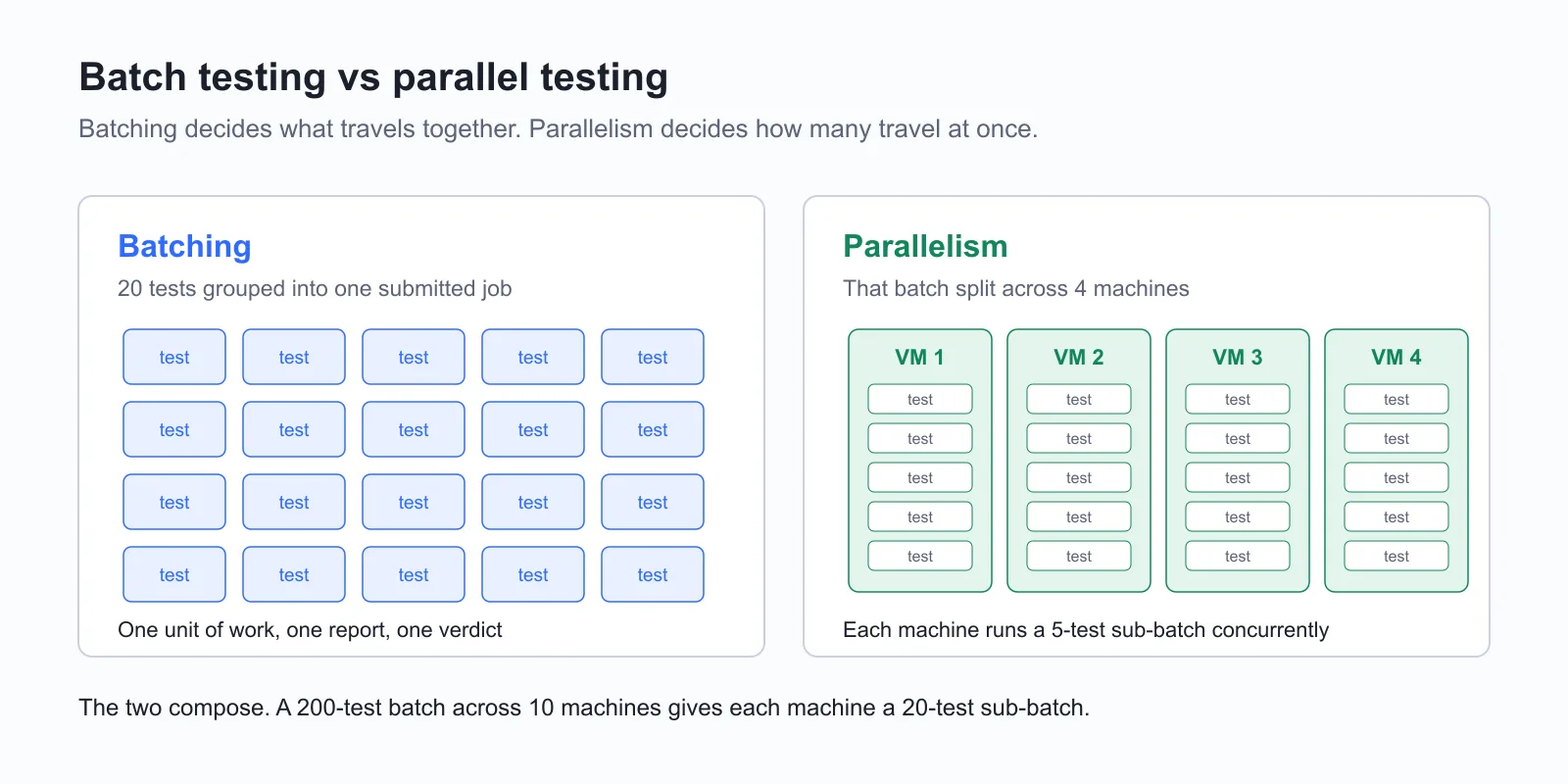
- Batch versus parallel: Batching decides which tests travel together as one job; parallelism decides how many jobs run at once. A 200-test batch across 10 machines gives each machine a 20-test sub-batch.
- Culprit isolation: A failed batch names no culprit. Bisecting it, by re-running one half and then halving whichever half fails, finds the offending change in a logarithmic number of reruns.
- Scheduling model: Time-based triggers fire a batch on a cron expression for nightly runs; event-based triggers fire on a merge or deployment. Most teams run both at different batch sizes.
- Spring Batch 6.0: JobLauncherTestUtils is deprecated in favour of JobOperatorTestUtils, and JUnit 4 is no longer supported, so most published Spring Batch test examples are now outdated.
- In pharmaceutical manufacturing, batch testing means batch release testing of a production lot against specification, an unrelated meaning that shares the term.
Batch wall-clock time is bounded by the slowest sub-batch, so the fix is more machines rather than fewer tests. TestMu AI's HyperExecute takes a discovered list of tests and splits it across a declared number of concurrent virtual machines.
What Is Batch Testing in Software Testing?
A batch is defined by how its tests are submitted rather than by what they check. The group is handed to the runner once, executes start to finish with no human input between tests, and produces a single pass or fail verdict covering every member.
A worked example makes the shape concrete. A payments team merges nine pull requests on a Friday afternoon. Running the full 40-minute suite after each one would take six hours, so instead they queue all nine into a single run that fires at 7 PM and lands one report by 8 PM. That queued run is a test batch.
Scale forces the model. Google reported in Taming Google-Scale Continuous Testing that even with enormous resources dedicated to testing, it is unable to regression test each code change individually, which increases the lag between check-in and feedback.
| Term | What it means |
|---|---|
| Test batch | The group of test cases submitted together as one unit of work. |
| Batch mode execution | Running that group unattended, start to finish, with no human input between tests. |
| Batch run | One completed execution of a batch, with its consolidated report and verdict. |
One disambiguation, because the search results for this term are split. In pharmaceutical and food manufacturing, batch testing means batch release testing: analysing samples from a produced lot against specification before that lot can be sold. Everything below concerns software.
How Does Batch Testing Work?
A batch run moves through five stages: selection, grouping, triggering, execution, and reporting. Tests are picked, bound into an addressable unit such as a TestNG XML suite or a Playwright project, started by a scheduler, run unattended, then merged into one report.
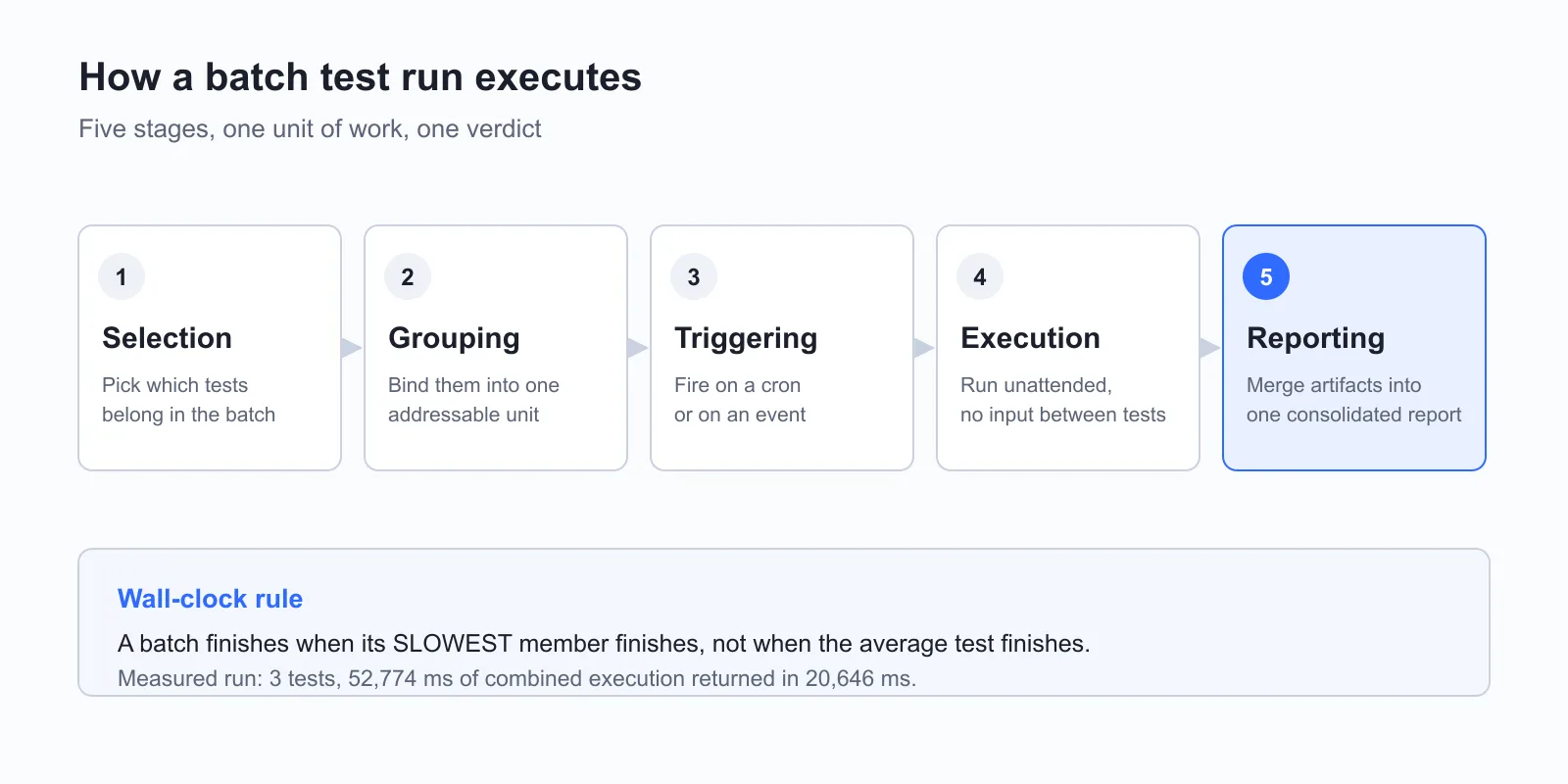
- Selection picks which tests belong in the batch, whether that is an entire suite, a tagged subset, or only the tests mapped to the changed modules.
- Grouping binds those tests into an addressable unit, such as a TestNG XML suite, a pytest marker, a JUnit tag, or a Playwright project.
- Triggering starts the run from a scheduler, either on a cron expression or on an event such as a merge.
- Execution runs every test unattended, with the runner recording results rather than stopping for input.
- Reporting merges per-test artifacts into one report, which is the only output most of the team will ever look at.
The layer that decides how those stages are coordinated is test orchestration, and the activity the batch performs once it fires is covered in our guide to test execution, including execution states and how to read a consolidated report.
Wall-clock time is the metric that matters, and it behaves in a way that surprises teams new to batching. A batch finishes when its slowest member finishes, not when the average test finishes. Adding a fast test to a batch costs almost nothing; adding one slow test sets a new floor for the entire group.
What a Measured Batch Run Actually Looks Like
I ran a three-test Playwright batch on the TestMu AI cloud against the Selenium Playground under a single build name, to see how batch wall-clock time actually behaves. All three tests passed. These are the timings the run reported:
| Test in the batch | Result | Individual time |
|---|---|---|
| simple-form-demo | Passed | 16,160 ms |
| checkbox-demo | Passed | 15,971 ms |
| radiobutton-demo | Passed | 20,643 ms (slowest member) |
| Sum of individual times | 3 of 3 passed | 52,774 ms |
| Actual batch wall-clock | 3 of 3 passed | 20,646 ms |
The three tests consumed 52,774 ms of combined execution, but the batch returned in 20,646 ms, three milliseconds after its slowest member finished. In my experience that three-millisecond gap is the whole lesson: a batch is priced at its slowest test, not its average one.
Read that honestly. This was three tests asserting on page load and page title only, on one run, not a benchmark. It makes the slowest-member rule concrete; it does not measure the machine-reduction figures cited in the next section, and a suite with real data setup or heavier assertions would shift the individual timings.
What Batch Size Should You Use?
Start at four. Researchers at Concordia University, analysing 276 million Chrome test outcomes alongside Ericsson data, found ConstantBatching with a batch size of 4 held average feedback time steady while using up to 72% fewer machines, with no adaptive scheduling to build.
Their paper, Accelerating Continuous Integration with Parallel Batch Testing, reports that the size-4 configuration also delivers a constant execution reduction of up to 75%. The same study measured two adaptive strategies: DynamicBatching, which adjusts batch size based on the remaining changes in the queue, and TestCaseBatching, which lets new builds join a batch before full test execution completes.
| Strategy | Machine reduction | Execution reduction | What it costs you |
|---|---|---|---|
| ConstantBatching (size 4) | Up to 72% | Up to 75%, constant | Nothing beyond a fixed size setting, which is why it is the sensible default |
| DynamicBatching | Up to 91% | Up to 99%, variable | Queue-depth awareness in the scheduler, and variable batch sizes to reason about during triage |
| TestCaseBatching | Up to 81% | Up to 67%, variable | A runner that can admit a new build into an in-flight batch |
A fixed batch size of 4 captures most of the available saving with none of the implementation complexity. Move to a dynamic strategy only when queue depth varies enough that a fixed size is visibly wrong at peak and off-peak.
Two forces set the ceiling. Larger batches amortise setup cost across more tests and cut machine usage. Larger batches also mean a single failure invalidates more work and forces a more expensive investigation. Where the runner supports deterministic splitting, as Playwright sharding does, you can hold batch size constant and vary only the machine count.

Note: A batch is only as fast as the machines available to run it. TestMu AI runs test batches across 3,000+ browser and OS combinations and 10,000+ real devices, so batch size stops being limited by the hardware you own. Try TestMu AI free!
How Is Batch Testing Different From Regression, Parallel, and Continuous Testing?
Batch testing specifies execution mechanics: many tests, one unattended job, one report. Regression testing specifies purpose, parallel testing specifies concurrency, sequential execution specifies ordering, and continuous testing specifies cadence. None of them replaces batching; each composes with it.
| Approach | What it actually specifies | Relationship to batching |
|---|---|---|
| Batch testing | How tests are grouped and submitted: many tests, one unattended job, one report | The baseline model the other approaches are measured against |
| Regression testing | The purpose: confirm existing behaviour survived a change | A regression suite is the most common payload of a batch, but a batch can carry any test type |
| Parallel testing | The concurrency: how many units of work execute simultaneously | Composes with batching. Split a 200-test batch across 10 machines and each runs a 20-test sub-batch |
| Sequential execution | Tests run one after another, each waiting for the previous to finish | The inside of a batch is often sequential; batching describes the submission, not the ordering |
| Continuous testing | The cadence: tests run on every change, automatically | Continuous testing at scale is usually implemented as many small batches rather than one large one |
| Smoke testing | The scope: a thin set of checks confirming the build is worth testing further | Typically a small, fast batch that gates the larger batch behind it |
The batch versus parallel confusion is the one worth resolving carefully. Batching decides what travels together. Parallelism decides how many travel at once. A team can batch without parallelism, running one large group on one machine overnight. A team can parallelise without batching, dispatching every test individually across a grid.
If your suite is slow because tests wait in line rather than because any individual test is slow, the fix is concurrency, which our guide to parallel testing covers, and spreading one run across machines is the subject of distributed testing. Where the batch carries regression coverage, our guide to regression testing covers what belongs in the group, and a gating batch is usually a smoke test suite.
Batch processing testing and real-time processing testing sit one level lower, at the application under test rather than the test runner. A batch processing system accepts a bounded input set, processes it to completion, and produces output; testing it means asserting on the whole output file. A real-time system processes events as they arrive; testing it means asserting on latency and per-event correctness.
How Do You Schedule Batch Test Execution?
Every batch trigger is either a clock or an event. Time-based triggers fire on a cron expression and suit long suites that absorb off-hours capacity without gating a merge. Event-based triggers fire on a merge, a deployment, or a queue depth threshold. Most teams run small event-based batches per merge plus a full overnight batch.
- Time-based triggers fire on a cron expression, which suits long suites that can absorb off-hours machine capacity and do not gate a merge.
- Event-based triggers fire on a merge, a deployment, or a queue reaching a threshold depth, which suits short batches that must block a bad change from progressing.
- Hybrid scheduling runs a small event-based batch on every merge and a full time-based batch overnight, which is the pattern most teams converge on.
Where that batch lives in the delivery pipeline is a CI/CD testing decision, and Jenkins remains the most common host for cron-triggered nightly jobs. In GitHub Actions the same job is a schedule block holding a cron expression, and the practical detail teams miss is pairing it with a manual dispatch trigger: a nightly job you cannot run on demand is a nightly job you cannot debug.
Two scheduling details decide whether the overnight batch is usable in the morning. Cron expressions on most CI platforms are evaluated in UTC, so a run scheduled for what looks like a quiet hour can land in the middle of another region's working day. Queued scheduled jobs also compete with on-demand pipeline runs for the same runner pool, so a batch that starts on time can still finish late.
Once the batch outgrows a single runner, the scheduling problem becomes a distribution problem. TestMu AI's HyperExecute orchestration cloud handles this with an Auto-Split strategy: a discovery command emits the list of test entities, the platform splits that list across the number of concurrent virtual machines you declare, and each entity is interpolated into the runner command so it executes in isolation.
Three settings in that configuration carry most of the benefit. Auto-split turns one suite into sub-batches, concurrency declares how many virtual machines those sub-batches land on, and a cache key derived from the lockfile checksum lets dependencies restore instead of reinstalling. That last one matters more than it looks, because dependency installation is otherwise paid once per machine per run, on every sub-batch. Setup instructions are in the HyperExecute documentation.

What Happens When a Test Fails Mid-Batch?
The batch turns red and names a failing test, but not the change that broke it. Bisection is the standard recovery: re-run one half of the failing batch, and if that half fails the culprit is inside it. Repeat until one change remains. A batch of 16 needs roughly four reruns rather than 16.
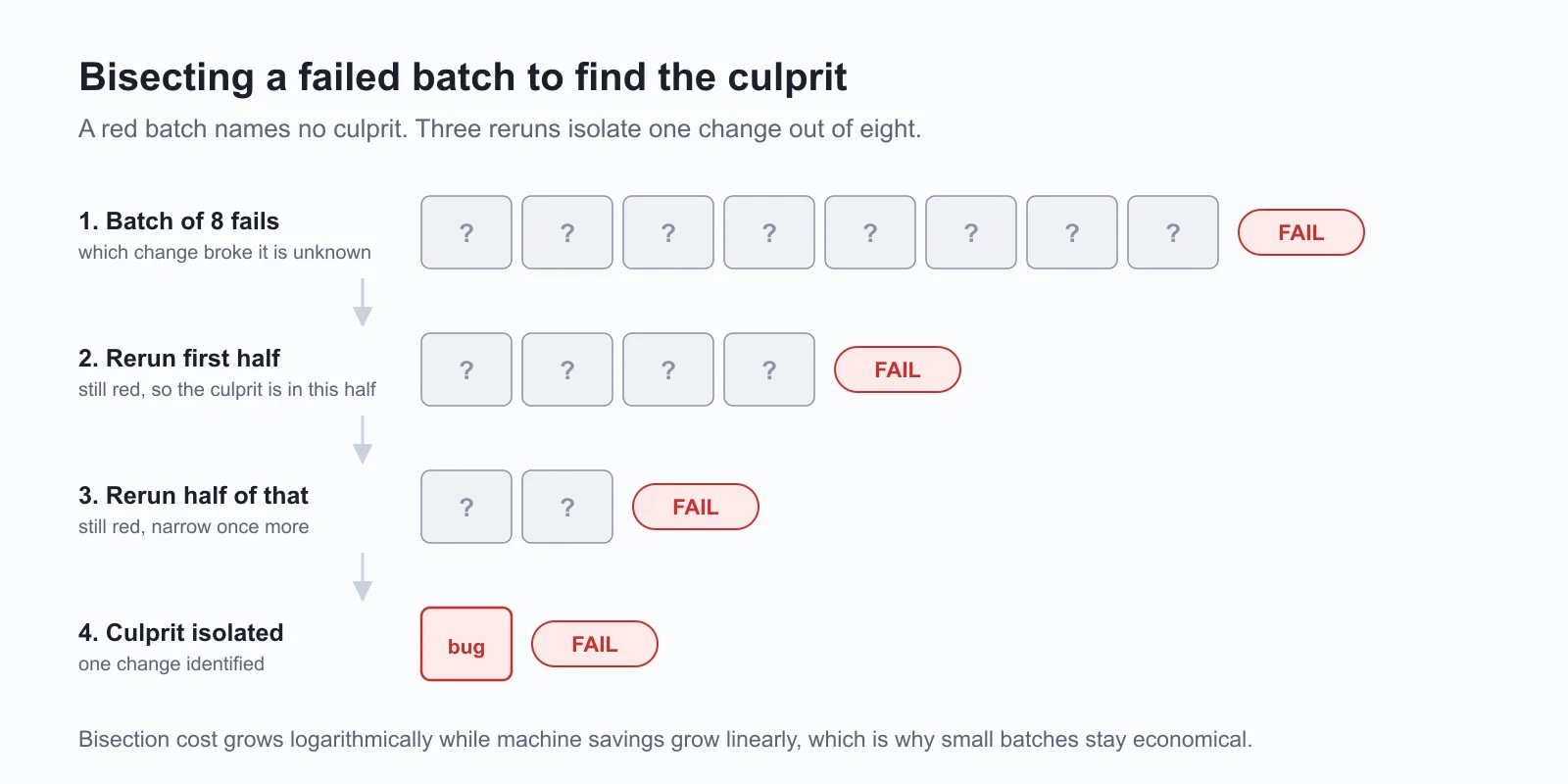
Twelve changes went into a batch, the batch is red, and the report names a failing test but not the change responsible. Batching bought machine savings by giving up the one-to-one mapping between a change and its verdict, and bisection buys that mapping back at a logarithmic price.
Continuous integration platforms automate this splitting step so a red batch is decomposed without a human driving each rerun. Because bisection cost grows logarithmically while machine savings grow linearly, small batches remain the safe default.
Three controls reduce how often you reach for bisection at all. Each is a configuration setting rather than a process change.
- Fail-fast aborts a batch after a threshold of consecutive failures, so a uniformly broken build stops burning the full suite's compute. In HyperExecute this is a failFast block with a maxNumberOfTests threshold, and the counter resets on any pass, which deliberately targets a broken run rather than an intermittently flaky one.
- Scoped retries absorb genuinely transient failures. HyperExecute exposes retryOnFailure with maxRetries between 1 and 5, plus a retryOptions block that matches error output by regex so retries fire only on known-transient errors and never mask a real assertion failure.
- Auto-muting suppresses tests that fail consistently enough to be noise rather than signal, with a default threshold of 5 consecutive failures, keeping a chronically broken test from failing every batch it appears in.
Retries carry a real hazard: a retry that turns a red batch green hides a flaky test rather than fixing it, and flakiness compounds in batches because one unreliable test taints every group it joins. Our guide to preventing flaky tests covers detection, and stopping a pytest suite after N failures shows the framework-level equivalent of fail-fast.
How Do You Run Batch Tests in TestNG, pytest, and Spring Batch?
Every major framework already has a grouping primitive. TestNG groups classes in an XML suite file with parallel and thread-count attributes. pytest groups by marker, selected with -m and bounded by --maxfail. Spring Batch tests the job itself with @SpringBatchTest.
TestNG XML Suites
TestNG's XML suite file is a batch definition. A suite element names the classes or groups that belong in the batch, and two attributes on that same element carry the batch and parallelism distinction: parallel sets what runs concurrently, such as classes or methods, while thread-count caps how many run at once.
Setting thread-count to 4 matches the batch size the Concordia study found effective, which makes the suite file the cheapest place to apply that finding. Pointing the runner at the file with the suite-XML flag then executes the whole batch as one job. For selecting members by tag rather than by class, see grouping test cases in TestNG, and creating a TestNG XML file for parallel execution walks through the full file.
pytest Markers
pytest builds batches from markers. Decorate the tests with a custom marker such as nightly, then select that marker at run time with the -m flag so one command addresses the whole group. Adding -n spreads the selected batch across worker processes, which requires the pytest-xdist plugin.
The --maxfail flag is pytest's fail-fast: it aborts the batch once the failure count is reached rather than running the remaining tests against an obviously broken build. Our guide to running multiple pytest test cases in one file covers the collection rules that decide what lands in the group.
Spring Batch Job Testing
Testing a Spring Batch job is a distinct problem: the batch is the application, and the test launches it end to end and asserts on the exit status. Most tutorials still show JobLauncherTestUtils, which is now outdated. The Spring Batch unit testing documentation states that as of Spring Batch 6.0, JUnit 4 is no longer supported and migration to JUnit Jupiter is recommended. Alongside that change, JobLauncherTestUtils was deprecated in favour of JobOperatorTestUtils, following the deprecation of JobLauncher in favour of JobOperator.
The shape of such a test is short. Annotate the class with @SpringBatchTest and @SpringJUnitConfig, inject the test utility, start the job, and assert that the returned JobExecution carries a COMPLETED batch status. The annotations are the same on both versions; only the injected type changes.
If you are on Spring Batch 5 or earlier, JobLauncherTestUtils is still the correct class. On 6.0 and later, inject JobOperatorTestUtils instead, because the deprecated utility is scheduled for removal in a future release. Copying an older tutorial verbatim is the most common way this breaks.

How Do You Test ETL, Mainframe, and End-of-Day Batch Jobs?
When the batch is the product, assertions target the output set rather than a screen: a produced file, table, or ledger compared against an expected result. Restart and recovery behaviour is itself under test, boundary records dominate the risk, and a job that finishes after its window has failed even if its output is correct.
- Assertions target the output set rather than a screen, so the test compares a produced file, table, or ledger against an expected result rather than checking an element.
- Restart and recovery behaviour is itself under test, since a job that dies at record 40,000 of 50,000 must resume without double-posting, and that path only executes when you deliberately kill the job mid-run.
- Boundary records dominate the risk, so the first record, the last record, an empty input, a duplicate key, and a record that fails validation halfway through are what determine whether the job is correct.
- Idempotency matters more than speed, because operations teams rerun failed jobs routinely and a rerun that double-applies transactions is worse than a job that failed cleanly.
- Execution windows are fixed by downstream systems, so a job that is correct but finishes after the window has closed has still failed.
Data pipeline jobs are the most common case, and our guide to ETL testing covers the transformation and reconciliation checks in depth. On IBM Z systems the same jobs carry job control language dependencies and scheduling chains where one job's output feeds the next, so a single failure cascades through the night's run: see mainframe testing for the validation approach and mainframe automation for bringing those systems under automated test.
The practical test-design rule for any data pipeline batch: assert on record counts, on checksums or control totals, and on a sample of transformed rows. Counts catch dropped records, control totals catch arithmetic errors, and row sampling catches transformation logic that is wrong but internally consistent.
What Are the Best Practices for Batch Testing?
Start at a batch size of 4 and change it only with a measurement. Keep the slowest test out of the fast batch, make every batch independently rerunnable, cache dependencies keyed on the lockfile checksum, set fail-fast only on merge-gating batches, and track batch pass rate over time rather than per-run status.
- Start at a batch size of 4 and change it only with a measurement, since the Concordia study found that size captured up to a 72% machine reduction without adaptive scheduling.
- Keep the slowest test out of the fast batch, because a batch finishes when its slowest member finishes and one long test sets the floor for everything grouped with it.
- Make every batch independently rerunnable, so that bisection is a matter of re-invoking a subset rather than reconstructing state by hand.
- Cache dependencies keyed on the lockfile checksum, removing a fixed installation cost that would otherwise be paid on every machine in every run.
- Set fail-fast thresholds on batches that gate a merge and leave them off overnight batches, where the full result set is more useful than an early abort.
- Route retries through regex-scoped rules rather than a blanket retry count, so infrastructure errors are absorbed and assertion failures still fail.
- Send batch results somewhere a human will see before the next run starts, since a nightly batch whose report nobody opens is machine time spent for nothing.
- Track batch pass rate over time rather than per-run status, because a batch that fails intermittently on different tests is reporting flakiness rather than regressions.
Grouping tests into named, reusable batches is a test management concern as much as an execution one, and a test suite is the artifact that holds a batch definition stable across runs. What the batch emits at the end is covered in our guide to test reports, which is where pass rate over time actually gets read.
What Should You Do First to Start Batch Testing?
Open your slowest scheduled job, group its tests into batches of four, and add a fail-fast threshold to whichever batch gates your merges. Those two changes capture most of the machine saving batching offers and cap the cost of a red batch, before any platform change is needed.
When the batch outgrows the machines available to run it, distribution becomes the constraint rather than batch size. TestMu AI's HyperExecute splits a discovered test list across concurrent virtual machines and ships the fail-fast, scoped-retry, and dependency-caching controls this guide describes as YAML keys, alongside AI root cause analysis on failed runs. The HyperExecute YAML parameters reference lists every key, and a free TestMu AI account is enough to run your first distributed batch.
Tracking tests across tools and teams? TestMu AI's Test Manager keeps test cases, runs and results in one place.
Author

Salman Khan
Blogs: 136


Salman is a Test Automation Evangelist and Community Contributor at TestMu AI, with over 6 years of hands-on experience in software testing and automation. He has completed his Master of Technology in Computer Science and Engineering, demonstrating strong technical expertise in software development, testing, AI agents and LLMs. He is certified in KaneAI, Automation Testing, Selenium, Cypress, Playwright, and Appium, with deep experience in CI/CD pipelines, cross-browser testing, AI in testing, and mobile automation. Salman works closely with engineering teams to convert complex testing concepts into actionable, developer-first content. Salman has authored 120+ technical tutorials, guides, and documentation on test automation, web development, and related domains, making him a strong voice in the QA and testing community.
Reviewer

Shahzeb Hoda
Reviewer
Shahzeb Hoda is the Associate Director of Marketing and a Community Contributor at TestMu AI, leading strategic initiatives in developer marketing, content, and community growth. With 10+ years of experience in quality engineering, software testing, automation testing, and e-learning, he has authored and reviewed 70+ technical articles on software testing and automation. Shahzeb holds an M.Tech in Computer Science from BIT, Mesra, and is certified in Selenium, Cypress, Playwright, Appium, and KaneAI. He brings deep expertise in CI/CD pipeline automation, cross-browser testing, AI-driven testing practices, and framework documentation. On LinkedIn, he is followed by 3,700+ engineers, developers, DevOps professionals, tech leaders, and enthusiasts.


Batch Testing FAQs
Did you find this page helpful?
More Related Blogs

TestMu AI forEnterprise
Get access to solutions built on Enterprise
grade security, privacy, & compliance
- Advanced access controls
- Advanced data retention rules
- Advanced Local Testing
- Premium Support options
- Early access to beta features
- Private Slack Channel
- Unlimited Manual Accessibility DevTools Tests