

Power Your Software Testing with AI Agents and Cloud
The Native AI-Agentic Cloud Platform to Supercharge Quality Engineering. Test Intelligently and Ship Faster.


- TestMu AI (Formerly LambdaTest)
- /
- Blog
- /
- What Is Autonomous Testing: A Complete Guide
What Is Autonomous Testing: A Complete Guide
A practical guide to autonomous testing: how AI creates, runs, and self-heals tests with less human effort, how it differs from traditional automation, the six stages of testing autonomy, and the tools that support it today.
Last Updated on:
Autonomous testing uses AI to take over parts of the software testing lifecycle that people traditionally handle: deciding what to test, writing the tests, repairing them when the UI changes, and triaging failures. People still set the goals and approve what ships, and how much they approve depends on the stage of autonomy a team has reached.
In GitLab's 2025 survey of 3,266 DevSecOps professionals, conducted by The Harris Poll, only 37% said they would trust AI to handle daily work tasks without human review.
For a QA team, that means choosing which testing jobs to delegate to AI first and which review gates to keep.
Overview
Autonomous testing uses AI and machine learning to design, execute, and self-heal software tests with less human involvement. It covers the full cycle: generating cases from requirements, prompts, or code changes, running them in CI/CD, repairing broken locators when the UI changes, and analyzing failures for root cause.
Core Elements of Autonomous Testing
- Test Case Design: Autonomous testing tools generate scenarios from requirements, user flows, recordings, or code changes, so a new requirement becomes a test case without anyone writing a script.
- Test Execution: Generated tests run in the CI/CD pipeline on each change, validating application behavior across the browsers, devices, and environments the team targets.
- Self-Healing: When the user interface changes, an autonomous testing tool re-resolves broken steps automatically, which cuts script maintenance; well-designed tools reject low-confidence matches because a wrong heal can pass a real bug.
- Test Result Analysis: Autonomous failure analysis separates product defects from environment or test faults and clusters related failures, so triage starts from a likely cause.
- Reporting: Autonomous testing dashboards and alerts deliver each run's step screenshots, network and console logs, and trend data to the team that owns the flow.
Tools Supporting Autonomous Testing
- Natural language testing: KaneAI by TestMu AI is a GenAI-native testing agent that lets teams plan, author, and evolve tests using natural language instructions without manual scripting.
- Command-line verification: Kane CLI by TestMu AI runs natural-language objectives headless from a terminal or CI step and returns an exit code that fails the build on a broken flow.
- Pull request testing: QA.tech attaches an AI agent to GitHub pull requests and GitLab merge requests, generating tests only where coverage is missing and posting a review verdict.
- Agent-built web tests: Functionize's AI agents build, run, and maintain end-to-end web tests from natural-language descriptions and self-heal them when the UI changes.
- Change-based test selection: Tricentis SeaLights recommends the existing tests a code change affects and flags changed code that has no test coverage, which trims large regression runs.
- Enterprise ERP and CRM: Worksoft provides codeless, end-to-end automation for SAP, Salesforce, and other packaged enterprise applications, marketed as intelligent test automation for business-process testing.
What Is Autonomous Testing?
Autonomous testing, also called autonomous software testing, is an approach in which AI systems plan, create, run, and maintain tests with decreasing human involvement. An autonomous tool works from intent, such as a requirement, a natural-language objective, or a code change, and decides the steps needed to verify it.
The pressure behind the approach is maintenance: scripted suites break when markup changes, and each broken locator waits for a person to fix it. Autonomous testing targets that upkeep, along with the triage of flaky tests that pass on retry.
Autonomous Testing vs. Automation Testing
Automation testing runs scripts that people write: a person decides what to check, encodes each step as selectors and assertions, and repairs the script when the application changes. Autonomous testing moves those decisions to the tool, which generates the steps from an objective and re-resolves elements when the page shifts.
| Dimension | Automation Testing | Autonomous Testing |
|---|---|---|
| Test Creation | Written by testers or developers in a framework such as Selenium or Playwright | Generated from requirements, tickets, natural-language objectives, or code changes |
| Script Maintenance | Manual updates when selectors or flows change | Self-healing re-resolves changed elements; ambiguous changes are surfaced for review |
| Test Selection | A person or a fixed schedule decides what runs | The tool can select the tests a code change affects |
| Failure Triage | A person reads logs and screenshots to find the cause | The tool separates product failures from environment or test faults and attaches evidence |
| Human Role | Writes, runs, and repairs tests | Sets objectives, reviews generated plans and heals, and signs off |
| Determinism | The same script takes the same path on every run | The agent's path can vary between runs, so pass criteria must be explicit assertions |
| Best For | Stable flows with predictable regression suites | Fast-changing UIs and teams with more flows than scripting capacity |
Agentic QA stops short of full autonomy: an AI agent receives a goal a person wrote and chooses its own steps at runtime, while the person still approves the plan and the result. Agentic testing is the method (agents that plan and act), and autonomous testing measures how much of the lifecycle runs without a person, so a tool can be agentic without being fully autonomous.
How Does Autonomous Testing Work?
An autonomous testing tool runs a loop: it takes in intent, plans the test, resolves each step against the live application, executes it, heals or escalates when the page changes, and classifies the result.
- Intent intake - the tool starts from a natural-language objective, a requirement such as a PRD or Jira ticket, a recorded session, or a pull request diff.
- Plan generation - the intent becomes an ordered test plan with proposed assertions that a person can review before anything runs; in KaneAI, this plan review is the first human approval gate.
- Element resolution - each step is matched to the live page by what the element is for, such as "the Add to Cart button", in place of a fixed CSS or XPath selector.
- Execution - the plan runs in a real browser or on a device, from a laptop, a CI job, or a cloud grid.
- Healing or escalation - when the page changes, the tool re-resolves the target. Kane CLI scores every match and rejects low-confidence matches up front, so an ambiguous change reaches a person. A wrong heal that passes a real bug is the main failure mode of self-healing test automation.
- Classification and evidence - the result separates a product failure from an environment, infrastructure, or test fault, and the run keeps step screenshots, network logs, and console output for review.
Under the hood, an LLM agent observes the page, picks the next action, acts, and observes again until the objective is met or a step budget runs out; Kane CLI caps a flow at 50 steps by default. Each authored step is a model call, which is where the cost, latency, and run-to-run variance of autonomous testing come from.
Benefits of Autonomous Testing
Lower Maintenance Load
In KaneAI, runtime Auto-Heal recovers a changed locator so the run continues, and when a step has to be re-authored, Adaptive Heal saves the result as a new test version that waits for approval by default. A broken selector becomes a review item for the team. Adaptive Heal is one of three strategies under a single Self-maintenance setting, alongside Dynamic Test, which authors every objective from its goal on every run, and Retry on Failure, which re-runs the test unchanged. Only one strategy can be active at a time, and the two re-authoring strategies need a test case authored on the New Experience engine.
A replication study of web element relocalization found that its HybridSimilo algorithm locates 98.8% of elements with broken locators in realistic testing scenarios.
That figure measures a research algorithm on a benchmark, so measure your own heal acceptance rate during the pilot before relying on any vendor's healing.
The hours that come back go to test strategy, edge-case design, and exploratory work. The self-healing vs manual maintenance ROI comparison shows where those saved hours break even against tool cost.
Authoring Without Framework Code
Natural-language authoring lets people who know the product but not Playwright or Selenium write tests. A product manager can turn an acceptance criterion into an executable KaneAI test without writing framework code.
Change-Aware Test Selection
Change-aware tools such as Tricentis SeaLights map a code change to the tests it affects, so a pipeline runs those tests first and can skip the rest. Autonomous test orchestration covers how agents decide which tests to run.
Failure Triage With Evidence
When a run fails, autonomous tools attach what a reviewer needs to act: step screenshots, network and console logs, and a verdict on whether the product failed or the environment or test broke.

Note: Run AI-authored tests up to 70% faster on HyperExecute with TestMu AI. Try TestMu AI Today!
Six Stages From Manual to Autonomous Testing
SmartBear's ebook Six Stages from Manual to Autonomous Testing, a vendor model written around its TestComplete product, adapts the six stages the Society of Automotive Engineers (SAE) uses to describe driving automation:
| Stage | What the Tool Does | What the Tester Still Owns | Signs Your Team Is Here |
|---|---|---|---|
| 1. Manual Testing | Nothing; the tester acts as the end user | Test creation, execution, maintenance, monitoring, and fallback when tests fail | No automated suite; every check is run by hand |
| 2. Assisted Automation | Helps create and execute tests, for example through record-and-replay | Managing and maintaining the scripts by hand | A tool records or runs tests, but people write and fix every script |
| 3. Partial Automation | Takes control of some parts of test creation, maintenance, or execution | Monitoring the tests and the application | The tool maintains parts of the suite, and people watch every run |
| 4. Automation Acceleration | Takes over more of the work to speed automation up, for example distributed, parallel, and CI/CD-triggered runs | Monitoring quality as long as conditions do not change | Suites run in parallel from CI, and people repair locators when the UI changes |
| 5. Unassisted Automation | Handles more of creation, execution, and maintenance, for example AI-powered visual recognition | Less monitoring, even when conditions change | The tool recovers from UI changes, and people review its fixes |
| 6. Autonomous Testing | Creates, maintains, and executes tests, learns from failed tests, and decides how new tests are created and run | SmartBear describes autonomous solutions as still in their infancy | The tool decides what to test and learns from failures |
SmartBear notes that end-to-end autonomous testing has yet to be widely adopted by large enterprises. Read against these definitions, agentic authoring and healing tools such as KaneAI, QA.tech, and Functionize work at stages 4 and 5, while Tricentis SeaLights and Worksoft accelerate existing automation.
How to Implement Autonomous Testing
Roll out autonomous testing one flow at a time, alongside the suite you already run.
Step 1: Audit Your Current Test Coverage
Before adding AI, map your current test coverage and its gaps. List the highest-risk flows, the most frequently failing tests, and the suites that consume the most maintenance hours; those are the first candidates for autonomous tooling.
Step 2: Match the Tool to Your Starting Point
- Existing Selenium suites - add self-healing to the scripts you already have. TestMu AI's Auto Healing for Selenium test suites is enabled with the autoHeal capability, which cannot be combined with smartWait in the same session, and recovers from certain failures during execution. The most brittle flows can move to an AI-native Selenium alternative that authors in natural language.
- Existing Playwright suites - pass autoHeal in the Playwright capabilities on the TestMu AI grid, as the guide to Auto Healing for Playwright test suites shows.
- New flows without framework code - author them in natural language with KaneAI and export to Selenium, Playwright, Cypress, or Appium when the team wants code.
- Large suites with long runs - add change-based test selection, such as Tricentis SeaLights, which recommends the existing tests a code change affects.
- Native mobile apps - run existing Appium, Espresso, XCUITest, or Detox suites on TestMu AI's App Automation cloud of real Android and iOS devices, emulators, and simulators, which includes auto-healing. For a quick local check, Kane CLI can drive an Android emulator or iOS simulator build with --target emulator or --target simulator on macOS Apple Silicon.
- Code written by AI coding agents - verify the rendered UI on every commit with a command-line agent such as Kane CLI.
Step 3: Integrate With Your CI/CD Pipeline
Run autonomous tests on every pull request, as a non-blocking job until the pilot proves them out. Kane CLI fits a pipeline as one step: run it headless with a timeout and CI credentials, and its exit codes (0 passed, 1 failed, 2 error, 3 timeout or cancellation) stop the pipeline without custom scripting.
Before blocking merges on those exit codes, read the result_code in the run_end event of the NDJSON output. Kane CLI groups codes by cause (3xx stuck, 4xx agent error, 5xx infrastructure, 6xx blockers such as a CAPTCHA, 7xx assertion failures), so a pipeline can block on 7xx and route the rest to a retry or an alert; an exhausted credit balance, for example, reports 560.
This Playwright script ran on the TestMu AI cloud grid on September 24, 2026: it searches the ecommerce playground for an iPhone, opens the first result, adds it to the cart, and waits for the cart badge to read 1.
import { chromium } from 'playwright-core';

const capabilities = {
  browserName: 'Chrome',
  browserVersion: 'latest',
  'LT:Options': {
    platform: 'Windows 11',
    build: 'Autonomous Testing Article',
    name: 'Scripted add-to-cart flow',
    user: process.env.LT_USERNAME,
    accessKey: process.env.LT_ACCESS_KEY,
  },
};

const browser = await chromium.connect(
  'wss://cdp.lambdatest.com/playwright?capabilities=' +
    encodeURIComponent(JSON.stringify(capabilities))
);
const page = await browser.newPage();
const lt = (action) => page.evaluate(() => {}, 'lambdatest_action: ' + JSON.stringify(action));

try {
  await page.goto('https://ecommerce-playground.lambdatest.io/');
  const search = page.locator('input[name="search"]:visible');
  await search.fill('iPhone');
  await search.press('Enter');
  await page.locator('.product-thumb h4 a').first().click();
  const price = (await page.locator('h3.price-new').textContent()).trim();
  await page.locator('button.button-cart:visible').click();
  const badge = page.locator('.cart-icon .cart-item-total:visible');
  await badge.filter({ hasText: /^1$/ }).waitFor({ timeout: 10000 });
  console.log('product:', await page.title(), '| price:', price);
  console.log('cart count:', (await badge.textContent()).trim());
  await lt({ action: 'setTestStatus', arguments: { status: 'passed', remark: 'cart count is 1' } });
  const { data } = JSON.parse(await lt({ action: 'getTestDetails' }));
  console.log('build:', data.build_id, '| session:', data.test_id);
} catch (err) {
  await lt({ action: 'setTestStatus', arguments: { status: 'failed', remark: err.message } });
  throw err;
} finally {
  await browser.close();
}
Console output from that run:
product: iPhone | price: $123.20
cart count: 1
build: 106158177 | session: DA-WIN-17458-1790250268294842656IGW
The build report for that session on the TestMu AI dashboard records the pass, the command log with each selector, and the session video, paused here on the cart confirmation:
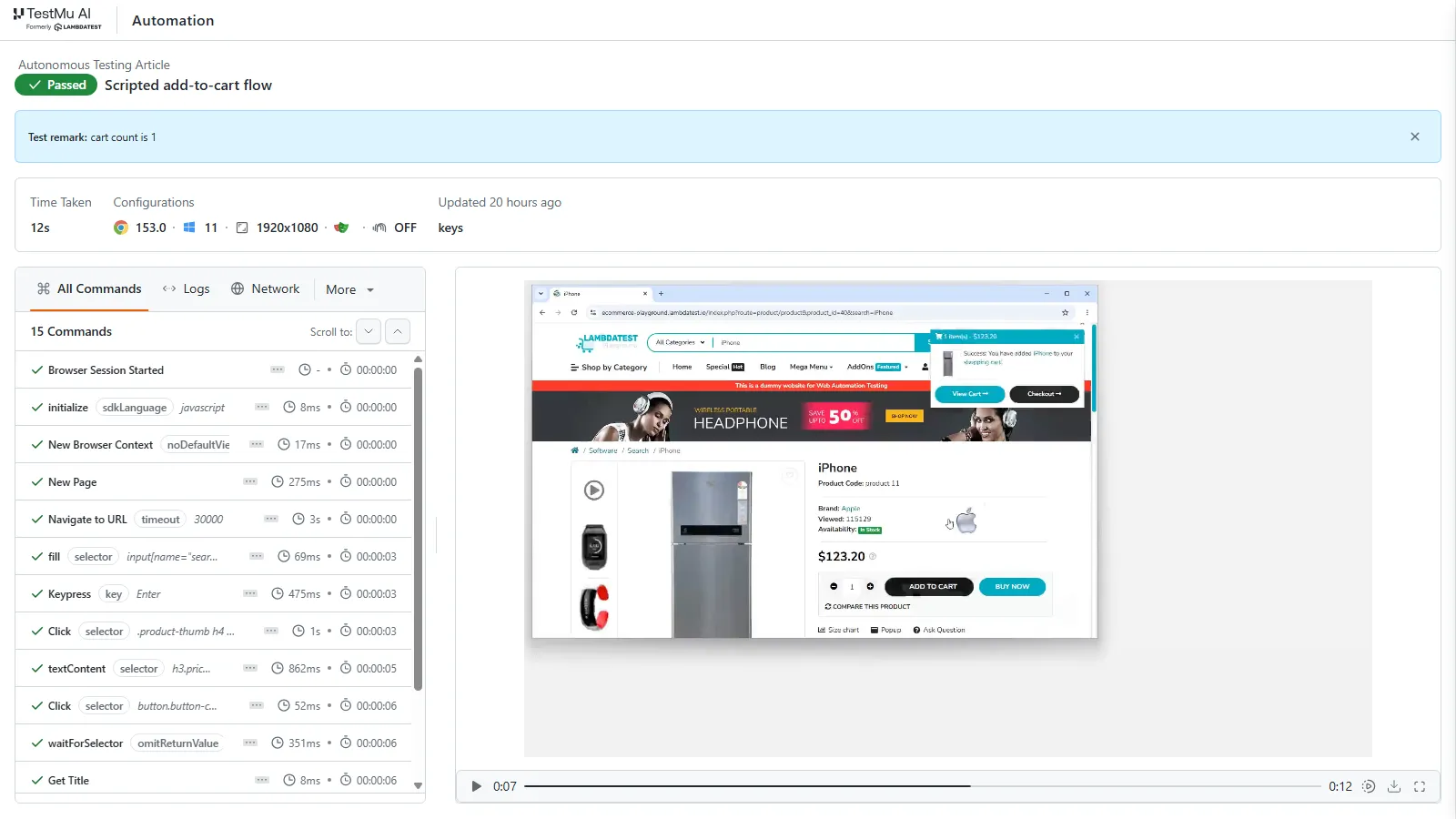
The script depends on five CSS selectors, and a storefront theme update that renames any one of them fails the run until someone edits the code. Written as a Kane CLI objective, the same flow names no selectors, because the agent resolves each element at run time:
# Install, authenticate, and run the same flow in agent mode
npm install -g @testmuai/kane-cli
kane-cli login   # OAuth in a browser; in CI, pass --username and --access-key instead

kane-cli run --agent --headless --timeout 300 \
  --url https://ecommerce-playground.lambdatest.io/ \
  "search for 'iPhone', open the first result, add it to the cart, \
   assert the cart count shows 1, store the product price as 'price'"
The objective states the cart-count check explicitly, so the run fails if the badge does not read 1.
Step 4: Define Human Review Gates
Keep a person on edge cases, UX judgment, and high-stakes flows such as payments and authentication. Decide gate by gate which test categories an agent may approve alone, using the exit criteria for human out of the loop testing, and require review of every heal on critical flows.
KaneAI supports these gates directly: test plans are reviewable before execution, a person can pause a run, correct a step, and hand control back to the agent, and re-authored test versions wait for approval unless auto-approve is switched on. These controls keep QA judgment with people while AI app testing writes tests from natural language and runs root-cause analysis on failures.
Step 5: Supply Context and Test Data
Testing agents such as Kane CLI work from the context you supply (a project context file, run variables, and prior-run memory) and need no per-application model training. Write objectives as testable outcomes, provide stable test data and credentials, and review heals and failure verdicts from the pilot's first runs to catch misreads early.
Step 6: Measure What Changes
Run the pilot as a timeboxed experiment. For the first two weeks, log maintenance hours and escaped defects for the chosen flow; for the next four, run the autonomous version as a non-blocking CI job next to the script; in the last two, decide against thresholds you wrote down at the start.
Track maintenance hours per week, heal acceptance rate (re-authored versions a reviewer approves versus declines, plus a weekly spot check of runtime heals), and false-pass rate. To measure false passes, seed a few known defects into a staging build and count which version fails on each.
Autonomous Testing Use Cases by Industry
Autonomous testing fits industries whose UIs change often, whose releases ship frequently, and whose escaped defects are expensive.
| Industry | What Changes Often | What Autonomous Testing Protects |
|---|---|---|
| Banking and Financial Services | Payment flows, onboarding journeys, and account dashboards under regulatory change | Checkout and balance flows across frequent releases, with step evidence for audits |
| Healthcare and Life Sciences | Patient portals and clinical workflows | Critical workflows, with a recorded trail showing each was validated |
| E-commerce and Retail | A/B tests, seasonal redesigns, and promotion logic that break brittle locators | Search, cart, and checkout, where regression testing effort concentrates |
| SaaS Teams Using AI Coding Agents | Features shipped several times a day | Rendered UI, verified before merge |
Autonomous Testing Tools
This list is unranked, and claims about third-party tools were checked against each vendor's own product pages in September 2026. For a wider list, see the AI testing tools roundup.
| Tool | What It Automates | Best Fit | Limitation to Plan For |
|---|---|---|---|
| KaneAI (TestMu AI) | Authoring from natural language, requirements, and pull request diffs; self-healing; failure analysis | Teams that want non-scripters to author and maintain tests | Pull request validation is in beta, and agent authoring and healing draw on credits |
| Kane CLI (TestMu AI) | Verification of rendered UI from natural-language objectives | Developers and AI coding agents checking their own changes | Agent runs draw on credits; local runs need Chrome on the runner or a remote browser endpoint |
| QA.tech | Pull request and merge request review: classifies the change, fills coverage gaps, runs tests, posts a verdict | Teams that want testing attached to code review | Mobile tests run on simulators and emulators; real devices are listed as coming soon |
| Functionize | Agent-built web tests with self-healing across Chrome, Firefox, Safari, and Edge | Web teams replacing hand-scripted flows | Agent work draws on a shared credit balance and pauses when it runs out |
| Tricentis SeaLights | Change-based test selection and test gap analysis | Large, mature suites with long regression runs | Selects from existing tests and does not generate new ones |
| Worksoft | Codeless end-to-end automation for SAP, Oracle, Salesforce, and other packaged apps | Enterprise business-process testing | Marketed as intelligent test automation; its pages describe no autonomous agent |
KaneAI by TestMu AI (Formerly LambdaTest)
KaneAI turns natural-language prompts, PRDs, Jira tickets, and recordings into executable test cases, runs them on TestMu AI's HyperExecute cloud across 3,000+ browser and OS combinations, and keeps them current as the UI changes.
Key Features
- Author Using Natural Language - write steps as natural-language sentences, including If/Else and While logic, and refine the generated steps conversationally before saving.
- Self-Healing Tests - runtime Auto-Heal recovers changed locators so the run continues, and a step that has to be re-authored is saved as a new version for review.
- Multi-Framework Export - generated tests export to Selenium, Playwright, Cypress, and Appium in multiple languages, so a team keeps its existing code.
- Validate Every Pull Request - in beta, a comment on a GitHub pull request makes KaneAI read the diff, generate tests, run them, and post results with root-cause analysis back in the thread, as the GitHub App integration docs describe.
- Smart Bug Detection - on a failed run, KaneAI captures the trace, drafts the ticket, and routes it to the right owner in your bug tracker.
Results depend on objectives and acceptance criteria being specific, and flows that span several external systems can still need supplementary scripting.

With the rapid adoption of AI in testing, the KaneAI Certification validates practical expertise in AI-powered testing and positions engineers as high-value contributors to modern QA teams.
KaneAI's natural-language authoring pairs with Kane CLI, a command-line companion that runs the same objectives from the terminal, CI, or an AI coding agent. It validates rendered UI in a real Chrome browser, returns standard exit codes (0 passed, 1 failed, 2 error, 3 timeout), and streams structured NDJSON so a pipeline or agent can consume the result. This closes the verification loop inside the terminal, where code is written and shipped. See the Kane CLI documentation to install it.
# Install and run an autonomous check in agent mode
npm install -g @testmuai/kane-cli

kane-cli run --agent --headless --timeout 300 \
  --url https://ecommerce-playground.lambdatest.io/ \
  "search for 'iPhone', open the first result, add it to the cart, \
   assert the cart count shows 1, store the product price as 'price'"

# Terminal result (final run_end event)
# {"type":"run_end","status":"passed","one_liner":"Add-to-cart flow verified",
#  "duration":41.8,"final_state":{"price":"$101.00"},
#  "test_url":"https://test-manager.lambdatest.com/projects/.../test-cases/..."}
For generating tests from a sentence, running them with bug triage, and the limits that still need a person, see autonomous testing command line.
Functionize
Functionize, now sold as Functionize Studio, uses AI agents to build, run, and maintain end-to-end web tests from natural-language descriptions. Tests self-heal when the UI moves and run on Chrome, Firefox, Safari, and Edge, singly or in parallel, on cloud-native infrastructure with nothing to install.
Billing draws every agent task from one credit balance the team shares, so cost tracks how much agent work runs, and agent work pauses when the balance runs out. Its product pages describe web UI flows and no native iOS or Android app testing, so teams with a mobile app should compare a Functionize alternative.
Tricentis SeaLights
Tricentis announced its acquisition of SeaLights in July 2024, and the product now ships as Tricentis SeaLights in the Tricentis quality intelligence portfolio. It maps code to tests, analyzes the code changes in each build, and recommends the existing tests those changes affect, so teams skip tests the change does not touch.
Test gap analysis flags changed code that is not covered by tests before it reaches production, and quality gates can block risky changes before merge. Because it selects from and measures an existing suite, it needs extensive regression coverage to start from.
Worksoft
Worksoft Certify provides codeless, end-to-end automation across SAP, Oracle, Salesforce, Microsoft Dynamics, ServiceNow, and other packaged enterprise applications, so business analysts can build tests without scripting. It also supports web and desktop applications, with mobile device coverage through a third-party device-lab integration.
Worksoft describes itself as intelligent test automation for the modern enterprise and Certify as codeless. Teams whose core product is a consumer web or mobile app should trial it against their own stack.
How to Choose an Autonomous Testing Tool
Score each candidate against these criteria and weight them by where your team sits today.
- Authoring model - can a non-scripter describe a test in natural language, or does it still need framework code? This decides how much of the team can contribute.
- Heal confidence - does it reject low-confidence matches and log every heal where a reviewer can see it, or can it bind to the wrong element and pass a broken flow? Ask to see a rejected heal in the demo.
- Migration path - can it reuse your existing Playwright or Selenium scenarios and export tests back to code, the way a Playwright alternative with code export does, so moving to it does not mean re-authoring the suite?
- CI/CD fit - does it run headless with standard exit codes and documented pipeline recipes, or does it need custom glue to fail a build on a broken flow?
- Evidence and governance - does every run produce screenshots, step traces, and a shareable report you can attach to a pull request or an audit?
- Coverage reach - can the same test run across the browser, OS, and device combinations your users run?
- Testing types - does it cover only UI flows, or also API, database, and accessibility checks?
A team losing most of its hours to selector maintenance should weight heal confidence and migration highest. A developer-heavy team shipping with AI coding agents should weight CI/CD fit and evidence, and an enterprise standardizing on ERP or CRM systems should weight codeless authoring and integration depth.
TestMu AI covers the first two profiles: KaneAI authors in natural language and runs on HyperExecute, and Kane CLI verifies rendered UI in a real Chrome browser from the terminal or a pipeline.

Challenges With Autonomous Testing
False Passes From Over-Eager Healing
A heal that binds to the wrong element turns a failing step green and can ship the bug the test existed to catch. The web element relocalization study cited above found that the VON Similo algorithm tends to produce more false positives than the original Similo. Require confidence scores on heals, keep auto-approve off for re-authored tests during a pilot, and spot-audit passed runs.
Uncertainty About AI Accuracy
On a benchmark of 45,373 broken test repairs across 59 open-source projects, the TaRGET test repair study, accepted at IEEE Transactions on Software Engineering, reports a 66.1% exact match accuracy.
Exact match is a strict metric, since some non-matching repairs are still valid, but the gap is why generated fixes need review before they merge.
Non-Deterministic Runs
An LLM-driven agent can take a different path through the same page on two runs, so a pass has to rest on explicit assertions about the end state. Kane CLI grants a pass only when the expected state is verified through evidence such as DOM state, URL changes, or network responses, which keeps the pass criterion fixed even when the path varies. Saving the flow as a Kane CLI _test.md file removes most of the remaining variance, because later runs replay the recorded steps from cache without consuming LLM credits.
Flakiness That Healing Cannot Fix
A study of 649 OpenStack projects found that cross-project flakiness affects 55% of OpenStack projects and significantly increases both review time and computational costs.
The study's qualitative analysis points to race conditions in CI, inconsistent build configurations, and dependency mismatches. Self-healing addresses none of those causes, so keep CI and dependency hygiene in scope during a pilot.
Phases That Still Need Human Judgment
Autonomous tooling maps well to functional and regression testing. UX evaluation, exploratory testing, and the judgment-based parts of accessibility assessment still depend on human intuition, even though rule-based WCAG checks can run automatically on every test.
Integration and Data Exposure
Autonomous tools need connections to issue trackers, test management systems, and CI, and each connection goes through a security review. LLM-based agents also send page content and test data to a model, so confirm where that data is processed and retained before pointing a tool at production-like data.
Lack of Industry Standardization
IEEE 829, the former test documentation standard, is superseded by the ISO/IEC/IEEE 29119 series, whose Part 3 now covers test documentation. The AI-specific guidance, ISO/IEC TR 29119-11:2020 and ISO/IEC TS 42119-2:2025 (which applies the 29119 series to AI systems), addresses how to test AI-based systems, not how to govern AI that does the testing, so teams still define their own acceptance criteria, coverage thresholds, and governance.
Cost Model and ROI
Check whether a tool prices per seat or meters agent work in credits, as Functionize and TestMu AI's KaneAI and Kane CLI do, since metered plans make cost track execution volume. Estimate monthly ROI as maintenance hours saved times loaded hourly cost, plus the reduction in escaped-defect cost, minus license or credits, amortized setup, and reviewer time for heals and plans, and measure it on one flow first.
Conclusion
Pick one high-maintenance regression flow and author it in natural language with KaneAI, following the guide to author your first desktop browser test. Run it alongside the scripted version, with the script on TestMu AI's test automation cloud, and after a few weeks compare maintenance hours and false-pass rate for the two.
Author

Harish Rajora
Blogs: 100


Harish Rajora is a software developer at TestMu AI with over 6 years of hands-on experience in Python and cross-platform application development across Windows, macOS, and Linux. He has authored 800+ technical articles and worked on large-scale projects, including GenAI applications and core engineering features used by millions. Harish has led DevOps initiatives building CI/CD pipelines with Jenkins, AWS, GitLab, and GitHub, and holds an M.Tech in Software Engineering from IIIT Allahabad.
Reviewer

Sirajuddin Khan
Reviewer
Sirajuddin Khan is Vice President of Product Management at TestMu AI (formerly LambdaTest), where he drives the company's agentic AI product strategy, building a suite of autonomous agents that includes Agentic Browsers and Agentic Visual Testing and shifting the unit of work from test execution to autonomous outcomes. One of the company's earliest product leaders, he has owned the roadmap for the high-performance execution cloud and grew the cross-browser testing products from early adoption to market leadership. He brings over a decade of experience across SaaS, B2B, and eCommerce, with earlier product roles at Wydr and ShopClues, where his catalog and search work cut delivery SLAs and lifted seller activity. Sirajuddin holds an MBA in Information Technology from Sikkim Manipal University and a B.Tech in Computer Science Engineering from Maharshi Dayanand University.


Autonomous Testing FAQs
Did you find this page helpful?
More Related Blogs
TestMu AI forEnterprise
Get access to solutions built on Enterprise
grade security, privacy, & compliance
- Advanced access controls
- Advanced data retention rules
- Advanced Local Testing
- Premium Support options
- Early access to beta features
- Private Slack Channel
- Unlimited Manual Accessibility DevTools Tests