

Power Your Software Testing with AI Agents and Cloud
The Native AI-Agentic Cloud Platform to Supercharge Quality Engineering. Test Intelligently and Ship Faster.


- TestMu AI (Formerly LambdaTest)
- /
- Blog
- /
- How to Perform Autonomous Testing From the Command Line
How to Perform Autonomous Testing From the Command Line
Run autonomous testing from the terminal: turn on self-healing, generate tests from one sentence, run them with bug triage, and see where agents still need you.
Published on:
An AI agent that writes tests, runs them, and reports green is only useful if you can check its work. That is where adoption stalls: the Stack Overflow 2025 AI survey found 37.9% of respondents do not plan to use AI agents at all, and among developers who listed tasks they will not hand to AI, 44.1% named testing code.
This guide runs each step of autonomous testing from the terminal with TestMu AI and Kane CLI: self-healing on the cloud grid, tests generated from one sentence, a parallel run with bug triage, a suite designed from a PRD and measured for coverage, and the places the agent still needs a person.
TL;DR
To run autonomous testing from the command line, generate tests from a plain-English description with kane-cli generate, save them as _test.md files, and run them with kane-cli testrun run --bug-detection continue. The agent authors steps on the first run, replays them afterwards, and labels each failure as a product bug or an automation bug.
- Self-healing locators: autoHeal: true in LT:Options makes TestMu AI re-locate an element after a DOM change and log the healed and original selectors. Heals full page redesigns: No.
- Test generation: kane-cli generate turned one sentence into 2 scenarios and 4 test cases; --save wrote the 2 functional cases as runnable _test.md files.
- Bug triage: --bug-detection continue attaches a verdict to each failure. The failed generated test came back as automation_bug, agent_misstep, confidence 0.91, with no product bug confirmed.
- Playwright test agents: npx playwright init-agents scaffolds planner, generator, and healer agents that run inside a host coding agent. Runs without a host agent: No.
- Coverage: kane-cli cover measures coverage per acceptance criterion once requirements are ingested with kane-cli context ingest and tests designed with kane-cli design tests. Works on sentence-generated tests alone: No.
Autonomous Testing Steps as CLI Commands
Autonomous testing is a question of which decisions you hand to the tool. Each row below moves one more decision from you to the agent, and each has a single command. For the concepts behind the term, see autonomous testing.
| The tool decides | Command or setting | You still own |
|---|---|---|
| Nothing: it runs your script | npx playwright test | Steps, locators, assertions, fixes |
| Which element a broken locator meant | autoHeal: true in LT:Options | Steps, assertions, reviewing healed selectors |
| Every step toward a stated goal | kane-cli run "objective" | The goal and what counts as passing |
| Which tests to write | kane-cli generate, then testrun run | Reviewing, editing, and keeping cases |
| Whether a failure is a product bug | --bug-detection continue | Accepting the verdict, filing the defect |
| Which tests a requirement needs | kane-cli context ingest, then design tests | Approving the use cases and the design |
Moving down the table cuts script maintenance and shifts your work into the last column: reviewing what the agent wrote and decided.
How to Add Self-Healing to a Scripted Suite
Self-healing is the smallest handover: the test stays yours, and the platform fixes a locator that stopped matching. TestMu AI's Playwright auto healing docs describe it as recording the DOM path of each element found on a passing run, then generating a new locator from that record when the element goes missing after a DOM change.
// playwright.config.ts - self-healing on the TestMu AI cloud grid
const capabilities = {
  browserName: 'Chrome',
  browserVersion: 'latest',
  'LT:Options': {
    platform: 'Windows 11',
    build: 'Checkout regression',
    user: process.env.LT_USERNAME,
    accessKey: process.env.LT_ACCESS_KEY,
    autoHeal: true,   // record DOM paths on passing runs, re-locate elements after DOM changes
  },
};- Review what healed - the command log on the TestMu AI automation dashboard shows the healed selector next to the original one, so every heal is visible and reviewable.
- Know the limits - the docs list simple ID, class, and attribute changes as the best case, and full redesigns, workflow changes, and browser or network failures as out of scope.
- Masking risk - a heal can hide a real regression where an element genuinely moved for the wrong reason. The trade-offs are covered in self-healing test automation.
How to Generate Tests From One Sentence
Test generation hands over the question of what to test. Kane CLI takes a description and returns scenarios and test cases, with --scenario-limit and --per-scenario-limit capping each at 1 to 20. One sentence about a cart flow produced 2 scenarios and 4 test cases, and the agent added a performance scenario nobody asked for.
$ kane-cli generate "shopper searches for a product, adds it to the cart, and updates the quantity in the cart on https://ecommerce-playground.lambdatest.io" \
    --agent --scenario-limit 2 --per-scenario-limit 2
{"type":"generate_done","request_id":"38766","status":"completed","scenario_count":2,"case_count":4,
 "save_hint":"kane-cli generate --save --req 38766"}

$ kane-cli generate --save --req 38766
{"type":"generate_save_result","suite_dir":".testmuai/tests/shopping-cart-product-quantity-38766","saved":2,"fell_back":0}
--save wrote the 2 functional cases as _test.md files; the two performance cases stayed as cases in the request and were not saved as runnable tests. Each file is plain English with a frontmatter block, and neither generated file named a start URL, so add a url key like the one below before running.
---
mode: testing
url: https://ecommerce-playground.lambdatest.io   # added by hand: the generated file had no start URL
max_steps: 30
timeout: 300
variables: {}
---

# Search for a product, add it to the cart, and increase its quantity

## Step 1
Search for "iPhone" and add "iPhone" to the cart. Navigate to the Shopping Cart. Increase the quantity for "iPhone" from "1" to "2". Verify the "Unit Price" and "Total" for the iPhone.- Start URL order - Kane CLI resolves the URL from the --url flag first, then the file's url frontmatter, then the stored default from config set-url. Without one, a generated test starts on the wrong site.
- Refine instead of editing - kane-cli generate "refinement" --refine --req 38766 regenerates against the same request, so feedback shapes the next batch.
For every generation option, see Kane CLI AI test case generation.

Note: Try the same one-sentence generation on your own app with Kane CLI and a TestMu AI account. Sign up for free.
How to Run Generated Tests and Triage Failures
testrun run executes the _test.md files in parallel workers. On the first run the agent authors each step in a real Chrome browser; --bug-detection continue investigates any failure and records whether it is a product bug. The two generated tests split: one passed in 115 seconds, one failed after 294.
$ kane-cli testrun run .testmuai/tests/shopping-cart-product-quantity-38766/Cart-Search-Add-Update/*_test.md \
    --parallel 2 --bug-detection continue --headless
{"type":"testrun_authored_member_end","path":".../search-for-a-product-add_test.md","status":"passed","duration_s":115}
{"type":"testrun_authored_member_end","path":".../search-for-a-product-add-2_test.md","status":"failed","duration_s":294,
 "failure":{"message":"AP determined agent is stuck ...","step_index":1}}
{"type":"testrun_summary","totals":{"tests":2,"passed":1,"failed":1,"broken":0,"skipped":0,"authored":2}}
The failing test asked the agent to set the quantity to zero and verify an empty cart. The bug verdict did not blame the store:
{"type":"test_md_bug_verdict","step_index":1,"confirmed":false,
 "bug_title":"Agent repeatedly added product instead of completing cart workflow",
"family":"automation_bug","category":"agent_misstep","severity":"minor","confidence":0.91}- confirmed: false - no product defect was confirmed, so nobody files a bug against the cart.
- automation_bug / agent_misstep - the agent kept clicking add-to-cart controls instead of opening the cart, which points at the test wording.
- The fix - the run summary suggested adding the item once, opening the cart through the cart link, setting the quantity to 0, applying the update, and then checking the empty-cart message. Spelling those steps out in the _test.md file is the refinement.
A test that passed once is replayed afterwards instead of re-authored. Rerunning the passing test finished in 113 seconds with no re-authoring (authored: 0).
$ kane-cli testrun run tests/search-for-a-product-add_test.md --headless
{"type":"testrun_member_end","status":"passed","duration_s":113}
{"type":"testrun_summary","totals":{"tests":1,"passed":1,"failed":0,"broken":0,"skipped":0,"authored":0}}
How to Perform Autonomous Testing With Kane CLI
In Kane CLI, the decisions in the table at the top of this guide show up at four levels, and this section walks through each from the terminal: an objective with no steps, where the agent plans the run; a journey that crosses a 3D Secure challenge with nothing special-cased; a run that ends in a classified bug verdict instead of a bare failure; and a suite designed from a requirements document, run, and measured for coverage.
The examples use the Stripe-style and Amazon-style demo stores from the Kane CLI use cases and the assurance workflow from the docs. The commands and output shown are from Kane CLI 0.8.18 on Windows 11; they run unchanged on macOS and Linux.
Step 1: Install Kane CLI and Log In
Install the @testmuai/kane-cli package from npm, confirm the version, and log in once. Web runs also need Google Chrome installed; Kane CLI launches and drives it itself. Full setup steps are in the Kane CLI getting started docs.
npm install -g @testmuai/kane-cli
kane-cli --version
kane-cli login0.8.18Step 2: One Objective, No Steps
The smallest autonomous run is a single sentence. There is no test file, no selector and no step list; the agent reads the page, decides what to click and type, and returns a verdict with proof.
kane-cli run --url https://www.testmuai.com/newsletter/ "enter qa+news@example.com in the newsletter signup, click subscribe, assert the page shows a success message" --agent{"type":"stream_start","cli_version":"0.8.18","surface":"run"}
{"step":1,"status":"passed","remark":"Opened the newsletter page and located the signup form"}
{"step":2,"status":"passed","remark":"Entered the email and clicked Subscribe"}
{"step":3,"status":"passed","remark":"Success message is visible: Thanks for subscribing"}
{"type":"run_end","status":"passed","reason":"Objective completed","duration":24.6}--agent switches the output to NDJSON with one line per step and a final run_end event, which is what a pipeline or a coding agent reads. The exit code is 0.
The three steps in the output were planned by the agent, not written by you; the same objective on a page with a different layout plans a different path to the same assertion.
The same shape reads values as well as asserting them. Ending an objective with store the price as 'price' returns the value in the run_end event's final_state, so a script can pull a live price or a fare from a page in one line.
Step 3: A Journey Through a 3DS Challenge
Strong customer authentication is where scripted automation usually stops: the challenge lives in an iframe from another domain, appears after a delay, and changes markup between providers. The 3DS challenge use case writes the journey as four plain-English steps and lets the agent handle the dialog as part of the flow. Save this as tests/stripe/3ds-challenge_test.md:
---
mode: testing
tags: [payments, sca]
variables:
  checkout_url: "https://my-testing-repo-main.vercel.app/stripe-clone-app/checkout"
  three_ds_card:
    value: "4000 0025 0000 3155"
    secret: true
---

# 3DS challenge

## Submit the payment
Open {{checkout_url}}?reset=true, enter card {{three_ds_card}} with expiry 12/30 and CVC 123, and submit the payment.

## Verify the challenge
Verify the 3D Secure challenge dialog shows the amount $240.00 and the masked card Visa ending 3155.

## Approve the challenge
Click Approve payment and verify a green success banner appears.

## Check the receipt
Verify the receipt shows the 3D Secure authenticated badge and the status succeeded.
kane-cli testmd run tests/stripe/3ds-challenge_test.md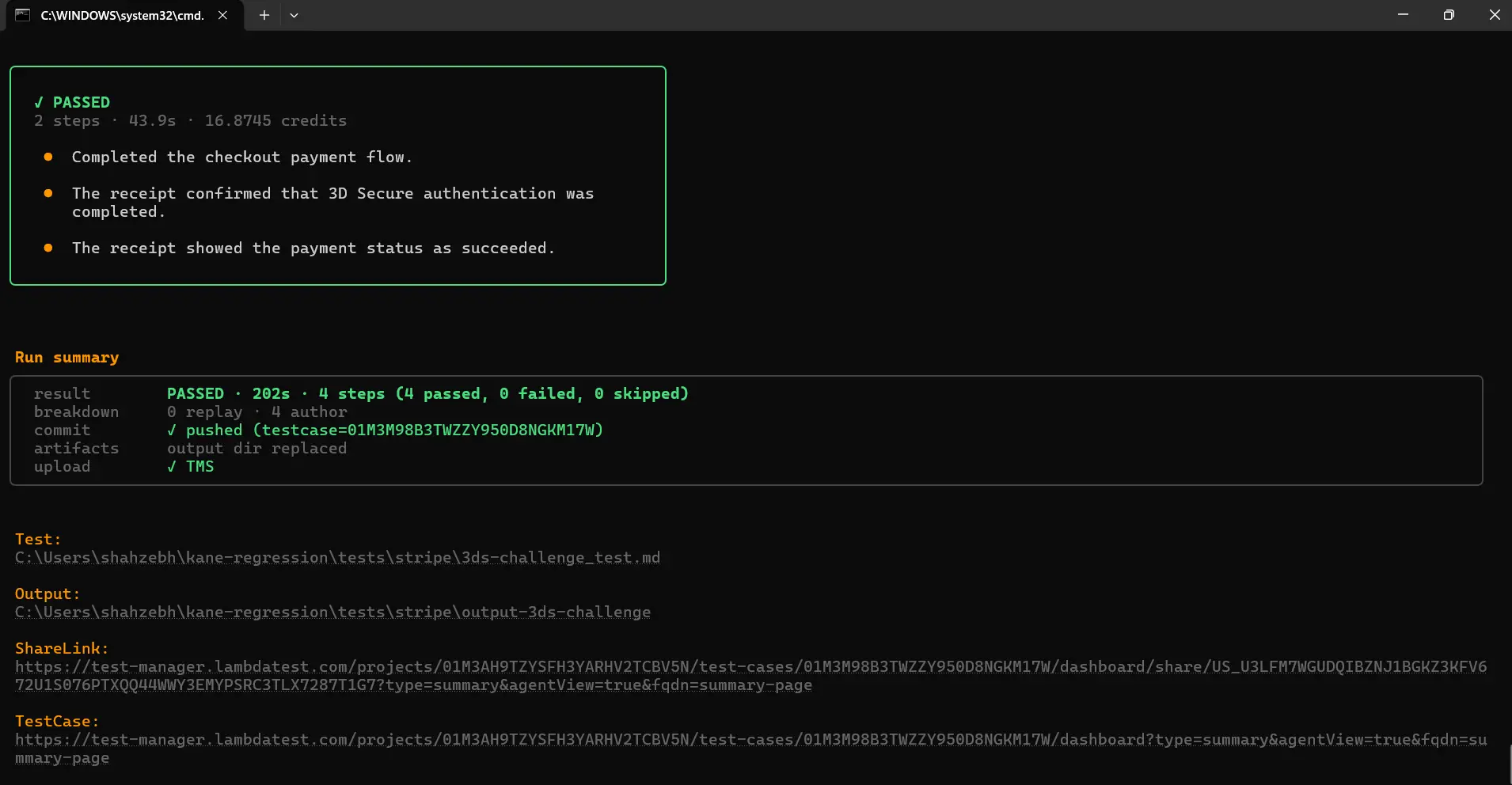
The first run authored all four steps (0 replay, 4 author) and passed in 202 seconds, and the receipt step confirmed both the 3D Secure authentication and the succeeded status.
Nothing in the file names the iframe or waits for it. The agent finds the dialog when it appears, reads the amount and the masked card from it, and clicks through. A one-time code works the same way: Kane CLI pauses the run for the code and continues.
The badge assertion in step 4 is the one that matters for the business, since an authenticated payment carries different dispute liability than an unauthenticated one; a receipt without the badge fails the test even when the money moved.
Step 4: A Run That Ends in a Bug Verdict
A scripted test fails with a timeout or a missing element; an autonomous run fails with a diagnosis. The generated cart test earlier in this guide came back as automation_bug, a problem with the test's wording. The one-click checkout use case shows the other verdict: three steps, and the second one hits a real defect in the storefront.
kane-cli testmd run tests/amazon/one-click-checkout_test.md --bug-detection continue---
test: ../one-click-checkout_test.md
status: failed
duration_s: 123
---
# ShopKart 1.3: One-click checkout - Result
## Confirm the 1-Click settings are shown ✓ passed (44s)
## Buy with one click ✗ failed (77.2s)
Reason: AP determined agent is stuck - no viable actions remain - bug verdict: Buy Now leaves order submission permanently pending after null-reference exception [application_issue/script_error, confidence 0.98]
## Confirm the order number and charge ✓ passed ( - )The verdict names the step, classifies the cause as an application script error rather than a test or environment problem, and gives a confidence. The third step shows no duration because it was never reached.
The evidence pack holds the console error and the screenshot of the pending state, so the report a developer receives is the bug, not a stack of retries. --bug-detection takes three values: off, stop (halt the run on a confirmed bug) and continue (record it and keep going); the default comes from kane-cli config set-bug-detection.
The other half of this level is self-healing on replay. When a page changes in a way that breaks the recorded path but not the objective, a replay miss does not fail the run: adaptive heal re-authors only the failing tail, up to three attempts, then falls back to a full re-author. --no-adaptive-heal turns that off when a replay miss should be terminal, for example on a release gate.
Step 5: From a PRD to a Designed Suite
The fourth level starts before any test exists. Kane CLI's assurance lifecycle takes a requirements document, proposes use cases from it with the lines they came from, and designs runnable tests for the ones you approve. Each stage commits to a context graph under .context/, and nothing downstream runs until the upstream stage is reviewed.
In a new project folder, start with the PRD for the storefront's cart, a short Markdown file. Since 0.7.1, context ingest lands the file and runs the extraction in one pass; kane-cli context extract re-runs it later.
kane-cli context ingest docs/cart-prd.mdingested docs/cart-prd.md (sha256:3f9a...) into .context/
extract: 7 use-case proposals
uc-manage-the-cart cites cart-prd.md:12-31
uc-apply-a-discount-code cites cart-prd.md:33-40
uc-guest-checkout cites cart-prd.md:42-58
...Review the proposals. Approving one marks it trusted; the rest stay proposals and design nothing.
kane-cli context review --approve uc-manage-the-cartDesign tests for an approved use case. The output is acceptance criteria that hold across every path, scenarios that cover the happy path plus negative, boundary, edge and security cases, and exactly one _test.md per scenario, each assertion tagged with the criterion it verifies. --max caps the number of scenario and test pairs.
kane-cli design tests --use-case uc-manage-the-cart --max 9design: uc-manage-the-cart
acceptance criteria 6
scenarios 9
tests written 9 (.testmuai/tests/)
add-first-item_test.md @verifies ac-cart-1, ac-cart-2
update-quantity_test.md @verifies ac-cart-2, ac-cart-3
remove-last-item_test.md @verifies ac-cart-4
quantity-boundary-zero_test.md @verifies ac-cart-3
...kane-cli design explain with a test's id replays why that test exists: the technique that produced it, the boundary values considered, and the criteria it verifies. Open one generated file and it reads like the 3DS test in Step 3, with {{variables}} for values the PRD did not pin and @verifies tags on the assertion steps.
Design declares each variable it invents as an empty stub in .testmuai/variables/assurance.json. Fill those values before the first run, because a designed test refuses to author until they are set.
Step 6: Run the Designed Suite and Measure Coverage
The generated tests run like any other suite: with no path, testrun run discovers every _test.md in the project, the first run authors each step, and later runs replay. Each run seals an evidence pack.
kane-cli testrun run --parallel 39 test(s) selected - plan valid
...
testrun : failed (7 passed, 2 failed)
quantity-boundary-zero_test.md ✗ Reason: quantity field accepts 0 and cart total shows -$0.00
[application_issue/validation_bug, confidence 0.91]
remove-last-item_test.md ✗ Reason: empty-cart message never renders after last removal
[application_issue/state_transition_bug, confidence 0.88]Two real defects surfaced from tests nobody wrote by hand, each with a verdict and evidence. The last command closes the loop by reporting what the run proved against what the design still owes:
kane-cli covercoverage - <execution-id>.evidence
depth (proven by the pack):
◐ ███████░░░ 67% uc-manage-the-cart - partial (4/6 ACs proven, 2 failed)
completeness (live graph):
...When the PRD changes, kane-cli maintain reconcile updates the suite against the new document instead of leaving stale tests in place. In the Testμ 2026 session on mobile app validation in the agentic loop, the same loop on a PRD for a shopping app produced 18 tests carrying 46 acceptance criteria and surfaced two real bugs before a single test was written by hand.
In CI, the designed tests run with the same secrets and flags as any other suite, and cover gives the number a release gate can read; the two review checkpoints stay with a person.
The journeys in this section, with their test.md and command, are published as Kane CLI use cases: 3DS challenge, one-click checkout, and for the same pattern with a popup, express checkout button. The requirements-to-tests workflow is documented in Kane CLI assurance, Kane CLI assurance design and Kane CLI assurance coverage, and the Testμ 2026 session shows it end to end.
How Playwright Test Agents Compare From the CLI
Playwright ships its own agents. Per Playwright's test agents docs, the planner explores the app and writes a Markdown plan, the generator turns the plan into test files, and the healer runs the suite and repairs failing tests. The CLI only scaffolds them:
$ npx playwright init-agents --loop=claude
 specs/README.md - directory for test plans
 seed.spec.ts - default environment seed file
 .claude/agents/playwright-test-generator.md - agent definition
 .claude/agents/playwright-test-healer.md - agent definition
 .claude/agents/playwright-test-planner.md - agent definition
 .mcp.json - mcp configuration
 Done.
The generated .mcp.json points at npx playwright run-test-mcp-server, and the three agent files are instructions for a host coding agent. The loop runs inside Claude Code, VS Code, Codex, or OpenCode, which is the main practical difference from Kane CLI.
| Question | Playwright test agents | Kane CLI |
|---|---|---|
| Where the loop runs | Inside a host coding agent, through the playwright-test MCP server | Kane CLI itself, headless in a terminal or CI job |
| What you commit | Markdown plans in specs/ and .spec.ts files | Plain-English _test.md files with recorded steps |
| Healing | Healer edits failing tests until they pass or marks them skipped | Replay re-authors the failing tail, then the whole test |
| Failure triage | The healer's code change | A product-bug or automation-bug verdict with confidence |
| Evidence | Playwright traces and reports | A sealed evidence pack per execution |
If your team already reviews Playwright code, the agents keep that workflow. A full planner, generator, and healer walkthrough is in Playwright agents.
Limits of Autonomous Testing From the CLI
Coverage is the clearest limit for tests generated from one sentence. kane-cli cover reports what was proved per acceptance criterion, so it needs requirements to measure against, and a sentence-generated suite has none:
$ kane-cli cover
Error: no context store here (run `kane-cli context ingest <files>` first)

$ kane-cli evidence validate .testmuai/evidence/<execution-id>.evidence
evidence: valid (L1, status finalized)- Requirements in, coverage out - the PRD path in Steps 5 and 6 of the Kane CLI walkthrough above is what gives cover something to report. Another run of the same path is in Kane CLI from PRD to evidence.
- Use cases need approval - design refuses an unreviewed use case, so a person decides which requirements become tests before any are designed.
- Generated tests need review - one of two generated tests was worded loosely enough for the agent to get stuck, and neither named a start URL.
- Verdicts need an owner - a verdict with 0.91 confidence is strong evidence, and someone still accepts it and chooses to refine the test or file the defect.
- Evidence you can check - kane-cli evidence validate confirms a pack is complete, so the verdict can be audited later.

Running Autonomous Tests in CI
Gate pull requests on tests that have passed and been reviewed, and let new generations run in a job that reports without blocking. testrun run accepts --username and --access-key, so the job needs no interactive login, and --tags selects members by the tags key in each file's frontmatter.
name: autonomous-tests
on: [pull_request]

jobs:
  kane-cli:
    runs-on: ubuntu-latest
    timeout-minutes: 30
    steps:
      - uses: actions/checkout@v4
      - uses: actions/setup-node@v4
        with:
          node-version: 22
      - run: npm install -g @testmuai/kane-cli
      - name: Replay reviewed tests with bug triage
        run: >
          kane-cli testrun run --tags regression --parallel 4
          --bug-detection continue --headless
          --username "${{ secrets.LT_USERNAME }}"
          --access-key "${{ secrets.LT_ACCESS_KEY }}"
      - name: Keep the evidence packs when something fails
        if: failure()
        uses: actions/upload-artifact@v4
        with:
          name: kane-evidence
path: .testmuai/evidence/- Tag what you trust - add tags: [regression] to a _test.md file only after its first run passed and someone read the steps.
- Evidence on failure - the .testmuai/evidence/ folder carries the verdict, screenshots, network log, and console output a reviewer needs without rerunning.
- The same pipeline shape - selection, retries, and sharding for scripted suites follow the pattern in end-to-end testing command line.
Troubleshooting Autonomous Runs From the CLI
Each row below produces a specific message, and most of them surface on the first generated suite.
| Symptom | Likely cause | Fix |
|---|---|---|
| A generated test opens the wrong site | The _test.md file has no start URL, so the stored default is used | Add url: to the frontmatter or pass --url |
| "not a *_test.md file" | A folder was passed to testrun run | Pass the files, or no path with --tags for auto-discovery; PowerShell and cmd pass a glob unexpanded |
| "AP determined agent is stuck" | The step text leaves the path to the goal ambiguous | Spell out each page and control, or use generate --refine |
| "no context store here" from cover | No requirements were ingested | kane-cli context ingest, then kane-cli design tests |
| design tests exits 2 on a use case | The use case is still an unreviewed proposal | kane-cli context review --approve with its id, then design again |
| A designed test refuses to run with unresolved_variables | Design declared variables that have no values yet | Fill them in .testmuai/variables/assurance.json |
| Replay fails with "No such file or directory" inside .evidence on Windows | The evidence path passes the Windows path-length limit | Run from a shorter project path; the same replay passed there |
| A healed test hides a real change | autoHeal matched a different element than intended | Review healed selectors in the command log before trusting the pass |
Conclusion
Pick one flow you already test by hand, describe it in a sentence, and run kane-cli generate with --save. Add the start URL, run the files with --bug-detection continue, fix whatever the verdicts point at, and tag the tests that pass for your pipeline. When a PRD exists for the flow, ingest it and let kane-cli design tests build the suite instead, so kane-cli cover can report what each run proved.
The Kane CLI introduction covers installation and sign-in, and turning on autoHeal for the scripted suite you already have is the smallest first step.
Author

Anubhav Singhmaar
Blogs: 43

Anubhav Singhmaar is an AI Product Manager at TestMu AI driving Kane CLI, the command-line tool that brings browser automation to the terminal, turning natural-language flows into runs in a real Chrome browser that return pass or fail with shareable proof. He owns the roadmap and prioritization and works with engineering to ship developer-facing features. Before TestMu AI, he spent over four years at Sprinklr owning enterprise voice AI across APAC and EMEA. A mechanical engineer turned product manager, he grounds guidance in real QA workflows.
Reviewer

Sirajuddin Khan
Reviewer
Sirajuddin Khan is Vice President of Product Management at TestMu AI (formerly LambdaTest), where he drives the company's agentic AI product strategy, building a suite of autonomous agents that includes Agentic Browsers and Agentic Visual Testing and shifting the unit of work from test execution to autonomous outcomes. One of the company's earliest product leaders, he has owned the roadmap for the high-performance execution cloud and grew the cross-browser testing products from early adoption to market leadership. He brings over a decade of experience across SaaS, B2B, and eCommerce, with earlier product roles at Wydr and ShopClues, where his catalog and search work cut delivery SLAs and lifted seller activity. Sirajuddin holds an MBA in Information Technology from Sikkim Manipal University and a B.Tech in Computer Science Engineering from Maharshi Dayanand University.


Autonomous Testing CLI FAQs
Did you find this page helpful?
More Related Blogs
TestMu AI forEnterprise
Get access to solutions built on Enterprise
grade security, privacy, & compliance
- Advanced access controls
- Advanced data retention rules
- Advanced Local Testing
- Premium Support options
- Early access to beta features
- Private Slack Channel
- Unlimited Manual Accessibility DevTools Tests