

Power Your Software Testing with AI Agents and Cloud
The Native AI-Agentic Cloud Platform to Supercharge Quality Engineering. Test Intelligently and Ship Faster.


- TestMu AI (Formerly LambdaTest)
- /
- Learning Hub
- /
- Test Cases for Search Functionality: Positive, Negative, and Edge Scenarios
Test Cases for Search Functionality: Positive, Negative, and Edge Scenarios
A complete, example-driven set of test cases for search functionality: functional, negative, UI, results, performance, security, and accessibility scenarios, plus how to automate and manage them.
Last Updated on:
A shopper types "wireless earbuds" into your store, the page returns zero results, and they leave for a competitor that had the exact product in stock. Nothing crashed, no error was logged, and your smoke tests stayed green. The search feature failed quietly, which is the way search usually fails.
Test cases for search functionality are the checks that stop that from happening. A complete set verifies a search feature returns correct, relevant, fast, and safe results across seven categories: functional (positive), negative and edge, search-box UI and usability, results and relevance, performance, security, and accessibility. This guide gives you ready-to-use cases in each category, with examples run against a real search page, plus the automation and management steps that turn a checklist into a maintained suite.
Overview
To thoroughly test search functionality, execute structured test cases across seven categories, prioritizing functional and negative scenarios to catch immediate bugs. Use TestMu AI Test Manager to automatically generate these cases from user stories and run layout checks on the TestMu AI real device cloud.
- Functional and negative scenarios: These cases verify that valid queries return correct results and that empty, misspelled, or malformed inputs fail gracefully without throwing server errors, helping catch immediate bugs.
- Production and security checks: These scenarios ensure the search feature holds up under real-world traffic, user diversity, and potential security attacks by validating relevance, performance, security, and accessibility.
- TestMu AI Test Manager: This tool AI-generates search test cases from user stories and rolls manual and automated runs into a single coverage view to simplify suite organization.
- TestMu AI real device cloud: This platform provides access to over 10,000+ real Android and iOS devices to catch layout and input issues that desktop emulators hide during mobile layout testing.
What Are Test Cases for Search Functionality?
A test case for search functionality is a single, repeatable check with a defined input, a set of steps, and one expected result, written to prove a search feature behaves correctly for a specific scenario. "Search functionality" is not one feature but several working together: the input field, autocomplete, the query parser, the ranking and relevance engine, filters and pagination, and the results display.
Search deserves this level of attention because it is often the primary way users find what they need. In Baymard Institute's 2026 e-commerce search UX benchmark, roughly half of test participants reached for search as their preferred product-finding strategy, yet 56% of the sites benchmarked failed to adequately support those searches. A feature half your users depend on, failing on more than half of sites, is exactly where test coverage pays off.
The categories below organize that coverage. If you are new to structuring cases at all, the fundamentals in our guide to how to write test cases apply here first, and this article specializes them for search.
Why Is Search Functionality So Hard to Test?
Search looks like one text box, but it hides an enormous input space and a subjective success criterion. A login form has a handful of valid and invalid states; a search field accepts any string a human can type, in any language, with typos, and "correct" means "relevant," which is a judgment, not a boolean.
The scale of what goes wrong is documented. Baymard's e-commerce search UX study tested 19 leading sites and recorded more than 700 search-specific usability issues, which the researchers distilled into 31 search UX guidelines after benchmarking 327 sites. More than half of those guidelines concern the search field, autocomplete, and results display rather than the ranking algorithm, which tells you where a tester should spend effort first.
A few properties make search uniquely hard to cover, and each maps to a category later in this guide:
- Unbounded input: every string is a valid input, so negative and edge cases matter as much as the happy path.
- Relevance is subjective: "returns results" is not enough; the right results must rank first, which needs explicit expected outcomes.
- It is an attack surface: untrusted text flows into a query, so injection and cross-site scripting are live risks, not theoretical ones.
- It is timing-sensitive: autocomplete and results are judged in milliseconds, so performance is a functional requirement, not a nice-to-have.
What Are the Functional (Positive) Test Cases for Search?
Functional test cases confirm that valid queries return the results a user expects. Build them around the query types users actually enter: Baymard groups real searches into eight common query types, from exact product names to symptom and thematic queries, so a good positive suite covers more than just an exact-match keyword.
| ID | Test scenario | Expected result |
|---|---|---|
| SF-01 | Search an exact product name that exists in the catalog. | The matching product appears, ranked at or near the top of results. |
| SF-02 | Search a partial keyword (for example, "blue shirt" for "blue cotton shirt"). | Relevant products containing the partial term are returned. |
| SF-03 | Search with multiple keywords in one query. | Results match all or most terms, not just the first word. |
| SF-04 | Search the same term in different letter cases ("IPHONE" vs "iphone"). | Both queries return the same result set; search is case-insensitive. |
| SF-05 | Type a few characters and wait for autocomplete suggestions. | Relevant suggestions appear and selecting one runs that search. |
| SF-06 | Submit a search using the Enter key, then repeat using the search button. | Both submission methods run the query and land on the same results. |
| SF-07 | Search a term with leading and trailing spaces (" laptop "). | The query is trimmed and returns the same results as the clean term. |
| SF-08 | Scope a search to a category (dropdown plus keyword). | Results respect the selected category and exclude out-of-scope items. |
| SF-09 | Search a common term that returns many matches. | Result count and pagination are accurate and navigable. |
Write each functional case with a concrete input value, not "a valid keyword." A case that says "search iphone and expect 8 results" is testable and can be automated; "search should work" cannot.
How Do You Write Negative and Edge Test Cases for Search?
Negative and edge cases confirm that search fails safely when the input is empty, meaningless, or malformed. Because a search field accepts any string, this is where most real defects live, and where a green happy-path suite gives false confidence. The goal for every case below is the same: a clear, graceful response, never a stack trace, a blank screen, or a 500 error.
| ID | Test scenario | Expected result |
|---|---|---|
| SN-01 | Submit an empty search with no text entered. | A prompt or the defined default state appears; no error is thrown. |
| SN-02 | Search a term with no matches ("asdfghjkl"). | A friendly "no results found" message shows, with suggestions if available. |
| SN-03 | Search using special characters and symbols (@, #, %, &, /). | Input is handled gracefully; no server error and no broken layout. |
| SN-04 | Paste an extremely long string (for example, 5,000 characters). | The field truncates or rejects the input; the app stays responsive. |
| SN-05 | Search a query made only of whitespace. | Treated as an empty query, not a search for blank characters. |
| SN-06 | Enter numeric input where a text term is expected ("12345"). | The query runs and returns matching items or a clean no-results state. |
| SN-07 | Search a misspelled but common term ("labtop"). | Typo tolerance or a "did you mean" suggestion surfaces the intended results. |
| SN-08 | Search with Unicode characters or emoji. | Input is encoded correctly and returns results or a clean empty state. |

How Do You Test the Search Box UI and Usability?
The search box is a piece of UI before it is a query engine, and Baymard found that more than half of its search guidelines are about the field, autocomplete, and results presentation rather than ranking. These cases check that the control is discoverable, responsive, and behaves consistently. Because a search bar renders differently across viewports, run them across breakpoints; this is the same surface covered by GUI testing.
| ID | Test scenario | Expected result |
|---|---|---|
| SU-01 | Check the search box is visible and consistently placed across pages. | The field appears in the expected location on every page tested. |
| SU-02 | Verify placeholder text describes what to search for. | Placeholder is present, descriptive, and disappears on input. |
| SU-03 | Confirm the search icon or button is clickable with a clear affordance. | The control triggers the search and shows a hover or active state. |
| SU-04 | Test focus behavior and the clear (X) control. | Clicking focuses the field; clear empties it and resets results. |
| SU-05 | Navigate the autocomplete dropdown with arrow keys and Enter. | Suggestions highlight on arrow keys and select on Enter. |
| SU-06 | Render the search box across mobile, tablet, and desktop widths. | Layout stays usable and the field does not overflow or collapse. |
| SU-07 | Trigger a search that takes time to return. | A loading indicator shows while results are fetched. |
Responsive behavior is where a search box breaks most often, and an emulator rarely matches a real handset's touch target and keyboard behavior. Running these UI cases on TestMu AI's real device cloud of 10,000+ real Android and iOS devices catches layout and input issues that a desktop viewport hides.
How Do You Validate Search Results and Relevance?
Returning results is not the same as returning the right results. Relevance cases assert on ranking, sorting, filtering, and pagination, and they need explicit expected outcomes so "relevant" is testable rather than a matter of opinion. Pin each case to a known catalog and a known query so the expected order is reproducible.
| ID | Test scenario | Expected result |
|---|---|---|
| SR-01 | Search a specific term and inspect ranking order. | The most relevant items appear first, not buried on page two. |
| SR-02 | Apply a sort option (price low-to-high, rating, newest). | Results reorder correctly and the active sort is indicated. |
| SR-03 | Apply filters or facets (brand, price range, availability). | Result set narrows to items matching every active filter. |
| SR-04 | Navigate pagination or trigger infinite scroll. | The next result set loads without duplicates or gaps. |
| SR-05 | Compare the displayed result count to the actual items returned. | The stated count matches the number of results shown. |
| SR-06 | Search a synonym of a catalog term ("sofa" vs "couch"). | Synonym handling returns the expected products. |
| SR-07 | Change the query and confirm results refresh. | Old results clear and the new query's results render. |
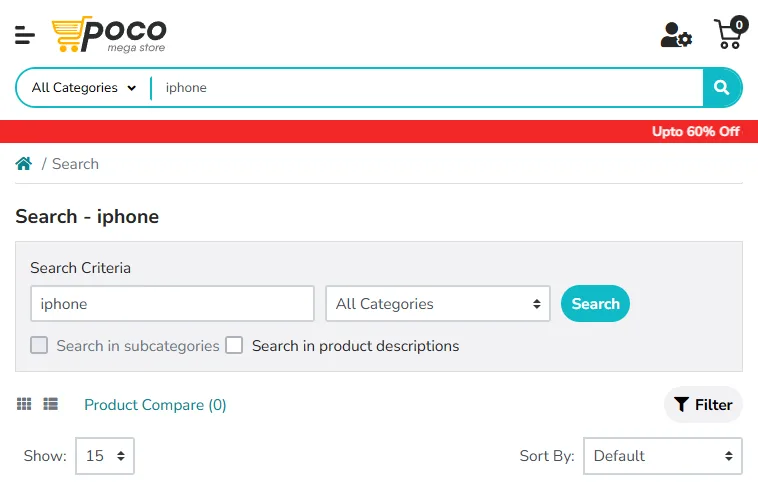
To make these examples concrete, we ran an exact-keyword case on the TestMu AI cloud against the Ecommerce Playground. Searching "iphone" returned a "Search - iphone" results page with eight product results, exactly the assertion SF-01 and SR-05 expect, so the selectors used in the automation example below are verified, not assumed.
This is the same class of catalog-driven relevance testing our Shopify test cases template applies to a storefront, adapted here to the search results page specifically.

Note: Search must return the same results whether a user is on Chrome, Safari, or a five-year-old Android phone. TestMu AI runs your search test cases across 3,000+ browser and OS combinations and 10,000+ real devices, so a rendering or input bug shows up before your users find it. Start testing for free.
How Do You Test Search Performance and Autocomplete?
For search, speed is a functional requirement. Nielsen Norman Group's long-standing response-time limits put about 0.1 second as the threshold where a response feels instantaneous and 1 second as the limit for keeping a user's flow of thought uninterrupted. Autocomplete lives inside that first budget, and results should land inside the second. These cases turn those limits into assertions.
| ID | Test scenario | Expected result |
|---|---|---|
| SP-01 | Measure autocomplete suggestion latency as the user types. | Suggestions render fast enough to feel instant, near the 0.1s limit. |
| SP-02 | Measure results load time for a typical query under normal load. | Results return within the agreed budget, ideally around 1 second. |
| SP-03 | Run concurrent searches to simulate peak traffic. | Response time degrades gracefully and no requests error out. |
| SP-04 | Query a broad term against a large catalog. | Large result sets return within budget without timing out. |
| SP-05 | Type quickly and watch network calls. | Input debounces so it does not fire one request per keystroke. |
| SP-06 | Run search on a throttled slow network (for example, 3G). | The UI shows progress and stays usable rather than freezing. |
How Do You Write Security Test Cases for a Search Box?
A search box is a public text field that feeds untrusted input straight into a query, which makes it one of the most exposed inputs in an application. Injection is ranked A03 in the OWASP Top 10:2021, which recorded over 274,000 occurrences of injection weaknesses across the applications analyzed, and cross-site scripting is folded into that same category. Every case below should confirm that input is sanitized and output is escaped.
| ID | Test scenario | Expected result |
|---|---|---|
| SS-01 | Search a SQL injection payload (' OR 1=1 --). | Input is treated as a literal string; no data leak and no DB error. |
| SS-02 | Search a reflected XSS payload (a script tag). | The payload is escaped in the results echo and never executes. |
| SS-03 | Save a search containing script, then reopen the saved-search view. | Stored input is escaped on render; no stored XSS fires. |
| SS-04 | Submit an over-length payload to probe for a denial-of-service path. | Input length is capped and the request is rejected cleanly. |
| SS-05 | Fire many rapid queries from one client. | Rate limiting throttles abusive traffic without blocking real users. |
| SS-06 | Inspect autocomplete for leaked data. | Suggestions never expose other users' queries, PII, or private items. |
| SS-07 | Trigger an intentional error via malformed input. | A generic error page shows; no stack trace, query, or schema leaks. |

How Do You Test Search Accessibility?
A search that only works with a mouse and clear eyesight is broken for a large share of users. Accessibility cases confirm the search field is perceivable and operable by keyboard and assistive technology, tested against the W3C WCAG 2.1 guidelines. The most search-specific rule is Success Criterion 4.1.3 Status Messages, which requires that a change like a new result count be announced to screen readers without moving focus.
| ID | Test scenario | Expected result (WCAG) |
|---|---|---|
| SA-01 | Check the search input has a programmatic label. | A screen reader announces the field's name and role (SC 4.1.2). |
| SA-02 | Operate the entire search with the keyboard only. | Focus, type, submit, and suggestion navigation all work (SC 2.1.1). |
| SA-03 | Run a query and listen for the result count with a screen reader. | The count is announced via a status message, no focus move (SC 4.1.3). |
| SA-04 | Tab to the input and check the focus indicator. | A visible focus indicator appears on the input and results (SC 2.4.7). |
| SA-05 | Inspect the autocomplete widget's ARIA roles. | Combobox and listbox roles expose suggestions to assistive tech (SC 4.1.2). |
| SA-06 | Measure contrast of the input text and placeholder. | Text meets the 4.5:1 minimum contrast ratio (SC 1.4.3). |
These checks are tedious by hand and easy to skip, which is why they are a good automation target. TestMu AI's accessibility testing suite runs WCAG checks against the search UI alongside your functional runs, so a missing label or an unannounced result count is flagged in the same report.
How Do You Automate and Manage Search Test Cases?
The functional and negative cases run on every release, so they are the first to automate. The example below scripts SF-01 with Selenium in Java, points the driver at the TestMu AI cloud grid with an LT:Options block, searches the Ecommerce Playground, and asserts that products come back. The selectors match the live page we verified above.
// SF-01: an exact keyword returns results, run on the TestMu AI cloud
ChromeOptions browserOptions = new ChromeOptions();
browserOptions.setPlatformName("Windows 11");
browserOptions.setBrowserVersion("latest");

HashMap<String, Object> ltOptions = new HashMap<>();
ltOptions.put("username", System.getenv("LT_USERNAME"));
ltOptions.put("accessKey", System.getenv("LT_ACCESS_KEY"));
ltOptions.put("build", "Search Functionality Test Cases");
ltOptions.put("name", "SF-01 exact keyword returns results");
ltOptions.put("smartWait", 15);
browserOptions.setCapability("LT:Options", ltOptions);

WebDriver driver = new RemoteWebDriver(
    new URL("https://hub.lambdatest.com/wd/hub"), browserOptions);
WebDriverWait wait = new WebDriverWait(driver, Duration.ofSeconds(15));

driver.get("https://ecommerce-playground.lambdatest.io/");
WebElement search = wait.until(
    ExpectedConditions.visibilityOfElementLocated(By.name("search")));
search.sendKeys("iphone");
search.sendKeys(Keys.ENTER);

// Assert at least one product result is returned
boolean hasResults = wait.until(
    ExpectedConditions.numberOfElementsToBeMoreThan(By.cssSelector(".product-thumb"), 0));
Assert.assertTrue(hasResults, "Search for 'iphone' should return products");
driver.quit();
Reproduce this against the Selenium Playground for form-style inputs, or the Ecommerce Playground for a full catalog search. Because the test logic is separate from the run configuration, the same script fans out across TestMu AI's test automation cloud of 3,000+ browser and OS combinations without a rewrite.
Automation covers the cases that repeat; the whole suite still needs a home. TestMu AI's Test Manager can generate these search cases from a plain-language user story, organize them into folders, plans, and cycles, and pull both manual and automated runs into a single coverage view. Its traceability links every case to its requirement, run, and defect, so you can prove the search feature is covered before you ship. The generate test cases with AI documentation walks through turning a requirement into a structured case.
Conclusion
Start with one move: take the search box you are responsible for and write the nine functional and eight negative cases from the tables above with real input values, not vague descriptions. That single pass catches the empty-query crashes, the special-character errors, and the zero-result dead ends that ship most often, and it gives you a suite you can automate next.
From there, layer in the results, performance, security, and accessibility cases so the feature holds up in production and under attack, not just in a demo. Automate the repeating cases on TestMu AI's Automation Cloud, organize the full set in Test Manager, and follow the Selenium getting-started docs to wire the run into CI. A search feature that half your users depend on deserves a test suite that treats it that way.
Author

Harshit Paul
Blogs: 93


Harshit Paul is Director of Product Marketing at TestMu AI (formerly LambdaTest), with over 8 years of experience in product and growth marketing for developer and QA tools, leading the Agentic AI in Quality Engineering space. He has authored 80+ technical articles for TestMu AI on software testing and automation, and hosted webinars on Selenium, automation testing, browser compatibility, DevOps, and continuous testing. He has led go-to-market and technical marketing initiatives across software testing products, contributing to SEO, content strategy, and developer marketing. He began his career as a certified Salesforce developer at Wipro Technologies, where he worked for 2 years before moving into marketing. Harshit holds a degree in computer programming from Vivekananda Institute of Professional Studies.


Search Functionality Test Cases FAQs
Did you find this page helpful?
More Related Learning Hubs
TestMu AI forEnterprise
Get access to solutions built on Enterprise
grade security, privacy, & compliance
- Advanced access controls
- Advanced data retention rules
- Advanced Local Testing
- Premium Support options
- Early access to beta features
- Private Slack Channel
- Unlimited Manual Accessibility DevTools Tests