
Power Your Software Testing with AI Agents and Cloud
The Native AI-Agentic Cloud Platform to Supercharge Quality Engineering. Test Intelligently and Ship Faster.


- TestMu AI (Formerly LambdaTest)
- /
- Blog
- /
- How to Test Across Browsers Without Code
How to Test Across Browsers Without Code (2026 Guide)
Test the same flow across Chrome, Safari, Firefox, and Edge on real browsers and devices in plain English. No Selenium, no Playwright, no code.
Published on:
Testing across browsers catches gaps like a flexbox layout Chrome forgives that collapses on Safari's WebKit engine, or a date picker that opens in Firefox but does nothing in Edge, since Blink, WebKit, and Gecko render the same CSS differently. KaneAI writes that check once in plain English and runs it on Chrome, Safari, Firefox, and Edge.
Why cross-browser scenarios are hard to test
A cross-browser test is not one test. It is the same flow multiplied by every place it can render differently, and real coverage has to touch all of them:
- Different rendering engines, where Blink in Chrome, WebKit in Safari, and Gecko in Firefox lay out the same CSS in subtly different ways
- Native controls, where date pickers, file inputs, and dropdowns are drawn by the browser itself and behave differently on each one
- Version and OS spread, where the newest Chrome on Windows and an older Safari on macOS are effectively two separate targets
- Mobile engines, where mobile Safari on iOS and Chrome on Android add touch, viewport, and autoplay rules that desktop never sees
- Feature support gaps, where a modern API works in three browsers and silently fails in the fourth your customer happens to use
- The combinatorial blowup, where a five-step flow across four browsers on three operating systems is already dozens of runs to keep green
Testing one browser by hand is tedious. Testing the same flow across every browser your customers actually use, on every release, is the part that never gets done.
The old way: one script forked per browser
Here is what running one signup flow across Chrome, Safari, and Firefox looks like in a typical Selenium setup:
for browser in ["chrome", "safari", "firefox"]:
    driver = build_remote_driver(browser)
    wait = WebDriverWait(driver, 10)
    driver.get("https://yourapp.com/signup")
    wait.until(EC.presence_of_element_located((By.ID, "email"))).send_keys("test.user@example.com")
    driver.find_element(By.ID, "plan-annual").click()
    driver.find_element(By.CSS_SELECTOR, "button[type='submit']").click()
    wait.until(EC.url_contains("/welcome"))
    heading = driver.find_element(By.CSS_SELECTOR, ".welcome-title").text
    assert "Welcome" in heading, f"[{browser}] expected welcome page, got: {heading}"
    driver.quit()
The loop looks tidy, but the reality is not. Safari needs its own driver quirks, the file input that works headless in Chrome throws on Firefox, and the moment a developer renames the plan toggle or moves the welcome title into a new component, the assertion breaks on all three at once. Maintenance like this is the dominant cost of a large automation suite, and engineers spend a large share of every sprint re-pointing selectors and patching browser-specific waits instead of writing new coverage. It also still requires someone on the team who writes Python or JavaScript in the first place. It is the core tradeoff behind code-based vs. codeless test automation.
If you are a manual QA engineer, a PM, or a founder without a dedicated automation engineer, the code wall means cross-browser coverage usually gets tested by hand on the one or two browsers you have installed, and everything else ships untested.
The no-code way: write the test the way you would explain it
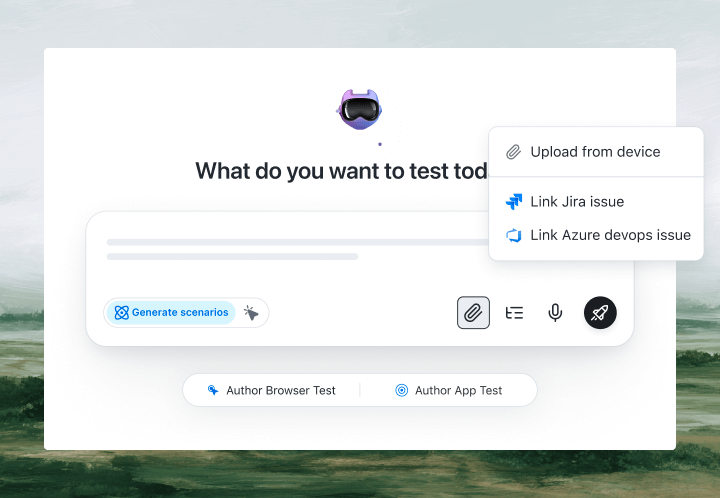
With KaneAI, you write the flow once in plain English and pick the browsers it runs on:
- Go to yourapp.com and open the signup page
- Enter the email test.user@example.com
- Choose the annual plan
- Click Create Account
- Verify the welcome page loads and shows the welcome message
That is the entire test. KaneAI reads each step, finds the right controls on your live site the way a human tester would, by understanding the page rather than matching brittle CSS selectors, and executes the same flow on every browser you selected. When the annual toggle sits in a different spot on Safari than on Chrome, the test adapts instead of breaking, and its self-healing re-anchors the step and flags the change for you to review. You author once in plain English, run across 3,000+ real browser and OS combinations with real-engine rendering rather than spoofed user agents, and never rewrite a per-browser variant. One test, every browser.

The cross-browser scenarios that actually break
Once the happy path runs everywhere, real coverage is just adding the flows that break on one engine and pass on the rest. Here are the ones worth writing first, each takes about two minutes:
Layout and responsive rendering
- Open the pricing page and shrink to a mobile width
- Verify the plan cards stack in one column and nothing overlaps or gets cut off
- Verify the sticky header and the buy button stay fully visible on Safari and Firefox
Native form controls and date pickers
- Open the booking form and click the date field
- Verify the calendar opens and lets you pick a future date
- Verify the selected date shows the same value on Chrome, Edge, and Safari
File upload and download
- Upload a profile photo through the file input
- Verify the preview renders and the upload succeeds on every browser
- Download the generated invoice and verify the file is received
Media playback and autoplay
- Open the product tour video
- Verify the player loads and playback controls respond
- Verify muted autoplay behaves correctly on mobile Safari where autoplay rules are strictest
Run all of them across Chrome, Safari, Firefox, and Edge and on real mobile devices from the same plain-English steps, with no per-browser rewrites.
Putting it on autopilot
Cross-browser tests earn their keep when they run without you:
- Schedule the suite nightly across your full browser matrix, so a Safari-only regression cannot sit in production for a week before anyone notices
- Trigger on deploy via CI, where Kane CLI runs the same tests from your pipeline, returns clean exit codes, and pauses for an OTP or CAPTCHA instead of failing
- Alert on failure in Slack, with a full replay of exactly what the AI saw on the browser that broke: screenshots, video, and the reason in plain English
When a test fails, you do not get a stack-trace exception at line 47. You get a plain-English reason for the exact step that failed. Anyone on the team can read it, see which browser is at fault, and fix the test, because the test is just English.
Try it across your own browsers in 10 minutes
- Sign up for KaneAI free, with no credit card
- Paste your app URL and write your first flow in plain English
- Pick the browsers and devices to run it on, from Chrome and Edge to Safari and mobile
- Run it and watch the same test execute across every browser at once
Your app is only as good as the browser your customer opened it in, and that is too much surface area to test by hand and too dynamic for brittle scripts. Test it in the language you already speak. Once cross-browser coverage is in place, read how to automate regression tests without code to keep every browser green on each release, and how to run end-to-end tests without code to cover the full journey behind each one.

Note: Test across every browser without writing a line of code. Start with KaneAI free.
Author

Anurag Sharma
Blogs: 6

Anurag Sharma is Senior Vice President of Engineering at TestMu AI, leading platform and product engineering across the testing cloud. He improved the streaming technologies behind live and screenshot testing, built the components that run the automation and manual test grids, and created an SSH-based Tunnel over a TCP proxy to test locally hosted and firewall-protected websites. He also built a microservice that scales virtual machines across bare-metal servers on demand using server health stats and weighted round robin. He brings over 12 years of experience across Golang, Node.js, Python, Java, Redis, Kafka, and MySQL, with earlier work engineering decision-support systems for Indian Railways.
Reviewer

Shahzeb Hoda
Reviewer
Shahzeb Hoda is the Associate Director of Marketing and a Community Contributor at TestMu AI, leading strategic initiatives in developer marketing, content, and community growth. With 10+ years of experience in quality engineering, software testing, automation testing, and e-learning, he has authored and reviewed 70+ technical articles on software testing and automation. Shahzeb holds an M.Tech in Computer Science from BIT, Mesra, and is certified in Selenium, Cypress, Playwright, Appium, and KaneAI. He brings deep expertise in CI/CD pipeline automation, cross-browser testing, AI-driven testing practices, and framework documentation. On LinkedIn, he is followed by 3,700+ engineers, developers, DevOps professionals, tech leaders, and enthusiasts.


Cross-Browser Testing FAQs
Did you find this page helpful?
More Related Blogs

TestMu AI forEnterprise
Get access to solutions built on Enterprise
grade security, privacy, & compliance
- Advanced access controls
- Advanced data retention rules
- Advanced Local Testing
- Premium Support options
- Early access to beta features
- Private Slack Channel
- Unlimited Manual Accessibility DevTools Tests