

Power Your Software Testing with AI Agents and Cloud
The Native AI-Agentic Cloud Platform to Supercharge Quality Engineering. Test Intelligently and Ship Faster.


- TestMu AI (Formerly LambdaTest)
- /
- Blog
- /
- How to Perform Smoke Testing From the Command Line
How to Perform Smoke Testing From the Command Line
Run a production smoke test from the terminal: wait for the deploy, confirm the build ID, curl key routes, run a tagged browser subset, and gate on exit codes.
Published on:
The deploy job turns green, and a few minutes later someone reports a blank checkout page. The pipeline proved the build compiled and the container started; nothing proved the new version was serving traffic, or that its critical pages still worked.
A production smoke test closes that gap right after the change ships. This guide turns it into a post-deploy gate of five terminal commands, uses TestMu AI's Selenium Playground as the example target, and routes every failure by exit code, then builds the same kind of gate as a plain-English smoke suite with Kane CLI.
TL;DR
A production smoke test is a short scripted check that runs right after a deploy to confirm the new build is serving traffic and its critical paths still work. From the command line, one script chains curl, a build ID check, a tagged Playwright subset, and Kane CLI. Exit 0 promotes, 1 rolls back, and 2 retries.
- Build ID check: comparing the live buildId to the one your build produced proves the new version is serving traffic. A mismatch means the rollout or a CDN cache refresh has not finished. Rolls back on mismatch: No (the gate exits 2 and retries).
- curl route checks: curl --fail exits 22 when a route returns HTTP 400 or above, and 6 or 7 when the host cannot be resolved or reached, which separates a build defect from an environment problem.
- Anchored smoke tag: Playwright's --grep is a regular expression, so "@smoke" also matches "@smoke-prod". The pattern "@smoke($|\s)" selects only the smoke tests.
- Zero-test guard: Playwright exits 1 with "No tests found" when a tag matches nothing, the same code as a failed test. Counting tests with --list first stops a typo from triggering a rollback. Rolls back on zero tests: No (the gate exits 2).
- Grid failure check: Playwright also exits 1 when the TestMu AI grid rejects the access key. The smoke gate script searches the log for browserType.connect and exits 2. Rolls back on a rejected key: No (the job retries).
- Kane CLI check: kane-cli run adds a plain-English check on TestMu AI and exits 0 (passed), 1 (failed), 2 (environment error), or 3 (timeout). An unreachable target still returns 1, so the curl layers run first.
- Kane CLI smoke suite: kane-cli testrun run --tags smoke runs every _test.md tagged smoke and exits 0 (passed), 1 (a check failed), 2 (nothing ran, including a tag that matched no file), or 3 (cancelled). Takes a folder path: No.
The Five Layers of a Post-Deploy Smoke Gate
The DORA 2025 state of AI-assisted software development report found only 8.5% of respondents keep their change failure rate at 0% to 2%, and only 21.3% restore service in less than an hour after a change degrades it. The gate below runs the curl checks first, so a dead host, a missing route, or a stale build returns a verdict in under 30 seconds, before a browser starts.
| Layer | Command | Catches | Elapsed at finish |
|---|---|---|---|
| 1. Wait | curl --retry --retry-all-errors | Site down, DNS not ready, deploy still starting | Under 1s |
| 2. Build ID | curl + grep buildId, polled | Old version still serving, cached release | 1s |
| 3. Routes | curl --fail -w per route | 404s, 500s, slow critical pages | 2s |
| 4. Browser | npx playwright test --grep -x | Blank renders, dead buttons, script errors | 30s |
| 5. Objective | kane-cli run --agent | A user flow that no longer completes | 109s |
For the definition and a case checklist, see smoke testing; for how it differs from a narrower recheck, see smoke testing vs sanity testing.
How to Wait for the Deploy and Confirm the Build Is Live
Retry the first request instead of sleeping. The curl manpage describes --retry-all-errors, added in curl 7.71.0, as retrying on any error, and --max-time as capping each transfer, so a slow start gets a few chances while a dead host fails in about 15 seconds. -L follows redirects, so a URL missing its trailing slash still reaches the real page.
# Layer 1: wait until the deployed URL answers (retries cover DNS, connect, and HTTP errors)
curl -fsSL -o /dev/null --retry 5 --retry-all-errors --retry-delay 3 --max-time 10 "$BASE_URL"

# Layer 2: poll until the build you shipped is the one serving traffic
for attempt in 1 2 3 4 5 6; do
  live=$(curl -fsSL --max-time 10 "$BASE_URL" | grep -oE '"buildId":"[^"]+"' | head -1 | cut -d'"' -f4)
  # App Router or another stack: live=$(curl -fsSL --max-time 10 "${BASE_URL}version")
  [ "$live" = "$EXPECTED_BUILD_ID" ] && break
  sleep 5
done
A 200 only proves something answered, and during a rolling update the old version answers first. A Next.js Pages Router app embeds its buildId in the __NEXT_DATA__ script of every page, and next build writes the same value to .next/BUILD_ID. App Router pages have no __NEXT_DATA__ script, so there, and on other stacks, serve the commit SHA from a /version route and use the commented line instead.
$ EXPECTED_BUILD_ID=q7Hx2build-from-this-commit ./smoke-gate.sh
[  0s] 1/5 waiting for https://www.testmuai.com/selenium-playground/ to answer
[  1s] 2/5 waiting for build q7Hx2build-from-this-commit to serve traffic
[ 29s] ENVIRONMENT: live build is 'lBoZJhn2mxDy5OnioHniR' after 6 checks, expected 'q7Hx2build-from-this-commit'
$ echo $?
2- Build mismatch exits 2 - the old build is still serving traffic, so a rollback would change nothing; the pipeline retries once the rollout or cache refresh finishes.
- Polling window - six checks 5 seconds apart give a rolling update about 30 seconds before the gate exits 2, and the CI job adds two more attempts a minute apart.
How to Run a Production Smoke Test With curl
Per curl's exit code list, the exit code names the failure type: 22 means the server answered with HTTP 400 or above (only with --fail), 28 is a timeout, 6 is a host that could not be resolved, and 7 is a failed connection. In the route loop, the gate maps 22 and 28 to a build defect and every other code to an environment problem. The wait layer sends any failure to exit 2, because a deploy that is still starting returns errors too.
$ SMOKE_ROUTES="simple-form-demo/ no-such-demo/" ./smoke-gate.sh
[  0s] 1/5 waiting for https://www.testmuai.com/selenium-playground/ to answer
[  0s] 2/5 waiting for build lBoZJhn2mxDy5OnioHniR to serve traffic
[  1s] 3/5 critical routes
      200  0.212300s  /simple-form-demo/
      404  1.269352s  /no-such-demo/
curl: (22) The requested URL returned error: 404
[  2s] BUILD DEFECT: /no-such-demo/ failed (curl exit 22)
$ echo $?
1

$ BASE_URL=https://staging.example.invalid ./smoke-gate.sh
[  0s] 1/5 waiting for https://staging.example.invalid/ to answer
curl: (6) Could not resolve host: staging.example.invalid
curl: (6) Could not resolve host: staging.example.invalid
curl: (6) Could not resolve host: staging.example.invalid
curl: (6) Could not resolve host: staging.example.invalid
curl: (6) Could not resolve host: staging.example.invalid
curl: (6) Could not resolve host: staging.example.invalid
[ 15s] ENVIRONMENT: site never answered (curl exit 6)
$ echo $?
2- Timing per route - -w "%{http_code} %{time_total}s" prints status and duration for every route, so a page that suddenly takes seconds shows up in the log before it becomes a timeout.
- Auth-protected routes - the curl manpage warns that --fail is not fail-safe for 401 and 407 responses, so smoke public routes or check the status code from -w.
- Read-only in production - GET requests only. Anything that writes belongs in the staging smoke suite.
# An API smoke test needs the response body, so each JSON endpoint gets its own line after the route loop
curl -fsSL --max-time 5 -H "Accept: application/json" "${BASE_URL}api/health" \
  | grep -q '"status":"ok"' || build_red "api/health returned an unexpected body"
How to Run a Browser Smoke Subset With a Hard Time Budget
Keep the browser layer to a few tagged tests and cap it. Playwright's test CLI documents -x as stopping after the first failure and --global-timeout as the maximum time the whole run may take. The config sends every test to the TestMu AI grid and turns BASE_URL into the baseURL behind page.goto(''):
// playwright.config.ts - sends every test to the TestMu AI grid, so the CI runner needs no local browser
import { defineConfig } from '@playwright/test';

const capabilities = {
  browserName: 'Chrome',
  browserVersion: 'latest',
  'LT:Options': {
    platform: 'Windows 11',
    build: 'Smoke Gate From the Command Line',
    name: 'post-deploy smoke',
    user: process.env.LT_USERNAME,
    accessKey: process.env.LT_ACCESS_KEY,
    playwrightClientVersion: '1.63.0',
    video: true,
    console: true,
  },
};

export default defineConfig({
  testDir: './tests',
  timeout: 30_000,
  retries: 0,
  reporter: 'line',
  use: {
    baseURL: process.env.BASE_URL || 'https://www.testmuai.com/selenium-playground/',
    // TestMu AI Playwright grid (the endpoint keeps the lambdatest.com domain)
    connectOptions: {
      wsEndpoint: `wss://cdp.lambdatest.com/playwright?capabilities=${encodeURIComponent(JSON.stringify(capabilities))}`,
    },
  },
});
Here is the Playwright smoke test file the gate runs, with the read-only production check beside it:
// tests/smoke.spec.ts
import { test, expect } from '@playwright/test';

// Three checks, one per critical path. Tagged so the gate can select them with --grep "@smoke($|\s)".
test('landing page lists the demos', { tag: '@smoke' }, async ({ page }) => {
  await page.goto('');
  await expect(page.getByRole('link', { name: 'Simple Form Demo' })).toBeVisible();
});

test('form round-trips a message', { tag: '@smoke' }, async ({ page }) => {
  await page.goto('simple-form-demo/');
  await page.getByRole('textbox', { name: 'Please enter your Message' }).fill('smoke');
  await expect(async () => {
    await page.getByRole('button', { name: 'Get Checked Value' }).click();
    await expect(page.locator('#message')).toHaveText('smoke', { timeout: 1_000 });
  }).toPass({ timeout: 15_000 });
});

test('data table renders rows', { tag: '@smoke' }, async ({ page }) => {
  await page.goto('table-sort-search-demo/');
  await expect(page.getByRole('row', { name: /A\. Satou/ })).toContainText('Tokyo');
});

// tests/prod.spec.ts
import { test, expect } from '@playwright/test';

// Read-only: loads a page and checks it rendered. No form submits, no accounts, no orders.
test('read-only prod check', { tag: '@smoke-prod' }, async ({ page }) => {
  await page.goto('');
  await expect(page).toHaveTitle(/Selenium Grid Online/);
  await expect(page.getByRole('link', { name: 'Simple Form Demo' })).toBeVisible();
});
--grep is a regular expression, so a plain "@smoke" also selects the read-only @smoke-prod test. A tag that matches nothing exits 1, which is also Playwright's code for a failed test:
$ npx playwright test --grep "@smoke" --list
Total: 4 tests in 2 files          # also picks up the @smoke-prod test

$ npx playwright test --grep "@smoke($|\s)" --list
Total: 3 tests in 1 file           # anchored: @smoke-prod is left out

$ npx playwright test --grep "@smoek"
Error: No tests found
$ echo $?
1 # same exit code as a failed test- Anchor the tag - "@smoke($|\s)" matches exactly the 3 smoke tests. Tagging and selection in more depth are covered in regression testing command line.
- Count before you run - the gate runs --list first and exits 2 on zero tests, so a tag typo never reads as a build defect.
- No retries - --retries=0 keeps a flaky smoke test visible instead of letting it pass on the second try.
Playwright also exits 1 when it cannot reach the grid, and when --global-timeout fires with "Timed out waiting 120s for the test suite to run". The gate searches the log for either message and exits 2, so a rejected access key does not roll back a healthy deploy:
$ LT_ACCESS_KEY=not-a-real-key ./smoke-gate.sh
...                                   # layers 1 to 3 pass
[  4s] 4/5 browser smoke (@smoke($|\s)) on the TestMu AI grid

Running 3 tests using 1 worker

[1/3] tests/smoke.spec.ts:4:5 › landing page lists the demos @smoke
  1) tests/smoke.spec.ts:4:5 › landing page lists the demos @smoke

    Error: browserType.connect: WebSocket error: wss://cdp.lambdatest.com/playwright 401 Unauthorized

    ...
Testing stopped early after 1 maximum allowed failures.

  1 failed
    tests/smoke.spec.ts:4:5 › landing page lists the demos @smoke
  2 did not run
  1 error was not a part of any test, see above for details
[ 10s] ENVIRONMENT: Playwright could not reach the grid or ran out of time (exit 1)
$ echo $?
2
The same rules apply to a pytest smoke test or a Jest run, with different zero-match codes. Per pytest's exit codes reference, pytest returns 5 when no tests were collected, including when -m deselects every test. Jest exits 0 when -t matches nothing, so its guard reads the JSON report:
pytest -m smoke -x                 # stop at the first failure; exit 5 if the marker selects nothing
npx jest -t smoke --bail --json --outputFile=jest.json \
  && node -e "process.exit(require('./jest.json').numPassedTests > 0 ? 0 : 2)"   # -t matching nothing exits 0
npx playwright test --grep "@smoke($|\s)" -x --retries=0 --global-timeout=120000
Because the browser layer runs on the TestMu AI automation cloud, the CI runner needs no local browser install, and the same tag can fan out across its 3,000+ browser and OS combinations when a release needs wider coverage.

Note: Run the config and spec above against your own deployment on the TestMu AI grid by setting LT_USERNAME, LT_ACCESS_KEY, and BASE_URL. Sign up for free.
How to Add a Plain-English Check With Kane CLI
The last layer checks one user flow without a spec file. Kane CLI runs an objective in a real Chrome browser and exits 0 when it passes, 1 when an assertion fails, 2 for an environment error such as authentication or a Chrome crash, and 3 on timeout. Pass the credentials as flags, since a fresh CI runner has no saved Kane CLI login:
kane-cli run "open Checkbox Demo, tick the single checkbox, and assert it is checked" \
  --url "$BASE_URL" --username "$LT_USERNAME" --access-key "$LT_ACCESS_KEY" \
  --agent --headless --timeout 180 > kane.ndjson
echo $?                            # 0 passed, 1 failed, 2 environment, 3 timeout
Unlike the Playwright layer, Kane CLI starts Chrome on the runner by default, so the CI image needs Chrome on PATH (GitHub's ubuntu-latest image has it) or a --ws-endpoint pointing at a remote browser. Exit 2 covers problems in Kane CLI's own setup; a target host that does not resolve counts as a failed objective, so the run exits 1 and its one_liner names the cause:
$ kane-cli run "open Checkbox Demo and assert the page title contains Checkbox" \
    --url https://staging.example.invalid/ --agent --headless --timeout 120
{"type":"run_end","status":"failed","one_liner":"The test could not reach the staging site because its address could not be found.",
 "result_code":330,"reason_code":"stuck.ap_stuck","duration":34.7}
$ echo $?
1- curl before Kane CLI - by layer 5, curl has already proved the host is reachable, so a Kane CLI exit 1 points at the page rather than the network.
- Stuck agents exit 1 - Kane CLI also exits 1 when its agent gets stuck, with a reason_code that starts with stuck., so keep the objective to one short flow and read the one_liner the gate prints.
- No verdict exits 2 - when Kane CLI stops before judging the app, for example on an account with no Kane CLI credits left, it exits 1 with an empty one_liner. The gate checks for that case and exits 2 instead of rolling back.
- Scheduled checks - running the same objectives every few minutes, not once per deploy, is covered in synthetic monitoring with Kane CLI.
- No-code suites - the Kane CLI section below turns this single check into a tagged suite of _test.md files with its own deploy gate, and run smoke tests covers more no-code smoke patterns.
The Full Smoke Gate Script and Its Exit Codes
The five layers fit in one script with a three-value contract: 0 promote, 1 build defect, 2 environment problem. A missing setting, such as an empty LT_ACCESS_KEY, exits 2 before the first request, so a broken pipeline secret never triggers a rollback.
#!/usr/bin/env bash
# smoke-gate.sh - one post-deploy smoke gate.
# Exit 0 = promote. Exit 1 = build defect: roll back. Exit 2 = environment problem: retry, do not roll back.
set -uo pipefail

step()      { printf '[%3ss] %s\n' "$SECONDS" "$1"; }
build_red() { printf '[%3ss] BUILD DEFECT: %s\n' "$SECONDS" "$1"; exit 1; }
env_red()   { printf '[%3ss] ENVIRONMENT: %s\n' "$SECONDS" "$1"; exit 2; }

# A missing setting is an environment problem, never a reason to roll back.
for var in BASE_URL EXPECTED_BUILD_ID LT_USERNAME LT_ACCESS_KEY; do
  [ -n "${!var:-}" ] || env_red "$var is not set"
done
case "$BASE_URL" in */) ;; *) BASE_URL="$BASE_URL/" ;; esac
DEFAULT_TAG='@smoke($|\s)'   # anchored, so @smoke-prod is not selected
SMOKE_TAG="${SMOKE_TAG:-$DEFAULT_TAG}"
# Routes are appended to BASE_URL, so list them without a leading slash.
ROUTES="${SMOKE_ROUTES:-/ simple-form-demo/ checkbox-demo/ table-sort-search-demo/}"
OBJECTIVE="${SMOKE_OBJECTIVE:-open Checkbox Demo, tick the single checkbox, and assert it is checked}"
KANE="${KANE:-kane-cli}"

step "1/5 waiting for $BASE_URL to answer"
curl -fsSL -o /dev/null --retry 5 --retry-all-errors --retry-delay 3 --max-time 10 "$BASE_URL"
rc=$?; [ $rc -eq 0 ] || env_red "site never answered (curl exit $rc)"

step "2/5 waiting for build $EXPECTED_BUILD_ID to serve traffic"
for attempt in 1 2 3 4 5 6; do
  live=$(curl -fsSL --max-time 10 "$BASE_URL" | grep -oE '"buildId":"[^"]+"' | head -1 | cut -d'"' -f4)
  [ "$live" = "$EXPECTED_BUILD_ID" ] && break
  [ "$attempt" -eq 6 ] && env_red "live build is '${live:-none}' after 6 checks, expected '$EXPECTED_BUILD_ID'"
  sleep 5
done

step "3/5 critical routes"
for path in $ROUTES; do
  [ "$path" = "/" ] && path=""
  curl -fsSL -o /dev/null --max-time 5 -w "      %{http_code}  %{time_total}s  /$path\n" "$BASE_URL$path"
  rc=$?
  case $rc in
    0) ;;
    22|28) build_red "/$path failed (curl exit $rc)" ;;
    *) env_red "/$path unreachable (curl exit $rc)" ;;
  esac
done

step "4/5 browser smoke ($SMOKE_TAG) on the TestMu AI grid"
count=$(npx playwright test --grep "$SMOKE_TAG" --list 2>/dev/null | grep -c '›')
[ "$count" -gt 0 ] || env_red "no tests match $SMOKE_TAG - fix the tag, not the build"
npx playwright test --grep "$SMOKE_TAG" -x --retries=0 --global-timeout=120000 --reporter=line 2>&1 | tee playwright.log
rc=${PIPESTATUS[0]}
if [ "$rc" -ne 0 ]; then
  grep -qE 'browserType.connect|Timed out waiting .* for the test suite' playwright.log \
    && env_red "Playwright could not reach the grid or ran out of time (exit $rc)"
  build_red "a browser smoke test failed"
fi

step "5/5 plain-English check with Kane CLI"
$KANE run "$OBJECTIVE" --url "$BASE_URL" --username "$LT_USERNAME" --access-key "$LT_ACCESS_KEY" \
  --agent --headless --timeout 180 > kane.ndjson 2> kane.err
rc=$?
verdict=$(grep -o '"one_liner":"[^"]*"' kane.ndjson | tail -1 | cut -d'"' -f4)
case $rc in
  0) echo "      kane: $verdict" ;;
  1) [ -n "$verdict" ] || env_red "Kane CLI stopped before judging the app (credits, auth, or setup), see kane.ndjson"
     build_red "Kane CLI: $verdict" ;;
  *) env_red "Kane CLI exited $rc (2 = environment, 3 = timeout)" ;;
esac

step "PASS: all five layers green, safe to promote"
A passing gate takes about 110 seconds, most of it in the browser and Kane CLI layers:
$ BASE_URL=https://www.testmuai.com/selenium-playground/ EXPECTED_BUILD_ID=lBoZJhn2mxDy5OnioHniR ./smoke-gate.sh
[  0s] 1/5 waiting for https://www.testmuai.com/selenium-playground/ to answer
[  0s] 2/5 waiting for build lBoZJhn2mxDy5OnioHniR to serve traffic
[  1s] 3/5 critical routes
      200  0.206508s  /
      200  0.218559s  /simple-form-demo/
      200  0.217781s  /checkbox-demo/
      200  0.212636s  /table-sort-search-demo/
[  2s] 4/5 browser smoke (@smoke($|\s)) on the TestMu AI grid

Running 3 tests using 1 worker

[1/3] tests/smoke.spec.ts:4:5 › landing page lists the demos @smoke
[2/3] tests/smoke.spec.ts:9:5 › form round-trips a message @smoke
[3/3] tests/smoke.spec.ts:18:5 › data table renders rows @smoke
  3 passed (20.7s)
[ 30s] 5/5 plain-English check with Kane CLI
      kane: ticked the single checkbox on TestMu AI's Checkbox Demo page
[109s] PASS: all five layers green, safe to promote
$ echo $?
0
Each failure path stops at the first layer that can see it, and only the missing route returns 1:
| Scenario | Stopped at | Gate exit | Time to verdict |
|---|---|---|---|
| Everything healthy | All five layers | 0 | 109s |
| LT_ACCESS_KEY is empty | Settings check | 2 | 0s |
| Host does not resolve | Layer 1, after 5 retries | 2 | 15s |
| Old build still serving | Layer 2, after 6 checks | 2 | 29s |
| A critical route returns 404 | Layer 3 | 1 | 2s |
| Smoke tag matches nothing | Layer 4, zero-test guard | 2 | 7s |
| Grid rejects the access key | Layer 4, log check | 2 | 10s |
| No Kane CLI credits left | Layer 5, empty verdict | 2 | 77s |
Wiring the Smoke Gate Into a Deploy Pipeline
Google's SRE book introduction puts roughly 70% of outages down to changes in a live system, so the gate runs in the job right after the deploy. The workflow below gives exit 2 up to three attempts, rolls back on exit 1, and fails the job on any code other than 0:
name: deploy
on:
  push:
    branches: [main]

jobs:
  deploy:
    runs-on: ubuntu-latest
    steps:
      - uses: actions/checkout@v4
      # next.config.js sets generateBuildId: async () => process.env.GIT_SHA
      - run: GIT_SHA=${{ github.sha }} ./scripts/deploy.sh production   # builds, applies, waits on kubectl rollout status

  smoke:
    needs: deploy
    runs-on: ubuntu-latest
    timeout-minutes: 30
    steps:
      - uses: actions/checkout@v4
      - run: npm ci && npm install -g @testmuai/kane-cli
      - name: Smoke gate, retrying environment problems
        id: gate
        env:
          BASE_URL: https://www.example.com/
          EXPECTED_BUILD_ID: ${{ github.sha }}
          SMOKE_TAG: "@smoke-prod"                   # read-only subset in production
          SMOKE_ROUTES: "/ pricing/ login/"          # your critical routes, no leading slash
          SMOKE_OBJECTIVE: "open Pricing and assert the plan cards are visible"
          LT_USERNAME: ${{ secrets.LT_USERNAME }}
          LT_ACCESS_KEY: ${{ secrets.LT_ACCESS_KEY }}
        run: |
          for attempt in 1 2 3; do
            bash ./smoke-gate.sh && code=0 || code=$?
            [ "$code" -eq 2 ] || break
            sleep 60
          done
          echo "code=$code" >> "$GITHUB_OUTPUT"
      - name: Roll back on a build defect
        if: steps.gate.outputs.code == '1'
        env:
          KUBECONFIG_DATA: ${{ secrets.KUBECONFIG }}
        run: |
          echo "$KUBECONFIG_DATA" > "$RUNNER_TEMP/kubeconfig"
          KUBECONFIG="$RUNNER_TEMP/kubeconfig" kubectl rollout undo deployment/web
      - name: Fail the job on any code but 0
        if: steps.gate.outputs.code != '0'
run: echo "smoke gate exited ${{ steps.gate.outputs.code }}" && exit 1- Pin the build ID - next build creates a new ID on every build unless next.config.js sets generateBuildId: async () => process.env.GIT_SHA, so build the image with GIT_SHA set to the commit and pass the same SHA as EXPECTED_BUILD_ID.
- Your own routes and objective - SMOKE_ROUTES and SMOKE_OBJECTIVE replace the Selenium Playground defaults; left unset, a production run would curl demo paths, get a 404, and roll back a healthy deploy.
- Fail closed - the last step fails the job on any code but 0, including 127 for a missing script, so an unexpected exit never promotes the deploy.
- Cluster access for rollback - the smoke job runs on a fresh runner, so it writes the KUBECONFIG secret before kubectl rollout undo; for gradual releases, the same gate can hold a canary testing rollout instead.
- Preview deployments - to run the gate on every pull request's preview URL, see test Vercel preview deployments automatically.
- Larger suites - when the smoke subset grows past a handful of tests, HyperExecute splits it across VMs, and its failFast setting aborts the job after a set number of consecutive failures.

How to Perform Smoke Testing With Kane CLI
A smoke suite answers one question in minutes: did the deploy break anything users hit first? It is small, fast, and runs straight after the deploy job, and its exit code decides whether the release stays up.
In Kane CLI each check is a _test.md file written in plain English, tagged smoke, and run together with testrun run; a single check can also be a one-line objective with no file at all, which is what layer 5 of the gate above runs.
The walkthrough builds a three-check suite from the Kane CLI use cases: the ShopKart home page loads, search reaches a product with a working buy box, and a test-card payment on the Stripe-style checkout reaches the success page. Together they cover the three paths a storefront cannot lose. The commands and output shown are from Kane CLI 0.8.18 on Windows 11; they run unchanged on macOS and Linux.
Step 1: Install Kane CLI and Log In
Install the @testmuai/kane-cli package from npm, confirm the version, and log in once. Web runs also need Google Chrome installed; Kane CLI launches and drives it itself. Full setup steps are in the Kane CLI getting started docs.
npm install -g @testmuai/kane-cli
kane-cli --version
kane-cli login0.8.18Step 2: The One-Line Smoke Check
The smallest smoke check needs no file. One objective, one assertion, and Kane CLI opens a real browser, checks it, and exits with a code a script can read.
kane-cli run --url https://my-testing-repo-main.vercel.app/shop-clone-app "assert the home page loads and the main heading is visible" --headless --agent --timeout 120
echo $?{"type":"stream_start","cli_version":"0.8.18","surface":"run"}
{"step":1,"status":"passed","remark":"Home page loaded; main heading ShopKart is visible"}
{"type":"run_end","status":"passed","reason":"Objective completed","duration":11.4}
0A status page can say green while users see a blank screen; this checks what they see. --headless and --agent are the two flags a pipeline needs, and --timeout keeps a hung page from holding the deploy job.
Step 3: Write the Smoke Suite as Three Tagged Files
Create a project folder with a tests/smoke/ directory. Each check is a short _test.md with tags: [smoke] in its front matter, so testrun can select the whole suite by tag. Keep every check under a minute and every step ending in something visible.
kane-smoke\
  tests\smoke\
    homepage-loads_test.md
    search-to-product_test.md
    hosted-checkout_test.md
tests/smoke/homepage-loads_test.md:
---s
mode: testing
tags: [smoke]
variables:
  store_url: "https://my-testing-repo-main.vercel.app/shop-clone-app"
---

# Home page loads

## Home page
Open {{store_url}} and verify the main heading and the search box are visible.
tests/smoke/search-to-product_test.md, from the search to product page use case:
---
mode: testing
tags: [smoke]
variables:
  store_url: "https://my-testing-repo-main.vercel.app/shop-clone-app"
---

# Search to product page

## Search the storefront
Open {{store_url}}, type headset into the search box, and verify the results show 1 result for headset with Wireless Gaming Headset 7.1.

## Open the product
Click the result and verify the product page shows the title, the brand Aurex, and the price $79.99.

## Confirm the buy box
Verify the product shows In Stock with Add to Cart and Buy Now buttons.
tests/smoke/hosted-checkout_test.md, from the hosted Checkout session use case:
---
mode: testing
tags: [smoke]
variables:
  checkout_url: "https://my-testing-repo-main.vercel.app/stripe-clone-app/checkout"
  test_card:
    value: "4242 4242 4242 4242"
    secret: true
---

# Hosted checkout

## Pay with the test card
Open {{checkout_url}}?reset=true, enter card {{test_card}} with expiry 12/30 and CVC 123, and submit.

## Reach the success page
Verify the success page is shown with the amount paid.
Confirm the suite discovers as three files, then preview the tag selection without running anything. With no path, testrun run discovers every _test.md under the project and --tags filters them; a folder path is rejected.
kane-cli testmd list
kane-cli testrun run --tags smoke --dry-run
testrun: testrun 3 paths
parallel=1 on-failure=continue
+ tests/smoke/homepage-loads_test.md
+ tests/smoke/search-to-product_test.md
+ tests/smoke/hosted-checkout_test.md
3 test(s) selected - plan validStep 4: Run It After the Deploy
Run the suite the moment the deploy finishes. --parallel 3 runs all three checks at once. --on-failure fail-fast stops dispatching further checks after the first failure, which saves time once the suite outgrows the worker count, because a smoke suite exists to give a fast answer, not a full report.
kane-cli testrun run --tags smoke --parallel 3 --on-failure fail-fast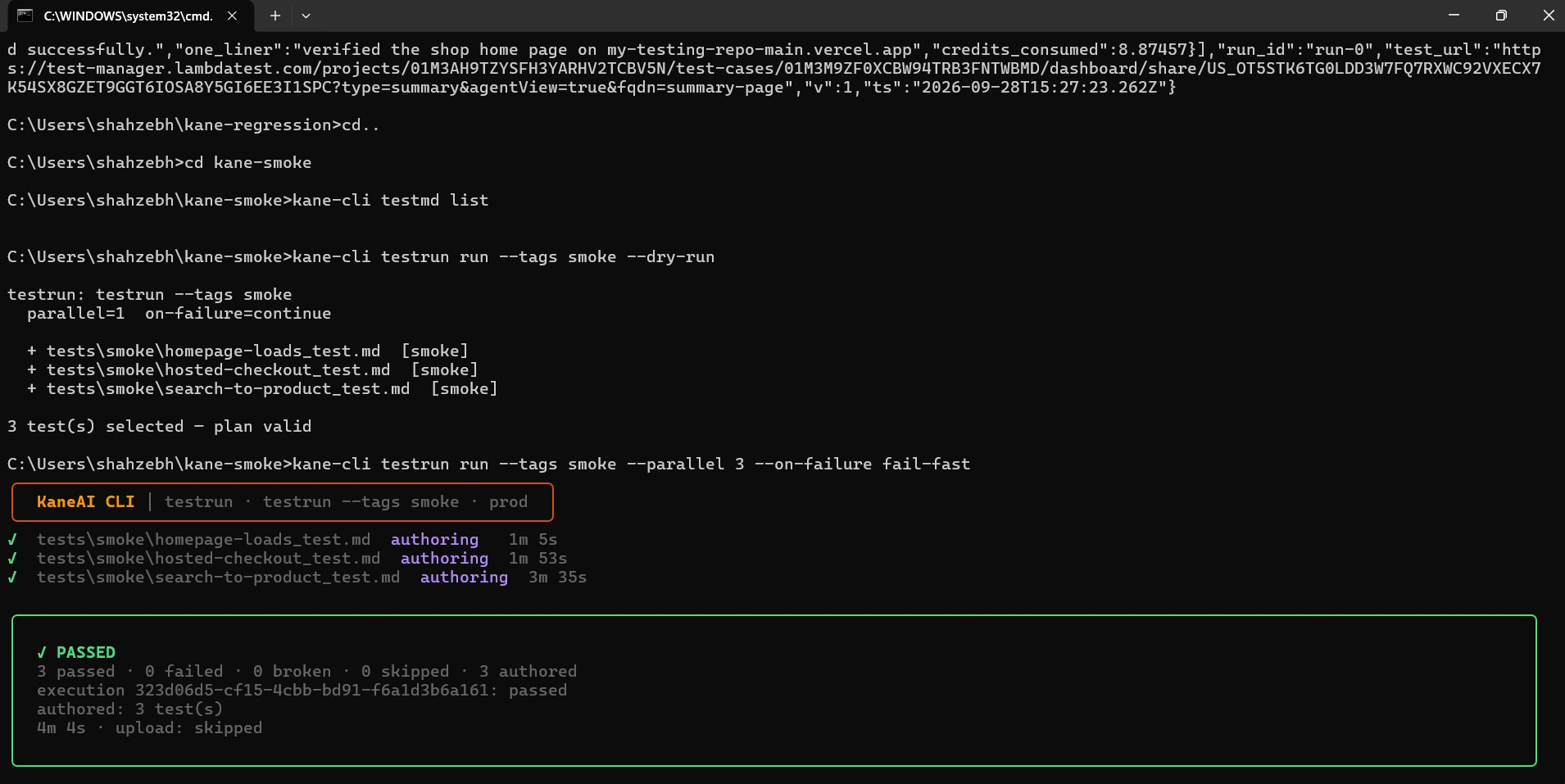
On this first run all three checks were authored in parallel and passed in 4m 4s: the home page in 1m 5s, the hosted checkout in 1m 53s, and search to product in 3m 35s.
The first run authors each step; every run after that replays the recording instead of authoring it again. When a check fails, the output carries a Reason: line for the step, and a later step in that file shows as skipped because it never ran:
# search-to-product_test.md - Result
## Search the storefront ✓ passed (4.1s)
## Open the product ✗ failed (31.0s)
Reason: product page returned 500 after clicking the result
        [application_issue/server_error, confidence 0.96]
## Confirm the buy box ⏭ skipped

testrun : failed (2 passed, 1 failed)
Each test writes output-<name>/Result.md next to its file, and the suite's sealed evidence pack in .testmuai/evidence/ holds the step screenshots, network log and console output, so the failure arrives with its proof.
Step 5: Gate the Deploy on the Exit Code
testrun run's exit codes map onto the same promote, roll back, and retry contract as the gate script above. Exit code 1 means a check failed on the new build: roll back. Exit code 2 means nothing ran, from a tag that matched no file, an invalid plan, or a failed sign-in, so the build is not proven bad: retry, and do not roll back.
Exit code 3 means the run was cancelled, and the script retries it like a 2. testrun also exits 1 when a member breaks before judging the app; its summary counts those separately as broken, so check that count before a rollback on a flaky runner.
- name: Smoke suite after deploy
  env:
    LT_USERNAME: ${{ secrets.LT_USERNAME }}
    LT_ACCESS_KEY: ${{ secrets.LT_ACCESS_KEY }}
  run: |
    npm install -g @testmuai/kane-cli
    set +e                                   # read the exit code instead of stopping on it
    kane-cli testrun run --tags smoke --parallel 3 --on-failure fail-fast \
      --username "$LT_USERNAME" --access-key "$LT_ACCESS_KEY"
    rc=$?
    if [ $rc -eq 2 ] || [ $rc -eq 3 ]; then
      echo "smoke could not complete (rc=$rc), retrying once"
      kane-cli testrun run --tags smoke --parallel 3 --on-failure fail-fast \
        --username "$LT_USERNAME" --access-key "$LT_ACCESS_KEY"
      rc=$?
    fi
    case $rc in
      0) echo "smoke passed" ;;
      1) echo "smoke failed on the new build"; ./scripts/rollback.sh; exit 1 ;;
      *) echo "smoke could not complete (rc=$rc), not rolling back"; exit $rc ;;
    esac
The same suite runs on the HyperExecute grid with --remote after kane-cli plugin install remote-execution, which keeps the deploy runner free of browsers. Tag a handful of the longer regression tests smoke as well and they join this run without a second file; the full regression tag stays on the nightly schedule.
The checks in this suite, with their test.md and command, are published as Kane CLI use cases: search to product page and hosted Checkout session, and theme update smoke shows the same idea for a storefront theme push. For the pipeline flags and exit codes see Kane CLI is CI/CD ready, and for running the suite on the grid see Kane CLI remote execution.
Troubleshooting Smoke Gates From the CLI
Each row starts from the message you see in the job log.
| Symptom | Likely cause | Fix |
|---|---|---|
| Smoke run also executes @smoke-prod tests | --grep "@smoke" is a regex that matches the longer tag | Use --grep "@smoke($|\s)" |
| "No tests found" and exit 1 | The tag matched nothing | Count with --list first and exit 2 on zero |
| Layer 2 reports live build 'none' | An App Router page or another stack has no __NEXT_DATA__ buildId | Serve the commit SHA from a /version route and read that instead |
| Build check keeps failing after a good deploy | A CDN still serves the previous HTML, or the image ran next build again with a new ID | Purge the page cache in the deploy job, and pin generateBuildId to the commit SHA |
| browserType.connect ... 401 Unauthorized | The grid rejected LT_USERNAME or LT_ACCESS_KEY | Update the CI secrets and rerun; the gate already exited 2 |
| Kane CLI stopped before judging the app | Kane CLI exited 1 with no verdict, for example with no credits left on the account | Read kane.ndjson, fix the credits or sign-in, and rerun |
| Kane CLI exits 1 on a site that is down | An unreachable target is a failed objective, not a Kane CLI environment error | Keep the curl layers before the Kane CLI layer |
| A route check hits /C:/Program Files/... | Git Bash on Windows rewrote a leading "/" in an environment variable | List routes without a leading slash |
| curl exit 23 on every request | MSYS_NO_PATHCONV=1 stopped Git Bash from translating /dev/null | Unset it, or write to a temp file |
| "not a *_test.md file" from kane-cli testrun run | A folder path was passed; testrun run takes files or no path | Drop the path and select with --tags smoke |
| The Kane CLI smoke run exits 2 with an empty plan | --tags smoke matched no _test.md file | Check each file's tags with kane-cli testmd list; the exit 2 already kept the deploy from rolling back |
Conclusion
Start a production smoke test with layers 1 to 3: a curl wait, a build ID check, and four critical routes take about 3 seconds on a healthy deploy and catch a stale build or a route that returns 404 or 500. Add the tagged browser subset and the Kane CLI check next to catch pages that load but render blank or stop working, then wire exit 1 to your rollback command and exit 2 to a retry.
To keep the whole suite in plain English, save the checks as _test.md files tagged smoke and run them with kane-cli testrun run --tags smoke after each deploy. The Kane CLI introduction covers installation and sign-in.
Author

Samyak Goyal
Blogs: 26

Samyak Goyal is a Senior Member of Technical Staff at TestMu AI engineering Kane CLI, the command-line tool that runs browser automation from the terminal, where a flow described in natural language executes in a real Chrome browser and returns pass or fail with shareable proof. He is a backend engineer with 4+ years of experience, previously an SDE at Innovaccer, where he built APIs, introduced Kafka, and cut deployment from weeks to hours. Samyak also builds multi-agent systems, skill-orchestration frameworks, and a personal copilot that indexes 200+ microservice repositories.
Reviewer

Himanshu Sheth
Reviewer
Himanshu Sheth is the Director of Marketing (Technical Content) at TestMu AI, with over 8 years of hands-on experience in Selenium, Cypress, and other test automation frameworks. He has authored more than 130 technical blogs for TestMu AI, covering software testing, automation strategy, and CI/CD. At TestMu AI, he leads the technical content efforts across blogs, YouTube, and social media, while closely collaborating with contributors to enhance content quality and product feedback loops. He has done his graduation with a B.E. in Computer Engineering from Mumbai University. Before TestMu AI, Himanshu led engineering teams in embedded software domains at companies like Samsung Research, Motorola, and NXP Semiconductors. He is a core member of DZone and has been a speaker at several unconferences focused on technical writing and software quality.


Smoke Testing CLI FAQs
Did you find this page helpful?
More Related Blogs
TestMu AI forEnterprise
Get access to solutions built on Enterprise
grade security, privacy, & compliance
- Advanced access controls
- Advanced data retention rules
- Advanced Local Testing
- Premium Support options
- Early access to beta features
- Private Slack Channel
- Unlimited Manual Accessibility DevTools Tests