

Power Your Software Testing with AI Agents and Cloud
The Native AI-Agentic Cloud Platform to Supercharge Quality Engineering. Test Intelligently and Ship Faster.


- TestMu AI (Formerly LambdaTest)
- /
- Blog
- /
- How to Connect Kane CLI to GitHub Actions for CI/CD
Kane CLI runs real user-journey checks, written as plain-English objectives, inside a GitHub Actions workflow that provisions headless Chrome on every push and pull request. Because the tool returns a deterministic exit code, the pipeline can branch on pass or fail without custom parsing, using credentials stored securely as repository secrets to avoid interactive OAuth logins on the runner.
Building Reliable Quality Gates in CI/CD
A quality gate is only as trustworthy as the signal it acts on. Code-level checks confirm that an application builds, but they cannot confirm that a real user can log in, navigate, and complete a purchase. Wiring Kane CLI into your pipeline closes that gap by running the actual journey in a live browser on every push.
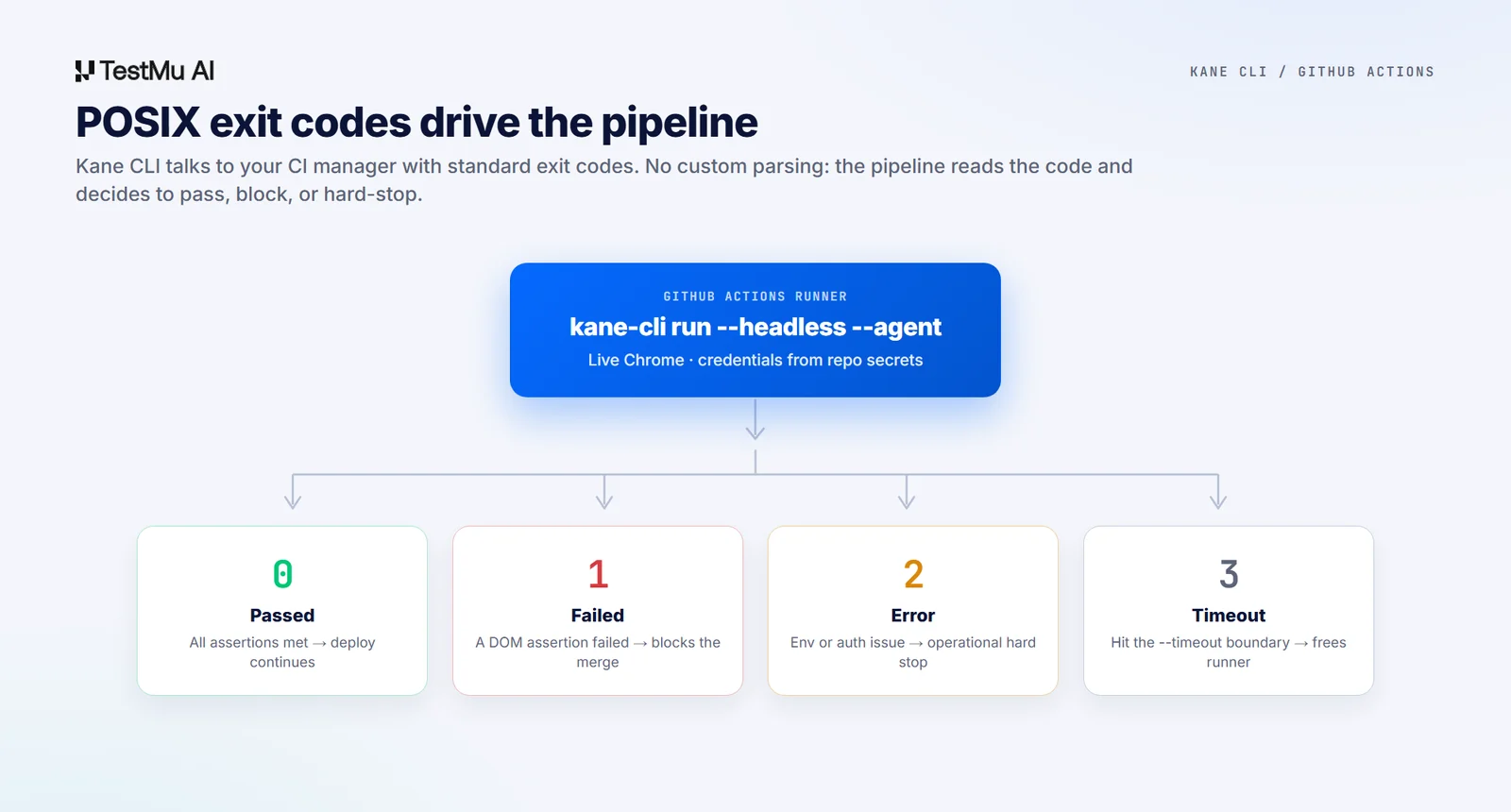
Because Kane CLI returns a deterministic exit code, the pipeline can branch on the result without any custom parsing. The same plain-English check that guards a local build also runs CI/CD ready with no second framework to maintain.

Note: Gate every pull request on a real browser check. Start free. Try Kane CLI
Securing Credentials within GitHub Secrets
In CI you must avoid interactive auth entirely. Running kane-cli login fails on a remote runner because it launches an interactive browser OAuth window that no one can complete. You authenticate headlessly instead by storing credentials as repository secrets.
- In your repository, go to Settings > Secrets and variables > Actions.
- Create a repository secret named LT_USERNAME.
- Create a second secret named LT_ACCESS_KEY.
These secrets are injected securely into the runner at runtime, keeping production credentials out of source. They never appear in logs or in your committed workflow file.
The Complete CI Workflow Configuration
Create a workflow at .github/workflows/browser-tests.yml to run checks on every push and pull request. The job provisions Chrome, installs Kane CLI, and executes your objective with credentials read from the secrets you just created.
name: Browser Tests
on: [push, pull_request]

jobs:
  kane-tests:
    runs-on: ubuntu-latest
    steps:
      - name: Check out repository source code
        uses: actions/checkout@v4
      - name: Initialize Node.js execution runtime
        uses: actions/setup-node@v4
        with:
          node-version: '20'
      - name: Provision live Chrome browser on runner
        uses: browser-actions/setup-chrome@v1
      - name: Globally install Kane CLI utility
        run: npm install -g @testmuai/kane-cli
      - name: Execute automated browser checks
        env:
          LT_USERNAME: ${{ secrets.LT_USERNAME }}
          LT_ACCESS_KEY: ${{ secrets.LT_ACCESS_KEY }}
        run: |
          kane-cli run "go to https://staging.myapp.com, log in, assert the dashboard shows 'Welcome'" \
            --headless --agent --timeout 300 \
            --username "$LT_USERNAME" --access-key "$LT_ACCESS_KEY"
That example targets a fixed staging URL. To run the same check against a fresh Vercel preview deployment on every pull request instead, see our guide to testing Vercel preview deployments automatically, which covers capturing the preview URL and clearing Vercel's Deployment Protection first.
Essential Pipeline Parameters Explained
Each flag in the run step controls how the check behaves on the runner. The three below are the ones that matter most for a stable, predictable pipeline.
- --headless: forces Chrome without a display server, required since cloud runners have no GUI.
- --timeout 300: sets a hard 5-minute ceiling so a stalled process does not hang and burn runner credits.
- --variables-file: injects environment-specific configs, logins, and feature flags into your plain-English objectives.
Deciphering POSIX Exit Statuses for Pipeline Control
Kane CLI communicates with your CI manager via standard POSIX exit codes, so there is no custom parsing to maintain. The runner reads the code and decides whether to continue, halt, or flag an operational issue. The diagram above maps each code to the pipeline state it triggers.
- exit 0: all checks and assertions passed, the runner continues to deployment.
- exit 1: a functional assertion failed in the DOM, the build halts and the PR merge is blocked.
- exit 2: an environment or infrastructure error such as invalid auth, a hard stop flagging an operational issue.
- exit 3: the run hit the --timeout boundary and was terminated to free runner resources.
Managing Minimal, Chrome-Free Environments
If your runner image cannot install Chrome locally, as with lightweight Node Alpine images, you can bypass the local browser requirement entirely. Point the CLI at a remote browser grid with the --ws-endpoint or --cdp-endpoint flags. Kane CLI streams instructions to the remote browser over WebSockets and returns the same deterministic exit codes.
Note: Want the full flag reference and agent setup behind this workflow? Read the Kane CLI docs. Read the docs
Once the pipeline is green, the same plain-English objective doubles as a guard you can run before any pull request, the way teams run a UI check before a PR to catch broken journeys early. Gate every merge on a real browser check and your CI stops trusting proxies and starts trusting the actual user journey.
The Kane CLI Certification is free and covers the same commands you just wired into CI, so you can prove you run them anywhere.
Author

Bhawana
Blogs: 75


Bhawana is a Community Evangelist at TestMu AI with over 3 years of experience creating technically accurate, strategy-driven content in software testing. She has authored 50+ blogs on test automation, cross-browser testing, mobile testing, and real device testing. She also serves as Product Marketing Manager for Kane CLI, the command-line tool that runs browser automation from the terminal using natural-language flows in a real Chrome browser. Bhawana is certified in KaneAI, Selenium, Appium, Playwright, and Cypress, reflecting her hands-on knowledge of modern automation practices. On LinkedIn, she is followed by 6000+ QA engineers, testers, AI automation testers, and tech leaders.


Frequently asked questions
Did you find this page helpful?
More Related Blogs
TestMu AI forEnterprise
Get access to solutions built on Enterprise
grade security, privacy, & compliance
- Advanced access controls
- Advanced data retention rules
- Advanced Local Testing
- Premium Support options
- Early access to beta features
- Private Slack Channel
- Unlimited Manual Accessibility DevTools Tests