

Power Your Software Testing with AI Agents and Cloud
The Native AI-Agentic Cloud Platform to Supercharge Quality Engineering. Test Intelligently and Ship Faster.


- TestMu AI (Formerly LambdaTest)
- /
- Blog
- /
- How to Perform Test-Driven Development From the Command Line
How to Perform Test-Driven Development From the Command Line
Run a TDD workflow from the terminal: see each test fail for the right reason, go green in watch mode, prove tests catch bugs, and gate commits and CI runs.
Published on:
Write the first test before its module exists and Jest exits 1, which looks like red. Its own summary line says otherwise: Tests: 0 total, so no assertion ran.
Catching that gap between an exit code and a failing assertion is the first job of a TDD workflow from the command line. This guide runs the loop in JavaScript and Python: exit codes as the red and green signal, watch mode for the refactor step, coverage and mutation gates, an acceptance test written first with Playwright and Kane CLI on TestMu AI, a coding agent building a feature against a failing Kane CLI test, and commit and CI gates that keep the cycle honest.
TL;DR
A TDD workflow from the command line is the red-green-refactor cycle driven by test-runner exit codes. You write one failing test and confirm it exits 1 on an assertion, write the least code that exits 0, then refactor while watch mode reruns the suite. Git hooks and CI enforce the same exit codes.
- Right-reason red: A Jest test that imports a missing module exits 1 while reporting "Tests: 0 total", so no assertion ran. A stub that returns undefined turns it into a real failure: "Expected: 12, Received: undefined". Counts as red before an assertion fails: No (the suite never loaded).
- jest --watch: Jest's watch mode reruns the tests related to each saved file. It finds changes through git, so outside a git or hg repository it exits 1 and suggests --watchAll. Works without git: No (use --watchAll).
- pytest-watcher: The ptw command reruns pytest on every save and passes flags such as -x --lf --nf straight through. With --lf the green rerun covers only the last failure, so run the full suite before committing.
- Mutation score: Lines and branches at 100% still let a Stryker mutant that empties the error message survive a bare toThrow(). With thresholds.break set to 90, the resulting score of 87.50 exits 1. Is 100% coverage enough: No (87.50 mutation score).
- Acceptance test first: A Playwright spec and a Kane CLI _test.md written before the feature pass on TestMu AI's Selenium Playground sum form, fail on the empty local page, and pass once the form exists. The Kane CLI replay of the saved recording took 3.72 seconds.
- AI agent gate: A Claude Code Stop hook that exits 2 while the unit suite is red keeps the agent working instead of letting it finish. Claude Code ends the turn after 8 consecutive blocks.
- Agent-built feature: a Kane CLI _test.md written before the feature goes red, Claude Code implements until kane-cli testmd run --agent exits 0, and replays guard the refactor. Agent verifies its own change in a real browser: Yes.
- Commit and CI gate: husky for JavaScript and pre-commit for Python run the unit suite on every commit and block a red one. git commit --no-verify skips hooks, so CI reruns the same commands. Runs on every push: Yes (push and pull_request triggers).
How to Set Up a Terminal TDD Workflow
A terminal TDD workflow needs three things: a runner that exits non-zero when an assertion fails, a watcher, and git.
The DORA 2024 Accelerate State of DevOps report found 59.6% of respondents whose job includes writing tests rely on AI for it, at least in part, while 39.2% report little (27.3%) or no trust (11.9%) in AI-generated code. A test you wrote and watched fail is the check that still holds when AI writes the rest.
# JavaScript: Jest for the unit loop, Playwright for acceptance, Stryker for mutation, husky for hooks
git init -b main
npm init -y
npm i -D jest@30.5.2 @playwright/test@1.63.0 @stryker-mutator/core@10.0.0 @stryker-mutator/jest-runner@10.0.0 husky@9.1.7
npx playwright install chromium

# Python: pytest, a watcher, coverage, and pre-commit in a virtual environment
python -m venv .venv
source .venv/Scripts/activate        # .venv/bin/activate on macOS and Linux
pip install pytest==9.1.1 pytest-watcher==0.6.3 pytest-cov==7.1.0 pre-commit==4.6.2| Step | JavaScript | Python | Expected exit code |
|---|---|---|---|
| Red | npx jest | python -m pytest -q | 1, on an assertion |
| Green | npx jest | python -m pytest -q | 0 |
| Refactor on save | npx jest --watch | ptw . -x --lf --nf | Reruns on every save |
| Prove the tests | npx stryker run | pytest --cov-branch --cov-fail-under=100 | 1 below the threshold |
| Acceptance | npx playwright test, kane-cli testmd run | Same commands, same app | 1 before the feature, then 0 |
| Commit | git commit (husky runs npm test) | git commit (pre-commit runs pytest) | Blocked while red |
The feature built test-first in every section is a sum calculator modeled on the Selenium Playground's "Two Input Fields" form. For the definitions behind each step, see test-driven development; for how it compares with behavior-driven development, see TDD vs BDD.
How to Write the Failing Test First and Confirm the Right Failure
Write the test before the code, run it, and read the counts as well as the exit code:
// tests/sum.test.js - written before src/sum.js exists
const { addValues } = require('../src/sum');

test('adds two numbers typed as text', () => {
  expect(addValues('7', '5')).toBe(12);
});
$ npx jest
FAIL tests/sum.test.js
● Test suite failed to run
Cannot find module '../src/sum' from 'tests/sum.test.js'
> 1 | const { addValues } = require('../src/sum');
| ^
2 |
3 | test('adds two numbers typed as text', () => {
4 | expect(addValues('7', '5')).toBe(12);
at Resolver._throwModNotFoundError (node_modules/jest-resolve/build/index.js:1031:11)
at Object.<anonymous> (tests/sum.test.js:1:23)
Test Suites: 1 failed, 1 total
Tests: 0 total
Snapshots: 0 total
Time: 1.133 s
Ran all test suites.
$ echo $?
1That red is for the wrong reason: the suite failed to load. Add a stub that returns nothing, and the same command fails on the assertion instead:
// src/sum.js - a stub, so the test can reach its assertion
function addValues(first, second) {
  return undefined;
}

module.exports = { addValues };
$ npx jest
FAIL tests/sum.test.js
● adds two numbers typed as text
expect(received).toBe(expected) // Object.is equality
Expected: 12
Received: undefined
2 |
3 | test('adds two numbers typed as text', () => {
> 4 | expect(addValues('7', '5')).toBe(12);
| ^
5 | });
6 |
at Object.<anonymous> (tests/sum.test.js:4:31)
Test Suites: 1 failed, 1 total
Tests: 1 failed, 1 total
Snapshots: 0 total
Time: 0.722 s
Ran all test suites.
$ echo $?
1The Python twin, add_values in sum_inputs.py with a stub that returns None, fails the same way under pytest:
$ python -m pytest -q
F                                                                        [100%]
================================== FAILURES ===================================
_____________________ test_adds_two_numbers_typed_as_text _____________________

    def test_adds_two_numbers_typed_as_text():
>       assert add_values("7", "5") == 12
E       AssertionError: assert None == 12
E        +  where None = add_values('7', '5')

test_sum_inputs.py:7: AssertionError
=========================== short test summary info ===========================
FAILED test_sum_inputs.py::test_adds_two_numbers_typed_as_text - AssertionErr...
1 failed in 0.09s
$ echo $?
1- Counts before exit codes - "Tests: 0 total" with exit 1 means the file never loaded; "1 failed, 1 total" with "Expected: 12, Received: undefined" is the red you want.
- Filter typos pass - a -t pattern that matches no test name skips every test and exits 0 in Jest and Vitest, while pytest -k exits 5. Zero-test exit codes for each runner are compared in smoke testing command line.
- One behavior per test - each cycle adds a single test, so each red run has exactly one reason to fail.
How to Go Green and Refactor in Watch Mode
Write the least code that turns the assertion green, then commit, so every green state is a commit you can return to:
// src/sum.js - the least code that passes
function addValues(first, second) {
  return Number(first) + Number(second);
}

module.exports = { addValues };
$ npx jest
Test Suites: 1 passed, 1 total
Tests: 1 passed, 1 total
Snapshots: 0 total
Time: 0.63 s, estimated 1 s
Ran all test suites.
$ echo $?
0
$ git add -A && git commit -q -m "green: adds two numbers typed as text"
$ git log --oneline
aa01b3d green: adds two numbers typed as textWatch mode removes the manual rerun. Start npx jest --watch in a second terminal: on a clean tree it waits, then reruns the test files related to whatever you save. Below, the next test (non-numeric input must throw) goes red on save, and the implementation turns it green on the following save:
$ npx jest --watch
No tests found related to files changed since last commit.

FAIL tests/sum.test.js
  ● rejects input that is not a number

    expect(received).toThrow()

    Received function did not throw

       6 |
       7 | test('rejects input that is not a number', () => {
    >  8 |   expect(() => addValues('seven', '5')).toThrow();
         |                                         ^
       9 | });
      10 |

      at Object.<anonymous> (tests/sum.test.js:8:41)

Test Suites: 1 failed, 1 total
Tests:       1 failed, 1 passed, 2 total
Snapshots:   0 total
Time:        1.106 s
Ran all test suites related to changed files.

Test Suites: 1 passed, 1 total
Tests:       2 passed, 2 total
Snapshots:   0 total
Time:        0.887 s, estimated 1 s
Ran all test suites related to changed files.
In Python, ptw . -x --lf --nf passes -x --lf --nf to pytest on every save. The same cycle, with the test expecting the message "Enter two numbers":
$ ptw . -x --lf --nf
[ptw] Detected modified: ./test_sum_inputs.py ->
============================= test session starts =============================
...
collected 2 items
run-last-failure: no previously failed tests, not deselecting items.

test_sum_inputs.py F

================================== FAILURES ===================================
___________________ test_rejects_input_that_is_not_a_number ___________________

    def test_rejects_input_that_is_not_a_number():
>       with pytest.raises(ValueError, match="Enter two numbers"):
             ^^^^^^^^^^^^^^^^^^^^^^^^^^^^^^^^^^^^^^^^^^^^^^^^^^^^
E       AssertionError: Regex pattern did not match.
E         Expected regex: 'Enter two numbers'
E         Actual message: "could not convert string to float: 'seven'"

test_sum_inputs.py:11: AssertionError
=========================== short test summary info ===========================
FAILED test_sum_inputs.py::test_rejects_input_that_is_not_a_number - Assertio...
!!!!!!!!!!!!!!!!!!!!!!!!!! stopping after 1 failures !!!!!!!!!!!!!!!!!!!!!!!!!!
============================== 1 failed in 0.10s ==============================
[ptw] Detected modified: ./sum_inputs.py ->
[ptw] Detected modified: ./sum_inputs.py ->
============================= test session starts =============================
...
collected 1 item
run-last-failure: rerun previous 1 failure

test_sum_inputs.py .                                                     [100%]

============================== 1 passed in 0.04s ==============================- --watch needs git - outside a repository Jest prints "--watch is not supported without git/hg, please use --watchAll" and exits 1.
- --lf narrows the green rerun - after the fix, pytest reran only the previous failure ("collected 1 item"), so run the full suite once before you commit.
- pytest-watcher over pytest-watch - PyPI lists pytest-watch 4.2.0 as its last release, from 2018-05-20; pytest-watcher 0.6.3 installs the same ptw command, so install only one.
- Refactor under a running watcher - rename and extract while the watcher stays green; a red rerun during a refactor means behavior changed.
The loop maps onto each runner's own flags. For a head-to-head of the two JavaScript runners, see Vitest vs Jest; selecting tests by changed files in CI is covered in regression testing command line.
| Loop action | Jest 30 | Vitest 5 | pytest 9 |
|---|---|---|---|
| Rerun on save | jest --watch (git), jest --watchAll | vitest (watch in an interactive terminal) | ptw . from pytest-watcher |
| Run once, for hooks and CI | jest | vitest run | pytest |
| Only tests related to changes | -o, --onlyChanged | --changed | --testmon (pytest-testmon) |
| Stop early | --bail (counts failing test files) | --bail=1 (counts failing tests) | -x |
| Filter by name | -t | -t | -k |
| Exit code when no test file matches | 1 | 1 | 5 |
How to Prove Your Tests Can Catch Bugs
Coverage shows which lines ran, and mutation testing shows whether a test notices when those lines are wrong. Start with a coverage threshold, so a drop fails the run:
// jest.config.js
module.exports = {
  testMatch: ["**/tests/**/*.test.js"],
  coverageThreshold: {
    global: { branches: 100, functions: 100, lines: 100, statements: 100 },
  },
};
$ npx jest --coverage
----------|---------|----------|---------|---------|-------------------
File | % Stmts | % Branch | % Funcs | % Lines | Uncovered Line #s
----------|---------|----------|---------|---------|-------------------
All files | 100 | 100 | 100 | 100 |
sum.js | 100 | 100 | 100 | 100 |
----------|---------|----------|---------|---------|-------------------
Test Suites: 1 passed, 1 total
Tests: 2 passed, 2 total
Snapshots: 0 total
Time: 1.909 s
Ran all test suites.
$ echo $?
0Stryker then changes the code one mutant at a time and reruns the tests. Per the Stryker configuration docs, a score under thresholds.break makes Stryker exit with code 1, which turns the score into a gate:
{
  "testRunner": "jest",
  "mutate": ["src/**/*.js"],
  "reporters": ["clear-text", "progress"],
  "thresholds": { "high": 90, "low": 80, "break": 90 }
}
$ npx stryker run
...
All tests/sum.test.js
✓ adds two numbers typed as text [line 3] (killed 4)
✓ rejects input that is not a number [line 7] (killed 3)
[Survived] StringLiteral
src/sum.js:5:21
- throw new Error('Enter two numbers');
+ throw new Error("");
Tests ran:
rejects input that is not a number
Ran 1.63 tests per mutant on average.
----------|------------------|----------|-----------|------------|----------|----------|
| % Mutation score | | | | | |
File | total | covered | # killed | # timeout | # survived | # no cov | # errors |
----------|--------|---------|----------|-----------|------------|----------|----------|
All files | 87.50 | 87.50 | 7 | 0 | 1 | 0 | 0 |
sum.js | 87.50 | 87.50 | 7 | 0 | 1 | 0 | 0 |
----------|--------|---------|----------|-----------|------------|----------|----------|
14:43:28 (9944) ERROR MutationTestReportHelper Final mutation score 87.50 under breaking threshold 90, setting exit code to 1 (failure).
$ echo $?
1
# after changing the test to toThrow('Enter two numbers')
$ npx stryker run
...
All tests/sum.test.js
✓ adds two numbers typed as text [line 3] (killed 4)
✓ rejects input that is not a number [line 7] (killed 4)
Ran 1.63 tests per mutant on average.
----------|------------------|----------|-----------|------------|----------|----------|
| % Mutation score | | | | | |
File | total | covered | # killed | # timeout | # survived | # no cov | # errors |
----------|--------|---------|----------|-----------|------------|----------|----------|
All files | 100.00 | 100.00 | 8 | 0 | 0 | 0 | 0 |
sum.js | 100.00 | 100.00 | 8 | 0 | 0 | 0 | 0 |
----------|--------|---------|----------|-----------|------------|----------|----------|
14:43:44 (14752) INFO MutationTestReportHelper Final mutation score of 100.00 is greater than or equal to break threshold 90
$ echo $?
0- Bare toThrow() is a common survivor - it passes for any error, so a mutant that empties the message lives on at 100% coverage. Asserting the text killed it and took the score from 87.50 to 100.00.
- Survivors above the threshold still matter - a later cycle passed the gate at 92.86 with a surviving mutant that removed .trim(); a test for a field of only spaces killed it.
- Python - pytest --cov=sum_inputs --cov-branch --cov-fail-under=100 printed "Required test coverage of 100% reached". mutmut 3.8 needs fork support and stops on native Windows with "To run mutmut on Windows, please use the WSL", so run it on Linux or in WSL. The coverage flags are explained in pytest code coverage report.
The coverage gate also catches refactors. Wrapping the export in a typeof module guard, so a browser could load the same file, added a branch the unit tests never take. Every test still passed, and the run still exited 1:
$ npx jest --coverage
----------|---------|----------|---------|---------|-------------------
File      | % Stmts | % Branch | % Funcs | % Lines | Uncovered Line #s
----------|---------|----------|---------|---------|-------------------
All files |     100 |    83.33 |     100 |     100 |
 sum.js   |     100 |    83.33 |     100 |     100 | 10
----------|---------|----------|---------|---------|-------------------
Jest: Coverage for branches (83.33%) does not meet "global" threshold (100%)
Test Suites: 1 passed, 1 total
Tests:       2 passed, 2 total
Snapshots:   0 total
Time:        0.932 s, estimated 1 s
Ran all test suites.
$ echo $?
1
The fix kept the browser concern out of the unit: the page defines a module object before loading the script, and the branch-coverage gate passed again.
How to Start a Feature From a Failing Acceptance Test
JetBrains' State of Developer Experience and Productivity report found 57% of developers (N=1,682) want AI help generating tests. Generated or hand-written, an acceptance test proves something only after you have seen it fail against an app that lacks the feature.
The outer loop wraps the unit loop: one acceptance test for the visible behavior stays red while unit cycles build the pieces, the double-loop pattern behind ATDD. The Selenium Playground's Simple Form Demo has a finished sum form, so the spec is calibrated there before it runs against a local page that has only a heading:
// acceptance/sum.spec.ts
import { test, expect } from '@playwright/test';

test('adds two numbers from the form', async ({ page }) => {
  await page.goto(process.env.SUM_URL ?? '/');
  await page.getByPlaceholder('Please enter first value').fill('7');
  await page.getByPlaceholder('Please enter second value').fill('5');
  await page.getByRole('button', { name: 'Get Sum' }).click();
  await expect(page.locator('#addmessage')).toHaveText('12');
});
// playwright.config.ts
import { defineConfig } from '@playwright/test';
export default defineConfig({
testDir: './acceptance',
timeout: 15_000,
retries: 0,
use: { baseURL: 'http://localhost:4173/', actionTimeout: 5_000 },
webServer: { command: 'node server.js', url: 'http://localhost:4173/', reuseExistingServer: true },
});$ SUM_URL=https://www.testmuai.com/selenium-playground/simple-form-demo/ npx playwright test --reporter=list
Running 1 test using 1 worker
ok 1 acceptance/sum.spec.ts:3:5 › adds two numbers from the form (4.9s)
1 passed (11.1s)
$ echo $?
0
$ npx playwright test -x --reporter=list
Running 1 test using 1 worker
x 1 acceptance/sum.spec.ts:3:5 › adds two numbers from the form (5.3s)
Testing stopped early after 1 maximum allowed failures.
1) acceptance/sum.spec.ts:3:5 › adds two numbers from the form
TimeoutError: locator.fill: Timeout 5000ms exceeded.
Call log:
- waiting for getByPlaceholder('Please enter first value')
3 | test('adds two numbers from the form', async ({ page }) => {
4 | await page.goto(process.env.SUM_URL ?? '/');
> 5 | await page.getByPlaceholder('Please enter first value').fill('7');
| ^
6 | await page.getByPlaceholder('Please enter second value').fill('5');
7 | await page.getByRole('button', { name: 'Get Sum' }).click();
8 | await expect(page.locator('#addmessage')).toHaveText('12');
at C:/tdd-demo/js/acceptance/sum.spec.ts:5:59
Error Context: test-results/sum-adds-two-numbers-from-the-form/error-context.md
1 failed
acceptance/sum.spec.ts:3:5 › adds two numbers from the form
1 error was not a part of any test, see above for details
$ echo $?
1
$ npx playwright test --last-failed --reporter=list
Running 1 test using 1 worker
ok 1 acceptance/sum.spec.ts:3:5 › adds two numbers from the form (356ms)
1 passed (2.4s)
$ echo $?
0- Calibrate first - SUM_URL points the spec at the playground; a pass there proves the locators and the expected "12", so the local red run can only be about the missing feature.
- Short timeouts for red - actionTimeout of 5 seconds makes the red run fail in about 5 seconds on the missing first input instead of waiting for the test timeout.
- --last-failed for the green run - it reruns only the failed acceptance test; the full npx playwright test run follows before the commit.
Write the Same Acceptance Test With Kane CLI
Kane CLI validates rendered UI in a real Chrome browser from natural language objectives, and a _test.md file keeps the objective in the repo. The first passing run saves a recording, and later runs replay the steps from cache:
---
mode: testing
url: http://localhost:4173/
max_steps: 10
tags: [tdd]
---

# Sum form

## Add two numbers
Type 7 in the first value field and 5 in the second value field, click Get Sum, and verify the result shows 12.
# calibrate the objective on the finished reference form (one-shot, saves nothing)
kane-cli run "Type 7 in the first value field and 5 in the second value field, click Get Sum, and verify the result shows 12." \
--url https://www.testmuai.com/selenium-playground/simple-form-demo/ --agent --headless --max-steps 10 --timeout 180
# red, green, then replay: the same test file against the local app
node server.js &
kane-cli testmd run acceptance/sum_test.md --agent --headless --timeout 180
echo $?| Run | Target | Exit | Duration | Result |
|---|---|---|---|---|
| Calibrate | Playground sum form | 0 | 42.8s | "calculated the sum on testmuai.com" |
| Red | Local page with only a heading | 1 | 77s | "The run stopped because it expected two value fields that were not available after the page loaded." No recording saved |
| Green | Local page with the form | 0 | 64s (54.7s authoring) | "calculated the sum of 7 and 5 on localhost", recording committed |
| Replay | Local page with the form | 0 | 13s (3.72s replay) | "replay completed", author_decisions: 0 |
- Red saves nothing - the failed run reported committed: false with reason run_failed, so the first passing run authors the steps and the recording lands in acceptance/output-sum/ next to the test.
- Read the one_liner in red - the red run ended with reason_code stuck.ap_stuck, and its one_liner named the missing value fields, which confirms the missing feature caused the failure.
- Draft objectives from a description - kane-cli generate turns a written description of the feature into test scenarios and test cases without launching a browser; each one still has to go red before it counts.
Run the Acceptance Test on the Cloud Grid Before Merge
The TestMu AI automation cloud runs Playwright scripts across 3,000+ real browser and OS combinations, and a tunnel lets those browsers reach localhost. The grid config reuses the local one and adds the endpoint; the tunnel flags are covered in testing locally hosted pages:
// playwright.grid.config.ts
import { defineConfig } from '@playwright/test';
import base from './playwright.config';

const capabilities = {
  browserName: 'Chrome',
  browserVersion: 'latest',
  'LT:Options': {
    platform: 'Windows 11',
    build: 'TDD From the Command Line',
    name: 'sum form acceptance',
    user: process.env.LT_USERNAME,
    accessKey: process.env.LT_ACCESS_KEY,
    tunnel: true,
    tunnelName: 'tdd-sum',
    playwrightClientVersion: '1.63.0',
  },
};

export default defineConfig({
  ...base,
  timeout: 60_000,
  use: {
    ...base.use,
    connectOptions: {
      wsEndpoint: `wss://cdp.lambdatest.com/playwright?capabilities=${encodeURIComponent(JSON.stringify(capabilities))}`,
    },
  },
});
$ ./LT.exe --user "$LT_USERNAME" --key "$LT_ACCESS_KEY" --tunnelName tdd-sum
No configuration file found. Proceeding with defaults
INFO LambdaTest Tunnel version: 3.2.35
INFO Tunnel binary started on port :9090
$ npx playwright test --config playwright.grid.config.ts --reporter=list
Running 1 test using 1 worker
ok 1 acceptance/sum.spec.ts:3:5 › adds two numbers from the form (1.2s)
1 passed (20.2s)
$ echo $?
0The run appears on the dashboard as build "TDD From the Command Line": Chrome 153 on Windows 11, routed through the tunnel named tdd-sum. Leave Auto Healing off for acceptance specs, so a changed locator fails the test instead of being healed past.

Note: Run the sum spec on the TestMu AI grid through a tunnel with your own username and access key. Sign up for free.
How to Keep an AI Coding Agent Test-First in the Terminal
Write the failing test yourself, then let the agent implement. Claude Code's hooks reference documents that a Stop hook exiting 2 "Prevents Claude from stopping, continues the conversation", and that Claude Code ends the turn after 8 consecutive blocks. Register a command hook in .claude/settings.json, and have the script exit 2 while Jest fails:
{
  "hooks": {
    "Stop": [
      {
        "hooks": [
          { "type": "command", "command": "bash .claude/hooks/tests-green.sh" }
        ]
      }
    ]
  }
}
#!/usr/bin/env bash
# Stop hook: exit 2 keeps the agent working while the unit suite is red.
cat > /dev/null # the hook input JSON arrives on stdin; this gate does not need it
if ! out=$(npx jest --silent 2>&1); then
echo "Unit tests are failing. Make them pass before you stop:" >&2
echo "$out" | grep -E "●|Tests:" >&2
exit 2
fiThe next behavior was an empty field: addValues('', '5') returned 5, because Number('') is 0. With that test added and the code unchanged, the hook blocks; after the fix it exits 0:
$ echo '{"hook_event_name":"Stop","stop_hook_active":false}' | bash .claude/hooks/tests-green.sh
Unit tests are failing. Make them pass before you stop:
  ● rejects an empty field
Tests:       1 failed, 2 passed, 3 total
$ echo $?
2

# after the fix in src/sum.js
$ echo '{"hook_event_name":"Stop","stop_hook_active":true}' | bash .claude/hooks/tests-green.sh

$ echo $?
0- Exit 2 blocks - the same reference notes that for most events exit 1 is a non-blocking error, so a gate that exits 1 lets the agent stop on a red suite.
- stop_hook_active - Claude Code sets it to true when the agent is already continuing because of a Stop hook; the script above ignores it and relies on the 8-block cap.
- UI verdicts for the agent - Kane CLI's --agent mode prints NDJSON and exits 0 when the test passes, 1 on a failed assertion, 2 on an environment error, and 3 on a timeout, so the agent can run the _test.md above and read the result. Setup for Claude Code, Codex CLI, and Gemini CLI is in Kane CLI skills, and the next section builds a whole feature that way.
PreToolUse and PostToolUse gates for the same agent are covered in Claude Code hooks.
How to Perform Test-Driven Development With Kane CLI
Unit frameworks make the red-green-refactor loop cheap for functions. Kane CLI makes it cheap for user-facing behavior, because the test is a _test.md file in plain English that can be written before a single line of the feature exists, run in a real browser, and replayed after every change.
The sum form earlier in this guide ran that loop by hand on one field. With a coding agent such as Claude Code building the feature, the failing test is the spec the agent works to and the passing run is the proof.
The walkthrough builds one feature on a local storefront modeled on the Shoplify demo store from the Kane CLI use cases: a SAVE10 discount code at checkout. The test is adapted from the discount code application use case and written first; the local app starts without the feature. The commands and output shown are from Kane CLI 0.8.18 on Windows 11; they run unchanged on macOS and Linux.
Step 1: Install Kane CLI and the Coding-Agent Skill
Install the @testmuai/kane-cli package from npm, confirm the version, and log in once; web runs also need Google Chrome installed. Then install the skill file that teaches Claude Code, Codex CLI and Gemini CLI when and how to call Kane CLI; other agents can read the hosted copy at testmuai.com/kane-cli/agents.md. Full setup steps are in the Kane CLI getting started docs.
npm install -g @testmuai/kane-cli
kane-cli --version
kane-cli login
npx @testmuai/kane-cli-skill
0.8.18
kane-cli skill installed for: Claude Code, Codex CLI, Gemini CLIStart the app you are building against, here the storefront on http://localhost:3000. Before its first browser task, the skill confirms who is signed in with kane-cli whoami, so a missing login surfaces before the agent starts coding.
Step 2: Write the Test Before the Feature
Write the behavior you want as a test. The checkout does not accept SAVE10 yet; the file describes the code and the numbers that must appear once it works. Save it as tests/checkout/discount-code_test.md.
---
mode: testing
tags: [checkout, tdd]
variables:
  store_url: "http://localhost:3000"
  discount_code: "SAVE10"
---

# Discount code at checkout

## Reach checkout with one item
Open {{store_url}}, click Add to cart on the first product, open the cart, and click Checkout. Verify the order summary shows a subtotal of $32.00.

## Apply the discount code
Enter {{discount_code}} in the Discount code field and click Apply. Verify a discount line reading SAVE10 with -$3.20 appears in the order summary.

## Check the reduced total
Verify the order total is $28.80 before shipping and that the discount line survives a page reload.
Each step ends in an assertion the feature has to satisfy, and the numbers are exact: 10 percent of $32.00 is $3.20, and the total is $28.80. That precision is what makes the test a spec.
The reload check in step 3 is deliberate; it forces the discount to be stored server-side rather than in page state, which is a design decision the test makes before any code does.
Step 3: Red, Run It and Read the Failure
Run the test against the app as it is with kane-cli testmd run tests/checkout/discount-code_test.md. Step 1 passes, because checkout already exists. Step 2 fails, because the checkout does not accept SAVE10 yet:
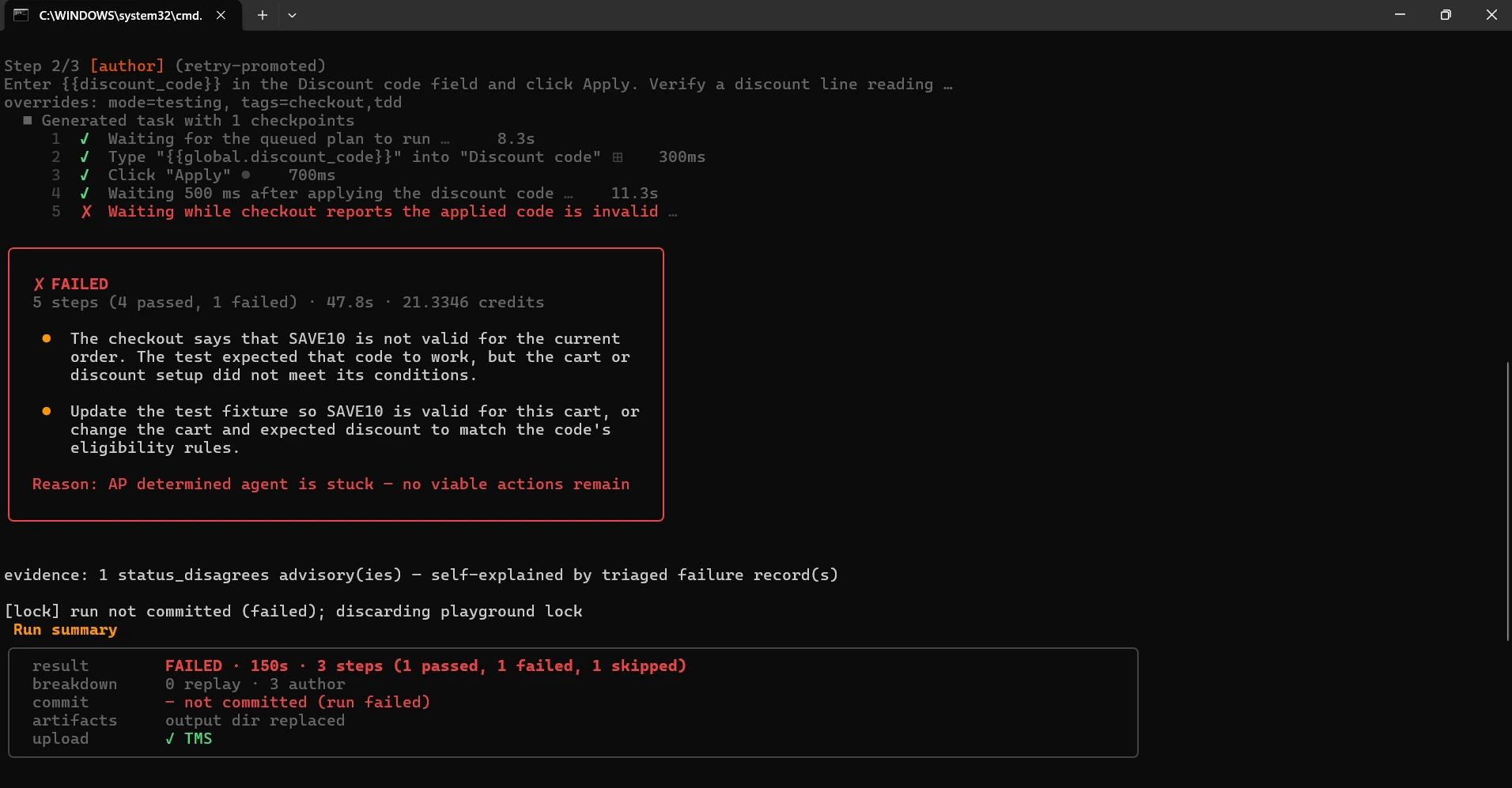
The run failed in 150 seconds with 1 passed, 1 failed and 1 skipped, and the summary reads not committed. Nothing reached Test Manager, but the step that passed keeps its local recording, so the next run replays step 1 and authors only the steps that failed or never ran.
Read the verdict before acting on it. Bug detection classified the failure as automation_bug/test_data_issue and suggested making SAVE10 valid in the test fixture, because Kane CLI has no way to know the code is a spec for behavior that does not exist yet. In test-driven development that red is the point: leave the test alone and build the feature.
This red is still doing real work: it confirms the test reaches checkout and that the assertion fails on the missing behavior rather than on a timeout or a wrong page. Result.md in output-discount-code/ and the evidence pack in .testmuai/evidence/ keep the screenshot of the checkout rejecting the code, which is what you hand to whoever builds it.
Step 4: Green, Hand the Failing Test to Claude Code
The failing test is the spec. In Claude Code, with the skill installed, point the agent at the file and ask for the smallest change that makes it pass. The skill teaches the agent to verify with Kane CLI rather than to assume:
> Make tests/checkout/discount-code_test.md pass. Read the test and
> output-discount-code/Result.md first. Make the checkout accept SAVE10
> for 10 percent off, store the applied code
> with the cart so it survives reload, then verify against localhost:3000
> with kane-cli and show me the run_end line.
The agent edits the checkout page and the cart API, then runs the test itself:
kane-cli testmd run tests/checkout/discount-code_test.md --agent --headless --timeout 300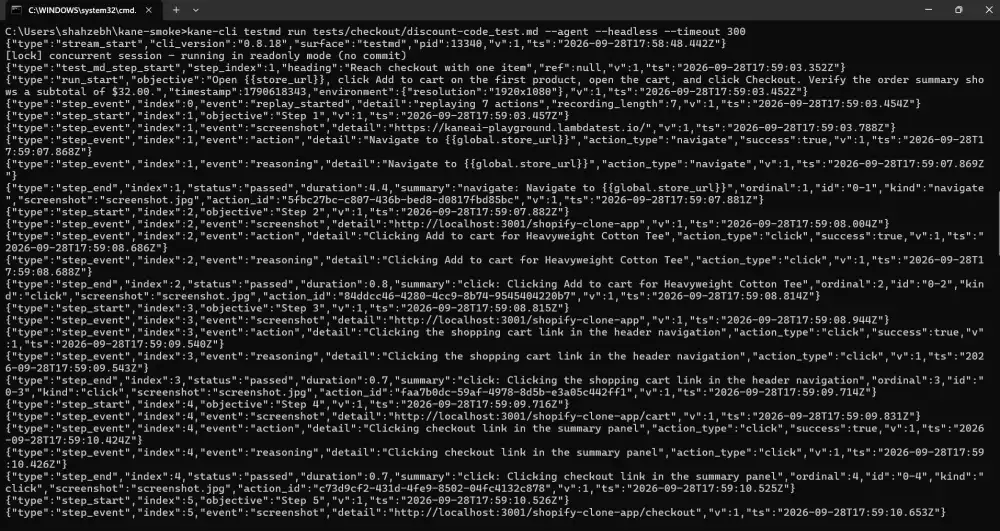
With --agent the run streams NDJSON, one event per action, which is what the agent reads as it works. The run passed in 216 seconds: step 1 replayed its recording, steps 2 and 3 were authored, and the last step confirmed $28.80 before shipping and the discount line still present after a reload.
The agent reports the quoted assertions from the run_end event, not a guess that the code looks right. Exit code 0.
If the first attempt fails, the agent reads the new Reason: line and the evidence pack, changes the code, and runs again; the loop is the same one a developer runs by hand, with the test as the fixed point.
Step 5: Refactor, and Let Replay Guard It
With the test green, its recording is cached. Refactor the checkout, for example moving the discount math from the page into the cart service, and rerun. Nothing in the test changed, so every step replays against the refactored app in seconds, and the header shows it.
kane-cli testmd run tests/checkout/discount-code_test.mdtest.md run
steps 3 (3 replay, 0 author per walker)
## Reach checkout with one item ✓ passed (5.1s)
## Apply the discount code ✓ passed (4.4s)
## Check the reduced total ✓ passed (3.8s)
result PASSED · 14s · 3 steps (3 passed, 0 failed, 0 skipped)The next cycle starts by adding a test, not code. Save the negative case as tests/checkout/discount-code-invalid_test.md, with the same front matter and the same first step to reach checkout, then this step, and watch it go red before the validation exists:
## Reject an unknown code
Enter NOPE99 in the Discount code field and click Apply. Verify an error reading Code not recognised appears and the order total stays $32.00.
Editing a step in an existing file follows the same rule the replay engine uses everywhere: the edited step and every step after it author again, the steps before it keep replaying. Keep the output-<name>/ folders in version control so a teammate's first run replays too.
Step 6: Keep the Loop in CI
Once the feature branch is green locally, the same files gate the pull request. Start the app in the job, run the tests tagged tdd headless, and let the exit code decide: 0 passed, 1 a failed step, 2 nothing ran, 3 cancelled.
- name: Discount code behavior
  env:
    LT_USERNAME: ${{ secrets.LT_USERNAME }}
    LT_ACCESS_KEY: ${{ secrets.LT_ACCESS_KEY }}
  run: |
    npm install -g @testmuai/kane-cli
    npm run start &
    npx wait-on http://localhost:3000
    kane-cli testrun run --tags tdd --parallel 2 --headless \
      --username "$LT_USERNAME" --access-key "$LT_ACCESS_KEY"
The committed recordings replay in CI, so a pull request that touches checkout pays for authoring only on the steps it changed. When the spec itself changes, edit the step first, watch it go red, and repeat the loop; the test file's history is the feature's history. The step fits into the tdd-gate workflow in the next section.
The feature in this section is adapted from the discount code application use case and slots into the storefront guest checkout flow. The agent hand-off follows the verify-after-change loop in Kane CLI with AI coding agents. For why green stays green through a refactor see Introducing test.md, and for writing the tests from a requirement before any code exists see Kane CLI assurance design.
How to Gate Commits and CI on Test Exit Codes
GitHub's Octoverse 2025 counted 11.5 billion GitHub Actions minutes in public projects, up 35% from 8.5 billion, as developers automate more build, test, and security activity.
Before CI, a commit hook runs the same check on your machine: npx husky init writes npm test into .husky/pre-commit, and a red suite blocks the commit.
$ npx husky init
$ cat .husky/pre-commit
npm test

$ git commit -m "test: decimals add cleanly"
> js@1.0.0 test
> jest

FAIL tests/sum.test.js
  ● adds decimals without floating point noise

    expect(received).toBe(expected) // Object.is equality

    Expected: 0.3
    Received: 0.30000000000000004

      18 |
      19 | test('adds decimals without floating point noise', () => {
    > 20 |   expect(addValues('0.1', '0.2')).toBe(0.3);
         |                                   ^
      21 | });
      22 |

      at Object.<anonymous> (tests/sum.test.js:20:35)

Test Suites: 1 failed, 1 total
Tests:       1 failed, 4 passed, 5 total
Snapshots:   0 total
Time:        0.523 s, estimated 2 s
Ran all test suites.
husky - pre-commit script failed (code 1)
$ echo $?
1
The Python project gets the same gate from the pre-commit framework, with a local hook that runs the whole suite:
# .pre-commit-config.yaml
repos:
  - repo: local
    hooks:
      - id: pytest
        name: pytest (fail fast)
        entry: python -m pytest -x -q
        language: unsupported
        pass_filenames: false
        always_run: true
$ pre-commit install
pre-commit installed at .git/hooks/pre-commit
$ git commit -m "test: decimals add cleanly"
pytest (fail fast).......................................................Failed
- hook id: pytest
- exit code: 1
..F
================================== FAILURES ===================================
_______________ test_adds_decimals_without_floating_point_noise _______________
def test_adds_decimals_without_floating_point_noise():
> assert add_values("0.1", "0.2") == 0.3
E AssertionError: assert 0.30000000000000004 == 0.3
E + where 0.30000000000000004 = add_values('0.1', '0.2')
test_sum_inputs.py:16: AssertionError
=========================== short test summary info ===========================
FAILED test_sum_inputs.py::test_adds_decimals_without_floating_point_noise - ...
!!!!!!!!!!!!!!!!!!!!!!!!!! stopping after 1 failures !!!!!!!!!!!!!!!!!!!!!!!!!!
1 failed, 2 passed in 0.07s
$ echo $?
1- Whole-suite hooks - pass_filenames: false and always_run: true make pre-commit run pytest on every commit, even when no Python file is staged.
- language: unsupported - pre-commit 4.4.0 renamed language: system, and the old alias is scheduled for removal.
- --no-verify skips both - a hook is a local convenience, so CI reruns the same commands on every push.
# .github/workflows/tdd-gate.yml
name: tdd-gate
on: [push, pull_request]

jobs:
  unit:
    runs-on: ubuntu-latest
    steps:
      - uses: actions/checkout@v7
      - uses: actions/setup-node@v7
        with:
          node-version: 22
      - run: npm ci
      - run: npx jest --ci --coverage      # exits 1 below coverageThreshold
      - run: npx stryker run               # exits 1 below thresholds.break

  acceptance:
    needs: unit
    runs-on: ubuntu-latest
    steps:
      - uses: actions/checkout@v7
      - uses: actions/setup-node@v7
        with:
          node-version: 22
      - run: npm ci && npx playwright install --with-deps chromium
      - run: npx playwright test          # webServer starts server.js
      - name: Replay the Kane CLI acceptance test
        env:
          LT_USERNAME: ${{ secrets.LT_USERNAME }}
          LT_ACCESS_KEY: ${{ secrets.LT_ACCESS_KEY }}
        run: |
          node server.js &
          npx -y @testmuai/kane-cli@0.8.17 testmd run acceptance/sum_test.md \
            --agent --headless --timeout 180 \
            --username "$LT_USERNAME" --access-key "$LT_ACCESS_KEY"
Running the same steps locally with CI=true is a quick check before a push. On the finished project, each one exits 0:
| Step | Exit code | Output |
|---|---|---|
| npx jest --ci --coverage | 0 | 5 tests passed, 100% on all four coverage metrics |
| npx stryker run | 0 | Mutation score 100.00, 14 of 14 mutants killed |
| npx playwright test | 0 | 1 passed |
| kane-cli testmd run with --username and --access-key | 0 | Replay completed in 3.98s, author_decisions: 0 |
When the unit suite grows past what one runner handles quickly, HyperExecute splits it across machines, and its failFast setting takes a maxNumberOfTests count to abort the job after that many consecutive failures.

Troubleshooting TDD From the CLI
Each row starts from the message the terminal prints.
| Symptom | Likely cause | Fix |
|---|---|---|
| Exit 1 with "Tests: 0 total" | The test imports a module that does not exist yet | Add a stub export so the run fails on the assertion |
| "--watch is not supported without git/hg, please use --watchAll" | jest --watch finds changed files through git or hg | Run git init, or use --watchAll |
| "No tests found related to files changed since last commit." | jest --watch started on a clean working tree | Save a test or source file to trigger the first run |
| A -t run exits 0 with every test skipped | The pattern matches no test name in Jest or Vitest | Check the skipped count on the Tests: line; pytest -k exits 5 instead |
| "Coverage for branches (83.33%) does not meet "global" threshold (100%)" with all tests passing | A refactor added a branch the unit tests cannot reach | Move environment-specific code out of the unit, or test both paths |
| Stryker reports "Ran 0.00 tests per mutant on average" and every mutant survives | The Stryker 10 Vitest runner on Vitest 5 (open issue #6210) | Use the Jest runner, or pin Vitest 4 for mutation runs |
| "To run mutmut on Windows, please use the WSL" | mutmut needs fork support | Run it in WSL or on a Linux CI runner |
| "husky - pre-commit script failed (code 1)" | The suite is red, or package.json has no test script for the npm test that husky init writes | Fix the failing test or add the script |
| pre-commit "Executable ../.venv/Scripts/python not found" | A relative interpreter path in the hook's entry | Use python -m pytest with the virtual environment active |
| Playwright webServer "listen EADDRINUSE: address already in use :::3000" | Another process holds the port | Change the port in server.js and in baseURL |
| Kane CLI red run exits 1 with reason_code stuck.ap_stuck | The agent could not find the controls the objective names | Expected in red; confirm the one_liner names the missing feature |
| "not a *_test.md file" from kane-cli testrun run | A folder path was passed; testrun run takes files or no path | Drop the path and select with --tags tdd |
| A red Kane CLI run's verdict reads automation_bug/test_data_issue | The feature the test specifies does not exist yet, so Kane CLI blames the test data | Expected in red; keep the test and build the feature |
Conclusion
Start your TDD workflow with one failing test and read its counts before you trust the red: exit 1 with one failed assertion and a test count above zero. Add jest --watch or ptw next, then the husky or pre-commit gate, then a Stryker break threshold once the suite has a few cycles behind it.
For the acceptance loop, the Kane CLI introduction covers installation and sign-in before the first _test.md. Hand that failing _test.md to a coding agent and the same loop becomes the agent's spec, with the passing run as its proof.
Author

Sri Harsha
Blogs: 4

Sri Harsha is Engineering Manager of the Open Source Program Office at TestMu AI (formerly LambdaTest), where he leads open-source engineering behind the Selenium and Appium automation grid and builds agentic AI systems for quality engineering. He is a member of the Selenium Technical Leadership Committee and a committer to WebdriverIO and Appium, and was recognized with the LambdaTest Delta Award 2023 for Best Contributor in open-source testing. He brings over 10 years of experience in software testing and automation, with earlier roles at EPAM Systems and ZenQ. Sri Harsha holds a B.Tech in Computer Science from Jawaharlal Nehru Technological University.
Reviewer

Himanshu Sheth
Reviewer
Himanshu Sheth is the Director of Marketing (Technical Content) at TestMu AI, with over 8 years of hands-on experience in Selenium, Cypress, and other test automation frameworks. He has authored more than 130 technical blogs for TestMu AI, covering software testing, automation strategy, and CI/CD. At TestMu AI, he leads the technical content efforts across blogs, YouTube, and social media, while closely collaborating with contributors to enhance content quality and product feedback loops. He has done his graduation with a B.E. in Computer Engineering from Mumbai University. Before TestMu AI, Himanshu led engineering teams in embedded software domains at companies like Samsung Research, Motorola, and NXP Semiconductors. He is a core member of DZone and has been a speaker at several unconferences focused on technical writing and software quality.


TDD CLI FAQs
Did you find this page helpful?
More Related Blogs
TestMu AI forEnterprise
Get access to solutions built on Enterprise
grade security, privacy, & compliance
- Advanced access controls
- Advanced data retention rules
- Advanced Local Testing
- Premium Support options
- Early access to beta features
- Private Slack Channel
- Unlimited Manual Accessibility DevTools Tests