
Power Your Software Testing with AI Agents and Cloud
The Native AI-Agentic Cloud Platform to Supercharge Quality Engineering. Test Intelligently and Ship Faster.


- TestMu AI (Formerly LambdaTest)
- /
- Learning Hub
- /
- Salesforce Testing: Types, Process & Best Practices (2026)
Salesforce Testing: Types, Process & Best Practices (2026)
Learn what Salesforce testing is, its main types, a seven-step process, and how to automate Apex, Flow, LWC, UI and Agentforce tests before each release.
Last Updated on:
Salesforce testing validates that your CRM org still works after every deployment, configuration change, and platform release. Salesforce ships three releases a year on top of your own flows, Apex, and integrations, so a change that passed in a sandbox can still break lead routing or quote pricing in production.
To automate Salesforce testing, work in layers: Apex unit tests run from the Salesforce CLI with sf apex run test (sf logic run test adds flow tests), Jest covers Lightning Web Components, API tests cover integrations, and a small end-to-end UI suite covers the revenue journeys, all re-run in a preview sandbox before each seasonal release. KaneAI by TestMu AI can write the UI tests from plain English.
Each layer below comes with the commands or code to run it, and the KaneAI section shows an opportunity created in a live Salesforce org from plain-English steps.
TL;DR
Salesforce testing is the practice of validating a Salesforce org's configuration, Apex code, Lightning components, and integrations after every deployment and platform release. It exists because Salesforce ships three releases a year on top of each org's own customizations, so regression, integration, and user acceptance testing have to run on every cycle.
What Salesforce Testing Ensures
- Testing scope: Salesforce testing validates configuration, customization, and integrations, because most of a Salesforce org is metadata such as objects, fields, flows, and page layouts rather than application code.
- Shadow DOM and dynamic IDs: Lightning components render inside Shadow DOM and Salesforce regenerates element IDs at runtime, which is what makes Salesforce harder to automate than a standard web app.
- 75% Apex coverage: Salesforce blocks a production deployment until at least 75 percent of Apex code is covered by tests and every one of those tests passes.
- Sandbox requirement: Anything that writes data needs a sandbox or scratch org. Apex unit tests roll back their records, but functional, integration, and UAT checks create real Salesforce records.
- Do you need to know how to code to test Salesforce?: No for functional, regression, and UAT checks, which admins can run through the Salesforce UI. Yes for Apex unit tests and LWC Jest tests, because those tests are code.
- Sandbox vs. scratch org: A Salesforce sandbox is a long-lived copy of production metadata (plus data for Partial Copy and Full sandboxes), while a scratch org is a disposable, source-driven org that suits CI builds.
Manual vs. Automated Testing
- Automated Testing: Regression suites, multi-step end-to-end workflows like Lead-to-Cash, and high-volume data setups that exercise governor limits need automation because they repeat on every release. KaneAI by TestMu AI authors these Salesforce tests from plain-English steps.
- Manual Testing: Exploratory testing, initial user acceptance testing, and one-off configuration tweaks require manual execution because they depend on human judgment rather than fixed assertions.
Steps to Test a Salesforce Application
- Sandbox Setup: Salesforce teams pick a Developer, Partial Copy, or Full Copy sandbox environment based on the testing depth required, which keeps changes isolated from live production data.
- Test Case Definition: Salesforce test cases map to real workflows with defined inputs and expected results, the way Salesforce case management breaks case creation, routing, and escalation into discrete testable steps.
- Apex Unit Tests: Salesforce developers run Apex test classes from the Developer Console or Salesforce CLI and confirm at least 75% code coverage before deployment.
- Functional and Regression Testing: QA teams validate updated workflows, validation rules, page layouts, and flows, then re-run existing tests to confirm no existing Salesforce features broke.
- Integration and API Testing: Testers verify Salesforce connections to ERP, marketing, and payment systems for two-way data flow, error handling, and valid authentication.
- User Acceptance Testing: Stakeholders validate workflows using scripted scenarios and sign off in a UAT environment that closely mirrors production configuration and data volume.
- Production Verification: After a Salesforce go-live, teams run 10 to 15 targeted smoke tests covering record creation, automation triggers, reports, and key integration paths.
What Is Salesforce Testing?
Salesforce testing verifies that Apex code, Flows, Lightning pages, permissions and integrations still work after every deployment and each of Salesforce's three yearly releases. It covers functional, regression, integration, and user acceptance checks across Sales Cloud, Service Cloud, and custom Apex, run in a sandbox before changes reach production.
The goal is to ensure that every customization, automation, and third-party connection behaves as intended without disrupting live operations or data integrity. Because most of an org is metadata (objects, fields, relationships, and flows), a Salesforce tester checks how configuration behaves as well as what the UI shows. For example, a Salesforce test might convert a qualified lead in a sandbox and check that the new account, contact, and opportunity keep the company name, owner, and custom field values, then run the same check again after each seasonal release.
The scope of Salesforce QA testing includes:
- Customizations - Make sure the workflows, automation, and Apex logic you build behave exactly as intended.
- Integrations - Check that your connections with external apps and middleware continue to run without errors.
- Salesforce Updates - After every seasonal release, confirm that your existing functionality still works.
- Data Consistency - Verify that records, fields, and reports in your org remain accurate and reliable.
- AI Agent Validation - For orgs running Agentforce, test that agents make correct decisions, stay in scope, and escalate when confidence is low.
What Are the Key Salesforce Terminologies?
Salesforce test plans use the platform's own vocabulary for data, automation, and environments. These are the terms a Salesforce tester works with most:
- Objects - Containers for data in Salesforce, similar to tables in a database. Examples include Accounts, Contacts, and Opportunities.
- Fields - Individual pieces of data within an object, like columns in a table. Can be standard or custom.
- Records - Single entries in an object; each record represents an instance, like one account or contact.
- Page Layouts - Define how fields, sections, and buttons are arranged on a record's interface.
- Flows - Salesforce's automation tool for record-triggered logic, guided screens, approvals, and scheduled jobs.
- Workflow Rules and Process Builder - Legacy automation tools that Salesforce is retiring in favor of Flow. Orgs that still run them have migrations ahead, and each one needs testing.
- Validation Rules - Rules that enforce data integrity by preventing invalid or incomplete data entry.
- Apex - Salesforce's proprietary programming language for custom logic and advanced automation.
- Lightning Web Components (LWC) - Reusable modules built on web standards used to construct dynamic interfaces in Salesforce Lightning Experience.
- Sandbox types - Developer and Developer Pro sandboxes copy metadata only, Partial Copy sandboxes add a sample of production data, and Full sandboxes copy all metadata and data.
- Scratch Org - A temporary, source-driven Salesforce environment created via Salesforce DX, ideal for isolated feature development and CI/CD pipelines.
- Salesforce Object Query Language (SOQL) - A query language similar to SQL, used to retrieve Salesforce data.
- Agentforce - Salesforce's agentic AI platform (formerly Einstein Copilot) that runs autonomous agents for multi-step business tasks, adding a new testing layer.
- Einstein Trust Layer - Salesforce's built-in security and compliance framework for AI, including audit trails and data masking for Agentforce interactions.
- Tri-Annual Releases - Salesforce delivers three platform updates every year (Spring, Summer, and Winter), each requiring regression testing to protect existing customizations.
The Salesforce Admins team disabled the creation of new workflow rules starting in Winter '23, planned to disable new Process Builder processes in Summer '23, and delivered a migration tool that converts workflow rules into flows.
If your org still runs either tool, treat every migrated rule as a code change: test the flow it became against the records the old rule handled, then deactivate the original.
These fundamentals help testers (also called SFDC testers) design better test cases and identify issues early. The same grounding prepares you for common Salesforce interview questions when targeting testing or admin roles.
Why Is Salesforce Testing Crucial?
Salesforce testing is critical because failures in core workflows directly impact revenue, data accuracy, and user productivity while the platform evolves with three releases each year.
Salesforce is ranked #1 for CRM applications based on IDC's 2025 revenue market share figures, as cited on Salesforce's #1 CRM page.
One org usually carries sales, service, and reporting at once, so a broken flow or integration reaches several teams in the same release:
- Platform Evolution - Each platform release can change behavior your customizations depend on, and testing confirms that your functionality continues to perform as intended.
- Complex Customizations - With proper validation, workflows, automation, and Apex code function together without conflict.
- Data Reliability - Consistent testing supports accurate reports and dashboards that leadership can trust for decision-making.
- Third-Party Integrations - Testing ensures applications and middleware exchange data accurately to keep processes running without interruptions.
- AI Agent Reliability - With Agentforce deployments growing, testing AI agent behavior ensures autonomous actions are correct, compliant, and within approved boundaries.

Note: Test your Salesforce orgs across 3,000+ browser and OS combinations, and the Salesforce mobile app on 50,000+ real devices, with TestMu AI's real device cloud.
Salesforce Testing vs. Standard Web Testing
Salesforce testing is harder than standard web testing because the platform is metadata-driven rather than code-first, runs in a shared multi-tenant environment, and generates element IDs dynamically at runtime.
A standard web app changes on your schedule; a Salesforce org changes on both yours and Salesforce's, so your suite must absorb configuration drift, dynamic IDs, and tri-annual upgrades without constant manual repair.
| Aspect | Standard Web App Testing | Salesforce Testing |
|---|---|---|
| Architecture | Code-first; the UI maps directly to your own source. | Metadata-driven; objects, fields, and layouts are configuration, not code. |
| Environment | Single-tenant; you control the full stack. | Multi-tenant; governor limits and shared infrastructure shape behavior. |
| Element IDs | Stable IDs and selectors you define. | Dynamic IDs regenerated at runtime, plus Shadow DOM boundaries. |
| Release cadence | Changes only on your own schedule. | Tri-annual platform releases (Spring, Summer, Winter) on top of your changes. |
Automation on a Salesforce org spans the full stack: Apex unit tests through the native framework, UI flows through Selenium or Playwright, API integrations through REST and SOAP checks, and end-to-end processes through AI-native platforms, the layer TestMu AI covers with Salesforce test automation with AI agents. These Salesforce-specific obstacles are what break it:
- Shadow DOM - Lightning components render inside a Shadow DOM, hiding elements from standard locators. Tools must traverse the shadow root to interact.
- Dynamic element IDs - Salesforce generates IDs dynamically, so hard-coded XPath or ID selectors break often. Use metadata or semantic-attribute locators.
- MFA handling - Multi-factor authentication dialogs appear during execution in secure orgs. Tools must handle MFA challenges programmatically to avoid blocking runs.
- Configuration drift - Profiles, permission sets, and validation rules vary across environments, so a test passing in one sandbox fails when config drifts.
- Seasonal release breakage - Each seasonal update can shift locators, rendering, and API behavior, so script-based suites need locator repair after every release.
Salesforce Selenium testing remains the code-first route, and it only stays stable once a team has solved four things by hand: durable Lightning locators, Shadow DOM traversal in LWC, an MFA workaround, and a working lead-creation example to build the rest of the suite around.
If you write that code with an AI coding assistant such as Claude Code or Cursor, TestMu AI Agent Skills give the assistant framework-specific guidance for Selenium, Playwright, Cypress, Appium, and other frameworks. You install one skill at a time from the agent-skills repository, for example with npx agentskillsforall add https://github.com/LambdaTest/agent-skills.git --skill playwright-skill.
When comparing Salesforce test automation tools, check how each one handles these obstacles, plus sandbox-to-production parity and CI/CD integration. The evaluation framework later in this guide turns each one into a demo test.
Automation programs on Salesforce often stall for one of three reasons: no sandbox strategy, a framework chosen before the workflows were mapped, or CI/CD wiring left until the end. The step-by-step process below sequences the work from sandbox setup to production verification to avoid all three.
What Are the Different Types of Salesforce Testing?
Salesforce testing includes unit, functional, integration, regression, UAT, performance, security, Agentforce AI agent testing, and seasonal release testing, each addressing different failure modes in the platform.
Testing Salesforce requires a layered approach because failure modes exist at multiple levels. The platform combines custom code, configurations, and external integrations, so a single test type never validates the full scope of an org.
Unit and Component Testing
Unit testing is where quality starts. Developers perform unit testing for Apex code, Lightning Web Components, and Flows before anything moves to the broader QA cycle, so defects surface in the smallest building blocks first.
- Apex tests check triggers, classes, and batch jobs, and Salesforce enforces at least 75% code coverage before production. For trigger events, context variables, and bulk test classes, see the Salesforce Apex trigger guide.
- Lightning Web Component tests use Jest to verify component rendering, data binding, and user interactions; see the dedicated LWC Jest section below.
- Flow tests validate automation logic. Give each decision branch its own input set, and retest every flow created by migrating a workflow rule or process. The Salesforce flow testing guide covers Test Mode, Agentforce-drafted scenarios and UI checks of a flow's result.
Business Process and Functional Testing
Once the pieces are in place, this layer checks that Salesforce delivers the right outcomes for users across their daily workflows.
- Functional testing ensures page layouts, validation rules, workflows, and approvals work according to requirements.
- Regression testing re-checks existing functionality after updates or deployments.
- Smoke testing provides a quick confidence check that core actions (like creating a record or running a report) still function.
Integration and Data Testing
Salesforce rarely stands alone. It often connects with ERP, billing, or marketing platforms, and these connections must be verified after every change to prevent silent data failures downstream.
- Integration testing checks APIs, middleware, and event-driven processes.
- End-to-end testing validates workflows that cross system boundaries.
- Data migration testing ensures clean imports, accurate mapping, and complete reconciliation when moving data from legacy systems.
Non-Functional Testing
Non-functional testing checks whether the org performs, scales, and stays secure, and it is the layer most often skipped until a production incident forces it.
- Performance testing evaluates response times and scalability under load.
- Security testing validates permissions, authentication, and data protection. For regulated industries, this covers GDPR controls and the Einstein Trust Layer.
- Resilience testing simulates failures (like API outages) to confirm the system can recover gracefully.
User Acceptance and Production Testing
The last layer puts Salesforce in front of the people who use it every day, then confirms the release in production.
- User Acceptance Testing (UAT) allows business users to validate that Salesforce supports their real-world tasks.
- Production verification testing takes place after go-live to ensure deployments succeeded.
- Seasonal release testing runs the regression suite in each release preview window, before the update reaches production.
The automation section below maps each of these layers to where it runs, who owns it, and which tool runs it.
Automated vs. Manual Salesforce Testing
Not every Salesforce test belongs in automation, and not every check is worth a human's time. The rule of thumb: automate anything stable, repetitive, and high-volume; keep human judgment for exploratory or one-off work.
Automate these
- Regression suites - Re-running the same validations after every deployment and seasonal release is exactly where automation pays for itself.
- End-to-end workflows - Multi-step business processes such as Lead-to-Cash span objects, automation, and integrations, and need to be verified on every change cycle.
- High-volume data setups - Generating and validating bulk records to exercise governor limits and performance is impractical to do by hand.
Keep these manual
- Exploratory testing - Unscripted investigation of new features surfaces edge cases no automated assertion anticipates.
- Initial UAT - Business stakeholders validating that a workflow feels right belongs with real users, not scripts.
- One-off configuration changes - A single field tweak or layout adjustment rarely justifies the cost of authoring and maintaining an automated test.
For the automated tier, TestMu AI's automation cloud runs Selenium, Playwright, and Cypress suites in parallel across 3,000+ browser and OS combinations, so a Lead-to-Cash regression run does not queue behind a single local browser.
How Do You Automate Salesforce Testing?
Automate Salesforce testing one layer at a time, starting with the layer Salesforce already enforces. Apex tests gate every production deployment, so they come first; flow, component, and API tests follow because they are fast and stable; a small end-to-end UI suite covers the journeys that carry revenue; and the whole pack runs again before each seasonal release.
Each layer runs in a different place and has a different owner:
| Layer | What It Checks | Where It Runs | Tools | Who and When |
|---|---|---|---|---|
| Apex unit tests | Triggers and classes, with bulk, negative, and single-record cases, against the 75% coverage gate | Scratch org or Developer sandbox | Apex test classes, sf apex run test | Developers, on every pull request |
| Flow tests | Each flow takes the right path for each set of inputs | Developer or Partial Copy sandbox | Automated flow tests, run from Application Test Execution or sf logic run test | Admins and developers, on every flow change |
| Lightning Web Components | Rendering, events, and wire data, with no org involved | CI runner or laptop | Jest with @salesforce/sfdx-lwc-jest | Developers, on every pull request |
| API and integration tests | REST and SOAP calls, platform events, and middleware contracts, using the methods of API testing | Partial Copy sandbox | Any HTTP test framework, or API steps in KaneAI | QA engineers, on every deployment |
| End-to-end UI tests | The revenue journeys for each persona, such as lead to opportunity, quote, and case routing | Partial Copy or Full sandbox | Playwright, Selenium, or WebdriverIO (with UTAM page objects), or KaneAI | QA engineers and admins, nightly and before each release |
| Static analysis | Security and performance problems in Apex, JavaScript, HTML, CSS, and Flow metadata | CI runner | Salesforce Code Analyzer (sf code-analyzer run) | Developers, on every pull request |
| Release regression pack | Everything above, against the upcoming release | Sandbox on the preview release | The same suites, run in parallel | QA lead, in each Sandbox Preview window |
Flow, component, and API tests run fast and break less often than UI tests. UI tests matter most to the business but cost the most to keep working after each release, which is why the suite adds them last and keeps them few.
The Salesforce CLI's sf logic run test command runs Apex tests and automated flow tests in one call, and it takes the same test levels and result formats as sf apex run test:
# Apex and flow tests in one run, JUnit for CI
sf logic run test \
  --target-org my-sandbox \
  --test-level RunLocalTests \
  --test-category Apex \
  --test-category Flow \
  --code-coverage \
  --result-format junit \
  --output-dir ./test-results \
  --synchronous
Both commands need the View All Data permission. RunLocalTests, the default test level, runs every local test in your org except those from installed managed packages and namespaced unlocked packages; RunAllTestsInOrg adds those; RunSpecifiedTests runs only the tests you name.
How to Set Up Test Data for Salesforce Tests
Records that one test changes can break another test running beside it, so each test should create the data it needs:
- Apex tests - Build records in a @TestSetup method or a test data factory instead of reading org data, and avoid SeeAllData=true. Salesforce rolls the records back when each test finishes, as the unit testing section explains.
- UI and API tests - Create the records a test needs through the Salesforce API before it runs and delete them afterwards, rather than relying on a shared record another test may have edited.
- Parallel runs - Give every test record a unique name, such as a timestamp or a random suffix, so two runs never collide.
- Volume and migration tests - Load data with Data Loader or the Bulk API into a Partial Copy or Full sandbox, the sandbox types that hold production data.
- Personal data - Mask it when production data is copied into a sandbox, and check that the regression suite still passes on the masked values.
Which Framework Should You Use to Automate Salesforce UI Tests?
Of the layers in the table above, only end-to-end UI tests need a browser framework, and Lightning makes that choice harder: shadow roots, element IDs regenerated at runtime, and seasonal releases that reshuffle the markup a locator depends on.
- Selenium - Full control in Java, Python, C#, JavaScript or Ruby, at the cost of code to cross each shadow boundary and selectors that need repair after releases. With UTAM, Salesforce's JSON page object model, each fix stays inside one page object.
- Playwright - Its locators pierce open shadow roots and auto-wait for elements, which suits a new suite. XPath stops at shadow boundaries, closed shadow roots are out of reach, and a renamed label still breaks the locator built on it.
- Provar - A commercial, Salesforce-first platform with persona-based tests built on the org's own configuration; Provar says those tests adapt to Salesforce updates automatically. Teams already maintaining an open-source suite would add a second platform.
- KaneAI - An AI-native agent by TestMu AI. You describe the flow in plain English, and it works through shadow roots and runtime IDs as it runs, repairs steps that a release breaks, and flags each repair for review. It leaves Apex unit tests and the 75% coverage gate to Salesforce's own tooling.
The Salesforce test automation guide has the full comparison, the reasons Salesforce suites break and a lead-creation test written three ways. KaneAI vs Provar compares the two directly.
Common Salesforce Test Scenarios
These recurring business scenarios belong in every Salesforce regression suite, each as an explicit test case:
- Lead-to-Opportunity conversion - Convert a qualified lead and confirm field mapping carries company, contact, and custom values into the new records without loss.
- Opportunity-to-Quote (CPQ) - Generate a quote from an Opportunity and verify that pricing rules, discounts, product bundles, and line items calculate correctly and sync back. Salesforce CPQ testing helps ensure these quote-to-cash processes remain accurate across every release.
- Validation-rule enforcement - Save a record with required fields missing and confirm the rule blocks the save and surfaces the correct error message.
- Profile-based permission checks - Log in as different profiles and verify each role sees only the records, fields, and actions its permissions allow.
For ready-to-adapt templates with steps and expected results, the Salesforce test cases collection covers these scenarios and many more.
How to Test a Salesforce Application Step by Step
Set up a sandbox, define test cases mapped to business workflows, run unit and functional tests, validate integrations, conduct UAT, then verify in production after each deployment.
The same seven steps apply whether you are testing a new customization, validating a third-party integration, or preparing for a seasonal release.
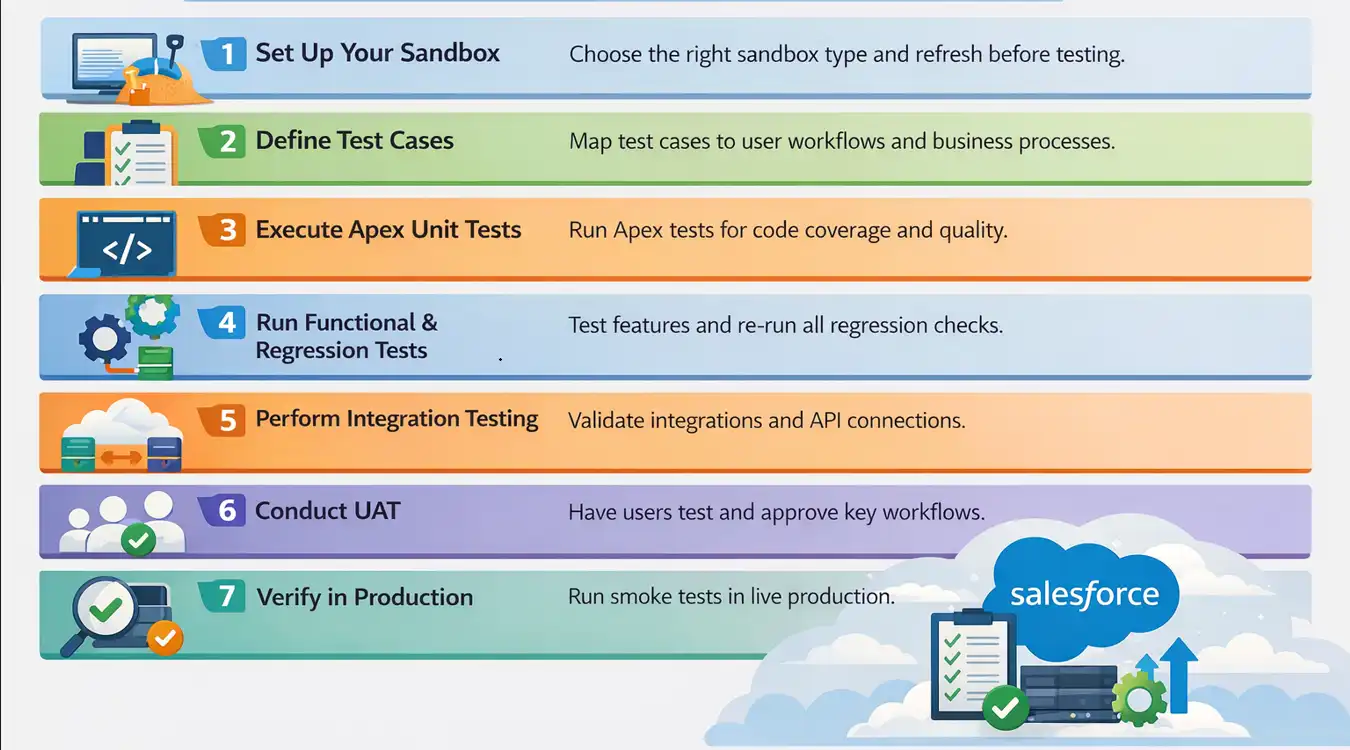
Step 1: Set Up Your Sandbox Environment
Before any test runs, work in a sandbox, not production. Choose your sandbox type based on what you need to test:
- Developer sandbox (metadata only, refreshable daily) for unit testing and Apex code.
- Partial Copy sandbox (metadata plus a sample of production data, refreshable every 5 days) for functional and integration testing.
- Full sandbox (all metadata and data, refreshable every 29 days) for UAT and performance testing with production-scale data.
- Scratch org for CI/CD pipelines where each build requires a clean, reproducible environment via Salesforce DX.
Refresh sandbox metadata before each major test cycle to ensure parity with the current production configuration, and book the Full sandbox refresh well ahead of UAT, since its long refresh interval leaves no room for a second attempt.
Step 2: Define Test Cases Based on Business Processes
Map test cases to real user journeys as well as written requirements. A lead-to-opportunity workflow, a CPQ quote, or a case resolution are valid scenarios. Each case defines input data, action, expected result, and acceptance criteria. To draft a first set from a written requirement, the AI test case generator turns a plain-language description into test cases you can edit.
Step 3: Execute Unit Tests on Apex Code
Run Apex test classes in the Developer Console or with the Salesforce CLI (sf apex run test, or sf logic run test to include automated flow tests), and confirm coverage clears Salesforce's deployment minimum before you promote the change.
For deployments, the Spring '26 developer guide introduced RunRelevantTests, a beta test level that analyzes the deployment and runs only the tests relevant to your code changes, used with sf project deploy start --test-level RunRelevantTests.
Step 4: Run Functional and Regression Tests
Test all modified and affected workflows, validation rules, page layouts, and automation flows. For regression, re-run your full suite of previously passing tests to confirm no existing functionality was broken by recent changes.
During manual runs, turn on the Error Console that the same Spring '26 release added (Setup > User Interface > Advanced Settings). It collects non-fatal Lightning errors in the background instead of interrupting the tester with error pop-ups.
Step 5: Perform Integration and API Testing
If your org connects to external systems (ERP, marketing, or payment processors), validate each integration point. Confirm data flows both ways, error handling works, and tokens stay valid.
Outbound messages can no longer send session IDs starting February 16, 2026, per the Spring '26 developer guide, so retest any integration that relied on them after switching it to OAuth.
Step 6: Conduct User Acceptance Testing
Invite business stakeholders to test real-world workflows in the staging sandbox. UAT should be scripted with defined test scenarios, expected outcomes, and a clear pass or fail sign-off process before deployment proceeds.
Step 7: Verify in Production After Deployment
After go-live, run smoke tests in production to confirm the deployment succeeded. Check critical paths: record creation, automation triggers, reports, and integrations. Keep production verification to 10 to 15 scenarios rather than a full regression run.

How to Perform Salesforce Unit Testing
Salesforce unit testing uses Apex test classes annotated with @isTest to verify individual methods and triggers. According to Trailhead's Apex testing unit, at least 75% of Apex code must be covered by tests, and all those tests must pass, before you can deploy it.
Records that a test method creates are not committed to the database; Trailhead notes they roll back when the test finishes, so tests can run safely against a real org.
Consider a store that gives discounts: if a customer buys something worth 1000 and you apply a ten percent discount, the final price should be 900. The class below calculates that price, and the test class after it checks both the result and the error path.
Code to Test (Apex Class)
public class DiscountService {
    public static Decimal applyDiscount(Decimal amount, Decimal percent) {
        if(amount == null || percent == null) {
            throw new AuraHandledException('Amount and percent are required');
        }
        return amount - (amount * (percent / 100));
    }
}
Code Walkthrough
- Takes two numbers - amount and percent.
- If either is missing, it throws an error.
- Otherwise, it subtracts the discount and gives back the final price.
The Unit Test (Test Class)
@isTest
public class DiscountServiceTest {
    @isTest
    static void testApplyDiscount() {
        // Step 1: Set up input values
        Decimal amount = 1000;
        Decimal percent = 10;
        // Step 2: Call the method we want to test
        Decimal result = DiscountService.applyDiscount(amount, percent);

        // Step 3: Verify the result is what we expect
        System.assertEquals(900, result, '10% discount on 1000 should return 900');
    }

    @isTest
    static void testApplyDiscountRequiresInputs() {
        Boolean thrown = false;
        try {
            DiscountService.applyDiscount(null, 10);
        } catch (AuraHandledException e) {
            thrown = true;
        }
        System.assert(thrown, 'A null amount should throw AuraHandledException');
    }
}
Code Walkthrough
- @isTest tells Salesforce this is a test class.
- The first method gives the service inputs (1000 and 10) and checks that the output is exactly 900.
- The second method passes a null amount and asserts that the exception fires, which also covers the throw branch the first test never reaches.
Test Execution
- In Setup, enter Application Test Execution in the Quick Find box and open the page. It replaced the Apex Test Execution page and runs Apex and flow tests together.
- Select DiscountServiceTest.
- Click Run.
- Check the result status. Green means the test passed; red means it failed, and the detail pane shows the failing assertion message.
The same class runs from the Salesforce CLI, which is how a pipeline calls it:
sf apex run test \
  --target-org my-sandbox \
  --class-names DiscountServiceTest \
  --code-coverage \
  --result-format human \
  --wait 10
How to Test Lightning Web Components With Jest
Lightning Web Components are the standard building block for Salesforce Lightning UIs, and they need a separate testing approach from Apex.
Apex classes run inside Salesforce; LWC tests run outside it using Jest and the @salesforce/sfdx-lwc-jest package, which mocks platform modules.
LWC Jest tests let you verify component rendering, user interaction handling, and wire adapter behavior in complete isolation, catching bugs before the component ever touches a real org.
Setting Up LWC Jest Testing
Install the Jest testing utilities for LWC in your Salesforce DX project. The test:unit script calls sfdx-lwc-jest, so add it to package.json if your project does not already define it:
# Install LWC Jest utilities
npm install @salesforce/sfdx-lwc-jest --save-dev

# Run all LWC tests
npm run test:unit

# Run tests in watch mode during development
npm run test:unit -- --watch
Example: Testing an LWC Component with Jest
Consider a simple contactCard component that displays a contact's name and email. The component exposes both values as public properties with @api, which is what lets the test set them.
Component HTML (contactCard.html)
<template>
    <lightning-card title="Contact Details">
        <div class="slds-p-around_medium">
            <p class="contact-name">{name}</p>
            <p class="contact-email">{email}</p>
        </div>
    </lightning-card>
</template>
Component JavaScript (contactCard.js)
import { LightningElement, api } from 'lwc';

export default class ContactCard extends LightningElement {
    @api name;
    @api email;
}
Jest Test (__tests__/contactCard.test.js)
import { createElement } from 'lwc';
import ContactCard from 'c/contactCard';

describe('c-contact-card', () => {
    afterEach(() => {
        // Clean up DOM after each test
        while (document.body.firstChild) {
            document.body.removeChild(document.body.firstChild);
        }
    });

    it('renders contact name and email correctly', () => {
        // Step 1: Create the component
        const element = createElement('c-contact-card', {
            is: ContactCard
        });

        // Step 2: Set component properties
        element.name = 'Jane Doe';
        element.email = 'jane@example.com';
        document.body.appendChild(element);

        // Step 3: Assert rendered output
        const nameEl = element.shadowRoot.querySelector('.contact-name');
        const emailEl = element.shadowRoot.querySelector('.contact-email');

        expect(nameEl.textContent).toBe('Jane Doe');
        expect(emailEl.textContent).toBe('jane@example.com');
    });

    it('displays empty string when no name is provided', () => {
        const element = createElement('c-contact-card', {
            is: ContactCard
        });
        element.name = '';
        document.body.appendChild(element);

        const nameEl = element.shadowRoot.querySelector('.contact-name');
        expect(nameEl.textContent).toBe('');
    });
});
Run npm run test:unit and Jest reports both tests passing:
PASS force-app/main/default/lwc/contactCard/__tests__/contactCard.test.js
  c-contact-card
    √ renders contact name and email correctly (217 ms)
    √ displays empty string when no name is provided (20 ms)

Test Suites: 1 passed, 1 total
Tests:       2 passed, 2 total
Snapshots:   0 total
Key points about LWC Jest testing
- Shadow DOM access - Use element.shadowRoot.querySelector() to access elements inside the component's Shadow DOM; standard document.querySelector() will not find them.
- Wire adapters - Use @salesforce/sfdx-lwc-jest mock utilities to simulate @wire data; real Salesforce data is not available in Jest tests.
- Cleanup - Always remove components from the DOM in afterEach to prevent test interference.
- TypeScript types - Spring '26 completed TypeScript definitions for every Lightning base component in the @salesforce/lightning-types package, which gives editors autocomplete for properties such as value and label.
Jest tests stop at the component boundary. To exercise the same component inside a live org, where Shadow DOM traversal happens during real browser interactions, use an end-to-end test like the KaneAI walkthrough below.
How to Perform Salesforce Testing Using KaneAI
KaneAI is a GenAI-native testing agent from TestMu AI that plans, authors, executes, and maintains end-to-end tests from natural-language prompts. QA engineers, admins, and business users describe a Salesforce workflow in plain English, and KaneAI turns it into test steps, runs them on the TestMu AI cloud, and self-heals them as the org changes.
KaneAI covers the UI and end-to-end layer. It does not replace Apex unit tests or the code-coverage gate for deployments, which stay in the Salesforce CLI and your pipeline, or the tooling that deploys metadata between orgs.
Connect your Salesforce org to KaneAI, describe the test in plain English, review generated steps, and execute across browsers with AI root cause analysis for any failures.
Step 1: Connect your Salesforce org to KaneAI
Log in to TestMu AI, navigate to KaneAI, and connect your Salesforce sandbox or production org. If your org is behind a firewall, route the connection through the TestMu AI Tunnel.
Step 2: Describe your Salesforce test in plain English
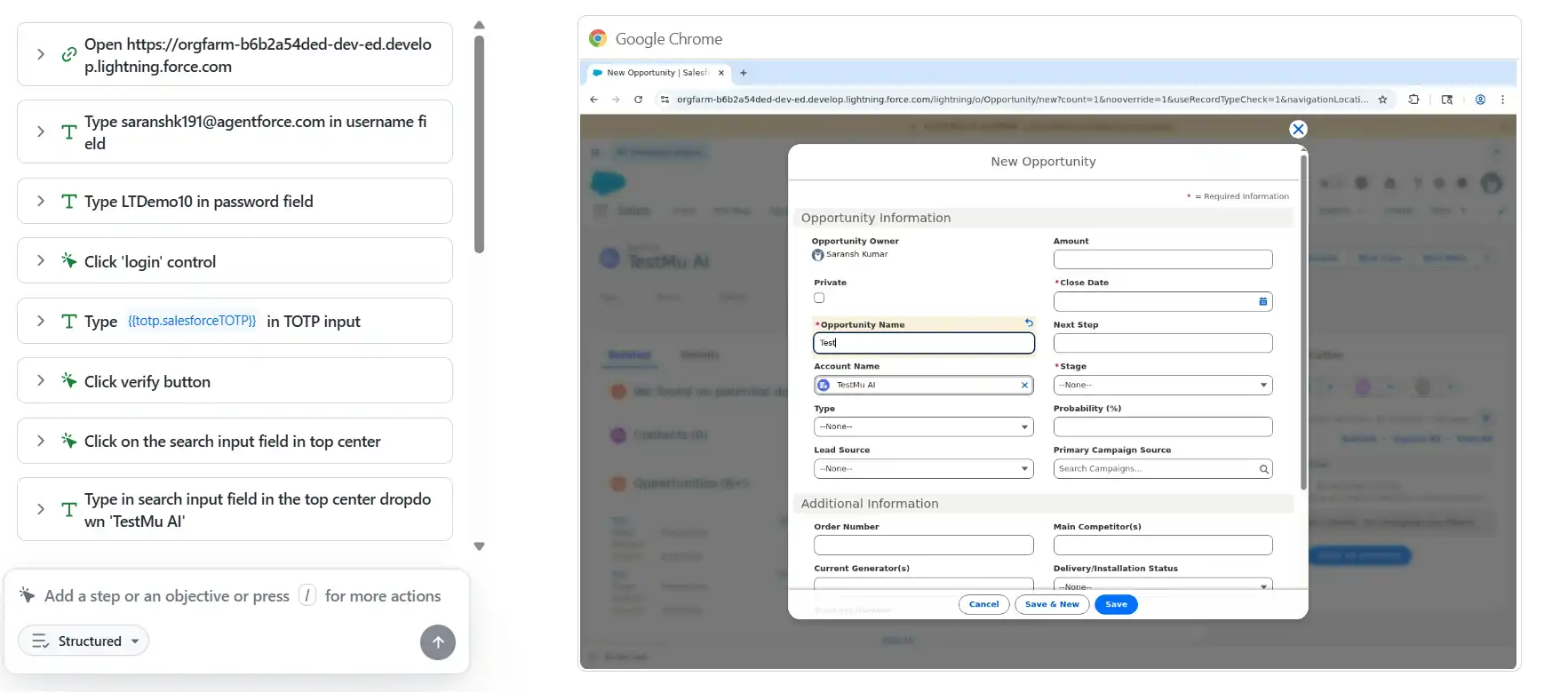
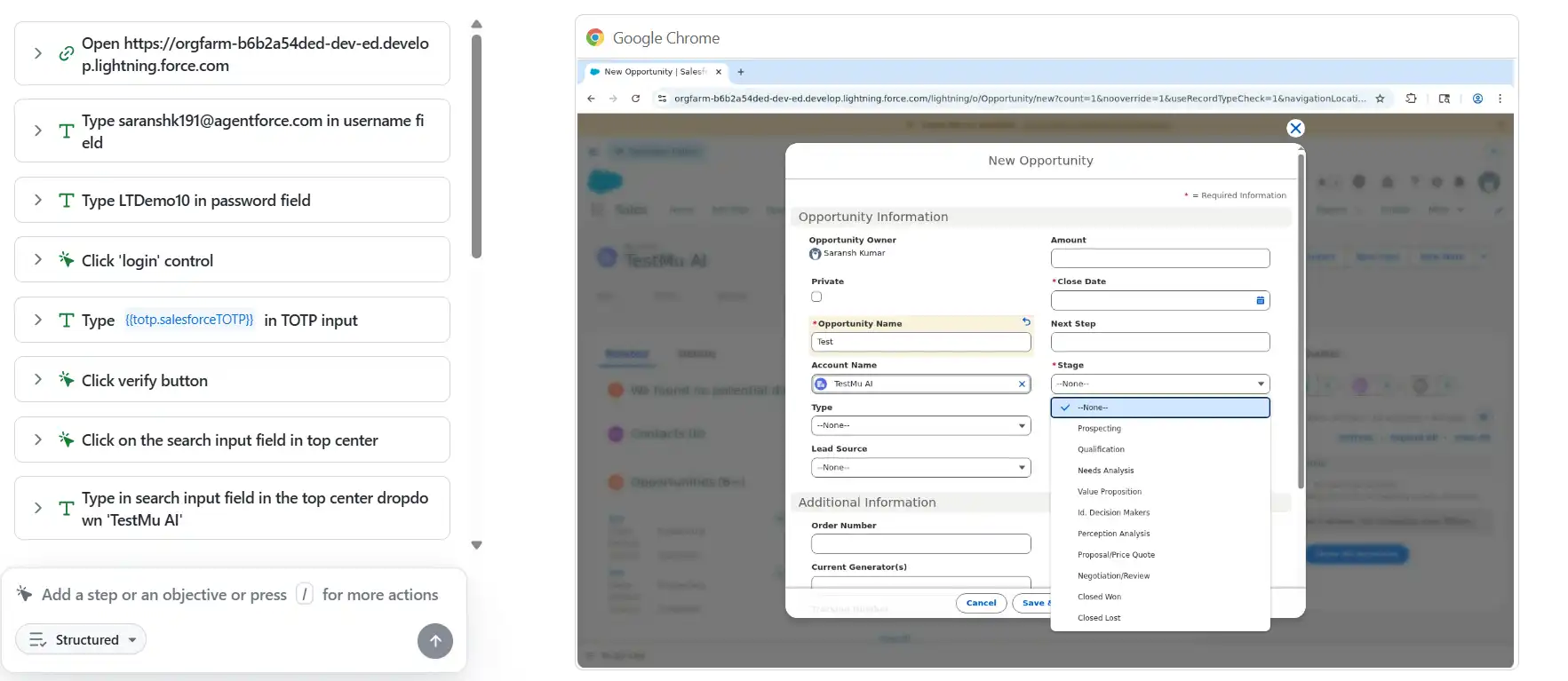
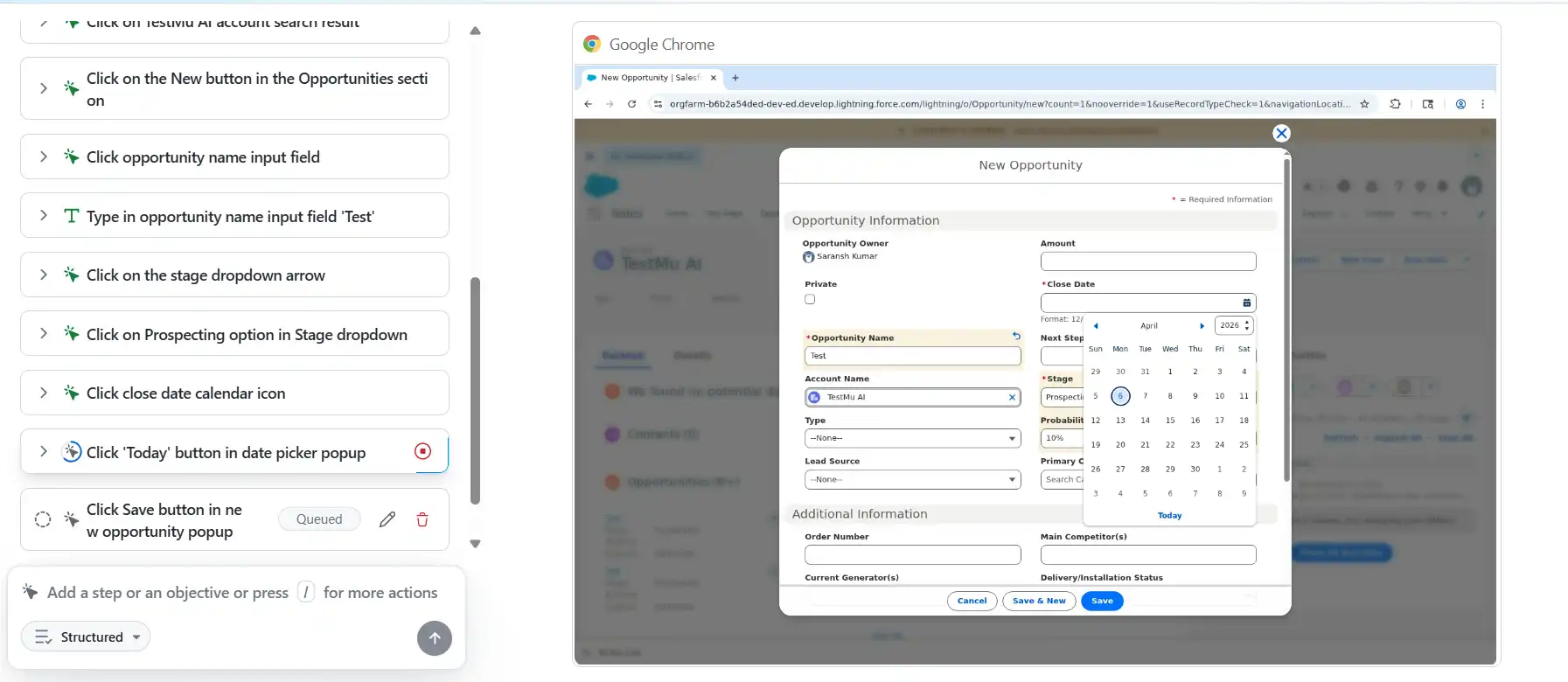
Type a plain English description of the Salesforce workflow you want to test. The steps below come from a test run against a live Salesforce org:
- Log in to Salesforce with your username and password.
- Complete MFA verification.
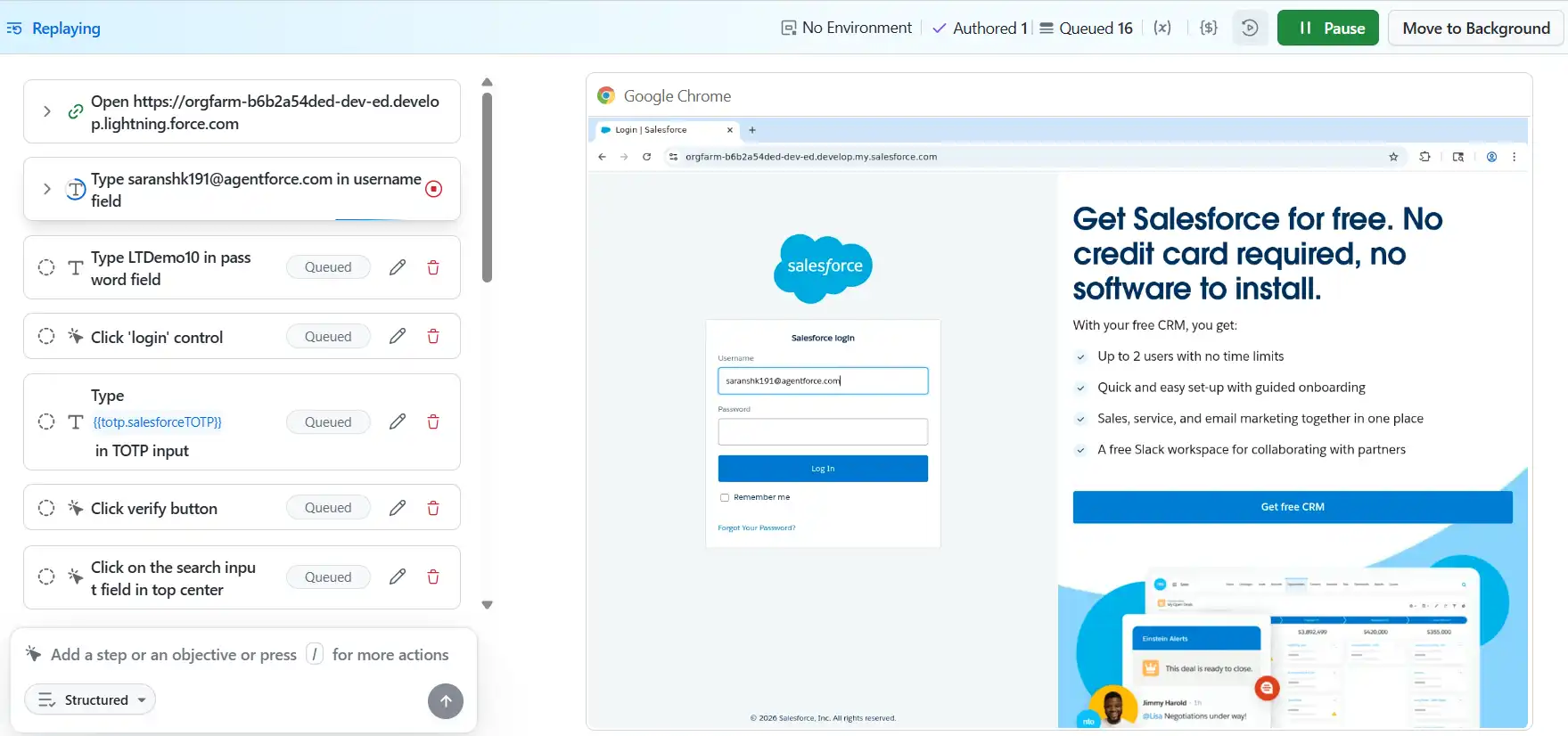
- Search for the TestMu AI account.
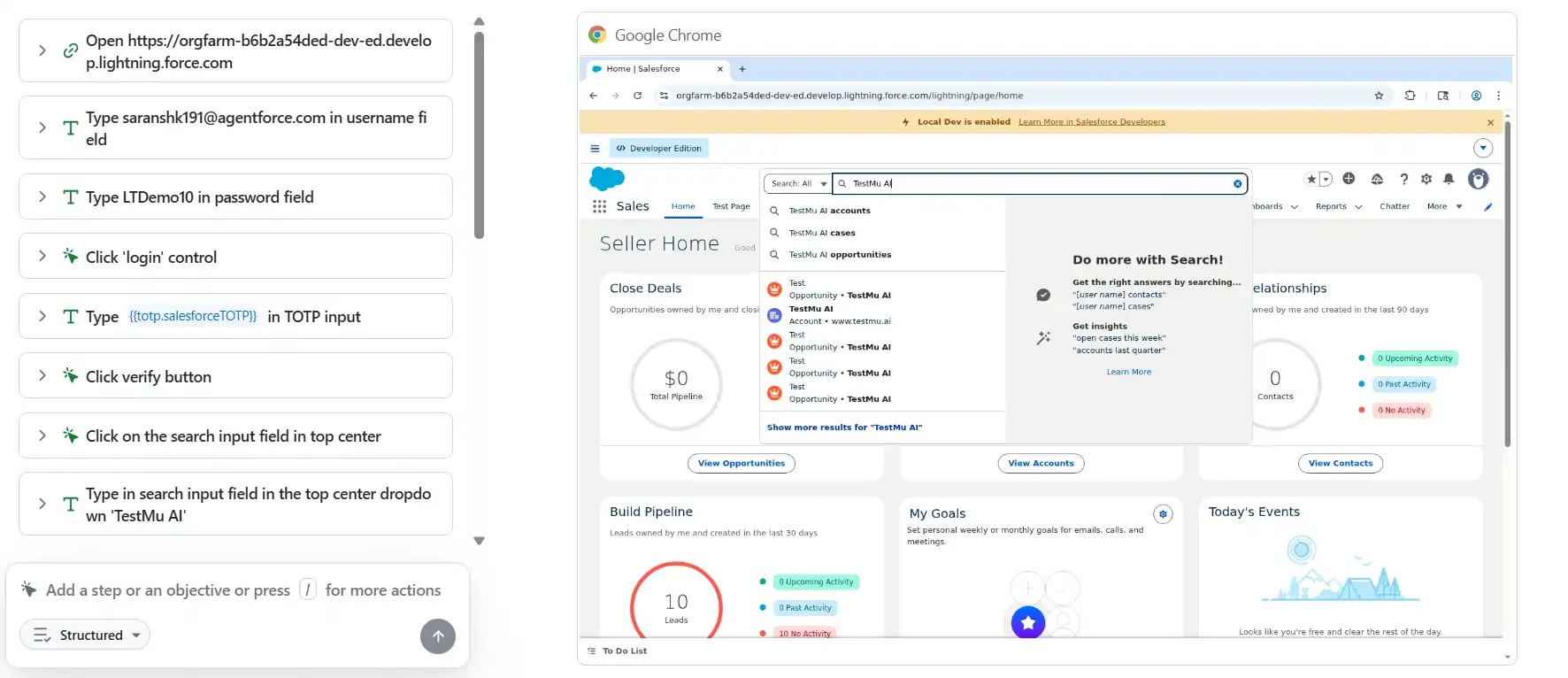
- Open the Opportunities section.
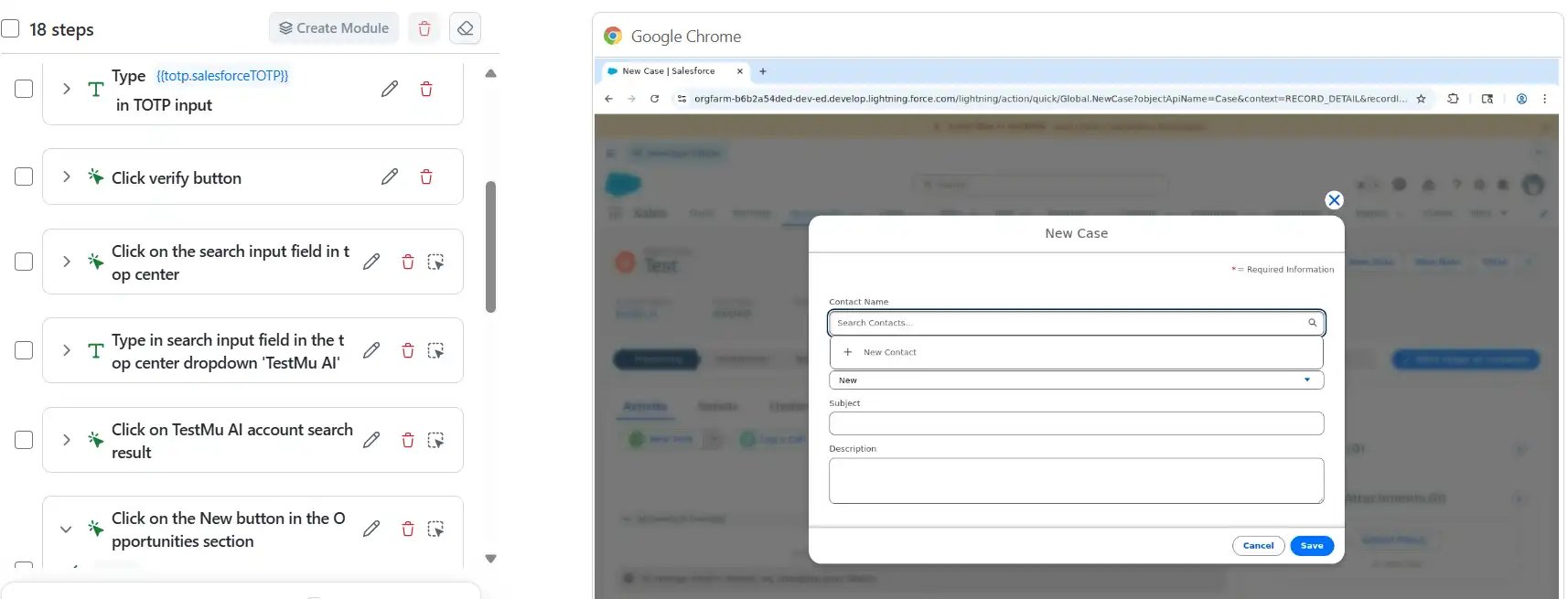
- Click New to create a new opportunity.
- Enter the opportunity name as Test.
- Set Stage to Prospecting.
- Set Close Date to today.
- Click Save.
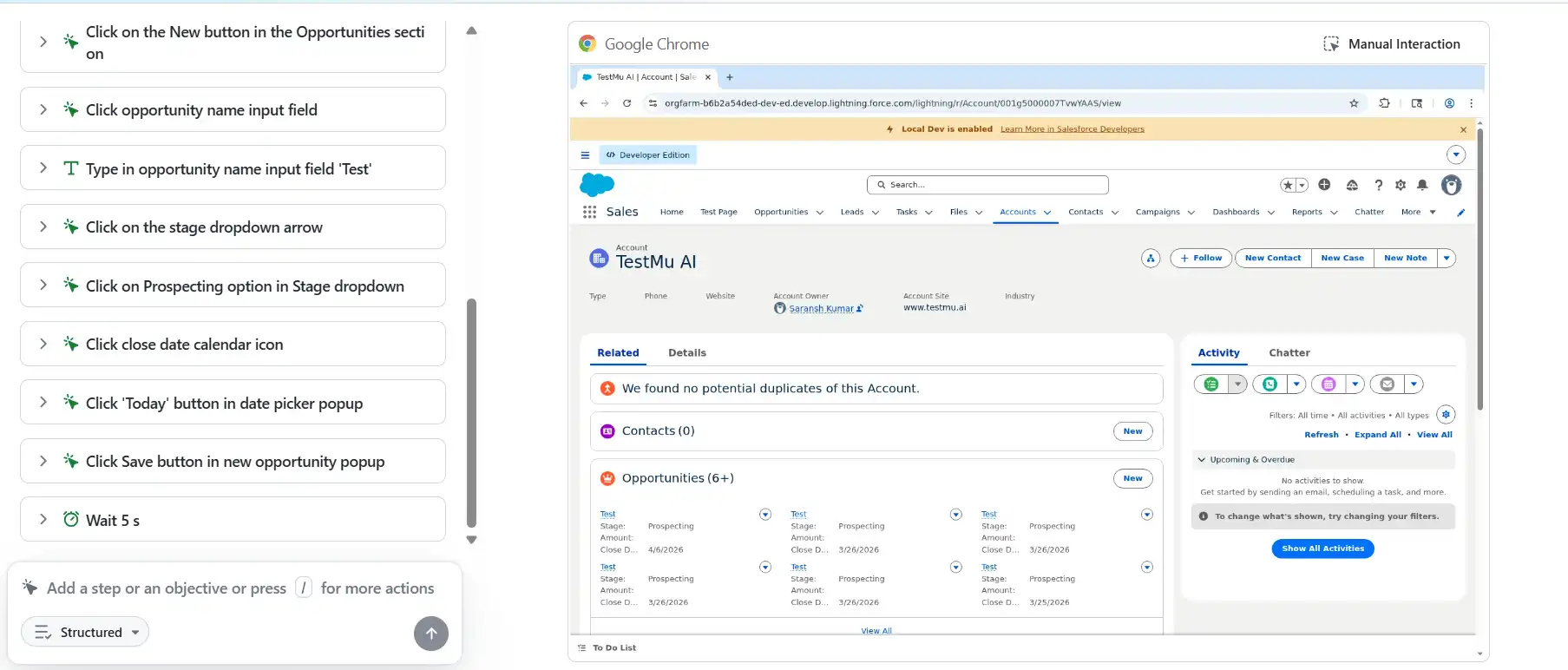
KaneAI reads this description, maps each instruction to the Salesforce UI, and generates every step automatically, including MFA handling, Shadow DOM traversal, and date picker interaction, with no selector or script written.
Step 3: Review and Execute
KaneAI presents the generated steps for review before execution. Edit steps, add assertions, or parameterize across data sets and orgs.
Click Run, and KaneAI executes it across your chosen browser, OS, and org in parallel on HyperExecute.
Step 4: Review Results with AI-Powered Root Cause Analysis
After execution, KaneAI surfaces a dashboard with per-step pass/fail status, screenshots, network logs, and AI-powered root cause analysis. If a seasonal release moves an element, self-healing re-anchors the step and surfaces the change for your review instead of failing the run.
What Does KaneAI Handle Natively for Salesforce?
These Salesforce-specific behaviors are built into KaneAI runs:
- Shadow DOM traversal - KaneAI crosses the Shadow DOM boundary to locate and interact with Salesforce Lightning Web Components without custom scripts.
- Dynamic element ID resolution - KaneAI resolves locators from Salesforce metadata at runtime, so elements stay identifiable when Salesforce regenerates component IDs.
- MFA authentication - KaneAI generates TOTP codes from the account's secret key, so MFA-protected logins run unattended in CI without anyone holding an authenticator app.
- Multi-org test execution - KaneAI runs the same Salesforce test simultaneously across sandbox, staging, and production orgs without duplicating test scripts.
- Self-healing - KaneAI re-anchors steps whose elements change after a Salesforce seasonal release and flags each heal for review, which significantly reduces locator maintenance.
- Parallel execution - KaneAI runs the Salesforce suite in parallel on HyperExecute across 3,000+ browser and OS combinations, with 50,000+ real devices available for the Salesforce mobile app.
To build the same flow in your own account, follow the KaneAI guide to author your first desktop browser test, then point it at your Salesforce sandbox URL.
How to Test Agentforce AI Agents in Salesforce
Agentforce, Salesforce's agentic AI platform and evolution of Einstein Copilot, runs autonomous agents that resolve cases, qualify leads, and trigger workflows on their own. Agentforce testing checks those agents before and after every change to their instructions, actions, or data.
Testing Agentforce agents differs from testing Apex code or Lightning components because agents are non-deterministic: the Atlas Reasoning Engine can produce slightly different outputs from the same input on each run. Pass/fail assertions built on exact-match output do not work reliably, so your testing strategy must account for acceptable output variance.
What Makes Agentforce Testing Unique?
Agentforce testing differs from traditional UI or workflow automation because AI agents make dynamic decisions, reason across multiple steps, and rely heavily on enterprise data context. Effective testing validates behavior, governance, and decision quality on top of the outputs themselves. The Agentforce testing guide splits that into routing, actions, conversations, guardrails, and channel, with a test for each.
- Non-deterministic outputs - The same prompt can yield slightly different responses. Tests must validate intent and accuracy rather than exact wording.
- Multi-step reasoning - Agents can invoke multiple Salesforce actions in sequence, so testing must cover every action in the chain as well as the final output.
- Data dependency - Agentforce agents are grounded in your Data Cloud. Stale or low-quality records cause wrong decisions, making data quality a prerequisite.
- Governance requirements - The Einstein Trust Layer provides audit trails, but regulated organizations must verify agents cannot access data beyond their defined scope.
- Environment limitations - Some agent behaviors (particularly those that rely on production usage context) are difficult to fully replicate in sandbox environments.
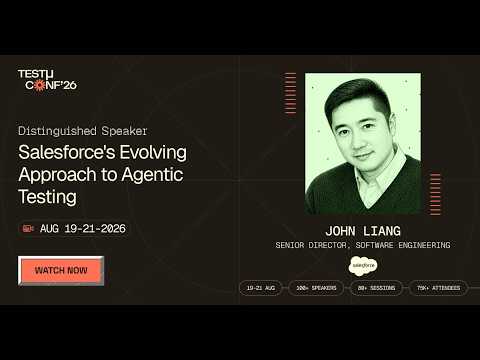
In this TestMu Conf 2026 session, John Liang covers Testing at the Speed of Agents: Salesforce's Evolving Approach to Agentic Testing, walking through the testing assumptions that broke once agent outputs stopped being deterministic.
Using the Agentforce Testing Center
Salesforce provides a native Agentforce Testing Center (Setup > Testing Center) that accepts CSV test cases for batch validation, one test case per row.
The template in Trailhead's testing criteria unit has four columns, Utterance, Expected Subagent, Expected Actions, and Expected Response, and it takes API names rather than labels for the subagent and the actions. Running tests consumes requests and credits, and because testing agents can modify CRM data, Trailhead advises using the Testing Center only in a sandbox.
The Agentforce Testing Center cost and limits breakdown covers what to budget before a large run.
Example CSV test cases for an Agentforce service agent
Utterance,Expected Subagent,Expected Actions,Expected Response
"What is the status of my order 12345?",Order_Status,"['Get_Order_Status']","Gives the current status of order 12345."
"I want to cancel my subscription",Subscription_Cancellation,"['Verify_Identity','Escalate_To_Human']","Confirms the request and hands off to a human agent."
"Can you update my billing address?",Account_Update,"['Verify_Identity','Update_Billing_Address']","Confirms the new billing address after verifying identity."
Steps to run tests in the Agentforce Testing Center
- Go to Setup > Testing Center and click New Test.
- Select the agent you want to test.
- Download the CSV template and populate it with your test utterances and expected outcomes.
- Upload the CSV and save the test configuration.
- Click Run and review, per utterance, whether the agent chose the expected subagent, ran the expected actions, and returned a matching response.
Agentforce Testing Best Practices
- Audit your data first - Validate the core records an agent reads before testing it, and confirm through Einstein Trust Layer audit trails that it reaches only the records its profile permits.
- Test narrow use cases - Deploy agents with single, well-defined domains first (e.g., case deflection). Broad multi-subagent agents are harder to validate fully.
- Test escalation paths - Check what happens when confidence is low or a request falls outside every subagent's scope; the agent should hand off to a human rather than guess.
- Assert on outcomes, not wording - Check the record the agent updated, the case it escalated, or the field it wrote, because those results repeat from run to run even when the wording of the reply does not.
- Re-run the suite before every release - Keep the test spec in source control and re-run it before each Salesforce release and after every agent change. The Agentforce regression testing guide covers the sf agent test workflow and a CI gate that catches failed assertions. Finish with a monitored production pilot for behaviors that only real usage triggers.
Note: When an Agentforce agent updates a case or creates an opportunity, a KaneAI test by TestMu AI can open that record in the Salesforce UI and assert the fields the agent changed, logging in through MFA with generated TOTP codes. Start free.
How to Evaluate Salesforce Testing Tools: A Capability Framework
Your Salesforce testing approach decides how fast you ship and how much engineering time goes into post-release locator triage. Rather than rank vendors, score whatever you evaluate against the capabilities below, and ask for each demo in the right-hand column.
| Capability | Why It Matters for Salesforce | What to Demand in a Demo |
|---|---|---|
| Native Shadow DOM traversal | Every Lightning component renders inside its own shadow root; tools without first-class traversal force you to write fragile bridging code. | Author a test against a Lightning record page without any shadow-root selector helpers. |
| Metadata-aware locators | Dynamic IDs change on every page render; XPath and CSS selectors based on them break under load. | Show me a locator strategy that survives a sandbox refresh without manual repair. |
| Self-healing after seasonal releases | Spring, Summer, and Winter releases ship UI changes; without self-healing, every changed locator becomes a manual fix before the next run. | Run the same suite before and after the latest preview sandbox upgrade. Count the manual fixes. |
| Built-in MFA handling | Secure orgs require MFA on every login; tools that block on the MFA dialog cannot run unattended in CI. | Execute a headless test through MFA with no custom hooks or test-mode logins. |
| Multi-org parallel execution | Teams commonly run sandbox, staging, and production tiers; running them one after another multiplies suite time by the number of orgs. | Trigger the same test concurrently against two org URLs without script duplication. |
| Plain-English or codeless authoring | Salesforce admins and business analysts own most workflows; if only engineers can write tests, coverage stalls. | Hand the tool to an admin and watch them author a test in under 10 minutes. |
| CI/CD + Salesforce DX integration | Tests must run on every PR, not on demand. A tool that cannot speak to GitHub Actions, Jenkins, or your DevOps deployment webhooks is a manual tool. | Show the YAML / pipeline snippet that runs the suite on a scratch org spin-up. |
How to Pick the Right Approach for Your Team
Match the buyer profile to the right category instead of fixating on logos:
- Admin-led or business-analyst-led teams - prioritize codeless testing tools with metadata-aware locators. Engineering dependency is the biggest blocker to coverage at this profile.
- DevOps-centric teams - prioritize CI/CD wiring, scratch-org orchestration, and gate-on-coverage policies. Authoring speed matters less than pipeline determinism.
- Enterprise QA teams (multi-cloud, regulated) - prioritize audit trails, parallel multi-org execution, and governance-grade reporting. A capability gap here becomes a compliance gap.
- Engineering-led teams with custom frameworks - prioritize extensibility, deep Apex test integration, and the ability to call the tool from existing automation harnesses.
- AI-native QA teams - prioritize plain-English authoring, self-healing, and backend checks in the same run as the UI flow. KaneAI's AI app testing orchestrates API and UI suites together, so a backend regression surfaces in the same run as a Lightning UI failure.
The most important consideration is sustainability: a feature-rich tool that creates scripting dependency your team cannot maintain is worse than a simpler tool your admins can own confidently.
How to Integrate Salesforce Testing into a CI/CD Pipeline
Shift-left testing moves quality checks as early as possible. On Salesforce, that means running Apex, LWC Jest, and integration smoke tests on every pull request, so failures surface in minutes instead of during UAT or after go-live.
The foundation of a Salesforce CI/CD pipeline is Salesforce DX (SFDX), Salesforce's source-driven development model that treats org configuration and code as version-controlled source files, making automated deployments and testing reproducible.
Example: GitHub Actions Pipeline for Salesforce Testing
The following workflow runs on every pull request. It authenticates to a sandbox with a JWT, deploys the source, runs local Apex tests with code coverage, and then runs the LWC Jest suite:
name: Salesforce CI

on:
  pull_request:
    branches: [main, develop]

jobs:
  salesforce-tests:
    runs-on: ubuntu-latest

    steps:
      # 1. Checkout source
      - uses: actions/checkout@v4

      # 2. Install Salesforce CLI and project dependencies (including sfdx-lwc-jest)
      - name: Install dependencies
        run: |
          npm install -g @salesforce/cli
          npm ci

      # 3. Authenticate to the sandbox using JWT
      #    SF_INSTANCE_URL example: https://MyDomain--ci.sandbox.my.salesforce.com
      - name: Authenticate to Salesforce Sandbox
        run: |
          echo "${{ secrets.SF_JWT_KEY }}" > server.key
          sf org login jwt \
            --client-id ${{ secrets.SF_CLIENT_ID }} \
            --jwt-key-file server.key \
            --username ${{ secrets.SF_USERNAME }} \
            --instance-url ${{ secrets.SF_INSTANCE_URL }} \
            --alias ci-sandbox

      # 4. Deploy source to the sandbox
      - name: Deploy to sandbox
        run: sf project deploy start --target-org ci-sandbox --wait 30

      # 5. Run local Apex tests with code coverage
      - name: Run Apex Tests
        run: |
          sf apex run test \
            --target-org ci-sandbox \
            --test-level RunLocalTests \
            --code-coverage \
            --result-format junit \
            --output-dir ./test-results \
            --wait 30

      # 6. Run LWC Jest unit tests
      - name: Run LWC Jest Tests
        run: npm run test:unit -- --coverage

      # 7. Upload test results, even when a test fails
      - name: Upload test results
        if: always()
        uses: actions/upload-artifact@v4
        with:
          name: salesforce-test-results
          path: ./test-results
CI/CD Best Practices for Salesforce
- Use scratch orgs for PR builds - Ephemeral and source-driven, they give each run a clean environment. Reserve sandboxes for integration and UAT.
- Gate on test coverage - Fail the build if Apex coverage drops below 75% or any test class fails at PR stage.
- Add static analysis - Salesforce Code Analyzer (sf code-analyzer run) checks Apex, JavaScript, HTML, CSS, and Flow metadata for security and performance problems. Set its --severity-threshold flag so the build fails when a violation at or above that severity appears.
- Use DevOps Center quality gates - If you promote changes through DevOps Center, its built-in testing can run Apex unit tests, flow tests, and Code Analyzer at each pipeline stage, and a quality gate (a minimum pass percentage, a severity threshold, or tests that must never fail) blocks a promotion that misses it.
- Validate before releasing to production - Run sf project deploy validate against production, then ship the validated job with sf project deploy quick, which skips the Apex test run.
- Try RunRelevantTests on large suites - The beta --test-level RunRelevantTests deploy option runs only the tests relevant to the deployment; keep RunLocalTests as the fallback while it is in beta.
- Add a post-deployment stage - After deploying to staging, trigger the KaneAI end-to-end suite for UI, integration, and agent-facing flows; the KaneAI GitHub App can run it on each pull request and post results back.
- Parallelize the end-to-end tier - Run long suites on HyperExecute; TestMu AI's Boomi case study reports 78% faster test execution after the move.
- Cache CLI and npm dependencies - Installing the Salesforce CLI and npm packages dominates setup time on a cold runner, so cache both between runs.
- Log defects automatically - Send each failure to Jira, Azure DevOps, or Slack from the pipeline, so a failing test opens a defect without a hand-written ticket.
- Keep revenue workflows in every run - Lead generation and opportunity workflows lie on the path to revenue in most orgs, so put both in the suite that every pipeline run triggers.

How to Run Salesforce Regression Testing Before Each Release
Salesforce regression testing for a release means running your full suite in a sandbox that is already on the upcoming release, fixing what breaks before production upgrades, and finishing with a short smoke pass in production. Salesforce's release page says releases arrive three times a year, typically Spring in February, Summer in June, and Winter in October, and it recommends using the 4 to 6 week Sandbox Preview window to validate core business processes.
Only sandboxes created before the preview cutoff get upgraded early, so check your sandbox's instance and the sandbox preview dates on the Maintenances tab of Salesforce Trust Status before the window opens, then run this checklist for every release.
Before the Preview Window
- Read the release notes as soon as the preview publishes, and list every feature, Release Update, and API change that touches your org.
- Decide which sandbox will sit on the preview instance, and refresh it before Salesforce's sandbox preview cutoff so it upgrades early.
- Review the Release Updates page for updates enforced in this release, and test each one in a sandbox before it switches on automatically.
During the Preview Window
- Run the full regression suite in the preview sandbox: Apex tests, LWC Jest tests, and the end-to-end UI suite.
- Re-run profile and permission set tests, because a release can change page behavior and access defaults.
- Re-test flows, validation rules, and integrations, including any that call versioned APIs.
- Run the Agentforce test suite if agents are live, since platform changes can shift agent behavior.
- Log and fix every breakage before the production upgrade date.
After the Production Upgrade
- Run 10 to 15 targeted smoke tests in production covering record creation, automation triggers, reports, and key integration paths.
- Compare the results with the preview run, and close out the release in your test management tool.
Salesforce Testing Challenges and Solutions
Each challenge below pairs a Salesforce-specific failure mode with a fix your team can apply in the next test cycle.
Challenge #1: Customization Complexity
Salesforce orgs often have extensive custom objects, fields, triggers, and Apex logic. Testing needs to account for both standard and custom behavior to prevent unexpected failures after every deployment.
Solution: Keep a dedicated test suite for custom objects and triggers, separate from standard functionality. Use Apex classes with data factory patterns for consistent data. Prioritize regression coverage for high-risk customizations touching revenue or integrations.
Challenge #2: Integration Dependencies
Salesforce frequently connects with ERP, marketing, and billing platforms. These connections can cause delays, failures, or data inconsistencies that are difficult to reproduce in a sandbox environment.
Solution: Use mock services and stub APIs to simulate external responses during sandbox testing. Keep an integration sandbox that mirrors your production middleware. Run live integration tests in a full-copy sandbox before every deployment.
Challenge #3: Data Volume and Quality
Testing with unrealistic datasets produces misleading results. High data volumes can surface performance issues that developer sandboxes never expose, and incomplete data leads to false test passes.
Solution: Use synthetic data generation tools to build production-scale datasets in your full sandbox. Mask sensitive production data before importing it. Include large-volume scenarios in your regression suite to catch performance regressions before production.
Challenge #4: Gaps Between Sandbox and Production
Salesforce sandboxes do not perfectly mirror production. Workflow rules, email alerts, and third-party integrations may behave differently in a sandbox, creating gaps between what you tested and what goes live.
Solution: Use full-copy sandboxes for UAT and pre-production, not developer or partial ones. Sync sandbox metadata with production before each major cycle. Run production verification smoke tests after every deployment to catch missed gaps.
Challenge #5: Seasonal Release Breakage
Salesforce delivers three major updates every year (Spring, Summer, and Winter). Each can change UI behavior, deprecate APIs, or alter component rendering, and script-based suites absorb the hit as broken Lightning locators, which is why Salesforce teams often evaluate a Selenium alternative.
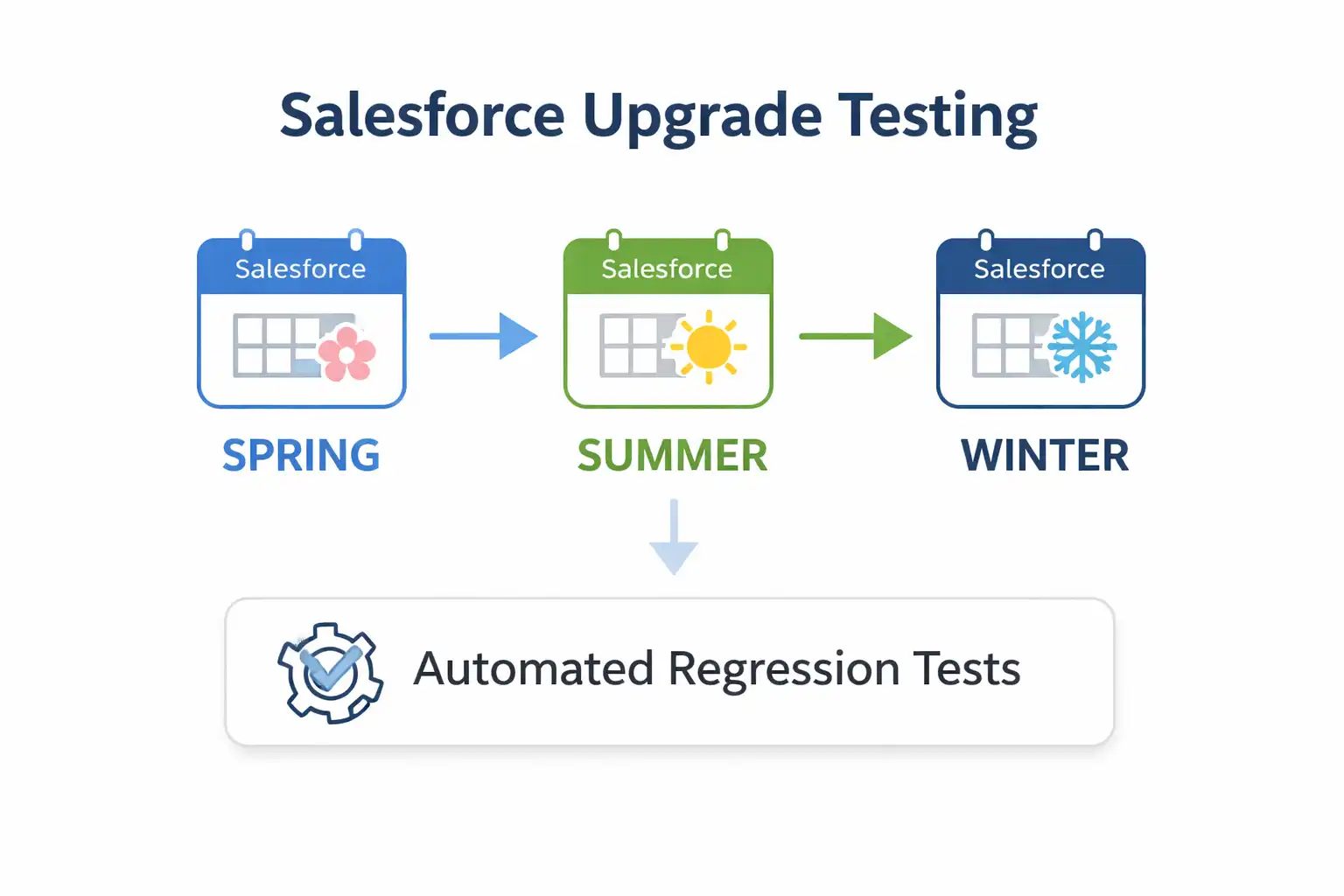
Solution: Read the release notes as soon as the preview publishes, move a sandbox onto the preview release during the sandbox preview window, and run full regression there before production upgrades. AI testing tools such as KaneAI shrink the repair work: KaneAI auto-heal re-anchors broken steps and queues each change for review.
To size the effort for your org, the Salesforce test maintenance cost breakdown compares upkeep on scripted Selenium for Salesforce suites with self-healing ones.
Challenge #6: Security and Access Controls
Profiles, permission sets, and sharing rules create complex access control scenarios that are difficult to test comprehensively. A misconfigured permission can expose sensitive data to the wrong user or block a workflow entirely.
Solution: Build role-based test cases that log in under each major profile (Sales Rep, Manager, Admin, Support Agent) and check field visibility, record access, and permissions. Automate them to validate access control on every deployment.
Salesforce Testing Best Practices
Apply these practices on top of the step-by-step process and the CI/CD setup above:
- Build test data deliberately - Use anonymized, masked, or synthetic datasets that reflect production data patterns, and cover edge cases, large data volumes, and data integrity scenarios.
- Combine declarative and programmatic testing - Pair declarative testing (flows, validation rules) with Apex unit tests and LWC Jest tests, so code coverage does not depend on UI scripts alone.
- Retest migrated automation - Inventory any remaining workflow rules and Process Builder processes, convert them to flows, and run the regression suite against each converted flow before deactivating the original.
- Automate Salesforce-specific scenarios first - Prioritize automation for regression suites, tri-annual release validation, and integration touchpoints. A natural-language agent such as KaneAI keeps that suite maintainable by re-anchoring steps when Shadow DOM structures and locators shift.
Salesforce Sandbox and Admin Testing Questions
These questions come up most often from Salesforce admins and release managers planning where and how tests run.
What Is the Difference Between a Developer Sandbox and a Full Copy Sandbox?
A Developer sandbox copies only your production metadata (objects, fields, flows, and code) with no production data. It is used for unit testing and code development. A Full Copy sandbox replicates both your metadata and all production data, making it suitable for UAT, performance testing, and pre-deployment validation where realistic data volumes are required.
How Often Can You Refresh a Salesforce Sandbox?
The refresh interval depends on the sandbox type: Full sandboxes can be refreshed every 29 days, Partial Copy sandboxes every 5 days, and Developer and Developer Pro sandboxes once per day. Larger, heavily customized orgs take longer to copy, so schedule a Full sandbox refresh well ahead of a UAT window; missing the cycle means testing against month-old metadata.
What Is the Difference Between a Sandbox and a Scratch Org?
A sandbox is a long-lived copy of your production org used for development, integration testing, and UAT. A scratch org is a temporary, source-driven environment created via Salesforce DX for isolated feature development. Scratch orgs are ideal for CI/CD pipelines where each build needs a clean, reproducible environment.
Can You Test Salesforce Without a Sandbox?
Not safely for anything that writes data. Apex unit tests run in an isolated context and roll their records back, so they can execute in production, but functional, integration, and UAT checks create real records, fire real automation, and can send real email. Use a Developer sandbox or a Salesforce DX scratch org for those, and keep production for a short read-only smoke pass immediately after deployment.
How Do You Test Salesforce Permission Sets and Profiles?
Log into Salesforce under each major user profile (Sales Rep, Manager, Admin, Support Agent), and validate that field visibility, record access, edit permissions, and workflow triggers behave correctly for each role. These role-based tests should run automatically in your regression suite to catch access control regressions after every deployment.
How Do You Test Salesforce Flows?
Salesforce Flows are tested by creating test records that trigger the Flow and then validating the expected field updates, email alerts, and record creations that result. Complex flows with multiple decision branches require separate test cases per path. Testing should include both happy path scenarios and edge cases where conditions are not met.
Who Is Responsible for Salesforce Testing, the Admin or the QA Team?
It is shared in most orgs. Developers own Apex unit tests and LWC Jest tests, admins validate the configuration they change such as flows, validation rules, and page layouts, and the QA team owns functional, regression, integration, and UAT coordination across the whole solution. Problems appear at the seam between configuration and code, so name one owner for the regression suite regardless of who writes each individual test.
What Is the Difference Between Validating and Deploying a Salesforce Change Set?
A validation runs the entire deployment, including the Apex tests the target org requires, without committing anything, so failures surface before they reach production. A deploy commits the metadata. When a validation succeeds, quick deploy can ship that same validated package within 10 days without re-running the test suite, which shortens production releases that would otherwise spend hours running Apex tests.
Conclusion
Start with one workflow you cannot afford to ship broken, such as lead-to-opportunity, case-to-resolution, or quote-to-cash. Author it once in plain English with KaneAI, run it on every pull request from your GitHub Actions or Jenkins job, and expand coverage one workflow at a time after it survives its first seasonal release.
The KaneAI docs walk through that first authored test, and the TestMu AI page on Salesforce testing tools lists the Salesforce-specific capabilities to try against your own sandbox.
Author

Harshit Paul
Blogs: 96


Harshit Paul is Director of Product Marketing at TestMu AI, with over 8 years of experience in product and growth marketing for developer and QA tools, leading the Agentic AI in Quality Engineering space. He has authored 80+ technical articles for TestMu AI on software testing and automation, and hosted webinars on Selenium, automation testing, browser compatibility, DevOps, and continuous testing. He has led go-to-market and technical marketing initiatives across software testing products, contributing to SEO, content strategy, and developer marketing. He began his career as a certified Salesforce developer at Wipro Technologies, where he worked for 2 years before moving into marketing. Harshit holds a degree in computer programming from Vivekananda Institute of Professional Studies.
Reviewer

Himanshu Sheth
Reviewer
Himanshu Sheth is the Director of Marketing (Technical Content) at TestMu AI, with over 8 years of hands-on experience in Selenium, Cypress, and other test automation frameworks. He has authored more than 130 technical blogs for TestMu AI, covering software testing, automation strategy, and CI/CD. At TestMu AI, he leads the technical content efforts across blogs, YouTube, and social media, while closely collaborating with contributors to enhance content quality and product feedback loops. He has done his graduation with a B.E. in Computer Engineering from Mumbai University. Before TestMu AI, Himanshu led engineering teams in embedded software domains at companies like Samsung Research, Motorola, and NXP Semiconductors. He is a core member of DZone and has been a speaker at several unconferences focused on technical writing and software quality.
On This Page
- What Is Salesforce Testing
- Key Salesforce Terms
- Why Salesforce Testing Matters
- Salesforce vs. Web Testing
- Types of Salesforce Testing
- Automated vs. Manual
- Automation by Layer
- Common Test Scenarios
- Step-by-Step Process
- Apex Unit Testing
- LWC Jest Testing
- Testing With KaneAI
- Agentforce Agent Testing
- How to Evaluate Tools
- CI/CD Integration
- Release Regression Testing
- Challenges and Solutions
- Best Practices
- Sandbox and Admin Questions
- Conclusion
Salesforce Testing FAQs
Did you find this page helpful?
More Related Learning Hubs

TestMu AI forEnterprise
Get access to solutions built on Enterprise
grade security, privacy, & compliance
- Advanced access controls
- Advanced data retention rules
- Advanced Local Testing
- Premium Support options
- Early access to beta features
- Private Slack Channel
- Unlimited Manual Accessibility DevTools Tests