

Power Your Software Testing with AI Agents and Cloud
The Native AI-Agentic Cloud Platform to Supercharge Quality Engineering. Test Intelligently and Ship Faster.


- TestMu AI (Formerly LambdaTest)
- /
- Blog
- /
- Pairwise Test Technique For Cross Browser Testing
Leveraging Pairwise Test Technique For Cross Browser Testing
We will look into pros and cons of leveraging pairwise testing algorithm to perform cross browser testing with the help of a pairwise testing example.
Last Updated on:
On This Page
- Introduction To Pairwise Testing
- Pairwise Testing – An Example
- Pairwise Testing Example – Problem Statement (Mobile E-Commerce O2O Application)
- Variables & Operations Involved In The Process Of Pairwise Testing Example
- Pairwise Testing – When To Use It?
- Using Pairwise Testing To Speed Up Cross Browser Testing
- Internet Explorer Retirement
- Pairwise Testing tools
- Conclusion
Pairwise testing covers every pair of input parameters instead of every possible combination, making browser compatibility testing across many browsers and operating systems practical. The Orthogonal Array technique narrowed one mobile e-commerce example from 48,000 possible combinations down to 96 valid rows once invalid IMEI states were collapsed into two categories. This guide walks through a pairwise testing example, when to use the technique, how it speeds up cross browser testing, and the tools that generate these test combinations.
Key Takeaways
- Pairwise testing, or all-pairs testing, is a black box technique that tests every combination of each pair of input parameters instead of every possible combination.
- The Orthogonal Array technique narrowed one mobile e-commerce example from 48,000 possible input combinations down to 96 valid rows once invalid IMEI states were collapsed into two categories.
- Pairwise testing rests on the coupling effect, a finding from Jefferson Offutt's 1992 research showing that complex faults surface when a product is tested for simple faults.
- Microsoft PICT and AllPairs are combinatorial tools that generate pairwise test combinations automatically instead of building an orthogonal array by hand.
- A cross browser test matrix built today should use Microsoft Edge instead of Internet Explorer, since Microsoft ended Internet Explorer 11 support on June 15, 2022.
- Pairwise testing reduces test case volume but can miss defects when the interaction between configuration variables is not understood before the test cases are designed.
Introduction To Pairwise Testing
Pairwise Testing, also called as all-pairs testing is a black-box test design technique that can deliver nearly 100% test coverage. As per the ISTQB (International Software Testing Qualifications Board), the official definition of Pairwise Testing is as mentioned below

In a complex project, the output for majority of the test cases may not depend on one single parameter. There could be multiple factors like state transitions/state machines, input parameters, shared parameters, variable factors like accessible memory/user preferences, etc. depending on the type & domain of the project. Though there are methodologies like Boundary Value Analysis & Equivalence Partitioning to derive values of these variable factors; their usage can only be limited to arrive at the ‘probable values’ that these factors can have.
Though you may come up with the possible values for these variable factors, come up with test cases/test suites that can cover all the combinations can be a herculean task. Hence, it becomes critical to come up with a ‘subset of combinations’ which when inputted to the test cases result in achieving the best results i.e. maximum test coverage.
The lingering question could be ‘How do you give precedence to certain test combinations over others?’ and what if you do not test some input combinations that may have affected the overall test coverage. This is where ‘Pairwise Testing’ or ‘All-pairs Testing’ can be used for coming up with effective tests that have multiple input parameters. The mechanism used by pairwise testing to come up with discrete test combinations will be discussed in subsequent sections.
Pairwise Testing – An Example
Pairwise testing should be used in scenarios where the application/web-app being developed has huge number of entries and large test configurations. For instance, if you are working on a website/web-application that can be downloaded & used by consumers from across the globe, you need to make sure that it works seamlessly on different browsers/devices/operating systems. Your job is to devise a foolproof cross browser testing strategy so that the application is tested on different combinations that yield best possible test results.
In order to come up with different test combinations for browser compatibility testing using the pairwise testing algorithm, techniques like ‘Orthogonal Array’ and tools that make use of ‘Classification Tree’ concept can be used.
Before we had a look at a ‘cross browser testing’ use case; to start with, let us have a look at a rather simpler pairwise testing example.
Pairwise Testing Example – Problem Statement (Mobile E-Commerce O2O Application)
- For a pairwise testing example, we will consider an e-commerce store (or a store which is an integration of O2O i.e. Online to Offline) which caters to ‘buying & selling’ of mobile phones. Consumers can ‘Buy’ new/old phones from the online medium or from the physical outlet/store.
- Apart from buying phones of the brand (Samsung, one plus, Oppo), customers can also sell their old phones online or by visiting their store.
- An online store is open 365/7 whereas the store is open only during Business working Hours (9 AM ~ 8 PM).
- Customers should have multiple touch points in order to have a look & feel of the product (primarily phones from Samsung, One Plus, Oppo) and there should be the facility to ‘buy/sell’ old/new phones. Due to business reasons, the store (online, as well as offline) is only operational in cities of Hyderabad & Mumbai only.
Once we have the requirements, it is time to have a look at the different parameters (fixed & variable) involved in development & testing of the application
Variables & Operations Involved In The Process Of Pairwise Testing Example
- Transaction category – Buy and Sell (2 combinations)
- Model category – Samsung, One Plus, Oppo (3 combinations)
- Location category – Mumbai, Hyderabad (2 combinations)
- Booking type/category – In-store, online (2 combinations)
- Timings – Working (9 AM ~ 8 PM), Non-Working (365/7, only in case of online category) (2 combinations)
- IMEI Validity – Valid (phones with Indian IMEI for only Samsung, Oppo, One Plus phones), Invalid (international unlocked phones) (‘N’ combinations for phones with valid IMEI, let’s assume ‘N’ = 1000)
Now, that we have the details about the requirements. Can you imagine the number of possible combinations.
(2 * 3 * 2 * 2 * 2 * 1000) = (48,000) test combinations
In order to cater to these many combinations, the test team might need to invest a significant amount of time required for test case development & testing. If we look closely, IMEI can be categorized in a simplistic manner and classified in only ‘two main categories’ (valid and invalid) i.e. 2 combinations.
We again have a look at the number of valid combinations.
(2 * 3 * 2 * 2 * 2 * 2) = 96 combinations
To arrive at the best possible test combinations, we make use of the ‘Orthogonal Array’ technique, using which we get pre-defined arrays with respect to combination for every generation of the test case. To start with, the number of columns in the array is normally number of entries + one (One extra column is added for serial number).
In the application which we are planning to test, our columns would be Model, Transaction, IMEI, Location, booking type, timings.
ORDER CATEGORY
MODEL
LOCATION
IMEI VALADITY
BOOKING TYPE
TIMINGS
Buy
Samsung
Hyderabad
Valid
In Store
Working
Sell
One Plus
Mumbai
Invalid
Online
Non-Working
–
Oppo
–
–
–
–
The number of entries that each column can have is below
ORDER CATEGORY
MODEL
LOCATION
IMEI VALADITY
BOOKING TYPE
TIMINGS
2
3
2
2
2
2
Before we generate the combination of test cases, we have to make sure that the column which has the maximum number of values (in our case, it is Model) should be the first column. The orthogonal array for pairwise testing example of ‘Mobile e-store O2O Application’ would look like below
MODEL
ORDER CATEGORY
LOCATION
IMEI VALADITY
BOOKING TYPE
TIMINGS
3
2
2
2
2
2
MODEL
ORDER CATEGORY
LOCATION
IMEI VALADITY
BOOKING TYPE
TIMINGS
Samsung
Buy
Hyderabad
Valid
In Store
Working
One Plus
Sell
Mumbai
Invalid
Online
Non-Working
Oppo
–
–
–
–
–
As you can see from the above array, Phones can be purchased/sold via online/offline medium. Irrespective of the medium being used, only customers from Hyderabad, and Mumbai can use the application. Customers can access the online store at anytime and offline store is open only during ‘Business hours’. We now work on the different test combinations that are possible with the available data set.
To start with, fill all the columns starting with the one which can take the maximum number of entries i.e. in our case, it is ‘Model’ (3 entries). The order columns are updated in decreasing chronological order. The array would look something as shown below
MODEL
ORDER CATEGORY
LOCATION
IMEI VALADITY
BOOKING TYPE
TIMINGS
Samsung
–
–
–
–
–
Samsung
–
–
–
–
–
–
–
–
–
–
–
–
–
–
–
–
–
One Plus
–
–
–
–
–
One Plus
–
–
–
–
–
–
–
–
–
–
–
–
–
–
–
–
–
Oppo
–
–
–
–
–
Oppo
–
–
–
–
–
In order to come up with the different combinations for our pairwise testing example, we make a list of patterns that are possible for one particular model (e.g. Samsung). Phone of model Samsung can have ‘Buy/Sell’ option and that operation is only possible for cities like Mumbai & Hyderabad. Booking can be done ‘in store/online’. If the IMEI is valid, the necessary operation (Buy/Sell) can go through, else the operation is rejected.
Based on the analysis, below is the table derived from our requirements. As you can see, there are two entries for ‘Buy + Hyderabad’ and ‘Sell + Mumbai’. In order to have different combination of testcases, we have created a new combination under One Plus for ‘Buy + Mumbai’ & ‘Sell + Hyderabad’
MODEL
ORDER CATEGORY
LOCATION
IMEI VALADITY
BOOKING TYPE
TIMINGS
Samsung
Buy
Hyderabad
Valid
In Store
Working
Samsung
Sell
Mumbai
Invalid
Online
Non-Working
–
–
–
–
–
–
–
–
–
–
–
–
One Plus
Buy
Mumbai
Valid
Online
Working
One Plus
Sell
Hyderabad
Invalid
In Store
Non-Working
–
–
–
–
–
–
–
–
–
–
–
–
Oppo
Buy
Hyderabad
Valid
Online
Working
Oppo
Sell
Mumbai
Invalid
In Store
Non-Working
By looking at the entries, we observe that is not a fair distribution for ‘IMEI Validity’ columns & ‘Order Category’ columns i.e. there is no entry for ‘Buy + Invalid’ and ‘Sell + Valid’. Hence, we perform a swap operation for the last 2 entries in the ‘IMEI Validity’.
MODEL
ORDER CATEGORY
LOCATION
IMEI VALADITY
BOOKING TYPE
TIMINGS
Samsung
Buy
Hyderabad
Valid
In Store
Working
Samsung
Sell
Mumbai
Invalid
Online
Non-Working
–
–
–
–
–
–
–
–
–
–
–
–
One Plus
Buy
Mumbai
Valid
Online
Working
One Plus
Sell
Hyderabad
Invalid
In Store
Non-Working
–
–
–
–
–
–
–
–
–
–
–
–
Oppo
Buy
Hyderabad
Invalid
Online
Working
Oppo
Sell
Mumbai
Valid
In Store
Non-Working
A potential combination could be when a particular product (irrespective of the brand) is brought during the ‘non-working hours’. We do not bother about the manner in which the product was purchased i.e. online/in store. Hence, we add two more test cases where all the column entries are ‘NA’ except for ‘Timings’. With only two values for Timings, we add another two test cases. The final test array has 8 entries and is shown below
MODEL
ORDER CATEGORY
LOCATION
IMEI VALADITY
BOOKING TYPE
TIMINGS
Samsung
Buy
Hyderabad
Valid
In Store
Working
Samsung
Sell
Mumbai
Invalid
Online
Non-Working
–
Buy
NA
NA
NA
Non-Working
–
–
–
–
–
–
One Plus
Buy
Mumbai
Valid
Online
Working
One Plus
Sell
Hyderabad
Invalid
In Store
Non-Working
–
Sell
NA
NA
NA
Working
–
–
–
–
–
–
Oppo
Buy
Hyderabad
Invalid
Online
Working
Oppo
Sell
Mumbai
Valid
In Store
Non-Working
As shown in the final computation table, we have narrowed down from 96 test combinations to only 8 combinations. This would reduce the overall complexity involved in execution of these test combinations. The combinations that are generated for pairwise testing might differ from one scenario to another.
You could even make use of pairwise testing online tools to create different test combinations. For the purpose of verification, we use this pairwise testing tool. The input values that were provided to the tool are shown below
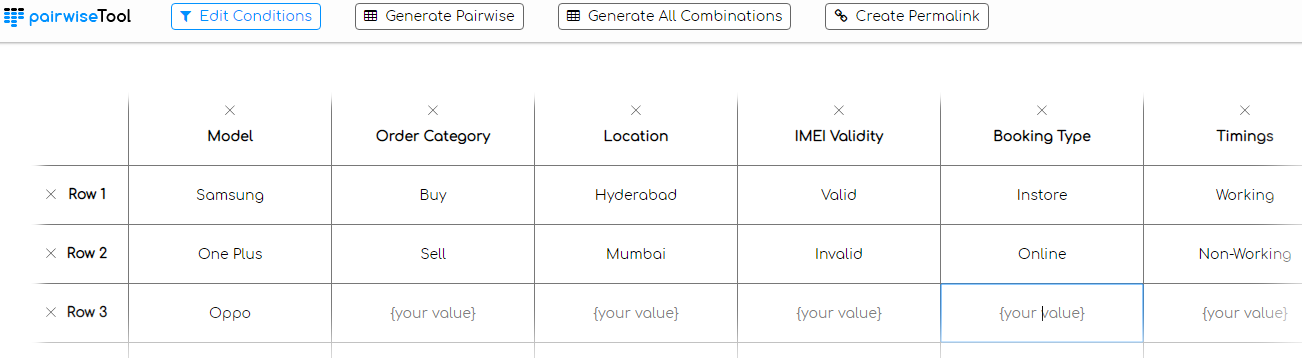
Once you have keyed in the input values for your pairwise testing example, you have the option to generate ‘All combinations’ (by clicking ‘Generate All Combinations’, as well as ‘Pairwise combinations’ (by clicking ‘Generate Pairwise’). As expected, when we clicked on ‘Generate All combinations’, it generated 96 different combinations.
When we clicked ‘Generate Pairwise’, there were 9 different combinations generated, most of them are inline with the combinations that were generated earlier using the ‘Orthogonal Array’ technique. Here is the permalink to the test combination generation. Below is the snapshot of the combinations created by the pairwise testing tool.
S No.
MODEL
ORDER CATEGORY
LOCATION
IMEI VALADITY
BOOKING TYPE
TIMINGS
1
Samsung
Buy
Hyderabad
Valid
Instore
Working
2
Samsung
Sell
Mumbai
Invalid
Online
Non-Working
3
Samsung
–
–
–
–
–
4
One Plus
Sell
–
Valid
Online
–
5
One Plus
–
Hyderabad
Invalid
–
Working
6
One Plus
Buy
Mumbai
–
Instore
Non-Working
7
Oppo
–
Valid
–
–
Non-Working
8
Oppo
Buy
–
Invalid
Instore
–
9
Oppo
Sell
Hyderabad
–
Online
Working
Now that you have a fair idea about the usage of pairwise testing with example mentioned above, let us have a brief look at the scenarios when using it would be highly beneficial.

Pairwise Testing – When To Use It?
Though Pairwise testing can be highly effective in locating issues/bugs in the product, the test analyst or test lead needs to decide whether it should be used for testing their product. Pairwise testing is based on the ‘coupling effect’, a research which was conducted by Jefferson Offutt in the year 1992. As per this finding, major complicated faults are implicitly tested if the product is explicitly tested for simple faults.
This means that if there is a fault that occurs due to settings applied to some configuration variables, there is a high possibility that the fault could be the setting of a ‘smaller subset of configuration variables’.
Combinational data generation can be used to extend the capabilities of pairwise testing to triples, quartets, etc. In a nutshell, if the configuration variables/test combinations (data set) included in the pairwise test plan are ‘ideal for testing’ (i.e. testing that combination indirectly means that many other combinations have been tested), you can achieve the best results from this test approach. Let’s have a look at some of the major advantages of Pairwise testing.
- It can be used in any type & scale of the project, irrespective of the domain being used i.e. medical, agriculture, technology, etc.
- As pairwise testing is based on the principle that majority of the bugs are triggered through an input parameter or due to an interaction between a pair of parameters, there is a significant reduction in the number of test cases being executed. The test cases for pairwise testing can be instrumental in attaining higher test coverage with better quality assurance.
- There is a significant reduction in the effort involved in designing test cases. As the focus is on the test cases that have the maximum impact, teams can achieve better test coverage with fewer efforts.
Though pairwise testing or all-pairs testing has a lot of advantages, there are certain limitations as well. Some of the limitations are below:
- Pairwise testing might not be effective if the interaction between the configuration variables is not understood while coming up with the test cases.
- As the test combinations are derived using techniques like Orthogonal Array, there are possibilities where the most important inputs are not given proper consideration during test case design & development. In case of cross browser testing; ‘browser version’ is an important parameter and testing may falter in case certain browser versions are not tested to the full potential.
- The ROI (Return on Investment) of Pairwise testing may be less in case the input values that are used for testing are incorrect. Though boundary value testing is important to achieve maximum test coverage, it should not happen that testing is performed with incorrect input values. Take the case of testing your web application/website on different devices. Having an input combination of Linux & Internet Explorer (IE) may not fetch any results and should be ignored. If there are more test cases that focus on such category of inputs, lesser would be the advantage of using pairwise testing.
Hence, it is recommended to perform a feasibility test before opting for pairwise testing. If there are other projects in your organization where pairwise testing has been used, test leads should have a look at the learning (wrt pairwise testing) and other aspects related to testing.

Austin Siewert
Co-Founder, Steadfast Systems
Discovered @TestMu AI yesterday. Best browser testing tool I've found for my use case. Great pricing model for the limited testing I do 👏
2M+ Devs and QAs rely on TestMu AI
Deliver immersive digital experiences with Next-Generation Mobile Apps and Cross Browser Testing Cloud

This certification is for anyone who wants to stay ahead among professionals who are growing their career in Selenium automation testing.
Here’s a short glimpse of the Selenium 101 certification from TestMu AI:

Using Pairwise Testing To Speed Up Cross Browser Testing
As mentioned earlier, software products have to be tested for ‘cross-browser + cross-platform + cross-device’ compatibility before they are released to the end customers. There could be a possibility that your target customers might be using ‘old version of Chrome browser on Windows 7’ or ‘latest version of Firefox on Ubuntu’, etc.
If the product is not verified for ‘overall compatibility’, it could result in average customer experience as there could be issues in UI or in functionality. For example, the product explainer video is located on YouTube, but the target browser does not have ‘Adobe Flash support’. Hence, it is important that the product goes under web based browser testing against browsers/operating systems/devices that are used by your ‘target customer/audience’. Maintaining an in-house infrastructure to accommodate different test devices having multiple versions of browsers is impractical & non-scalable. This is where TestMu AI as a cross browser testing tool on the cloud can be beneficial for testing. You can perform Automation testing using their online Selenium grid, UI regression testing, Responsive testing, live interaction testing, and so much more on the TestMu AI platform.
The section where we discussed about the ‘Pros & Cons of Pairwise testing’ clearly mentioned about the importance of focusing on the test combinations that can give the maximum ROI as far as pairwise testing is concerned. There are scenarios where you have to perform cross-browser testing of your product and you focus your effort on ‘test combinations that are invalid’ or ‘ignore combinations that matter the most’. Create a browser compatibility matrix to keep your priorities in check. Also, use a web analytics tool to track browsers which bring your the most traffic.
Let’s consider the previous pairwise testing example of ‘Mobile e-store O2O Application’ where your test team has to verify the basic functionalities (customer signup, sign-in, product search, and product checkout) of the online store on different browsers (Firefox, Chrome, Internet Explorer, Safari, etc.), Operating systems (iOS, macOS, Windows, Ubuntu, Android, etc.). To keep the scenario less complex, we have not introduced the ‘browser versions’/‘OS versions’/device type, etc.
Below is the input table that consists of the requirements. As we would use the orthogonal array technique for thegeneration of test combinations, ‘Operating System’ would be the first column in the array.
Operating System
Browser
Functionality being tested
Android
Internet Explorer (IE)
Sign-up
macOS
Mozilla Firefox
Sign-in
iOS
Google Chrome
Product Search
Windows
Safari
Product Checkout
Ubuntu
–
–
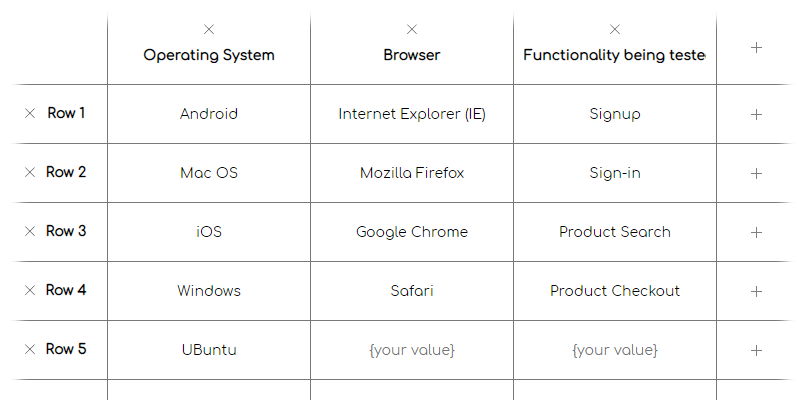
You need to apply the same logic which was explained in the section to generate test combinations for pairwise testing. Below is the list of the test combinations to be used for cross browser testing based on our pairwise testing example.
S No.
Operating System
Browser
Functionality being tested
1
Android
Internet Explorer (IE)
Sign up
2
Android
Mozilla Firefox
Sign-in
3
Android
Google Chrome
Product Search
4
Android
Safari
Product Checkout
5
Android
–
–
6
Mac OS
Mozilla Firefox
Product Search
7
Mac OS
Google Chrome
Product Checkout
8
Mac OS
Safari
–
9
Mac OS
–
Signup
10
Mac OS
Internet Explorer (IE)
Sign-in
11
iOS
Google Chrome
–
12
iOS
Safari
Signup
13
iOS
–
Sign-in
14
iOS
Internet Explorer (IE)
Product Search
15
iOS
Mozilla Firefox
Product Checkout
16
Windows
Safari
Sign-in
17
Windows
–
Product Search
18
Windows
Internet Explorer (IE)
Product Checkout
19
Windows
Mozilla Firefox
–
20
Windows
Google Chrome
Signup
21
UBuntu
–
Product Checkout
22
UBuntu
Internet Explorer (IE)
–
23
UBuntu
Mozilla Firefox
Signup
24
Ubuntu
Google Chrome
Sign-in
25
Ubuntu
Safari
Product Search
As seen in the combinations above, there are certain cases which can be considered as ‘false-positives’ e.g. Internet Explorer (IE) is not present on iOS & macOS operating systems. Hence, these combinations have to be ignored even though it is a part of the test array.
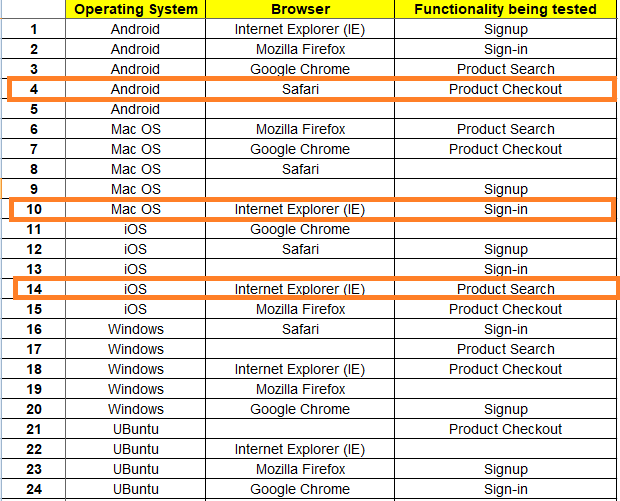
Complete list of test combinations for the above use case can be found at here. As a test team or test lead, your job does not end at generation of the test combinations, but to carefully allocate ‘adequate resources’ (manpower & time) to verify combinations that are important for your project. If you focus on the wrong combinations, you may not be able to achieve adequate test coverage and your product may be released with bugs.
Once you have identified the necessary combinations, you can make use of cloud based cross browser testing provided by TestMu AI. Using TestMu AI Capabilities Generator, you can use automation test framework like Selenium with languages like C#, Python, Java, Ruby, PHP, Javascript.
The capability generator provides you with code for different combinations using parameters like Operating System/Browser type/Browser version/Resolution, etc, based upon your selections. As you already have a list of test combinations generated using the Orthogonal Array tech.
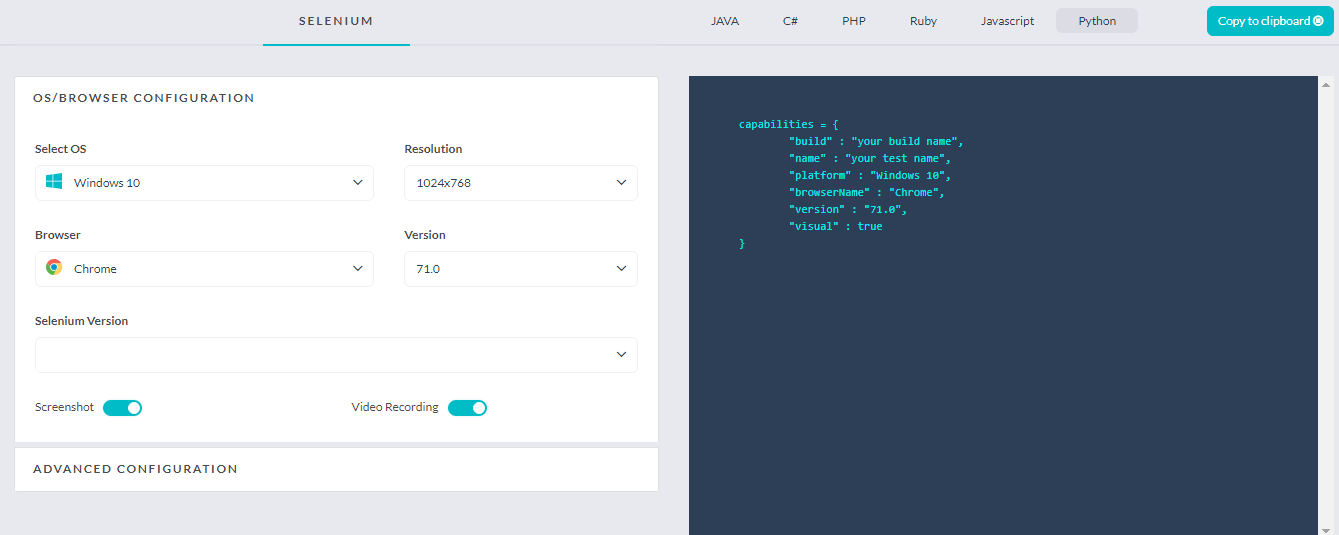
In case your team is not well equipped with automation techniques, they can make use of manual cross browser testing on TestMu AI. While planning these tests, it is important to keep a track of the test combinations generated for pairwise testing since the basis of any type of testing is the ‘test combinations’.
Should a 2026 Pairwise Test Matrix Still Include Internet Explorer?
No. Microsoft ended Internet Explorer 11 support on June 15, 2022, and replaced it with Microsoft Edge, so a pairwise test matrix built today should use Edge instead of IE as a browser parameter.
- Browser parameter swap: Replace Internet Explorer with Microsoft Edge, the current default browser on Windows, in any browser and OS combination matrix built today.
- The platform-exclusivity example needs a new pair: The worked example above pairs IE with macOS and iOS to show an impossible combination, but Edge now runs on Windows, macOS, iOS, Android, and Linux, so a same-style example today needs a platform-locked browser like Safari instead.
- IE Mode is not a default test target: Microsoft keeps IE Mode inside Edge for legacy enterprise sites, but that is a compatibility fallback to test only if a specific application still needs it, not a parameter for a general test matrix.
The core discipline has not changed: focus on writing effective test cases for the pairs that matter, and keep performing cross browser testing against the browsers your real users actually run.
Pairwise Testing tools
There are many tools available for generation of test combinations for pairwise testing, such as Microsoft PICT and AllPairs. It is necessary that you have a look at the product license and necessary terms & conditions before short listing any tool.
TestMu AI’s LT Browser is a next-gen browser to build, test & debug mobile websites. Try it now, for free!
Conclusion
There are many testing methodologies that are used for testing different categories of products/projects. Pairwise testing is one approach that should be used in scenarios where you want to achieve the best test coverage with optimum efforts. Similar to any test approach, it is recommended that you have a look at case-studies/projects in your organization where pairwise testing was successfully deployed and fetched good results.
Combinations generated for pairwise testing example can be used to verify your product for cross browser testing by making use of TestMu AI. The core USP of pairwise testing is ‘achieving good test results in minimum time duration’ and using TestMu AI, you can double the benefits of pairwise testing.
Austin Siewert
Co-Founder, Steadfast Systems
Discovered @TestMu AI yesterday. Best browser testing tool I've found for my use case. Great pricing model for the limited testing I do 👏
2M+ Devs and QAs rely on TestMu AI
Deliver immersive digital experiences with Next-Generation Mobile Apps and Cross Browser Testing Cloud
Author

Himanshu Sheth
Blogs: 142


Himanshu Sheth is the Director of Marketing (Technical Content) at TestMu AI, with over 8 years of hands-on experience in Selenium, Cypress, and other test automation frameworks. He has authored more than 130 technical blogs for TestMu AI, covering software testing, automation strategy, and CI/CD. At TestMu AI, he leads the technical content efforts across blogs, YouTube, and social media, while closely collaborating with contributors to enhance content quality and product feedback loops. He has done his graduation with a B.E. in Computer Engineering from Mumbai University. Before TestMu AI, Himanshu led engineering teams in embedded software domains at companies like Samsung Research, Motorola, and NXP Semiconductors. He is a core member of DZone and has been a speaker at several unconferences focused on technical writing and software quality.


Pairwise Testing FAQs
Did you find this page helpful?
More Related Blogs
TestMu AI forEnterprise
Get access to solutions built on Enterprise
grade security, privacy, & compliance
- Advanced access controls
- Advanced data retention rules
- Advanced Local Testing
- Premium Support options
- Early access to beta features
- Private Slack Channel
- Unlimited Manual Accessibility DevTools Tests