
Fully Agentic Test Case Management Tool
Write, Track and Manage Every Manual or Automated Tests in One Agentic Test Management Platform with TestMu AI Test Manager.

Jira as a Software Testing Tool: What It Does and How QA Teams Use It
Jira is not a testing tool, but QA teams run bugs and QA workflows in it. Get a bug template, 10 JQL queries, automation rules and when to add an app.
Published on:
Jira is not a software testing tool. Jira is Atlassian's work tracker, and QA teams use it for the work around testing: logging bugs, moving stories through QA statuses, querying defects with JQL and reporting on dashboards. Jira has no native test case, test run or test cycle, so teams add a test management app or platform.
This guide shows what Jira handles well for testers, where it stops, and a ready-to-copy QA setup: a bug template, a defect workflow, ten saved JQL queries and four automation rules.
TL;DR
No. Jira is not a software testing tool; it is Atlassian's work tracker (see what is Jira), and QA teams use it for the work around testing: bug tracking, QA statuses on the board, JQL filters, dashboards and automation rules. Test cases and test runs per build need an app or a connected platform such as TestMu AI's Test Manager.
How Do You Use Jira for Testing?
- Bug tracking: Jira bug tracking for testers starts with a Bug work item that carries steps, expected and actual results, environment, severity and evidence, linked to the story it breaks. The bug life cycle then maps to Jira statuses.
- Triaged status: A Triaged status in Jira records the defect triage decision before anyone starts a fix, and resolutions such as Won't Fix, Duplicate or Cannot Reproduce close a bug without adding more statuses to the board.
- Saved JQL filters: Saved JQL queries in Jira give QA a retest queue, a release-blocker list and a reopened-bug count. Filter Results gadgets on a Jira dashboard turn those filters into a release-readiness view without a status meeting.
- Test case storage: Jira has no native test case, test run or test cycle. A custom work type covers a small manual suite, while results per build and a requirements traceability matrix need an app or a connected platform.
Is Jira a Testing Tool?
Jira is a commercial work-management product from Atlassian, used to plan, track and release work. Some tutorials call Jira an open-source testing tool; it is neither open source nor a test runner. Jira never executes a test, drives a browser or checks an expected result.
What Jira does give testers is a shared system of record with developers and product managers. A bug filed in Jira sits on the same board, in the same sprint and under the same release version as the story it breaks. That shared context is why most QA teams work in Jira even though Jira itself does not test anything.
A note on wording: Jira Cloud now calls issues "work items" and issue types "work types" (Atlassian, 2025). JQL and the API still accept issue, so the queries in this guide work on Cloud and Data Center.
What Can Jira Do for Software Testing Without Any App?
| Testing job | Native Jira? | How |
|---|---|---|
| Log and track bugs | Yes | Bug work type with custom fields and a defect workflow |
| Link bugs to stories and releases | Yes | Issue links ("is blocked by", "relates to") and Fix Version |
| Show what is waiting for QA | Yes | A "Ready for QA" status column on the board, plus a saved filter |
| Query defects (escaped bugs, reopen rate, release blockers) | Yes | JQL saved filters |
| QA dashboards | Yes | Filter Results, Pie Chart and Created vs Resolved gadgets |
| Automate QA hand-offs | Yes | Jira Automation rules (trigger, condition, action) |
| Write acceptance criteria | Partly | A field or checklist on the story; no pass/fail per criterion |
| Store reusable test cases with steps | No | Needs a custom work type or an app |
| Record test runs and results per build or environment | No | Needs an app or an external platform |
| Requirement coverage and traceability report | No | Needs an app or an external platform |
| Run automated tests | No | Runs in CI or a test platform; results can be pushed back |
The line is simple: Jira handles the workflow around testing well and the test assets and results not at all.
How Do QA Teams Use Jira Day to Day?
A typical sprint for a tester in Jira:
- Pick up work from the board. Stories move into a "Ready for QA" column when development finishes.
- Test the story in the test tool or manually, against the acceptance criteria on the story.
- File bugs as Bug work items linked to the story, with severity, environment and steps to reproduce.
- Move the story to "QA Passed" or back to "In Progress" with linked blockers.
- Retest fixes when bugs move to "Ready for Retest", then close or reopen them.
- Report release readiness from a dashboard built on saved JQL filters.
Steps 3 to 6 are where Jira earns its place for QA. The next sections set them up properly.
What Should a Bug Report in Jira Include?
A bug that developers can fix without a follow-up message needs these fields. Add the missing ones as custom fields on the Bug work type and make the first five required:
| Field | Example | Why it matters |
|---|---|---|
| Summary | "Checkout: total ignores 10% coupon when cart has 2+ items" | Searchable and specific |
| Steps to reproduce | Numbered steps from a clean state | Removes back-and-forth |
| Expected vs actual result | "Expected $90.00, got $100.00" | States the defect, not an opinion |
| Environment | staging, Chrome 131, build 4.12.0-rc2 | Bugs are often environment-specific |
| Severity | Critical / Major / Minor / Trivial | Impact on users (set by QA) |
| Priority | Highest to Lowest | Order of fixing (set by product or lead) |
| Affects Version / Fix Version | 4.12 | Release tracking and escaped-defect reports |
| Linked story | SHOP-87 | Ties the bug to the requirement it breaks |
| Evidence | Screenshot, video, console and network logs | Proves the failure |
| Found in | Regression / New feature / Production | Feeds escaped-defect metrics |
Keep severity and priority as separate fields. A typo on the pricing page can be minor severity and highest priority. Merging the two loses that signal.
For regulated teams (fintech, insurance, healthcare, legal): make Evidence required on Critical bugs and restrict who can move a bug to Done. Jira's work item history then records who closed which defect and when, which is the first thing an auditor asks for.
What Is a Good Bug Workflow in Jira for QA?
The default Jira workflow (To Do → In Progress → Done) hides the QA steps. A defect workflow that shows them:
Open → Triaged → In Progress → Ready for Retest → Closed
                                      ↓
                                  Reopened → In Progress
Triaged → Won't Fix / Duplicate / Cannot Reproduce (resolutions)- Triaged separates "someone looked at it" from "someone is fixing it".
- Ready for Retest gives QA a queue of its own. Without it, fixed bugs sit in Done and are never verified.
- Reopened as a real status (not a comment) makes reopen rate measurable with JQL.
- Use resolutions (Won't Fix, Duplicate, Cannot Reproduce) instead of extra statuses, so the board stays readable.
Which JQL Queries Should Every QA Team Save?
Save these as filters and share them with the team. Replace SHOP with your project key and adjust status names to your workflow.
-- 1. Release blockers: open high-priority bugs in the next release
project = SHOP AND issuetype = Bug AND fixVersion in unreleasedVersions()
AND priority in (Highest, High) AND statusCategory != Done ORDER BY priority DESC

-- 2. My retest queue
project = SHOP AND issuetype = Bug AND status = "Ready for Retest" ORDER BY updated ASC

-- 3. Stories waiting for QA in the current sprint
project = SHOP AND issuetype = Story AND sprint in openSprints() AND status = "Ready for QA"

-- 4. Bugs reopened this week (a fix-quality signal)
project = SHOP AND issuetype = Bug AND status CHANGED TO "Reopened" DURING (startOfWeek(), now())

-- 5. New bugs in the last 7 days
project = SHOP AND issuetype = Bug AND created >= -7d ORDER BY created DESC

-- 6. Escaped defects: bugs found in production in the last 90 days (needs a "Found in" field)
project = SHOP AND issuetype = Bug AND "Found in" = Production AND created >= -90d

-- 7. Stale bugs nobody has touched in 30 days
project = SHOP AND issuetype = Bug AND statusCategory != Done AND updated <= -30d

-- 8. Bugs closed in the last 14 days (release notes and verification)
project = SHOP AND issuetype = Bug AND resolved >= -14d ORDER BY resolved DESC

-- 9. Unassigned critical bugs
project = SHOP AND issuetype = Bug AND assignee is EMPTY AND priority = Highest AND statusCategory != Done

-- 10. Bugs reported by the QA team this month
project = SHOP AND issuetype = Bug AND reporter in membersOf("qa-team") AND created >= startOfMonth()
Put filters 1, 2, 3 and 4 on a QA dashboard with Filter Results gadgets, and add a Created vs Resolved chart on filter 5. That dashboard answers "can we ship?" without a meeting.
Which Jira Automation Rules Help QA Teams?
Jira Automation rules are built from a trigger, optional conditions and actions, with no code. Four rules that remove manual hand-offs:
| Rule | Trigger | Action |
|---|---|---|
| Send fixed bugs back to the reporter | Bug transitions to "Ready for Retest" | Assign to the reporter; add a comment with the fix version |
| Block stories with open bugs | Bug linked to a story is created with priority Highest | Transition the story to "Blocked"; post to the team's Slack channel |
| Create a test sub-task for every story in QA | Story transitions to "Ready for QA" | Create a sub-task "Test SHOP-87" assigned to QA |
| Flag missing evidence | Bug created with severity Critical | If Evidence is empty, comment asking for a screenshot or log |
Check your plan's automation limits before rolling out rules that fire on every transition. Atlassian meters automation steps by plan on Jira Cloud.
How Do You Manage Test Cases With Jira?
Jira has no test case or test run, so teams use a custom work type, a Jira-native app such as Xray or Zephyr, or a connected test platform.
How to set up each:
- Native: the step-by-step setup (work type, fields, workflow, JQL) is in the Jira test case management guide.
- Jira-native app: the Xray in Jira tutorial covers install, Test Plans, Test Executions and CI result imports. SmartBear's Zephyr is the other widely used Jira-native option; as of November 2026 SmartBear sells it as Zephyr Essential, Zephyr Standard and Zephyr Advanced (SmartBear).
- Connected test platform (tests live in a separate tool, and a Jira app links cases, runs and bugs to Jira work items): see the next section.
For a full side-by-side of 19 tools, use the Jira test management tools comparison.
For a quick visual walkthrough of this concept, watch the video below from TestMu AI.

Subscribe to the TestMu AI YouTube channel for more tutorials on testing and automation.
Which Approach Fits Your Team?
- 5-person B2B SaaS startup, mostly manual testing: native Jira work types plus the saved JQL above. Add a tool when you pass a few hundred cases or start a regression suite.
- Regulated product (fintech, insurance, healthcare): you need requirement-to-test-to-result traceability and a record of who approved what. Use an app or platform with a traceability report; native Jira cannot produce one.
- Large automation suite in CI: pick a tool that ingests automated results by API on every run. Manually recording automated results in Jira does not survive the first week.
- E-commerce teams testing many browsers and devices: results per environment matter more than test steps. Pick a tool that records results per browser, device and build.
Where Does TestMu AI Fit With Jira?
TestMu AI connects to Jira as a test platform, not as another set of issue types:
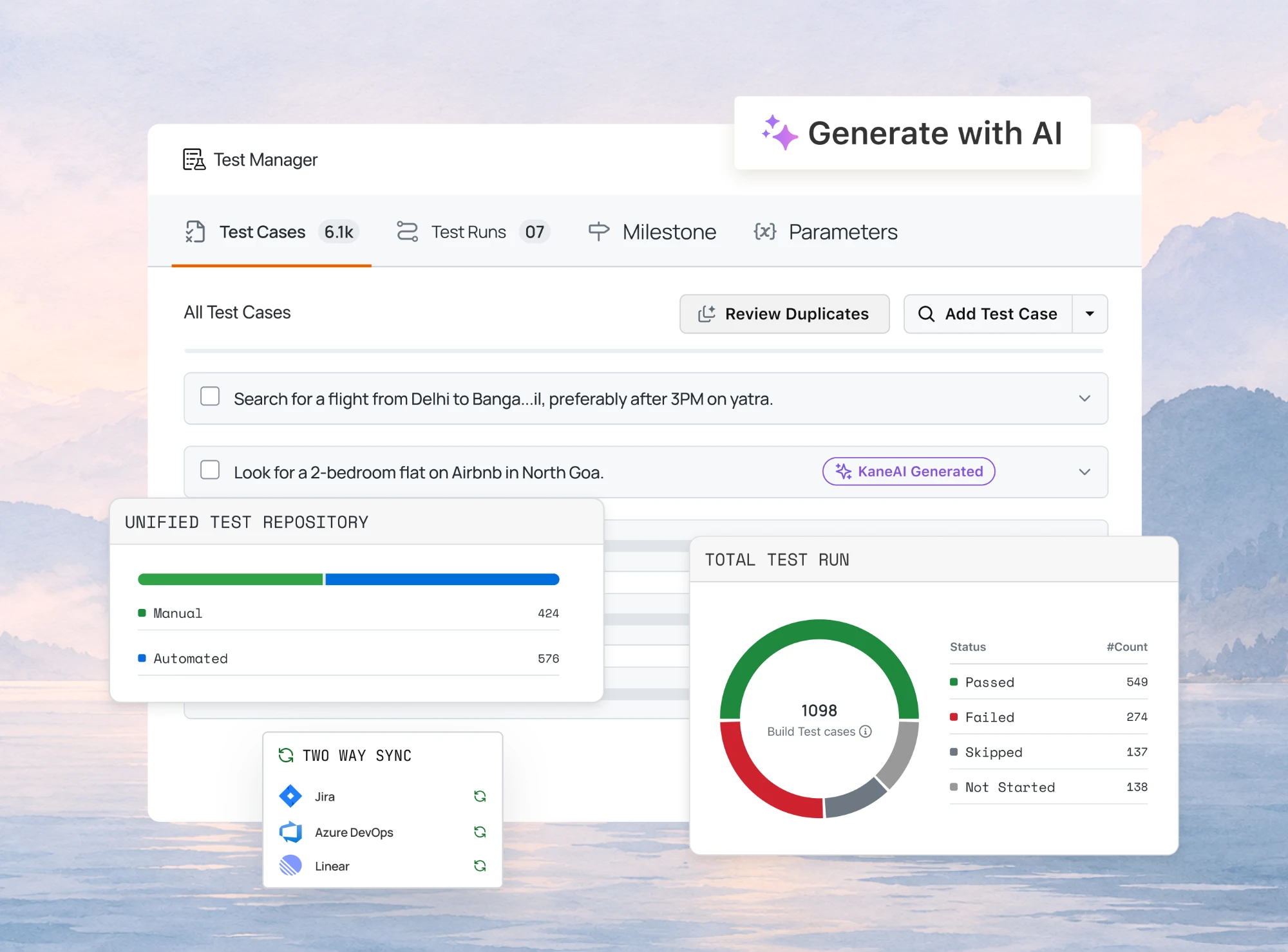
- Test Manager with two-way Jira sync. Test cases link to Jira stories, and when a test fails, a bug is filed to Jira with screenshots and the run clip attached; status changes in Jira sync back to the test case (Test Manager). The free plan is listed as "Free Forever" with unlimited projects; the Jira and Azure DevOps integration is part of the Premium and Enterprise plans (pricing).
- Test cases from Jira tickets. KaneAI turns a Jira ticket, PRD or screenshot into structured test cases with steps and expected results, then runs them on real browsers and devices.
- TestMu AI app on the Atlassian Marketplace. The free "TestMu AI Cloud" app shows linked test cases and execution history on any Jira work item (listing).
- Migration in from Jira apps. Test Manager imports from Xray Cloud, Zephyr, TestRail and qTest.
What TestMu AI does not do: replace Jira as your work tracker. Bugs, stories and releases stay in Jira.

Note: Keep Jira for the workflow, add real test runs. Start free with TestMu AI Test Manager to organise cases and runs, then turn on the Jira integration (Premium and Enterprise) to see coverage, runs and auto-filed bugs on the stories your team already tracks.
Jira for QA: Setup Checklist
- Bug work type with the ten fields above; first five required
- Defect workflow with Triaged, Ready for Retest and Reopened
- Severity and priority as separate fields
- "Ready for QA" column on the board
- Ten saved JQL filters shared with the team
- QA dashboard on filters 1 to 5
- Four automation rules live, within plan limits
- A decision on test cases: native, app or connected platform
Conclusion
Start with the Bug work type and the defect workflow, because every saved filter and dashboard in this guide reads those fields and statuses. Then switch on the automation rules within your plan's step allowance, and decide where test cases will live before the suite outgrows a custom work type.
If you pick a connected platform, the steps to link stories and bugs are in link Jira issues with Test Manager.
Tracking tests across tools and teams? TestMu AI's Test Manager keeps test cases, runs and results in one place.
Author

Abhishek Mishra
Blogs: 19

Abhishek Mishra is a Technical Product Manager at TestMu AI, where he owns Test Manager, the test management product. He has over 8 years of experience in product management and market analysis, spanning AI-native software testing, product strategy, and analytics. On TestMu AI, he authored guides on test management and test case management. Previously, he served as the Product Lead at IndiaClan and co-founded Gartley618 Technologies, a firm focused on quantitative trading and blockchain. He holds a B.Tech degree.
Reviewer

Mayank Bhola
Reviewer
Mayank Bhola is Co-Founder and Head of Products at TestMu AI, where he leads the entire product portfolio across KaneAI, Kane CLI, HyperExecute, SmartUI, the Real Device Cloud, Accessibility, and other software testing product lines. As an early Lead Architect he designed and built the company's flagship Tunnel technology from scratch, created the React-based automation platform, and architected the data-intensive pipelines and FAAS services that scale it. He brings more than 10 years of experience in software development and product engineering, with earlier roles as Head of Technology at Juggernaut Books and Senior Software Engineer at PressPlay TV and Zomato. Mayank holds a B.Tech in Computer Engineering from JIIT Noida.


Jira Software Testing Tool FAQs
Did you find this page helpful?
More Related Blogs







TestMu AI forEnterprise
Get access to solutions built on Enterprise
grade security, privacy, & compliance
- Advanced access controls
- Advanced data retention rules
- Advanced Local Testing
- Premium Support options
- Early access to beta features
- Private Slack Channel
- Unlimited Manual Accessibility DevTools Tests