
Author End-to-End Tests in Natural Language with KaneAI
Plan, Author, and Evolve E2E Tests for Web and Mobile Apps in Natural Language.

Xray in Jira: How to Set Up and Use Xray Test Management
How to use Xray in Jira: install it, create Tests, Test Plans and Test Executions, import JUnit results from CI, read coverage, and avoid common traps.
Published on:
On This Page
Xray in Jira is a Marketplace app that stores tests as Jira issues. You install Xray, add its six issue types (Test, Precondition, Test Set, Test Plan, Test Execution, Sub-Test Execution) to a project, write Tests linked to stories, run them inside Test Executions, and push automated results from CI through Xray's REST API. Coverage then shows on each story.
This tutorial walks through that whole loop on Jira Cloud, with the exact API calls for CI imports and the status rules that trip most teams up. Facts about Xray are checked against Xray's Marketplace listing and documentation as of November 2026.
TL;DR
Xray is a paid test management app that runs inside Jira and stores tests, test plans and test executions as Jira issues. To use it, install Xray from the Atlassian Marketplace, add its issue types to a project, map stories as requirements, run Tests inside Test Executions, and import CI results through the Xray REST API.
Xray at a Glance
- Built into Jira: No. Xray is a paid Atlassian Marketplace app that a Jira admin installs, with a free trial on both its Standard and Advanced editions.
- Runs tests: No. Xray records manual and automated results but does not run tests or host browsers, so automated suites run in CI or on a cloud grid and import their reports.
How Xray Works in Jira
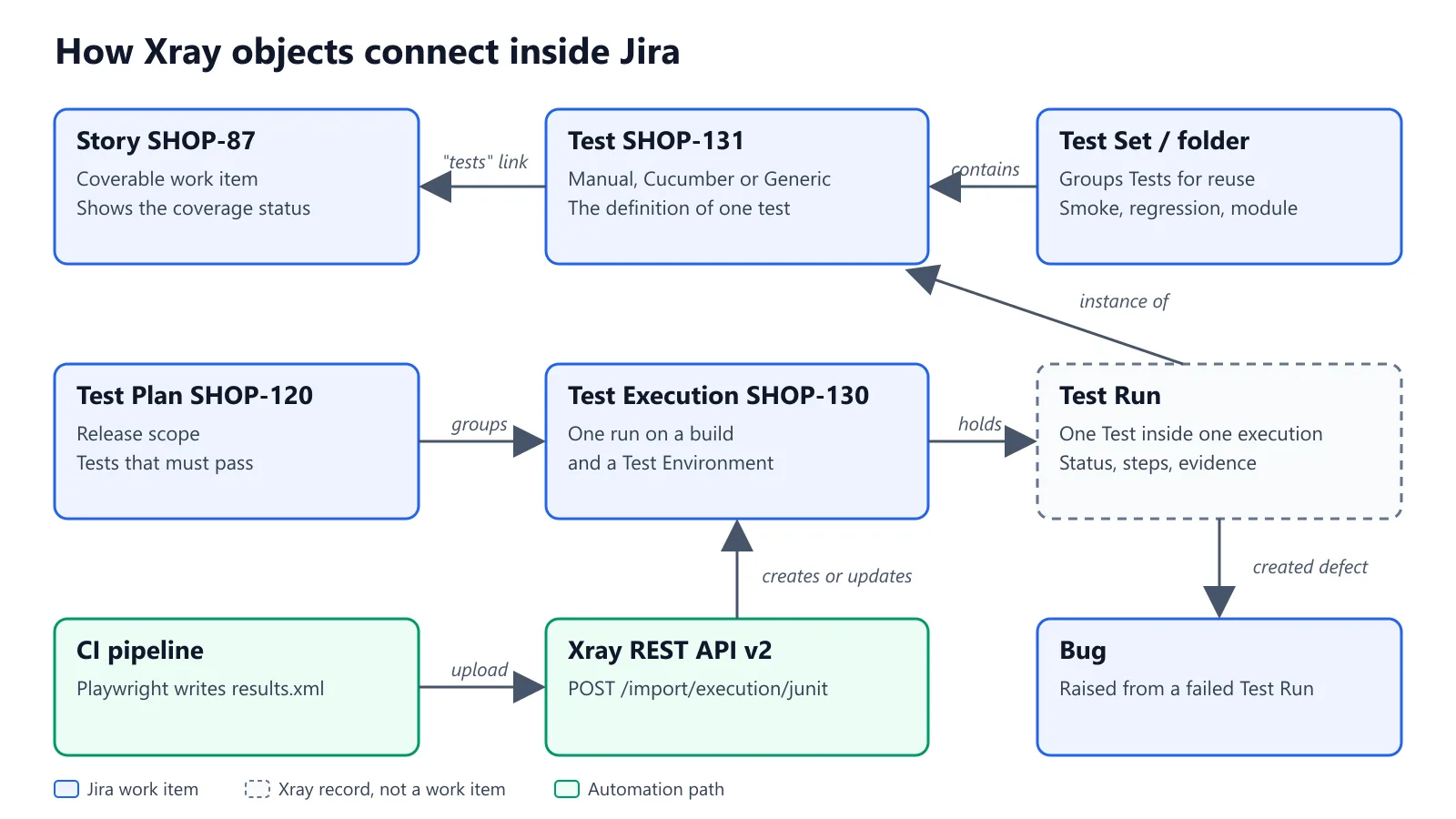
- Xray Test Run: An Xray Test Run is one execution of one Test inside one Test Execution, holding the status, step results, evidence and linked defects. A Test Run is an Xray record rather than a Jira issue, so it has no key of its own.
- Xray requirement mapping: Xray shows coverage only on issue types mapped as requirement types, usually Story and Epic. A story type left unmapped shows no coverage even when Tests link to it.
- Xray final-status precedence: In Xray the final-status precedence setting is on by default, so the latest finished Test Run counts and a newly scheduled TODO run does not reset a Test that already passed or failed.
- Xray JUnit import: CI posts the report to Xray's /api/v2/import/execution/junit endpoint. Xray matches each test case on its class name plus test name, creating a Generic Test the first time and adding Test Runs to it afterwards.
- KaneAI by TestMu AI: KaneAI generates test cases from a Jira ticket, PRD or screenshot, which testers review before keeping them as Tests in Xray or in TestMu AI.
What Is Xray in Jira?
Xray is a test management app for Jira. Xray is listed on the Atlassian Marketplace as "Xray - Test Management for Jira" by Xblend. As of November 2026 the Marketplace listing shows about 25,200 installs and a 4.3/5 rating from 554 reviews, and it supports Jira Cloud, Jira Server and Jira Data Center (11.x) (Atlassian Marketplace).
The Xray brand sits in Sembi, the software-quality portfolio that also includes TestRail and Testmo (QA Financial).
The key design choice: Xray does not keep tests in a separate database that syncs to Jira. Every Xray artifact except the Test Run is a Jira issue, so Tests get the same permissions, workflows, JQL filters and dashboards as your stories and bugs.
Which Issue Types Does Xray Add to Jira?
| Xray issue type | What it holds | Typical owner |
|---|---|---|
| Test | One test case. Type is Manual (steps), Cucumber (Gherkin scenario) or Generic (free text, used for automated tests) | QA engineer |
| Precondition | A reusable setup state, such as "user logged in with admin role" | QA engineer |
| Test Set | A flat, reusable group of Tests (a Test can belong to many sets) | QA lead |
| Test Plan | The scope for a release or sprint: which Tests must pass | QA lead |
| Test Execution | One run of a group of Tests against a version and environment; holds a Test Run per Test | Whoever runs the tests, or CI |
| Sub-Test Execution | A Test Execution created as a sub-task of a story, so the story's Tests are run and tracked from the story itself | The story's tester |
The Test Run is not an issue. A Test Run is the record of one Test inside one Test Execution: status, step results, evidence and linked defects. Most confusion about Xray comes from mixing up the Test (the definition) with the Test Run (one attempt).
Which Xray Edition Do You Need?
As of November 2026 the Marketplace listing splits Xray into two editions, with a separate Xray Enterprise app on top:
| Edition | What the listing includes |
|---|---|
| Standard | Test management and execution, BDD support, AI Test Case Generation, AI Test Prioritization, Rovo Test Plan Summarizer |
| Advanced | Everything in Standard plus AI Test Script Generation, enhanced storage, enhanced API, Usage Monitor, expanded Manual Step Library |
| Xray Enterprise (separate app) | Enterprise add-ons such as visual test models, per getxray.app |
Pricing is per user and billed through Atlassian. Check the Pricing tab on the listing for your user tier, because Atlassian app prices change with Jira user counts.
How Do You Install and Configure Xray in Jira Cloud?
Installing Xray takes about ten minutes if you are a Jira admin. Configuration is where teams lose time, so do steps 3 and 4 before anyone writes a test.
- Install the app. In Jira, open Apps > Explore more apps, search for "Xray Test Management", and start the free trial. Only a Jira site admin can install Marketplace apps.
- Add the Xray issue types to your project. Open the project's Xray settings. Xray offers to add Test, Precondition, Test Set, Test Plan, Test Execution and Sub-Test Execution to the project's issue type scheme. Accept, or add them manually under Project settings > Issue types if your scheme is shared with other projects.
- Tell Xray which issues are requirements. In the project's Xray settings (Test Coverage and Defect Mapping), map the issue types that tests should cover (usually Story and Epic) as requirement types, and map Bug as the defect type. Coverage only appears on mapped types. Skipping this step is the most common reason a story shows "UNCOVERED" even though Tests link to it.
- Create test environments up front. Decide on environment names (for example
chrome,safari,staging) and use them consistently. Xray's docs advise against composed names such asstaging-chrome, because coverage can then only be analyzed for the combination, never for one browser or stage. Xray calculates status per environment, so a typo creates a second environment silently. - Generate API keys for CI. In Xray's global settings, open API Keys and create a Client ID and Client Secret for a service user. The secret is shown once, so put it straight into your CI secret store.
How Do You Create a Test Case in Xray?
Create a Jira issue of type Test, then pick the test type:
- Manual: add numbered steps, each with an action, test data and expected result. Use this for exploratory paths, UAT scripts and anything a person runs.
- Cucumber: paste a Gherkin
ScenarioorScenario Outline. Xray can export these as.featurefiles to your automation repo and import Cucumber JSON results back. - Generic: a free-text definition, used for automated tests. You rarely create Generic Tests by hand, because Xray creates them on the first CI import (see below).
Then link the Test to the story it verifies with the "tests" link, attach any Precondition, and add the Test to a Test Set or a folder in the Test Repository (the project-level folder tree). Use folders for permanent structure (by module) and Test Sets for groupings that cut across folders (smoke, regression, payments).
Tip for regulated teams (fintech, insurance, healthcare): keep the Test workflow strict (Draft > Reviewed > Approved) and require a reviewer on transition. Because Xray Tests are Jira issues, Jira's issue history gives you an audit trail of who changed a test step and when, which auditors ask for.

Note: Write Xray tests from the tickets you already have. KaneAI by TestMu AI turns a Jira ticket, PRD or screenshot into structured test cases with steps and expected results, then runs them on real browsers and devices. Start free with KaneAI and point it at your next story.
How Do Test Plans and Test Executions Work in Xray?
A Test Plan answers "what must pass for this release?" A Test Execution answers "what happened when we ran these tests on this build and environment?"
A clean pattern for a two-week sprint:
- Create one Test Plan per release, for example
Release 4.12, with Fix Version set. - Add the Tests in scope: the release's new Tests plus the regression Test Set.
- From the Test Plan, create Test Executions: one per environment for manual runs, plus one per CI pipeline for automated runs. Executions created from the plan are linked to it automatically.
- Testers open a Test Execution, click Run on a Test, and record step results. If a step fails, create a Bug from that step, so the defect links back to the Test Run and the story.
- The Test Plan board aggregates every execution, so the latest result per Test is visible in one place.
What Do Xray Test Statuses Mean?
Xray ships five Test Run statuses that cannot be deleted (Xray docs):
| Status | Final? | Meaning |
|---|---|---|
| TODO | No | Not started |
| EXECUTING | No | In progress |
| PASS | Yes | Passed |
| FAIL | Yes | Failed |
| ABORTED | Yes | Stopped and not completed |
Two rules decide what a Test's status "is" across many runs:
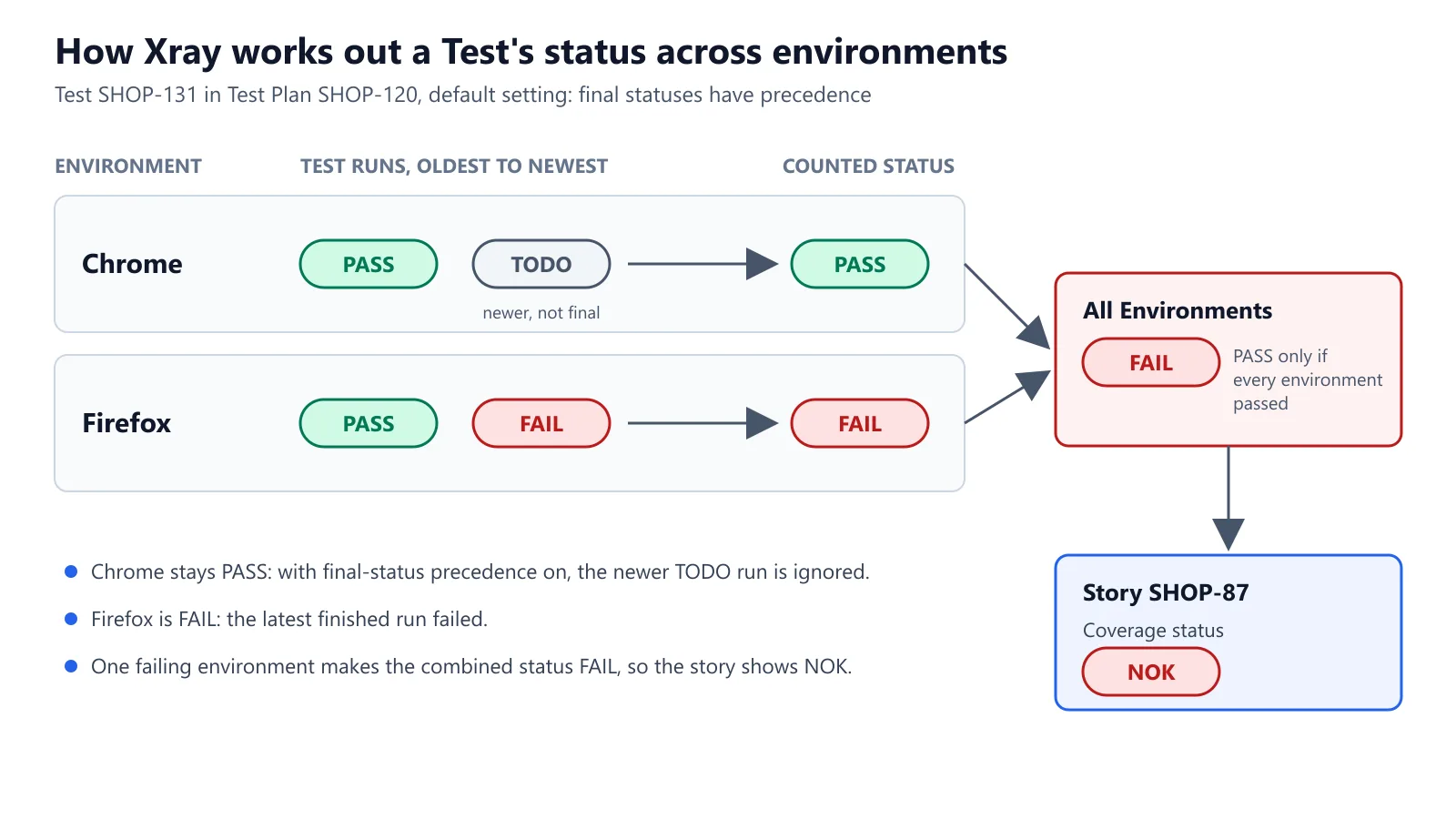
- Final statuses win by default. With the default setting "Final statuses have precedence over non-final statuses", the most recent PASS, FAIL or ABORTED counts, and a newer TODO run does not reset the Test. Turn the setting off and the newest run of any status wins, so creating a fresh execution makes a passed Test look not run.
- Environments combine pessimistically. When you view status across all environments, a FAIL in any environment makes the combined status FAIL. The combined status is PASS only if every environment passed.
What Do Xray Coverage Statuses Mean?
Coverage is shown on requirement issues (stories, epics):
| Coverage status | Meaning |
|---|---|
| OK | All linked Tests passed |
| NOK | At least one linked Test failed |
| NOTRUN | At least one Test is TODO or ABORTED, none failed |
| UNKNOWN | At least one Test is in an unknown state, none failed |
| UNCOVERED | No Tests are linked to the requirement |
Coverage is always calculated in a context: a version, a Test Plan or an environment. When a product owner says "the story is green in Jira but red in the report", the two views are almost always using different contexts.
How Do You Import Automated Test Results Into Xray?
Xray Cloud accepts results from CI through REST API v2. The flow is: authenticate with your API key, then POST the report file.
On the first import Xray creates a Generic Test for each automated test case it has not seen, keyed by the test's identity in the report (for JUnit, the class name plus test name). On later imports it reuses those Tests and adds new Test Runs.
Step 1: get a token.
TOKEN=$(curl -s -H "Content-Type: application/json" -X POST \
  --data "{\"client_id\":\"$XRAY_CLIENT_ID\",\"client_secret\":\"$XRAY_CLIENT_SECRET\"}" \
  https://xray.cloud.getxray.app/api/v2/authenticate | tr -d '"')
Step 2: produce a JUnit XML report. Most runners can. With Playwright (docs):
PLAYWRIGHT_JUNIT_OUTPUT_NAME=results.xml npx playwright test --reporter=junitStep 3: import it.
curl -H "Content-Type: text/xml" -H "Authorization: Bearer $TOKEN" -X POST \
  --data-binary @results.xml \
  "https://xray.cloud.getxray.app/api/v2/import/execution/junit?projectKey=SHOP&testPlanKey=SHOP-120&testEnvironments=staging;chrome"
Use projectKey to create a new Test Execution on each run, or testExecKey=SHOP-130 to append to an existing one. Adding testPlanKey links the new execution to the release's Test Plan, so automated and manual results land on the same board. Optional revision, fixVersion and testEnvironments set those fields on the new Test Execution.
Xray Cloud has matching endpoints for other formats under /api/v2/import/execution/: cucumber, testng, nunit, xunit, robot, and the generic Xray JSON format at /api/v2/import/execution. Xray Data Center uses /rest/raven/... endpoints with Jira authentication instead of the token step; check the Data Center docs for your version.
A Full GitHub Actions Job
name: e2e-to-xray
on: [push]
jobs:
  e2e:
    runs-on: ubuntu-latest
    steps:
      - uses: actions/checkout@v7
      - uses: actions/setup-node@v7
        with: { node-version: 24 }
      - run: npm ci && npx playwright install --with-deps
      - run: npx playwright test --reporter=junit
        env:
          PLAYWRIGHT_JUNIT_OUTPUT_NAME: results.xml
      - name: Push results to Xray
        if: ${{ !cancelled() }}   # import failures too, not just green runs
        env:
          XRAY_CLIENT_ID: ${{ secrets.XRAY_CLIENT_ID }}
          XRAY_CLIENT_SECRET: ${{ secrets.XRAY_CLIENT_SECRET }}
        run: |
          TOKEN=$(curl -s -H "Content-Type: application/json" -X POST \
            --data "{\"client_id\":\"$XRAY_CLIENT_ID\",\"client_secret\":\"$XRAY_CLIENT_SECRET\"}" \
            https://xray.cloud.getxray.app/api/v2/authenticate | tr -d '"')
          curl -sf -H "Content-Type: text/xml" -H "Authorization: Bearer $TOKEN" -X POST \
            --data-binary @results.xml \
            "https://xray.cloud.getxray.app/api/v2/import/execution/junit?projectKey=SHOP&testPlanKey=SHOP-120&testEnvironments=staging;chrome"
The if: ${{ !cancelled() }} line matters. Without it, the import step is skipped whenever a test fails, and Xray only ever sees passing runs.
If the suite is too slow to run on one CI machine, run it in parallel on a cloud grid or on HyperExecute, TestMu AI's test orchestration platform, collect the JUnit files as build artifacts, and import them with the same call.
How Do You Link Automated Tests to Jira Stories?
The first import creates Generic Tests that are not linked to anything. Link each new Test to its story once (bulk-link from the Test Execution or from the Test Repository). After that, every import updates coverage on the story automatically.
For Cucumber, put the story key as a tag before the Feature: line (for example @SHOP-87) so Xray links it for you.

What Reports Does Xray Provide in Jira?
Xray's built-in reports cover the questions a QA lead gets asked every release:
- Traceability report: requirements > Tests > Test Runs > defects, in one table. This is the report auditors and release managers want.
- Test Plan and Test Execution views: progress bars and per-status counts for a release or a single run.
- Coverage on each requirement: the OK/NOK/NOTRUN/UNKNOWN/UNCOVERED status above, filterable by version and environment.
- Jira dashboard gadgets: add Xray gadgets to a Jira dashboard for a live release view without opening the app.
For trend analysis across many releases (flaky tests, mean time to fix, pass rate per module), teams usually export to a BI tool such as eazyBI, or query Xray's GraphQL API. Xray reports describe what was recorded. They do not tell you which failures are new or which tests are flaky.
What Are the Limits of Xray in Jira?
Xray is mature and widely used, but plan around these limits:
| Limit | What happens | Workaround |
|---|---|---|
| Xray JQL functions on Jira Cloud (as of Nov 2026) | Data Center-style functions such as testExecutionTests() are not fully available on Cloud; per Xray's docs, the DC-compatible Cloud versions are in closed beta behind a feature toggle | Use Xray's GraphQL API (getTestExecution, getTestExecutions) and page through results (100 items per call) |
| Test identity in automated imports | Renaming a test method or class makes Xray create a new Generic Test; the old one keeps its history and links | Rename deliberately; relink the new Test and archive the old one |
| Issue count | Every Test, Test Plan and Test Execution is a Jira issue, so large suites add tens of thousands of issues to Jira | Archive old executions; keep CI imports appending to fewer executions with testExecKey |
| Status context | The same Test can show PASS in one Test Plan and FAIL in another | Always state the context (version, plan, environment) in reports |
| Execution | Xray records results but does not run tests or host browsers and devices | Run tests in CI or on a cloud grid, then import results |
How Does TestMu AI Work Alongside Xray?
Xray manages test definitions and results. It does not author tests from tickets or run them. TestMu AI covers those two jobs and can sit next to Xray or replace it:
- Author from Jira tickets. KaneAI takes a Jira ticket (plus a PRD, PDF or screenshot) and returns structured test cases with steps and expected results. Testers review them and keep them in Xray or in TestMu AI's Test Manager.
- Run at scale, report back to Xray. Suites that run on TestMu AI's cloud or on HyperExecute still produce standard JUnit output, so the import call above does not change.
- Move off Xray when it stops fitting. TestMu AI's Test Manager imports Xray Cloud data in one flow. Per the migration docs, the import needs your Jira host, email and API token plus Xray's Client ID and Client Secret.
What moves and what doesn't when you migrate from Xray Cloud to TestMu AI Test Manager (from TestMu AI's migration docs, Sep 2026):
| Moves | Does not move |
|---|---|
| Test cases with summary, description, priority, labels, preconditions | Test runs, execution logs and results |
| Manual steps and expected results, in order | Datasets |
| BDD/Gherkin scenarios | Standalone Preconditions as reusable objects |
| Attachments at test and step level, rich text | Jira comments on test cases |
| Custom fields (auto-created) and linked requirements (with the Jira integration) | Xray environment configuration |
| The Xray test key, kept as a tag | Xray Server and Data Center projects (Cloud only) |
If you are weighing whether to stay on Xray at all, the Xray alternatives guide compares the options, and the guide to choosing a Jira software testing tool covers what Jira does for QA with and without an app. For running tests inside Jira without any app, see Jira test case management.
Xray in Jira Setup Checklist
Use this before the first sprint on Xray:
- Xray issue types added to every project that will hold Tests
- Story and Epic mapped as requirement types; Bug mapped as defect type
- Environment names agreed and documented
- Test workflow set (Draft > Reviewed > Approved) for regulated projects
- Test Repository folders by module; Test Sets for smoke and regression
- One Test Plan per release with Fix Version set
- API keys stored in CI secrets, import step running with
if: ${{ !cancelled() }} - Automated Tests linked to stories after the first import
- Final-status precedence left on (the default)
Conclusion
Xray gives you structure in Jira. The slow part is still writing good test cases for every story. Start free with KaneAI, give it a Jira ticket, and get reviewed-ready test cases with steps and expected results that you can run on real browsers and devices.
Testing web or mobile apps without writing code? KaneAI by TestMu AI turns plain-English instructions into tests.
Author

Abhishek Mishra
Blogs: 19

Abhishek Mishra is a Technical Product Manager at TestMu AI, where he owns Test Manager, the test management product. He has over 8 years of experience in product management and market analysis, spanning AI-native software testing, product strategy, and analytics. On TestMu AI, he authored guides on test management and test case management. Previously, he served as the Product Lead at IndiaClan and co-founded Gartley618 Technologies, a firm focused on quantitative trading and blockchain. He holds a B.Tech degree.
Reviewer

Himanshu Sheth
Reviewer
Himanshu Sheth is the Director of Marketing (Technical Content) at TestMu AI, with over 8 years of hands-on experience in Selenium, Cypress, and other test automation frameworks. He has authored more than 130 technical blogs for TestMu AI, covering software testing, automation strategy, and CI/CD. At TestMu AI, he leads the technical content efforts across blogs, YouTube, and social media, while closely collaborating with contributors to enhance content quality and product feedback loops. He has done his graduation with a B.E. in Computer Engineering from Mumbai University. Before TestMu AI, Himanshu led engineering teams in embedded software domains at companies like Samsung Research, Motorola, and NXP Semiconductors. He is a core member of DZone and has been a speaker at several unconferences focused on technical writing and software quality.


Xray in Jira FAQs
Did you find this page helpful?
More Related Blogs



TestMu AI forEnterprise
Get access to solutions built on Enterprise
grade security, privacy, & compliance
- Advanced access controls
- Advanced data retention rules
- Advanced Local Testing
- Premium Support options
- Early access to beta features
- Private Slack Channel
- Unlimited Manual Accessibility DevTools Tests