

Power Your Software Testing with AI Agents and Cloud
The Native AI-Agentic Cloud Platform to Supercharge Quality Engineering. Test Intelligently and Ship Faster.


- TestMu AI (Formerly LambdaTest)
- /
- Blog
- /
- Smart Ignore for Visual Testing: Focus on What Matters Most
Smart Ignore for Visual Testing: Focus on What Matters Most
Streamline visual testing with TestMu AI Smart Ignore. Hide layout shifts and reduce false positives, allowing teams to focus on meaningful content changes.
Last Updated on:
Smart Ignore is a visual testing feature that filters out layout-shift differences so testers see only real content changes in a build comparison.
It classifies each pixel difference as anti-aliasing, sub-pixel font rendering, animation timing, a compression artifact, or a genuine content change before flagging it as a diff.
This guide covers what Smart Ignore is, why teams choose it, how to turn it on for a build, and how AI testing agents use it now.
Key Takeaways
- Smart Ignore is a visual testing feature that filters layout-shift differences out of a build comparison, leaving only genuine content changes flagged as a diff.
- Smart Ignore classifies a pixel difference as anti-aliasing, sub-pixel font rendering, animation timing, a compression artifact, or a real content change before flagging it.
- Switching from pixel-to-pixel comparison to Smart Ignore mode happens from the Diff Options dropdown on an existing build, with no separate setup step.
- Filtering out non-critical layout shifts saves review time during a large-scale UI update, when many elements move at once.
- Smart Ignore's classification cuts false positives by up to 95 percent compared to pixel-to-pixel comparison, per the feature's own support documentation.
- An AI testing agent in a CI pipeline can read Smart Ignore's diff classification and auto-approve a build when every flagged difference is a known noise category, not a content change.
What Is Smart Ignore?
Smart Ignore lets you overcome the challenge of displacement differences in dynamic web websites and web applications. When content is added, removed, or adjusted, some changes often cause visual displacements on the web page. Traditional visual testing tools can flag these shifts as significant differences, leading to false positives and clutter in test results.
The Smart Ignore feature of the SmartUI visual testing tool leverages AI to intelligently filter out displacement-related differences. By filtering out irrelevant layout shifts, Smart Ignore provides a clearer, more accurate view of meaningful visual element differences, making your visual tests more efficient and reliable.

Note: Want to know more about Smart Ignore? Check out our detailed support documentation on Ignoring Displacement Differences using Smart Ignore.
Why Choose Smart Ignore?
TestMu AI Smart Ignore offers a range of benefits that enhance the accuracy and efficiency of your visual testing efforts:
- Focused Visual Comparisons: Smart Ignore filters out irrelevant changes caused by layout shifts, allowing testers to focus solely on important content modifications, improving test precision.
- Reduced Visual Noise: By minimizing the clutter caused by displacement, Smart Ignore makes it easier to identify genuine differences, cutting the time teams spend chasing a false positive and false negative.
- Optimized for Dynamic Content: For websites with frequent updates, particularly during cross browser testing across many browser and OS combinations, Smart Ignore improves efficiency by focusing on significant changes, making visual tests quicker and more reliable.
- Improved Precision for Major UI Changes: During large-scale UI updates, Smart Ignore helps testers filter out non-critical layout shifts, ensuring that the focus remains on important content changes.
- Time-Saving: It reduces the time teams spend investigating non-critical changes, allowing them to streamline their workflows and deliver better results faster.
How to Get Started With Smart Ignore?
To demonstrate how Smart Ignore can improve visual testing by filtering out irrelevant displacement differences, let’s walk through an example that compares the traditional pixel-to-pixel comparison with the Smart Ignore feature.
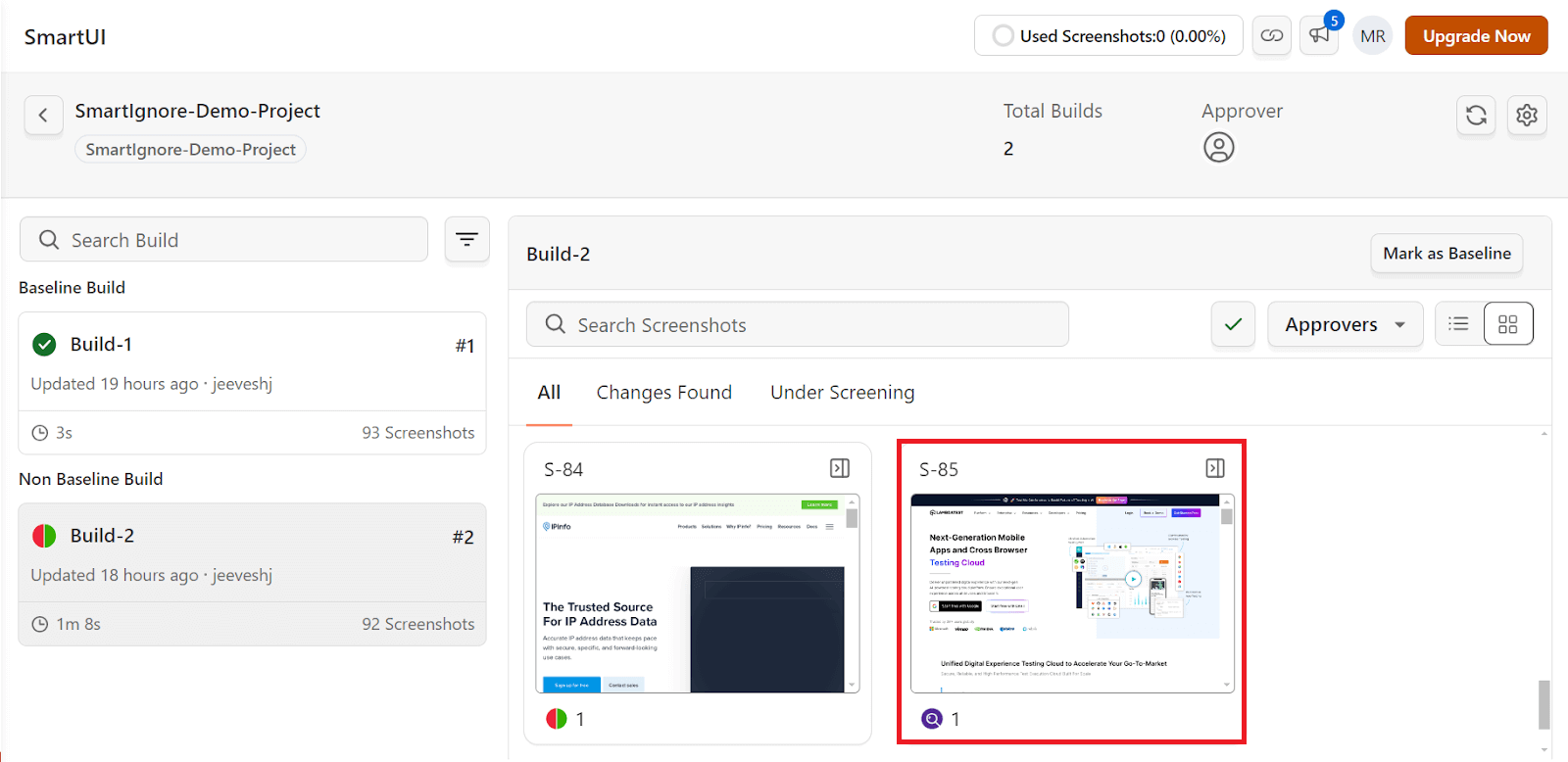
- Head over to the SmartUI dashboard. Select the project and the platform you want to test on.
- Navigate to the list of builds and select a screenshot variant from the available options.
- Next, return to the Diff Options dropdown menu. Select the Smart Ignore mode. The Smart Ignore feature filters out layout shifts and displacement-related changes that do not affect the user experience.
The Diff Options dropdown menu shows the pixel-to-pixel output. The pixel-to-pixel comparison will detect even minor visual displacement shifts in layout or element position, flagging them as differences. It can include irrelevant changes, such as button displacement or slight shifts in images, which often lead to false positives and visual noise.
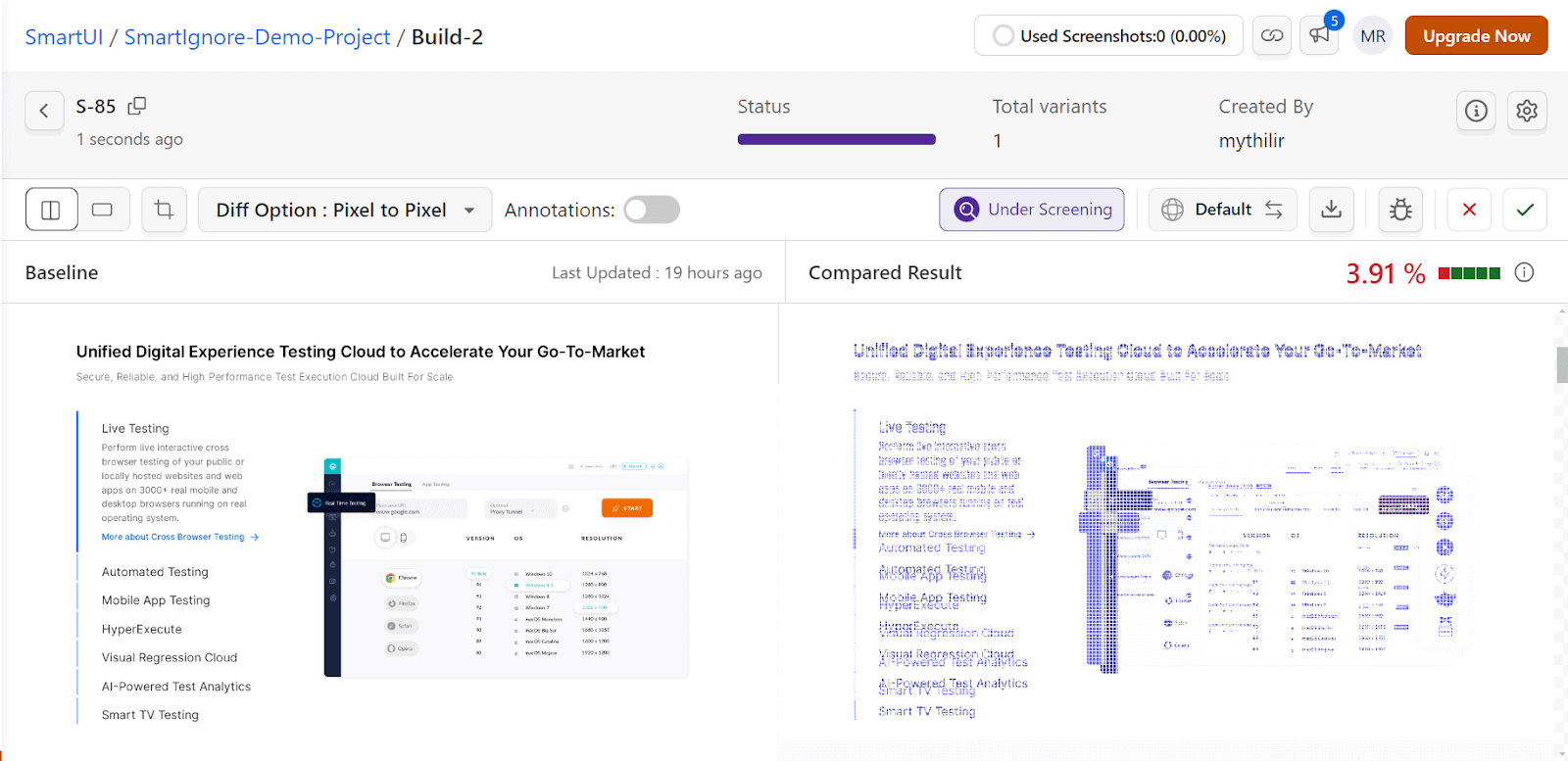
In this case, we see that the baseline image on the left is what is considered the reference layout, while the image on the right shows the current version that is being tested. The areas marked in blue on the right image indicate the detected differences.
Since this mode detects every minor pixel shift, even unintentional or irrelevant changes, it can lead to a cluttered comparison, making it challenging to identify the significant changes.
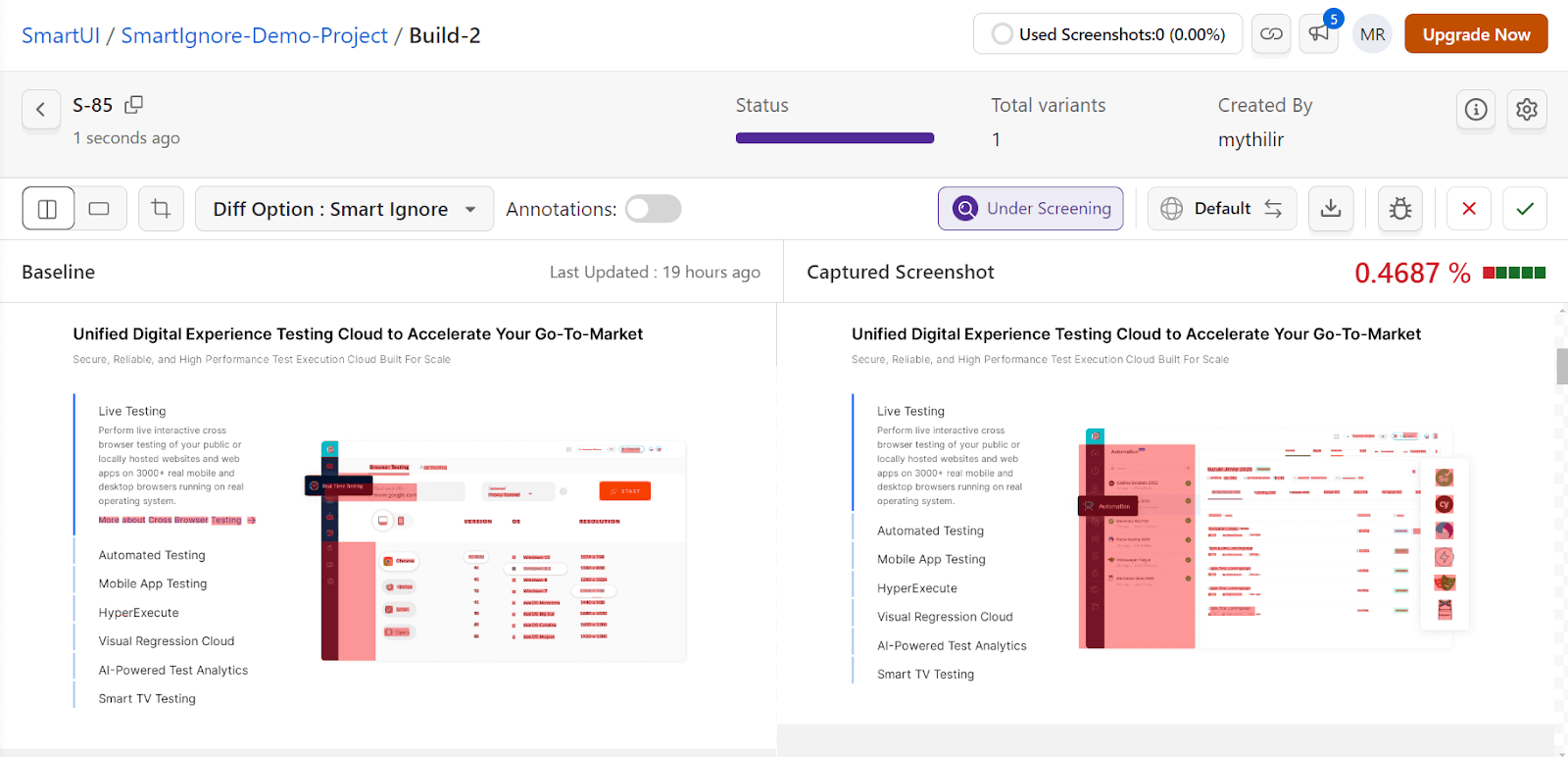
The key difference here is that Smart Ignore ignores minor shifts like slight button displacements or layout alignment adjustments. The highlighted areas are, therefore, much more refined, with fewer irrelevant changes being flagged.
As shown above, the comparison shows a much cleaner and more focused set of differences, with less visual noise compared to the previous pixel-to-pixel comparison.
How Do AI Testing Agents Use Smart Ignore Now?
An AI testing agent in a CI pipeline now reads Smart Ignore's diff classification directly from the build result and auto-approves a run when every flagged difference falls into a known noise category, instead of waiting for a person to open the diff viewer.
- Anti-aliasing at element edges: a sub-pixel rendering difference at the border of an element is discarded instead of flagged as a shift.
- Sub-pixel font rendering: the same text rendered a fraction of a pixel apart across operating systems is treated as identical, not a diff.
- Animation and transition timing: two captures taken mid-transition are matched to the same end state instead of failing the build.
- Compression artifacts: pixel noise introduced by image compression is excluded from the comparison.
- Configured dynamic regions: a region marked dynamic, such as a timestamp or an ad slot, is skipped on every run.
The feature's own support documentation puts the false-positive reduction from this classification at up to 95 percent, which is why an agentic pipeline can fold Smart Ignore into automated visual regression testing and treat a pass as a reliable gate rather than a suggestion a person still has to confirm.
Conclusion
TestMu AI Smart Ignore is a game-changing feature that enables teams to conduct more focused and efficient visual testing. Whether you’re working with frequently updated content or navigating major UI changes, Smart Ignore ensures smoother, more effective visual comparisons using a reliable visual engine.
Feel free to explore the Smart Ignore feature and see how it can enhance your testing processes. If you need assistance or have any questions, feel free to reach out to us at support@testmuai.com or via our in-app chat support. We’re here to help you at every step of your journey.
Happy testing!
Author

Mythili Raju
Blogs: 58


Mythili is a Community Contributor at TestMu AI with 3+ years of experience in software testing and marketing. She holds certifications in Automation Testing, KaneAI, Selenium, Appium, Playwright, and Cypress. At TestMu AI, she leads go-to-market (GTM) strategies, collaborates on feature launches, and creates SEO optimized content that bridges technical depth with business relevance. A graduate of St. Joseph’s University, Bangalore, Mythili has authored 35+ blogs and learning hubs on AI-driven test automation and quality engineering. Her work focuses on making complex QA topics accessible while aligning content strategy with product and business goals.


Smart Ignore FAQs
Did you find this page helpful?
More Related Blogs
TestMu AI forEnterprise
Get access to solutions built on Enterprise
grade security, privacy, & compliance
- Advanced access controls
- Advanced data retention rules
- Advanced Local Testing
- Premium Support options
- Early access to beta features
- Private Slack Channel
- Unlimited Manual Accessibility DevTools Tests