

Power Your Software Testing with AI Agents and Cloud
The Native AI-Agentic Cloud Platform to Supercharge Quality Engineering. Test Intelligently and Ship Faster.


- TestMu AI (Formerly LambdaTest)
- /
- Blog
- /
- How to Schedule Accessibility Scans: A Step-by-Step Guide
How to Schedule Accessibility Scans: A Step-by-Step Guide
Schedule accessibility scans with TestMu AI to automate compliance checks, integrate sitemaps, and ensure WCAG standards .
Last Updated on:
Accessibility test scheduling automates recurring compliance scans so a team does not have to trigger checks by hand every time a site changes. Scans run on a set daily, weekly, or monthly schedule, and a sitemap integration adds newly published pages to future scans automatically, without manual URL entry.
TL;DR
- Accessibility test scheduling runs scans automatically on a daily, weekly, or monthly cadence instead of requiring someone to start each scan by hand.
- A sitemap integration adds newly published pages to future scans automatically, so a growing site does not create gaps in WCAG coverage.
- Scheduled scans can include pages behind login authentication, which most one-off manual scans skip.
- Each scheduled scan produces a report showing violation counts, severity, and the specific pages affected, making trends visible over time.
- Editing a scheduled scan lets a team change its name, recurrence, or run time without recreating the schedule from scratch.
- An AI coding assistant can draft a fix for a flagged accessibility issue, such as a missing alt attribute, but a person still has to verify and apply it.
- TestMu AI Accessibility Test Scheduling runs recurring WCAG 2.0, 2.1, or 2.2 scans from a URL list, CSV file, sitemap, or crawler, including pages behind login.
What Is TestMu AI Accessibility Test Scheduling?
TestMu AI Accessibility Test Scheduling is a feature that automates and schedules recurring or one-time scans, ensuring dynamic content and updates are consistently tested for compliance. It ensures continuous monitoring and comprehensive coverage without requiring additional setup or intervention.
While TestMu AI Accessibility DevTools excels at manual and on-demand checks during development and Accessibility Automation automates accessibility checks, Accessibility Test Scheduling complements these tools and features by adding the ability to run compliance checks automatically at regular intervals.
It schedules scans to run daily, weekly, or monthly to ensure that newly released content complies with accessibility guidelines. By automating the process, teams can focus on fixing issues and avoid the repetitive task of manually starting tests. With Accessibility Test Scheduling, compliance checks become part of an automated routine, aligning perfectly with modern Agile workflows.

Note: Learn more about Accessibility Test Scheduling in our support documentation.
Why Use TestMu AI Accessibility Test Scheduling?
With Accessibility Test Scheduling, you can select your desired WCAG version and customize scans to focus on specific sections of your website. This flexibility ensures that testing aligns with organizational and legal requirements.
It also generates detailed accessibility reports with trends and actionable insights, making it easier to track compliance progress and address issues proactively. While TestMu AI Accessibility DevTools focuses on providing immediate, session-specific insights and Accessibility Automation delivers reports triggered per test, Accessibility Test Scheduling adds value by offering consistently generated reports over time.
TestMu AI Accessibility Test Scheduling comes with several other key features to enhance the user experience and simplify compliance processes:
- Automated Test Schedules - Automatically runs tests at set intervals, ensuring your website remains within compliance standards continuously.
- Continuous Monitoring for All Pages - Automate scans across all pages, including those behind login authentication, to ensure consistent accessibility compliance.
- Avoid Manual URL Management - With the Sitemap Extractor, eliminate the hassle of manually adding URLs. Choose to scan your entire sitemap or specific sections with ease.
- Actionable Insights - Access detailed reports with actionable recommendations, which will help you continually refine and enhance accessibility across your platforms.
How to Schedule and Edit an Accessibility Scan?
To effectively manage and ensure accessibility compliance, scheduling and editing scans is crucial. Follow these detailed steps to configure your accessibility scans according to your specific needs:
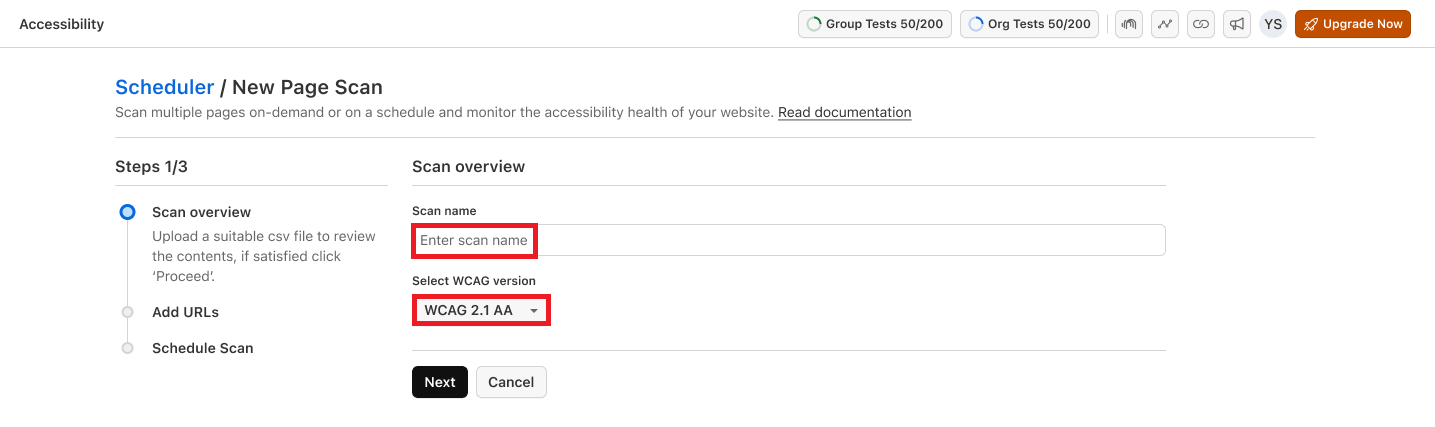
- Navigate to the Accessibility Testing Dashboard and select Schedule Scan. Enter a scan name and select the WCAG version to test against: WCAG 2.0, 2.1, or 2.2.
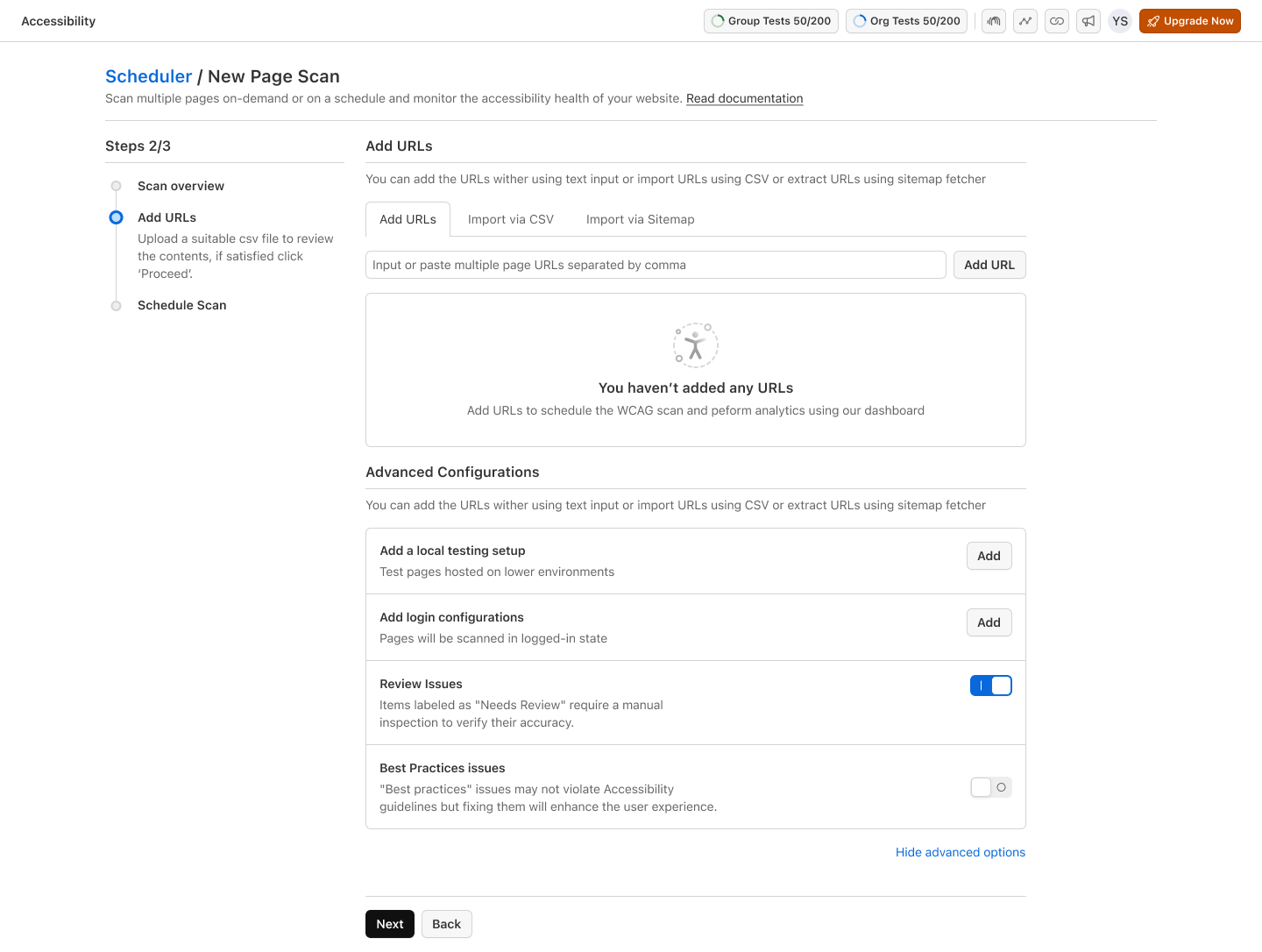
- You can add URLs by entering them manually, uploading a CSV with one URL per line, extracting them from a sitemap, or letting a crawler discover pages from a starting URL.
- Configure tunnels for local URLs, set login for restricted pages, and enable review settings.
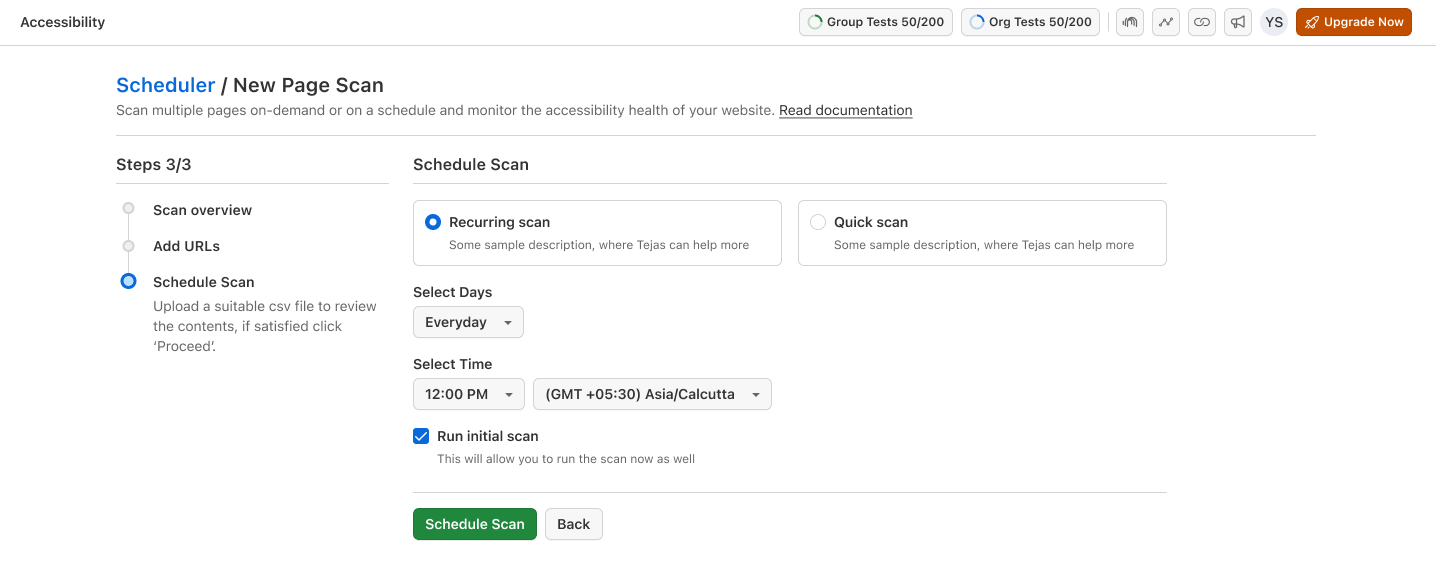
- Choose the scan type, set the frequency to daily, weekly, or monthly with the days, time, and timezone, and click Schedule Scan. You can also run an initial scan immediately.
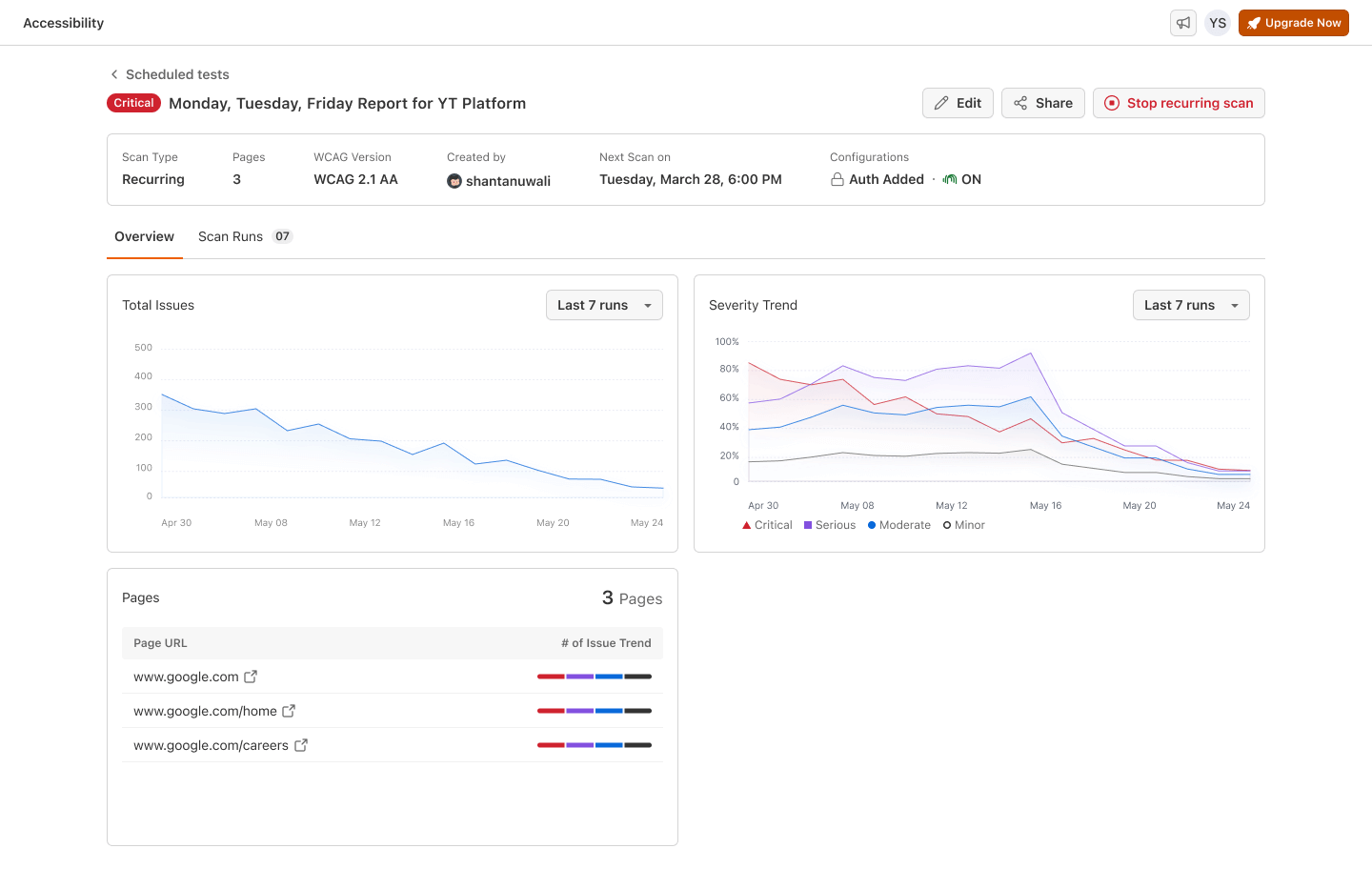
- Select and review reports from the Scan Summary list to analyze the detected issues where it shows the trends of detected issues, categorized by severity, and review the list of scanned pages with corresponding issue counts.
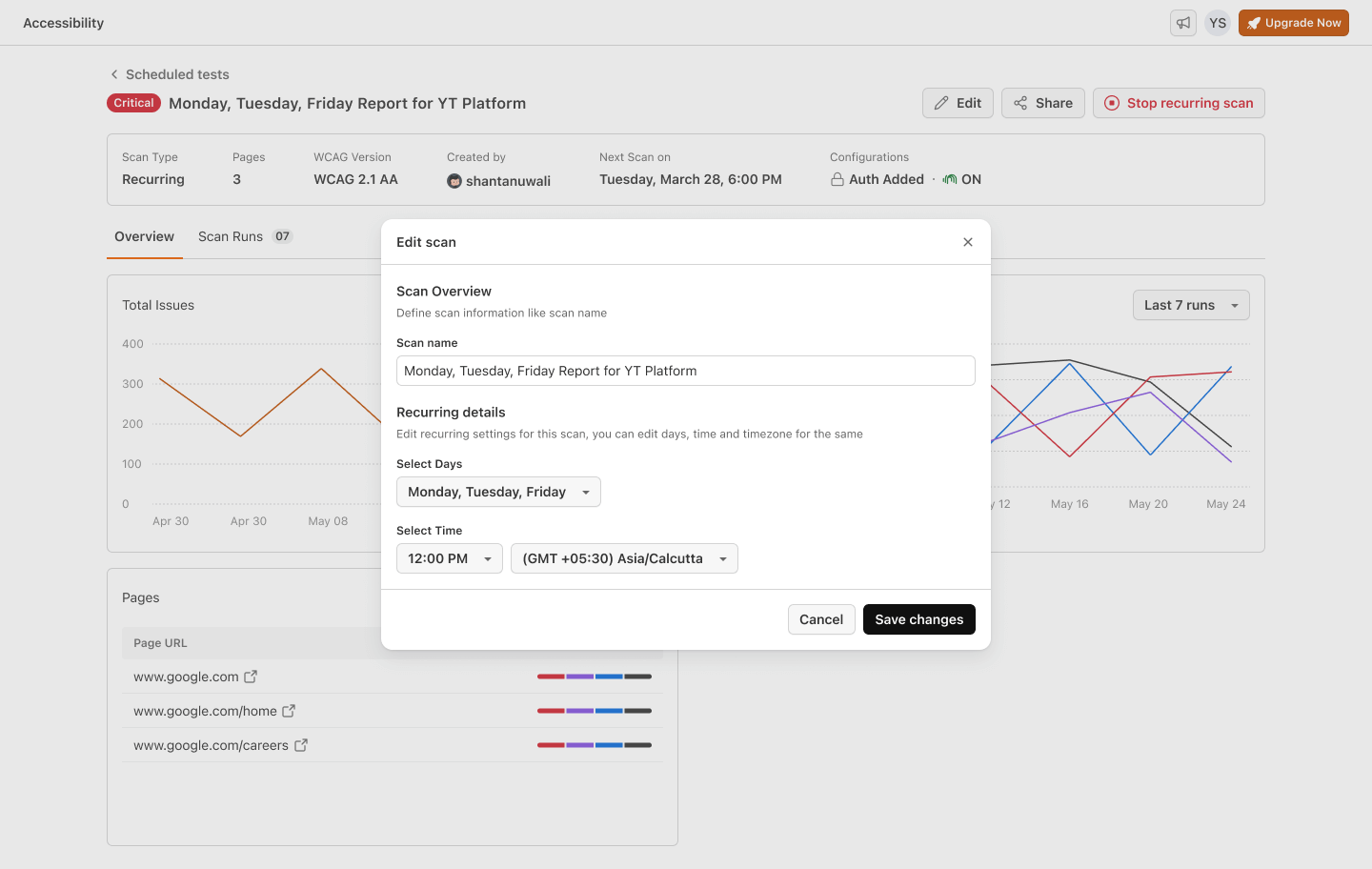
- To modify any details after setup, navigate to the Scheduled tests list, select your report, and hit Edit. Change scan names, recurrence details, and times as necessary, and save changes.
Example: Results of One Scan Run Across Five Pages
To show what a single scheduled run surfaces, I scanned five pages of the TestMu AI ecommerce playground with axe-core 4.13.0 and WCAG 2.2 Level A and AA rules, in Chrome 154 on Windows 11 on the TestMu AI cloud:
| Page | Critical issues | Serious issues | Rules that failed |
|---|---|---|---|
| Home | 1 | 14 | color-contrast, image-alt, link-name |
| Search results | 1 | 9 | color-contrast, link-name, select-name |
| Product compare | 0 | 6 | color-contrast, link-name |
| Contact | 0 | 8 | color-contrast, link-name |
| Register | 0 | 24 | color-contrast, link-in-text-block, link-name |
One run found 2 critical and 61 serious issues across five pages. Color contrast and links without an accessible name failed on every page, which is the pattern a recurring scan makes visible: shared template problems repeat on every page that uses the template, and a schedule shows whether a fix to that template actually cleared them on the next run. For guidance on which issues to fix first, see these common accessibility issues.
Sitemap Integration: Ensuring Comprehensive Coverage
A standout feature of TestMu AI's Accessibility Test Scheduling is its integration with the website's sitemap. It ensures that all pages, including newly added ones and those behind login authentication, are automatically included in the testing cycle once you save the credentials it reuses on each run.
This functionality is particularly beneficial for teams managing large or dynamic websites, where the automated inclusion of new pages in compliance scans ensures consistent testing and reduces the risk of leaving any part of the website unchecked.
With this feature, teams can confidently focus on resolving accessibility issues, knowing that their website is being tested without gaps or delays. To check the issues a scan cannot judge, pair it with the manual steps in this web accessibility checklist.
Can AI Agents Fix the Accessibility Issues a Scheduled Scan Finds?
AI coding assistants can draft a fix for many flagged issues, such as a missing alt attribute or a low contrast color pair, but a person still has to review and apply it.
- Rule-based fixes are fast - A scanner built on axe-core, the open source engine most automated tools use, names the exact WCAG rule a page fails, and an AI assistant such as GitHub Copilot can turn that into a corrected aria-label, alt attribute, or color value without a developer writing it from scratch.
- Coverage has a ceiling - Automated scans catch what is programmatically checkable, like missing alt attributes or contrast ratios, but they cannot judge whether an alt attribute's wording actually describes the image or whether a page's reading order makes sense, so some accessibility issues still need a person to confirm them.
- Sign-off still matters - Verify an AI-drafted fix against the specific WCAG success criterion it targets before it ships. A fix that is technically present, like alt text with no real description, can pass a re-scan while still failing a real user.
Conclusion
Start with a weekly scheduled scan on a subset of your most visited pages, fix the issues that repeat across templates, and move to a daily schedule once the reports are manageable. TestMu AI Accessibility Testing adds scheduled monitoring to DevTools scanning and CI/CD automation, and the accessibility test scheduling documentation covers setup, login, and tunnels.
Note: AI assistance was used in researching and updating this article. Mythili Raju wrote the article about a TestMu AI product feature, and feature details were checked against TestMu AI product documentation, following our editorial process and AI use policy.
Author

Mythili Raju
Blogs: 58


Mythili is a Community Contributor at TestMu AI with 3+ years of experience in software testing and marketing. She holds certifications in Automation Testing, KaneAI, Selenium, Appium, Playwright, and Cypress. At TestMu AI, she leads go-to-market (GTM) strategies, collaborates on feature launches, and creates SEO optimized content that bridges technical depth with business relevance. A graduate of St. Joseph’s University, Bangalore, Mythili has authored 35+ blogs and learning hubs on AI-driven test automation and quality engineering. Her work focuses on making complex QA topics accessible while aligning content strategy with product and business goals.
Reviewer

Rahul Mishra
Reviewer
Rahul Mishra is a Lead Member of Technical Staff at TestMu AI (formerly LambdaTest), leading frontend engineering and accessibility testing across the quality engineering platform. He mentors frontend engineers, runs code reviews and sprint planning, optimizes React.js rendering performance, and makes product features accessible to users with disabilities through WCAG and ADA-compliant accessibility audits. He brings 10+ years of experience across React.js, VueJS, TypeScript, Swift, Objective-C, and AWS, with earlier work as a Technical Lead at VectoScalar Technologies. Rahul holds a B.E. in Information Technology.


Accessibility Test Scheduling FAQs
Did you find this page helpful?
More Related Blogs
TestMu AI forEnterprise
Get access to solutions built on Enterprise
grade security, privacy, & compliance
- Advanced access controls
- Advanced data retention rules
- Advanced Local Testing
- Premium Support options
- Early access to beta features
- Private Slack Channel
- Unlimited Manual Accessibility DevTools Tests