

Power Your Software Testing with AI Agents and Cloud
The Native AI-Agentic Cloud Platform to Supercharge Quality Engineering. Test Intelligently and Ship Faster.


- TestMu AI (Formerly LambdaTest)
- /
- Blog
- /
- AI Agents for SDET: Workflows, Frameworks, and Pitfalls
AI Agents for SDET: Workflows, Frameworks, and Pitfalls
A practical 2026 guide to AI agents for SDETs: where they fit in the test loop, real workflows, frameworks, common failure modes, and a 90-day adoption plan.
Last Updated on:
AI agents for SDETs are autonomous systems that plan, generate, run, and debug tests on their own, with a human setting the goal and verifying the output. Capgemini's World Quality Report 2025 found 89% of organizations are piloting or deploying generative AI in quality engineering, yet only 15% have scaled it enterprise-wide.[1]
This guide covers how SDETs use agents day to day, the difference between an agent, an assistant, and a workflow, real workflows, the tools and frameworks SDETs use, where agents break, how to test AI agents, and a 90-day adoption plan.
Key Takeaways
To implement reliable AI agents for SDET workflows, use KaneAI by TestMu AI for natural-language test authoring and the Playwright MCP server to drive real browsers. Always verify agent-written tests manually, start with a single agent on bounded tasks, and set strict retry limits to prevent runaway API costs.
- Best for test reliability: Human-in-the-loop verification - SDETs must review and edit every agent-generated test before adding it to the suite, treating agent output as unverified code to prevent shipping broken tests.
- Best for UI locator accuracy: Playwright MCP server - This tool drives a real browser so the agent reads the live DOM and accessibility tree, preferring stable getByRole and getByTestId locators over brittle, hallucinated XPaths.
- Best for cost efficiency: Single-agent systems - Starting with one agent on a bounded task avoids the coordination failures and high token usage of multi-agent setups, which consume 15 times more tokens than standard chats according to Anthropic research.
- Best for budget control: Agent guardrails - Implementing retry limits, persistent state, and decision logs prevents looping agents from inflating API bills or reporting false passes without verifying assertions.
- Best for AI evaluation: Behavioral testing - Teams should evaluate non-deterministic agents by scoring consistency, hallucination rates, bias, and task completion across multiple scenarios rather than asserting a single expected string.
How Do SDETs Actually Use AI Agents Day to Day?
SDETs use AI agents for four daily jobs: generating test cases from acceptance criteria, drafting API tests against an existing collection, triaging failed builds, and exploring an app to reproduce bugs. Across teams, the same process applies: the agent drafts, the SDET reviews and edits, and only the edited output enters the suite.
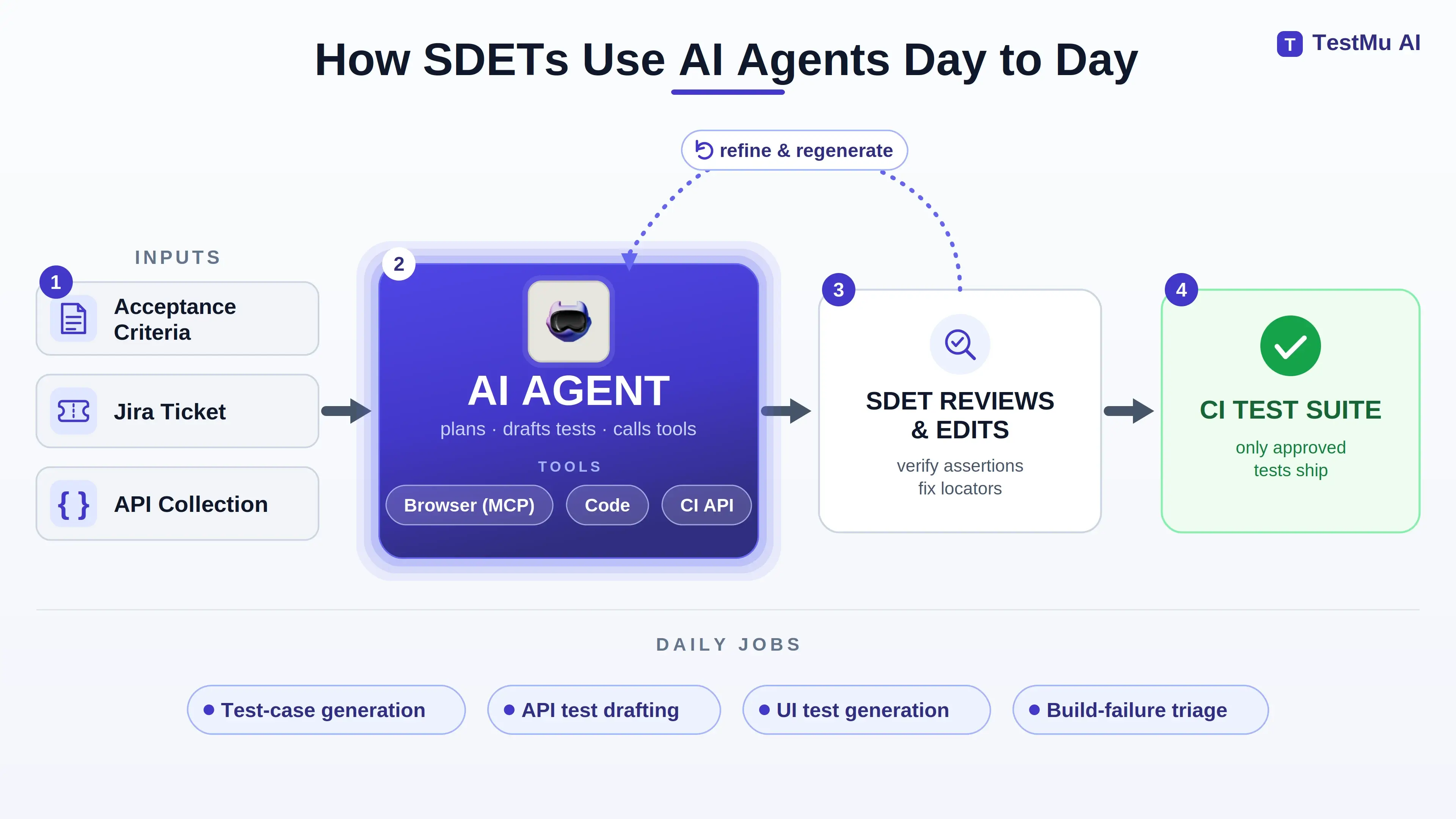
Each job has a clear pattern that works in practice:
- Test-case generation: The agent reads acceptance criteria, drafts scenarios, and emits a CSV of steps you edit and import into a tool like Azure DevOps. This is the most common daily use because the criteria are already a near-specification.
- API test drafting: Point a coding assistant at an existing collection, name the endpoint, and state what to verify, and it drafts request-and-assert tests that usually need only small edits. The explicit contract makes the output easy to check.
- UI test generation: Agents are noticeably weaker here, because they guess element locators they never saw. The working fix is an instruction file that forces ID, class, and data-testid over absolute XPaths, covered in the tools section below.
- Exploratory reproduction: An agent driving a browser to reproduce a bug succeeds about half the time in practice. It is useful enough to try, but you verify every result by hand.

I use it to generate test scenarios based on acceptance criteria and then I have it generate a test case csv file with all the steps based on the scenarios that I selected... I hate writing up test cases, so I have the GitHub Copilot do most of the work for me. I also have it create API tests for me. You can point it to the Bruno collection files, tell it which endpoint you are creating a test for, tell it what you want to test, and it will quickly generate the API tests for you.
- u/JustDesserts29, "Guys please tell how you are best using Ai as SDET", r/QualityAssurance (Source)
Agents are strong on API and scenario work and weak on UI locators. Check the UI tests an agent generates before adding them to the suite, because they are the most likely to be flaky. If locator churn is the part that keeps costing you rework, a QA agent built for the job authors those steps from natural language and self-heals them when the UI shifts, leaving your review time for the assertions rather than the selectors.
This is why the SDET role is changing rather than disappearing. SDETs add value by defining what to test, choosing edge cases, judging where an agent will misjudge, and understanding business impact the agent misses. For more on that broader shift, see ai in software testing.
What Is the Difference Between an AI Agent, an AI Assistant, and a Workflow for SDETs?
An AI assistant answers a prompt inside a chat and stops. A workflow runs an LLM through predefined code paths you control. An agent lets the LLM direct its own steps and tool calls to finish a task. Risk rises in the same order: an assistant cannot break your pipeline, a workflow fails predictably, and an agent can take an action you did not foresee.
The difference decides how much guardrail each one needs. Anthropic's engineering team defines it directly: "Workflows are systems where LLMs and tools are orchestrated through predefined code paths. Agents, on the other hand, are systems where LLMs dynamically direct their own processes and tool usage, maintaining control over how they accomplish tasks."[2]
| Attribute | AI Assistant | Workflow | AI Agent |
|---|---|---|---|
| What it does | Answers a prompt inside a chat and stops | Runs an LLM through predefined code paths | Directs its own steps and tool calls to finish a task |
| Who directs the steps | The human, one prompt at a time | Your code | The agent itself |
| Typical SDET use | Draft a test snippet or explain a failure in chat | A fixed test suite with one model-driven assertion | Read a failed build, find a root cause, open a ticket |
| Failure behavior | Cannot break the pipeline | Fails predictably along the coded path | Can take an action you did not foresee |
| Guardrail needed | None | Low | Retry caps, token budgets, and approval gates |
A workflow runs the steps your code defines in the order your code defines them. An agent decides the order itself at runtime, which is the defining property of Agentic QA. That control makes an agent more capable and harder to predict.
For a concrete example of this distinction in the Playwright stack, this guide to AI and Playwright MCP walks through the Planner, Generator, and Healer agents and how they decide the next action by inspecting the live accessibility tree rather than following a fixed script.
For an SDET, this maps to a concrete choice. A test suite that always runs the same steps with one model-driven assertion is a workflow, and a workflow engine is the right home for it. A system that reads a failed build, decides which logs to pull, forms a root-cause hypothesis, and chooses whether to open a ticket is an agent, and it needs caps and approval gates the workflow never did.
Anthropic's own advice is to "find the simplest solution possible, and only increasing complexity when needed," because agentic systems "trade latency and cost for better task performance."
Most testing tasks are workflows with an AI step, not full agents. Anthropic states the same trade-off, advising teams to start with the simplest setup and add agent autonomy only when the task needs it.
If the process is deterministic with AI at the decision points, a workflow engine is the safer default. Reach for a full agent only when the task genuinely needs the model to choose its own path. To go deeper on the agent-versus-autonomy spectrum, see multi-agent AI systems.

Note: Author and export end-to-end web and mobile tests from natural language with KaneAI by TestMu AI. Try it free.
What Real SDET Workflows Run on AI Agents?
Four workflows show up repeatedly in SDET practice: test generation from criteria, API test drafting against a collection, build-failure triage, and agent-assisted onboarding to an unfamiliar app. Each works because it is a bounded task with a clear input and a checkable output, which is exactly the shape an agent handles well.
1. Test generation from acceptance criteria. The agent reads the criteria or a Jira ticket, drafts scenarios, and emits structured steps you can import. This works because acceptance criteria are already close to a specification, so the agent translates them rather than inventing them.
It still needs a human review because the agent produces plausible-but-wrong assertions, so the edit pass is required.
2. API test drafting. Point the agent at an existing collection, name the endpoint, state what to verify, and it drafts the request-and-assert tests. API tests are the agent's strongest area because the contract is explicit and the output is easy to check against a known schema, which is why this workflow usually needs only small edits.
3. Build-failure triage. This is the workflow with the clearest payoff. An agent watches failed builds, groups similar failures, finds a likely root cause, and opens a ticket automatically. Industry write-ups describe teams cutting triage time meaningfully with exactly this pattern, because grouping and first-pass root cause is pattern work, the repetitive part of triage that does not use their judgment.[3]
4. Onboarding the agent to an app, then automating. Before asking an agent to write tests, walk it through the app to build a knowledge base it can reason against, then write automation together and iterate until a test is stable enough for the CI suite.
An agent that has context on your app produces better tests than an agent working from a single prompt, and building that context up front saves time on every later test.
Decide who owns unit-test coverage early. Agents lower the cost of writing unit tests enough that an SDET can own coverage directly and do the repetitive work instead of waiting on developers, which also strengthens the regression testing suite over time.
High coverage from agent-written tests is only worth it if each test is reviewed. An unreviewed coverage number does not tell you the tests are correct.
What AI Tools and Frameworks Do SDETs Use to Run Agents?
SDETs use three layers of tooling: coding assistants for day-to-day test code, agent frameworks for multi-step autonomy, and the Model Context Protocol (MCP) to connect either to real tools like a browser. The single most important tool for UI work is the Playwright MCP server, because it fixes the locator-guessing problem directly.
- Coding assistants (GitHub Copilot, Claude Code, Codex): Sit inside the editor and handle generation, review, and refactoring of test code. They cover most daily SDET work, and the paid tiers are worth it once the agent is doing real volume.
- Agent frameworks (LangGraph, CrewAI): Enter when a task needs the agent to direct its own multi-step process. LangGraph fits long-running, stateful agents like an overnight triage agent; CrewAI fits role-based crews where a generator agent hands off to a reviewer agent. Both are MIT-licensed and free at the core.
- Playwright MCP server: Drives a real Chromium browser so the agent reads the live DOM and accessibility tree and generates tests from actual page state instead of guessing selectors. This is the fix for agent-written UI flakiness.
- Open-source SDET agent projects: Community projects on GitHub wire a multi-agent crew to a browser tool to turn a user story into end-to-end tests across Selenium, Playwright, and Cypress. They are worth studying for the wiring even when they are not yet production-ready.
The locator problem is where agent-written UI tests most often fail. When an agent generates UI tests from a prompt alone, it guesses selectors it never saw, and those guesses default to absolute XPaths that break on the next layout change.
The Playwright MCP server fixes this. Because the agent reads the accessibility tree, it prefers Playwright's recommended getByRole and getByTestId locators over brittle XPaths, which is the same locator-rules discipline experienced SDETs already enforce by hand with instruction files.[4]
An agent that inspects the browser reads the real selectors, while an agent that skips that step invents them.
Frameworks require upfront engineering work. A framework gives you persistence, checkpointing, and human approval gates, and you write the code to wire them up. For a side-by-side of these and the no-code options, see this roundup of ai agent builders.
Writing and maintaining every test by hand is slow, and turning acceptance criteria, PRDs, and Jira tickets into reviewable tests is repetitive manual work that takes time away from a sprint. KaneAI by TestMu AI is a purpose-built test-authoring agent for that work: it plans, authors, and runs end-to-end web and mobile tests from natural-language prompts, and converts PRDs, Jira tickets, and other formats into structured test cases.
It targets the exact problem SDETs script by hand: turning acceptance criteria into reviewable tests without you writing every selector. Relevant capabilities for SDET work:
- Natural-Language Authoring: Plan, author, and run web and mobile test cases from prompts, with smart element detection that reduces the locator guesswork agents struggle with.
- Jira and File Input: Convert Jira tickets, PRDs, PDFs, and spreadsheets into structured test scenarios, the same input-to-test step SDETs script manually with a coding assistant. Keeping those generated cases traceable back to the ticket is covered in our Jira test management guide.
- Framework Export: Export the generated automation to Playwright, Selenium, Cypress, or Appium, so the output drops into an existing suite instead of locking you in.
You can read the getting started with KaneAI documentation to see the authoring and export flow in detail.

Where Do AI Agents Break in Production?
AI agents break in production in four ways, and none are model-quality problems you can prompt away. They are system-design problems an SDET has to engineer against:
- Runaway tool loops: An agent stuck in a retry loop keeps calling tools and spending tokens. A multi-agent system already uses about 15 times the tokens of a plain chat, so a loop costs more than a flaky script does.
- Silent passes: The agent reports a test passed without verifying the assertion against the real page, and you find out in production. This is the most damaging failure for an SDET.
- Hallucinated locators: The agent invents selectors it never inspected, defaulting to absolute XPaths that break on the next deploy.
- Compounding coordination errors: When agents hand off to each other, one bad step propagates to the next. Adding a second agent increases the number of ways the system can fail instead of dividing the work.
The reason a small failure becomes a large one is structural. Anthropic's engineering team is direct: agents "run for long periods of time, maintaining state across many tool calls," so "minor system failures can be catastrophic for agents," and "one step failing can cause agents to explore entirely different trajectories."[5]
A scripted test fails once, but an agent that takes a wrong step can keep acting on it for dozens of steps. To contain this, set a hard retry cap, a per-run token budget, and a decision log that records each step so a failed run can be debugged.
Coordination makes this worse: when agents hand off to each other, one bad step propagates, so every added agent adds more ways the system can fail.
For an SDET, most of these failures are not bad LLM answers but bad specification, coordination, and verification, which are the parts you design rather than the parts the model owns. The safest default is one agent owning a complete, checkable unit of work, with a handoff only where the task genuinely splits.
Industry coverage of agent-driven testing adds three more field pitfalls: poor training data leading to unreliable predictions, blind trust in agents without human validation, and a lack of explainability that makes a failed run hard to justify to stakeholders.[3] To prevent all three, treat agent output as unverified until a human or a deterministic check confirms it.
When I paired Claude Code with a Playwright suite on an Angular Material app, the agent kept generating selectors against the runtime-only attributes Angular Material assigns. Roughly half the selectors broke between releases. I pinned the project prompt to use data-testid only and routed the agent through the Playwright MCP server to read the live DOM.
After that change, selector stability returned to above 90% and the breakage between releases mostly stopped. The agent could not produce stable locators from a prompt alone; it needed to read the page.
The silent pass is also the failure Agent Assurance by TestMu AI is built to catch. Point it at the codebase of an agent you own and it derives the test suite itself, generating functional, non-functional, and adversarial scenarios such as prompt injection, tool misuse, and instruction override. It then invokes the agent for real and grades each criterion against observed evidence (the files that changed, the artifacts produced, the tool calls made) rather than the agent's own report of the run, returning Pass, Fail, or Unable to Verify with the assurance gap shown beside the pass rate. In CI, its exit codes separate "the agent did something wrong" from "we could not test it", so a harness limitation never reads as a bug in your agent.
Note: You cannot regression-test a vibe, and you cannot gate CI on an agent's own account of what it did. Early access is opening in batches. Join the Agent Assurance waitlist
Are AI Coding Assistants Like Claude Code, Codex, and Copilot Enough for SDET Testing?
No. AI coding assistants like Claude Code, Codex, and GitHub Copilot are strong at authoring test code, but on their own they do not cover real testing needs, because authoring, execution, visual checks, and validating AI features are different problems at different levels of testing.
While testing across a full test cycle with an AI coding assistant, the following bottlenecks showed up:
- Context bottleneck: over a long run it loses the application state and earlier test context that multi-step flows and large suites depend on.
- Execution bottleneck: it authors tests but cannot run the suite at scale across browsers and devices or orchestrate it inside CI.
- Visual bottleneck: it cannot diff the UI pixel by pixel, so visual regressions and layout breaks slip through.
- AI-feature bottleneck: it cannot judge a non-deterministic AI feature for consistency, hallucination, or bias.
- Verification bottleneck: it cannot tell a passing test from a correct one, so it writes plausible-but-wrong assertions and silent passes that a human has to catch.
These are strong authoring co-pilots, not a full quality layer.
SDET and engineering teams need a coordinated ecosystem of purpose-built AI agents that together form an end-to-end quality layer, which is how TestMu AI's agent suite is built for enterprise scale.
Each agent owns a level of the test cycle:
- KaneAI (test authoring): Plans, authors, and runs end-to-end web and mobile tests from natural-language prompts, and converts PRDs and Jira tickets into structured test cases. This is the creation layer and the flagship of the suite.
- HyperExecute (test execution and orchestration): Runs those tests at scale with smart distribution and automatic retries, executing up to 70% faster than a traditional grid so the suite runs fast enough for CI/CD.
- Visual Testing Agent (SmartUI): Detects visual regressions across browsers and devices with AI-native noise reduction, catching pixel-level UI breaks that functional tests miss.
- Agent Testing (validating AI features): Validates chatbots, voice agents, and phone agents for hallucination, bias, toxicity, and context awareness across thousands of scenarios, the non-deterministic half of the modern SDET role.
- Supporting agents (accessibility, auto-healing, orchestration, root-cause): Accessibility, Auto Healing, Test Orchestration, Test Management, Test Insights, and Root Cause Analysis agents cover WCAG scanning, flaky-test repair, scheduling, and failure analysis across the rest of the loop.
An SDET needs coverage at every level, not one tool applied to all of them. An ecosystem that hands off between authoring, execution, visual, and AI-feature validation is what an end-to-end quality layer means in practice.
Build an end-to-end AI agent quality layer

What Is a 90-Day AI Agent Adoption Plan for SDETs?
A 90-day AI agent adoption plan for SDETs is a staged rollout that moves a team from one coding assistant on one bounded task to a reviewed, capped, agent-assisted workflow inside CI. The sequence matters: baseline your current effort first, automate the safest task next, add the browser and guardrails second, and only move an agent into CI once a single agent is reliable.
Days 1-30: Baseline and One Bounded Task
Record how long your team currently spends authoring tests and triaging failures, so you can prove the change later. Install one coding assistant such as Claude Code, GitHub Copilot, or Codex, and point it at the single safest task: drafting API tests against an existing collection, reviewed and edited before merge. Write a locator-rules instruction file now, prefer ID, role, and data-testid and ban absolute XPaths, so every later UI test inherits it.
Days 31-60: Add the Browser and Set Guardrails
Add the Playwright MCP server so the agent reads the live DOM instead of guessing selectors, and start generating reviewed UI tests. Put hard caps in place before you scale: a retry limit, a per-run token budget, and a decision log. In this phase, confirm by running them that your agent-written tests stay stable across a release, because the silent-pass failure appears here.
Days 61-90: Move One Agent Into CI
Move a bounded agent into CI, with build-failure triage as the highest-payoff first candidate, and gate every consequential action behind a human approval or a hard cap. Keep the agent's scope narrow: it reads logs, groups failures, and suggests a root cause, but a human still approves the ticket it opens. Add a second agent only when one task clearly hands off to another, because every added agent adds coordination failure modes.
The skills to build alongside the tooling are prompt and context engineering, a working understanding of how LLMs fail, MCP and tool integration, and the verification judgment that turns agent output into trustworthy tests.
The coding and framework foundations do not go away; reading and fixing agent-generated Playwright and Selenium is now a daily task. For the language layer underneath, Selenium remains a core skill, and sharpening prompt engineering is the fastest single lever on agent output quality.
Will AI Agents Replace SDETs?
No. AI agents shift the SDET role toward orchestration, oversight, and verification rather than eliminating it. The job moves from writing every line of test code to deciding what to test, setting guardrails, reviewing agent output, and testing the agents themselves, work that grows in importance as more of the routine authoring is handed off.
In practice, the SDET role shifts along five lines:
- From authoring to orchestration: You direct agents across generation, execution, and triage instead of writing every test by hand, then own the loop that turns their drafts into a trustworthy suite.
- From running tests to setting guardrails: Retry caps, token budgets, decision logs, and approval gates become core deliverables, because an unbounded agent is a common cause of a failed test run.
- From writing assertions to reviewing output: Every agent-written test is code that needs a human read before it enters the suite, so judgment on what is plausible-but-wrong becomes a daily skill.
- From testing software to testing agents: AI agent testing for consistency, hallucination, and bias is now half the job, and it needs evaluation methods deterministic scripts never required.
- From coding alone to prompt and context engineering: The coding and framework foundations stay, and prompt engineering, MCP integration, and verification judgment are added on top as the main controls on agent output quality.
In this TestMu Conf 2026 session, Adeel Mansoor takes the same five shifts from the skills side and lays out what an SDET, a software engineer who lives in the quality space, needs to carry into the agentic era, in The New Skill Stack for SDETs in the Agentic Era.
The data backs the shift rather than a replacement. Capgemini's World Quality Report 2025 found 89% of organizations are piloting or deploying generative AI in quality engineering, yet only 15% have scaled it enterprise-wide, and non-adoption actually rose to 11%.[1] The report frames the shift as collaborative intelligence, where AI augments core testing work instead of replacing human judgment.
Anthropic's engineering team reaches the same conclusion from the agent side: "Human evaluation catches what automation misses," and "even in a world of automated evaluations, manual testing remains essential."[5] Human oversight is not a temporary phase. It is the part of the role that grows in importance.
Agents take over the repetitive authoring. The remaining human work, defining intent, judging edge cases, and verifying output, is the harder part of the job. The SDETs who do well direct the agent, check its output, and review every test it writes before trusting it.
Conclusion
AI agents do not replace SDETs; they shift the role to orchestration, guardrails, and verification. A single coding assistant authors tests well but cannot cover execution, visual checks, or AI-feature validation, so a coordinated suite of purpose-built agents, like KaneAI for authoring alongside the rest of TestMu AI's agents, is what covers the full test cycle. For a tool-by-tool view of the options, see this breakdown of AI agents for software testing.
Start with one bounded task and the 90-day plan: generate, review, cap, and verify, then add a second agent only when one task clearly hands off to another. If you are choosing the layer underneath, this roundup of LLM agent frameworks is a good next read.
Citations
- [1] World Quality Report 2025: AI Adoption Surges in Quality Engineering - Capgemini, OpenText, Sogeti (November 2025)
- [2] Building Effective Agents - Anthropic Engineering (December 2024)
- [3] How SDETs Are Using AI Agents to Test Smarter, Not Harder - Neova Solutions (2025)
- [4] How to Integrate Playwright MCP for AI-Driven Test Automation - Microsoft Community Hub (2026)
- [5] How We Built Our Multi-Agent Research System - Anthropic Engineering (June 2025)
Author

Prince Dewani
Blogs: 30

Prince Dewani is a Community Contributor at TestMu AI specializing in AI agents, software testing, QA, and SEO. He is certified in Selenium, Cypress, Playwright, Appium, Automation Testing, and KaneAI, and presented academic research on AI agents at PBCON-01. At TestMu AI, he has also carried out extensive cross-browser research on the support of modern web technologies such as WebGPU, WebAssembly, WebXR, WebGL2 and other web technologies, validating their compatibility and feature parity across major browsers and rendering engines through rigorous hands-on testing. Prince has hands-on experience building AI agent workflows using Anthropic Claude, Google Antigravity, n8n, LangChain, and other agentic frameworks, and works regularly with MCP and A2A protocols. He shares his work with 5,500+ QA engineers, developers, DevOps experts, tech leaders, and AI agent practitioners on LinkedIn.
Reviewer

Sri Harsha
Reviewer
Sri Harsha is Engineering Manager of the Open Source Program Office at TestMu AI (formerly LambdaTest), where he leads open-source engineering behind the Selenium and Appium automation grid and builds agentic AI systems for quality engineering. He is a member of the Selenium Technical Leadership Committee and a committer to WebdriverIO and Appium, and was recognized with the LambdaTest Delta Award 2023 for Best Contributor in open-source testing. He brings over 10 years of experience in software testing and automation, with earlier roles at EPAM Systems and ZenQ. Sri Harsha holds a B.Tech in Computer Science from Jawaharlal Nehru Technological University.


AI Agents for SDET FAQs
Did you find this page helpful?
More Related Blogs
TestMu AI forEnterprise
Get access to solutions built on Enterprise
grade security, privacy, & compliance
- Advanced access controls
- Advanced data retention rules
- Advanced Local Testing
- Premium Support options
- Early access to beta features
- Private Slack Channel
- Unlimited Manual Accessibility DevTools Tests