

Power Your Software Testing with AI Agents and Cloud
The Native AI-Agentic Cloud Platform to Supercharge Quality Engineering. Test Intelligently and Ship Faster.


- TestMu AI (Formerly LambdaTest)
- /
- Blog
- /
- April'26 Updates
April'26 Updates: Browser Cloud, KaneAI While Loops, iOS VoiceOver & More
What's new at TestMu AI in April: Browser Cloud, KaneAI While Loops, iOS VoiceOver on real devices, and updates across HyperExecute and Test Manager.
Last Updated on:
Last month, we focused on giving you more places to run your tests and more control over how you author them. Whether it's spinning up browsers on demand for AI agents, building smarter flows in KaneAI, running accessibility checks on real iOS devices, or organizing test runs around your project structure, April brought updates across the board.
Here's everything that shipped.
Introducing Browser Cloud on TestMu AI
Running browsers for testing, scraping, or AI agent workflows no longer requires standing up your own infrastructure. Browser Cloud on TestMu AI gives you on-demand access to 3,000+ browser and OS combinations, with sub-second startup and sessions that run up to 24 hours.
- Framework-agnostic SDK: Connects with Playwright, Puppeteer, Selenium, or your own AI agent integrations to spin up hundreds of headless browsers on demand.
- Session persistence: Keeps cookies, local storage, and login state across runs so you never re-authenticate or rebuild context.
- Geo-targeted proxies: Runs your agents from 180+ geolocations to validate region-specific content, pricing, and experiences.
- Built-in stealth: Avoids bot detection out of the box so your automation stays uninterrupted.
- Full observability: Live sessions, video replays, network and console logs, and step-by-step command playback for fast debugging.
- Local testing tunnel: Reaches apps behind your firewall or VPN without exposing them to the public internet.
To get started, check out the support documentation on What is Browser Cloud.
KaneAI: New Features and Enhancements
This release introduces a wave of upgrades to KaneAI, from loop support and inline variable replacement to network-level assertions and centralized admin controls for AI features.
While Loop Support
You can now repeat a block of test steps in KaneAI for as long as a condition holds true. No workarounds, no duplicated steps, just a loop that keeps running until your condition is met.
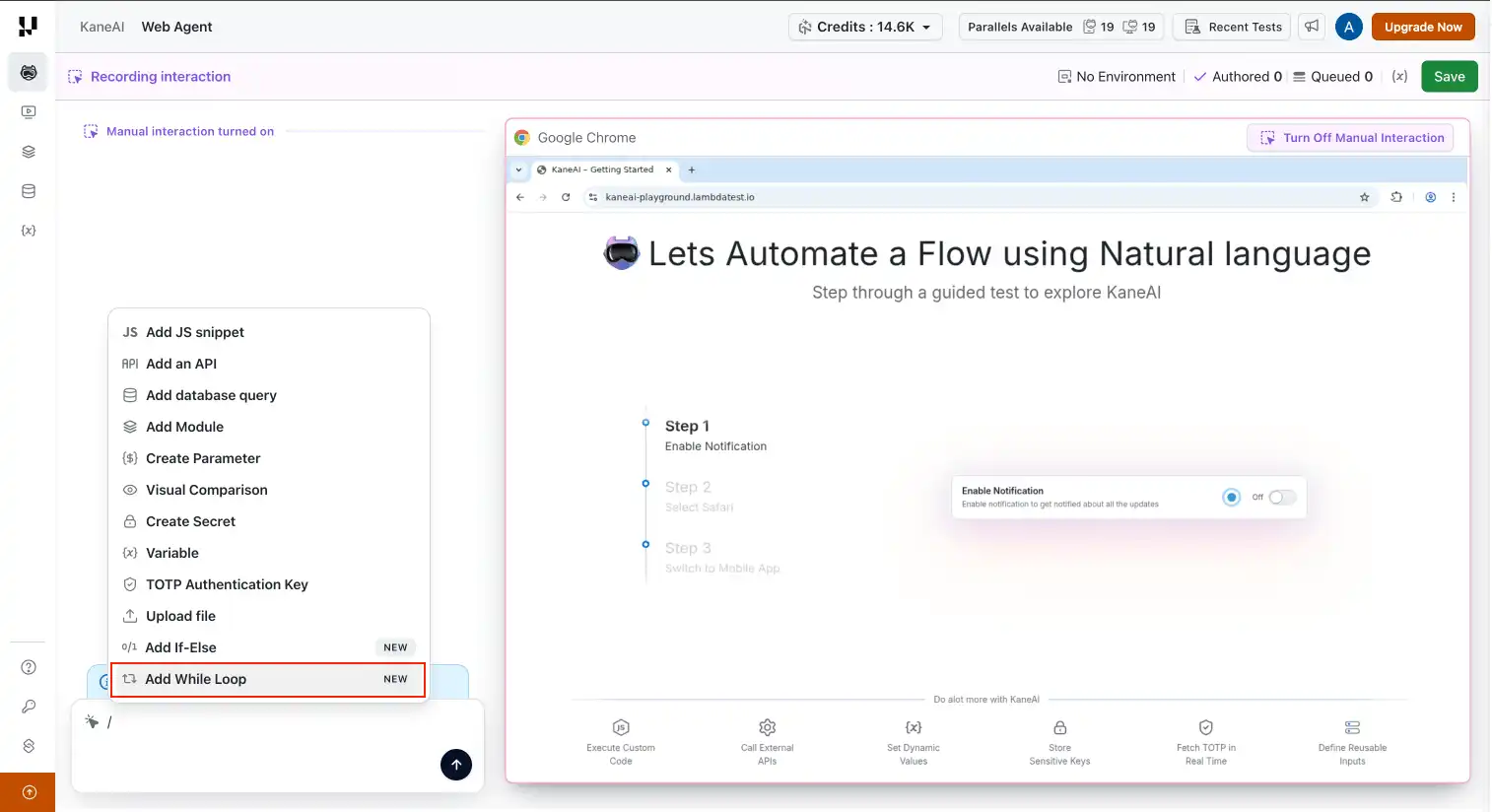
- Natural language conditions: Describe your loop condition the same way you author any other KaneAI step, in plain language that captures what you expect.
- Explicit condition builder: When you want more precision, define your condition directly with operands and operators for full control over the logic.
- Flexible step blocks: Drop any sequence of steps inside the loop body, including interactions, assertions, and waits.
Build efficient, repeatable automation flows with the new While Loop support in KaneAI.
Inline Variable Replacement
You no longer need to delete or re-record a step to make a value reusable. While reviewing a Manual Interaction step in KaneAI, highlight any hard-coded value in the instruction and swap it inline with a Parameter, Variable, or Secret.
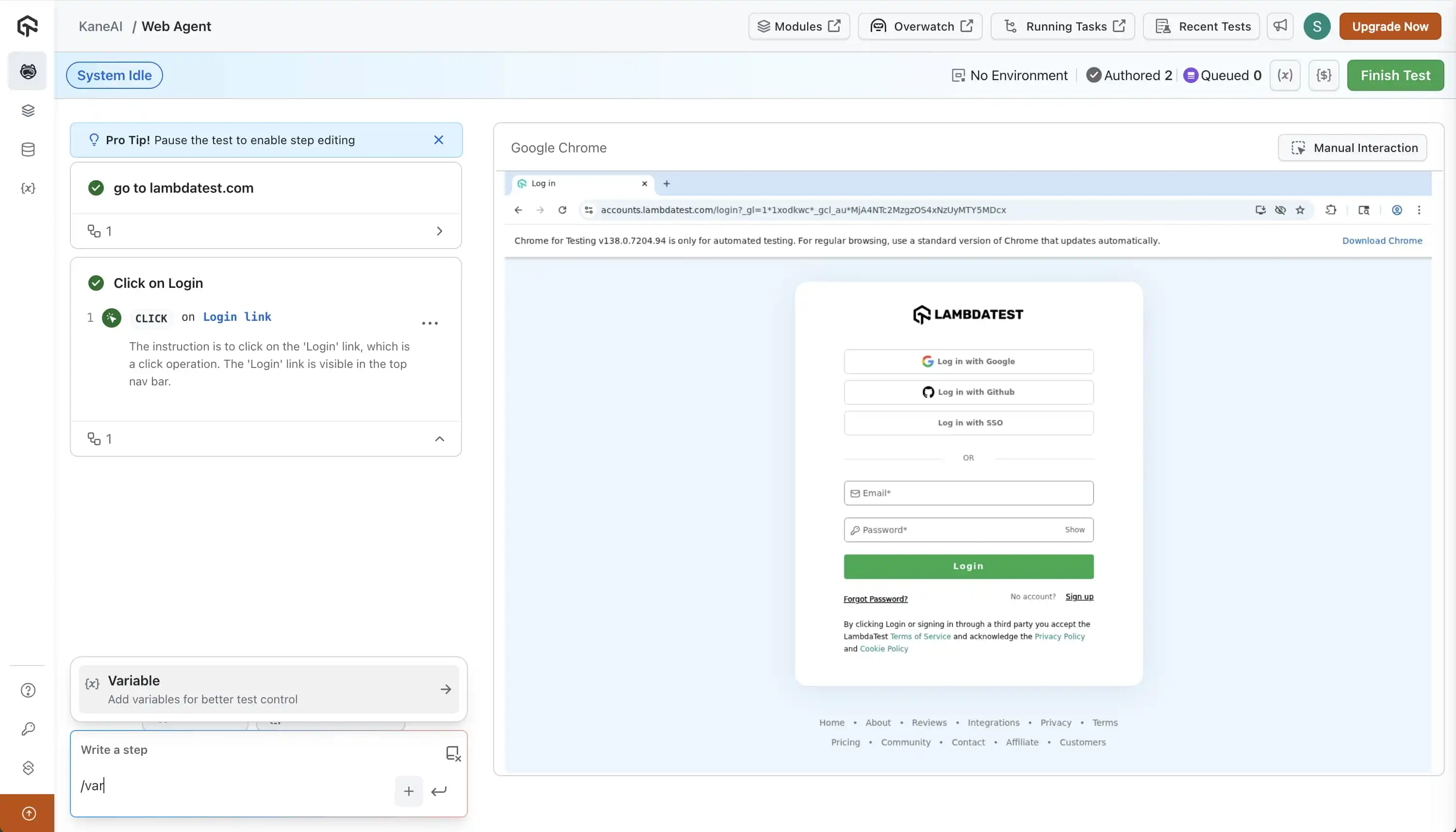
- Parameters: Plug in a test-level parameter to drive the same step with different inputs across runs.
- Variables: Reference a variable to keep values dynamic and consistent across multiple steps.
- Secrets: Replace sensitive values like passwords or tokens with a secret reference, so nothing is stored in plain text.
Works on both Desktop and Mobile App Manual Interaction sessions, with the rest of your steps left exactly as recorded. Explore how Variables in KaneAI make your test flows more dynamic and reusable.
Network Assertions in Mobile App and Web Sessions
You can now validate what's happening at the network layer directly inside your KaneAI test sessions, for both mobile app and web. No external tools or manual log inspection needed.
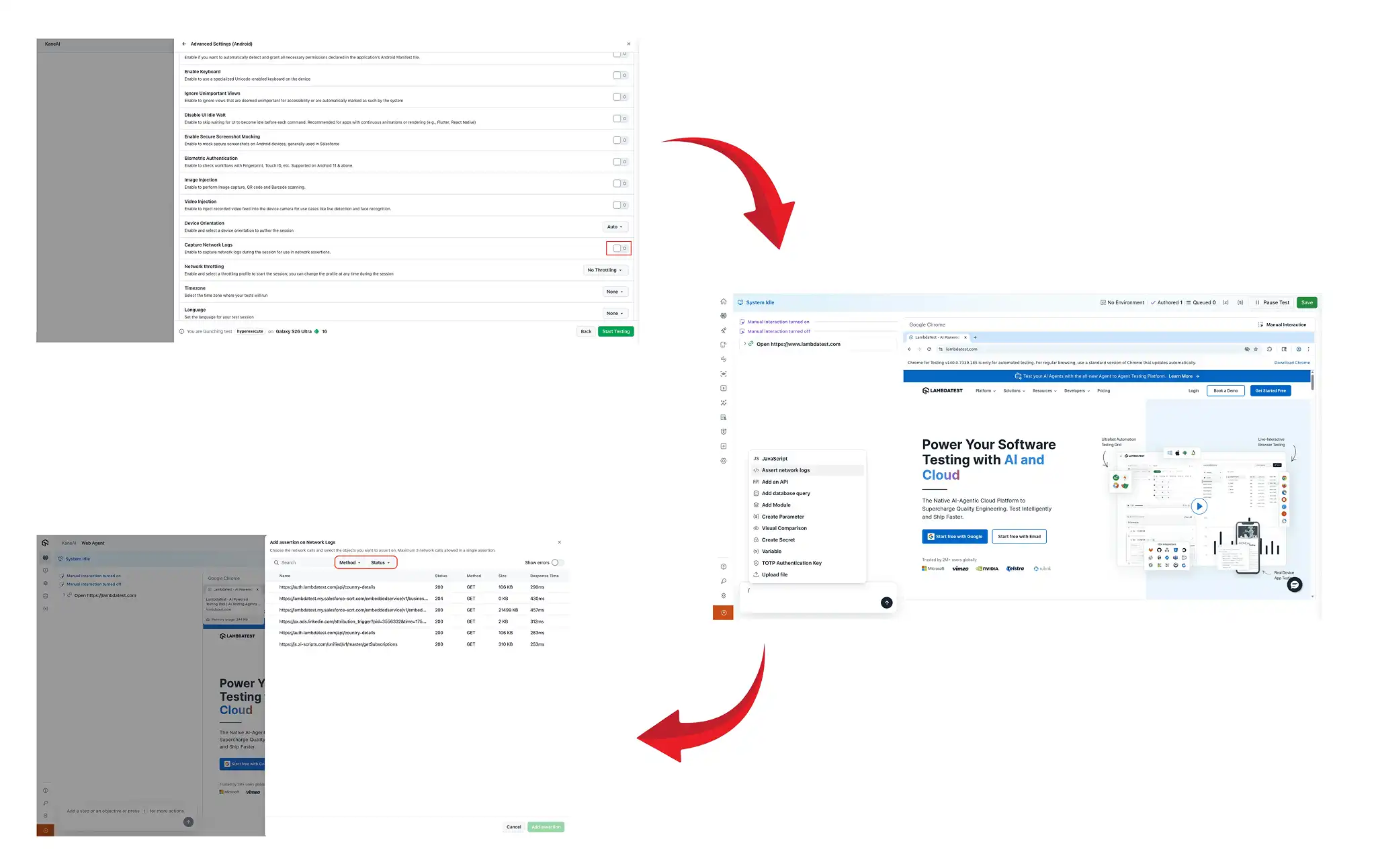
- API call validation: Confirm the specific endpoints you expect are actually called during your test flow.
- Response code checks: Assert on response status codes so failures surface as test failures, not silent bugs.
- Payload assertions: Verify that request and response bodies carry the data you expect.
- Request timing: Make sure network calls complete within acceptable time thresholds.
Strengthen your test coverage with built-in Network Assertions in KaneAI.
Admin Controls for AI Capabilities
Admins now get a single, centralized control to manage AI features across the entire TestMu AI platform. One toggle, one place, full control.
Go to TestMu AI (Formerly LambdaTest) for AI-powered cross-browser and mobile app testing at scale.
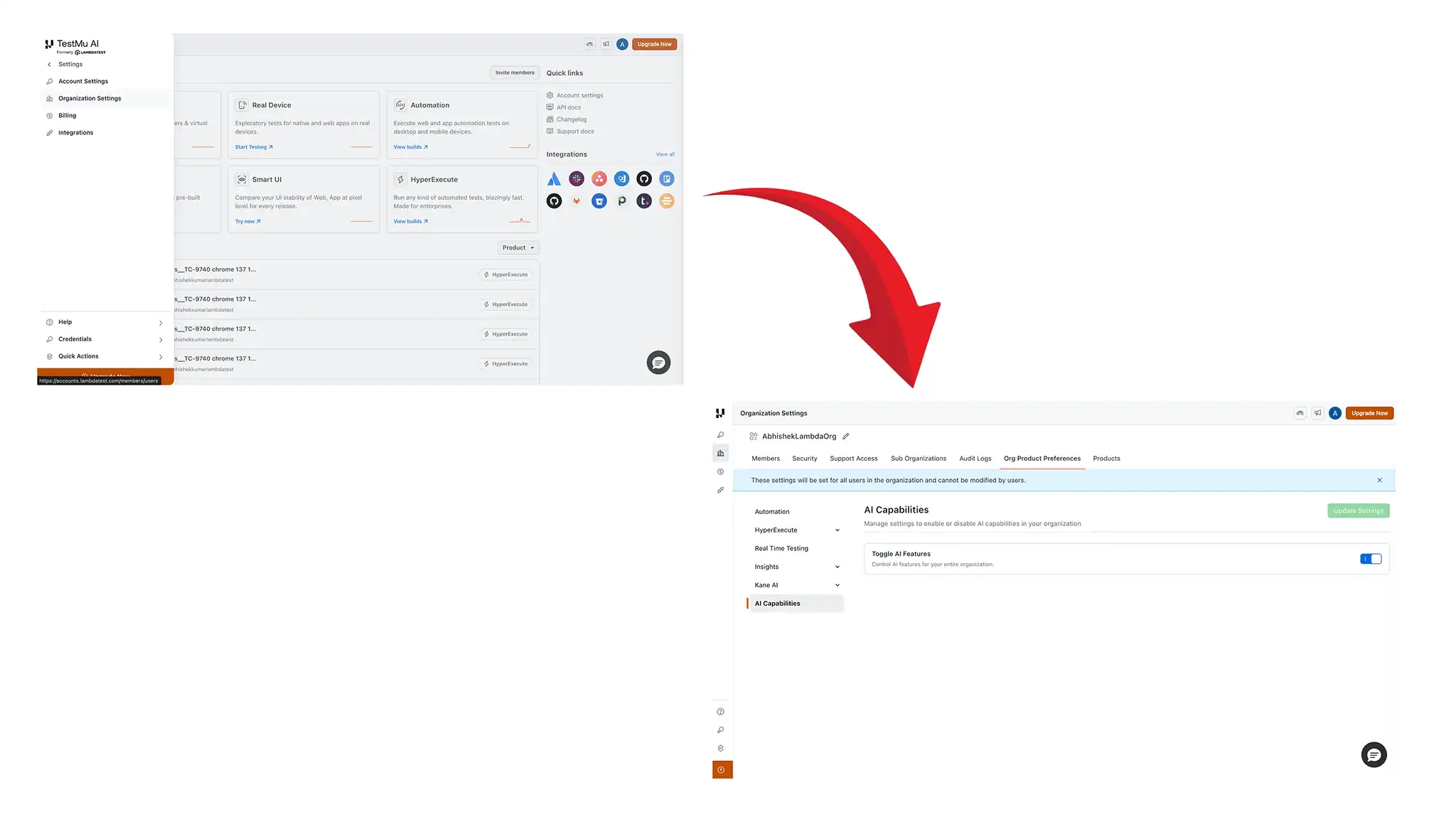
- Global AI toggle: Turn AI capabilities on or off across every product from a single admin setting, without configuring each product separately.
- Compliance-ready: If your organization has policies around AI usage, enforce them platform-wide without disrupting your broader testing setup.
- Instant effect: Changes apply right away, so your team's access to AI features reflects the setting in real time.
Simplify platform-wide AI governance with centralized Manage AI Capabilities controls in TestMu AI.
Accessibility Testing Improvements
We've shipped several updates across automated accessibility testing to bring real-device coverage to iOS VoiceOver and make day-to-day issue management more focused.
iOS VoiceOver on Real Devices
You can now turn on iOS VoiceOver on real devices through TestMu AI to manually test how your app or website behaves for users with visual impairments. As VoiceOver reads UI elements aloud, you can verify your interface is navigable and understandable without relying on visual cues.
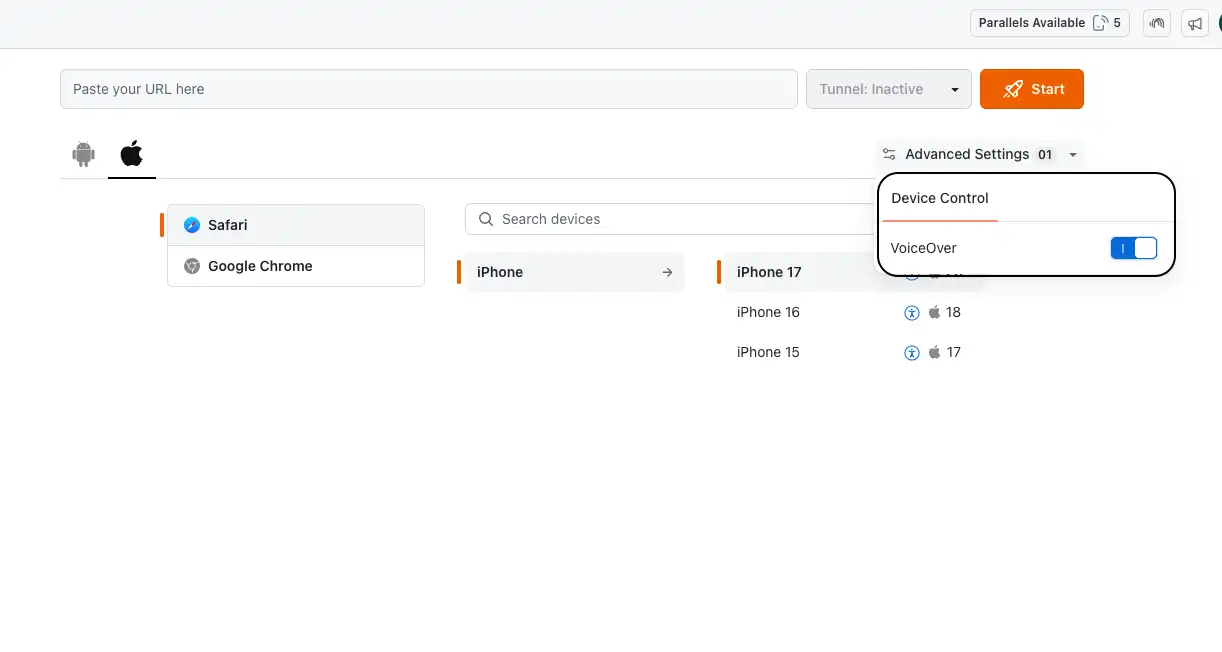
- WCAG compliance: Validate your app against Web Content Accessibility Guidelines on real iOS hardware, not simulators.
- Spoken feedback: Listen to how VoiceOver describes your labels, buttons, and interactions, exactly as a real user would hear them.
- Real device coverage: Run across supported iOS devices in the real device cloud to catch accessibility gaps that only show up on physical hardware.
Improve accessibility validation with iOS VoiceOver testing for accessibility on real devices in TestMu AI.
To get started following the support documentation on iOS VoiceOver testing on real devices.
Hide and Restore Issues
Managing accessibility issues across multiple scans just got more practical. You can hide issues that are known, deferred, or out of scope, and restore them at any time when you're ready to act on them.
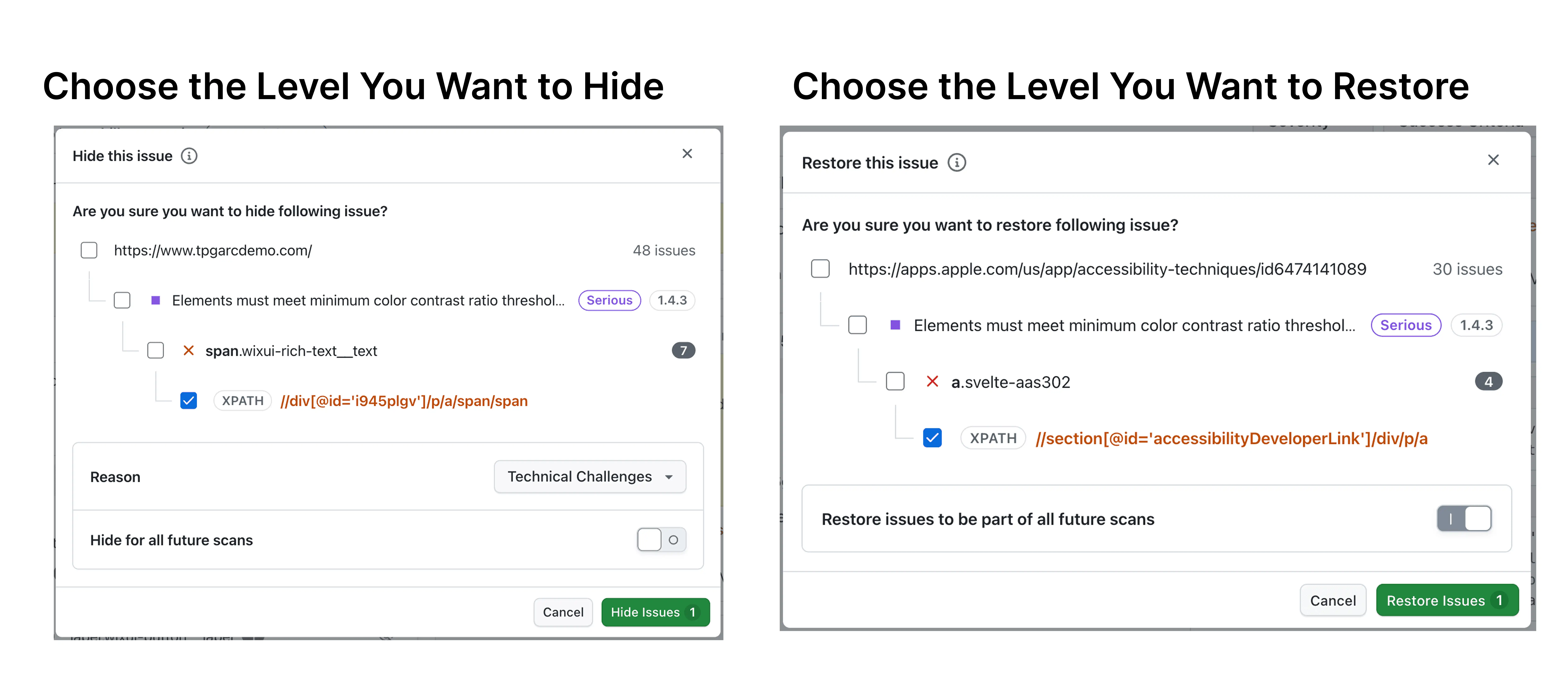
- Hide by hierarchy: Suppress issues at the scan, screen, or individual issue level so you control exactly what stays visible in your reports.
- Reason tracking: Attach a reason when hiding an issue so your team knows why it was suppressed and can revisit the decision later.
- Restore on demand: Hidden issues are never deleted. Bring them back into view at any point across future scans.
- Cleaner dashboards: Keep your reports focused on actionable issues without losing the full picture of what's been identified.
Learn how Hide and Restore Issues help you keep accessibility reporting focused and actionable in TestMu AI.
Tag Support for Mobile Accessibility Scans
Organizing accessibility scan results across multi-screen mobile apps just got easier. You can now attach tags to your scans to label, group, and filter results by screen, flow, or activity.
- Custom labels: Assign meaningful names like "Login Screen" or "Cart Screen" instead of relying on generic view identifiers.
- Dashboard filtering: Filter your accessibility dashboard by tag to focus on specific screens or flows without scrolling through unrelated results.
- Two ways to tag: Add tags from the dashboard after a scan completes, or attach them during automation using the
lambda-accessibility-scancommand. - Multi-tag support: Apply up to 20 tags per scan, each up to 50 characters, so you can cover complex journeys without losing granularity.
Learn how tag support for accessibility scans improves organization and filtering in mobile accessibility scans in TestMu AI.
Real Device Updates: GPX, Contacts, and Playwright iOS Commands
We've shipped several updates across Real Device testing to support richer media types, contact preloading, and additional Playwright commands on iOS.
GPX File Support in Media Upload
You can now upload GPX files to TestMu AI cloud devices as part of your test setup. GPX is the standard format for GPS route and waypoint data, which makes it ideal when you're testing location-aware features that depend on a real geographic path rather than a single static coordinate.
- Route simulation: Upload a GPX file with a full GPS route and replay movement along that path during your session.
- Location-based testing: Validate map navigation, delivery tracking, geofencing, or any feature that responds to changing device location.
- Same upload flow: Use the existing Upload Media API to push your GPX file to the device before your session begins, alongside other supported file types.
See how to upload GPX files and other media on real devices for route-based testing in TestMu AI.
Preload Contacts via .vcf Upload
You can now preload contacts onto a real device before your test session starts. Upload a .vcf (vCard) file through the Upload Media API, and the contacts are automatically injected into the device's native Contacts app at session launch.
This is useful when your app depends on the device address book for messaging, dialer, or contact-sync features, and you want a consistent, pre-populated state before each run.
- Upload Media API: Use the same API to upload your
.vcffile ahead of the session. - Automatic injection: Your contacts are available in the native Contacts app as soon as the session begins, with no manual setup required.
Learn how to upload contacts via .vcf and preload them on real devices using the Upload Media API in TestMu AI.
New Playwright Commands on iOS Real Devices
Your Playwright tests on iOS real devices now support three additional commands, giving you more control over element selection and frame navigation.
page.getByTestId(): Target elements by their test ID attribute, making your selectors more stable and independent of markup changes.page.frameLocator(): Reach elements inside iframes directly, so you can interact with embedded content without workarounds.locator.or(): Match elements using alternative locators. If the first locator doesn't find a match, the second one is tried, which helps with dynamic or conditionally rendered UI.
Playwright test automation on real iOS devices is now supported on TestMu AI across Node.js, Java, C#, and Python. To get started, follow Playwright testing on iOS real devices support documentation.
HyperExecute, Test Manager & Insights Updates
We've shipped several updates across HyperExecute, Test Manager, and Test Insights to make your runs more reliable, your exports more flexible, and your test data more accessible.
maxRetries for Espresso on HyperExecute
Two updates to Espresso on HyperExecute make flaky test management more reliable and results easier to read.
- maxRetries configuration: Set a retry limit for failed Espresso tests right in your HyperExecute YAML. When a test fails, HyperExecute reruns it automatically up to the count you define, so transient failures no longer block your run.
- Grouped retry results: Retry attempts for the same test are now consolidated under a single test entity in the results view, giving you a cleaner report without duplicate entries while keeping every attempt's details accessible.
By following the Espresso Testing on HyperExecute documentation, you can seamlessly execute Espresso tests while leveraging its secure cloud infrastructure, advanced features, and optimized execution workflow.
KaneAI Steps and Layout Options in Test Case Export
Exporting test cases to CSV now gives you more control over what's included and how it's structured. Two updates apply to both manual and KaneAI steps.
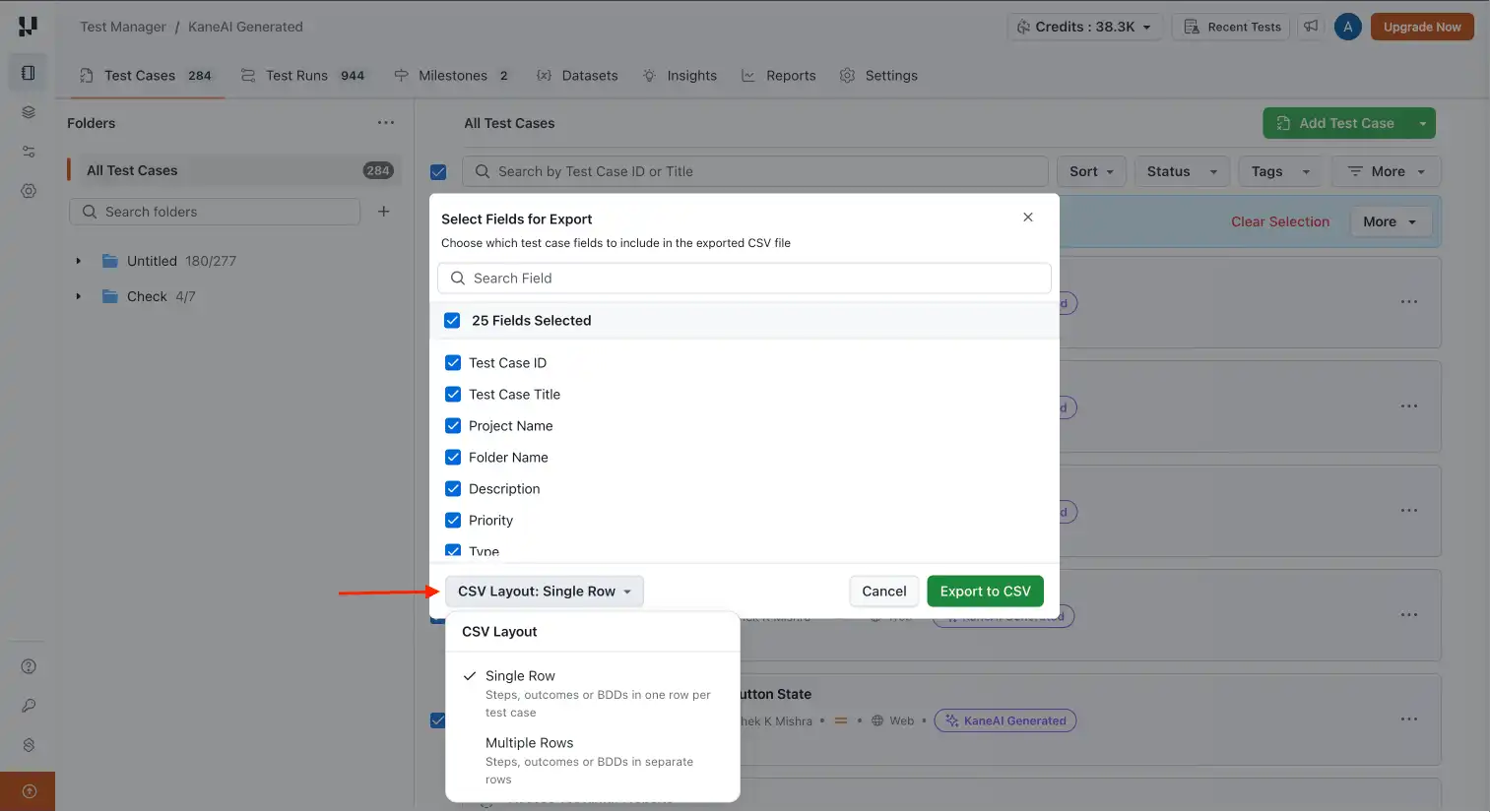
- KaneAI steps in exports: Natural-language steps authored in KaneAI are now available as a field in the export picker, selected by default, so your exports reflect the full test instead of just the manually written steps.
- Layout selector: Choose how steps appear in the CSV. Pick one row per step for a granular breakdown, or consolidate all steps into a single cell per test case for a more compact view.
Learn how to configure and export test cases with fields and CSV layout options in TestMu AI.
Folder-Based Test Instance Organization
Test instances on the Test Run Details page are now grouped by their original folder structure, so your runs mirror how you actually organize your tests. No more scrolling through a flat list to find what failed.
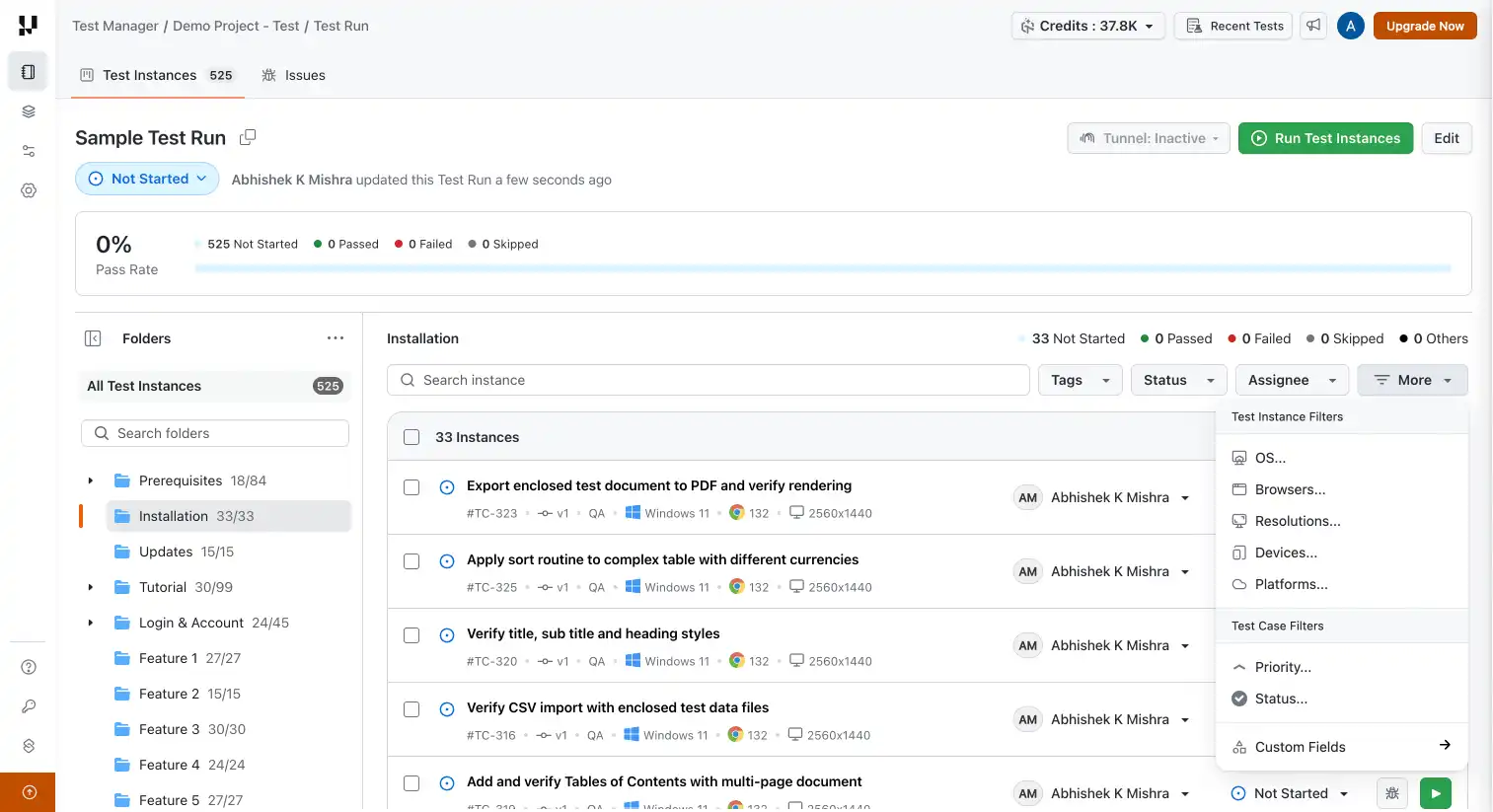
You also get folder-level status rollups, so one glance tells you which areas passed, which failed, and where to focus next. Understand how to save and manage test instances within folder-based test runs in TestMu AI.
Test Insights: API and Expanded RCA Log Coverage
Two updates in TestMu AI Test Insights make your test data work harder for you.
- Insights API: Pull test metrics into your own dashboards or plug test intelligence into your CI pipeline. The Insights API lets you access your data programmatically, on your terms. To use the Insights API to integrate test metrics into your CI pipelines, follow the support document on TestMu AI's Insights API.
- RCA log coverage expansion: If you run Cypress, Detox, or Maestro, your AI Root Cause Analysis is now a lot sharper. RCA ingests command logs, runner logs, flow execution logs, and device interaction logs for these frameworks, bringing them on par with Selenium, Appium, and Playwright.
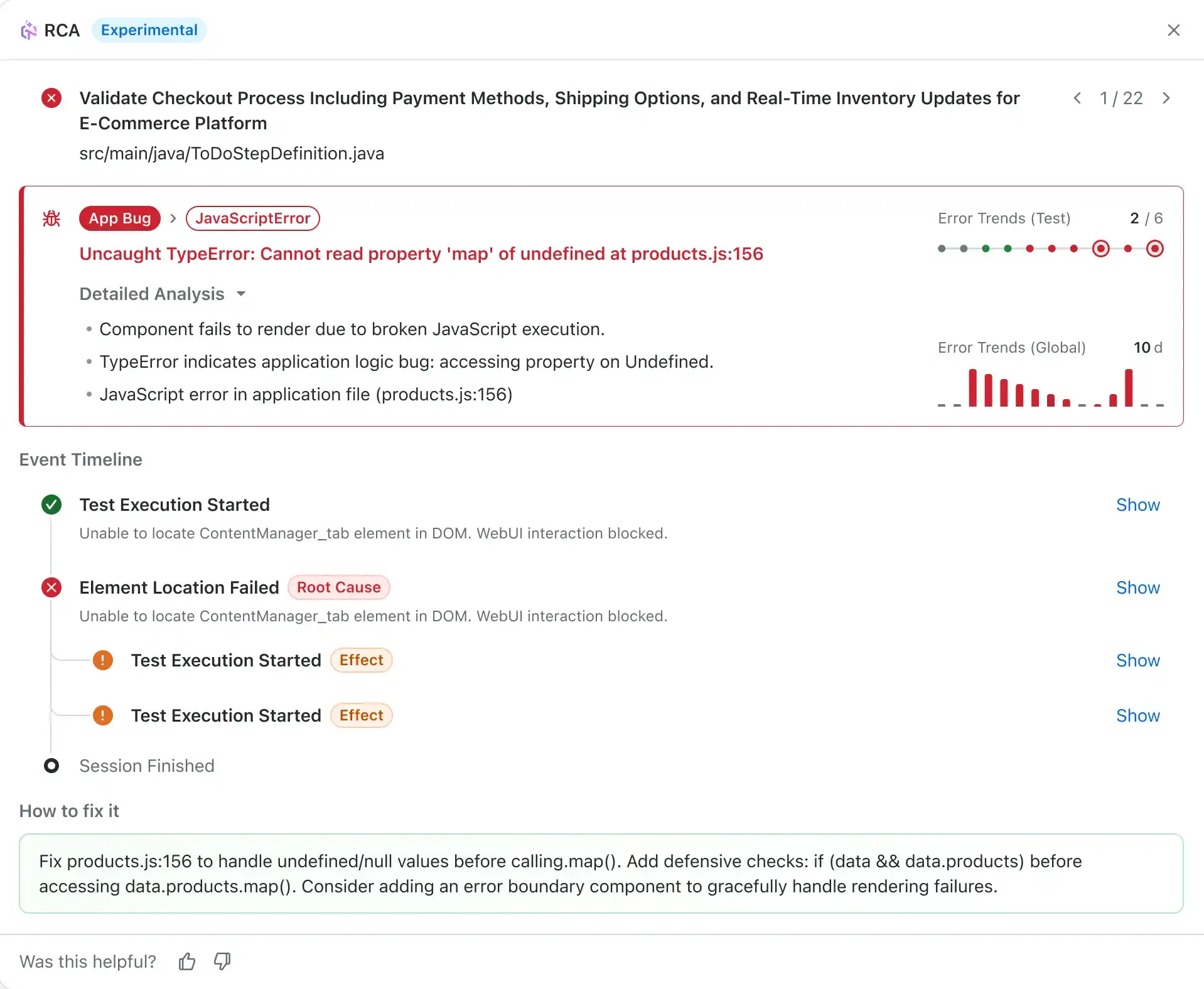
Insights AI Root Cause Analysis in TestMu AI automatically analyzes failed tests using advanced LLM-powered intelligence to identify root causes without manual log inspection. It provides intelligent root cause identification, actionable fixes, error timelines, and trend analysis to help you quickly understand and resolve failures.
Summing Up!
April brought meaningful updates across the platform. You can now spin up browsers on demand with Browser Cloud, build smarter KaneAI tests with While Loops, inline variables, and network assertions, and run accessibility checks on real iOS devices with VoiceOver, all without leaving your existing workflows.
With TestMu AI HyperExecute, Test Manager, and Test Insights, take advantage of more reliable Espresso retries, richer test case exports, folder-based test run organization, and a more actionable view of your test data, everything you need to move faster and test with confidence.
Author

Saniya Gazala
Blogs: 44


Saniya Gazala is a Product Marketing Manager and Community Evangelist at TestMu AI with 2+ years of experience in software QA, manual testing, and automation adoption. She holds a B.Tech in Computer Science Engineering. At TestMu AI, she leads content strategy, community growth, and test automation initiatives, having managed a 5-member team and contributed to certification programs using Selenium, Cypress, Playwright, Appium, and KaneAI. Saniya has authored 15+ articles on QA and holds certifications in Automation Testing, Six Sigma Yellow Belt, Microsoft Power BI, and multiple automation tools. She also crafted hands-on problem statements for Appium and Espresso. Her work blends detailed execution with a strategic focus on impact, learning, and long-term community value.


Did you find this page helpful?
More Related Blogs
TestMu AI forEnterprise
Get access to solutions built on Enterprise
grade security, privacy, & compliance
- Advanced access controls
- Advanced data retention rules
- Advanced Local Testing
- Premium Support options
- Early access to beta features
- Private Slack Channel
- Unlimited Manual Accessibility DevTools Tests